Boardcon Embedded Design EM3568 Manuale utente

EM3568 Debian10 User Manual
V1.0
www.boardcon.com
Boardcon Embedded Design

1
Customize the embedded system based on Your Idea
1. Introduction
1.1. About this Manual
This manual is intended to provide the user with an overview of the board and benefits, complete
features specifications, and set up procedures. It contains important safety information as well.
1.2. Feedback and Update to this Manual
To help our customers make the most of our products, we are continually making additional and
updated resources available on the Boardcon website (www.boardcon.com ,www.armdesigner.com).
These include manuals, application notes, programming examples, and updated software and
hardware. Check in periodically to see what’s new!
When we are prioritizing work on these updated resources, feedback from customers is the number
one influence, If you have questions, comments, or concerns about your product or project, please no
hesitate to contact us at support@armdesigner.com.
1.3. Limited Warranty
Boardcon warrants this product to be free of defects in material and workmanship for a period of one
year from date of buy. During this warranty period Boardcon will repair or replace the defective unit in
accordance with the following process:
A copy of the original invoice must be included when returning the defective unit to Boardcon. This
limited warranty does not cover damages resulting from lighting or other power surges, misuse, abuse,
abnormal conditions of operation, or attempts to alter or modify the function of the product.
This warranty is limited to the repair or replacement of the defective unit. In no event shall Boardcon
be liable or responsible for any loss or damages, including but not limited to any lost profits, incidental
or consequential damages, loss of business, or anticipatory profits arising from the use or inability to
use this product.
Repairs make after the expiration of the warranty period are subject to a repair charge and the cost of
return shipping. Please contact Boardcon to arrange for any repair service and to obtain repair charge
information.

2
Customize the embedded system based on Your Idea
Revision History
Ver
Description
Author
Date
V1.0
Initial version
Zhou Lijun
2022-04-11

3
Customize the embedded system based on Your Idea
Content
1 EM3568 Introduction....................................................................................................................................... 4
2 Compiler Environment.....................................................................................................................................5
2.1 Vmware10.0+ubuntu18.04.................................................................................................................. 5
2.2 Install Tools............................................................................................................................................ 5
3 Compile Source................................................................................................................................................6
4 Images Operation............................................................................................................................................ 6
4.1 Pack Image............................................................................................................................................6
4.2 Unzip Firmware.....................................................................................................................................9
5 Install Tools..................................................................................................................................................... 11
5.1 Install CP2102 Driver......................................................................................................................... 11
5.2 Install Rockchip Driver Assistant...................................................................................................... 12
5.3 Install Serial Terminal Tool.................................................................................................................13
6 Burn Images................................................................................................................................................... 15
7 Debian Application.........................................................................................................................................18
7.1 Display................................................................................................................................................. 18
7.2 SD Card............................................................................................................................................... 18
7.3 USB Host............................................................................................................................................. 19
7.4 Audio Player........................................................................................................................................ 20
7.5 Record..................................................................................................................................................22
7.6 Ethernet................................................................................................................................................23
7.7 RTC...................................................................................................................................................... 24
7.8 WiFi.......................................................................................................................................................25
7.9 Bluetooth..............................................................................................................................................27
7.10 CAN....................................................................................................................................................30
7.11 RS485................................................................................................................................................ 30
7.12 RS232................................................................................................................................................ 31
7.13 SATA..................................................................................................................................................32
7.14 4G....................................................................................................................................................... 33
7.15 GPS....................................................................................................................................................34

4
Customize the embedded system based on Your Idea
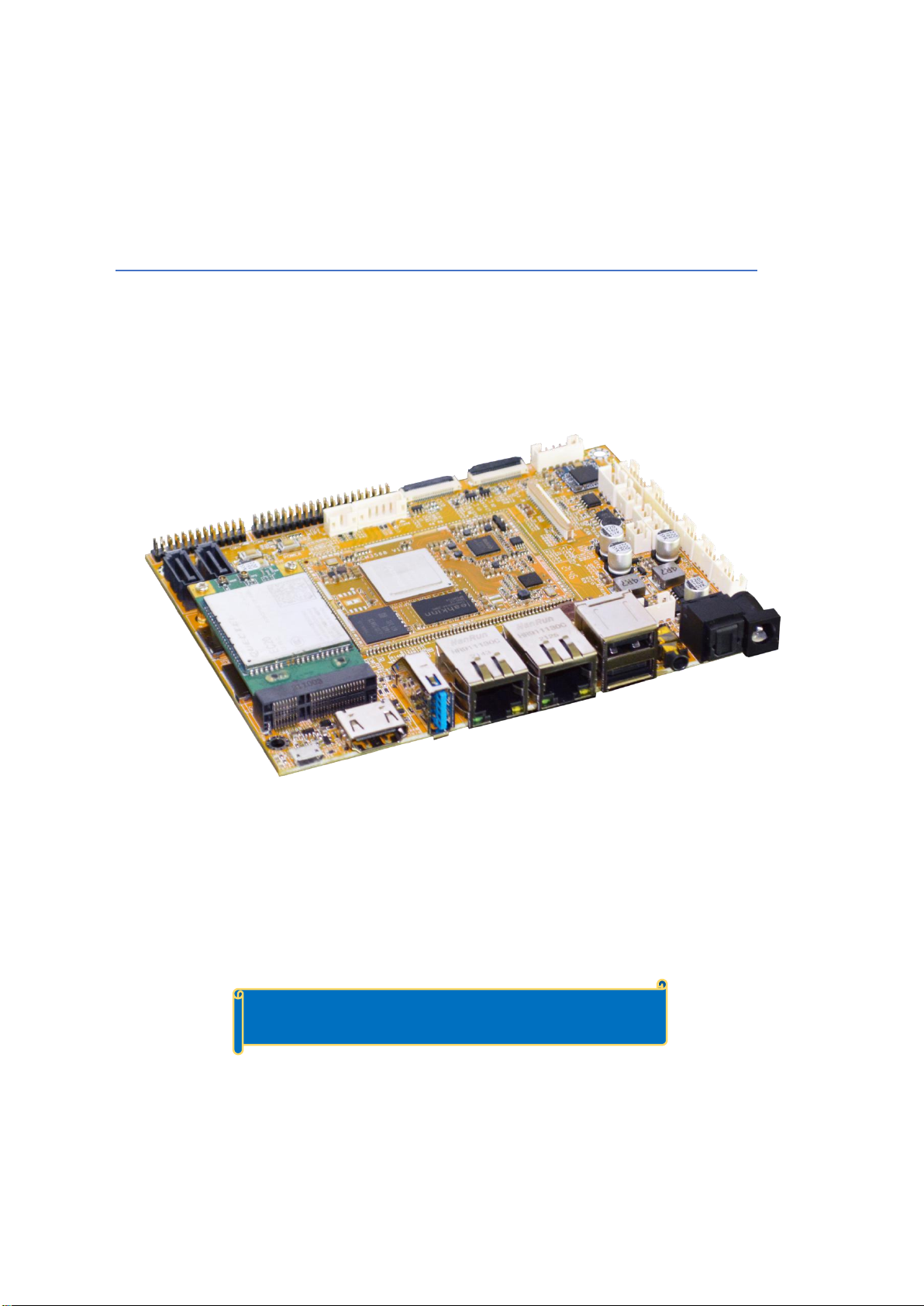
1 EM3568 Introduction
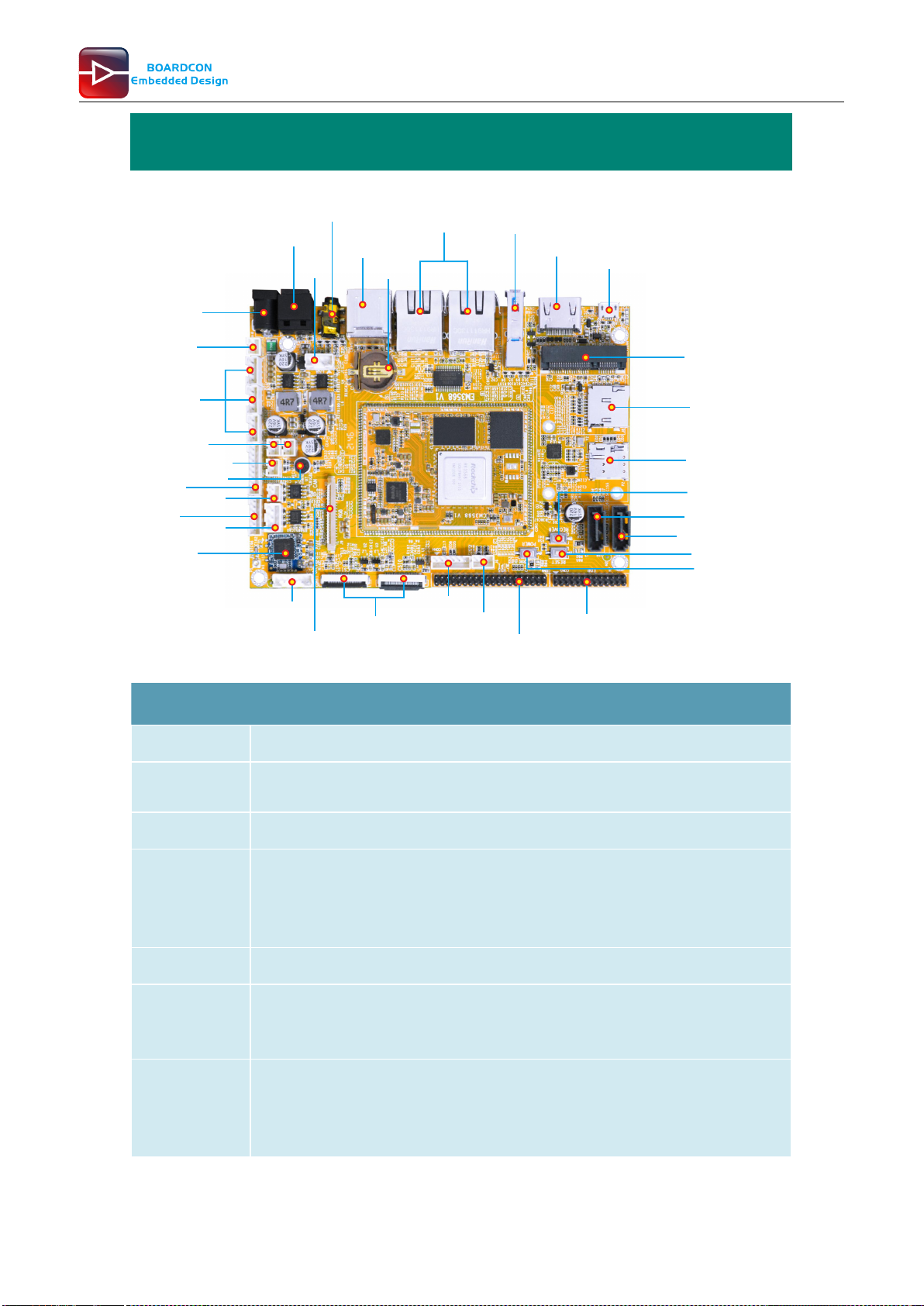
Power in
DC 12V
Headphone USB3.0
Host
USB
OTG
HDMI
2x USB2.0
Host
OPT
2x Gigabit
Ethernet
RTC
PCIe
4G/WiFi card
Micro SD
Nano SIM
SATA0
Recover
Reset
Power
eDP
LVDS/MIPI
2x Camera Debug
SPI
LCD(RGB)
Power in
DC 12V
3x UART
GPIO
SPI
MIC
RS485
CAN
SATA Power
Speaker
USB
2.0
WiFi&BT
Key con
SATA2(optional)
Specifications
CPU
Rockchip RK3568 Quad-core Cortex-A55 @ up to 2.0 GHz
GPU
ARM Mali-G52 GPU with support for OpenGL ES 1.1/2.0/3.2, OpenCL 2.0, Vulkan 1.1
NPU
0.8 TOPS
Storage
8GB eMMC flash (up to 128GB)
MicroSD card slot
2x SATA3.0 (SATA2 shared with PCIe2.0)
Power Supply
12V/3A DC input jack
USB
1x USB OTG 2.0
3x USB Host 2.0 (USB-AF or 4-pin connector)
1x USB 3.0
Connectivity
2x Gigabit Ethernet RJ45 ports via Realtek RTL8211F-CG controller
2.4G WiFi (802.11b/g/n) with Bluetooth 4.0
PCIe socket with Nano SIM card port to support 4G modules (PCIe socket integrated
PCIe2.0 for WiFi Card)

5
Customize the embedded system based on Your Idea
Serial
1x Serial port for debug, 3-pin connector
3x UART, 4-pin connectors
1x RS485, 3-pin connector
Video
HDMI 2.0, 4Kp60
MIPI DSI/LVDS, 1080p60 (40-pin header)
EDP 1.3, 2560x1600@60Hz (30-pin header)
RGB, up to 1920x1080@60Hz (40-pin FPC connector)
Audio
3.5mm audio I/O jack
8-channel audio via HDMI
SPDIF out
Speaker (2-pin connector)
MIC
Camera(optional)
2x MIPI Cameras, 24-pin FPC connector.
Keys
Recover, Reset, Power
Other features
RTC with battery connector; GPIO&I2C; CAN; Key connector(PWM3_IR/Reset /
Recover /Power)
Dimension
Based board - 135mm x 100mm; CPU module - 45mm x 60mm
2 Compiler Environment
2.1 Vmware10.0+ubuntu18.04
Install Vmware10.0 in windows OS, and then install ubuntu18.04 in VMware to compile. Please visit the
official website http://www.ubuntu.com/ to download and install ubuntu operating system.
Note: Debian should be complied by ubuntu 64bit OS.
2.2 Install Tools
PC OS: ubuntu system
Network: online
Permission: root
$ sudo apt-get install build-essential zlib1g-dev flex libx11-dev gperf libncurses5-dev bison lsb-core
lib32z1-dev g++-multilib lib32ncurses5-dev uboot-mkimage g++-4.4-multilib repo git ssh make gcc
libssl-dev liblz4-tool expect g++ patchelf chrpath gawk texinfo chrpath diffstat binfmt-support
qemu-user-static live-build bison flex fakeroot cmake gcc-multilib g++-multilibdevice-tree-compiler
python-pip ncurses-dev pyelftools unzip

6
Customize the embedded system based on Your Idea
3 Compile Source
Step 1, unzip the source and set the compile board
$ tar xvf sdk-1.1.tar.gz
$ cd sdk-1.1
Step 2, compile uboot
$ ./build.sh uboot
Step 3, compile kernel
$ /build.sh kernel
Debian10 kernel.img and resource.img are included in boot.img
Step 4, compile recovery
$ ./build.sh recovery
Step 5, compile Debian
$ sudo apt-get install binfmt-support qemu-user-static live-build
$ sudo dpkg -i ubuntu-build-service/packages/*
$ sudo apt-get install -f
$ RELEASE=buster TARGET=desktop ARCH=arm64 ./mk-base-debian.sh
$ VERSION=debug ARCH=arm64 ./mk-rootfs-buster.sh
$ ./mk-image.sh
After compile, you will get the linaro-rootfs.img image in the debian directory.
Step 6, Generated image file
$ ./mkfirmware.sh
$ ./build.sh updateimg (packaged in the update.img)
$ cd rockdev
$ ls
The update.img are generated in current directory.
4 Images Operation
4.1 Pack Image
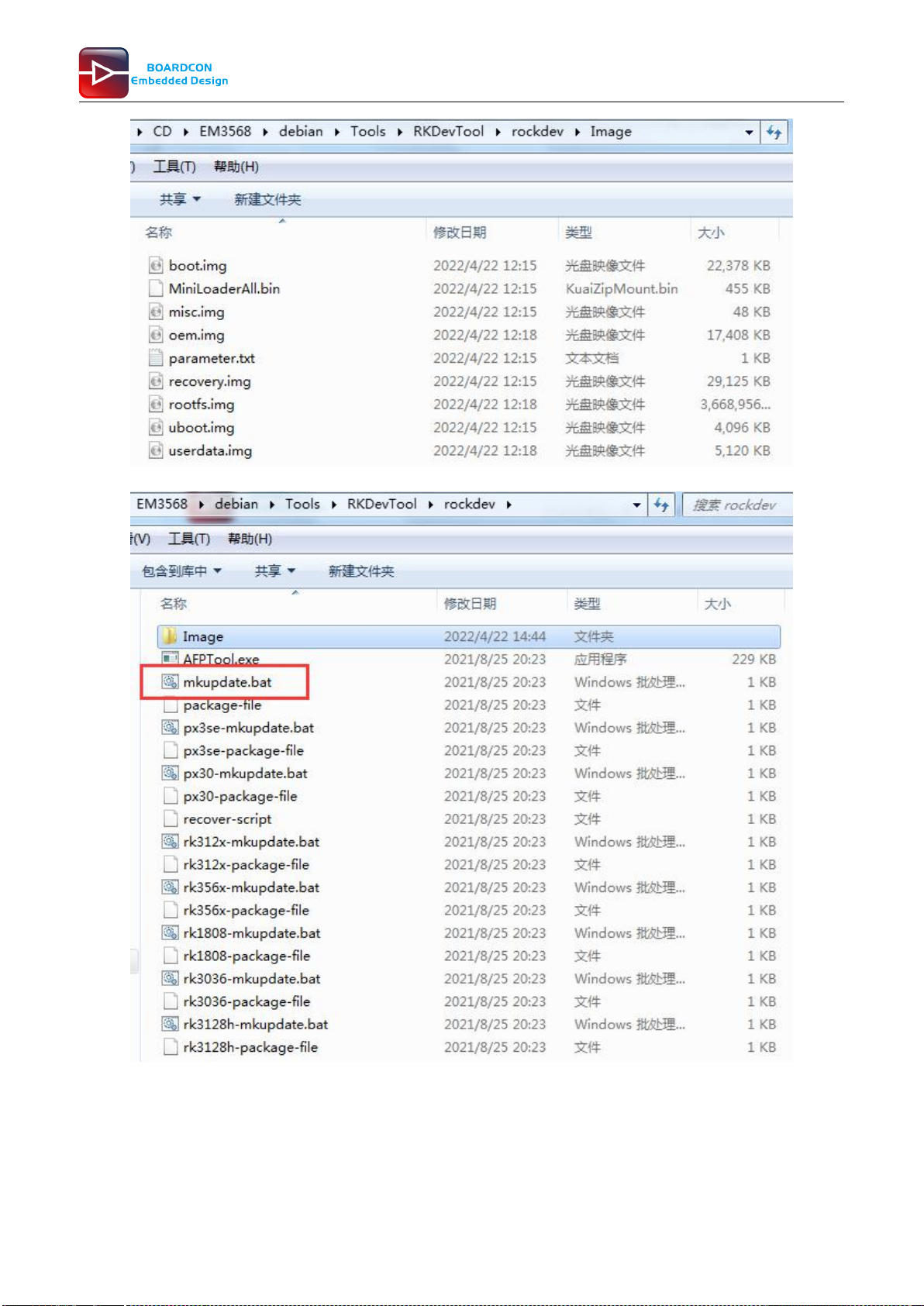
Step 1, copy all the files in debian directory rockdev to the windows RKDevTool/rockdev/Image
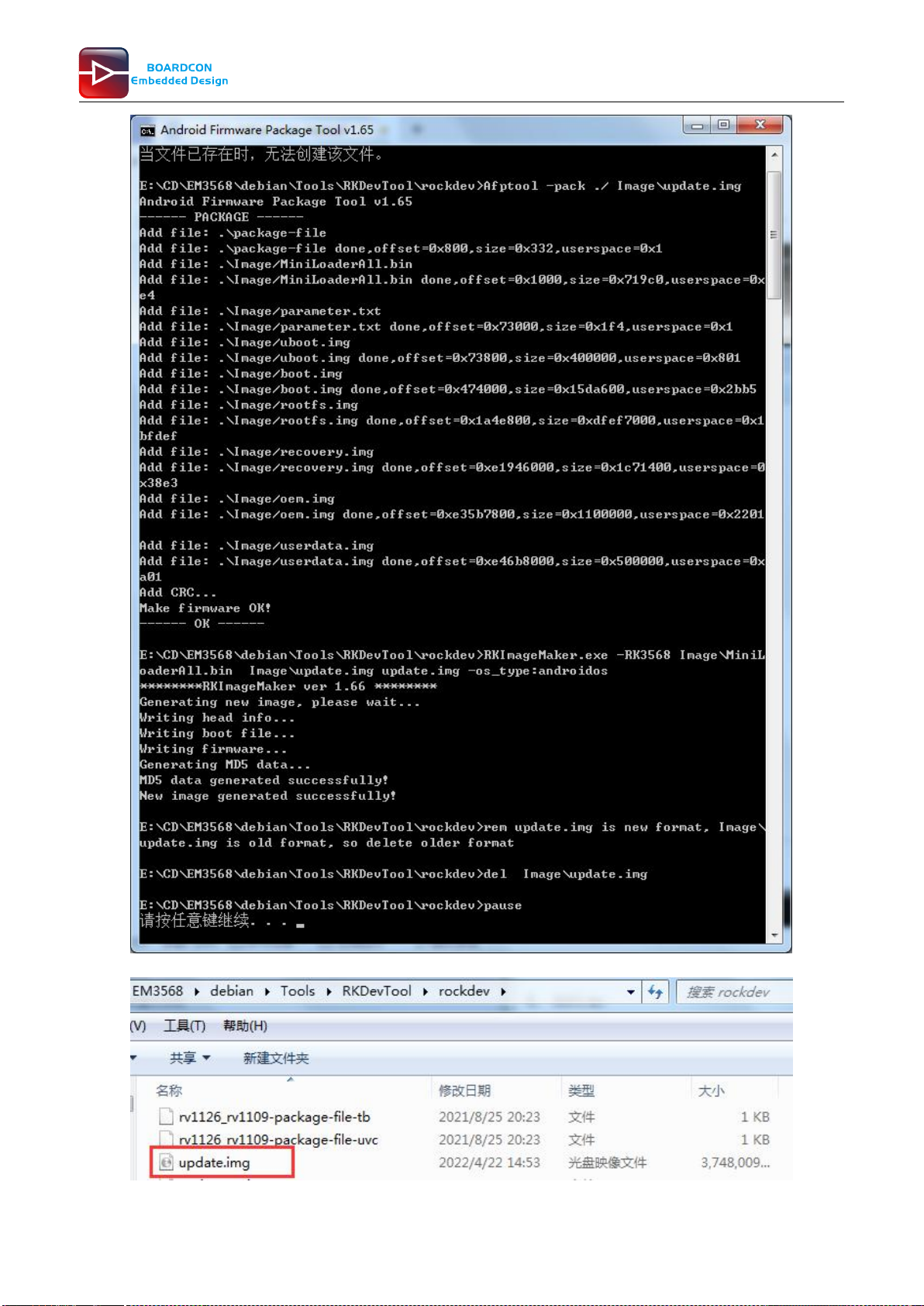
Step 2, enter RKDevTool/rockdev/, double-click to run mkupdate.bat.
Step 3, the update.img will be generated in rockdev directory.

7
Customize the embedded system based on Your Idea

8
Customize the embedded system based on Your Idea

9
Customize the embedded system based on Your Idea
4.2 Unzip Firmware
Unzip Firmware in windows.
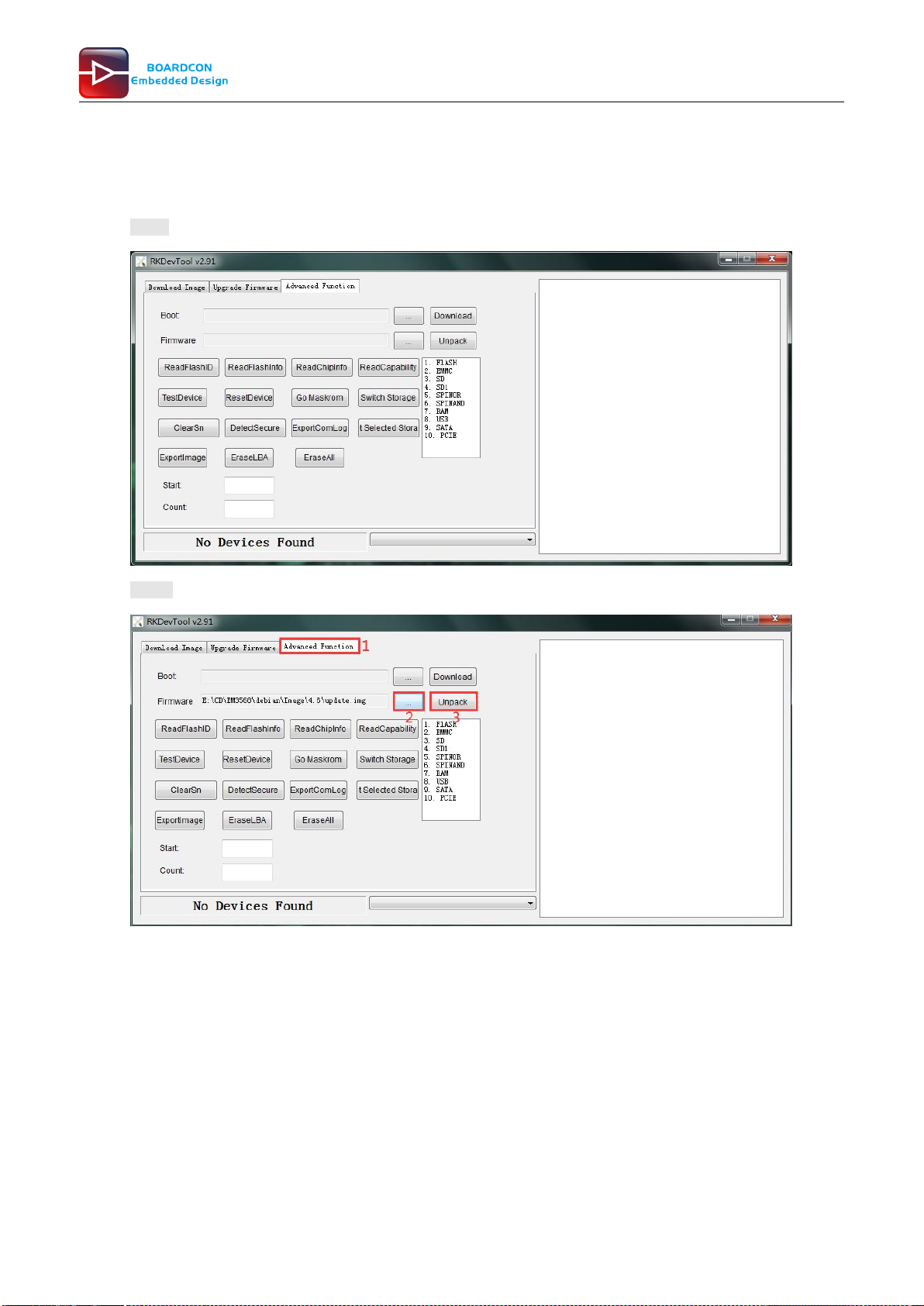
Step1, open RKDevTool.exe (Path:RKDevTool_Release\RKDevTool.exe)
Step 2, click Advanced Function -> Firmware, select update.img. Click Unpack to Unzip.
Altri manuali per EM3568
1
Indice
Altri manuali Boardcon Embedded Design Computer a scheda singola