Boca Systems SDIO Wireless LAN Card SDW11b Manuale utente

SDW11b
SDIO Wireless LAN Card
User Manual
1

Table of Contents
Package Contents & System Requirements........................................................................................................ 3
Package....................................................................................................................................................... 3
System Requirements................................................................................................................................. 3
Introducing SDW11b Card............................................................................................................................. 3
SDW11b features and benefits ................................................................................................................... 3
SDW11b Wireless Network Scenarios ....................................................................................................... 3
About the SDW11b CD-ROM.................................................................................................................... 4
Installing the Driver........................................................................................................................................ 4
Installation of the SDW11b Driver to the Pocket PC using Microsoft Active Sync®................................ 4
To verify if the installation of the driver was completed successfully:....................................................... 6
SDW11b Configuration Utility....................................................................................................................... 6
configuring IPC wlan utility........................................................................................................................... 8
Status tab .................................................................................................................................................... 8
Statistics tab................................................................................................................................................ 9
Site Survey tab.......................................................................................................................................... 10
Radio tab....................................................................................................................................................11
About tab...................................................................................................................................................11
SDIO Wireless lan card Specifications......................................................................................................... 12
Troubleshooting............................................................................................................................................ 13
Introduction.............................................................................................................................................. 13
Common Troubleshooting Tips................................................................................................................ 13
2

PACKAGE CONTENTS & SYSTEM REQUIREMENTS
Package
1. Manual (In CD-ROM )
2. Drivers and configuration utilities on CD-ROM
3. Quick Install Guide
4. Product Device
If you miss any of these items please contact your reseller.
System Requirements
PDA with Windows® Pocket PC 2002 and 2003 with at least 32 MB memory
Secure Digital (SD) slot (Assuming SDIO host controller and driver are already installed)
Microsoft® Active Sync® should be installed
An IEEE802.11b or Wi-Fi approved Access Point/Base station
INTRODUCING SDW11B CARD
The SDW11b is a wireless network card that complies with the IEEE 802.11b standard on wireless LANs
(Revision B).
SDW11b features and benefits
•Wi-Fi (Wireless Fidelity) certified (Expected in Q2/04).
•Supports data rates up to 11 Mbps.
•Fully compatible with any other wireless LAN system based on Direct Sequence Spread Spectrum (DSSS)
radio technology that complies with the “IEEE 802.11b standard on wireless LANs”.
•Automatic Transmit Rate Select mechanism in the transmit range of 11, 5.5, 2 and 1 Mbps.
•128 bit Wired Equivalent Privacy (WEP) data encryption and WPA support.
•Efficient Power Management.
•Roaming over multiple channels.
•Working range up to 300 meters in an open environment.
•Supports Ad-hoc and infrastructure modes for easy wireless communication.
SDW11b Wireless Network Scenarios
•The SDW11b enables you to:
•Connect your computer to a Peer-to-Peer workgroup of wireless computing devices
•Connect your computer to a Small Office/Home Office (SOHO) network that includes Wi-Fi access
points.
•Connect your computer to a Local Area Network (LAN) Infrastructure that includes the SDW11b, or
3

other IEEE 802.11b compliant LAN systems
Wireless stations can be equipped with the SDW11b, but also with other WLAN PC Cards. Both the
SDW11b and the WLAN PC Card share the same wireless functionality.
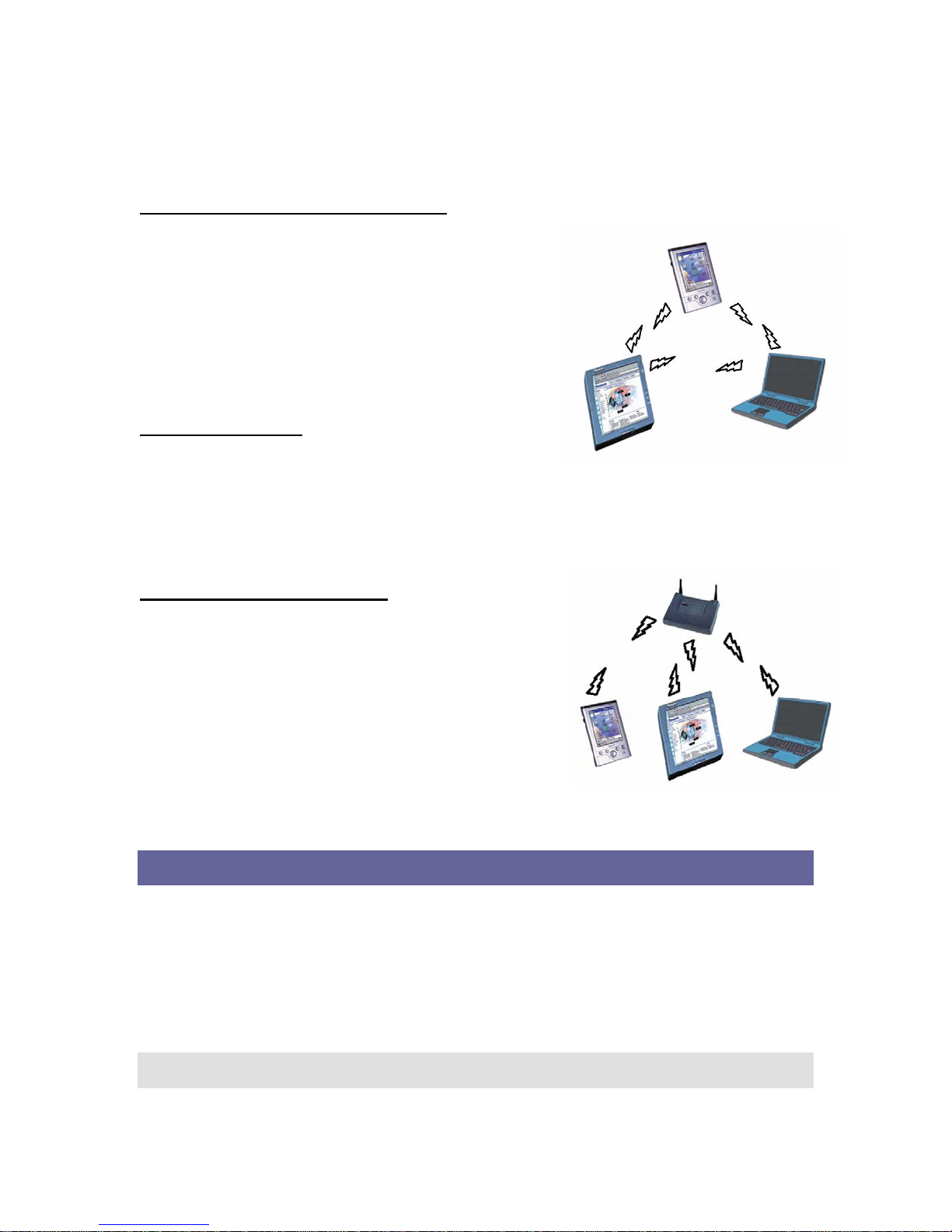
Peer-to-Peer (Ad-hoc) Workgroup
The Peer-to-Peer workgroup configuration enables you to
quickly set up a small wireless workgroup, where the workgroup
participants can exchange files using features like “Files and
Printer Sharing” as supported by Microsoft® Networking.
You can use this option to setup a temporary or Ad-hoc network
in environments where no access points are available (for
example in Small Office/Home Office “SOHO” environments).
As long as the stations are within range of one another, this is the
easiest and least expensive way to set up a wireless network.
Home Networking
With SDW11b, wireless access to the Internet or other devices is
at your fingertips. All you need to do is connect the SDLink11b to an existing access point that may be
connected to the external Cable or xDSL modems and you are ready to:
Share files and printers, and
Access the Internet.
2-2-3 Enterprise Networking
With the Wi-Fi certified Access Point in the corporate network
system, you can connect to a corporate Local Area Network (LAN)
infrastructure to access all network facilities in wireless. LAN
Infrastructures may either be:
Stand-alone wireless LANs.
Wireless network infrastructures connected to an existing
Ethernet network.
About the SDW11b CD-ROM
The SDW11b CD-ROM contains both software and documentation
for the SDW11b card.
INSTALLING THE DRIVER
Installation of the SDW11b Driver to the Pocket PC using
Microsoft Active Sync®
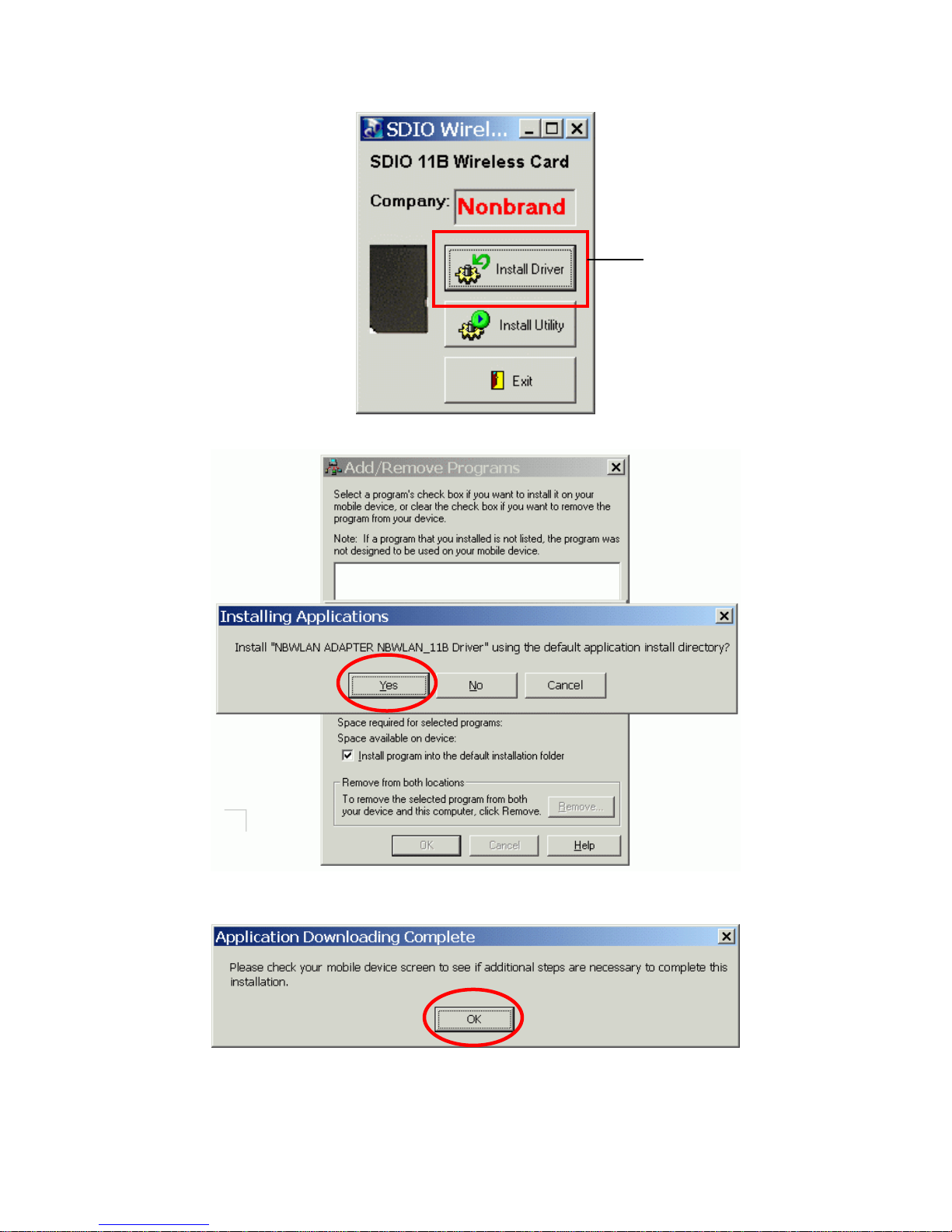
1. Connect your PDA to your computer and make sure Active-Sync® has established for a connection
between the two devices.
2. Insert the CD ROM to your PC. The following screen will apeear, click Install Driver to start driver
installation. After driver installation is complete, clik Install Utility to start utility installation.
Note: Do not insert the SDW11b into the card slot of your PDA until the Driver (in Step 1)
and Utility (in Step 2) installations have been performed.
4

3. Click “YES” to proceed the installation.
Step 1
4. Click “OK” to complete the driver installation.
5

To verify if the installation of the driver was completed
successfully:
1. Soft reset the PDA (push Soft-reset Button of PDA)
* Some PDA may not require resetting but it should be safer to reset.
2. Insert the SDW11b into the PDA
3. Check the LED on the SDW11b. If steady Blue light is seen, the SDW11b is active.
4. (Optional) To check the quality of the network connection, you should use the SDW11b configuration
utility program as described in the next section
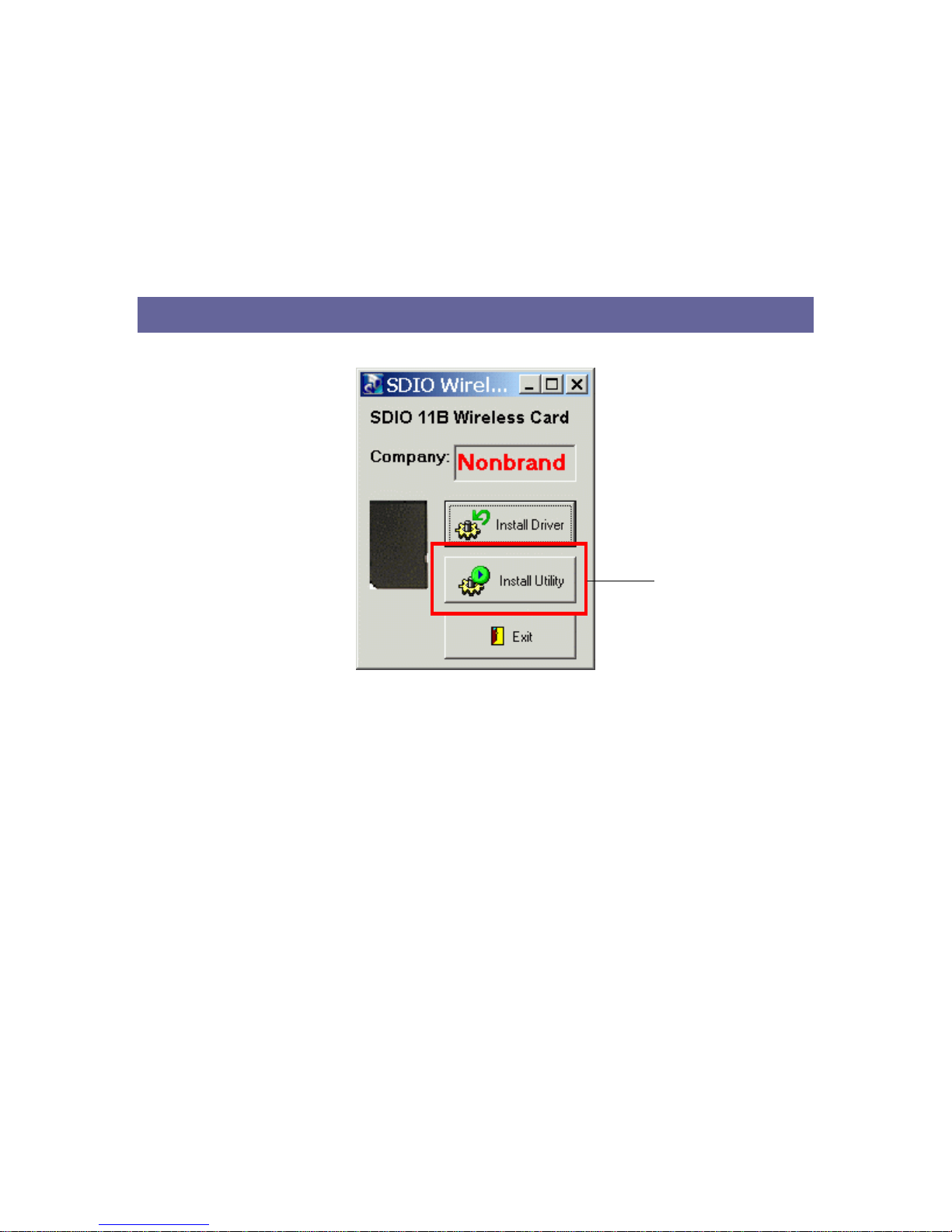
SDW11B CONFIGURATION UTILITY
1. Click Install Utility to perform utility installation.
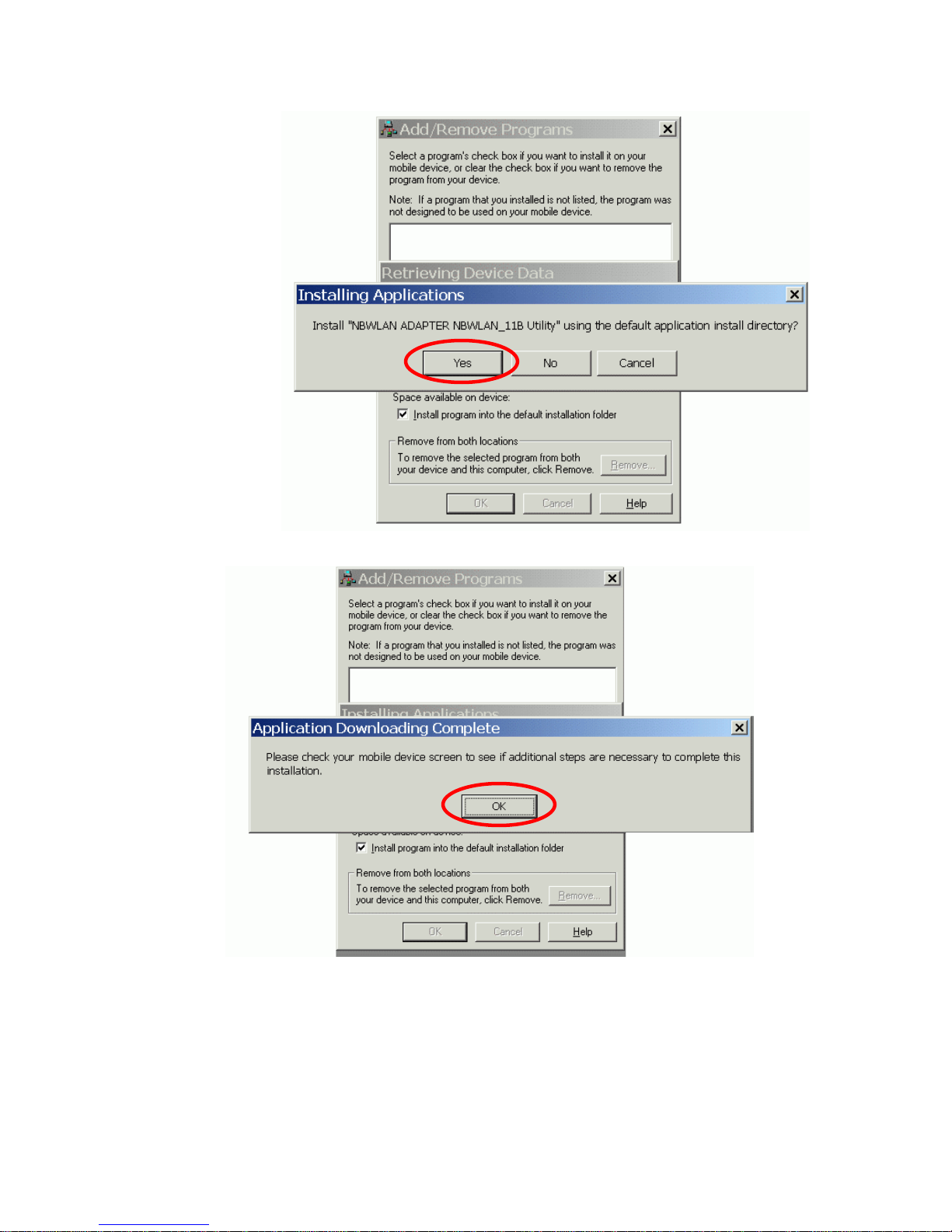
Step 2
2. Click “YES” to proceed the installation.
6

3. Click “OK” to complete the driver installation.
7

CONFIGURING UTILITY
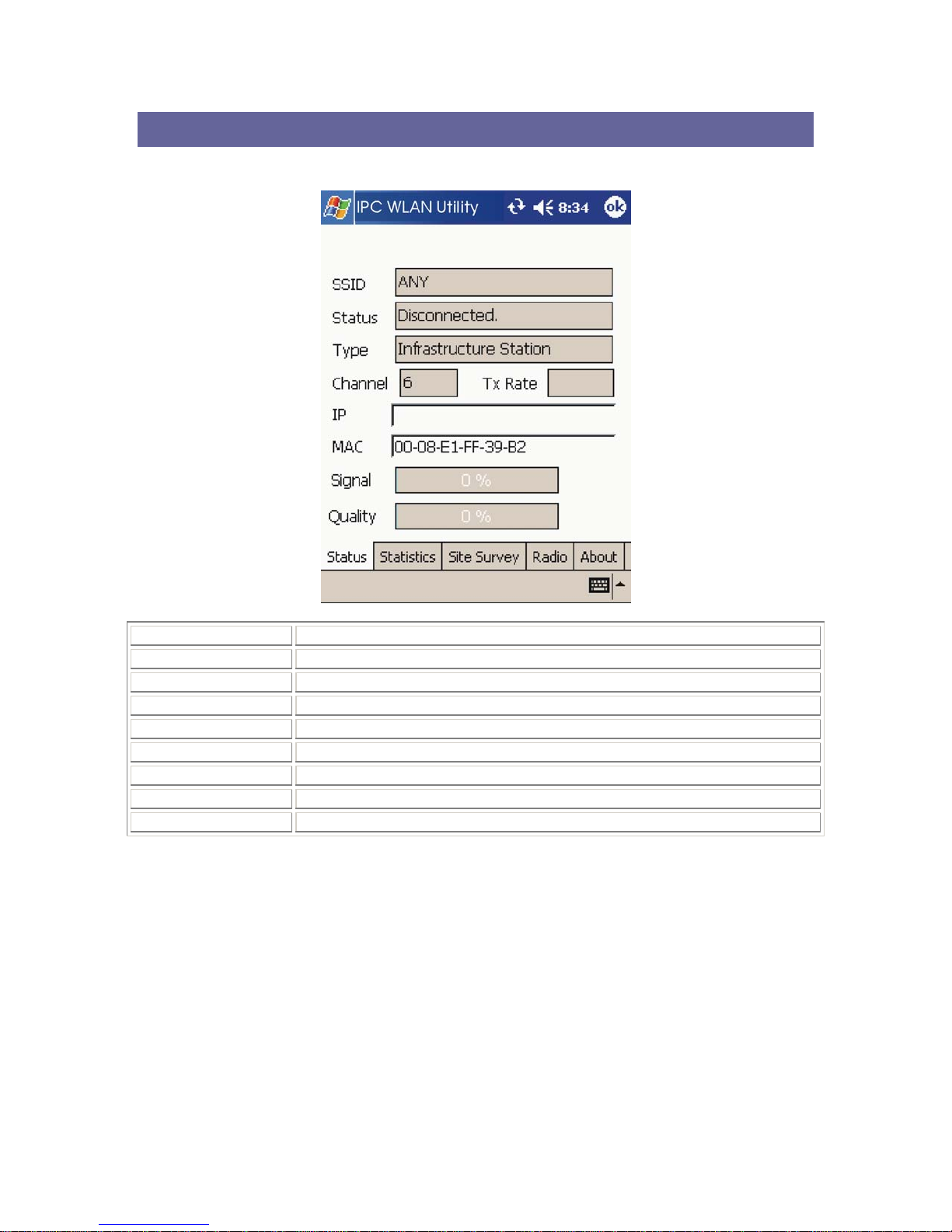
Status tab
SSID The current access point name (ESS ID)
Status The current connection status.
Type The current connection mode.
Channel The wireless radio channel currently used by the card.
Tx Rate The current transmit rate. This can be 1 Mbps, 2 Mbps and 5.5 Mbps.
IP The IP address of the card.
MAC The MAC address of the card.
Signal Shows the signal strength of the received signal.
Quality Shows the signal quality of the received signal.
8

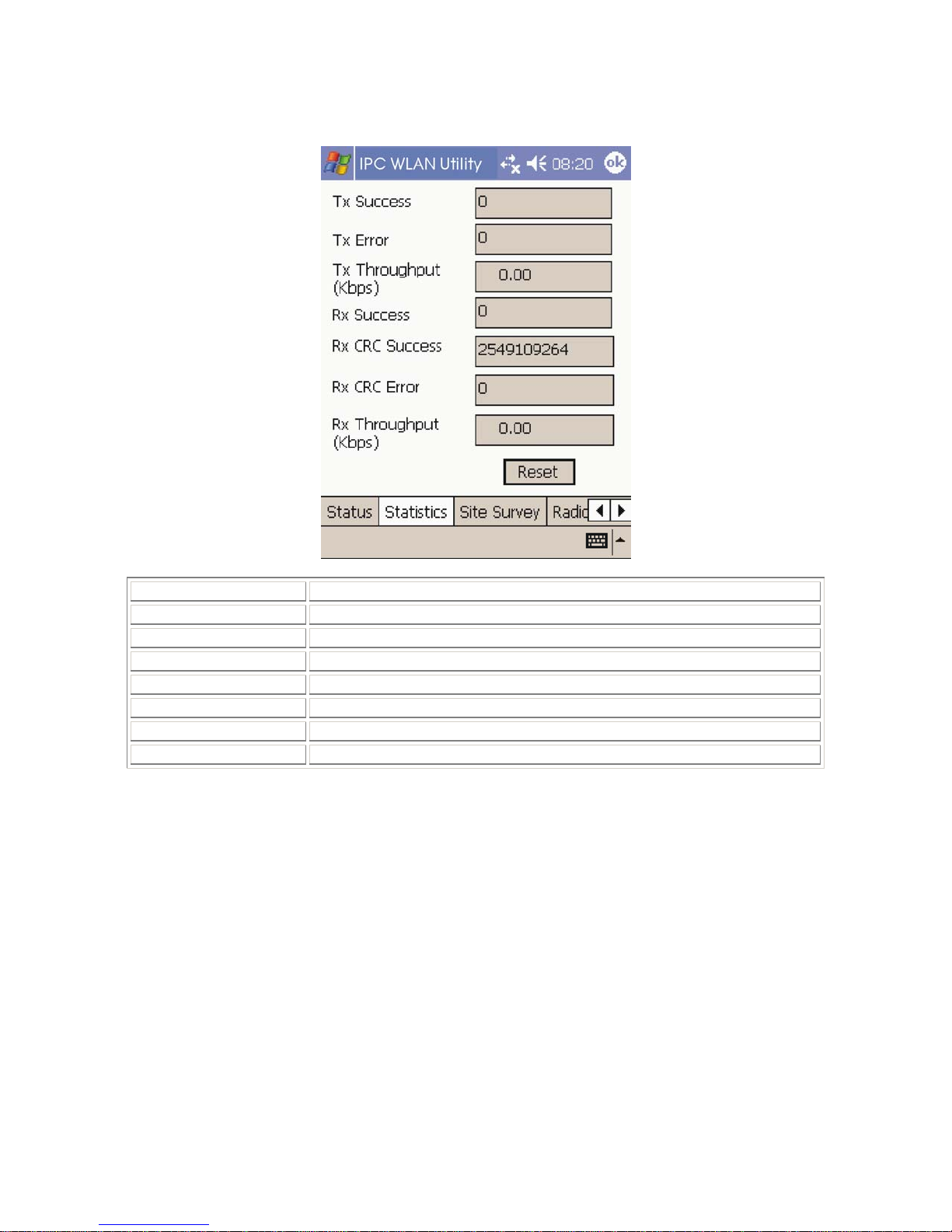
Statistics tab
Tx Success The number of successfully transmitted packets.
Tx Error The number of unsuccessfully transmitted packets.
Tx Throughput (kbps) The actual instantaneous transmit rates, in Kbps.
Rx Success The number of successfully received packets.
Rx CRC Success The number of successfully received CRC packets.
Rx CRC Error The number of unsuccessfully received CRC packets.
Rx Throughput (kbps) The actual instantaneous receive rates, in Kbps.
Reset Click to clear the previously settings.
9

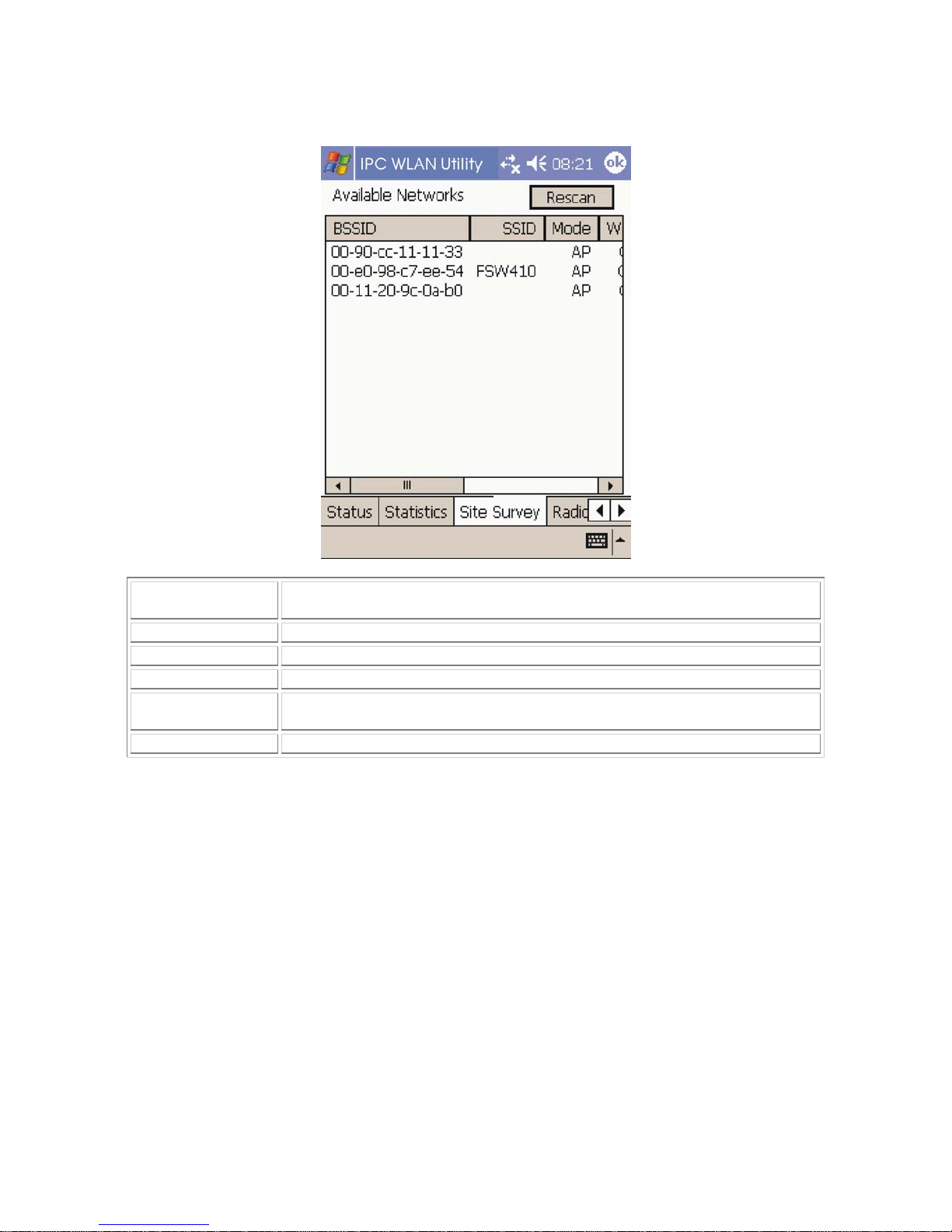
Site Survey tab
Rescan Searches for all available networks. Clicking on the button, the device will start to
rescan and list all available sites.
BSSID The MAC address for the Access Point or station.
SSID The current access point name (ESS ID).
Mode The currently connected device mode.
WEP WEP (Wired Equivalent Privacy) shows the current WEP used in theAP. WEP can
be enabled or disabled.
CH The wireless radio channel currently used by the card.
10
Indice
Altri manuali Boca Systems Scheda di rete
Manuali Scheda di rete popolari di altre marche

Buffalo
Buffalo AirStation WLI-PCM-L11GP Manuale utente

National Instruments
National Instruments NI 9234 Manuale utente

Hama
Hama 49276 Manuale utente

Linksys
Linksys WCF54G - Wireless-G Compact Flash Card Manuale operativo

Compaq
Compaq Wireless LAN 100 Manuale utente

Bose
Bose PowerMatch Dante Manuale utente