BTC BDV 316E Manuale utente

16X DVD-ROM DRIVE
316E
User’s Manual

DANGER INVISIBLE LASER RADIATION WHEN OPEN AVOID DIRECT EXPOSURE TO BEAM
VORSICHT INSICHTBARE LASERSTRAHLUNG WENN ABDECKUNG GEÖFFNET NICHT DEM
STRAHL AUSSETSEN
ATTENTION RADIATION DU FAISCEAU LASER INVISIBLE EN CAS D’OUVERTURE. EVITER TOUTE
EXPOSITION AUX RAYONS.
Copyright Statement
It is a criminal offence, under applicable copyright laws, to make
unauthorised copies of copyright-protected material, including computer
programs, films, broadcasts and sound recordings. This equipment
should not be used for such purposes.
CLASS 1 LASER PRODUCT
APPAREIL A LASER DE CLASSE 1
LASER KLASSE 1
LUOKAN 1 LASERLAITE
PRODUIT LASER
CATEGORIE 1

FCC Compliance Statement
This device complies with Part 15 of the FCC Rules. Operation is subject to the
following two conditions:
1. This device may not cause harmful interference, and
2. This device must accept any interference received, including interference that
may cause undesired operation.
FCC Warning Statement
This equipment has been tested and found to comply with the limits for a Class B
digital device, pursuant to Part 15 of the FCC Rules. These limits are designed to
provide reasonable protection against harmful interference in a residential
installation. This equipment generates, uses and can radiate radio frequency energy
and, if not installed and used in accordance with the instructions, may cause
harmful interference to radio communications. However, there is no guarantee that
interference will not occur in a particular installation. If this equipment does cause
harmful interference to radio or television reception, which can be determined by
turning the equipment off and on, the user is encouraged to correct the interference
by one or more of the following measures:
• Reorient or relocate the receiving antenna
• Increase the separation between the equipment and the receiver
• Connect the equipment into an outlet on a circuit different from that to which
the receiver is connected
• Consult the dealer or an experienced radio/TV technician for help.
CAUTION
Any changes or modifications not expressly approved by the party responsible for
compliance could void the user’s authority to operate the equipment.
FOR EUROPE
“The drive is in conformity with the EMC directive and low-voltage
directive.”

Table of Contents
INTRODUCTION 1
SYSTEM REQUIREMENTS 2
PACKAGE CONTENTS 2
INSTALLATION 3
HOST INTERFACE CONNECTIONS 3
HARDWARE INSTALLATION 4
DRIVER INSTALLATION 5
For Windows Environment 5
SOFTWARE INSTALLATION 5
DVD REGION CODING 6
Region Playback Control Management 6
Region Codes 6
DVD Video Decoder for PC Systems 7
About This DVD-ROM Drive 7
OPERATION & CONNECTION 8
FRONT PANEL 8
REAR VIEW 9
TECHNICAL DATA 10

16X DVD-ROM DRIVE
1
INTRODUCTION
Welcome to a multimedia world of DVD technology! This high-performance
DVD-ROM drive of ATAPI interface plays DVD titles at maximum 16X
DVD-ROM speed and plays CD-ROMs at maximum 48X speed. With the
bundled software,you can enjoy the wide range of educational and
entertaining CD/DVD titles with theater quality.
DVD stands for Digital Versatile Disc which has high-density capacity of
storing 4.7 gigabytes of data on single side and up to 17GB on double side
and dual layer. Other than that, a DVD is MPEG-2 compressed video
compatible and has Dolby Digital Surround Sound audio (known as AC-3)
capabilities. That is, the combination of DVD titles, your stereo setup and
this DVD-ROM drive package will bring you fascinating sound and visual
effect.
Here are some important features:
♦ 5.25" half-height internal drive
♦ Quick access time
♦ High data transfer rate (CAV* technology)
♦ Smooth DVD playback
♦ Efficient power saving feature
♦ Superior error recovery
♦ Excellent compatibility of media formats
♦ Horizontal & Vertical operation
♦ Good vibration resistance & low noise
*CAV: Constant Angular Velocity

16X DVD-ROM Drive
2
System Requirements
To install and use the DVD-ROM drive,it is recommended that you have
the following for your PC system:
♦ A PentiumTM II 350 MHz or faster CPU
♦ 16 MB RAM (32MB is recommended.)
♦ 16-bit SoundBlasterTM compatible sound card
♦ Amplified stereo speakers
♦ MicrosoftTM Windows 95/98/Me/NT/2000/XP
To run DVD titles with DVD playback software installed, the basic
requirements recommended:
♦ MicrosoftTM Windows 95/98/98SE/Me/NT4.0 SP5+/2000/XP
♦ Intel Pentium II 350MHz or above
♦ At least 64 MB RAM
♦ 16-bit SoundBlasterTM compatible sound card
♦ DVD-ROM drive
♦ Display card supporting DirectDraw
For detailed information, please refer to the software package.
Package Contents
The package contains the following items:
♦ 16X DVD-ROM drive
♦ Application CD −including application software
♦ Audio cable
♦ 4pcs of screws/bag
16X DVD-ROM DRIVE
3
INSTALLATION
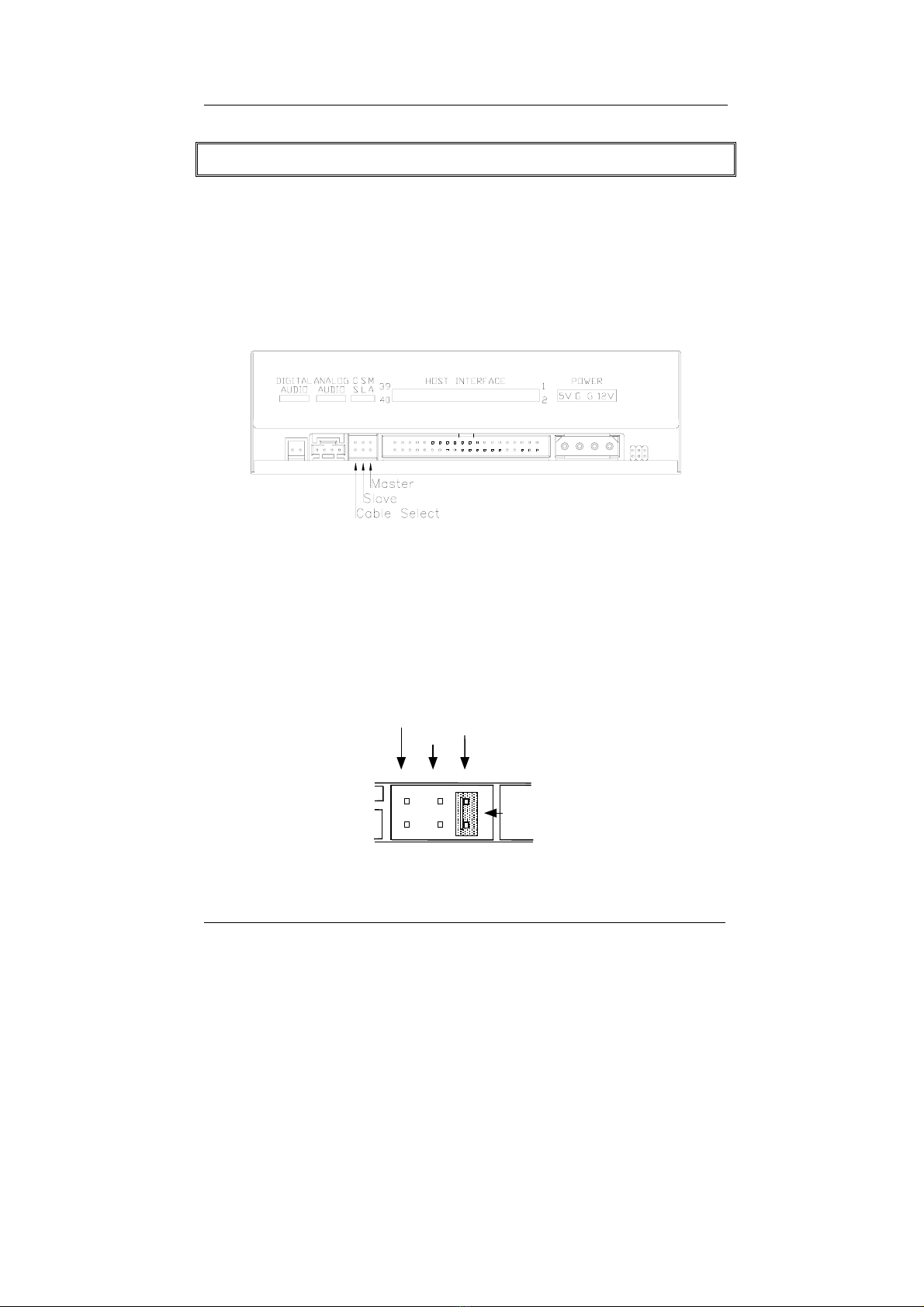
Host Interface Connections
Most current mainboard models have two IDE ports (primary and
secondary) which can connect two IDE cables. Two IDE cables
allow you to connect up to four devices, but it is recommended that
you separate IDE ports for your hard drive and your DVD-ROM drive.
If you connect only one device on the IDE cable, you can set the
jumper as “master” or “slave”.
If you connect two devices (e.g. DVD-ROM & CD-RW) on the same
cable, set different jumpers for each device (DVD-ROM as “master”,
CD-RW as “slave”, and vice versa.) The same rule applies to the
connection of having your hard disk and another device on the same
cable.
MASTER
CSEL
SLAVE
JUMPER
16X DVD-ROM Drive
4
Hardware Installation
1. Turn off the power to the computer system.
2. Disconnect the power cord and all cables from the back of your
computer, and then remove the cover of the computer.
3. Insert the drive into one of the vacant 5.25" drive bays and
secure it with screws to your PC.
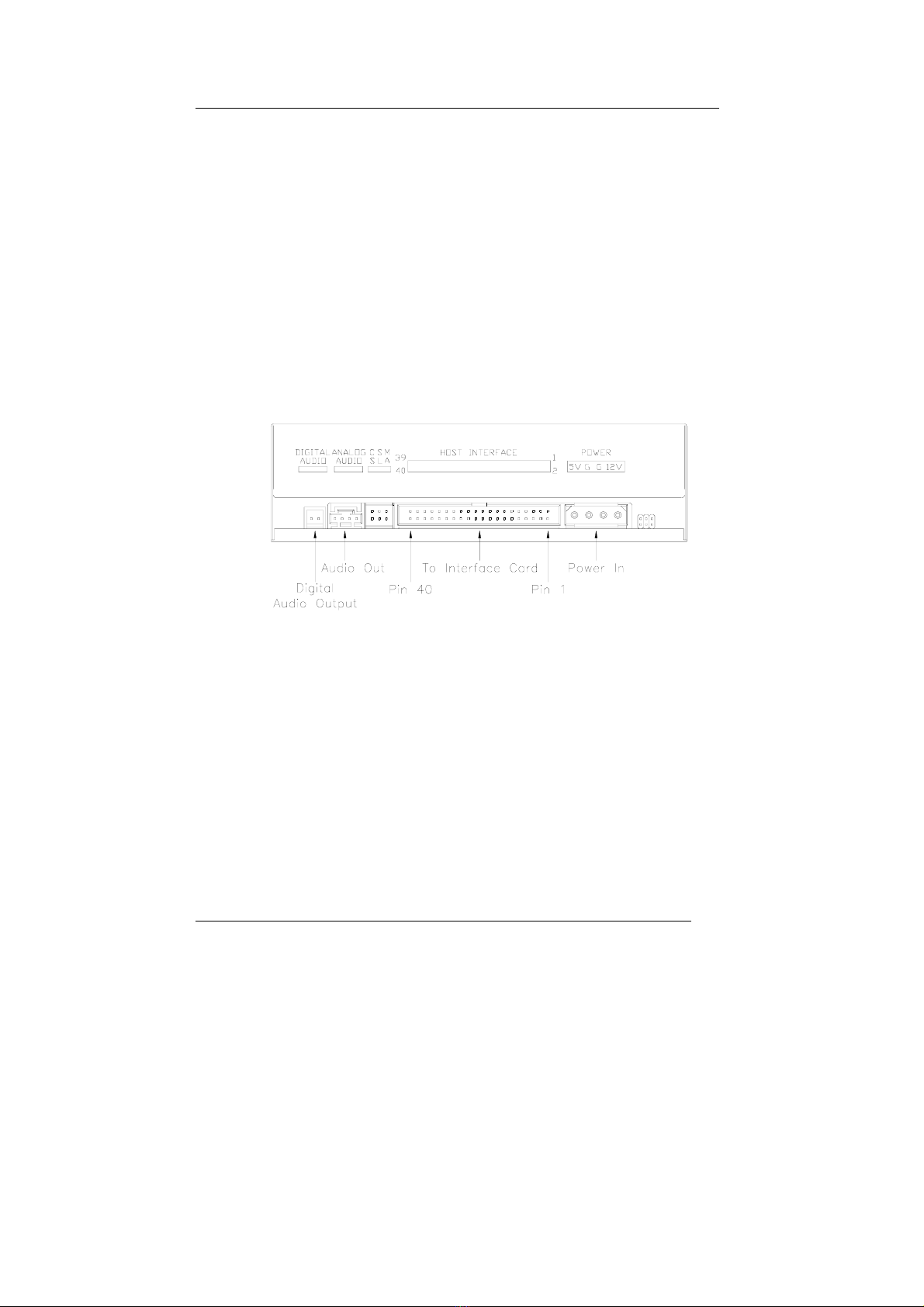
4. Connect one end of the 40-pin IDE cable to the IDE connector of
this drive and the other end to the IDE port on your mainboard.
Also, connect the power supply cable to the back of the drive.
Make sure to align and connect the red-edge of the IDE cable to Pin 1 on
the drive.
5. If you have a sound card that can be connected to this drive, you
can also connect the drive (as Audio-Out) and the sound card
(as Audio-in) with a 4-pin audio cable.
If your mainboad is integrated with built-in sound system, plug
the 4-pin audio cable into the CD-IN connector on the
mainboard as Audio-in.
6. Re-attach the cover of your computer, and reconnect the power
cord and all cables.

16X DVD-ROM DRIVE
5
Driver Installation
For Windows Environment
This DVD-ROM drive is a Plug & Play device. Windows 95/98//Me,
and Windows NT/2000/XP will automatically detect the drive and
load the appropriate driver.
Software Installation
The bundled DVD playback software offers maximum video and
audio playback entertainment on the PC. It comes with leading video
and audio technologies to deliver the highest quality viewing and
listening experience possible on the PC.
To install DVD playback software under Windows operating system,
you could either:
1. Insert the application CD and the installation program will run
automatically. Then follow the on-screen procedures.
Or
2. Run:\setup.exe on the application CD.

16X DVD-ROM Drive
6
DVD Region Coding
Region Playback Control Management
All DVD Video Playback systems have “Region Playback Control”
(RPC) which is required by Hollywood movie industry and defined by
DVD Forum. You can only play DVD-Video discs with the same
region code as your DVD-Video Playback system.
As for DVD-ROM drives, one kind of the DVD-Video Playback
system, there are 2 types:
RPC Phase 1 (as RPC1): RPC1 drives do not have built-in hardware
support for region management. DVD-ROM drives of this kind don’t
play a part in controlling the playback region. It solely depends on
the decoder.
RPC Phase 2 (as RPC2): RPC2 drives maintain the region change
count information in hardware, and in general, the region of such
drives can be changed up to 5 times by the end users under some
software decoder. (e.g. PowerDVD)
Region Codes
Region 1: Canada, U.S.
Region 2: Japan, Europe, South Africa, and Middle East, Egypt
Region 3: Southeast Asia and East Asia
Region 4: Australia, New Zealand, Pacific Islands, Central America,
Mexico, South America, and the Caribbean
Region 5: Eastern Europe, Indian subcontinent, Africa, North Korea,
and Mongolia
Region 6: China
Indice
Altri manuali BTC Unità DVD

BTC
BTC BCO4816IA Manuale utente

BTC
BTC BCO5232IM Manuale utente

BTC
BTC BCO4816IM Manuale utente

BTC
BTC BDV 316C Manuale utente

BTC
BTC BCO5232IB Manuale utente
BTC
BTC BCO5216IB Manuale utente

BTC
BTC BCO5216IA Manuale utente

BTC
BTC BCO5216IM Manuale utente

BTC
BTC BCO4816UI Manuale utente

BTC
BTC DRW1108UB Manuale utente