Comset CM685V-4 Manuale utente

CM685V-4 User Manual
1
www.comset.com.au
Industrial Grade 3G 4G 4GX Cellular Router
User Manual
CM685V-4
Comset: 37/ 125 Highbury Rd, Burwood VIC 3125, Australia

CM685V-4 User Manual
2
www.comset.com.au
Table of Contents
1 Product Introduction ··························································································································································5
1.1 Product overview············································································································· 5
1.2 Typical Application Diagram···································································································· 5
1.3 Features····································································································································· 6
2 Hardware Installation·························································································································································7
2.1 Overall Dimensions·················································································································· 7
2.2 Ports············································································································································ 8
2.3 Powering up the CM685V-4···································································································· 9
2.4 SIM/UIM card ···························································································································· 9
2.5 Terminal block ··························································································································· 9
2.6 Grounding································································································································ 11
2.7 Power Supply·························································································································· 11
2.8 LED Description······················································································································ 11
3 Software configuration·····················································································································································14
3.1 Overview·································································································································· 14
3.2 How to log into the Router····································································································· 14
3.3 Router status··························································································································· 17
3.3.1 Status overview···················································································································· 17
3.3.2 Network status····················································································································· 18
3.3.3 Firewall status······················································································································ 21
3.3.4 Routes··································································································································· 21
3.3.5 System log···························································································································· 22
3.3.6 Kernel log······························································································································ 22
3.3.7 Realtime graphs··················································································································· 23
3.4 System Configuration············································································································· 24
3.4.1 Setup wizard ························································································································ 24
3.4.2 System·································································································································· 28
3.4.3 Password······························································································································ 30
3.4.4 NTP········································································································································ 30
3.4.5 Backup/Restore··················································································································· 31
3.4.6 Upgrade································································································································ 31
3.4.7 Reset····································································································································· 33
3.4.8 Reboot··································································································································· 34
3.5 Services configuration············································································································ 34
3.5.1 ICMP check·························································································································· 34
3.5.2 VRRP ···································································································································· 36
3.5.3 Failover (link backup)·········································································································· 37
3.5.4 DTU······································································································································· 39
3.5.5 SNMP···································································································································· 41
3.5.6 GPS (optional) ····················································································································· 43

CM685V-4 User Manual
3
www.comset.com.au
3.5.7 SMS······································································································································· 45
3.5.8 VPN······································································································································· 48
3.5.8.1 IPSEC································································································································ 48
3.5.8.2 PPTP·································································································································· 49
3.5.8.3 L2TP··································································································································· 52
3.5.8.4 OpenVPN·························································································································· 53
3.5.8.5 GRE tunnel························································································································ 55
3.5.9 DDNS···································································································································· 56
3.5.10 Connect Radio Module····································································································· 58
3.6 Network Configuration ··········································································································· 60
3.6.1 Operation Mode··················································································································· 60
3.6.2 Mobile configuration············································································································ 61
3.6.3 Cell mobile data limitation·································································································· 62
3.6.4 LAN settings························································································································· 63
3.6.5 Wired-WAN··························································································································· 66
3.6.6 WiFi Settings························································································································ 67
3.6.6.1 Wifi General configuration ······························································································ 68
3.6.6.2 WiFi Advanced Configuration························································································· 69
3.6.6.3 WiFi Interface Configuration··························································································· 70
3.6.6.4 WiFi AP client···················································································································· 72
3.6.7 Interfaces Overview············································································································ 74
3.6.8 Firewall·································································································································· 75
3.6.8.1 General Settings··············································································································· 75
3.6.8.2 Port Forwards··················································································································· 75
3.6.8.3 Traffic rules························································································································ 76
3.6.8.4 DMZ···································································································································· 80
3.6.8.5 Security······························································································································ 81
3.6.9 Static Routes························································································································ 82
3.6.10 Switch·································································································································· 82
3.6.11 DHCP and DNS················································································································· 83
3.6.12 Diagnostics························································································································· 85
3.6.13 Loopback Interface ··········································································································· 86
3.6.14 Dynamic Routing··············································································································· 86
3.6.15 QoS····································································································································· 88

CM685V-4 User Manual
4
www.comset.com.au
Copyright © COMSET 2017
Comset is a registered trademark of Comset. Other brands used in this manual are trademarks
of their registered holders.
Specifications are subject to change without notice. No part of this manual may be reproduced
without the consent of Comset. All rights reserved.
WARNING: Keep at least a 20 cm distance between the user’s body and the modem
router device.
Address:37/ 125 Highbury Road, Burwood VIC 3125, Australia
Web:
http://www.comset.com.au
Phone: +61 3 9001 9720
Fax: +61 3 9888 7100

CM685V-4 User Manual
5
www.comset.com.au
Chapter 1
1 Product Introduction
1.1 Product overview
The Comset CM685V-4 is an industrial grade 3G/4G/4GX LTE WiFi Modem Router based on the
latest OpenWrt platform. With download speeds of up to 150 Mbps and upload speeds of up to 50
Mbps, it is one of the few routers on the Australian market that supports band B28 (700MHz).
The Comset CM685V-4 is designed to suit Australian conditions. It supports the latest LTE
Advanced Technology that performs fast and reliable data communication. It enables users to
quickly create a secure and fast wireless network. It features a built-in WiFi N300 with speeds of
up to 300 Mbps, one Ethernet WAN port for fixed internet connection and one Ethernet LAN port,
as well as a GPIO with two digital output ports. Other features include VPN IPSEC, PPTP, L2TP
and Open VPN to establish a secure connection over the 3G/4G network.
The durable and rugged design makes the CM685V-4 the router of choice for remote harsh
environments. The compact design, easy integration and advanced built-in features make it
suitable for a wide range of industrial M2M applications, including industrial automation, building
automation, smart metering, security, surveillance, transportation, health, mining and
environmental monitoring.
1.2 Typical Application Diagram
The Comset CM685V-4 3G/4G/4GX Router is suitable for a wide range of machine-to-machine
applications (M2M). A good example is the connection of ATM machines and POS systems
back to a server over a secure 4G connection using a secure VPN IPSEC tunnel.

CM685V-4 User Manual
6
www.comset.com.au
1.3 Features
The CM685V-4 supports the following:
LTE FDD B1/B2/B3/B4/B5/B7/B8/B28 and LTE TDD B40 with 3G fallback to
DC-HSPA+/HSPA+/HSPA/WCDMA B1/B2/B5/B8
IEEE802.11b/g/n N300 Wi-Fi AP function, WDS bridging, WEP, WPA/WPA2
Personal/Enterprise, TKIP/AES, Authenticated encryptionmode
RS232 interface data transparent transmission and protocol conversion
On-demand dialing, including time on/off-line, voice or SMS control on/off-line, data
trigger online or link idleoffline
TCP/IP protocol stack, Telnet, HTTP, SNMP, PPP, PPPoE, network protocol
VPN IPSEC, PPTP, L2TP and Open VPN
Configuration via a user-friendly interface using a web browser

CM685V-4 User Manual
7
www.comset.com.au
Chapter 2
2 Hardware Installation
1. Overall Dimensions
2. Accessories
3. Installation
2.1 Overall Dimensions

CM685V-4 User Manual
8
www.comset.com.au
2.2 Ports
LAN: LAN RJ45 Ethernet port
WAN: WAN RJ45 Ethernet port
RST: sys reset button
PWR: DC power socket. DC5~40V standard. (DC5~50V optional)
VCC: DC wire positive pole
GND: DC wire ground
GND: Serial ground
RX: Serial receive
TX: Serial transmit
RST: Reset
DIO0: Digital I/O port 0
DIO1: Digital I/O port 1
NC: Not connected
WPS: WPS button

CM685V-4 User Manual
9
www.comset.com.au
Antenna Connections Table
Antenna Connector
Marks
Cell
for main cell antenna
Aux
for auxiliary cell antenna
WiFi 1
for WiFi-1 antenna
WiFi 2
For WiFi-2 antenna
GPS
for GPS antenna (optional)
2.3 Powering up the CM685V-4
Please ensure the SIM card is inserted, and the antennas are connected before powering up
the router.
2.4 SIM/UIM card
If your router has a SIM/UIM card cover, please remove it and have the SIM card properly
inserted.
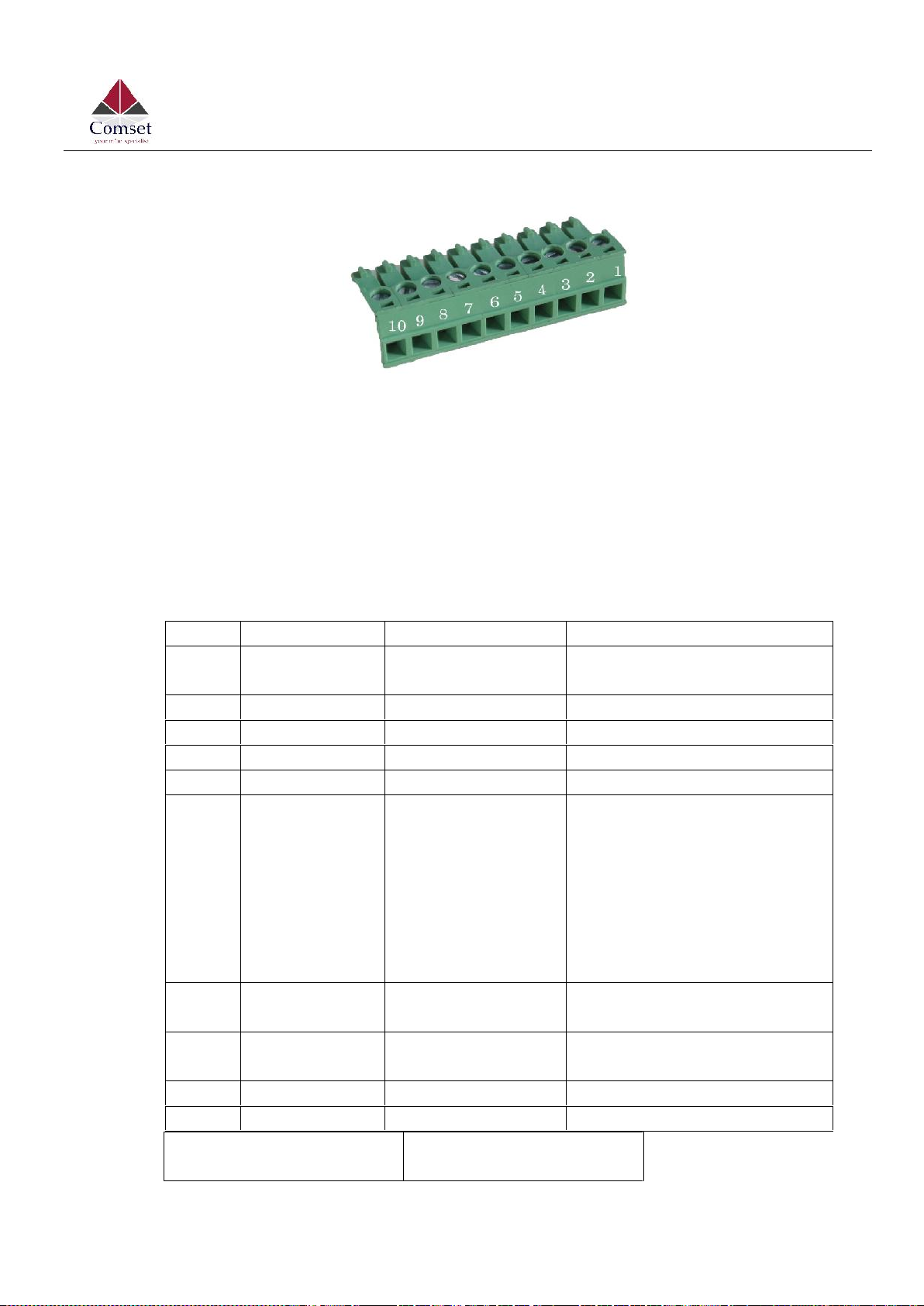
2.5 Terminal block
Please refer to the following table on Pin description relating to the terminal block:

CM685V-4 User Manual
10
www.comset.com.au
.
Attention:
1. If you are not using the AC adapter supplied with the router, and if you wish to power
up the unit using the terminal block, the power cable should be wired with the correct
voltage polarity. Wrong wiring will destroy the equipment. Pin 1 and Pin 2 are reserved
for power, where Pin 2 is “GND” and PIN 1 is power input “Vin”(DC5~40V).
I/O Terminal on router
Serial port (RS485 or
RS232)
PIN
Signal
Description
Note
1
VCC
+5-40V DC Input,
+5~50V optional
Current: 12V/1A
2
GND
Ground
3
GND
Ground
4
RX
Receive Data
5
TX
Transmit Data
6
RST
Reset
The Reset Pin has the same
function as the reset button.
Simply short the RST pin with
the GND Pin and hold for 3 sec
and the device will restore to
factory settings. If you hold for
1 sec, the router will reboot.
7
DIO0
General Purpose
I/O
8
DIO1
General Purpose
I/O
9
NC
Not connected
10
NC
Not connected
Indice
Altri manuali Comset Router di rete

Comset
Comset CM820V-4 Manuale utente

Comset
Comset CM550W-POE Manuale utente

Comset
Comset CM685V-1 Manuale utente

Comset
Comset CM510Q-W Manuale utente

Comset
Comset CM820V-W Manuale utente

Comset
Comset CM685V Manuale utente

Comset
Comset CM685 Series Guida alla risoluzione dei problemi

Comset
Comset CM685V-6 Manuale utente

Comset
Comset CM820Q-4 Manuale utente

Comset
Comset CM685V-W Manuale utente
Manuali Router di rete popolari di altre marche

NETGEAR
NETGEAR FS526T - Switch Manuale utente

Korenix
Korenix JetNet 5710G Series Manuale utente

Automated Logic
Automated Logic ZN551 Manuale del proprietario

Cisco
Cisco ASR 1000 Series Manuale dell'operatore

EnGenius
EnGenius ESR-9710 Manuale utente

Cisco
Cisco 805 Series Istruzioni operative e di sicurezza