CoPilot CPDVR2 Manuale utente

1 | P a g e
CPDVR2 HD Dash Cam
User Manual
Thank you for buying our CPDVR2 dash
cam. To get you started, we’ve written this
manual with the first-time dash camera
user in mind. This means we have given
instructions to help anyone who is new to
video recording.
Please read this manual before using your
new dash cam. The words we use will
become more familiar to you as you go
through the manual, and you set up and
operate your camera.
Please also pay attention to road safety at all times as you should not attempt to operate any
equipment while driving as this can be a dangerous distraction. A moment’s lapse of attention on
your part could cost lives –so drive safely, always.
We want you to enjoy using your dash cam, not to wind up recording an accident you caused!

2 | P a g e
Contents
Introduction ............................................................................................................................................4
Battery Operation: ..................................................................................................................................7
To charge the battery: ........................................................................................................................ 7
With a computer or USB Charger: ..................................................................................................7
With your vehicle cigarette lighter: ................................................................................................7
Suction Cup installation ..........................................................................................................................8
Memory card installation........................................................................................................................ 9
Notes about Memory Cards.................................................................................................................... 9
Settings Menu.......................................................................................................................................10
Video .................................................................................................................................................10
Video Settings: ......................................................................................................................................11
Resolution: ........................................................................................................................................11
Date Time Stamp:..............................................................................................................................11
Motion Detection:.............................................................................................................................11
Loop Recording: ................................................................................................................................11
Record Audio:....................................................................................................................................11
System Settings:....................................................................................................................................12
Format:..............................................................................................................................................12
Language:..........................................................................................................................................12
Auto Power Off: ................................................................................................................................12
Sys. Reset: .........................................................................................................................................12
Light Freq. .........................................................................................................................................12
Date Input: ........................................................................................................................................12
USB:...................................................................................................................................................12
Version: .............................................................................................................................................12
Picture Settings .....................................................................................................................................12
Playback ................................................................................................................................................13
Delete:...............................................................................................................................................13
Protect: .............................................................................................................................................13
To upload picture/video files to your PC ..............................................................................................13
Webcam ................................................................................................................................................14
SPECIFICATIONS: ...................................................................................................................................15
Sensor: ..............................................................................................................................................15

3 | P a g e
Capture mode: ..................................................................................................................................15

▪Video: ....................................................................................................................................15

Photo:............................................................................................................................................15
Lens: ..................................................................................................................................................15
Focus Range: .....................................................................................................................................15
Storage media:..................................................................................................................................15
File format:........................................................................................................................................15
Power Source:...................................................................................................................................15
I/O Port: ............................................................................................................................................15
Screen: ..............................................................................................................................................15
Microphone:......................................................................................................................................15
Speaker: ............................................................................................................................................15
Accessories:...........................................................................................................................................16
Computer System requirement: ...........................................................................................................16
About Co Pilot .......................................................................................................................................17
Address: ........................................................................................................................................17
Phone: ...........................................................................................................................................17
e-Mail: ...........................................................................................................................................17
FCC INFORMATION: ..............................................................................................................................18
FCC NOTICE: ..........................................................................................................................................18
USER INFORMATION.............................................................................................................................19
Glossary.................................................................................................................................................19

4 | P a g e
Introduction
The CPDVR2 is a self-contained compact portable dash cam / DVR (Digital Video Recorder). It is
charged by your vehicle’s 12-volt electrical outlet.
When operating in video record mode it records and saves video files to a Class 10 memory card.
(please see the notes about using micro SD memory cards and how to put them into your computer)
(you will need to purchase the memory card separately. They are available from most supermarkets
or can be ordered from the internet)
When the card is full, the camera automatically ‘loops’ and overwrites the earliest video files that
have been saved to the SD card.
In this way, your dash cam can record continuously hour upon hour. You will always have the most
current video files available for review, protection, or download.
These video files can be viewed on your dash cam’s playback screen, downloaded to a PC / Mac, or
viewed on a digital TV.
The SD memory card can also be removed and inserted into a PC / Mac for video download. If you
prefer, you can connect your dash cam with the USB cable to a computer so the video data can be
downloaded and saved.

5 | P a g e

6 | P a g e

7 | P a g e
Battery Operation:
Your dash cam has a 3.7V Li-ion rechargeable battery built-in. This battery allows for short-term use
(approximately 2.5 minutes for video recording or 4 minutes for video play back). Be sure to fully
charge the battery before use.
To charge the battery:
With a computer or USB Charger:
Plug the USB cable into the mini USB port on
the side of your dash cam, and plug it into the
USB port on any PC or USB charger (not
included). Your dash cam will power on and
illuminate when charging.
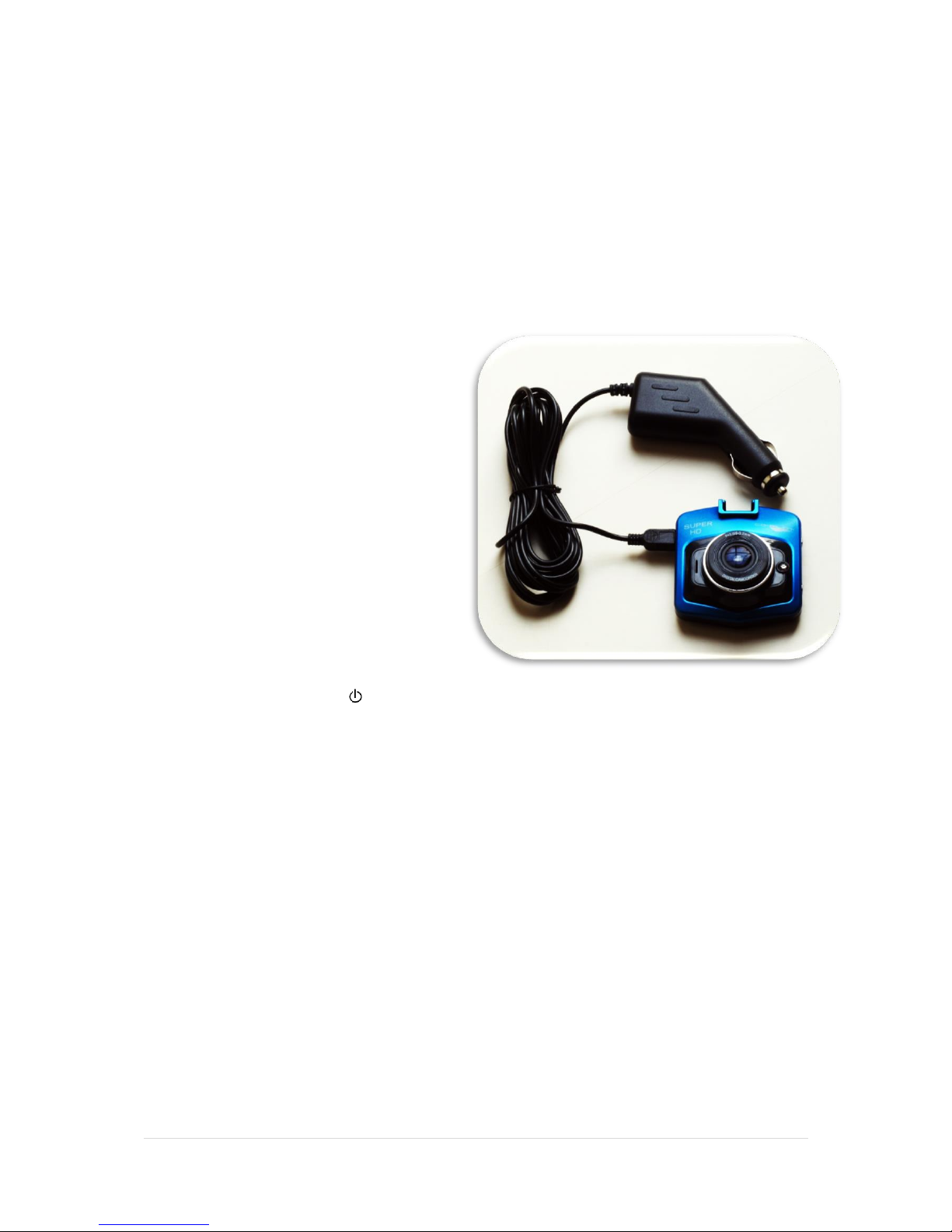
With your vehicle cigarette lighter:
Plug the USB cable end of your car adapter
into the mini USB port on the side of your
dash cam, and plug the adapter into the car
cigarette lighter. Your dash cam will power on
and illuminate when charging.
Be sure to keep your dash cam plugged in to
ensure uninterrupted recording.
For express charging press the button to turn off your dash cam. Red indicators will illuminate
when charging and will turn off once charging is complete.
Your battery will last longer if you follow these simple guidelines for charging and storing:
Charge your dash cam for at least 2 hours, or until fully charged, before you use it for the first time.
Recharge and store your dash cam in a cool, dry place. Battery life will naturally drain slowly over
time, so be sure to keep your device fully charged.

8 | P a g e
Suction Cup installation
1. Connect the suction cup mount to your dash cam like this:
2. Press the suction cup firmly onto your windscreen, pressing the knob to secure it like this:
3. Adjust to the desire angle like this:
4. To remove from your windscreen, release the lock and gently remove the suction section,
like this:

9 | P a g e
Memory card installation
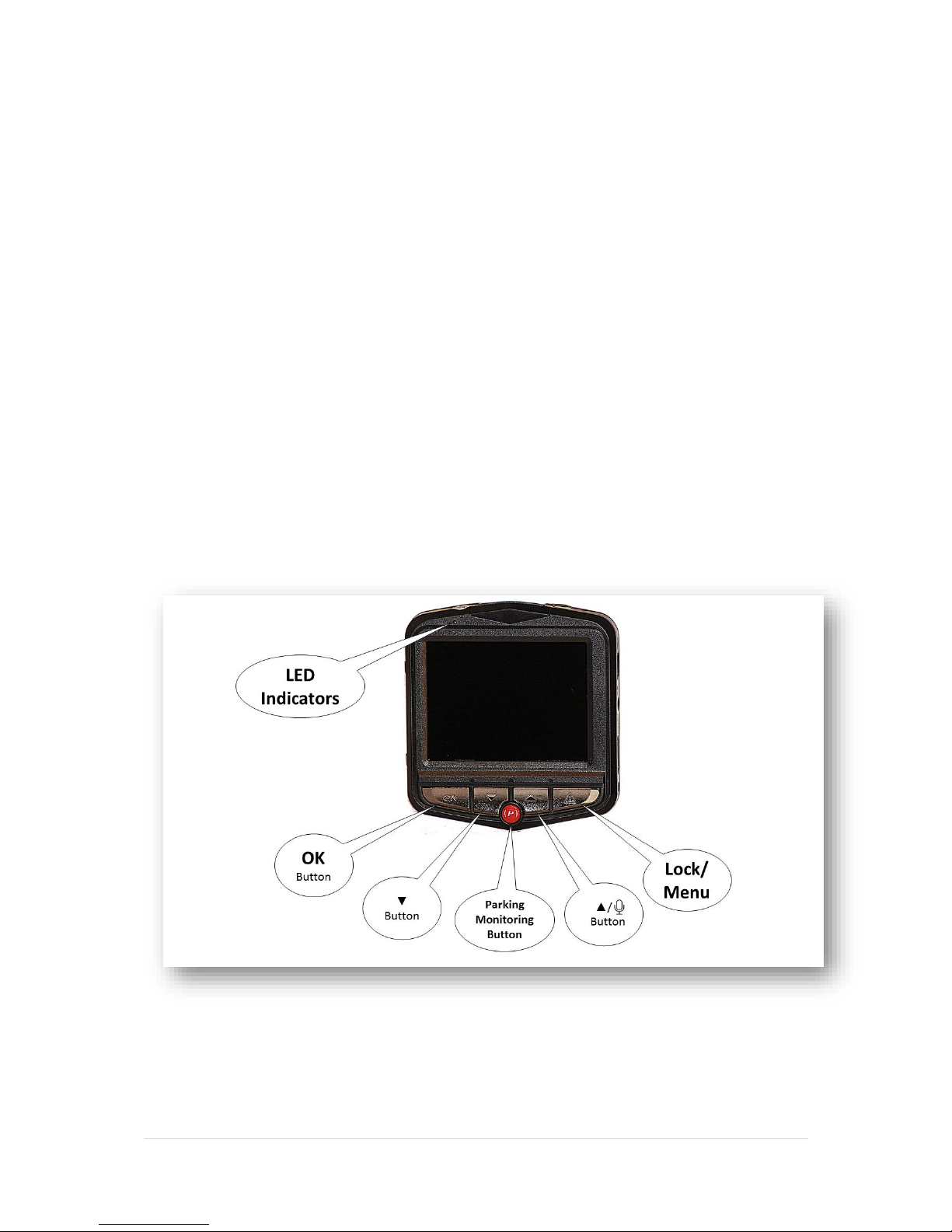
When recording video, press the ▲/ button to capture the video without audio. Press it
again to record with audio once again.
Notes about Memory Cards.
Memory cards can be from 4GB to 32 GB in size. Obviously the larger the capacity the more video
time you can record.
The dash cam uses the micro SD slot, and this can be removed and placed into your computer or
hand-held device to enjoy the videos.
Some older machines may require you to use an adapter to plug your micro SD memory card into
your computer. These often come with a new memory chip, but you should check your computer
interface (and manual) and ask at the store when you buy memory.

10 | P a g e
Settings Menu
Video
1. Recharge the built-in battery, as instructed earlier.
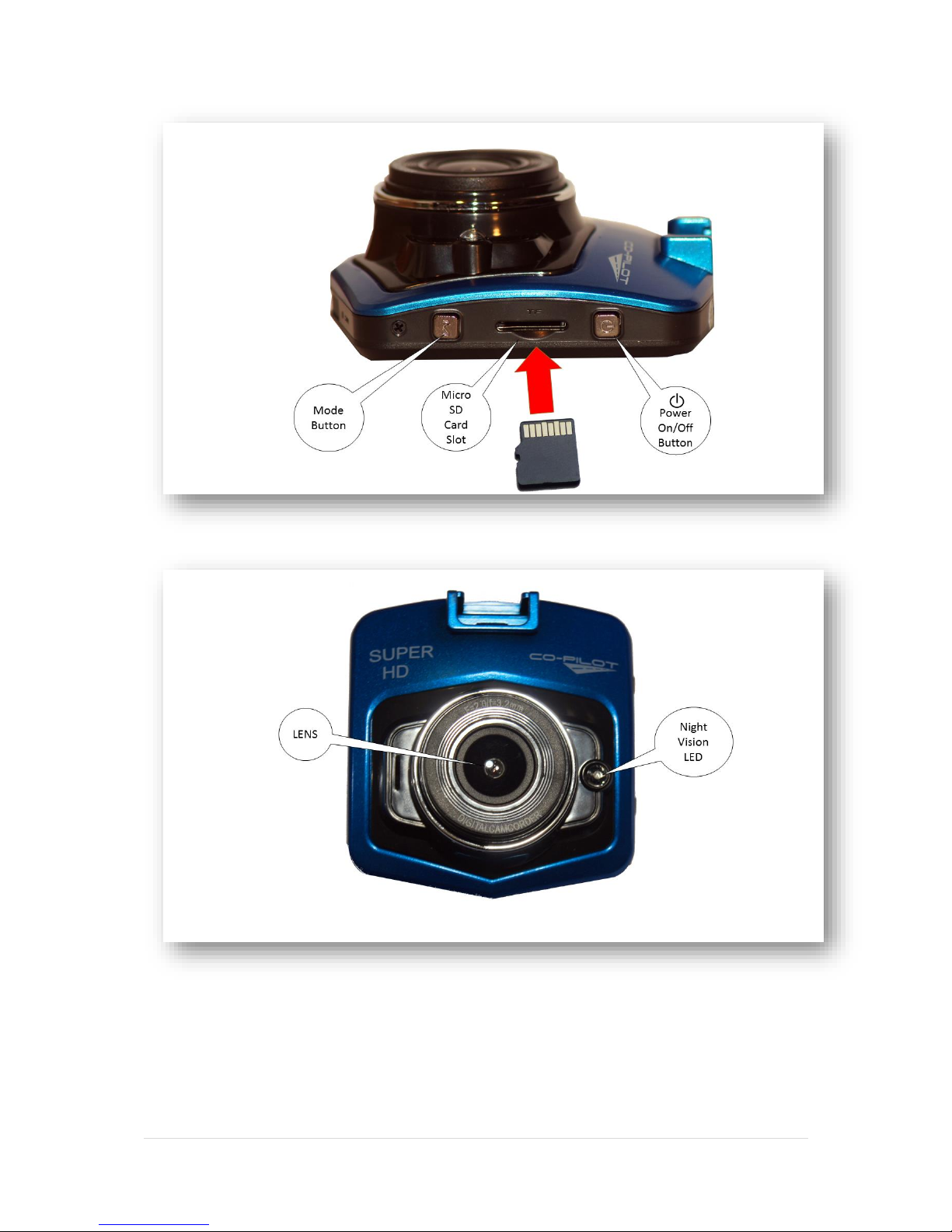
To wake the unit from standby mode, press the button or connect the cigarette lighter power
adapter or powered USB cable. Your dash cam will automatically enter video recording mode,
the blue indicator will light up and will appear on the display.
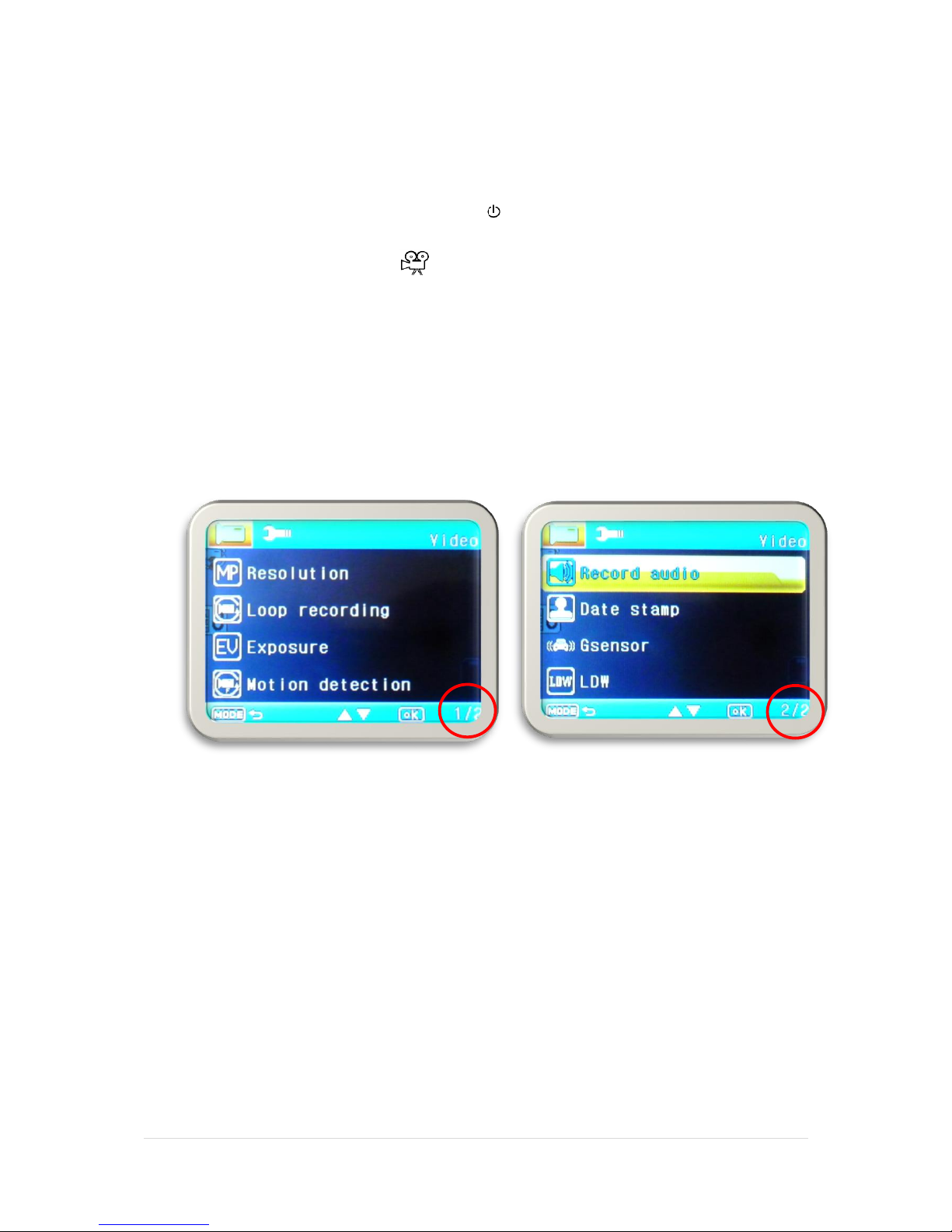
2. Press the MENU Button to enter the settings menu.
3. Using the ▼or ▲buttons to select the function you would like to adjust. Press the
MENU button to enter the subsequent menus and to exit the menu.
Press the “OK” button to enter or confirm the settings.
Screen 1 of 2 Screen 2 of 2
Indice
Altri manuali CoPilot Telecamera da cruscotto


