
Dini Argeo DGT1S Manuale utente

www.diniargeo.com
DGT1S
Digital weight transmitter
ENGLISHUSER MANUAL
For DGT1S with firmware release minimum 08.03

3
Optimized layout for A4 print.
USER_MAN_ENG_DGT1S_V8
Contents
Introduction 7
Transmitter installation 8
Installation requirements 8
Electrical precautions 9
Earthing of the system 11
Technical features 14
Load cell installation 15
Wiring diagrams 16
DGT1S 16
DGT1SAN 17
Display and function of the keys 18
Quick menu 18
Advanced programming menu 19
Access to the menu and saving the changes 19
Function of the keys in the menu 19
Block diagram of the menu 20
On / Off 22
Theoretical calibration 23
Calibration with sample weights 24
Manual calibration 26
Manual calibration 26
Quick zero calibration (pre-tare zeroing) 26

4
Optimized layout for A4 print.
USER_MAN_ENG_DGT1S_V8
Filter and stability 27
Filter adjustment 27
Stability detection sensitivity 27
Display updating frequency 28
Gravity 28
Zeroing parameters 29
Auto-zeroing on ignition 29
Maximum percentage of manual zeroing 29
Zero tracking 29
Restoring zero 30
Semi-automatic zeroing 30
Tare functions and parameters 31
Tare mode 31
Semi-automatic tare 31
Predetermined tare 31
Clearing the tare 31
Alibi memory 32
Enabling the alibi memory 32
Saving a weighing operation in the alibi memory 32
Reading the alibi memory 33
Initialising the alibi memory 33
Use functions 34
High resolution 34
Peak detection 34
Converting units of measurement 34
Alibi memory 34
No function 34
Input configuration 35
Output configuration 36
Analog output configuration 37
Serial communication configuration 39
Selection of the PC serial port 39

5
Optimized layout for A4 print.
USER_MAN_ENG_DGT1S_V8
Configuration of the printer port (COM.PRN) 40
Transmission mode 40
Baud rate, parity, data bits, stop bits 41
Printer power on mode 41
CTS signal 41
Print language 41
Reactivation of printing 42
Configuration of the PC port (COM.PC) 42
Transmission mode 42
Baud rate, parity, data bits, stop bits 43
Communication protocols 44
Standard string 44
Extended string 44
Serial commands 45
Diagnostics 48
Cells / converter test 48
Firmware release 48
Serial number 48
Display 48
Keypad 48
Serial ports 49
CTS signal 49
Inputs 49
Outputs 49
Analog output 49
Programming the Setpoints 49
Restoring factory settings 50
Date and time setting 50
Alarms 51

6
Optimized layout for A4 print.
USER_MAN_ENG_DGT1S_V8

7
Optimized layout for A4 print.
USER_MAN_ENG_DGT1S_V8
Dear Customer,
Thank you for purchasing a DINI ARGEO product.
This manual contains all the instructions for a correct installation and commissioning of the DGT1S digital weight transmitter.
While thanking you for purchasing this product, we would like to draw your attention to some aspects of this manual.
This booklet provides useful information for the correct operation and maintenance of the scale to which it refers; it is therefore essential
to pay the greatest attention to all those paragraphs that illustrate the simplest and safest way to operate.
It is recommended that you carefully follow the instructions for programming the weight transmitter; performing actions not indicated in
this manual could compromise the proper functioning of the scale.
The utmost care has been taken in compiling this manual, but reports of any inaccuracies are always welcome.
The instrument is covered by warranty and MUST NOT BE TAMPERED WITH BY THE USER under any circumstances.
Any attempt at repair or modification may expose the user to the danger of electric shock and voids any warranty conditions, relieving
the Manufacturer from all liability.
Any problem with the product must be reported to the manufacturer or to the retailer where it was purchased.
In any case, always TURN OFF THE POWER SUPPLY before any installation or repair operation.
Introduction

8
Optimized layout for A4 print.
USER_MAN_ENG_DGT1S_V8
Transmitter installation
Installation requirements
Observe the following conditions for correct installation of the transmitter and of the load receiver:
• Flat, level support surface.
• Stability and absence of vibrations.
• Absence of aggressive dusts and vapours.
• Absence of draughts.
• Make sure that the platform is levelled or that the load cells are evenly supported.
• Moderate temperature and humidity (15°C - 30°C and 40% - 70%).
• Do not install in an environment where there is a risk of explosion.
• All transmitter connections must be made in accordance with applicable regulations in the area and environment of installation.
Observe the electrical precautions listed in the section “Electrical precautions”.
• Ensure that it is correctly earthed, see the relevant section “Earthing of the system”.
• Do not perform welding when the load cells have already been installed.
• If necessary, use watertight sheaths and fittings to protect the load cell cables.
• Any junction boxes must be watertight.
• Anything not expressly described in this manual constitutes improper use of the equipment.

9
Optimized layout for A4 print.
USER_MAN_ENG_DGT1S_V8
Electrical precautions
• Use a regulated mains supply within ± 10% of the rated voltage.
• The electrical protections (fuses, etc.) are the responsibility of the installer.
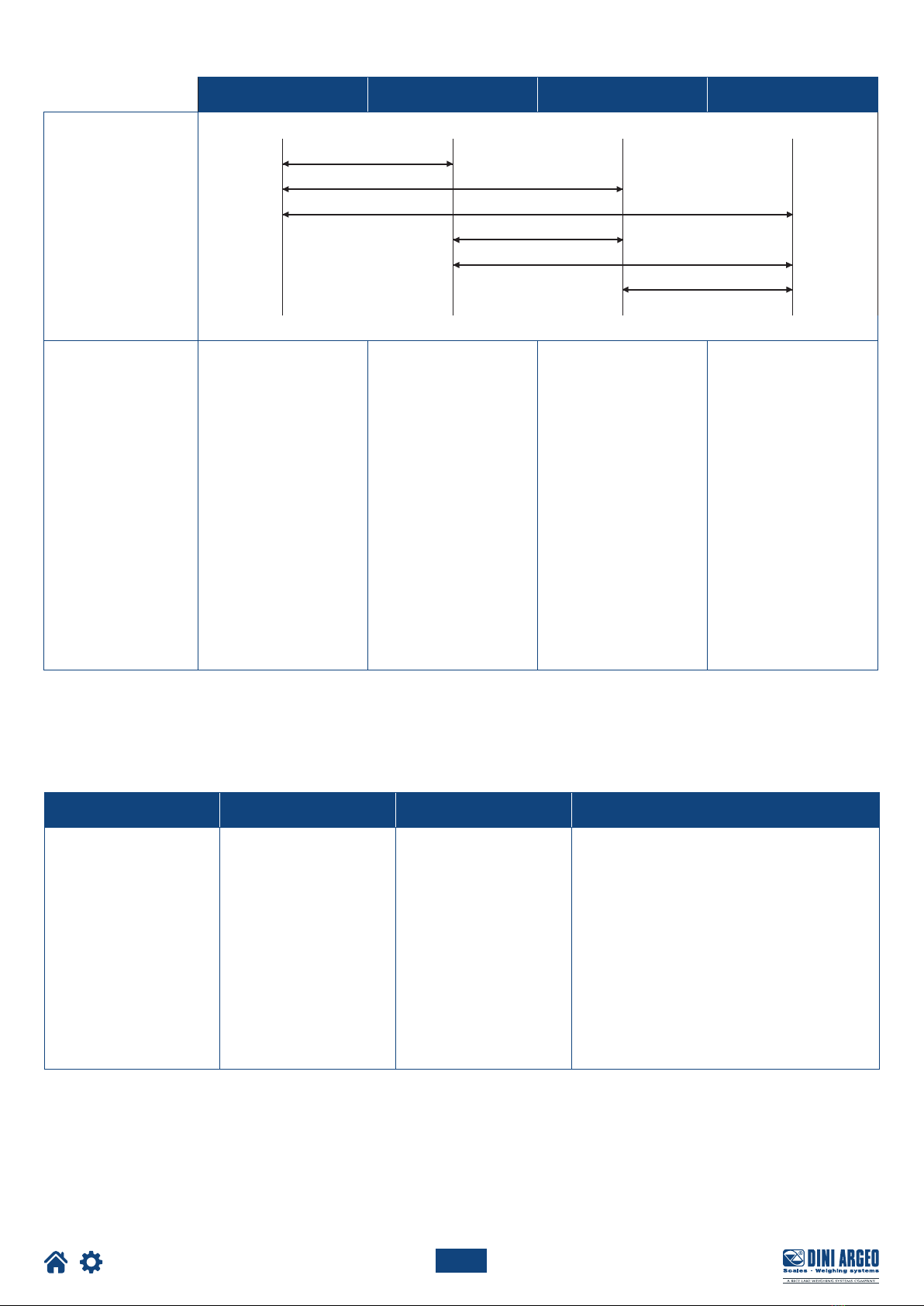
• Observe the recommended minimum distances between cables of dierent categories (see table on page 10).
• The following cables must comply with the maximum permissible lengths (see table on page 10), they must be shielded and must
beinserted alone in metal conduits or pipes:
- the load cell extension cables;
- the signal amplifier cables;
- the cables for connecting the serial ports;
- the analog output cables.
• The cell or amplifier cables must have an independent input in the electrical panel. They must be connected (if possible) directly to
the terminal block of the transmitter without passing through the conduit with other cables.
• Fit “RC” filters:
- on the contactor coils;
- on the solenoid valve coils;
- on all devices that produce electrical interference.
• If condensation can occur inside the weight transmitter, it is advisable to keep the equipment powered at all times.
• Connections to load cells and any external device must be as short as possible.
• The cable ends (connectors, leads, terminals, etc.) must be installed correctly; the cable shielding must be kept intact until close to
the connection point.
• If the transmitter is placed inside an electrical panel, a shielded cable must also be used for the power supply.
10
Optimized layout for A4 print.
USER_MAN_ENG_DGT1S_V8
Category I Category II Category III Category IV
Distance
≥ 100 mm
≥ 200 mm
≥ 500 mm
≥ 100 mm
≥ 500 mm
≥ 500 mm
Classification
Fieldbus, LAN network
(PROFIBUS, Ethernet,
Devicenet...).
Shielded data cables
(RS232...).
Shielded cables for
analog digital signals
< 25 V (sensors, load
cells...).
Low voltage power sup-
ply cables (< 60 V).
Coaxial cables.
DC supply cables with
voltage > 60 V and <
400 V.
AC supply cables with
voltage > 25 V and <
400 V.
Power supply cables
with voltage > 400 V.
Telephone cables.
Any cable subject to
lightning danger.
Load cell RS232 RS485 Analog output
50 metres with
6 x 0.25 mm2cable;
100 metres with
6 x 0.5 mm2cable.
15 m with baud rate up
to19200.
1200 m with shielded 2 x
24 AWG twisted pair with
outer braid + aluminium
strip.
CURRENT:
100 metres with 2 x 0.25 mm2cable;
150 metres with 2 x 0.5 mm2cable;
300 metres with 2 x 1 mm2cable.
VOLTAGE:
50 metres with 2 x 0.25 mm2cable;
75 metres with 2 x 0.5 mm2cable;
150 metres with 2 x 1 mm2cable.
RECOMMENDED DISTANCES AND CABLE CLASSIFICATION
MAXIMUM ALLOWED LENGTHS
Altri manuali per DGT1S
1
Indice
Altri manuali Dini Argeo Trasmettitore

Dini Argeo
Dini Argeo DGT1P Manuale utente

Dini Argeo
Dini Argeo DGT1SP Manuale utente

Dini Argeo
Dini Argeo DGT4X Manuale utente

Dini Argeo
Dini Argeo DGT4 Manuale utente

Dini Argeo
Dini Argeo DGT1S Manuale utente

Dini Argeo
Dini Argeo DGT4XAN Manuale utente

Dini Argeo
Dini Argeo DGT1SX Manuale utente

Dini Argeo
Dini Argeo DGT4X Manuale utente


