
E Star T2-601 UHD Manuale utente

1
EN
EN USER MANUAL
of digital Set Top Box
Please read this User Manual carefully to ensure proper use of this product and keep this manual for future reference.
Important Safety Instructions
1) Read these instructions.
2) Keep these instructions.
3) Heed all warnings.
4) Follow all instructions.
5) Do not use this apparatus near water.
6) Clean only with dry cloth.
7) Do not block any ventilation openings, install in accordance with the instructions.
8) Do not install near any heat sources such as radiations, heat registers, stoves, or other apparatus (including ampliers) that
produce heat.
9) Do not defeat the safety purpose of the polarized plug. If the provided plug does not t into your outlet, consult an electrician
for replacement of the obsolete outlet.
10) Protected the power cord from being walked on or pinched particularly at plugs, convenience receptacles, and the point where
they exit from the apparatus.
11) Only use attachments/accessories specied by the manufacturer.
12) Unplug this apparatus during lighting storms or when unused for long periods of time.
13) Refer all servicing to qualied service personnel. Servicing is required when the apparatus has been damaged in any way, such
as power- supply cord or plug is damaged, liquid has been spilled or objects have fallen into the apparatus, the apparatus has
been exposed to rain or moisture, does not operate normally, or has been dropped.
14) AC/DC adapter is used as the disconnect device, the disconnect device shall remain readily operable.
15) The ventilation should not be impeded by covering the ventilation openings with items, such as newspapers, table-cloth,
curtains, etc.
16) No naked ame sources, such as lighted candles, should be placed on the apparatus.
17) Attention should be drawn to the environmental aspects of battery disposal.
18) The use of apparatus in moderate climate.
19) The apparatus shall not be exposed to dripping or splashing and that no objects lled with liquids, such as vases, shall be
placed on the apparatus.
WARNING: To reduce the risk of re or electric shock, do not expose this apparatus to rain or moisture.
WARNING: The batteries shall not be exposed to excessive heat such as sunshine, re or the like.
Note: The marking plate was placed on bottom enclosure surface.
CAUTION
Risk of electric shock!
DO NOT OPEN!
ATTENTION
Risque de choc electrique!
NE PAS OUVRIR!
The symbol indicates that dangerous voltages constituting a risk of electric shock are present within this unit.
The symbol indicates that there are important operating and maintenance instructions in the literature accompanying
this unit.
This symbol indicates that this product incorporates double insulation between hazardous mains voltage and user
accessible parts .when servicing use only identical replacement parts .
This marking indicates that this product should not be disposed with other household wastes throughout the EU.
To prevent possible harm to the environment or human health from uncontrolled waste disposal, recycle it
responsibly to promote the sustainable reuse of material resources. To return your used device, please use the return
and collection systems or contact the retailer where the product was purchased. They can take this product for
environmental safe recycling.
CAUTION: When the apparatus was in electrostatic circumstance, it may be malfunction and need to reset by user.
The USB memory stick should be plug in the unit directly. USB extension cable should not be used to avoid failing of
data transferring and interference caused.
EN
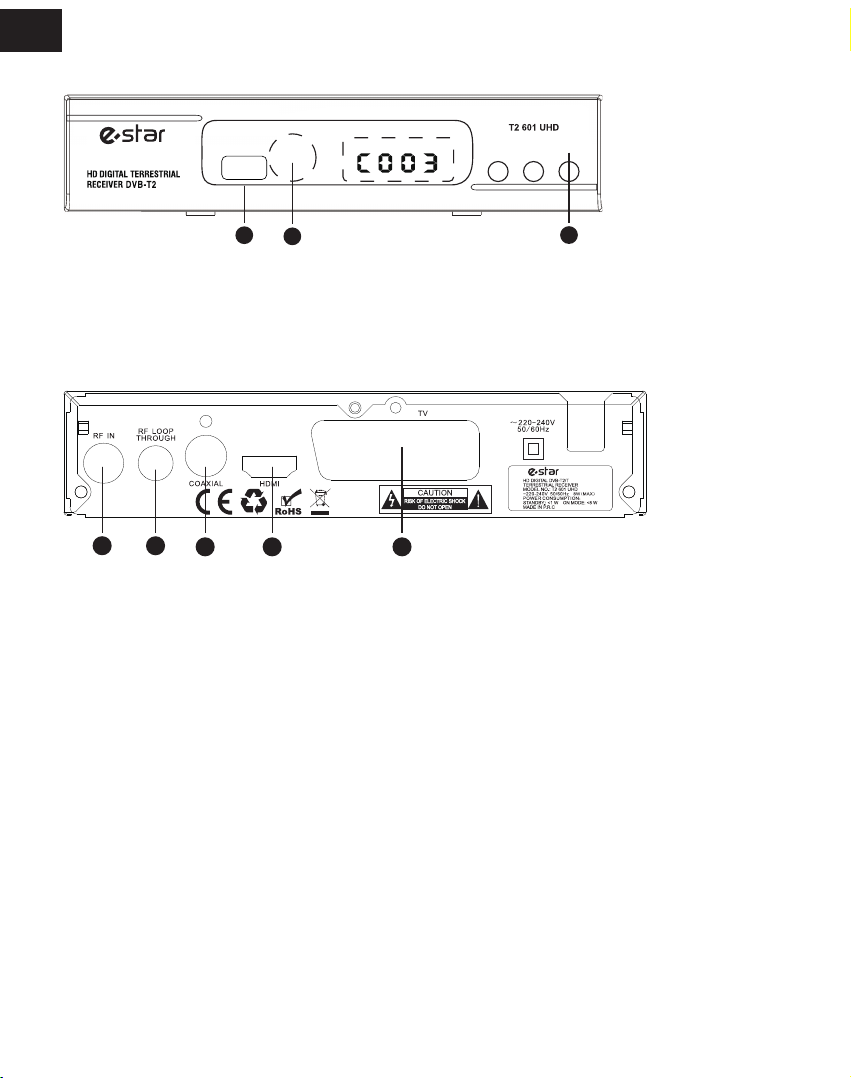
1.REMOTE CONTROL SENSOR: Used to receive the signal from the remote control.
2. STANDBY INDICATOR: Used to visually show power state of the set top box, the green LED will be light if turned on the set top
box and the red LED will be light if the set top box entered standby mode.
3. USB JACK(Optional): Used to connect to an external USB 2.0 device. If an external hard disk is connected to the USB port, suggest
using the adapter which supplies DC5V/1.5A power to the hard disk, which is not included in this unit.
1. RF IN : This socket connects to your external aerial.
2. RF OUT: This socket will bypass the RF signal to either your TV or another video system.
3. COAXIAL: This socket connects to a coaxial socket on your surround sound system.
4. HDMI OUT: This socket connects to HDMI in device.
5. SCART OUT: This socket connects to your TV.
1. Front panel
2. Rear panel
Front and Rear Panel
POWERCH- CH+
USB IR
12
3
123 4 5
3
EN
EN
3 System & Menu
3.1 System
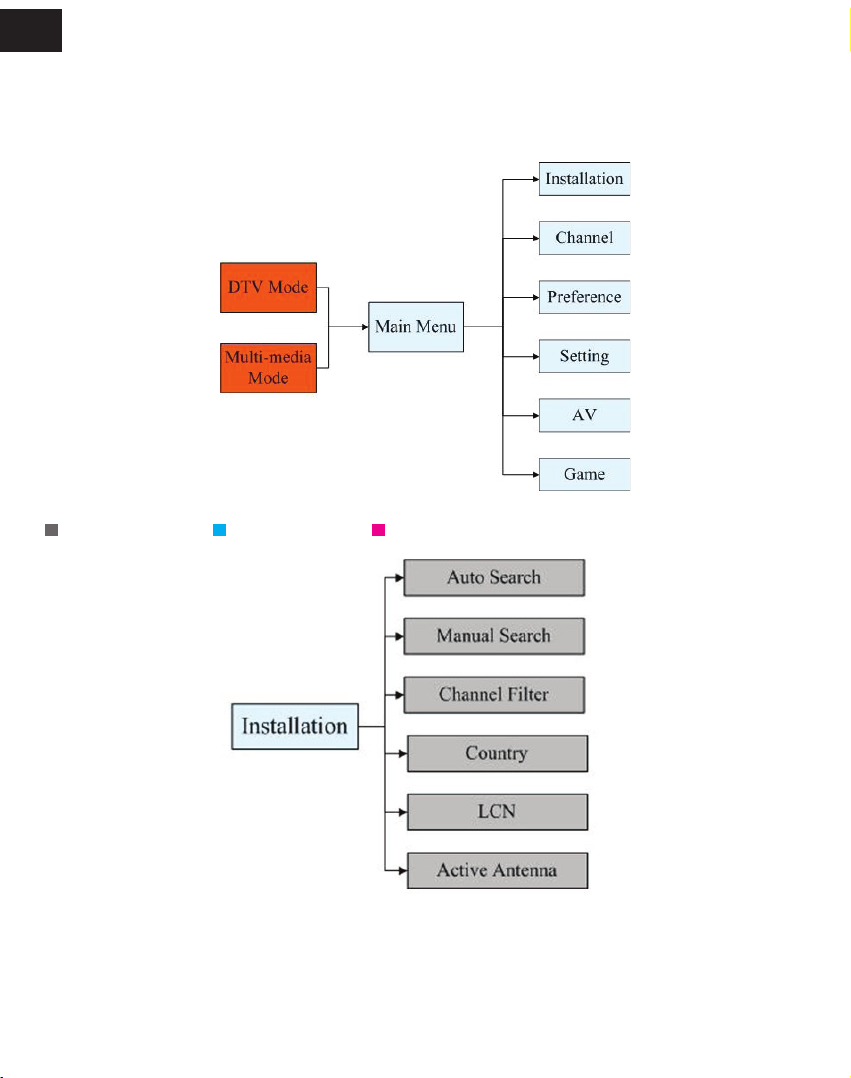
e current system supports: DTV Mode & Multi-media Mode. DTV Mode is for TV broadcasting; Multi-media Mode is for running
multimedia,game,recording,disk management, etc.
Auto entry DTV Mode aer starting system,press [SOURCE] to switch dierent mode.
3.2 Menu
Main menu as follows:
Pic 3.2 Menu
3.2.1Installation Menu
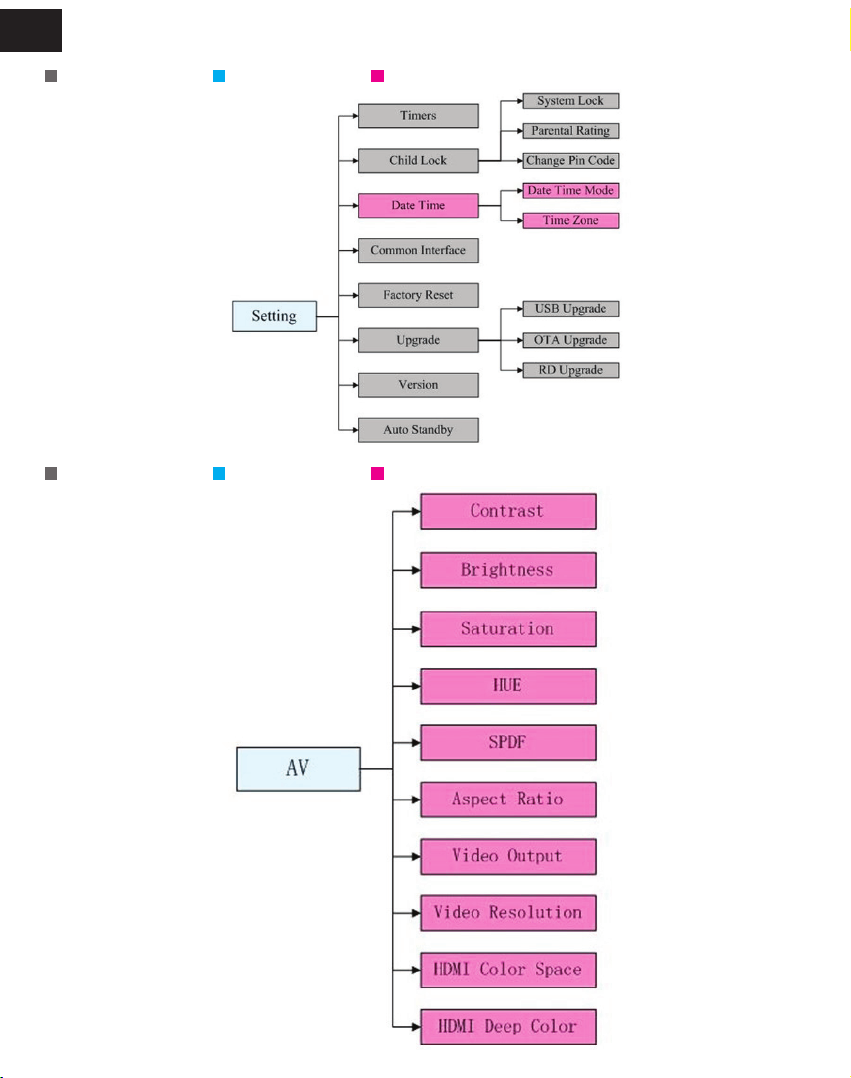
Set up only in DTV mode Set up only in USB mode Set up in both USB&DTV mode
Pic 3.2.1 Installation Menu
5
EN
3.2.2 Channel Menu
Pic 3.2.2 Channel Menu
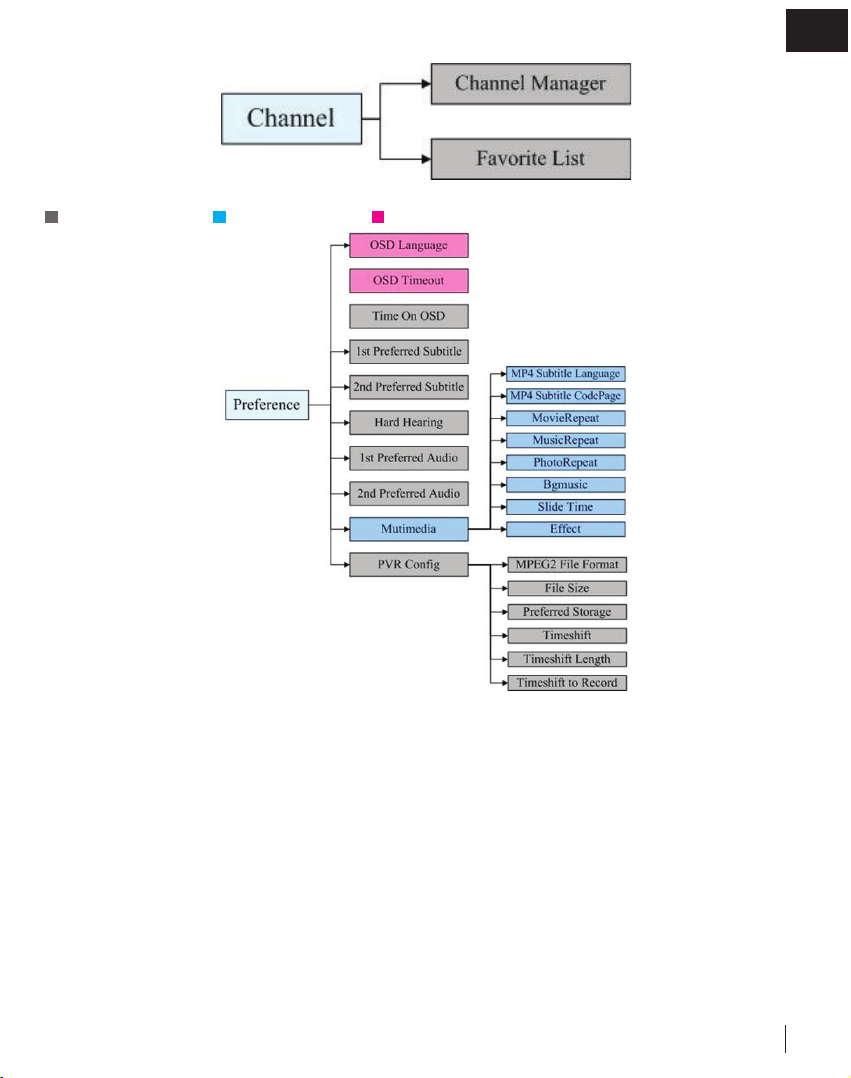
3.2.3 Preference Menu
Set up only in DTV mode Set up only in USB mode Set up in both USB&DTV mode
Pic 3.2.3 Preference Menu
EN
Pic 3.2.4 Setting Menu
3.2.4 Setting Menu
Set up only in DTV mode Set up only in USB mode Set up in both USB&DTV mode
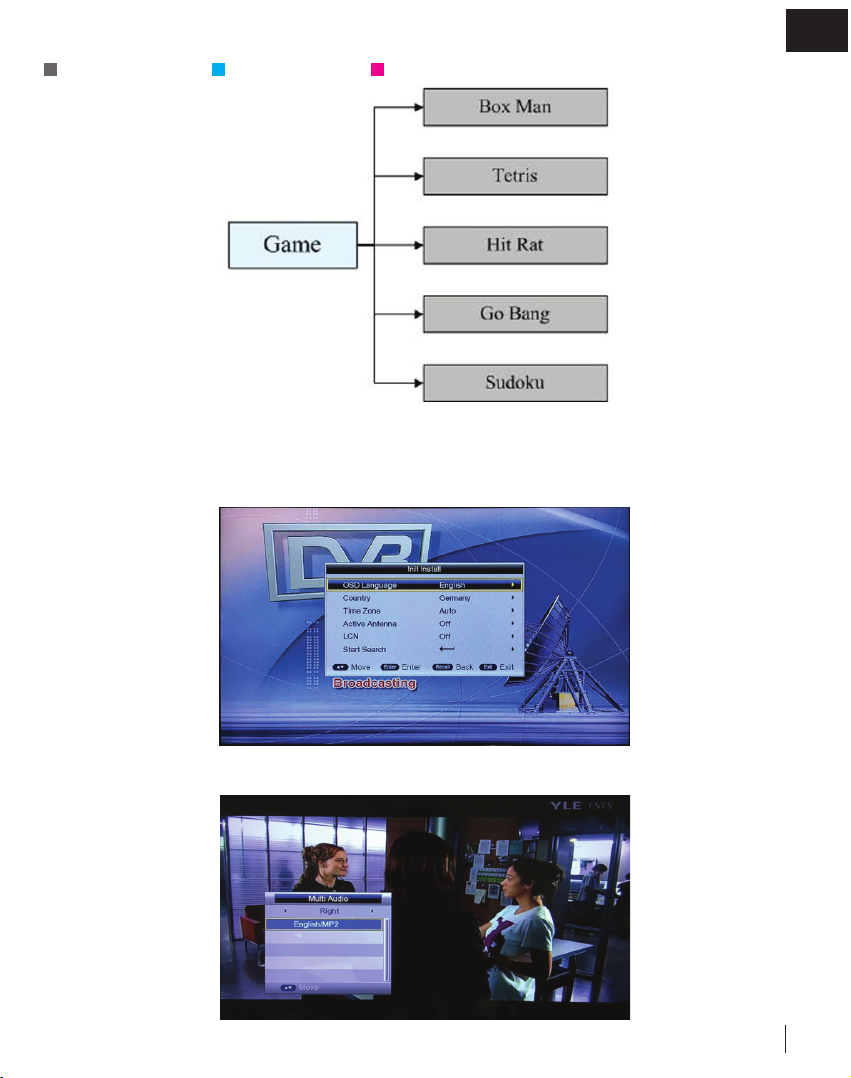
Pic 3.2.5 AV Menu
3.2.5 AV Menu
Set up only in DTV mode Set up only in USB mode Set up in both USB&DTV mode
7
EN
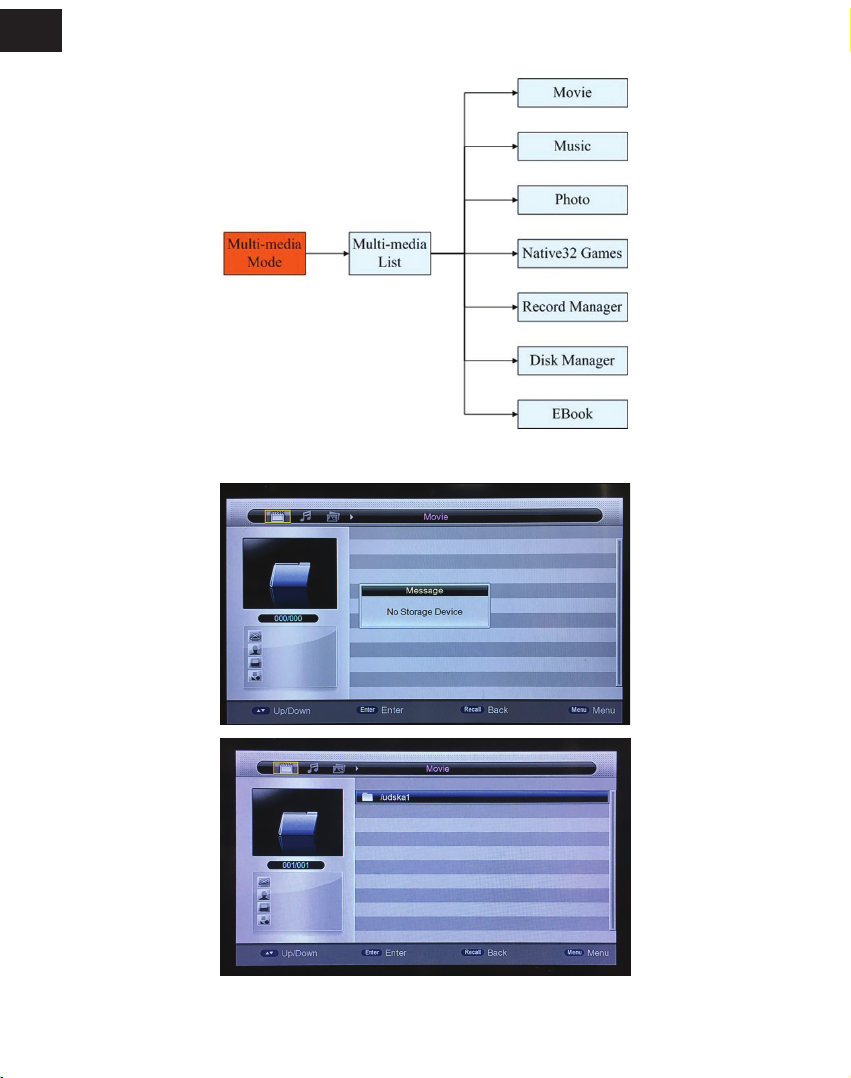
Pic 3.2.6 Game Menu
3.2.6 Game Menu
Set up only in DTV mode Set up only in USB mode Set up in both USB&DTV mode
4 DTV mode
4.1 Initialization
Initialization is needed for the rst-time entry into the system by setting language, country,time zone, Active antenna and channel num-
ber, etc. Aer nishing setting, choose [Start Search] and press [ENTER] to scan channels, and all available channels will be reserved
automatically. Menu display as follows (For Viewing TV program press EXIT):
Pic 4.1 Initialization
4.2 Language & Le and right channel switching
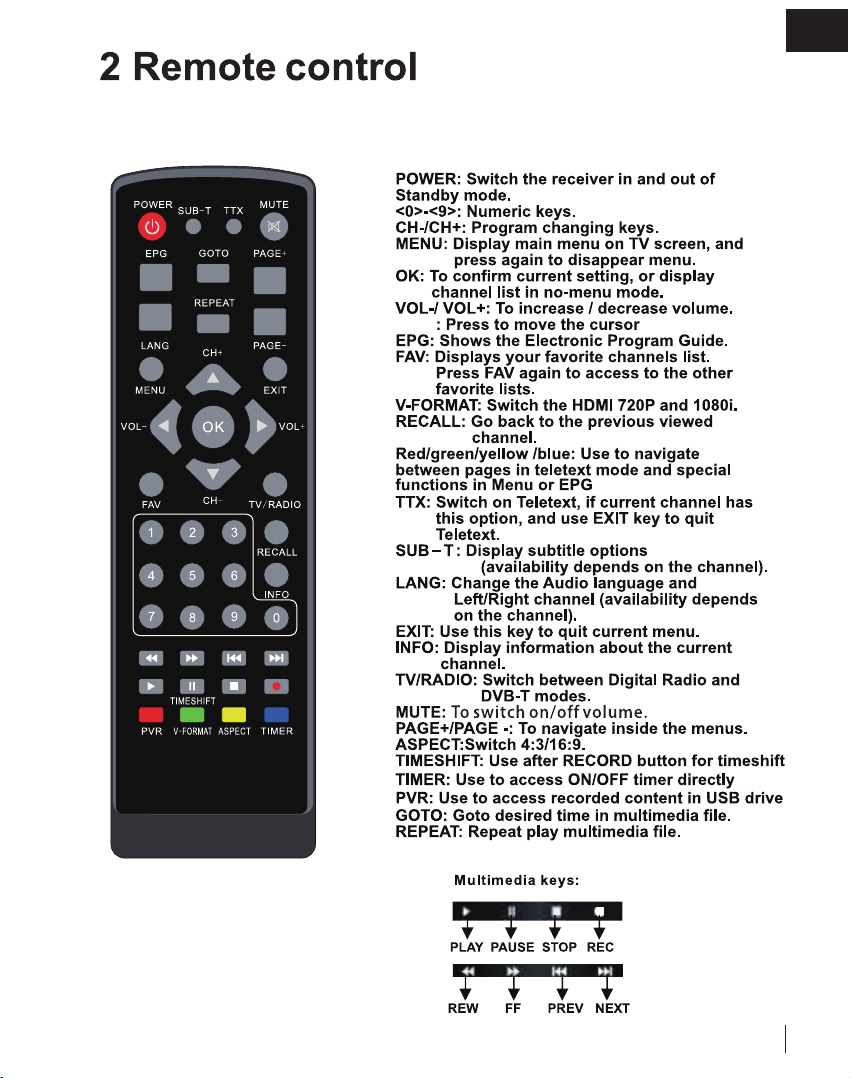
1. Under full-screen state, press [AUDIO] to match the language of the current program and show le& right Channel list:
Pic 4.2 language and le&
right Channel list

EN
2. Press [LEFT/RIGHT] to choose le & right channel or stereo: press [UP/DOWN] to choose language;
3. Press [ENTER] to Exit setup.
4.3 EPG
1. Press [EPG] to check Program information:
Pic 4.3.1 EPG Menu
Default EPG shows Now/Next Mode including 7 parts:
1 Mark 1 shows current EPG state;
2 Mark 2 shows current time and program information;
3 Mark 3 shows detailed date;
4 Mark 4 shows program, press [UP/DOWN] to switch program,or press [PAGE-/+] to switch pages.
5 Mark 5 shows Now Event,press [UP/DOWN] to check program, or press [LEFT/RIGHT] to change NOW or NEXT;
6 Mark 6 shows Next Event;
7 M ark 7 shows key function;
Red key: Switch EPG Mode.
Greed key: Recording tv programme of Mark 5 or make a record reservation of mark 6
2. Press Red key to entry Daily Mode:
Pic 4.3.2 Daily Mode
1 Press yellow key or blue key can change from Monday to Sunday.
2 Select playing tv shows, press green key to record

9
EN
3. Press Red key to entry Weekly Mode:
Pic 4.3.3 Weekly Mode
1. Press [LEFT/RIGHT] to switch windows.
2. Press yellow key or blue key to switch tv programmes of yesterday or tomorrow.
4.4 Teletext
Press [ TTX] to entry program menu:
1. Input page number (100~899) in Teletext to turn over;
2. Press [UP/DOWN] and [PAGE+/-] to switch pages;
3. Long press [UP/DOWN] for fast switch pages;
4. Press [ENTER] to change the transparency of TTX;
5. Press [LEFT/RIGHT] to switch to Sub page of current page, if choose [AUTO], it will switch to Sub pages automatically;
6. Four color key is used as Guidance, its specic functions are decided by code stream;
7. Press [TTX] or [EXIT] to exit
EN
5 Multimedia mode
Pic 5 Multi-media List
Press [SOURCE] to switch DTV Mode or Multi-media Mode. If you choose Multi-media Mode, it will check whether there is
USB(CARD) equipment automatically. If there is no USB(CARD) equipment or USB(CARD) equipment is pulled out, it will show like
pic 5.1:
Pic5.1 NO USB(CARD)
Insert USB ash and the initialization will be processed automatically:
Pic 5.2 USB(CARD)
Equipment
e partitions supported includes: FAT,FAT32 and NTFS.
6 Main menu
Main menu includes Installation,Channel,Preference,Setting,AV,Game.
Indice
Lingue:
Altri manuali E Star Decoder


