
EcoxGear SOUNDEXTREME SEI-SERMTRNS Manuale utente

User Guide
Transom Remote
Control
Model: SEI-SERMTRNS
2
· Please read this User Guide before installation and use.
· A CR2032 coin/button cell Battery is pre-installed in the Transom
Remote Control at the factory with a red plastic isolator in the
Battery Compartment to preserve battery life before initial use.
Before using the Transom Remote Control you MUST remove the
plastic isolator as follows:
Important
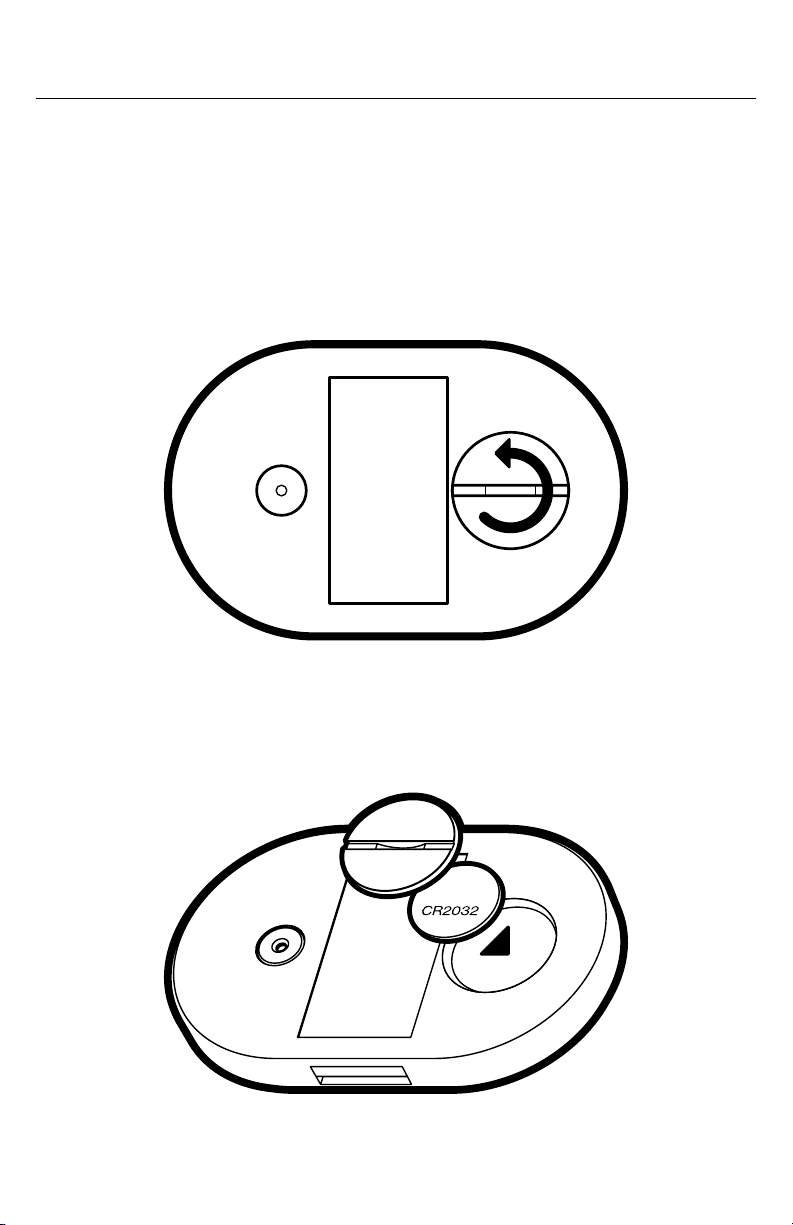
1. Unscrew the Battery Cap at the back of the Transom Remote
Control with your fingernail or a coin.
2. Remove the battery and the red plastic isolator sheet.
3. Place the battery back in the battery compartment.

3
Important
IMPORTANT: Ensure the battery’s positive side +faces down
(towards the device).
4. Carefully place the Battery Cap flat over the battery. Tighten
the Cap so the battery is secure in the compartment and sealed
from water and dirt.
5. Press a button on the Transom Remote Control and you
should see the red LED on the Button Panel flash. If you do
not see the red LED flash when you press a button on the
Transom Remote Control, open the Battery Cap and check if
the battery is properly installed. (Make sure that the battery’s
positive side is facing the correct direction and in contact with
the spring terminal).
WARNING:
· The Transom Remote Control contains an
industry standard coin/button cell Battery.
· DO NOT SWALLOW THE BATTERY.
· KEEP NEW AND USED BATTERIES
AWAY FROM CHILDREN.
· If the Battery Compartment does not close
securely, stop using the product.
· If the Battery is swallowed, the Battery
may cause severe internal burns and
may eventually lead to death. If you think
a Battery might have been swallowed
or placed inside any part of a body, seek
immediate medical attention.

4
Introduction
Features
The Transom Remote Control is an all-in-one device providing audio
and LED lighting controls to a paired SoundExtreme product.
Rugged Design and Easy Installation
· IP67 marine grade waterproof.
· Compact size and easy mounting.
RF Remote Transmitter
· The Transom Remote Control has a built-in, long range RF
433 MHz remote transmitter, which is used to pair with and
control SoundExtreme audio products.
Pair and Control Multiple Products
· The Transom Remote Control can pair and control up to 3
SoundExtreme products in the Transom Remote Control memory
as P1, P2, and P3.
EcoCast and LEDCast: Audio and Lighting Controls
· Audio Mode / Source selection.
· 3-Zone Volume Control: For multi-audio-Zone SoundExtreme
products like Marine Radios, with 2 wired Zones and 1 wireless
(EcoCast) Zone controls.
· LED Lighting Scene Control: Switch between 5 of the predefined
lighting Scenes on the paired SoundExtreme product.

5
Introduction
Lighting Control Concepts
Below are some terms and definitions to help you better understand
the Lighting Control Concepts associated with LEDCast-enabled
SoundExtreme products. Please refer to the paired SoundExtreme
product's User Guide for more details.
Zone
A Zone corresponds to all the LED lights that are connected
directly to one physical connection on an LED Lighting Controller
output. When you change a Zone status (on / o, Mode, etc.), the
LEDs connected to that Zone will change accordingly. Depending
on the product the Transom Remote Control is paired with, the
SoundExtreme product may have 1 to 4 LED lighting Zones.
Mode
There are 3 LED Mode categories, totaling in 44 Modes supported
by the Transom Remote Control:
· 8 Color Mode
· 20 Party Mode
· 16 Music Mode
Scene
A Scene is programed via the SoundExtreme Smartphone App.
You can customize each Zone into a Scene (a preset). Setting
the Scenes on the app allows a 1-button press to bring up your
desired custom settings for all of the LED products connected to
the SoundExtreme product. LEDCast-enabled SoundExtreme
products have 5 Scene settings.

6
Transom Remote Control Overview
Transom Remote Control Layout
Power Button
Play / Pause Button
Scenes Button
Tracking Button
Zone Volume Buttons
Audio Mode Button
Tracking Button
Radio Presets / Remote
Pairing Buttons
Master Volume
Button
Master Volume
Button

7
Transom Remote Control Overview
IMPORTANT: Maintaining Waterproofness
Your Bluetooth Remote is only waterproof when the Battery Door is
properly closed. In order to properly close the cap, turn it clockwise,
making sure that the cap fits flat and flush along the edges with the
back panel. If not properly closed the unit is NOT watertight.
WARNING: Keep Battery Out of Reach of Children
Battery Cap

8
BUTTON ACTION FUNCTION
POWER
Short-Press To turn the paired SoundExtreme
product on / o.
Press and Hold
(for 3 seconds)
To turn the paired SoundExtreme
product's LED lights on / o.
Short-Press To cycle through the 5 defined
Scenes for all Zones.
Short-Press To change Audio Source.
Press and Hold
(for 3 seconds)
To place the Transom Remote
Control into RF Pairing Mode.
Short-Press To play / pause audio.
Press and Hold
(for 3 seconds)
To activate EcoTalk feature.
Transom Remote Control Overview

9
NOTES
If the paired SoundExtreme product is powered by a battery, short-pressing this
button can turn the product o, but it cannot turn the product back on.
If paired with a SoundExtreme Marine Radio:
· Bring up the Audio Source Menu.
· Use the Tracking Buttons to highlight the Audio Mode you want, then short-press
the Play Button to select.
If paired with a dierent SoundExtreme product:
· Each short-press will cycle through the available Audio Source / Modes on the
product (e.g., Bluetooth, EcoCast Transmitting / Receiving, FM, AM, Aux-In, etc.).
While in Bluetooth Mode:
· Accept an incoming call if the paired SoundExtreme product has a microphone.
If paired with a SoundExtreme Marine Radio:
· While in AM/ FM Mode, change the radio’s Tuning Mode (Auto, Manual, or Preset).
While in Bluetooth Mode:
· Activate Siri or Hey Google.
· Reject an incoming call if the paired SoundExtreme product has a microphone.
Transom Remote Control Overview
10
BUTTON ACTION FUNCTION
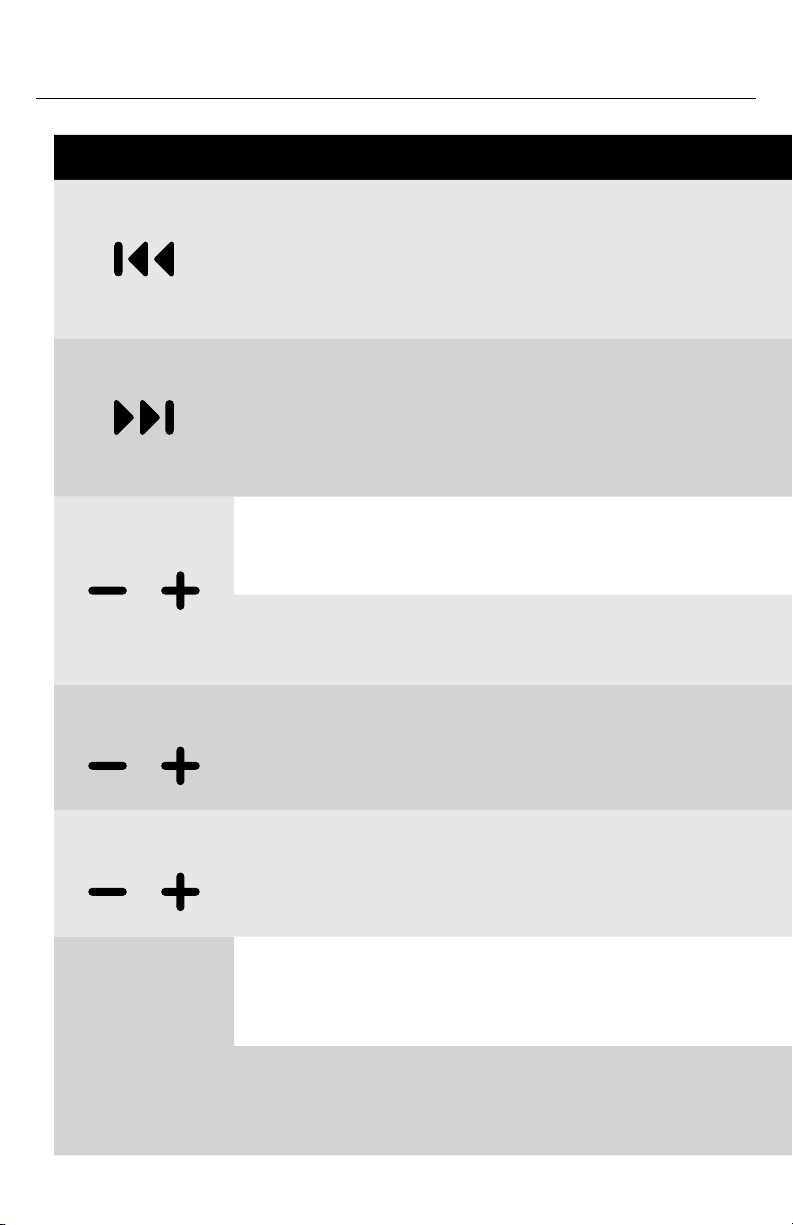
Short-Press · In Bluetooth Mode: To skip to
the previous track.
· In AM/ FM Mode: To tune in
a previous station.
Short-Press · In Bluetooth Mode: To skip to
the next track.
· In AM/ FM Mode: To tune in
a station.
Short-Press To increase or decrease the volume.
Press and Hold
(for 3 seconds)
To increase or decrease the volume.
Vol Z1 Short-Press To increase or decrease the volume
in Zone 1, only when paired with a
SoundExtreme Marine Radio.
Vol Z2 Short-Press To increase or decrease the volume
in Zone 2, only when paired with a
SoundExtreme Marine Radio.
P1 / P2 / P3
Press and Hold
(for 3 seconds)
When in AM/ FM Mode: To save the
current station to the corresponding
Preset Button.
Short-Press When in AM/ FM Mode: To
tune to the station saved to the
corresponding Preset Button.
Transom Remote Control Overview
Indice
Altri manuali EcoxGear Telecomando


