
ECS A75F2-M2 Manuale utente

A75F2-M2 USER MANUAL
Preface
Copyright
This publication, including all photographs, illustrations and software, is protected
under international copyright laws, with all rights reserved. Neither this manual, nor
any of the material contained herein, may be reproduced without written consent of
the author.
Version 1.0
Disclaimer
The information in this document is subject to change without notice. The manufac-
turer makes no representations or warranties with respect to the contents hereof
and specifically disclaims any implied warranties of merchantability or fitness for
any particular purpose. The manufacturer reserves the right to revise this publica-
tion and to make changes from time to time in the content hereof without obligation
of the manufacturer to notify any person of such revision or changes.
TrademarkRecognition
Microsoft, MS-DOS and Windows are registered trademarks of Microsoft Corp.
AMD, Phenom, Athlon, Sempron, Turion, and Duron are registered trademarks of AMD
Corporation.
Other product names used in this manual are the properties of their respective owners
and are acknowledged.
FederalCommunicationsCommission(FCC)
This equipment has been tested and found to comply with the limits for a Class B
digital device, pursuant to Part 15 of the FCC Rules. These limits are designed to
provide reasonable protection against harmful interference in a residential instal-
lation. This equipment generates, uses, and can radiate radio frequency energy and,
if not installed and used in accordance with the instructions, may cause harmful
interference to radio communications. However, there is no guarantee that interfer-
ence will not occur in a particular installation. If this equipment does cause harmful
interference to radio or television reception, which can be determined by turning
the equipment off and on, the user is encouraged to try to correct the interference by
one or more of the following measures:
•Reorient or relocate the receiving antenna
•Increase the separation between the equipment and the receiver
•Connect the equipment onto an outlet on a circuit different from that to
which the receiver is connected
•Consult the dealer or an experienced radio/TV technician for help
Shielded interconnect cables and a shielded AC power cable must be employed with
this equipment to ensure compliance with the pertinent RF emission limits govern-
ing this device. Changes or modifications not expressly approved by the system’s
manufacturer could void the user’s authority to operate the equipment.

ii
A75F2-M2 USER MANUAL
DeclarationofConformity
This device complies with part 15 of the FCC rules. Operation is subject to the follow-
ing conditions:
•This device may not cause harmful interference.
•This device must accept any interference received, including interference
that may cause undesired operation.
CanadianDepartmentofCommunications
This class B digital apparatus meets all requirements of the Canadian Interference-
causing Equipment Regulations.
Cet appareil numérique de la classe B respecte toutes les exigences du Réglement
sur le matériel brouilieur du Canada.
The manual consists of the following:
Describes features of the
motherboard.
Hpage 1
Describes installation of
motherboard components.
Hpage 7
Hpage 25
Hpage 51
Installing the Motherboard
Introducing the Motherboard
Provides information on us-
ing the BIOS Setup Utility.
Describes the motherboard
software.
Limits and methods of mesurement of radio disturbance char-
acteristics of information technology equipment
EN 55022
EN 61000-3-2 Disturbances in supply systems caused
EN 61000-3-3 Disturbances in supply systems caused by household appli-
ances and similar electrical equipment “ Voltage fluctuations”
EN 55024 Information technology equipment-Immunity characteristics-
Limits and methods of measurement
EN 60950 Safety for information technology equipment including electri-
cal business equipment
CE marking
AbouttheManual
This device is in conformity with the following EC/EMC directives:
Chapter 4
Chapter 1
Chapter 2
Chapter 3
Using BIOS
Using the Motherboard Software
Chapter 5
Setting Up AMD A75 RAID
Configuration
Provides information about
SATA RAID Setup
page 55
H
Chapter 6
Trouble Shooting
Provides basic trouble
shooting tips.
page 63
H

iii
A75F2-M2 USER MANUAL
Chapter 2 7
Installing the Motherboard 7
Safety Precautions..............................................................................7
Installing the Motherboard in a Chassis.......................................7
Checking Jumper Settings..................................................................8
Installing Hardware...........................................................................9
Installing the Processor............................................................9
Installing the CPU Cooler........................................................10
Installing Memory Modules...................................................11
Installing Add-on Cards..........................................................12
Connecting Optional Devices.................................................14
Installing a SATA Hard Drive...................................................20
Connecting Case Components........................................................21
Front Panel Header................................................................23
TABLE OF CONTENTS
Preface i
Chapter 1 1
Introducing the Motherboard 1
Introduction...........................................................................................1
Pakage Contents..................................................................................1
Specifications......................................................................................2
Motherboard Components................................................................4
I/O Ports...............................................................................................6
Chapter 3 25
Using BIOS 25
About the Setup Utility......................................................................25
The Standard Configuration........................ ...........................25
Entering the Setup Utility.......................................................25
Resetting the Default CMOS Values.....................................26
Using BIOS.........................................................................................26
BIOS Navigation Keys..............................................................27
Main Menu.............................................................................28
Advanced Menu......................................................................29
Chipset Menu..........................................................................41
M.I.B III(MB Intelligent BIOS III) Menu....................................43
Boot Menu...............................................................................45
Security Menu.........................................................................47
Exit Menu...............................................................................48
Updating the BIOS......................................................................49

iv
A75F2-M2 USER MANUAL
Chapter 4 51
Using the Motherboard Software 51
Auto-installing under Windows XP/Vista/7.................................51
Running Setup........................................................................51
Manual Installation..........................................................................53
ECS Utility Software (Intelligent EZ Utility).....................................53
Chapter 6 63
Trouble Shooting 63
Start up problems during assembly..............................................63
Start up problems after prolong use............................................64
Maintenance and care tips..............................................................64
Basic Troubleshooting Flowchart.....................................................65
Chapter 5 55
Setting Up AMD A75 RAID Configuration 55
Setting Up a Bootable RAID Array..................................................55
1
A75F2-M2 USERMANUAL
Chapter1
Chapter 1
Introducing the Motherboard
Introduction
Thank you for choosing the A75F2-M2 motherboard. This motherboard is a high per-
formance, enhanced function motherboard that supports socket FM2 for AMD TRIN-
ITY processors for high-end business or personal desktop markets.
The motherboard is based on AMD A75 (Hudson D3) express chipset for best desktop
platform. A75 is a single-chip, highly integrated, high performance Hyper-Transport
peripheral controller, unmatched by any other single chip-device controller. The
memory controller supports DDR3 memory DIMM frequencies of 1866/1600/1333/
1066/800. It supports two DDR3 slots with maximum memory size of 32 GB. One PCI
Express x16 slot, intended for Graphics Interface, is fully compliant to the PCI Ex-
press Gen2 (version 2.0). In addition, two PCI Express x1 slots and one v2.2 PCI slot
are supported.
It integrates USB 2.0 and USB 3.0 interface, supporting up to ten USB 2.0 ports (six
USB 2.0 ports at the rear panel and two USB 2.0 headers support additional four USB
2.0 ports) and four USB 3.0 ports (two USB 3.0 ports at the rear panel and one USB 3.0
header supports additional two USB 3.0 ports). The gray USB 2.0 header provides EZ
charger technology, please refer to Front Panel USB 2.0 headers of chapter 2 for
more details. This motherboard integrates a Serial ATA host controller, supporting
four SATA ports with maximum transfer rate up to 6Gb/s each.
There is an full set of I/O ports in the rear panel, including PS/2 mouse and keyboard
combo connectors, one D-sub (VGA) port, one HDMI port, one DVI port, six USB 2.0
ports, two USB 3.0 ports, one LAN port, three audio jacks for microphone, line-in and
6-ch line-out.
Your motherboard package ships with the following items:
Package Contents
A75F2-M2 Motherboard
Quick Installation Guide
User Manual
DVD
I/O Shield
2 SATA 6Gb/s Cables
The package contents above are for reference only, please take the actual
package items as standard.
Chapter1
2
A75F2-M2 USERMANUAL
CPU
Specifications
•AMDA75 Chipset
Chipset
• Dual-channel DDR3 memory architecture
• 2 x 240-pin DDR3 UDIMM sockets support up to 32 GB
• Supports DDR3 1866/1600/1333/1066/800 MHz DDR3
SDRAM
Memory
• 1 x PCI Express x16 Gen2 slot
• 2 x PCI Express x1 slots
• 1 x PCI slot
• Supported by AMD A75 (Hudson D3)
- 6 x Serial ATA 6Gb/s connectors
Expansion
Slots
Storage
• 1 x PS/2 keyboard and mouse combo connector
• 1 x D-Sub port (VGA)
• 1 x HDMI port
•1xDVIport
• 6 x USB 2.0 ports
• 2 x USB 3.0 ports
• 1 x RJ45 LAN connector
• 1 x Audio port (Line in, Line out, Mic_in Rear)
Rear Panel I/O
• Socket FM2 for AMD TRINITY processors
• Supports CPU up to 100W TDP
Note: Please go to ECS website for the latest CPU support list.
• 1 x 24-pin ATX Power Supply connector
• 1 x 4-pin 12V Power connector
• 1 x 4-pin CPU_FAN connector
• 1 x 3-pin SYS_FAN connector
• 1 x 3-pin PWR_FAN connector
• 2 x USB 2.0 headers support additional four USB 2.0 ports
(F_USB1 supports EZ Charger function)
• 1 x USB 3.0 header supports additional two USB 3.0 ports
• 6 x Serial SATA 6Gb/s connectors
• 1 x COM header
• 1 x Case open header
• 1 x SPDIF out header
• 1 x TPM header
• 1 x Front Panel audio header
• 1 x Front Panel switch/LED header
• 1 x Speaker header
• 1 x Parallel port header(LPT)
• 1 x Clear CMOS jumper
Internal I/O
Connectors &
Headers
• ALC662 6-Ch High Definition audio CODEC
- Compliant with HD audio specification
Audio
LAN •RTL8111E Gigabit Lan
• RTL8105E 10/100 LAN (optional)
Note: Please go to ECS website for the latest CPU support list.

3
A75F2-M2 USERMANUAL
Chapter1
• AMI BIOS with 32Mb SPI Flash ROM
- Supports ECS MIB III Utility
- Supports Plug and Play, S1/STR (S3)/STD (S4)
- Supports Hardware Monitor
- Supports ACPI 3.0 version & DMI
- Audio, LAN, can be disabled in BIOS
- Supports ECS GUI UEFI BIOS
- Supports Over-Clocking
- Supports Dual Display
- F7 hot key for boot up devices option
- Supports Multi-language BIOS
- Supports PaUp clear CMOS Hotkey (Has PS2 KB Model only)
System BIOS
Form Factor • Micro-ATX Size, 244mm x 210mm
• Supports eBLU/eDLU/eSF/EZ Charger
AP Support
Note: Please go to ECS website to get the latest news for AP
supporting.
Chapter1
4
A75F2-M2 USERMANUAL
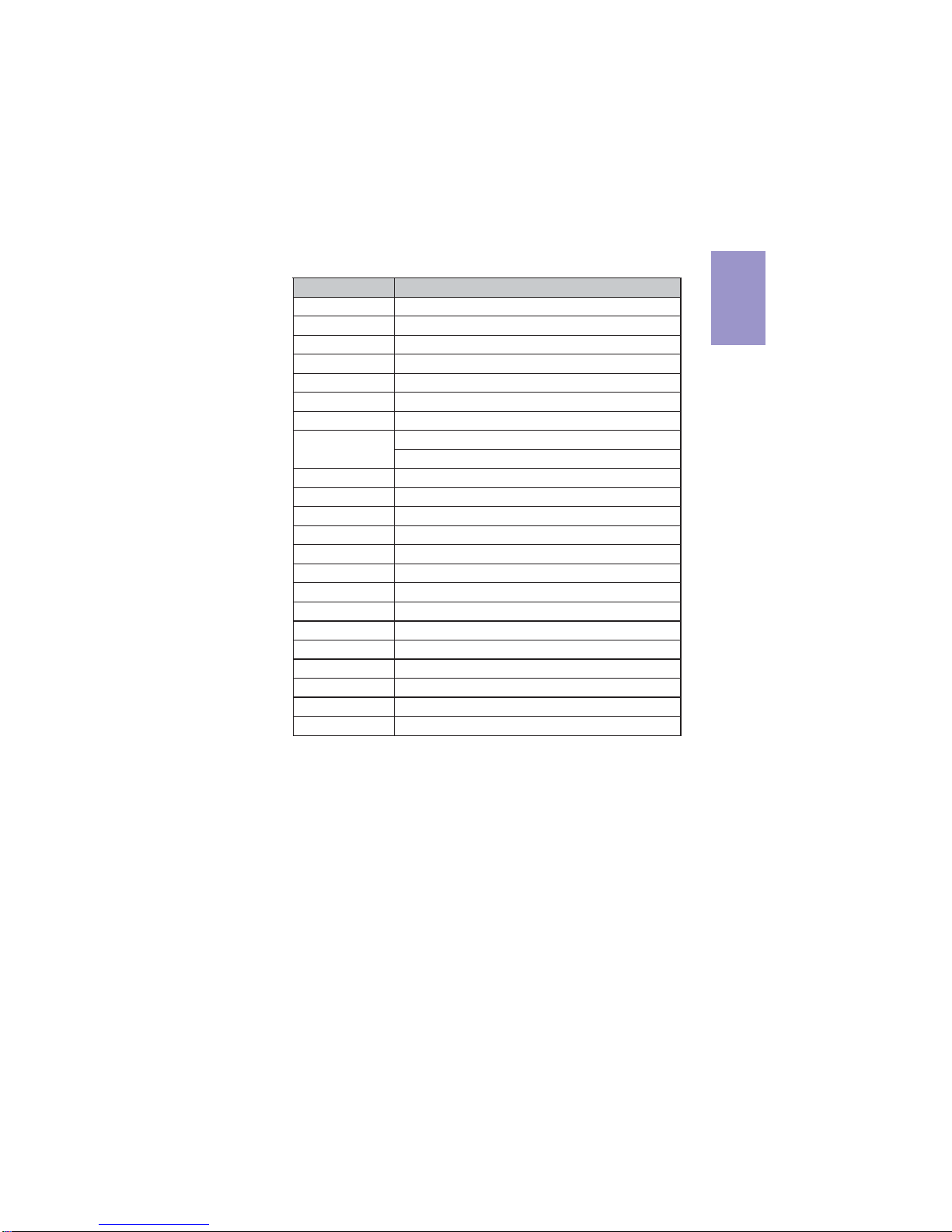
Motherboard Components
5
A75F2-M2 USERMANUAL
Chapter1
Table of Motherboard Components
LABEL COMPONENTS
1. CPU Socket FM2 for AMD TRINITY processors
2. SYS_FAN System cooling fan connector
3. CPU_FAN CPU cooling fan connector
4. DDR3_1~2 240-pin DDR3 SDRAM slots
5. ATX_POWER Standard 24-pin ATX power connector
6. SATA1~6 Serial ATA 6Gb/s connectors
7. F_PANEL Front panel switch/LED header
Front panel USB 2.0 headers
(F_USB1 supports EZ Charger function)
9. USB3F Front panel USB 3.0 header
10. PWR_FAN Power cooling fan connector
11. SPK Speaker header
12. CLR_CMOS Clear CMOS jumper
13. LPT Parallel port header
14. COM Serial port header
15. TPM Trusted Platform Module
16. CASE Case open header
17. PCIE1~2 PCI Express x1 slots
18. SPDIFO SPDIF out header
19. PCI 32-bit PCI add-on card slot
20. PCIEX16 PCI Express slot for graphics interface
21. F_AUDIO Front panel audio header
22. ATX12V 4-pin +12V power connector
8. F_USB1~2
Chapter1
6
A75F2-M2 USERMANUAL
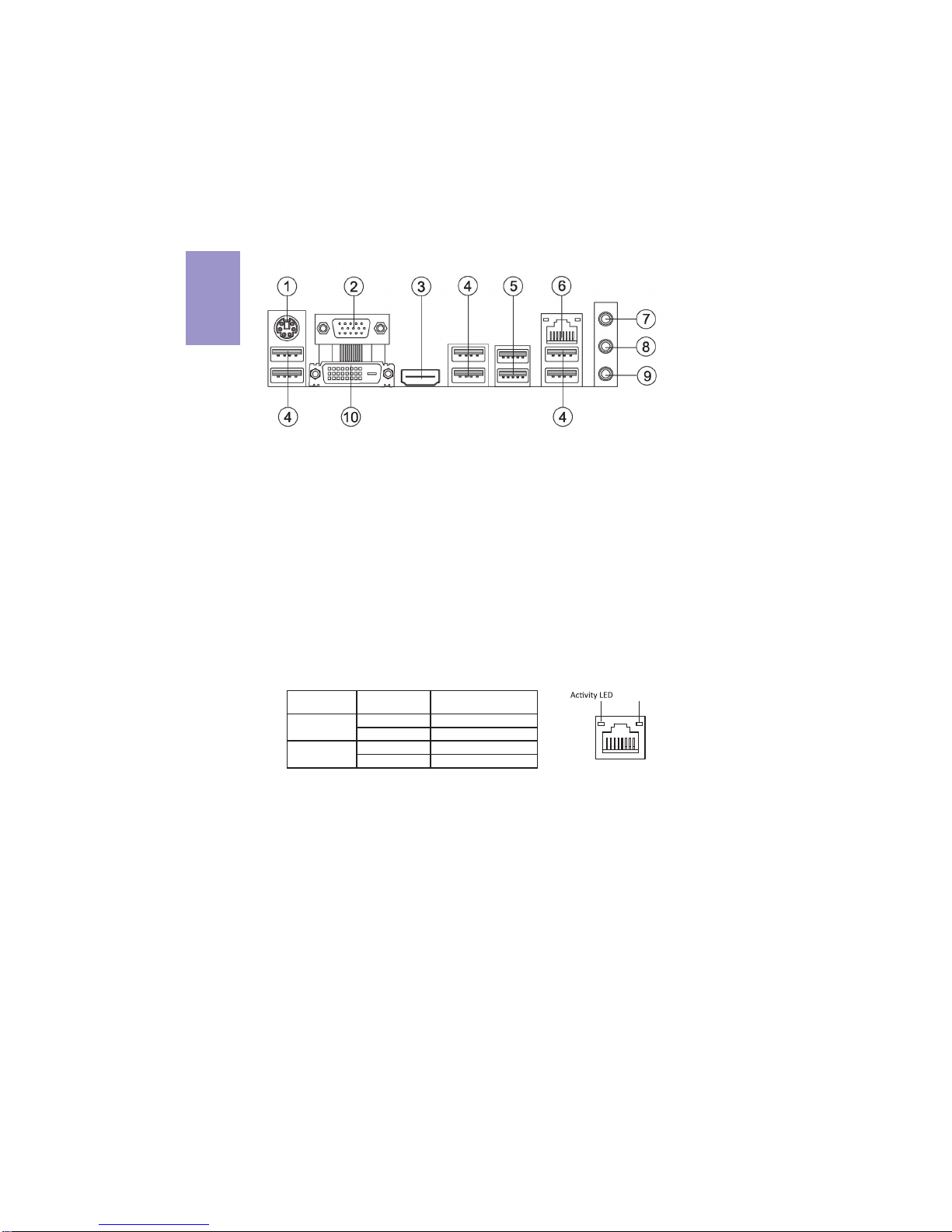
I/O Ports
1. PS/2 Keyboard and PS/2 Mouse combo connector
Use the PS/2 port to connect a PS/2 mouse or a PS2 keyboard.
2. VGA Port
Connect VGA display device to the VGA port.
3. HDMI Port
Connect HDMI display device to the HDMI port.
4. USB 2.0 Ports
Use the USB 2.0 ports to connect USB 2.0 devices.
5. USB 3.0 Ports
Use the USB 3.0 ports to connect USB 3.0 devices.
6. LAN Port
Connect an RJ-45 jack to the LAN port to connect your computer to the Network.
7. Line-in(blue)
It can be connected to an external CD/DVD player, tape player or other audio
devices for audio input.
8. Line-out(lime)
It is used to connect to speakers or headphones.
9. Microphone(pink)
It is used to connect to a microphone.
10. DVI Port
Connect DVI display device to the DVI port.
LAN LED Status Description
OFF No data
Orange blinking Active
OFF No link
Green Link
Activity LED
Link LED
Link LED
LAN Port
Altri manuali per A75F2-M2
1
Indice
Altri manuali ECS Scheda madre

ECS
ECS G41T-M5 Manuale utente

ECS
ECS H61H2-M6 Manuale utente

ECS
ECS GF8200SM-M3 Manuale utente

ECS
ECS L4S5MG/GL Manuale utente

ECS
ECS H67H2-A3 Manuale utente

ECS
ECS 651C-M Manuale utente

ECS
ECS H67H2-M4 Manuale utente

ECS
ECS P41G Series Manuale utente

ECS
ECS DURATHON 2 B150M-P73 Manuale utente

ECS
ECS A785GM-M7 Manuale utente


Manuali Scheda madre popolari di altre marche


Telit Wireless Solutions
Telit Wireless Solutions SL869-3DR Manuale utente

Gigabyte
Gigabyte GA-9IVDT Manuale utente

Texas Instruments
Texas Instruments ADS8372EVM Manuale utente

Commell
Commell MS-C73 Manuale utente

IBT Technologies
IBT Technologies MB860 Manuale utente

Nvidia
Nvidia TEGRA DG-04927-001_V01 Manuale utente


