Eiki PjNET-20 Manuale utente

OWNER’S MANUAL
This Pj-to NetDirector is an optional network product
for the projector. Mount this product to the projector
and connect a network cable. It enables a projector to
display the image data stored in the file server and the
screen image of the computer via the network. In addi-
tion, you can control and set up the projector remotely
by using the web browser.
This product is only used for EIKI projectors that have a
terminal for the Pj-to NetDirector.
This manual explains the installation of the Pj-to
NetDirector and its operation.
Chapter 1 Preparation
Chapter 2 Installation
Chapter 3 Basic Setting & Operation
Chapter 4 Controlling the Projector
Chapter 5 Network Capture & Viewer
Chapter 6 Controlling the Multi-Projectors
Chapter 7 Use of Serial Port
Chapter 8 Appendix
Pj-to NetDirector
Model No. PjNET-20

2
Federal Communication Commission Notice
This equipment has been tested and found to comply
with the limits for a Class B digital device, pursuant to
part 15 of the FCC Rules. These limits are designed
to provide reasonable protection against harmful
interference in a residential installation. This equip-
ment generates, uses and can radiate radio frequency
energy and, if not installed and used in accordance
with the instructions, may cause harmful interference to radio communications.
However, there is no guarantee that interference will not occur in a particular installa-
tion. If this equipment causes harmful interference to radio or television reception
which can be determined by turning the equipment off and on, the user is encour-
aged to try to correct the interference by one or more of the following measures:
- Reorient or relocate the receiving antenna.
- Increase the separation between the equipment and receiver.
- Connect the equipment into an outlet on a circuit different from that to which the
receiver is connected.
- Consult the dealer or an experienced radio/TV technician for help.
Use of shielded cable is required to comply with class B limits in Subpart B of Part 15
of FCC Rules.
Do not make any changes or modifications to the equipment unless otherwise speci-
fied in the manual. If such changes or modifications should be made, you could be
required to stop operation of the equipment.
Model Numbers : PjNET-20
Trade Name : EIKI
Responsible party : EIKI International, Inc.
Address : 30251 Esperanza Rancho Santa Margarita CA 92688-2132
Telephone No. : 800-242-3454 (949-457-0200)
Tested To Comply
With FCC Standards
FOR HOME OR OFFICE USE
EIKI PjNET-20
Compliances
CAUTION ON USE IN NETWORK
- When you receive an alert e-mail from the projector, you must check the projector
immediately. Fire or accident may result if the projector is used in an abnormal
condition.
- When you install the projector at remote location and use it through the network,
you must perform the safety inspections periodically. In this case you must pay
attention to the change of environment in which you installed the projector. It may
cause fire or an accident depending on the change of environment.
CAUTION
EIKI International, Inc. assumes no responsibility for the loss or damage of data or
damage of the computer caused by use of this product.

3
Network Unit
OWNER’S MANUAL
ENGLISH
Chapter 1 Preparation . . . . . . . . . . . . . . . . . . . . . . . . . . . . . . . . .5
Features . . . . . . . . . . . . . . . . . . . . . . . . . . . . . . . . . . . . . . . . . . . . .6
Operating Environment . . . . . . . . . . . . . . . . . . . . . . . . . . . . . . . . .9
Before use . . . . . . . . . . . . . . . . . . . . . . . . . . . . . . . . . . . . . . . . . . .10
Chapter 2 Installation . . . . . . . . . . . . . . . . . . . . . . . . . . . . . . . .13
Flow of installation . . . . . . . . . . . . . . . . . . . . . . . . . . . . . . . . . . . .14
Name and function of each part . . . . . . . . . . . . . . . . . . . . . . . . . .15
Installation and Network configuration . . . . . . . . . . . . . . . . . . . . .16
Mounting . . . . . . . . . . . . . . . . . . . . . . . . . . . . . . . . . . . . . . . . . . . . . . .16
Connection of LAN cable . . . . . . . . . . . . . . . . . . . . . . . . . . . . . . . . . .17
Network configuration . . . . . . . . . . . . . . . . . . . . . . . . . . . . . . . . . . . . .18
Password setting . . . . . . . . . . . . . . . . . . . . . . . . . . . . . . . . . . . . . . . .20
Notice about system construction . . . . . . . . . . . . . . . . . . . . . . . . . . .21
Installing the software . . . . . . . . . . . . . . . . . . . . . . . . . . . . . . . . . .22
Network Viewer & Capture installation . . . . . . . . . . . . . . . . . . . . . . . .22
Installed software . . . . . . . . . . . . . . . . . . . . . . . . . . . . . . . . . . . . . . . .23
File Converter 2 Installation . . . . . . . . . . . . . . . . . . . . . . . . . . . . . . . . .24
Installed software and places . . . . . . . . . . . . . . . . . . . . . . . . . . . . . . .24
Chapter 3 Basic Setting and Operation . . . . . . . . . . . . . . . . . .25
Login the setting page of the projector . . . . . . . . . . . . . . . . . . . .26
1 Enter the IP address . . . . . . . . . . . . . . . . . . . . . . . . . . . . . . . . . . . . .26
2 Select a display mode and login . . . . . . . . . . . . . . . . . . . . . . . . . . . .26
3 Display of main setting page . . . . . . . . . . . . . . . . . . . . . . . . . . . . . .27
Initial Settings . . . . . . . . . . . . . . . . . . . . . . . . . . . . . . . . . . . . . . . .29
1 Language Setting . . . . . . . . . . . . . . . . . . . . . . . . . . . . . . . . . . . . . . .29
2 Password Setting . . . . . . . . . . . . . . . . . . . . . . . . . . . . . . . . . . . . . . .30
3 Temperature unit setting . . . . . . . . . . . . . . . . . . . . . . . . . . . . . . . . .30
4 Date/Time Setting . . . . . . . . . . . . . . . . . . . . . . . . . . . . . . . . . . . . . .31
Network Configuration . . . . . . . . . . . . . . . . . . . . . . . . . . . . . . . . .32
1 Configure the network . . . . . . . . . . . . . . . . . . . . . . . . . . . . . . . . . . .32
2 Name the projector . . . . . . . . . . . . . . . . . . . . . . . . . . . . . . . . . . . . .32
E-mail Setting . . . . . . . . . . . . . . . . . . . . . . . . . . . . . . . . . . . . . . . .33
Examples: Type and contents of alert mail . . . . . . . . . . . . . . . . . . . . .35
Chapter 4 Controlling the Projector . . . . . . . . . . . . . . . . . . . . .37
Power on/off the projector . . . . . . . . . . . . . . . . . . . . . . . . . . . . . .38
Check the status of projector . . . . . . . . . . . . . . . . . . . . . . . . . . . .39
Control the projector . . . . . . . . . . . . . . . . . . . . . . . . . . . . . . . . . .40
Input . . . . . . . . . . . . . . . . . . . . . . . . . . . . . . . . . . . . . . . . . . . . . . . . . .41
PC Adjustment . . . . . . . . . . . . . . . . . . . . . . . . . . . . . . . . . . . . . . . . . .42
Save a Set . . . . . . . . . . . . . . . . . . . . . . . . . . . . . . . . . . . . . . . . . . . . . .43
Load a Set . . . . . . . . . . . . . . . . . . . . . . . . . . . . . . . . . . . . . . . . . . . . . .43
System Adjustment . . . . . . . . . . . . . . . . . . . . . . . . . . . . . . . . . . . . . .44
Image Adjustment . . . . . . . . . . . . . . . . . . . . . . . . . . . . . . . . . . . . . . . .45
Save an image adjustment value . . . . . . . . . . . . . . . . . . . . . . . . . . . .46
Load an image mode . . . . . . . . . . . . . . . . . . . . . . . . . . . . . . . . . . . . . .46
Screen . . . . . . . . . . . . . . . . . . . . . . . . . . . . . . . . . . . . . . . . . . . . . . . . .47
Contents

4
Sound . . . . . . . . . . . . . . . . . . . . . . . . . . . . . . . . . . . . . . . . . . . . . . . . .47
Setting . . . . . . . . . . . . . . . . . . . . . . . . . . . . . . . . . . . . . . . . . . . . . . . . .48
How to set the Timer . . . . . . . . . . . . . . . . . . . . . . . . . . . . . . . . . . . . .50
Check the Timer events . . . . . . . . . . . . . . . . . . . . . . . . . . . . . . . . . . .51
Cancel the timer . . . . . . . . . . . . . . . . . . . . . . . . . . . . . . . . . . . . . . . . .52
Service . . . . . . . . . . . . . . . . . . . . . . . . . . . . . . . . . . . . . . . . . . . . . . . .53
Save Actual Adjustment . . . . . . . . . . . . . . . . . . . . . . . . . . . . . . . . . . .54
Check the Save items . . . . . . . . . . . . . . . . . . . . . . . . . . . . . . . . . . . . .55
Control the projector's menu . . . . . . . . . . . . . . . . . . . . . . . . . . . .57
Make a memo . . . . . . . . . . . . . . . . . . . . . . . . . . . . . . . . . . . . . . .58
Chapter 5 Network Viewer & Capture . . . . . . . . . . . . . . . . . .59
Using the Network Capture function . . . . . . . . . . . . . . . . . . . . . .60
Launching the Network Viewer . . . . . . . . . . . . . . . . . . . . . . . . . . . . . .60
Parameter Determination . . . . . . . . . . . . . . . . . . . . . . . . . . . . . . . . . .60
Advanced using example . . . . . . . . . . . . . . . . . . . . . . . . . . . . . . . . . .64
Create the available data [File Converter] . . . . . . . . . . . . . . . . . . .65
[1] How to use the Network Viewer (File Converter 1) . . . . . . . . . . . .65
Converting procedure . . . . . . . . . . . . . . . . . . . . . . . . . . . . . . . . . . . . .66
[2] How to use the Network Viewer (File Converter 2) . . . . . . . . . . . .68
Conversion procedure . . . . . . . . . . . . . . . . . . . . . . . . . . . . . . . . . . . . .68
Making a program file [Program Editor] . . . . . . . . . . . . . . . . . . . .69
Procedure of making program . . . . . . . . . . . . . . . . . . . . . . . . . . . . . . .69
Using the Network Viewer function . . . . . . . . . . . . . . . . . . . . . . .72
Chapter 6 Controlling the Multi-Projectors . . . . . . . . . . . . . .79
Multi-Control . . . . . . . . . . . . . . . . . . . . . . . . . . . . . . . . . . . . . . . .80
Register IP address and projector name . . . . . . . . . . . . . . . . . . . . . . .81
Check IP address and projector name . . . . . . . . . . . . . . . . . . . . . . . .81
Exclude/Add/Delete a projector . . . . . . . . . . . . . . . . . . . . . . . . . . . . . .82
Control . . . . . . . . . . . . . . . . . . . . . . . . . . . . . . . . . . . . . . . . . . . . .83
Load and apply the setting value . . . . . . . . . . . . . . . . . . . . . . . . .83
Chapter 7 Use of Serial Port . . . . . . . . . . . . . . . . . . . . . . . . . . .85
Serial Port setting . . . . . . . . . . . . . . . . . . . . . . . . . . . . . . . . . . . . .86
Control Examples . . . . . . . . . . . . . . . . . . . . . . . . . . . . . . . . . . . . .88
Use of Telnet . . . . . . . . . . . . . . . . . . . . . . . . . . . . . . . . . . . . . . . .90
Control the projector with Telnet . . . . . . . . . . . . . . . . . . . . . . . . . . . .92
Chapter 8 Appendix:A . . . . . . . . . . . . . . . . . . . . . . . . . . . . . . .93
Examples of Connection . . . . . . . . . . . . . . . . . . . . . . . . . . . . . . .94
Web browser setting . . . . . . . . . . . . . . . . . . . . . . . . . . . . . . . . . .96
Product specification . . . . . . . . . . . . . . . . . . . . . . . . . . . . . . . . . .101
FAQ . . . . . . . . . . . . . . . . . . . . . . . . . . . . . . . . . . . . . . . . . . . . . .104
Contents

Chapter 1
Preparation
5
Network Unit
OWNER’S MANUAL
ENGLISH
1

6
Chapter 1 Preparation
Features
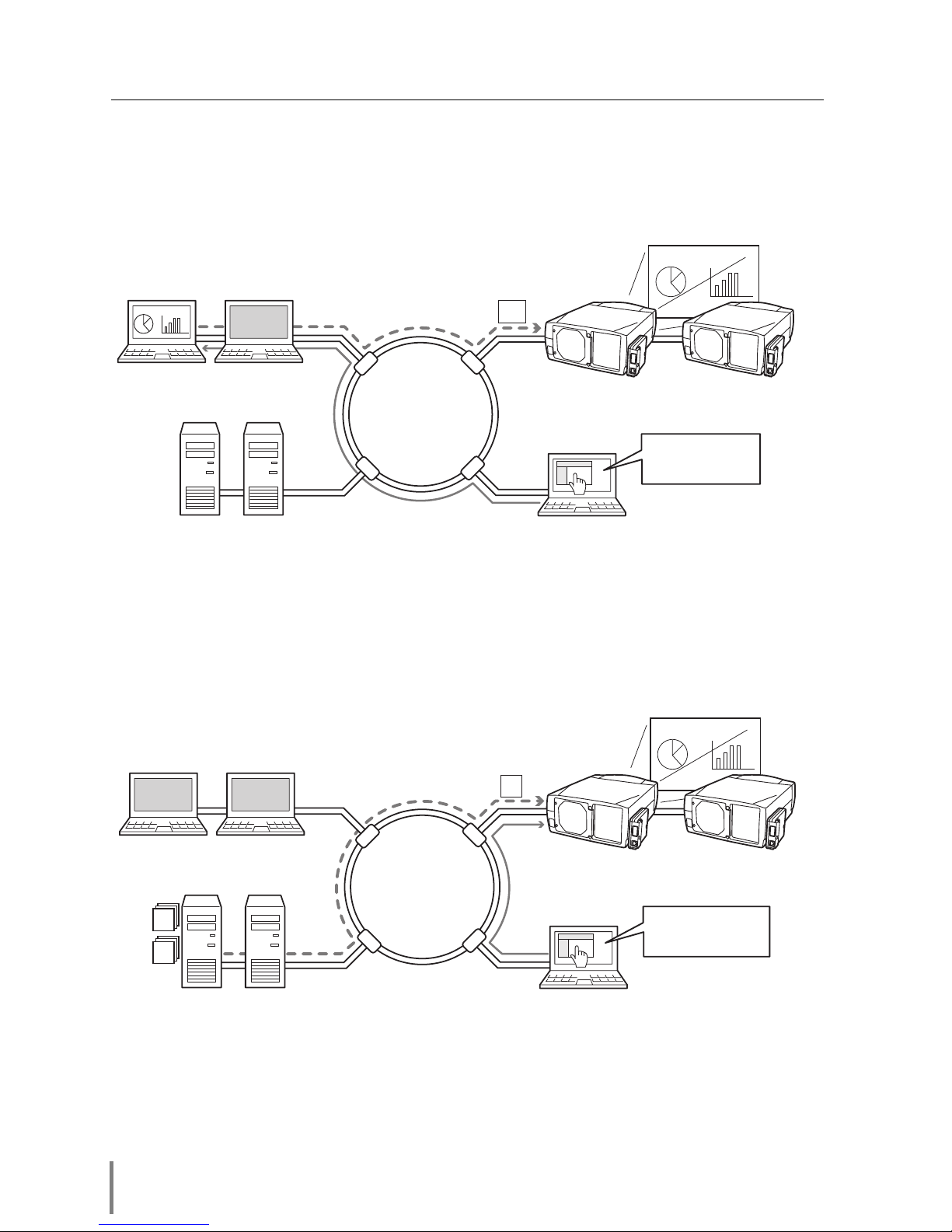
Network Capture function
It enables a projector to project the screen image of the computer on the screen via
the network by using an exclusive utility software .
Internet
Intranet
PC2
PC4PC3
PC5
PJ2 PJ1
PC1
Capture
Project a screen
image of PC1 with
PJ2.
Network Viewer function
The projector receives the image data stored in the file severs in the network and dis-
plays images automatically.
Internet
Intranet
PC2
PC4PC3
PC5
PJ2 PJ1
PC1
JPEG
Prog.
JPEG
Project JPEG images
stored in PC3 with PJ2.
* ftp file servers

7
Network Unit
OWNER’S MANUAL
ENGLISH
Web Management function
With this function, you can monitor projector functions such as power status, lamp
status, input mode, signal condition, lamp-use time, etc. through the network by using
the web browser installed on your computer.
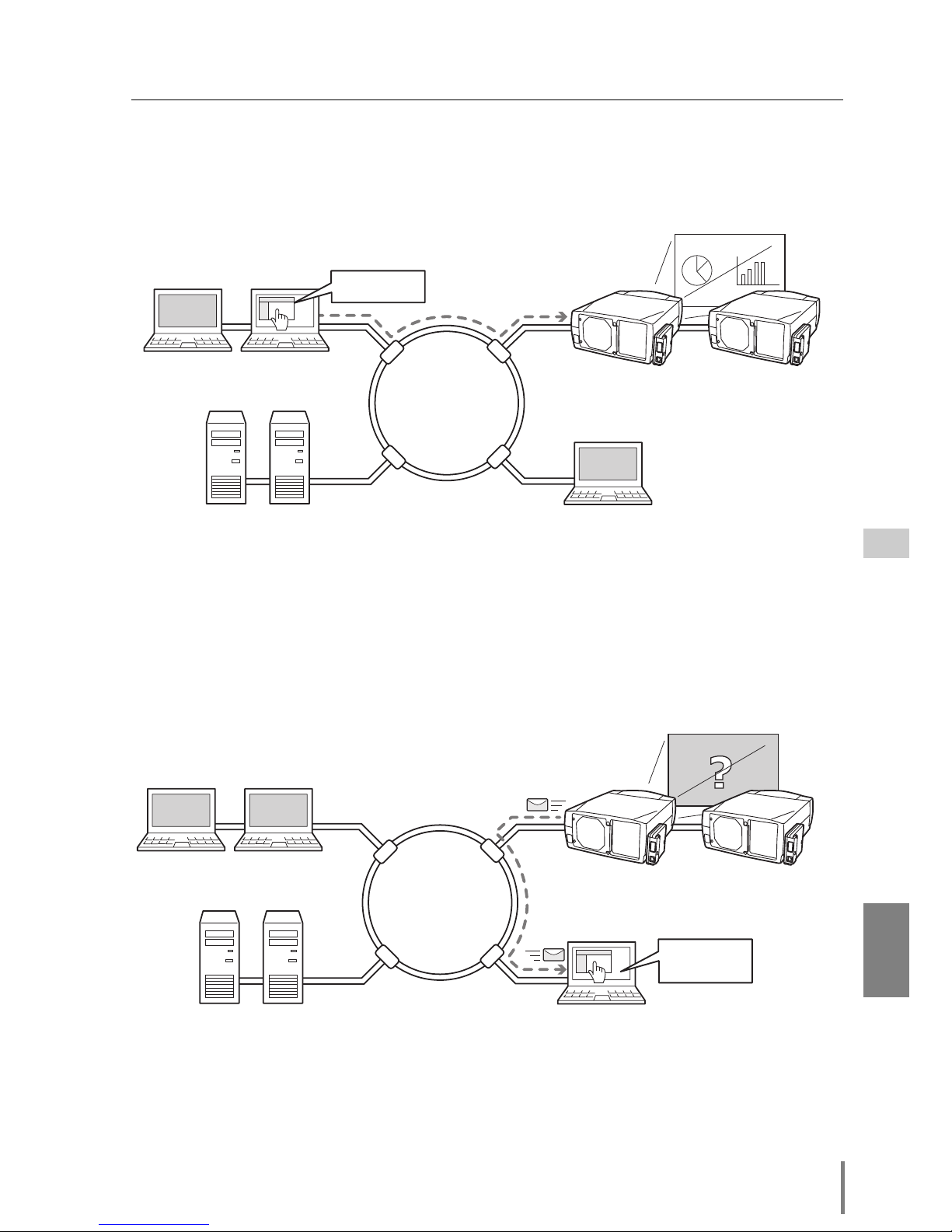
E-Mail Alert function
The projector (Network Unit) sends messages to the registered e-mail addresses
when a lamp abnormality or power failure occurs with the projector. This message
describes how to solve the cause of the problems. You can take efficient action for
quick recovery.
Internet
Intranet
PC2
PC4PC3
PC5
PJ2 PJ1
PC1
You've got
Mail.
Internet
Intranet
PC2
PC4PC3
PC5
PJ2 PJ1
PC1 Tu rn on PJ2.
Features

8
Chapter 1 Preparation
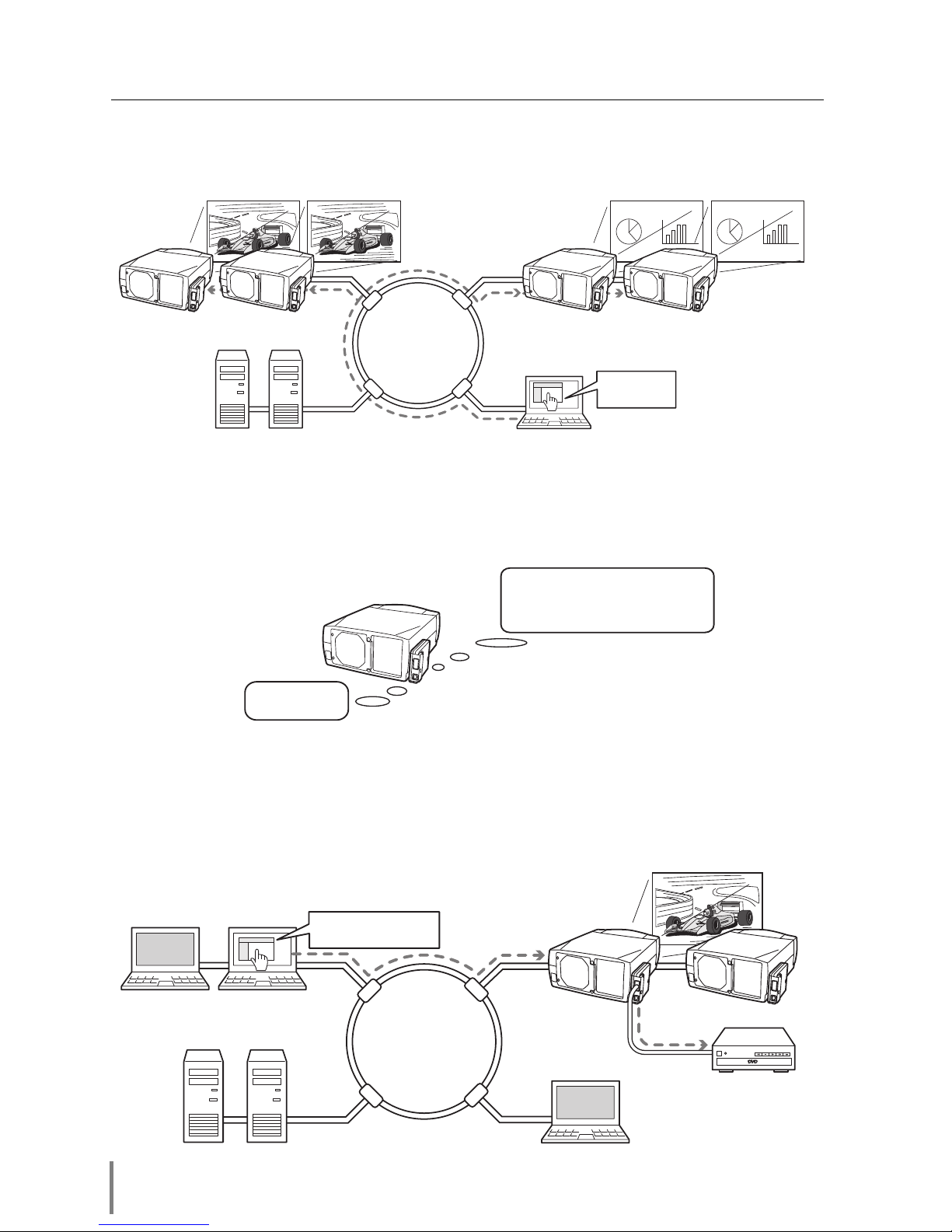
Multi-control function
A single computer can control and set up the multiple computers at the same time.
Automatic On/Off using Clock function
Automatically turn on or off the projectors at specified date/day and time by using the
clock function.
Control port ready for external equipment via network
This product provides a serial port (RS-232C) for controlling external equipment. By
connecting the equipment which has a serial port, it can be controlled by a computer
via the network. * This product does not provide the interface driver software to con-
trol external equipment.
Internet
Intranet
PC2
PC4PC3
PC5
PJ2 PJ1
PC1
DVD Player
Tu rn on the DVD player
and start playing.
I am ready to turn ON,
and select Input 3 (Video)
Now it's 11:30
Internet
Intranet
PC4PC3
PC5
PJ2 PJ1PJ4 PJ3
Select Input2
for PJ1 to PJ4

9
Network Unit
OWNER’S MANUAL
ENGLISH
Operating Environment
To perform the managing and setting of the projector by using this product, the envi-
ronment described below is required.
Network
Network must handle Ethernet correctly and accept TCP/IP and FTP protocol.
Operating System
Windows 98 / Windows 2000 / Windows Me / Windows NT4.0 SP6 / Windows XP
Computer system requirements
●Computer with 900 MHz or higher processor clock speed recommended;
* Intel Pentium/Celeron family or compatible processor recommended
●128 MB of RAM or higher recommended (64 MB minimum supported)
●100 MB of available hard-disk space
●VGA or higher-resolution video adapter and monitor
●CD-ROM drive
●10Base-T or 100Base-TX network card
Web browser application*
●Microsoft Internet Explorer version 5.0, 5.5 or 6.0.
●Netscape Navigator version 6.1, 6.2 or 7.0.
* Used to control and set up the projector. The layout of pages in the browser may slightly
differ from each type of application or operating system you use.
Internet mail application*
●Microsoft Outlook ●Microsoft OutlookExpress
●Netscape Mail
* Required the internet e-mail application software to receive an e-mail alert sent from this
product. If you do not use the function E-mail Alert, this application is not required.
File service*
●ftp server (Windows 2000 Professional or Windows XP Professional)
* The ftp service provided with the Windows 2000 Professional or Windows XP
Professional is required when using the Network Viewer function.

10
Chapter 1 Preparation
The limitation*1 of connection between this product and Hub or
Computer
Suitable LAN cables are limited by length and type as follows;
Connection Type of usable LAN cable Maximum length
Network Unit - Hub UTP Straight Cable with category 3 or 5 *2100m
Network Unit - Computer UTP Cross Cable with category 3 or 5*2100m
*1 There may be other limitations depending on your network environment or LAN specifica-
tion. Please consult your network administrator for further details.
*2 Category of LAN cable indicates the cable quality. Normally, a cable with category 3 or 5 is
used for 10Base-T network, and a cable with category 5 is used for 100Base-TX network.
Package contains
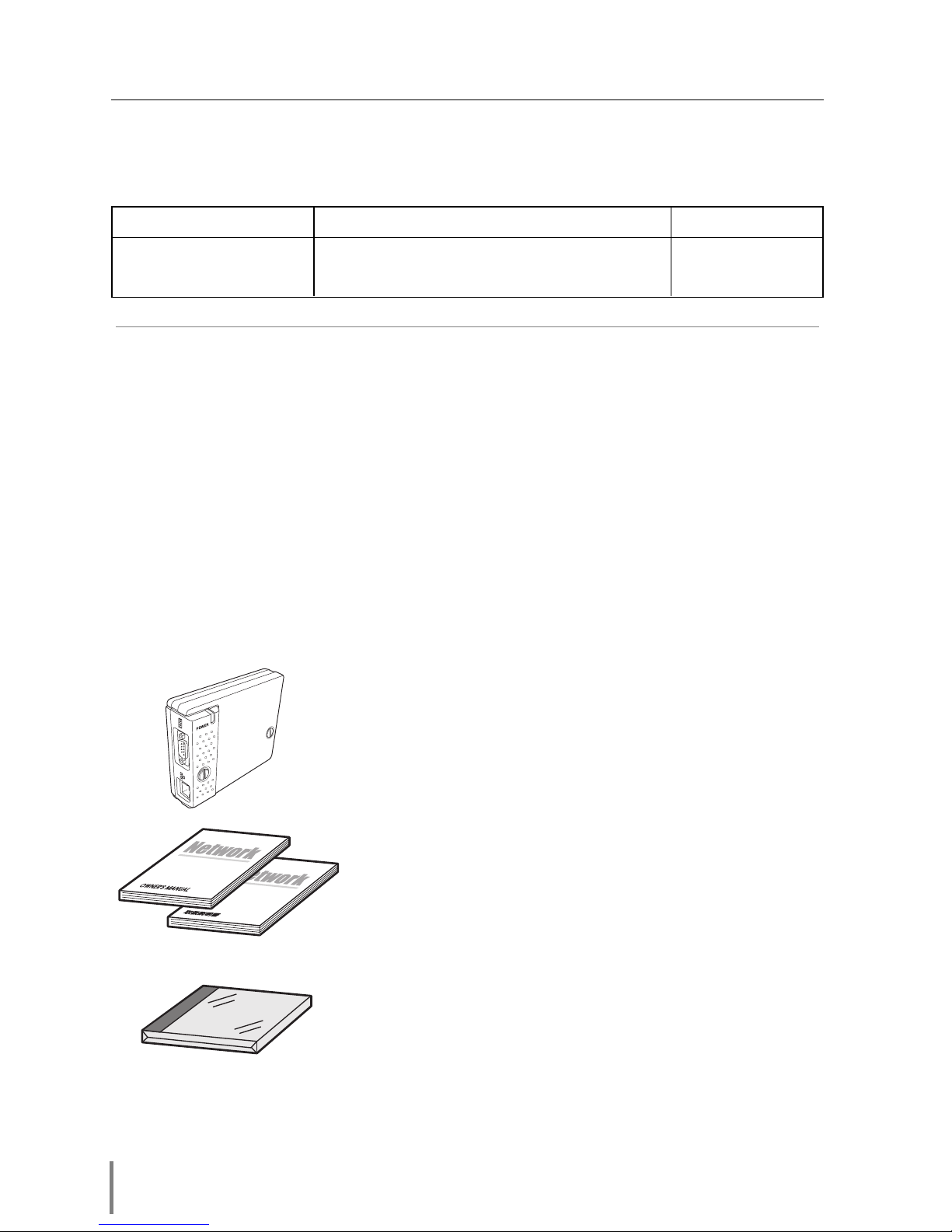
The package contains following items. Check each item as you unpack the package.
If you have any of the following items missing, contact the sales dealer.
❑Network unit 1 piece
❑CR-ROM 1 piece
❑Owner’s manual English/Japanese 1 piece each
Before use
Indice
Altri manuali Eiki Accessori per proiettori

Eiki
Eiki PjNET-15 Manuale utente

Eiki
Eiki AH-45201 Manuale utente

Eiki
Eiki AH-45401 Manuale utente

Eiki
Eiki AH-24711 Manuale per l'uso e la cura

Eiki
Eiki AH-38321 Manuale utente

Eiki
Eiki AH-55001 Manuale utente

Eiki
Eiki EVW-100 Manuale utente

Eiki
Eiki AH-50001 Manuale utente

Eiki
Eiki PjNET-10 Manuale del proprietario

Eiki
Eiki Smoke Resistant Box AH-69601 Manuale utente

Eiki
Eiki PJNET-30 Manuale utente

Eiki
Eiki NPC-1 Manuale utente

Eiki
Eiki AH-55401 Manuale utente

Eiki
Eiki PjNET-50 Manuale utente

Eiki
Eiki LNS-T10 Manuale per l'uso e la cura

Eiki
Eiki AH-A25010 Manuale utente

Eiki
Eiki PjNET-10 Manuale del proprietario

Eiki
Eiki AH-35001 Manuale utente

Eiki
Eiki PJNET-300 Manuale utente