
Eizo I SOUND Manuale utente

Important
For the sake of your safety, before using this product please read through the User's Manual
carefully, especially the Precautions section. Keep this manual for future reference.
Wichtig
Bitte lesen Sie diese Bedienungsanleitung sorgfältig durch, um sich mit dem sicheren und
rationellen Betrieb lhres neuen Lautsprechersystems vertraut zu machen.
Bewahren Sie diese Bedienungsanleitung in erreichbarer Nähe auf.
Important
Pour une utilisation sûre et confortable, lisez attentivement et vérifiez que vous avez compris la
section Précautions avant utilisation. Conservez ce Manuel d'Utilisation.

1
E
CONTENTS
This sound unit is exclusive use of the EIZO LCD monitor which provides
the proper electric and physical construction for the unit.
PRECAUTIONS ......................................................................................................2
INTRODUCTION ..................................................................................................5
1 INSTALLATION ................................................................................................. 9
2 TROUBLESHOOTING ..................................................................................... 17
3 CLEANING ...................................................................................................... 18
4 SPECIFICATIONS ............................................................................................. 19
LIMITED WARRANTY ........................................................................................ 20
DIMENSIONS .........................................................................................................i

2
PRECAUTIONS
This manual uses the safety symbols below. They represent critical information. Please read them
carefully.
WARNING
Failure to abide by the information in a
WARNING may result in serious injury and can
be life threatening.
CAUTION
Failure to abide by the information in a CAU-
TION may result in moderate injury and/or
property or product damage.
Indicates a prohibited action.
Carrying the monitor
CAUTION
• Remove the sound unit whenever moving the monitor.
Lifting the monitor by the sound unit is dangerous. It may result in injury or equipment
damage.

3
E
Operation
WARNING
•Keep the power terminal cover for the optional i⋅Sound™ unit away from children and infants.
Children and infants may accidentally swallow the cover and choke. If swallowed, consult a
doctor immediately.
CAUTION
• When adjusting the viewing angle of the monitor, do not do so by the sound unit.
Adjusting the monitor by the sound unit may dislodge it from the LCD monitor or result in
accidental pinching of the skin. Be careful not to drop or tip over the LCD monitor when removing
the sound unit from the monitor.
Cleaning
WARNING
• Keep liquids away from the monitor and the sound unit. Spillage into the unit may result in fire,
shock, or equipment damage.
CAUTION
• To ensure safety, always unplug the monitor before cleaning the sound unit. Failure to do so may
result in electric shock.
• Never use thinner, benzene, or other strong solvents or abrasive cleaners to clean the unit, as
these may cause damage to the unit.

4
Others
• The EIZO
i
⋅Sound™unit should only be used as a sound unit for the new range of EIZO LCD
monitors. It should not be used for any other purposes.
•The EIZO
i
⋅Sound™unit is for the exclusive use of EIZO LCD monitor which provides the proper
electric and physical construction for the unit.
•The sound unit is shielded to prevent creating a magnetic field. However, it is advisable not
to place any magnetic items (ex. recorded cassette tapes, watches, cash cards, floppy
diskette, etc.) near the unit to avoid any ill-affects to the items.
Copyright© 2000 by Eizo Nanao Corporation. All rights reserved. No part of this manual may be reproduced, stored in
a retrieval system, or transmitted, in any form or by any means, electronic, mechanical, or otherwise, without the prior
written permission of Eizo Nanao Corporation.
Eizo Nanao Corporation is under no obligation to hold any submitted material or information confidential unless prior
arrangements are made pursuant to Eizo Nanao Corporation’s receipt of said information.
Although every effort has been made to ensure that this manual provides up-to-date information, please note that EIZO
speaker unit specifications are subject to change without notice.
PlainTalk and Power Macintosh are trademarks of Apple Computer Inc.
i
⋅Sound is a trademark of Eizo Nanao Corporation.
EIZO is a registered trademark of Eizo Nanao Corporation.

5
E
INTRODUCTION
About This Manual
This manual explains the precautions, features, specifications, and operation of the EIZO
i⋅Sound™sound unit.
Package Contents
•i⋅Sound Sound Unit .......................... 1
•Stereo Mini-jack Cables .................. 2
•User’s Manual ................................. 1
•If any of the above-listed items is missing or damaged, please contact your local dealer for
assistance.
•We recommend that you retain the original packing materials in case of future need.

6
FEATURES
The EIZO i⋅Sound sound unit for LCD monitor is specifically designed for the new range of EIZO
LCD monitors making them complete multimedia units. This unit has two speakers that produce
clear stereo sound, a microphone and a volume control. It also accepts audio input from different
audio devices such as a sound board, CD and cassette player, as well as a microphone.
•Easy to fit and provides a sleek professional look
•No need for an AC power cord
The unit is connected through a direct power supply connector (DC IN) from the monitor.
When the monitor enters into a power saving mode, the speakers will turn off.
•Microphone
•Bass Reflex Ports
•Output connection and headphones jack
A MIC OUT and headphones jack are installed on the speaker unit. The MIC OUT jack is to be
used to transfer sound data from the internal and external speakers to a computer.
•Volume Control
A Volume Control dial is provided to alter the sound level from the speakers or the headphones.
7
E
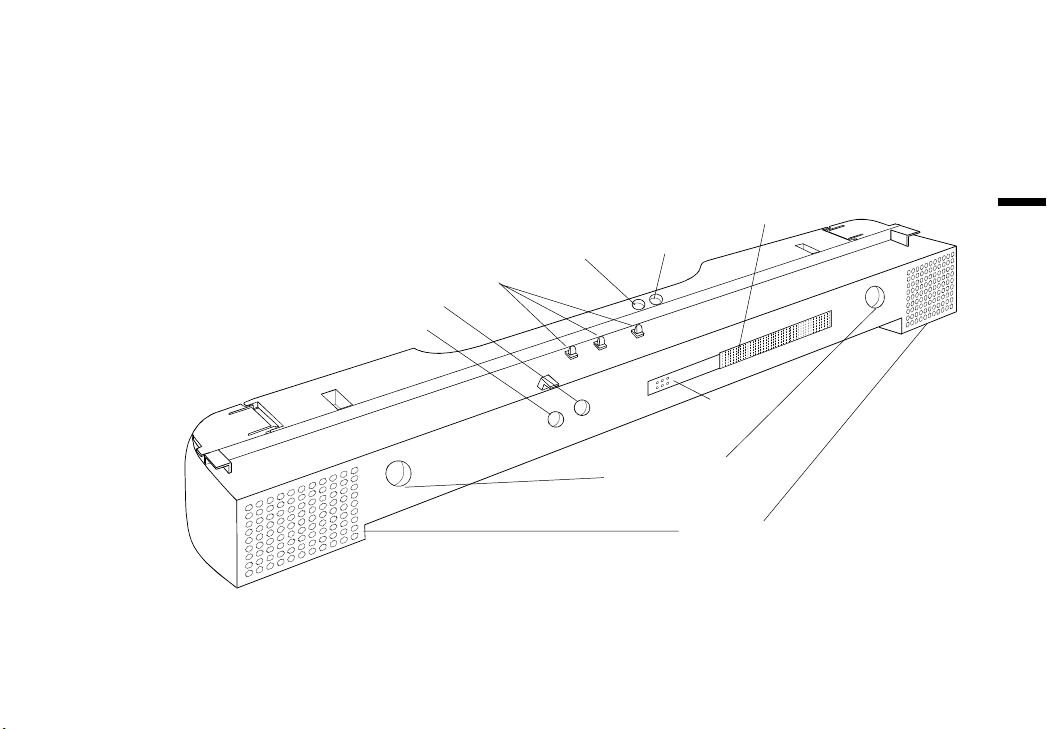
CONTROLS AND CONNECTORS
Front / Top / Side
SPEAKERS
MIC
LINE IN
MIC OUT
DC IN
VOLUME
BASS REFLEX
PORTS
EXT MIC
HEADPHONE

8
Front / Top/ Side
•DC IN: Power supply from the monitor
After combining the monitor and the speaker unit, the DC IN connector allows for an automatic
power supply of the speaker unit through the monitor.
•MIC: Internal microphone
The microphone can receive most types of sound (voice, music, etc.). In order to utilise the
audio input with a computer, please connect the computer with the MIC OUT.
•EXT MIC: External microphone jack
Please use this jack for the external microphone. The sound from the microphone can be output
to other devices such as computer when connected to the MIC OUT.
•HEADPHONE: Headphones jack
A set of headphones is a great tool to work without disturbing people within a close range.
When using the headphones, the speakers will not channel any audio information.
•VOLUME: Volume control dial
A volume control dial is provided to alter the sound level from the speakers or the headphones.
•LINE IN: External input jack
Please use this connection for external devices such as audio peripherals, computers, sound
boards to input sound to be heard through the speakers or headphones.
•MIC OUT: Sound output jack
This jack transfers the sound data from the internal and external microphone. The data can be
used by a computer through a connection stereo Mini-jack Cable.

9
E
1 INSTALLATION
•Always switch the monitor off before installing or removing the sound unit and whenever
connecting or disconnecting any other devices to the sound unit.
1.Remove the power terminal cover of the LCD monitor.
Switch the monitor off and remove the power terminal cover as shown below. Please keep the
covers for use at a later time (ex. when moving the monitor, etc.).
WARNING
•Keep the power terminal cover for the optional i⋅Sound™unit away from children and infants.
Children and infants may accidentally swallow the cover and choke. If swallowed, consult a
doctor immediately.
Rear
Power Terminal
Cover
Remove the power
terminal cover with
your finger.
Indice
Altri manuali Eizo Altoparlanti


