
EPZ E200 Manuale utente
U S E R M A N U A L
ユーザーマニュアル
E200使用手册
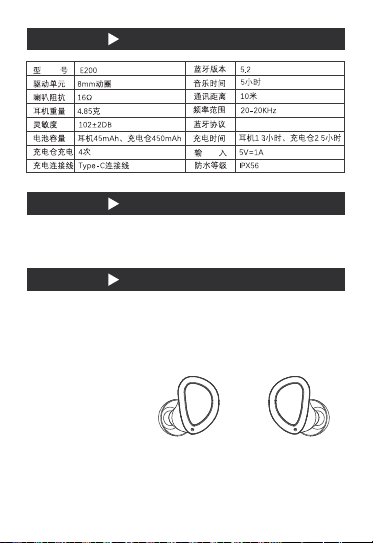
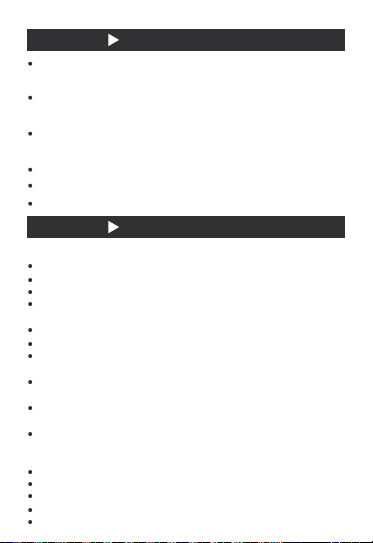
产品规格
包装明细
操作使用
开盖开机
左右:长按开机/关机
右:双击/下一曲/拒接来电
左:双击/上一曲/拒绝来电
右:三击/启动语音助手
蓝牙耳机(左右)、耳机充电盒、使用说明书、保修卡、Type-C充电线、6对硅胶帽、
精美包装
(右)(左)
A2DP,AVRCP,HFP/HSP,SPP/AAC/SBC
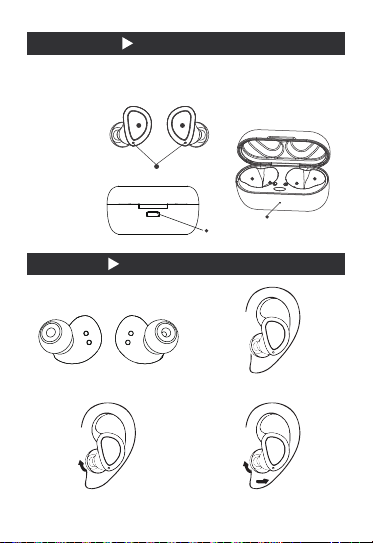
佩戴说明
初次使用请将耳机和充电盒充满电,取出左右耳机会自动组对成功,进入配对状态。
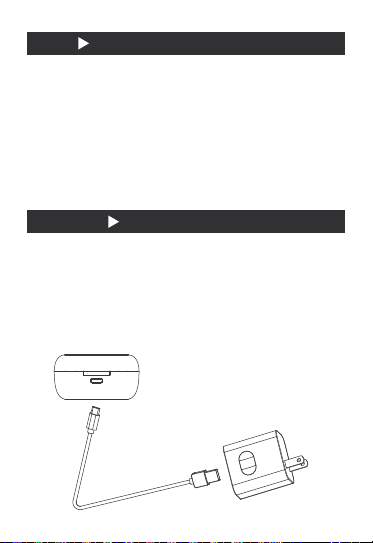
产品说明图
①充电位左
②充电位右
③左耳机
④右耳机
⑤耳机指示灯
⑥Type-C充电口
⑦电量检测灯
①侧面LR
②将耳机听筒对准插入耳道
③拉住耳机凸起部位,往面部
正前方慢慢旋转
④左右来回微调旋转,直至调
整至舒适角度
(L) (R)
3 4
5
7
21
6
配对
充电方式
①首次配对
耳机充好电后将左右耳机拿出,耳机指示灯闪烁,此时左右耳机会自动配对并有语音提示
“对耳成功”,双耳配对成功后,右耳红蓝灯交替闪烁。
②手机与耳机配对
耳机配对状态下,激活手机蓝牙设置,搜索到“E200”点击连接,连接上后有语音提示
“蓝牙已连接”。第二次使用会自动回连手机。
③清除配对
耳机无连接状态下单击4下恢复原厂设置
①给充电盒充电:
本产品包装内附带Type-c充电线,连接电源设配器充电
(*充电时红灯闪烁,充满红灯常亮)
②给耳机充电:
确保充电仓电量充足时,将耳机放入对应穴位,关闭充电仓,充电灯蓝灯常亮,充满后
灯灭
常见问题
蓝牙耳机信号不稳定?
重新启动蓝牙耳机
查看手机兼容性及通话质量
确认距离时候过远或者周边环境过远
不要停留在信号干扰的环境中
蓝牙耳机听不到声音?
检查耳机音量是否为静音
检查蓝牙耳机是否与设备连接
检查蓝牙耳机是否与手机距离过远或者周边有干扰体
什么是定制HIFI蓝牙耳机?
采集多数人耳廓,通过数据分析,做出更接近耳廓外观的蓝牙耳机,佩戴舒适,隔音
效果佳。
借鉴定制有线耳机的声学腔体,声学器件,结合多年的调音经验,铸造成高保真音质
的蓝牙耳机。
借鉴定制有线耳机的生产流程,全手工打造,精益求精,每一副耳机都犹如艺术品般
完美无瑕。
蓝牙5.2的优势?
更稳定的信号
更高的续航时间
更好的音质
更人性化的操作
更低的辐射
注意事项
本机需要使用原装充电线进行充电,Type-c线连接5V(1A-2A)电源适配器,5V(1A-
2A)车载充电头,推荐使用2A以下电源适配器。
本产品充电时请使用原装充电器或者电脑端口充电,切不可以使用廉价劣质的充电器
产品送保前,请自行保存好您的资料,以免丢失。
如果发生故障,我们将严格按照国家规定以及我们力所能及的服务为您解决,但我们
可能不会为因使用产品而导致的财产损害以及经济纠纷承担相关法律责任。
蓝牙产品均有使用环境与连接距离问题,请勿在大磁场干扰和辐射环境中使用。
请不要将蓝牙耳机放置于水中或者摔打,这些均会造成损坏。
如果蓝牙耳机长时间不使用,请约30天充电一次,以防因缺电而造成的无法启动。
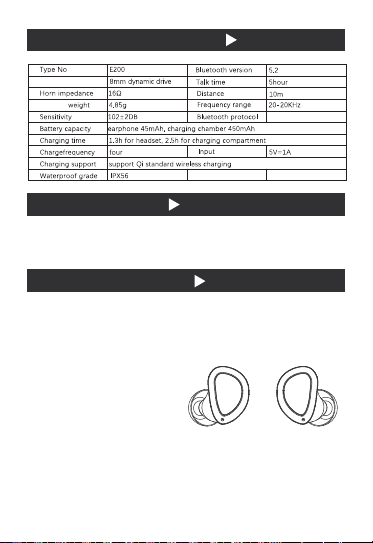
PRODUCT SPECIFICATION
PACKING DETAILS
OPERATION AND USE
Open the cover and start the machine
Left and right: long press to turn on / off
Right: double click / next / reject call
Left: double click / previous / reject call
Right: three click / start voice assistant
Speaker
Earphone�
Bluetooth
Earphone
( left and right ),headset charging box,operation manual,warranty card
type-c charging cable,6 pairs of silica gel caps,earphone,Storage bag,exquisite packaging
(Right)(Left)
A2DP,AVRCP,HFP/HSP
SPP/AAC/SBC

WEAR INSTRUCTIONS
For the first time, please fully charge the earphone and charging box. If you take out the left
and right earphones, they will automatically pair and enter the pairing state.
CATALOG ILLUSTRATION
① charging position left
② charging position right
③ Left earphone
④ Right earphone
⑤ headset indicator
⑥ type-C charging port
⑦ power detection lamp
② align the headset with the ear canal
④ fine tune and rotate left and right until
Adjust to comfort angle
①Side LR
(Left) (Right)
③ pull the raised part of the headset and
rotate it towards the front of the face
7
21
3 4
5
6
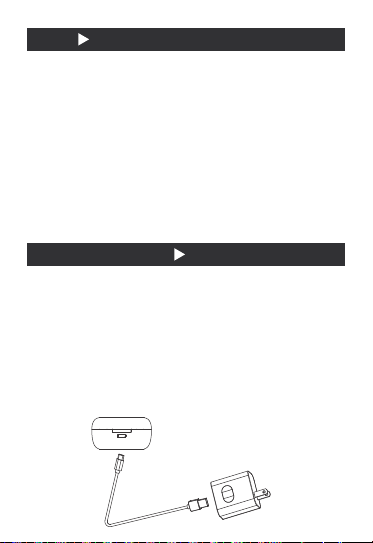
PAIR
CHARGING MODE
① First pairing:
After the earphones are charged, take out the left and right earphones , and the
indicator lights of the earphones will flash . At this time , the left and right earphones
will be automatically paired and there will be a voice prompt “Success to ear”. After
the pairing is successful , the red and blue lights on the right ear will flash alternately.
② Pair the phone with the headset:
When the headset is paire,activate the Bluetooth settings of the mobile phone search
for “E200“and click connect . After connecting , there will be a voice prompt
“Bluetooth is connected”. The second use will automatically connect back to the phone.
③ Clear pairing:
When the headset is not connected, click 4 to restore the original settings
Charging the charging box:
Type-C charging line is attached in the package of this product, which is connected to the
power supply and equipped with a charger for charging
(* the red light flashes when charging, and the full red light is always on)
Charging headphones:
When the charging chamber is fully charged, put the earphone into the corresponding
acupoint, close the charging chamber, the blue light of the charging lamp is always on,
and after full charge Lights out
①
②
COMMON PROBLEM
MATTERS NEEDING ATTENTION
This machine needs to use the original charging line for charging. The type-C line is
connected with the 5V (1a-2a) power adapter, 5V (1A-2A) for vehicle charging head, it is
recommended to use power adapter below 2A or Qi standard wireless charging box for
charging.
Please use the original charger or computer port to charge this product. Do not use cheap
and inferior charger.Before the product is sent for warranty, please keep your data to avoid
loss.
In case of failure, we will solve it for you in strict accordance with the national regulations
and the
services we can provide. However, we may not be liable for the property damage and
economic disputes caused by the use of the product.
Bluetooth products have problems with the use environment and connection distance.
Please do not use them in the environment of large magnetic field interference and
radiation.
Please don't put the Bluetooth
earphone
in the water or beat it, which will cause damage.
If the Bluetooth
earphone
is not used for a long time, please charge it once every 30 days,
in case of failure to start due to power shortage.
Bluetooth
earphone
signal unstable?
Restart Bluetooth
earphone
Check phone compatibility and call quality
Confirm that the distance is too far or the surrounding environment is too far
Do not stay in the environment of signal interference
Can't hear from Bluetooth
Earphone
?
Check whether the earphone volume is mute
Check whether the Bluetooth
earphone
is connected to the device
Check whether the Bluetooth
earphone
is too far away from the mobile phone or there is
interference around.
What is a custom hifi Bluetooth
earphone
?
Collect the pinna of most people, and make Bluetooth
earphone
closer to the appearance
of the pinna through data analysis. It is comfortable to wear and has good sound insulation
effect.
Learn from the acoustic cavity and acoustic devices of customized wired
earphone
,
combined with many years of experience in tuning, to cast Bluetooth
earphone
with high
fidelity sound quality.
Learn from the production process of customized wired earphones, which are all
hand-made and strive for perfection. Each earphone is as flawless as a work of art.
What are the advantages of Bluetooth 5.2?
More stable signal
Long endurance
Better sound quality
More humanized operation
Lower radiation
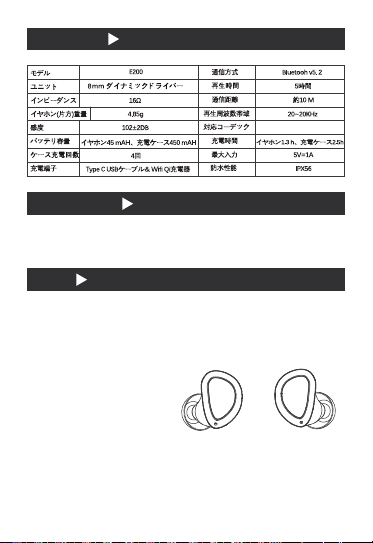
製品仕様
セット内容
操作
ふたを開けて電源を入れる
左右:長押しで電源を入れる/切る
右:ダブルクリック/次の曲/着信拒否
左:ダブルクリック/前の曲/着信拒否
右:音声アシスタントを3回クリック/起動
ブルートゥースヘットセット(左�右)、ヘットセット充電ボックス、ユーザーマヌエル、
保証書、TYPE C充電ケーブル、シリコンイヤピース6個、収納ケース。
(右)
(左)
A2DP,AVRCP,HFP/HSP
SPP/AAC/SBC
Indice
Altri manuali EPZ Cuffie


