
ExpertBoard EXP8051 Manuale utente

EXP8051
ALI 1449+1451
USER’S MANUAL

TABLE OF CONTENTS
CHAPTER 1 INTRODUCTION...............................1
1.1 OVERVIEW.................................................................1
1.2 SYSTEM FEATURES.................................................1
1.3 SYSTEM SPECIFICATION.........................................2
1.4 SYSTEM PERFORMANCE.........................................2
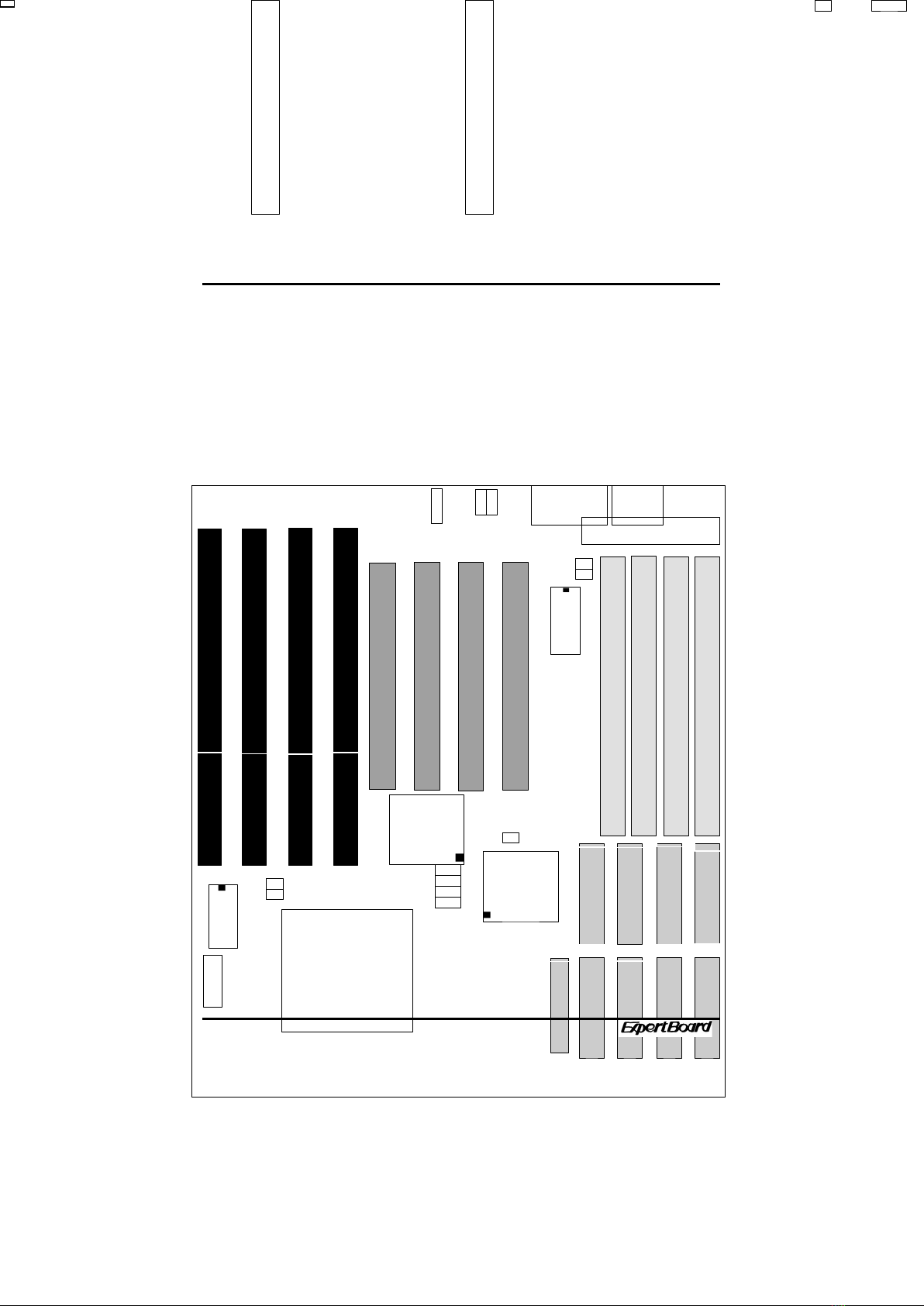
1.5 EXP8051 BOARD LAYOUT........................................3
CHAPTER 2 INSTALLATION................................4
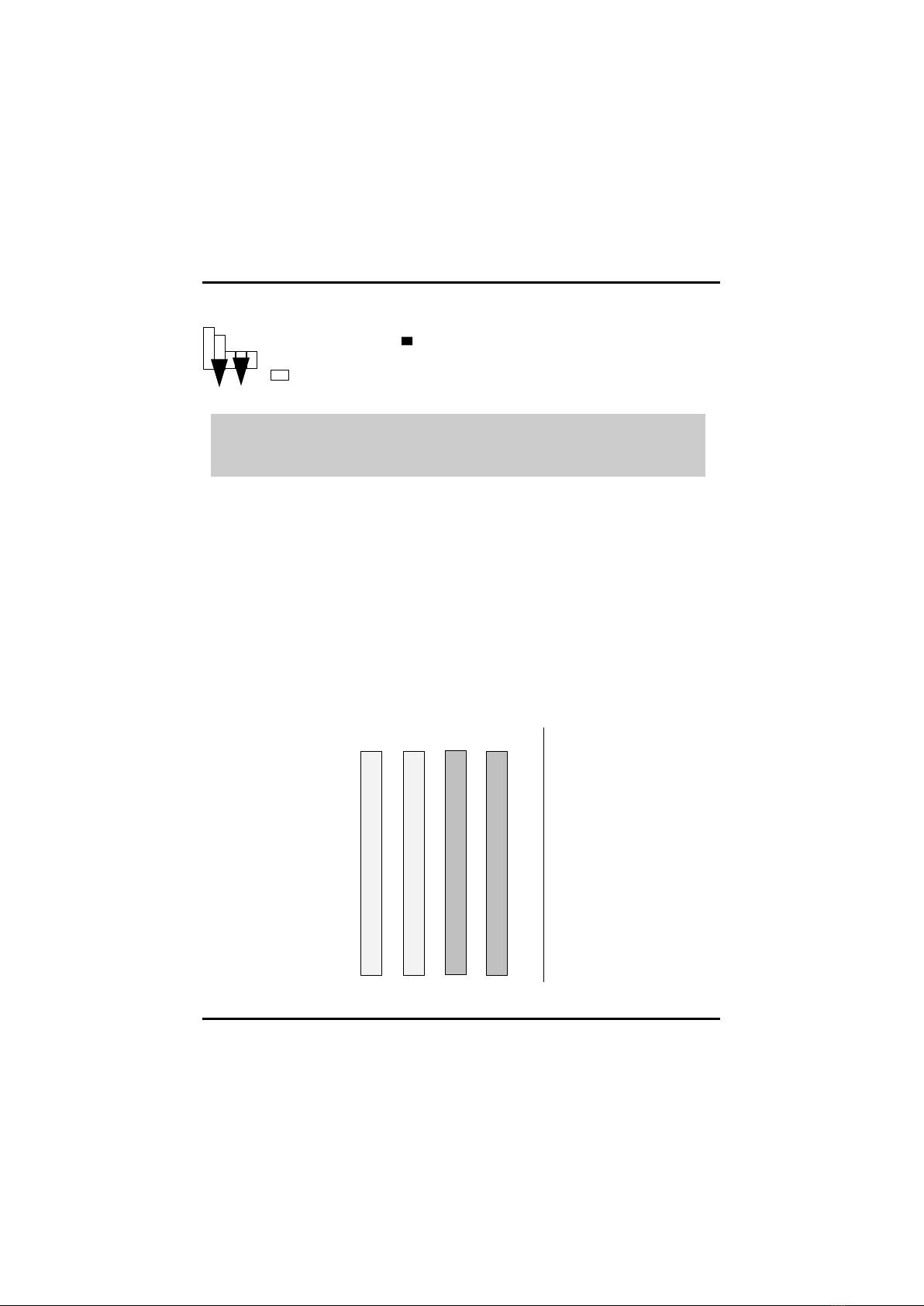
2.1 DRAM INSTALLATION...............................................4
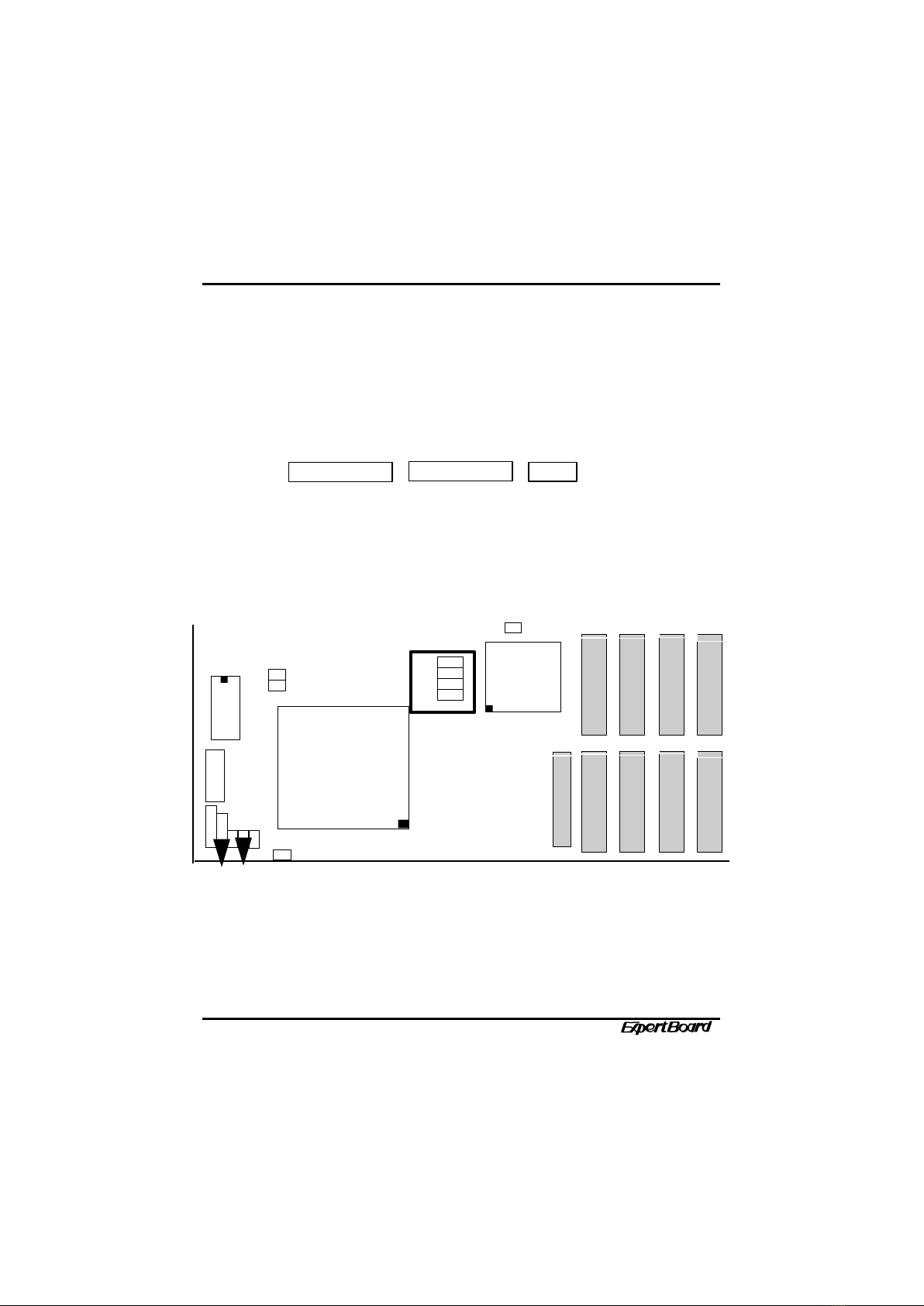
2.2 SRAM INSTALLATION...............................................5
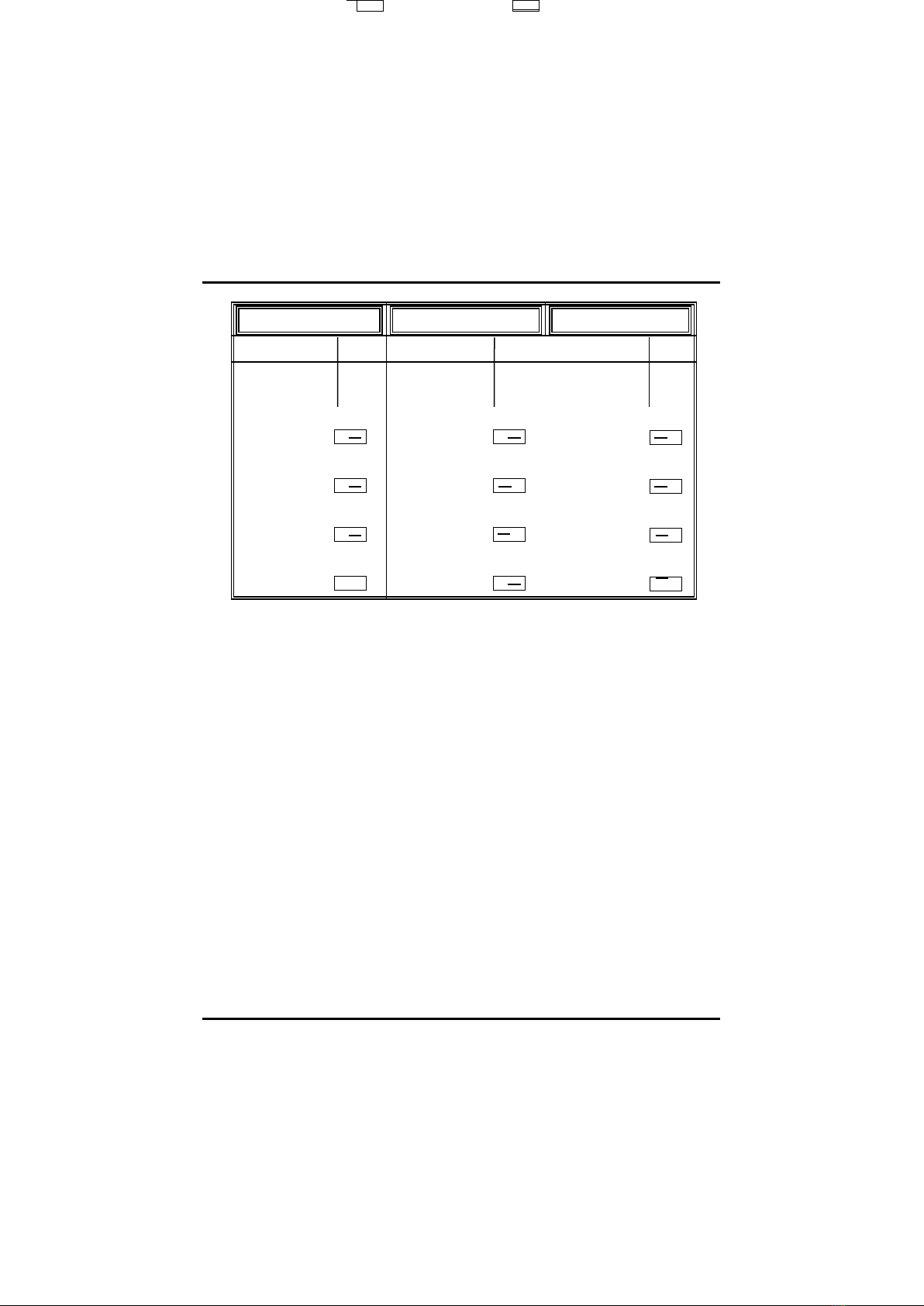
2.3 CPU INSTALLATION..................................................6
2.4 OTHER UMPER AND CONNECTOR INSTALLATION
..............................................................................................7
CHAPTER 3 SYSTEM BIOS SETUP....................10
3.1 SYSTEM SETUP......................................................11
3.2 FIXED DISK SETUP...........................................12
3.3 ADVANCED SYSTEM SETUP........................13
3.3.1 Memory Cache...........................................15
3.3.2 Memory Shadow..........................................16
3.3.3 Advanced Chipset Control..........................18
3.3.4 PCI Devices................................................20
3.4 BOOT OPTION....................................................23
3.5 SECURITY AND ANTI - VIRUS...........................24
3.6 GREEN PC FEATURES......................................26
3.7 LOAD ROM DEFAULT VALUES..........................28

3.8 LOAD VALUES FROM CMOS.............................29
3.9 SAVE VALUES TO CMOS...................................30
RMA FORM

EXP8051 User’s Manual
CHAPTER 1
INTRODUCTION
1.1 OVERVIEW
The EXP8051 is complemented by a 1MB second level Write-Back
cache providing workstation level computing performance , and
SIMM sockets support up to 128MB of DRAM.
The EXP8051 motherboard offers outstanding I/O
capabilities .Four PCI Local Bus slots provide a high bandwidth
data path for data-movement intensive function such as
Graphics . Four ISA slots complete the I/O mix .
The EXP8051 Baby-AT motherboard provides the foundation for
cost effective , high performance , highly expandable platforms.
1.2 S STEM FEATURES
q Supports INTEL PENTIUM
q Supports 4 MASTER 32-bit PCI Bus
q Supports L1/L2 Write Back/ Write Through Cache Feature
q Supports 256KB/512KB/1MB Cache Size
q Supports 72pin SIM MODULES
1

1.3 S STEM SPECIFICATIONS
Processor : INTEL PENTIUM
CPU Clock : 60/66 MHz CPU
Memory : 2MB to 128MB
SRAM Configuration : 256KB/512KB/1MB
BIOS Subsystem : PHOENIX/AWARD BIOS
Additional BIOS Feature : Set Program Resides in ROM
I/O Subsystem No. Slot : Four 16-bit ISA Bus & Four PCI 32-bit
Bus
Additiona Features
Miscellaneous Connectors : Reset Button, Internal Battery
Board Design : 4-layer Implementation for Low Noise
Operation
1.4 S STEM PERFORMANCE
SOFTWARE
CPU TYPE LANDMARK
V2.0
POWER
METER
V1.8 MIPS
NORTON
V8.0
CPU SPEED
60MHz 346.43MHz 28.4MIPS 190.1
66MHz 383.20MHz 32 MIPS 210.3
2
PENTIUM
U20 U19 U18 U17
U21 U22
U24 U23
U2
5
EXP8051 User’s Manual
1.5 EXP8051 BOARD LA OUT
3
1
SIMM
1
SIM
M2
SIMM
3
SIMM
4
P
1
· · · · · · · · · ·
P
2
1
4
J P
5J P
4
1
3
J P
3
BIO
S
J P
1
J P
2
PC
3
PC
2
PC4
PC
1
1 2
3 4
J P
6
J P1
0
J P 9
J P 8
J P 7
3
1
J P1
1
1
2
J P1
2
+
-
SIMM
1
SIMM
3
SIMM
4
SIMM
2
1
4
CHAPTER 2
INSTALLATION
Before the system is ready to operate, the hardware must be set
up for various functions of the system. To set up the EXP8051
main board is a simple task. The user only has to set a few
jumpers, connectors and sockets.
2.1 DRAM INSTALLATION
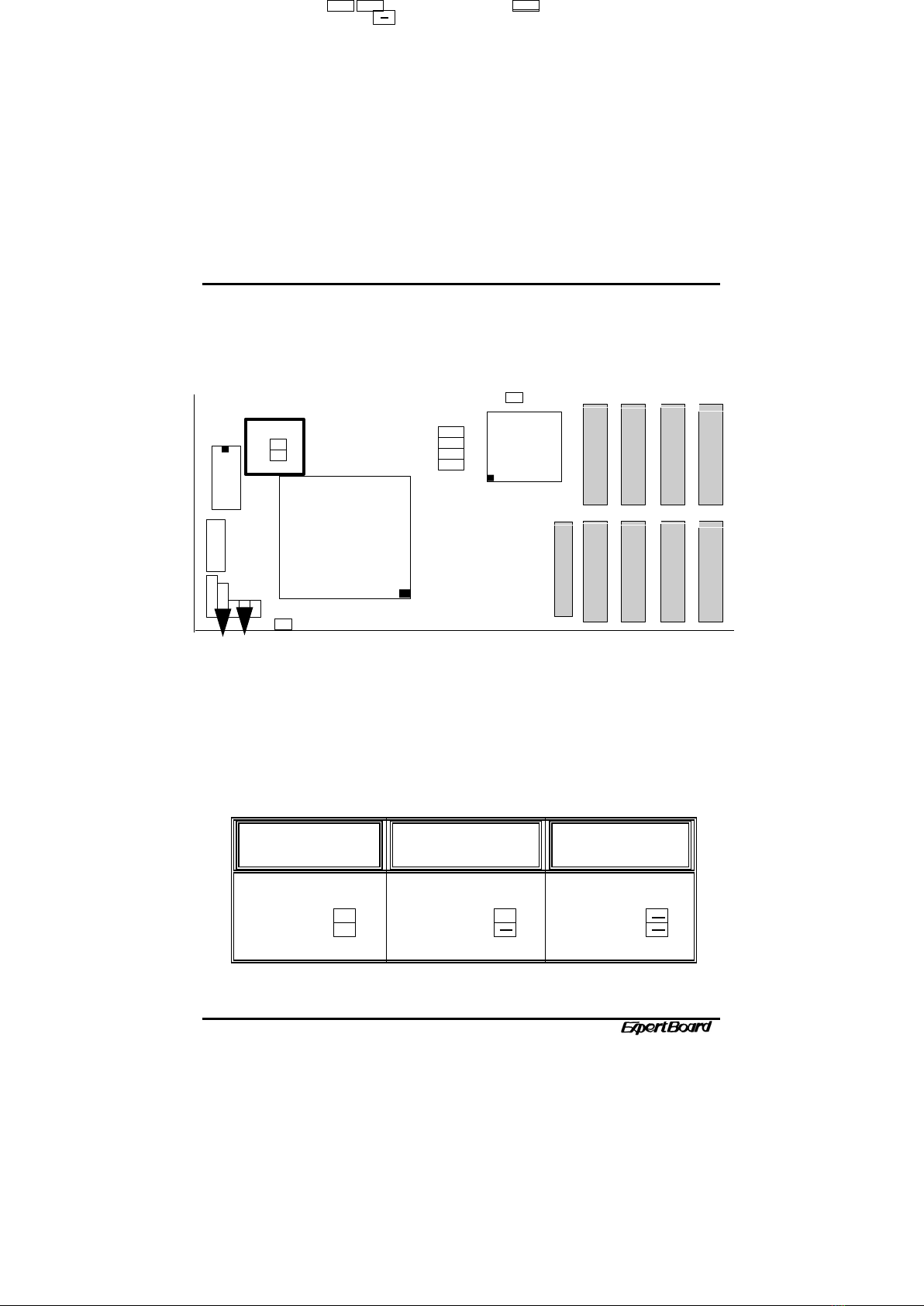
n The board layout below shows the locations of the DRAM
memory banks :
4
9
10
J P1
4
J P1
5
J P1
6
J P1
7
J P1
8
1
5
J P1
3
EXP8051 User’s Manual
2 SIMM1+SIMM2 + SIMM3+SIMM4 = TOTAL
Each group includes two SIMMs, each SIMM size can be
1,2,4,8,16,32MB,
please install the same DRAM size in one group.
2.2 SRAM INSTALLATION
CACHE SIZE
CONFIGURATION
5
J P1
3
1
5
J P1
8
J P1
7
J P1
6J P1
5
J P1
4
9
10
J P1
2
1
2
J P1
1
J P1
0
J P 9
J P 8
J P 7
3
1
J P
6
1 2
3 4
U23
U2
5
U24 U22 U21
U20 U19 U18 U17
1
4
PENTIUM
J P9
J P1
0
3 2
1
J P8
3 2
1
J P7
3 2
1
3 2
1J P9
J P1
0
3 2
1
J P8
3 2
1
J P7
3 2
1
3 2
1
J P9
J P1
0
3 2
1
J P8
3 2
1
J P7
3 2
1
3 2
1
··
··
··
··
TAG
RAM
··
··
··
··
··
··
··
256K 512K 1M
* : Defau t Setting
6
*
J P1
5·
·
1
2
5
6
J P1
5·
·
1
2
5
6
5
6
J P1
5
1
2
DATA RAM
TAG
RAM
DATA RAM
TAG
RAM
DATA RAM
U25
32KX
8
U17~U24
128KX8
U17~U24
64KX8
U25
32KX8
U17~U24
32KX8
U25
8KX
8
··
EXP8051 User’s Manual
2.3 CPU INSTALLATION
CPU FREQUENCY
SETTING
PENTIUM 50.0
MHz
PENTIUM 60.0
MHz
PENTIUM 66.6
MHz
7
*
J P1
5·
·
1
2
5
6
J P1
5·
·
1
2
5
6
J P1
5·
·
1
2
5
6
5
6
J P1
5
1
2
··
··
J P1
1
1
2
3
4
J P1
1
1
2
3
4
J P1
1
1
2
3
4
··
J P1
5
J P1
7
J P1
3
1
5
J P1
8
J P1
6
J P1
4
9
10
J P1
2
1
2
J P1
1
J P1
0
J P 9
J P 8
J P 7
3
1
J P
6
1 2
3 4
U23
U2
5
U24 U22 U21
U20 U19 U18 U17
1
4
PENTIUM
Indice
Altri manuali ExpertBoard Scheda madre


Manuali Scheda madre popolari di altre marche


Telit Wireless Solutions
Telit Wireless Solutions SL869-3DR Manuale utente

Gigabyte
Gigabyte GA-9IVDT Manuale utente

Texas Instruments
Texas Instruments ADS8372EVM Manuale utente

Commell
Commell MS-C73 Manuale utente

IBT Technologies
IBT Technologies MB860 Manuale utente

Nvidia
Nvidia TEGRA DG-04927-001_V01 Manuale utente


