
FOS Technologies AirLink Manuale utente
1
FOS AirLink
2
PRODUCT SPECIFICATIONS
TECHNICAL SPECIFICATION
Voltage: 5 Volt DC, 1 Ampere.
Consumption: 3 Watts max.
Frequency:2.4 GHz ISM band, 58 channels
Antenna:2dBi.
Latency:<5 msec
DMX Channels transmission:512 (1 Universe).
Transmitter & Receiver modes: yes, changing by pressing the Green button.
Operating range: Up to 400 m (no obstacles / line of sight)
DMX connector:3 pin XLR in/out.
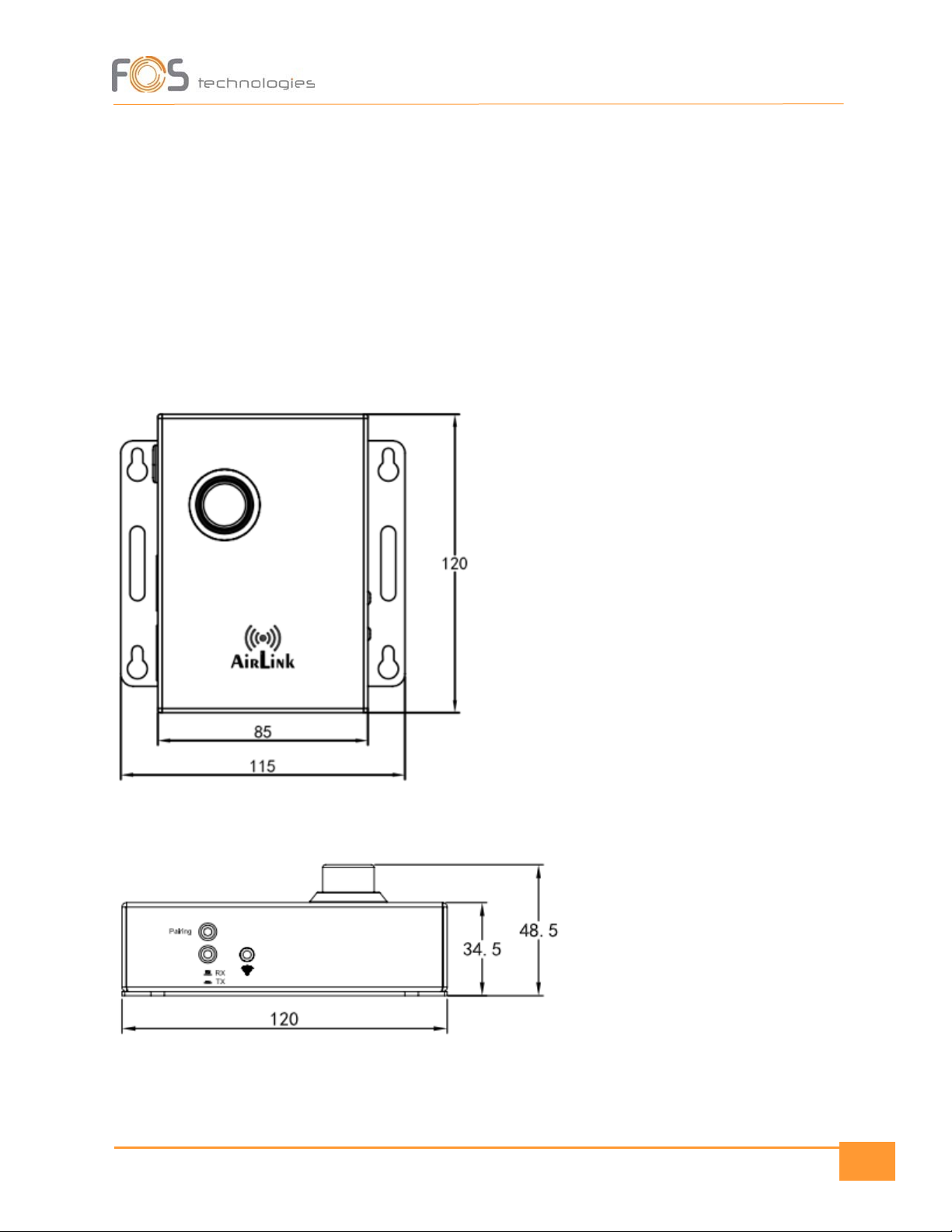
Dimensions:120 x 115 x 48,5 mm
Weight: 0,5 Kg
SAFETY WARNING
The cleaning frequency depends on the environment in which the fixture is installed. Damp,
smoky or particularly dirty surrounding can cause greater accumulation of dirt on the box.
Even in a clean type of surroundings, it is recommended to clean the housing at least once a
month. It is suggested to use a soft cloth using normal cleaning fluid.
The following points must be considered during the maintenance:
•Unplug the system from main power.

3
•Clean the box housing with a mild solution isopropyl alcohol, and a soft, lint free cotton cloth.
PROTECTION AGAINST SOLIDS AND
WATER
Only for IP-rated fixtures
The protection level of a housing is set by applied standards. For classification there is used the IP-Code.
It contains the declaration „IP“and two following numbers. The first number characterizes the protection
against harmful effects of solids, the second is rating the water protection. It is important to distinguish
whether encapsulation and harmful effect! There can be housing that is not capsuled completely but still
avoids harmful effect of solids or water.
PROTECTION EXAMPLES:
IP20: Protection against intruding objects >12,5mm „Finger protected “; No waterproofing. TYPICAL
PROTECTION FOR INDOOR USE FIXTURES
IP33: Protection against intruding objects >2,5mm; Falling water within an angle of 60° has no harmful
effect TYPICAL PROTECTION OF LED-LIGHTS USING RECESSED POWERCON AND DMX SOCKET. This
protection is linked to the mounting position of the fixture and always refers to typical mounting situation
like a Floor spot used standing on the ground.
IP54: complete protection against solids and low-pressure water from any side THIS TYPE OF FIXTURES
CAN BE USED UNDER NORMAL OUTDOOR CONDITIONS.
IP65: shielded against dust and pressurized water from any side. TYPICAL PROTECTION FOR OUTDOOR
RATED EVENTFIXTURES USING WATERPROOFED POWER AND SIGNAL LINK.
IP67: shielded against dust and protected for accidental briefly submerge. PROTECTION AGAINST
ACCIDENTIAL SUBMERGING ON TEMPORARY FLOODED AREA.
TEMPORARY USE
4
Event equipment is designed for temporary use. This are typical purpose as concerts, festivals, theatre,
clubs and disco use and referable venues. Long-term use, specially under outdoor conditions and fixed
outdoor installation can bring damage in aging materials and affect the coated surface. Sealings as well as
cables are made from rubber material and will age by long-term UV-emission as sunlight and should be
checked frequently.
LIMITATIONS OF IP PROTECTION
IP-Rating doesn´t mean unlimited outdoor use and protection against any kind of environmental
influence! Especially sunlight and included UV will bring accelerated aging. Some fixtures need special
parts or processes to fit the rated IP-Protection, like mounting covers or caps or similar. Sealings and other
plastic or rubber materials are aging parts. They must be checked frequently to ensure the protection and
safety of the fixtures. Also specified torque of screws can affect protection!
Installation
Hanging: The fixture can be mounted in a hanging position using the supporting bracket. The bracket
should be secured to the mounting truss or structure using a standard mounting clamp. Please note that
when hanging the unit, a safety cable should also be used.
UPRIGHT: The fixture can be mounted in an upright or sitting position using the supporting brackets.
NOTE! If the signal cable is over 60 m between the DMX512 controller and fixture or between
two fixtures, then a DMX signal amplifier is needed as well.
The manufacturer will not accept liability for any resulting damages caused by the non-
observance of this manual or any unauthorized modification to the fixture.
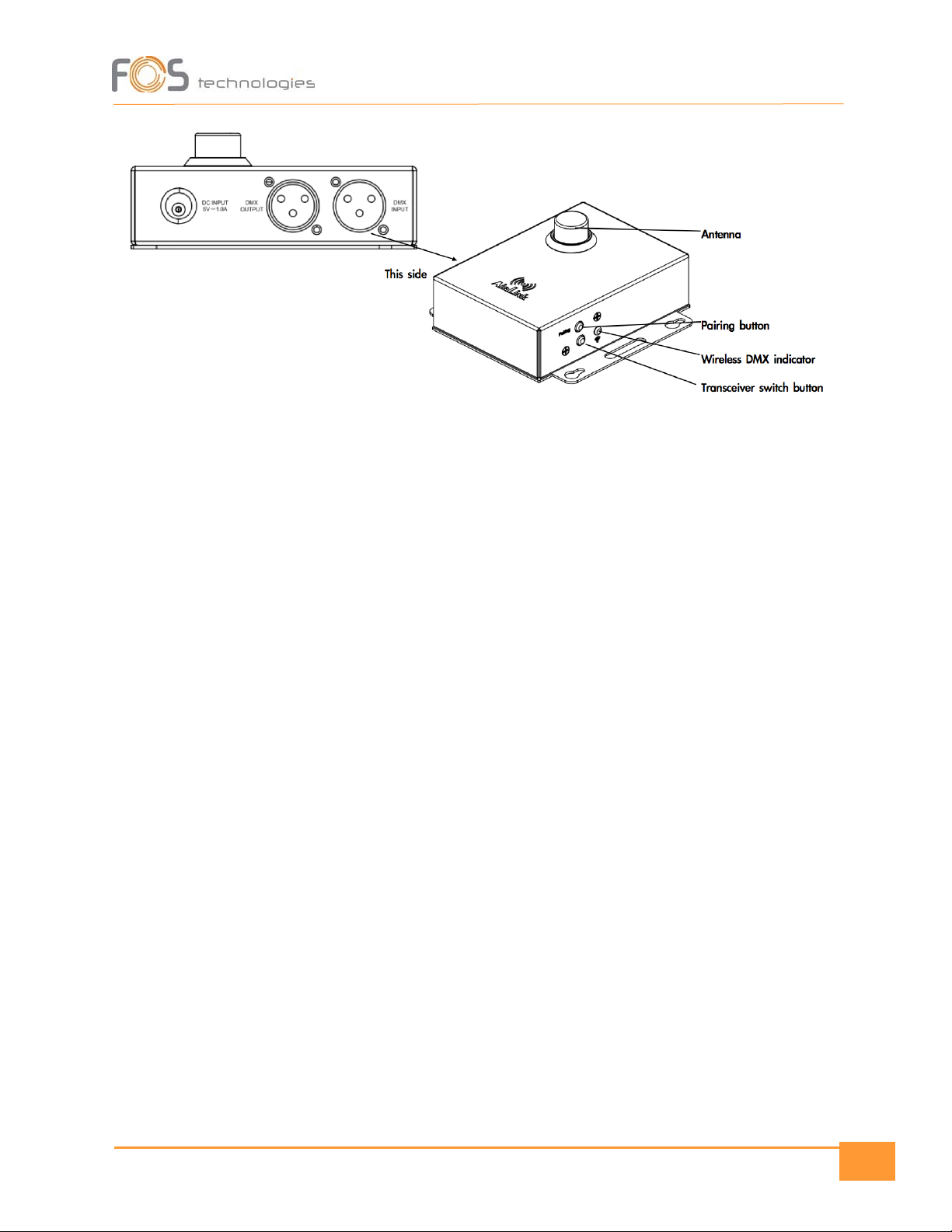
Product View
5
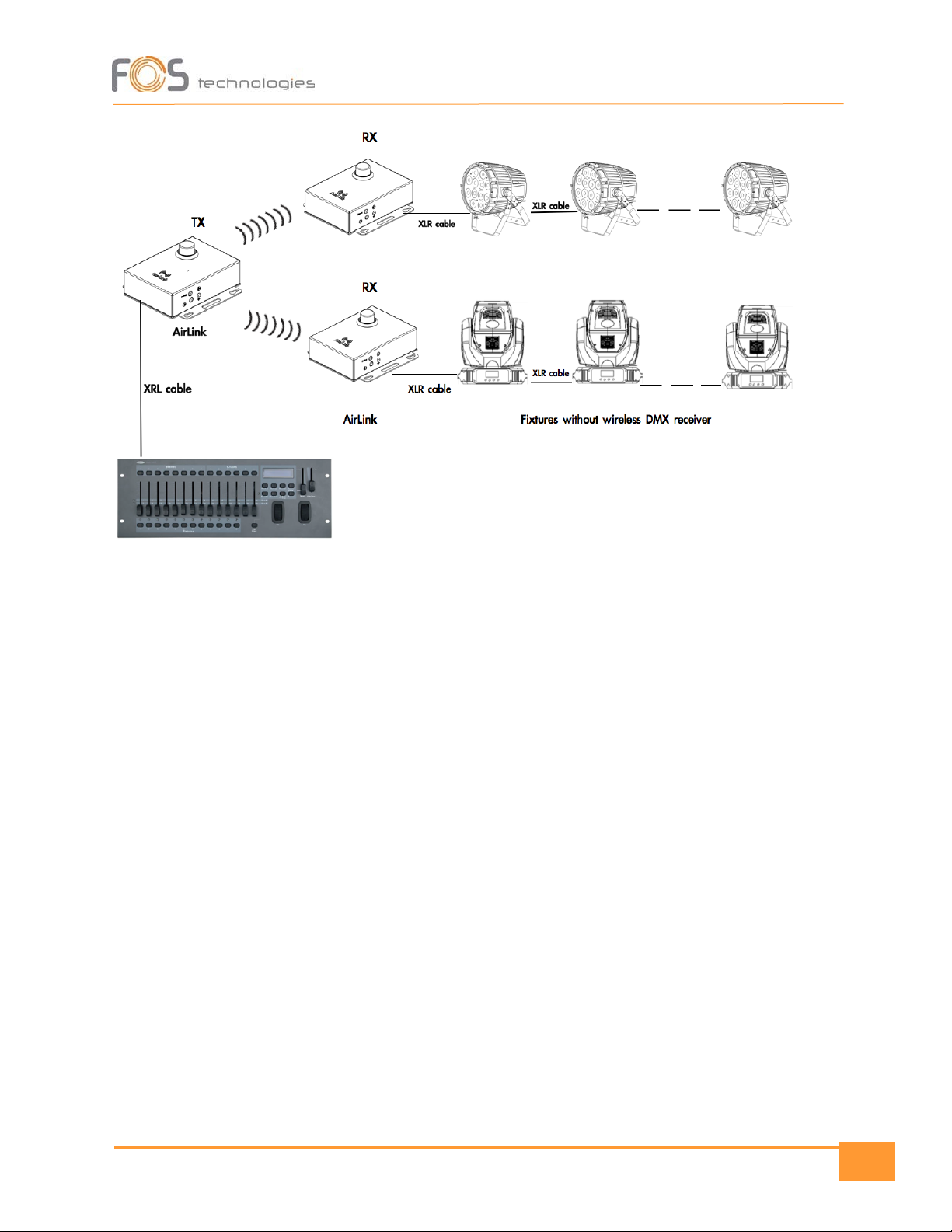
Point to Point connection
6
Press the “Pairing” button on the transmitter box, the yellow indicators on both the transmitter and
receiver will start to flash at the same time. After a few seconds the wireless DMX indicators will stay On,
this means pairing succeeds. Now you can control your fixtures with your lighting desk.
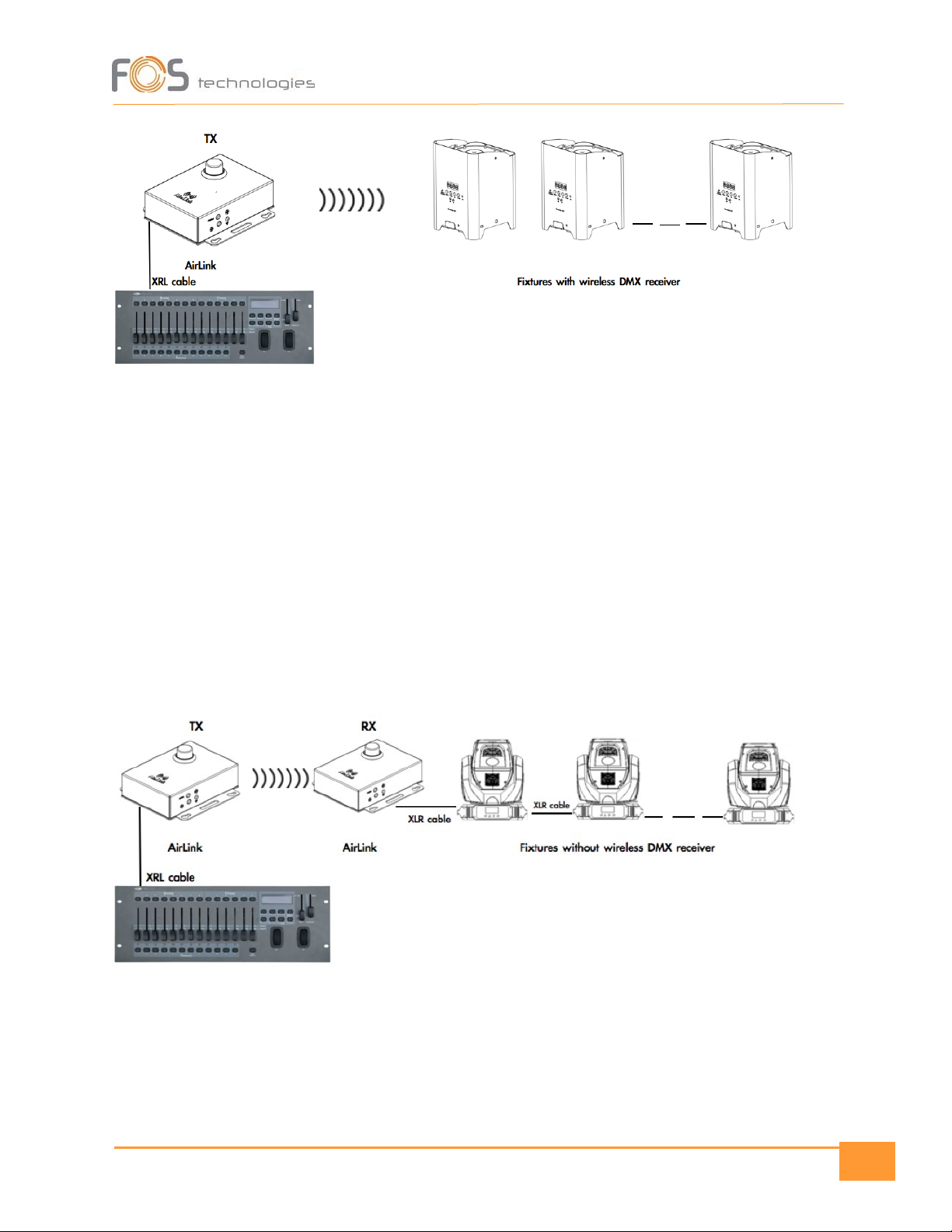
Use AirLink as Transmitter
Connect AirLink to its power adaptor, set it up as transmitter (TX) by pressing down the green button.
Connect AirLink to your lighting desk with XLR cable.
If you are going to control fixtures with wireless DMX receiver, make sure your fixtures are ready to
receive wireless DMX signal.
Now press the “Pairing” button on the transmitter box. The yellow indicators on the transmitter and
your fixtures start to flash at the same time. After a few seconds the wireless DMX indicators will stay
On, this means pairing succeeds. Now you can control your fixtures with your lighting desk.
7
Use AirLink as Transmitter & Receiver
If you are going to control fixtures without wireless DMX, you need to use another AirLink box, and
connect it to the first fixture. Set up this AirLink box as receiver by keeping the GREEN button RX. This
AirLink box can receive wireless DMX from transmitter.
AirLink allows to create point-to-point and point-to-points connection as below:
Point-to-Point:
8
Product Dimensions

9
Pairing
If your fixture can be controlled via wireless DMX system, you need first to pair your fixtures to
wireless DMX transmitter - AirLink box.
If your fixtures have no function of wireless DMX, you need to use another AirLink box. Connect this
AirLink box to your fixture with XLR cable, set up this AirLink as receiver (RX).
Indice
Altri manuali FOS Technologies Trasmettitore


