
FUTABA T16IZ Manuale utente

YourFutabaT16IZtransmitterprogrammingcanbeupdatedeasily
online.Whenfunctionsareaddedorimproved,theupdatefile
canbedownloadedfromourwebsite.Copytheupdatefilestothe
microSDcardandthenusethefollowingproceduretoupdatethe
program.CheckourwebsitefortheFAQregardingupdatingformore
information.
HowtoupdateT16IZ
ŸƓƇƄƗƌƑƊŃƓƕƒƆƈƇƘƕƈ
Note: If the battery fully discharges during
program updating, updating will fail. When
the remaining battery capacity is 50% or
less, always recharge the battery before
updating.
Note: The model data in the transmitter can
be used unchanged after updating, but to
be safe, back up the model data before
updating.
1. Download the zip file of the update data
from our website.
([WUDFWWKH]LSÀOHRQ\RXUFRPSXWHU
3. The "FUTABA" folder will be created on your
computer.
4. Copy the "FUTABA" folder into your microSD
card.
Note: If the microSD card has already had
"another FUTABA" folder before you make a
copy, the "FUTABA" folder is OVERWRITTEN.
5. Insert the microSD card with "FUTABA" folder
that contained the update software into the
SD card slot on your T16IZ radio transmitter.
6. Turn on the transmitter power while pressing
down the "HOME/EXIT" button. The update
screen appears on the LCD display of your
T16IZ and the software update is started.
FutabaWEB
16IZUpdateZipfile
Download
Copythe"FUTABA"
folderintoyourSDcard.
InstalledmicroSDcard
oftheupdatefile
PresstheHOME/EXITswitchandturnon
Updating
1
2
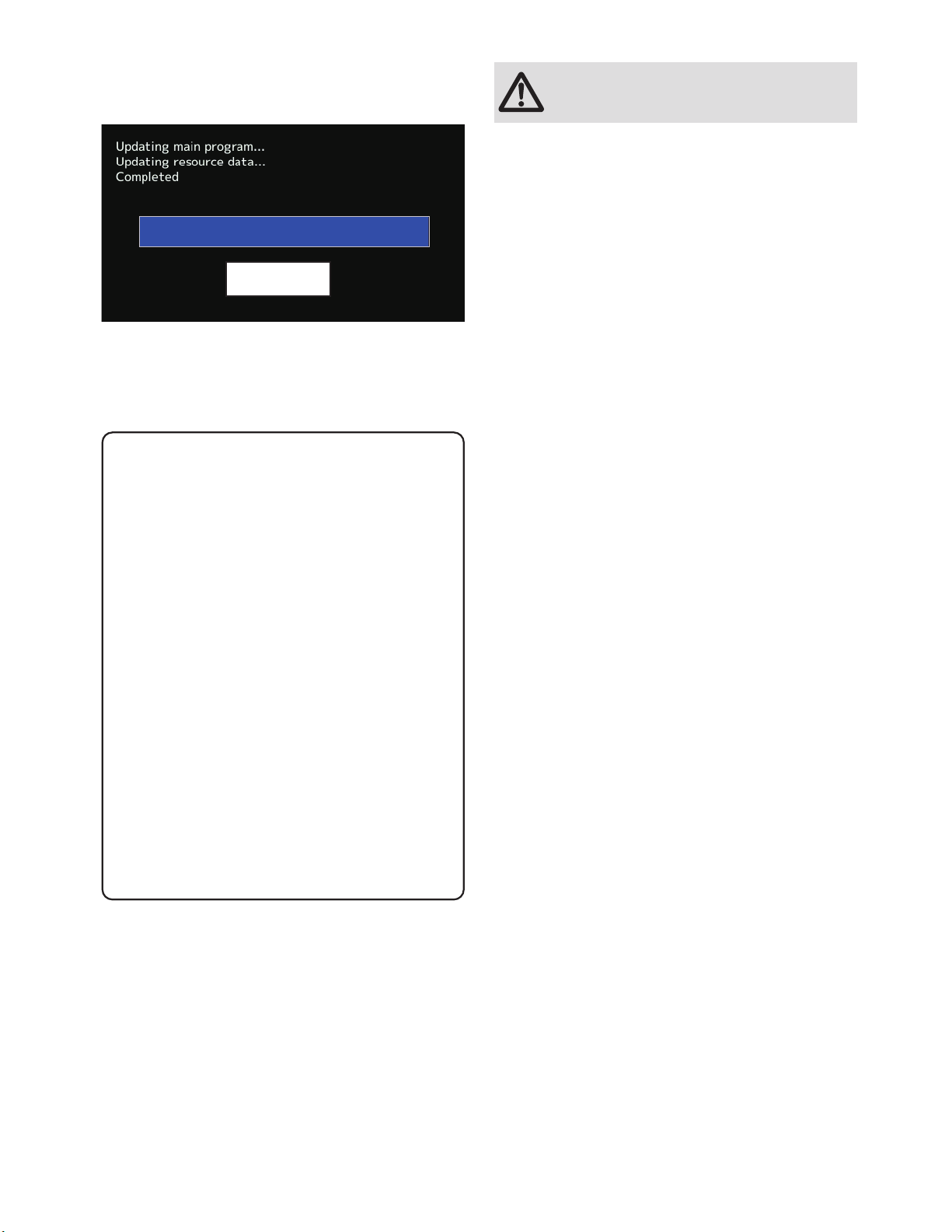
7. When the software update is completed,
"Completed" message is shown on the LCD
display of your T16IZ. (Show below picture.)
8. Turn off the power switch of your T16IZ and
remove the microSD card from the card slot.
Possible Problems
When one of the error messages shown
below appears on the LCD screen your
T16IZ, the software update will not be
completed.
"Low battery."
Software update is postponed because
of low battery. Retry the software update
after the battery is recharged.
8SGDWHÀOHQRWIRXQG
The T16IZ cannot find the update file on
the microSD card. Check to be sure all the
update files have been copied onto the
microSD card.
%URNHQÀOH
7KH7,=GHWHFWVWKHXSGDWHÀOHHUURU7KH
update file may be broken or for another
transmitter.
"Write error."
The software update procedure is stopped
for an unknown reason. Contact your local
service center when this error message
appears on the LCD screen of your T16IZ.
Don't absolutely remove the battery
and the microSD card from the
transmitter during the update.
There is a possibility that the transmitter
will be damaged.
Recovering a failed update
If you failed to update for any reason, it
may transmitter will not start.
In that case, please update again
transmitter in the following procedure.
1. Detach the battery from the transmitter.
2. Insert the microSD card that contained
WKHXSGDWHÀOHVWRWKHWUDQVPLWWHU
3. Attach the battery to the transmitter
while pressing down the "HOME/EXIT"
button.
4. The update will start.
Even after the above steps, if the
transmitter fails to update or does not
start, please have it serviced.
Complete
1M23Z07713 T16IZSOFTWAREUPDATECHANGES
V3.3
This software updates or alters the functions and features noted below. The instructions and information that follow are meant as a supplement to the original
instruction manual that accompanied the T16IZ transmitter. Please refer to the original instruction manual where applicable, but replace the steps indicated below with
these instructions. Please check to ensure that the update has been installed.
1) Select the System Menu.
2) Touch the [Information] button.
3) Confirm that the information in the display indicates the version numbers as noted above.
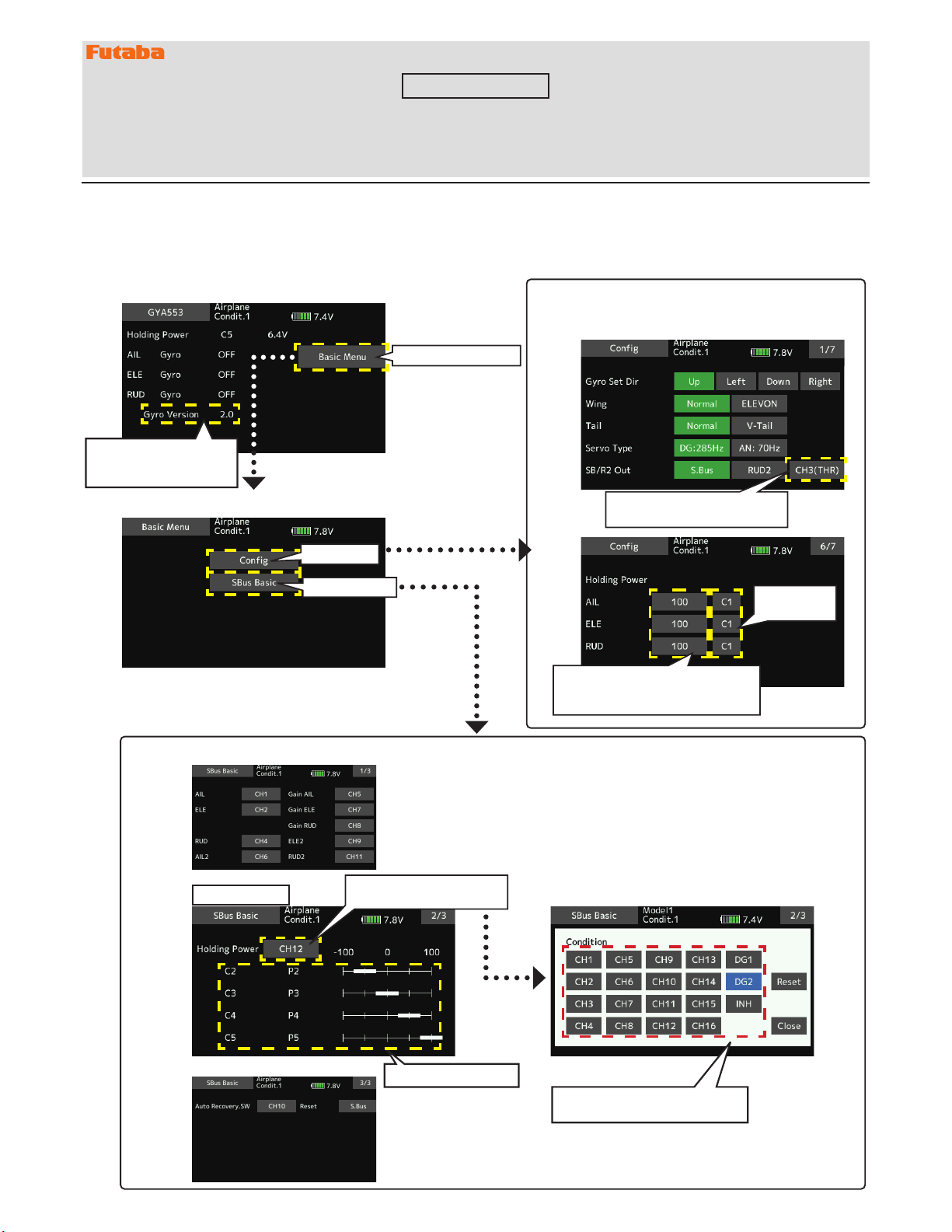
1. CH3 (THR) can be output to the RUD2 / S.BUS2 port.
2. The Holding Power rate of the aircraft in AVCS mode has been expanded to 5 types from C1 to C5, and each rate can be set by switching
the display.
3. Added the setting of switching CH of Holding Power rate C1 to C5 to S.BUS basic menu.
◆ BasicMenuscreen AddedCH3(THR)totheoutput
itemofRUD2/S.BUSport
C1-C5switch
button
Withtheswitchbutton,the
"holdingpower"ofeachrate(C1to
C5)canbedisplayedandadjusted.
Taptothebasicmenu
To"Config"
To"SBUSBasic"
◆S.BUSBasicscreen The second page has been added, and the total number of pages has changed from 2 to 3.
Additionalpage
HoldingPowerC2toC5
Taptomovetotherate
switchingCHsettingpage.
TaptheCHusedforrateswitching
toselectit.
Thesoftwareversionof
theconnectedGYA553is
displayed.
There are 7 pages in total, and the additional functions
are 1 page and 6 pages.
◆Configscreen
1. GYA553 New firmware Version 2.x support. → Refer to T16IZ GYA553 V2 Setting manual
26(1*,1((01HZÀUPZDUH9HUVLRQVXSSRUW
If you have used the EM-100, the update will unregister the EM-100 from the "Sensor" screen. Register the EM-100
again on the "Sensor" screen.
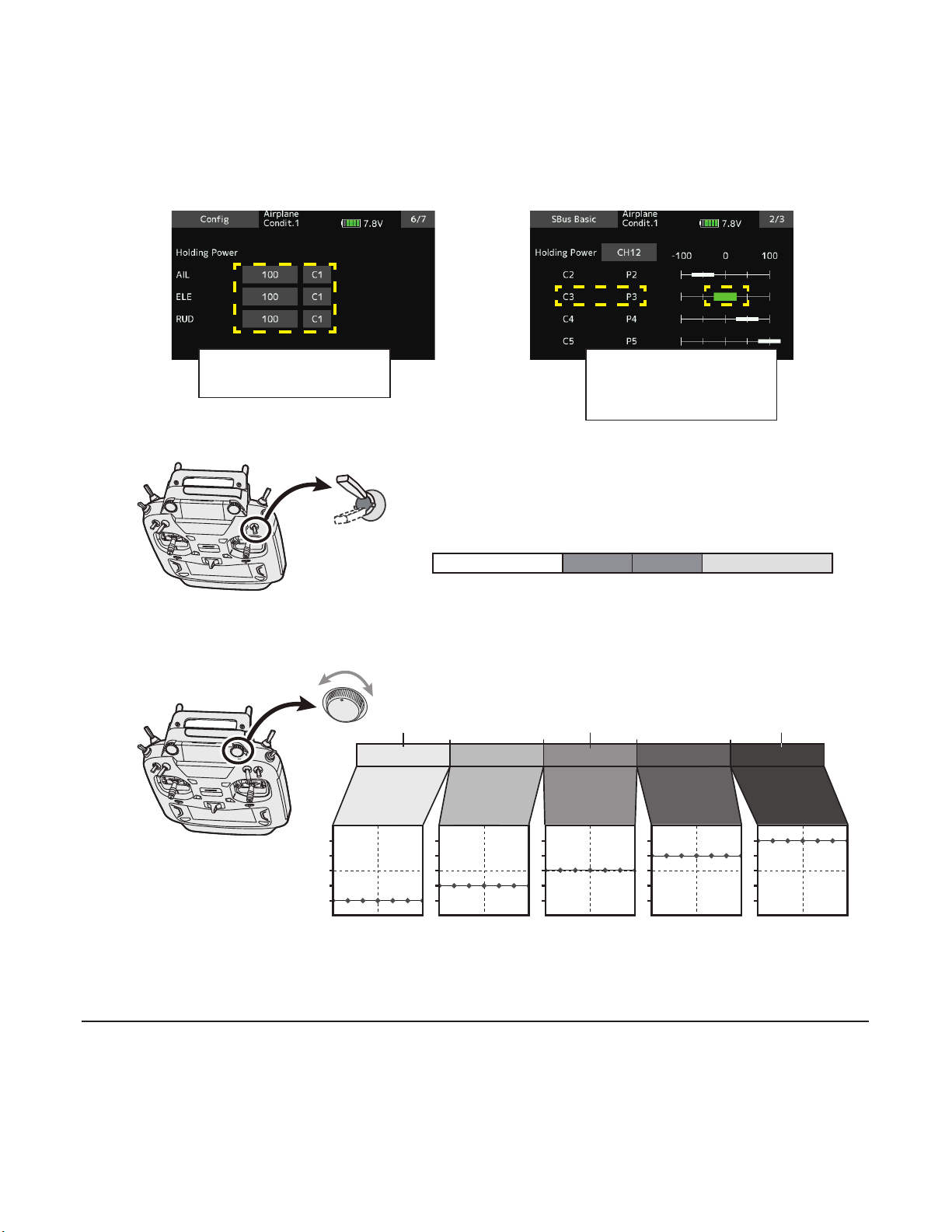
C1 C5
-100% 100%-35% 35%0%
C1 C3 C5C4C2
-100% 100%-25%-75% 75%25%0%
-100%
100%
0%
The current rate numbers C1 to C5 are displayed by operating the channel of the transmitter.
Like the flight condition function of the transmitter, you can set up to 5 different data for the attitude holding force rate of the
aircraft in AVCS mode by operating the switch from the transmitter, and switch between them. You can set the holding power rate
selector switch to the channel with the AFR function of the transmitter, and set the point for each rate on the AFR point curve to
switch. It is also possible to use the flight condition function to work with the flight condition switch.
When set to SW of DG1 or DG2
Switch channel rate
Channel rate
When set to dial or lever
C1
C5
S.BUSBasic2/3Config6/7
Displayandadjustthecurrentrate
numbersC1toC5byoperating
thechannelonthetransmitter.
Byoperatingthechannelofthe
transmitter,thechannelposition
ofthecurrentratenumbersC1
toC5willbedisplayedingreen.
T16IZSOFTWAREUPDATECHANGES
V3.2
V3
V3.1
1. Compatible with Futaba ESC MC-980H/A, MC-9130H/A, MC-9200H/A
Supports the telemetry function of MC-980H/A, MC-9130H/A, and MC-9200H/A.
1. Fixed an issue where the Vario Melody settings were not saved.
1. Fixed telemetry voice for Futaba ESC and Hobbywing ESC.
2. Fixed the problem that model copy fails.
This software updates or alters the functions and features noted below. The instructions and information that follow are meant as a supplement to the original
instruction manual that accompanied the T16IZ transmitter. Please refer to the original instruction manual where applicable, but replace the steps indicated below with
these instructions. Please check to ensure that the update has been installed.
1) Select the System Menu.
2) Touch the [Information] button.
3) Confirm that the information in the display indicates the version numbers as noted above.
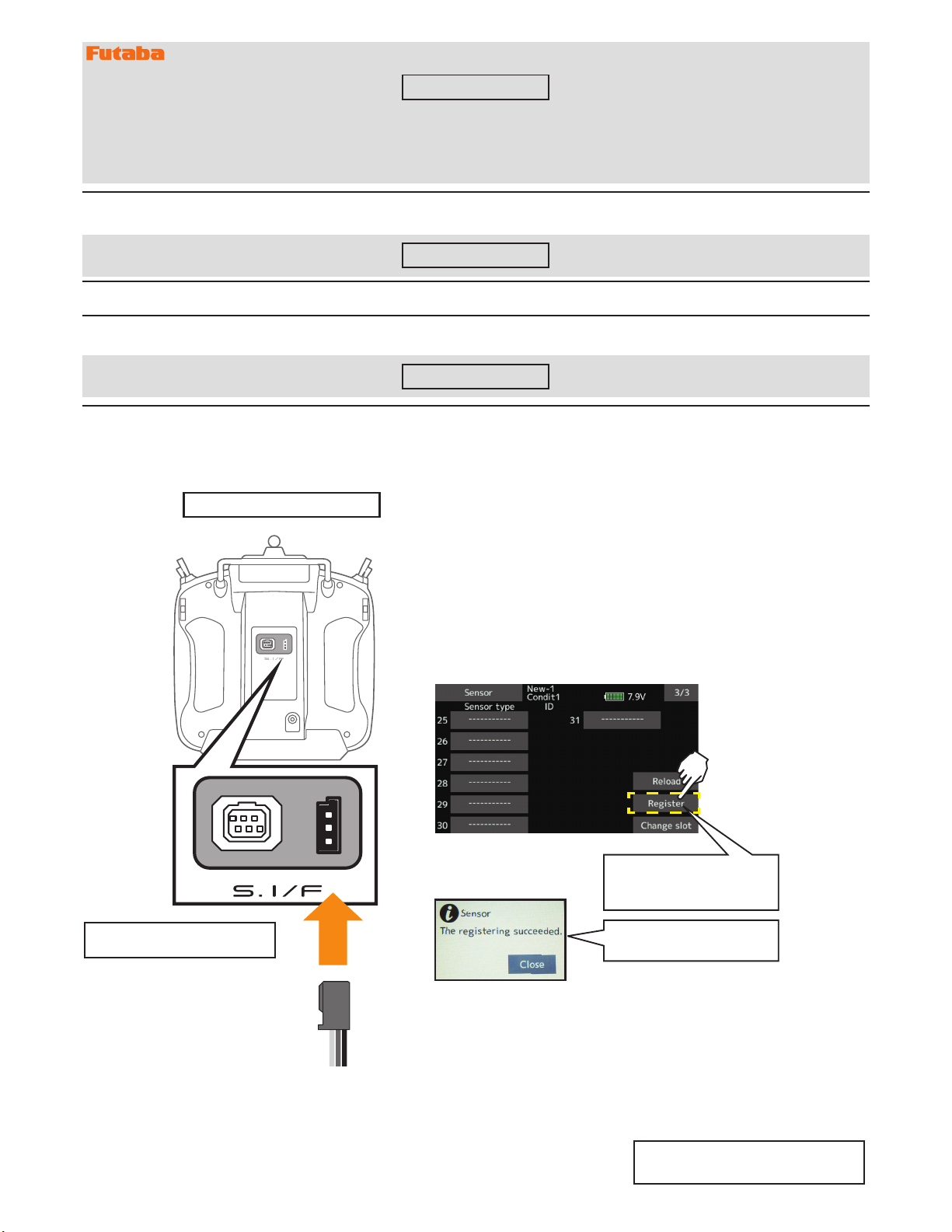
◆ RegistertheESCwithtransmitter. ◆ Alternatively,select[FutabaESC]instartslot24.
◆ TheregisteredESCwillbedisplayedas"FutabaESC".
ConnectSBM-2totheS.I/Fporton
thebackoftransmitter.
◆ Linkagemenu→Sensor→ 3/3
Registrationtotransmitter
● Callpage3of[Sensor].
*Pleasenotethattheproperdefaultslotforthisaccessoryisnumber8(8-
15).Thissensoruseseightslots.Beingmadetoastartslotare8,16,and
24.Informationonhowtochangetheslotassignmentisincludedinthe
transmitter'smanual.
ConnecttheSBM-2tothe
transmitterasshown,then
tapRegister.
Registrationiscompletewhen
thisscreenappears
Completeregistrationandremove
SBM-2fromthetransmitter.
◆The registered Hobbywing ESC is displayed as "Hobbywing ESC".
For details on Hobbywing ESC telemetry
support, refer to the Hobbywing website.
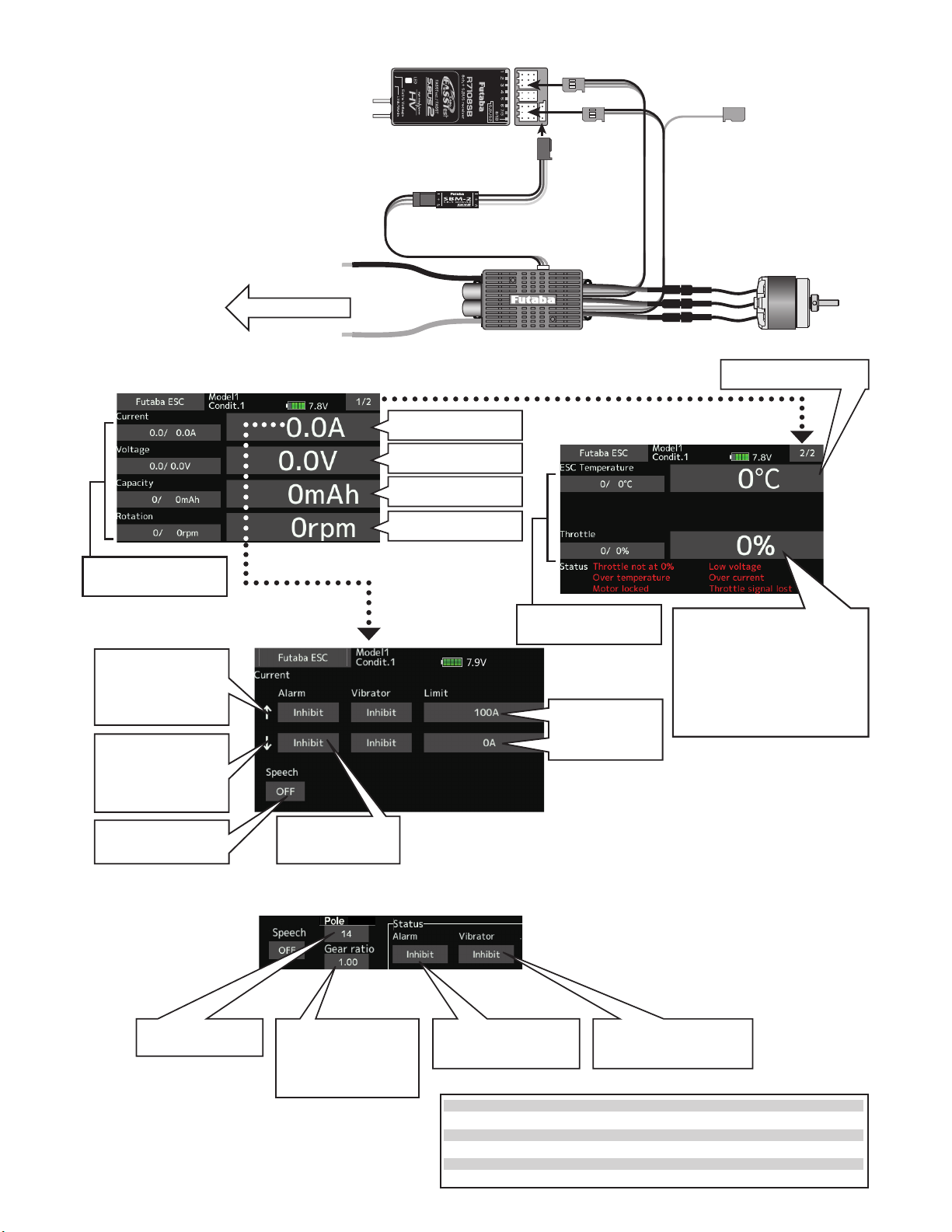
Alarmischosenfrom
Buzzer,Voice,and
Inhibit.
AllowsSpeechtobe
turnedONorOFF.
↑Anupwardarrow
indicatesthealarm
willsoundwhenthe
currentreachesabove
yoursetvalue.
↓Adownwardarrow
indicatesthealarm
willsoundwhenthe
currentreachesbelow
yoursetvalue.
*The current and capacity consumption display may vary
depending on the usage conditions, so use it as a guide.
◆ESC telemetry display screen
The ESC status is displayed. Alarm setting is also possible.
Displaymax/minvalue
Pressandholdtoreset.
Displaymax/minvalue
Pressandholdtoreset.
Taptomovetothe
currentsettingpage.
Taptomovetothe
voltagesettingpage.
Taptomovetothe
capacitysettingpage.
Taptomovetothe
rotationsettingpage.
Enterthenumberof
polesforyourmotor.
Whenenabled,thealarm
willbeactivatedinthe
followingwarningstate.
Ifthegearisdown,enter
thegearratiotodisplay
thehelicopterrotorspeed
andtheairplanegeardown
propellerspeed.
Whenenabled,thevibrator
willstartinthefollowing
warningstate.
◆ Warningstate
◆ AlarmscanbesetforVoltage,Capacity,Rotation,ESCtemperature,andThrottleusing
thesameprocedure.
ShowstheoutputlevelfromtheESC
tothemotor,notthepositionofthe
throttlestick.
Evenifthestickisinthe50%
position,theoutputmaynotbe50%
dependingontheESCsetting.
Throttlenotat0%
Lowvoltage
Overtemperature
Overcurrent
Motorlocked
Throttlesignallost
WhenthethrottlestickisnotlowwhenESCisstarted
Whenthebatteryvoltageisbelowthecutoffvoltage
WhentheESCtemperatureis110°Corhigher
Peakcurrentover
Whenthemotorlocks
Whennothrottlesignalisreceivedformorethan0.25s
Taptomovetothe
temperaturesettingpage.
Taptomovetothethrottlesetting
page.
◆ MC-9130H/Atelemetryconnectionexample
SBM-2
ESC
ToCH3
Tofreeport
Todrivebattery
Throttle
ToS.BUS2
◆ Alarmsetting
Setsthecurrenton
whichthealarm
operates.
V2
1. Add GYA553 Airplane Gyro setting function. (Refer the T16IZ GYA553 Setting Manual)
2. Compatible with SCORPION ESC telemetry
Added support for SCORPION POWER SYSTEM ESC some models.
©FUTABA CORPORATION 2022, 6
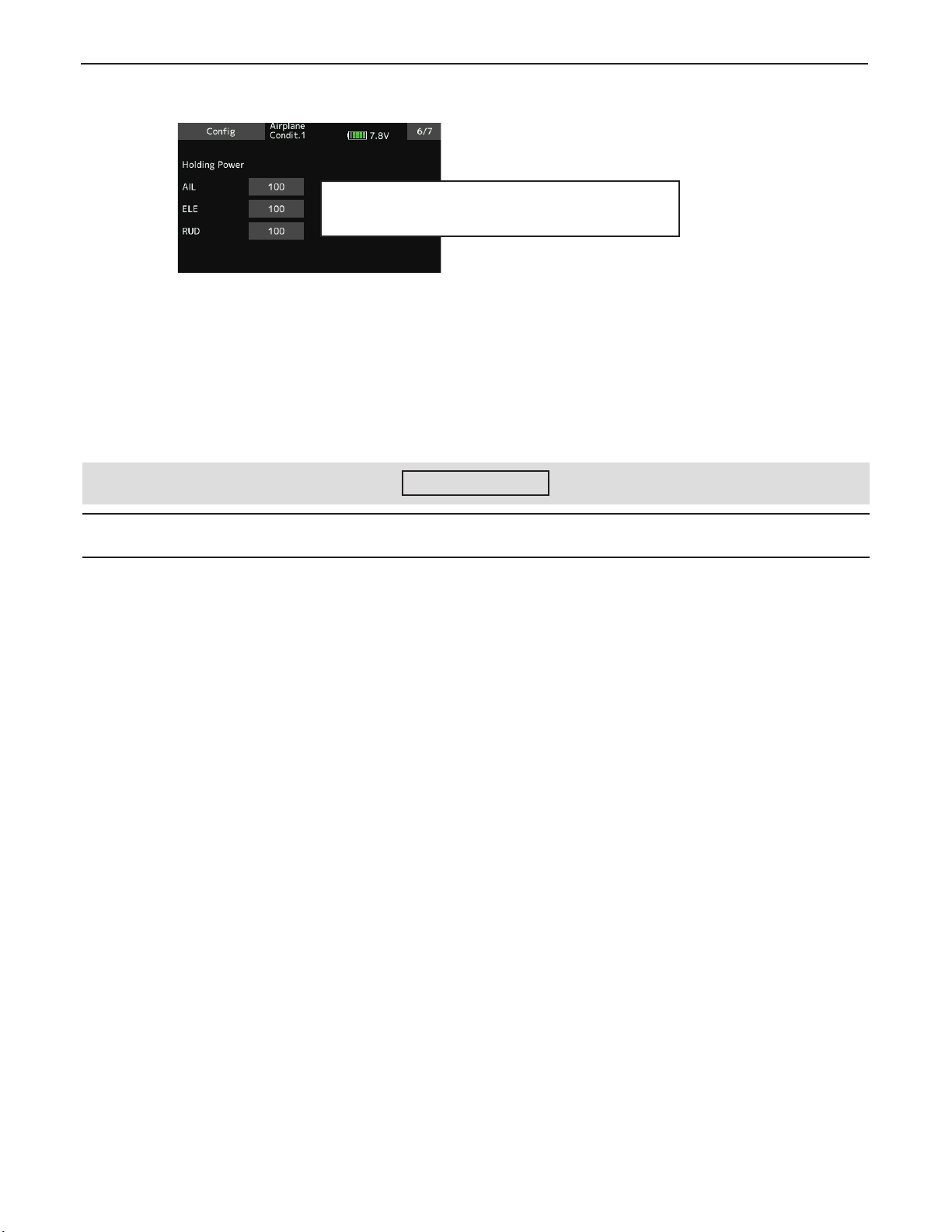
2. GYA553 Addition of setting parameters
AIL / ELE / RUD holding power setting has been added to the setting parameters of GYA553.
Adjusted the gyro holding force of the aircraft in AVCS mode.
Decreasing the value weakens the holding power and makes
the operation feeling closer to the Normal mode.
Altri manuali per T16IZ
8
Indice
Altri manuali FUTABA Trasmettitore

FUTABA
FUTABA R3006SB Manuale utente

FUTABA
FUTABA R3006SB Manuale utente

FUTABA
FUTABA 3PRKA Manuale utente

FUTABA
FUTABA FMT-02 Manuale utente

FUTABA
FUTABA R3008SB Manuale utente

FUTABA
FUTABA T6EXA Manuale utente

FUTABA
FUTABA T14SG Manuale tecnico

FUTABA
FUTABA FX-18 Manuale utente

FUTABA
FUTABA 9z Manuale utente

FUTABA
FUTABA FP-6EX - ADDENDUM Manuale utente


