GE 29393 Manuale utente

29393
Deluxe Caller ID Speakerphone
User’s Guide
We bring good things to life.

2
FCC REGISTRATION INFORMATION
Your telephone equipment is registered with the Federal Communications Commission and is in compliance with
parts 15 and 68, FCC Rules and Regulations.
1Notification to the Local Telephone Company
On the bottom o this equipment is a label indicating, among other in ormation, the FCC Registration number and
Ringer Equivalence Number (REN) or the equipment. You must, upon request, provide this in ormation to your
telephone company.
The REN is use ul in determining the number o devices you may connect to your telephone line and still have all
o these devices ring when your telephone number is called. In most (but not all) areas, the sum o the RENs o all
devices connected to one line should not exceed 5. To be certain o the number o devices you may connect to your
line as determined by the REN, you should contact your local telephone company.
Notes
• This equipment may not be used on coin service provided by the telephone company.
• Party lines are subject to state tari s, and there ore, you may not be able to use your own telephone equipment i
you are on a party line. Check with your local telephone company.
• Notice must be given to the telephone company upon permanent disconnection o your telephone rom your line.
2Rights of the Telephone Company
Should your equipment cause trouble on your line which may harm the telephone network, the telephone
company shall, where practicable, noti y you that temporary discontinuance o service may be required. Where
prior notice is not practicable and the circumstances warrant such action, the telephone company may temporarily
discontinue service immediately. In case o such temporary discontinuance, the telephone company must: (1)
promptly noti y you o such temporary discontinuance; (2) a ord you the opportunity to correct the situation; and
(3) in orm you o your right to bring a complaint to the Commission pursuant to procedures set orth in Subpart E
o Part 68, FCC Rules and Regulations.
The telephone company may make changes in its communications acilities, equipment, operations or procedures
where such action is required in the operation o its business and not inconsistent with FCC Rules and Regulations.
I these changes are expected to a ect the use or per ormance o your telephone equipment, the telephone
company must give you adequate notice, in writing, to allow you to maintain uninterrupted service.
INTERFERENCE INFORMATION
This device complies with Part 15 o the FCC Rules. Operation is subject to the ollowing two conditions: (1) This device
may not cause harm ul inter erence; and (2) This device must accept any inter erence received, including inter erence
that may cause undesired operation.
This equipment has been tested and ound to comply with the limits or a Class B digital device, pursuant to Part 15 o
the FCC Rules. These limits are designed to provide reasonable protection against harm ul inter erence in a residential
installation.
This equipment generates, uses, and can radiate radio requency energy and, i not installed and used in accordance
with the instructions, may cause harm ul inter erence to radio communications. However, there is no guarantee that
inter erence will not occur in a particular installation.
I this equipment does cause harm ul inter erence to radio or television reception, which can be determined by turning
the equipment o and on, the user is encouraged to try to correct the inter erence by one or more o the ollowing
measures:
• Reorient or relocate the receiving antenna (that is, the antenna or radio or television that is “receiving” the
inter erence).
• Reorient or relocate and increase the separation between the telecommunications equipment and receiving
antenna.
• Connect the telecommunications equipment into an outlet on a circuit di erent rom that to which the receiving
antenna is connected.
I these measures do not eliminate the inter erence, please consult your dealer or an experienced radio/television
technician or additional suggestions. Also, the Federal Communications Commission has prepared a help ul booklet,
“How To Identi y and Resolve Radio/TV Inter erence Problems.” This booklet is available rom the U.S. Government
Printing O ice, Washington, D.C. 20402. Please speci y stock number 004-000-00345-4 when ordering copies.
HEARING AID COMPATIBILITY
This telephone system meets FCC standards or Hearing Aid Compatibility.
FCC NUMBER IS LOCATED ON THE CABINET BOTTOM
REN NUMBER IS LOCATED ON THE CABINET BOTTOM

3
TABLE OF CONTENTS
FCC REGISTRATION INFORMATION 2
INTERFERENCE INFORMATION ........ 2
HEARING AID COMPATIBILITY ........ 2
ITRODUCTIO ..................................... 5
BEFORE Y OU BEGI .............................. 6
PARTS CHECKLIST ............................. 6
MODULAR JACK REQUIREMENTS .......... 6
ISTALLATIO & SETUP ......................... 7
IMPORTANT INSTALLATION
INFORMATION ................................... 7
DATA PORT ...................................... 7
INSTALLING THE BATTERIES .................. 7
ISTALLATIO ....................................... 9
DESKTOP INSTALLATION ...................... 9
WALL MOUNT INSTALLATION ............ 10
CALLER ID SET UP............................ 12
SETTING Y OUR LOCAL AREA CODE .... 13
SETTING Y OUR REGIONAL
AREA CODE ................................... 14
SETTING THE CID DISPLAY LANGUAGE 15
SETTING THE T ONE OR PULSE DIALING 16
CALLER ID FEATURES .......................... 17
SUMMARY SCREEN .......................... 17
RECEIVING AND STORING CALLS ........ 17
REVIEWING CALL RECORDS ............... 18
DELETING CALL RECORDS ................ 18
DIALING BACK ................................ 18
IF Y OU PROGRAMMED Y OUR
LOCAL AREA CODE OR
REGIONAL AREA CODE IN THE
SET UP MENU .................... 19
IF Y OU DID NOT PROGRAM
Y OUR LOCAL AREA CODE
IN THE SET UP MENU ........... 20
VIP (VERY IMPORTANT PERSON) ....... 21
STORING A VIP NUMBER IN
MEMORY ....................................... 21
VIEWING VIP RECORDS IN THE
VIP LOG ....................................... 21
MESSAGE I DICATORS ......................... 22
USI G THE SPEAKERPHO E .................. 23
SPEAKERPHONE LOCATION ................ 23
SPEAKERPHONE USE ....................... 24
TELEPHO E BASICS ............................. 25
RECEIVING A PHONE CALL ................ 25
PLACING A PHONE CALL ................... 25
SWITCHING BETWEEN SPEAKER AND
HANDSET ....................................... 26
TEMPORARY T ONE DIALING ............... 26
VOLUME CONTROL .......................... 26
REDIAL .......................................... 27
ONE -TOUCH REDIAL ....................... 27
FLASH ........................................... 27
DISPLAY CONTRAST ......................... 28
MUTE ........................................... 28
SEE MARKING ON BOTTOM / BACK OF PRODUCT
RISK OF ELECTRIC SHOCK
DO NOT OPEN
WAR I G: TO PREVENT FIRE OR
ELECTRICAL SHOCK HAZARD, DO
NOT EXPOSE THIS PRODUCT TO
RAIN OR MOISTURE.
THE LIGHTNING FLASH
AND ARROW HEAD
WITHIN THE TRIANGLE
IS A WARNING SIGN
ALERTING YOU OF
“DANGEROUS
VOLTAGE” INSIDE THE
PRODUCT.
CAUTION: TO REDUCE THE RISK OF
ELECTRIC SHOCK, DO NOT REMOVE
COVER (OR BACK). NO USER
SERVICEABLE PARTS INSIDE. REFER
SERVICING TO QUALIFIED SERVICE
PERSONNEL.
THE EXCLAMATION
POINT WITHIN THE
TRIANGLE IS A
WARNING SIGN
ALERTING YOU OF
IMPORTANT
INSTRUCTIONS
ACCOMPANYING THE
PRODUCT.
CAUTIO :

4
MEMORY ........................................... 29
STORING MEMORY DIAL NUMBERS .... 29
REVIEWING NUMBERS STORED IN
MEMORY ....................................... 31
CHANGING A STORED NUMBER ......... 31
ERASING A STORED NUMBER ........... 32
COPY CALLER ID MEMORY TO USER
MEMORY ....................................... 32
COPY REDIAL MEMORY TO USER
MEMORY ....................................... 33
STORING A PAUSE IN MEMORY ......... 34
DIALING FREQUENTLY CALLED
NUMBERS ...................................... 34
TROUBLESHOOTI G T IPS ....................... 35
GE ERAL PRODUCT CARE .................... 37
SERVICE ............................................ 37
IDEX ............................................... 38
LIMITED W ARRA TY ............................ 40

5
INTRODUCTION
Congratulations on purchasing this Caller ID telephone. This unit was
designed to be simple to use, and you can reach its ull potential more
quickly by taking a ew minutes to read this User’s Guide. This Caller ID
telephone is a multi unction product or use with the Caller ID and Call
Waiting services available rom your local telephone company.
Your Caller ID phone enables you to:
• Identi y callers be ore you answer the phone, and view the telephone
number and name o a waiting caller (Call Waiting Caller ID).
• View the time and date o each incoming call.
• Record up to 75 Caller ID messages sequentially.
• Know who called while you were away.
IMPORTANT: In order to use all of the features of this unit, you must
subscribe to two separate services: the standard Name/Number Caller ID
Service to know who is calling when the phone rings and Caller ID with Call
Waiting Service to know who is calling while you are on the phone. Contact
your local telephone company to subscribe to Caller ID and Caller ID with Call
Waiting Services.
CAUTION: When using telephone equipment, there are basic safety
instructions that should always be followed. Refer to the IMPORTANT
SAFETY INSTRUCTIONS provided with this product and save them
for future reference.

6
Base Telephone line cord
Handset Coiled cord
BEFORE YOU BEGIN
PARTS CHECKLIST
Make sure your package includes the ollowing items:
MODULAR JACK REQUIREMENTS
You need an RJ11 type modular phone jack, which is the
most common type o phone jack and might look like the
one pictured here. I you don’t have a modular jack, call
your local phone company to ind out how to get one
installed.
ABC
2
DEF
3
1
JKL
5
MO
6
GHI
4
TUV
8
WXYZ
9
PQRS
7
OPER
0#
TOE
*
FLASHREDIAL
SPEAKER
MUTECOTRASTVIP
STORE
DIAL
REVIEW
ERASEOPTIO
exit

7
INSTALLATION & SETUP
IMPORTANT INSTALLATION INFORMATION
• Never install telephone wiring during a lightning storm.
• Never touch uninsulated telephone wires or terminals, unless the
telephone line has been disconnected at the network inter ace.
• Use caution when installing or modi ying telephone lines.
DATA PORT
This phone is equipped with a data port or you to connect to an auxiliary
phone device, such as a ax machine, computer modem, answering
machine, or even a cordless phone.
INSTALLING THE BATTERIES
Your Caller ID phone uses 4 AA-size alkaline batteries or receiving and
storing Caller ID records and or the numbers you use or memory dialing.
IMPORTANT: You will have approximately 60 seconds to replace the batteries
before the memories stored are lost. Please read the instructions before
replacing the batteries and have the batteries ready to be inserted beforehand.

8
Battery compartment
CAUTION: Unplug all phone cords from the
wall before installing or changing batteries.
1. Use a screwdriver to loosen the screw
and pry up the battery compartment door
on the bottom o the phone.
2. Insert 4 AA-size alkaline batteries as
shown on the diagram in the battery
compartment.
3. Snap the battery compartment door back
into place and tighten the screw.
4. I the line cord was previously connected,
re-attach it to the unit and check your
memory locations.
NOTE: If the low battery icon appears
in the display, you need to replace the
batteries. It is important that you replace the
batteries as soon as possible in order to
maintain Caller ID operation.
During the replacing of batteries, a backup
circuit in the unit will retain your stored
information for up to 60 seconds. Write
down any stored information you do not
want erased.
IMPORTANT: If you’re not going to use the
telephone for more than 30 days, remove
the batteries because they can leak and
damage the unit.

9
INSTALLATION
DESKTOP INSTALLATION
1. Plug the coiled cord into the handset. Plug the other end into the jack on
the side o the base. Place the handset in the cradle on the base.
2. Plug the line cord into jack on the back o the base. Plug the other end
into a wall jack.
3. Set the RINGER switch on the base to the desired loudness.
• HI = De ault, loudest sound.
• LO = Sound will be lower.
• OFF = Telephone will not ring.
1
2
3

10
1
WALL MOUNT INSTALLATION
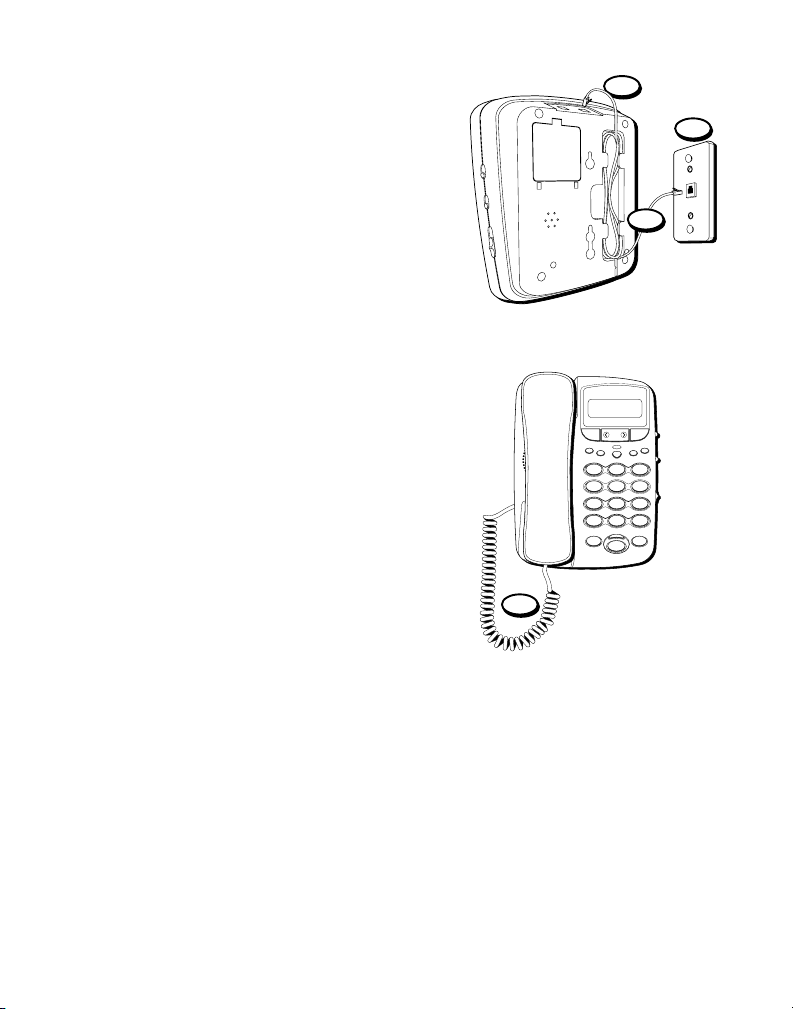
The speakerphone can be mounted on a
wall phone plate (not included).
1. Plug the phone cord into the phone jack
on the back o the unit, and wrap the
extra phone line around the bottom o
the base.
2. Connect the phone line to the modular
jack on the wall.
3. Slip the mounting holes over the wall
plate posts and slide the unit down
irmly into place.
4. Plug the handset line into the unit, then
hang up the phone.
ABC
2
DEF
3
1
JKL
5
MO
6
GHI
4
TUV
8
WXYZ
9
PQRS
7
OPER
0#
TOE
*
FLASHREDIAL/PAUSE
SPEAKER
PAUSECOTRASTVIP
STORE
DIAL
REVIEW
ERASEOPTIO
3
4
2
Indice
Altri manuali GE Telefono