GE 30544 Manuale utente

Model number:
30544
DECT 6.0 CORDED/CORDLESS TELEPHONE

Thank you for choosing GE!
Register your product
Please take a moment to register your product online. Just go to
www.gephones.com and click “register here” from the home page. Provide
your email address and receive product updates, special oers, or discounts
on future purchases.
* It will not diminish your warranty rights if you choose not to register.
Assistance and more information
Retain your sales receipt as proof of purchase in the event warranty service is
necessary.
For product assistance or for more information about accessories, visit our
website at www.gephones.com or call our customer service center at
1-877-394-9775.
Attach your sales receipt here.

Table of contents
Getting started
Parts checklist..................................................................1
Telephone base installation.......................................2
Telephone jack requirements ...................................2
Charger installation.......................................................3
Corded handset installation......................................3
Battery installation.........................................................4
Overview
Telephone base layout.................................................5
Telephone base layout.................................................6
Handset layout ................................................................7
Battery charging.............................................................8
Telephone base screen display icon......................9
Handset screen display icon.....................................9
Initial settings
Dialing mode..................................................................10
Programming your area code (optional) ..........10
Telephone operation
Make a call......................................................................11
Predial a call...................................................................11
Answer a call .................................................................11
Mute...................................................................................11
End a call.........................................................................12
Speakerphone...............................................................12
Volume control .............................................................12
Audio boost ....................................................................12
Equalizer ..........................................................................12
Make a call using the redial memory.................13
Save a number from the redial list to the
phonebook..................................................................13
Delete number from the redial list.......................14
Call waiting or call waiting with caller ID
service...........................................................................14
Using multiple handsets...........................................14
Reset VMWI ....................................................................15
Intercom/Find................................................................15
Intercom ..........................................................................16
To answer an incoming call during
intercom.......................................................................16
To transfer a call ..........................................................17
Handset settings
Ringer volume...............................................................18
Ringer Tones ..................................................................18
End Range Tone ...........................................................18
Key beeps........................................................................18
Equalizer ..........................................................................19
Handset name..............................................................19
Display language.........................................................19
Auto Talk..........................................................................20
Telephone base settings
Ringer volume...............................................................21
Ringer tone.....................................................................21
Key beeps........................................................................21
Display language.........................................................21
Base name......................................................................22
Equalizer ..........................................................................22
Clock and alarm
Date and time ...............................................................23
Phonebook
Add a phonebook record.........................................24
Memory location..........................................................25
Character table ............................................................26
To search a phonebook entry
alphabetically ............................................................27
Edit a phonebook entry ............................................27
Delete a phonebook entry.......................................28
Delete all phonebook entries.................................28
Phonebook capacity ..................................................28
Caller ID
Using Caller ID service ..............................................29
Phonebook Caller-ID matching.............................29
Review/call from the call log..................................29
Save a number to the phonebook.......................30
Delete caller ID record...............................................30
Call log display screen messages........................30
Answering system
Turning the answering system on or o...........31
Answering system and voice mail.......................31
Message capacity .......................................................31
New message indicator............................................31
Memo recording...........................................................31
Outgoing Announcement (OGA) ...........................32
Record outgoing announcement.........................33
Delete your recorded OGA ......................................33
Number of rings before the system
answers........................................................................34
Message Alert................................................................34
Call intercept..................................................................35
Message playback using the handset...............36

Message playback using the telephone
base................................................................................36
Options during playback..........................................36
Delete all messages ...................................................36
Remote code for remote access..........................37
Access the answering system remotely...........37
Remote access commands....................................38
Advanced settings
Registering a handset ...............................................39
Deregistering a handset...........................................39
Appendix
Troubleshooting guide..............................................40
General Product Care................................................41
Important Safety Instructions ...............................42
FCC Parts 15, 68 and ACTA......................................45
One Year Limited Warranty ....................................48
Index..................................................................................50
Technical specication .............................................52
Remote access operation card.............................53

1
Getting started
Parts checklist
Your telephone contains the following items. Save your sales receipt and original
packaging in the event warranty service is necessary.
Charger with adapter
attached
(1 for 30544XE1
2 for 30544XE2
3 for 30544XE3
4 for 30544XE4)
Cordless handset
(1 for 30544XE1
2 for 30544XE2
3 for 30544XE3
4 for 30544XE4)
Battery
compartment cover
(1 for 30544XE1
2 for 30544XE2
3 for 30544XE3
4 for 30544XE4)
Battery
(1 for 30544XE1
2 for 30544XE2
3 for 30544XE3
4 for 30544XE4) Telephone line cord
Telephone base
User’s guide
Power adapter for
telephone base
ans annc
clear
memo
Corded handset
Handset coiled cord
DECT 6.0 CORDED/CORDLESS TELEPHONE
Model number:
30544

Getting started
2
CAUTION:
1. Use only the power adaptor that came with this unit.
Using other power adaptors may damage the unit.
2. To prevent re or electrical shock hazard, do not
expose this product to rain or moisture.
Telephone base installation
1. Plug the smaller end of the power adapter into the power jack at the bottom of the
telephone base, route the cord through the tabbed slot on the left.
2. Plug one end of the telephone line into the jack at the bottom of the telephone
base, route the cord through the tabbed slot on the right.
3. Plug the other end of the telephone line into a telephone wall jack.
4. Plug the larger end of the power adapter into an electrical outlet not controlled by
a wall switch.
If you have DSL high speed Internet service, a DSL lter is required (not included).
Contact your DSL service provider for more information about DSL lter.
DSL lter (not included)
is required if you
have DSL high speed
Internet service.
Telephone jack requirements
To use this phone, you need a RJ11C type modular telephone jack,
which might look like the one pictured here, installed in your home.
If you do not have a modular jack, call your telephone service
provider to nd out how to have one installed.
Wall plate
Modular
telephone
line jack

Getting started
3
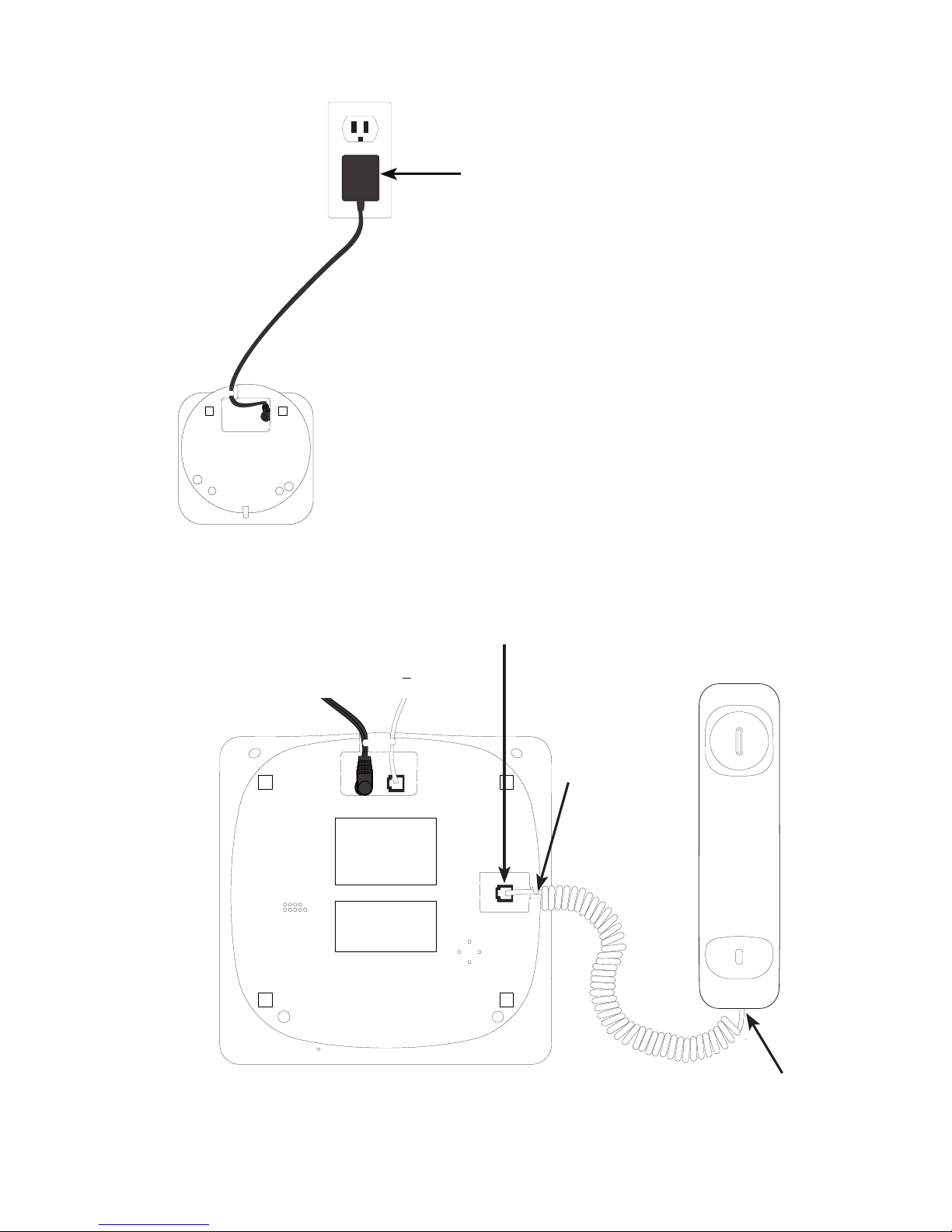
Plug one end of the handset coiled cord into
the jack on the bottom of the telephone base.
Plug the other end of the
handset coiled cord into the
jack at the corded handset.
Charger installation
Corded handset installation
Plug the power adapter into an
electrical outlet not controlled
by a wall switch. Route the
cord through the tabbed slot.
Route the
cord through
the tabbed
slot.

Getting started
4
Battery installation
CAUTION:
1. Use only the supplied rechargeable battery or equivalent replacement battery. See battery
specications on the Technical specication page or visit our website at www.gephones.com to
nd out how to order a replacement battery if necessary.
2. If the handset will not be used for an extended period of time, unplug the battery and remove it
from the handset to prevent possible leakage.
Please fully charge your handset before use!
For optimum battery performance, charge the battery for 16 hours before rst use.
NOTE: Use only the supplied rechargeable battery or replacement battery. Visit our website at
www.gephones.com to order a replacement battery if necessary.
1. Plug the battery connector
securely into the socket inside the
handset battery compartment.
Make sure that red and black
wires on the plug are properly
inserted into the socket as shown.
2. Place the battery
and the wire inside
the battery
compartment.
4. Place the handset onto the charger as shown. An animated
battery icon will display after a few minutes to show that
the handset battery is successfully being charged. For
optimum performance, please allow the battery to charge
for 16 hours before rst use.
3. Align the cover
against the battery
compartment and
slide it upwards until
it clicks into place.
Animated
charging
indicator
red
wire
black
wire

5
Overview
Telephone base layout
ans annc
clear
memo
Phonebook/down
• Press to review the
phonebook when the
telephone is not in use.
• While in menu, press to
scroll down.
• Press to decrease the
volume during a call,
message playback or call
screening.
redial
Press to review redial list.
Find/intercom
Press to initiate an intercom
call or transfer a call.
ans answer on/o
Press to turn the answering
system on or o.
• During a call, press to
answer an incoming
call if you receive a call
waiting alert.
• Press to delete the
message during
playback.
• Press and hold to delete
all old messages when
the phone is not in use.
During a call, press to
send touch-tone signals
temporarily.
CID/up
• Press to review the call log when the telephone
is not in use.
• While in menu, press to scroll up.
• Press to increase the volume during a call,
message playback or call screening.
annc
• Press to repeat a
message or press
twice to play the
previous message
during message
playback.
• Press and hold to
record an outgoing
announcement
message.

Overview
6
Telephone base layout
ans annc
clear
memo
clear clear/mute
• During programming,
press to cancel and exit
without making changes.
• Press to mute a call,
press again to resume
conversation.
menu/select
• Press to show menu.
• Press to select an item,
or to save an entry or
setting.
m1-m3
Press to dial preset memory
locations.
speaker
• Press to make or
answer a call using the
speakerphone.
• During a call, press
to switch between
speakerphone and
normal handset use.
boost
Press to increase
the listening
volume during a
call.
EQ
Press to adjust
the audio tone
during a call.
memo
• Press to skip to
the next message
during message
playback.
• Press and hold to
record a memo.
play
Press to play
messages
or stop
playback.
• Press and hold to add
a dialing pause when
dialing or entering
numbers into phonebook.
• Press to switch between
upper case and lower
case when entering
names into phonebook.
• Press to change the
telephone number format
(7 digits, 1+, or 1+ area
code) for appropriate
dialing.
Indice
Altri manuali GE Telefono