
General CL10 Manuale utente


TABLE OF CONTENTS
Introduction . . . . . . . . . . . . . . . . . . . . . . . . . . . . . . . . . . . . . . . . . . . . . . . . . . . . . . . . 3
Key Features & Benefits. . . . . . . . . . . . . . . . . . . . . . . . . . . . . . . . . . . . . . . . . . . . . 3 –4
Safety Instructions. . . . . . . . . . . . . . . . . . . . . . . . . . . . . . . . . . . . . . . . . . . . . . . . . . . . 4
What’s in the Box . . . . . . . . . . . . . . . . . . . . . . . . . . . . . . . . . . . . . . . . . . . . . . . . . . . . . 4
Product Overview. . . . . . . . . . . . . . . . . . . . . . . . . . . . . . . . . . . . . . . . . . . . . . . . . . 5 –6
Setup Instructions . . . . . . . . . . . . . . . . . . . . . . . . . . . . . . . . . . . . . . . . . . . . . . . . . . . . 7
Install Batteries . . . . . . . . . . . . . . . . . . . . . . . . . . . . . . . . . . . . . . . . . . . . . . . . 7
Install Test Leads . . . . . . . . . . . . . . . . . . . . . . . . . . . . . . . . . . . . . . . . . . . . . . . 7
Operating Instructions . . . . . . . . . . . . . . . . . . . . . . . . . . . . . . . . . . . . . . . . . . . . . 8 – 14
Single-Pole Circuit Applications . . . . . . . . . . . . . . . . . . . . . . . . . . . . . . . . 8 – 11
Locating a Cable or Line Break Behind a Wall . . . . . . . . . . . . . . . . . . 8 –9
Locating a Socket, Switch or Junction Box or Tracing a Line . . . . . . . . . 9
Locating a Cable or Line Break sing Two Transmitters . . . . . . . . . . . . 10
Locating a Blockage in a Non-metallic Pipe . . . . . . . . . . . . . . . . . . . . . 11
Locating a Metal Water Pipe . . . . . . . . . . . . . . . . . . . . . . . . . . . . . . . . . 11
Two-Pole Circuit Applications. . . . . . . . . . . . . . . . . . . . . . . . . . . . . . . . . 12 – 14
Locating a Socket, Switch, Junction Box or Fuse or Tracing a Line. . . . 12
Identifying the Fuse or Circuit Breaker Associated with an AC Outlet . . 13
Locating a Short Circuit. . . . . . . . . . . . . . . . . . . . . . . . . . . . . . . . . . . . . 13
Increasing the Detection Range on Charged Circuits . . . . . . . . . . 13 – 14
sing the Receiver as a Voltmeter . . . . . . . . . . . . . . . . . . . . . . . . . . . . . . . . . 14
Specifications . . . . . . . . . . . . . . . . . . . . . . . . . . . . . . . . . . . . . . . . . . . . . . . . . . . . . . 15
Operating & Maintenance Instructions . . . . . . . . . . . . . . . . . . . . . . . . . . . . . . . 16 – 17
Changing Batteries. . . . . . . . . . . . . . . . . . . . . . . . . . . . . . . . . . . . . . . . . . . . . 16
Checking and Replacing the Transmitter’s Fuse . . . . . . . . . . . . . . . . . . 16 – 17
Operating & Maintenance Tips . . . . . . . . . . . . . . . . . . . . . . . . . . . . . . . . . . . . 17
Warranty Information . . . . . . . . . . . . . . . . . . . . . . . . . . . . . . . . . . . . . . . . . . . . . . . . . 18
Return for Repair Policy . . . . . . . . . . . . . . . . . . . . . . . . . . . . . . . . . . . . . . . . . . . . . . . 18
2

INT ODUCTION
On jobs ranging from installing a through-the-wall air-conditioner to renovating a house with new
wiring and plumbing, it is vital to know the locations of existing electrical cables and wires, as
well as those of metal and non-metal pipes carrying water and gas. Without access to the
building’s construction drawings, there is no way to be sure that an action as simple as driving a
nail into a wall will not produce an electric shock—or far worse.
The CL10 Cable & Pipe Locator was designed to address this serious safety issue with maximum
flexibility. The CL10 consists of two main units—a transmitter and a receiver—and a set of
accessories. The two main units work together in the following way in most applications. The
user attaches the transmitter to an existing cable or wire (or metal pipe). In response to the push
of front-panel buttons, the transmitter sends a radio-frequency current and a digital identifying
code down the cable or wire. The current generates an electric field that can be sensed by the
receiver if its nose (probe) is positioned nearby—even on the other side of a wall, floor or ceiling.
Circuits in the receiver convert the weak induced voltage into a signal strong enough to be
displayed graphically and digitally. Other circuits read the identifying code to confirm the source
of the signal. By manipulating the strength of the transmitted signal and the sensitivity of the
receiver, the user can precisely locate cables, wires or pipes behind walls or under floors, as well
as discontinuities within them.
The system is equipped with several functions and features that improve its utility, accuracy and
reliability. One is the inclusion of big, bright LCDs, visual and audible indications, and mutable
loudspeakers—as well as an LED flashlight—on both units. Another is the system’s full
compatibility with single-pole and two-pole circuits. Other examples include the ability of either
unit to measure AC/DC voltage, just like a voltmeter. The transmitter even automatically tests its
own functioning and displays the results.
KEY FEATU ES AND BENEFITS
• Makes it safe to break through a wall by revealing and locating hidden cables, electrical lines,
and water/gas supply pipelines up to 6.6 ft. (2m) behind it
• Eliminates the need to find and read construction drawings before starting a job
• Detects breaks and short circuits in buried cables, electrical lines and floor-heating systems
• Identifies the circuit breaker or fuse associated with any energized or de-energized 110V outlet
• Traces branch-circuit sockets that have been accidently plastered over
• Transmitter and receiver communicate using any of eight codes; each displays readings on a
big, bright, multi-function graphic LCD. Both units also include a flashlight (for illuminating dark
areas) and a mutable beeper/buzzer.
• The transmitter displays its transmission power level (any of three levels), transmission code,
battery status, any voltages it detects, and the results of its functional self-test
• The transmitter or receiver also can operate as AC/DC voltmeter with a range of 12 to 600V
3

• The receiver has variable sensitivity, a backlit display, a loudspeaker and a 10-minute Auto
Power Off function. It can display the transmitter’s power level and transmission code, the
battery status of both units, and the amplitude of detected induced AC voltages
• Both units are compatible with one- and two-pole circuits
• Additional transmitters are available to make locating short-circuits and cable breaks more
accurate
• Includes a metal grounding rod
• The transmitter is powered by one 9V battery; the receiver by six “AAA” batteries
SAFETY INST UCTIONS
Prior to using the transmitter, inspect the unit, its test leads and any attached clips or probes
carefully for any signs of damage or wear. It is crucial that the instrument and its accessories
remain structurally sound. D N T USE the transmitter if you detect any signs of damage.
Do not exceed the transmitter’s overvoltage rating of CAT III 300V at any time.
Although it is safe to connect the transmitter directly to live circuits, use best-practice insulation
measures in accordance with industrial safety codes to avoid electric shock and harm.
When near dangerously high voltages, make measurements only under the supervision of a
qualified electrician.
WHAT’S IN THE BOX
The CL10’s transmitter, receiver and accessories come in a
black canvas pouch inside an illustrated cardboard box.
1. Pouch
2. Receiver
3. Transmitter
Accessories
4. Attachable red and black alligator clips with shrouded
banana jacks
5. “9V” battery
6. 6 “AAA” batteries
7. User’s manual
8. 5 ft. (1.5m) long red and black universal test leads with
shrouded banana plugs
9. Attachable red and black test probes with lantern-type tips
and shrouded banana jacks
10. Grounding rod
Fig. 1. How the CL10 is packaged
4

P ODUCT OVE VIEW
1. LCD
2. (P WER on/off) button
3. Transmission power (I, II or III) LEVEL SEL. button
4. Transmitting code START/ST P transmission button
5. Transmitting C DE SEL. button. Press and hold to
enter selection mode; press briefly to exit.
6. ▼button (press to reduce power level/change
transmitting code). Levels I, II and III and codes
F (default), E, , D, L, C, O and A are available.
7. ▲button (press to increase power level/change
transmitting code)
8. (Mute) on/off button
9. (Flashlight) on/off button
10. + jack
11. (ground) jack
12. Flashlight (on top)
13. Fold-out stand (on back)
14. Battery compartment (on back)
1. (Transmitter battery status) icon
2. Transmission power level (I, II or III)
3. Transmitting code
4. AC line voltage
5. DC line voltage
6. Line voltage measured (in voltmeter mode)
7. Transmitting status
8. Code being transmitted
9. Transmission signal amplitude
10. (Line voltage detection mode) icon
11. (Mute on) icon
5
쐉
씈
씉
Fig. 2. The transmitter’s controls,
display and physical features
Fig. 3. All possible indications on
the transmitter’s LCD

1. Flashlight
2. Probe
3. LCD
4. (Power on/off) button
5. Two-function (backlight/mute) button. Press briefly to
turn LCD backlight on and off; press and hold to
enter/exit mute mode (in which the loudspeaker and
button presses are silenced).
6. (Flashlight) on/off button
7. UAC button (press to exit cable locating mode and enter
line voltage detection mode)
8. MANUAL button (press to enter manual cable locating
mode, enabling receiver sensitivity to be reduced).
9. ▼button (press to reduce receiver sensitivity in manual
cable locating mode)
10. ▲button (press to increase receiver sensitivity in manual
cable locating mode)
11. Loudspeaker (on bottom)
12. Battery compartment (on back)
1. (Receiver battery status) icon 2. (Transmitter battery status) icon
3. Received transmission power level (I, II or III)
4. MANUAL cable locating mode indication
5. AUT matic cable locating mode indication
6. One of the following indications:
• In automatic cable locating mode, a number
indicating received signal amplitude
• In manual cable locating mode, the text SEL
(indicating no received signal) or a number
indicating received signal amplitude
• In line voltage detection mode, the text UAC.
7. Concentric circles graphically representing the
current receiver sensitivity. More circles indicate
higher sensitivity; fewer circles indicate lower sensitivity.
8. Received transmitting code 9. Received signal amplitude
10. (Line voltage detection mode) icon 11. (Mute on) icon
6
쐉
Fig. 4. The receiver’s controls,
display and physical features
Fig. 5. All possible indications
on the receiver’s LCD

SETUP INST UCTIONS
INSTALL BATTERIES
The CL10 transmitter is powered by one “9V” battery (included). The CL10 receiver is powered by
six “AAA” batteries (also included).
To install the “9V” battery in the transmitter:
1. Turn the unit over and lift the fold-out stand (Fig. 2, Callout 13) to expose the battery
compartment (Callout 14).
2. Remove the one Philips-head screw securing the battery compartment cover and set it
aside.
3. Remove the battery compartment cover and set it aside as well.
4. Install the supplied “9V” battery in the compartment, making sure to match the polarity
marks on the battery and the flanged connectors.
5. Replace the battery compartment cover and secure it with the Philips-head screw.
To install the “AAA” batteries in the receiver:
1. Turn the unit over.
2. Remove the one Philips-head screw securing the battery compartment cover (Figure 4,
Callout 12) and set it aside.
3. Remove the battery compartment cover and set it aside as well.
4. Install the six supplied “AAA” batteries in the compartment, making sure to match the
polarity marks on the batteries with the marks stenciled inside the compartment.
5. Replace the battery compartment cover and secure it with the Philips-head screw.
INSTALL TEST LEADS
All applications, with the exception of detecting line voltage (see p. 14), require use of the
transmitter and the supplied red and black test leads (Fig. 1, Callout 8).
To install the test leads, remove the four caps protecting the shrouded banana plugs at both
ends of the leads. Insert the plug at either end of the red lead into the + jack (Fig. 2, Callout 10)
on the top of the transmitter. Insert the plug at either end of the black lead into the jack
(Callout 11).
The type of application will determine whether to attach the alligator clips (Fig. 1, Callout 4) or the
Lantern-type test probes (Callout 9). In most cases, the alligator clips are preferable because they
produce a hands-free connection. If you do use the test probes, remember to remove both sets of
caps protecting the probes’ shrouded banana plugs and lantern-type tips. Both accessory types
are equipped with banana plugs that you push into the banana jacks of the test leads to make
secure connections.
7

OPE ATING INST UCTIONS
SINGLE-POLE CIRCUIT APPLICATIONS
For all single-pole applications described in this section, the transmitter is connected to only one
conductor of a cable or AC line. The return is to ground (earth). In all of the applications in this
section, the transmitter sends a digital code and an analog signal at the radio frequency (RF) of
125 k z through the conductor to ground.
Locating a Cable or Line Break Behind a Wall
1. Attach the clip or probe at the end of the transmitter’s
red test lead to the conductor of the cable or line
suspected of having a discontinuity.
2. Attach the clip or probe at the end of the black test
lead to a suitable ground. All other cables or lines in
the bundle must also be connected to the same
ground (Fig. 6).
3. Power on the transmitter by pressing the
(P WER) button. The LCD will “wake up” and the
beeper will sound. If the transmitter’s battery is
adequately charged and the mute is turned off, the
only indications on the transmitter’s initial screen will
be LEVEL I and C DE F, both on the left side.
4. Press the LEVEL SEL. button. The LEVEL I indication will flash. Press the ▲button once or
twice to raise the transmission power level to II or III, respectively. (If you know that the
cable or line “hugs” the back side of the wall, keep the power level at I; otherwise, raise it to
II or III.) Then press the LEVEL SEL. button again to save the setting.
5. Press the START/ST P button to begin sending an RF signal and transmitting code “F” over
the cable or line. Concentric circles will appear on the transmitter’s LCD display and
gradually spread, the transmitting code F will appear at lower right, and the special graphic
(Fig. 2, Callout 9) will indicate the transmission amplitude.
6. Power on the receiver by pressing the button. The LCD will “wake up” and the beeper
will sound. If the receiver’s battery is adequately charged, the only indications on the
receiver’s initial screen will be the text AUT at lower left (indicating that the unit is in
automatic cable locating mode, the default state) and a set of concentric circles in the
middle.
7. Move the probe of the receiver (Fig. 4, Callout 2) slowly along the wall away from where the
transmitter is connected. At this point, the receiver’s LCD should be displaying the
transmission power level (Fig. 4, Callout 3), the transmitting code “F” (Callout 8) and the
received signal amplitude (Callouts 6 and 9). As the probe moves, the tone of the beeper
also changes with the amplitude of the received signal.
8
Fig. 6. Locating a
cable break

8. When the probe of the receiver passes the location of the cable or line break, both
indications of received signal amplitude will show a sharp reduction and then disappear.
At this moment, press the MANUAL button on the receiver (Fig. 4, Callout 8) and move the
probe slightly back in the opposite direction.
9. With the receiver now in manual cable locating mode, press the ▼button to begin reducing
the receiver’s sensitivity. Continue to move the probe in the original direction until the LCD
loses the transmitting code, and then move the probe back slightly. If the LCD never loses
the code, press the ▼button again to further reduce the receiver’s sensitivity and then
move the probe again. The point at which the receiver’s LCD can barely display the
transmitting code is the location of the cable or line break.
Locating a Socket, Switch or Junction Box or Tracing a Line
Before performing the following procedure, make sure the circuit is dead (unpowered) and that
its neutral line and ground wire are connected and fully operational. Any exposed grounding
terminal can be used to ground the transmitter. For line tracing applications, the typical maximum
depth is 7 ft.
To locate a circuit component or trace a line:
1. Attach the supplied red alligator clip or red test
probe (depending on the application) to the
transmitter’s red test lead and then connect the
clip or probe to a component known to be part of
the circuit, as in Fig. 7.
2. Attach the supplied black alligator clip or black
test probe to the transmitter’s black test lead and
then attach the clip or probe to an auxiliary
ground, a ground terminal of a grounded socket, or
a properly grounded water pipe.
3. Follow Steps 3 through 9 of the procedure detailed
in “Locating a Cable or Line Break Behind a Wall”
on p. 8. Remember that if the cable fed by the transmitter runs in parallel with other
conductors (for example, in a cable duct) or if those conductors are crossed, the
transmitter’s signal is also carried by those other conductors.
4. As in the previous application, a component or line can be precisely located by adjusting the
transmitter’s output power and then operating the receiver in manual mode and adjusting its
sensitivity. In both of these applications, the stronger the signal received, the closer the
receiver is to the component to be located or the line to be traced. When tracing a line, an
abrupt decline in received signal power indicates a line break.
9
Fig. 7. Locating a Socket, Switch or
Junction Box or Tracing a Line
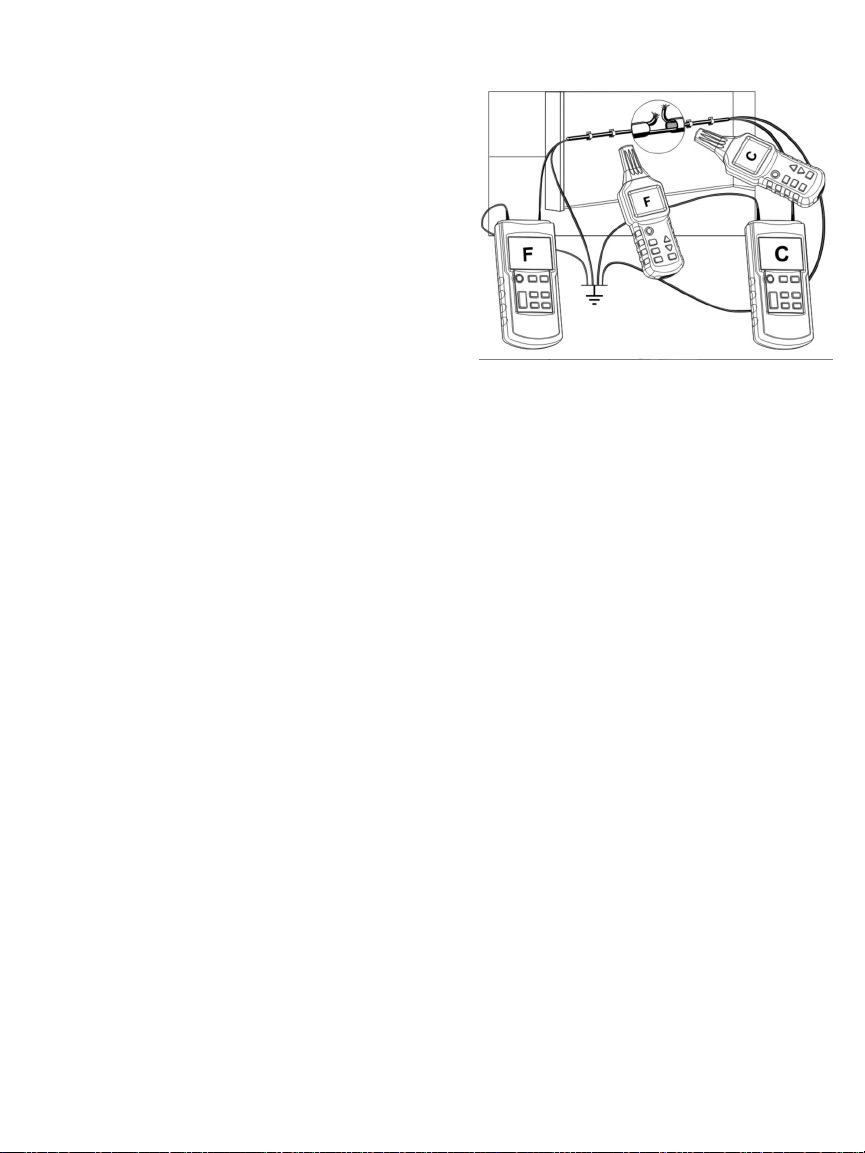
Locating a Cable or Line Break Using Two Transmitters
Attempts to locate a cable or line break by feeding
the transmitter’s signal into a conductor from one
end may not succeed if stray electromagnetic fields
are present. One way to solve this problem is to
attach a second transmitter to the conductor at its
opposite end.
Additional transmitters (Part No. CL10T) are available
from General. For more details or to order, enter
“CL10T” in the SEARCH box at
www.generaltools.com.
Before you begin, make sure that the circuit is dead
(unpowered) and that all transmitters and all cables
or lines not being investigated are properly grounded,
as in Fig. 8.
To proceed, connect both transmitters as shown in Fig. 8. Then follow Steps 3 and 4 of the
procedure detailed in “Locating a Cable or Line Break Behind a Wall” on p. 8.
owever, following Step 4 press and hold the C DE SEL. button of the second transmitter. This
will cause the text C DE F on the left side of the LCD to begin flashing. Press the ▲button five
times to change the code from Fto C. Then press and hold the C DE SEL. button again to save
the setting.
With the first transmitter sending Code F and the second transmitter sending Code C, complete
the procedure by performing Steps 5 through 9. The same CL10 receiver will display different
codes on either side of the cable or line break. When the receiver displays no code, it is
positioned directly at the break, where the codes overlap.
The use of two transmitters is particularly effective at pinpointing breaks in electric floor heating
systems characterized by extremely long conductors. There are only two constraints on the
technique:
1. If a shield mat is located above the heating wires, no ground connection may exist. If
necessary, separate the shield from the ground connection.
2. In addition to ensuring good grounding, make sure that there is considerable distance
between the grounding terminal of the transmitter and the target line. If this distance is too
short, it may be impossible to precisely locate the line.
10
Fig. 8. Using two transmitters to
locate a cable or line break
Indice
Altri manuali General Strumento analitico

General
General DCS500 Manuale utente

General
General DCS200 Manuale utente

General
General DCS2000 Manuale utente

General
General DCS1600ART Manuale utente

General
General DCS1800 Manuale utente

General
General DCS100 Manuale utente

General
General The Seeker DCS050 Manuale utente

General
General DCS200 Manuale utente

General
General LDM1 Manuale utente

General
General DPS16 Manuale utente

General
General iBORESCOPE4 Manuale utente

General
General GLDM25 Manuale utente

General
General SeaScope 600 Manuale utente

General
General Seeker 400 Series Manuale utente

General
General TS03 Manuale utente

General
General DCS660A Manuale utente

General
General P16PIP Manuale utente

General
General DCS600A Manuale utente


