
GINGKO MI SQUARE Manuale del proprietario

MI SQUARE
Pocket Bluetooth Speaker
TM
Packing List
Product Operations
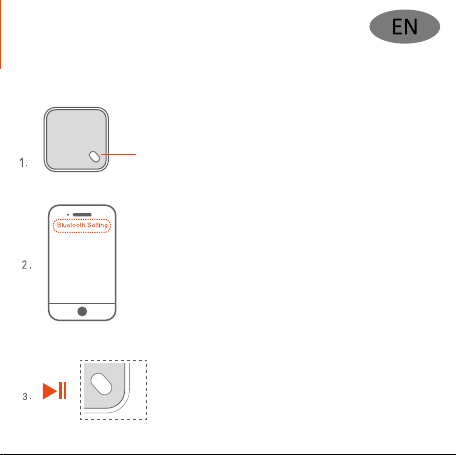
ON/OFF: press and hold it for 3 seconds to turn it on or off
Green light flashing: Bluetooth searching
Green light stays on: Successfully paired
Turn on the Bluetooth on your device in setting to
search your nearby Bluetooth devices;
Select ‘Gingko Mi Square’ to get paired
(It may take up toa minute tofind the device or sometimes
you may need to turn off and turn back on the bluetooth
function on your device to be able to find the Mi Square)
Gingko Mi Square
Music Playing
Play / Pause: press once
The device will turn itself off if it hasn’t been used
in 5 minutes.
It includes one unit MI SQUARE speaker, one USB charging cable
and one user manual.

5V Micro USB Charging Port
Approx 1.5-2 hours to be fully recharged;
please fully charge it for first time use;
Red light on: in charging;
Red light off: fully charged
(You may connect the USB charging lead to any
5V USB charger to charge the product, such us a
smartphone charger or a computer USB port).
TWS Pairing Instructions
This product has TWS (true wireless stereo) technology built in so it
allows you to enjoy the stereo quality sound when you have have
two MI Square Speakers.
Please follow the below instructions to get them paired.
1. Turn on both speakers by pressing and holding down the power
button for 3 seconds and make sure both of the speakers haven’t been
paired with any bluetooth device first.
2. Quickly double click the power button on one or both speakers and
they should get paired in 15 seconds with a beep sound.
3. If the pairing is not successfully, turn off the both devices and try it
again by following the above instructions. When paired, the main speaker
indication light will flash and the other device light will stay on.
4. To unpair the devices, double click the power button.
5. The two devices will be automatically paired once they have been
turned on If they have been paired before.
6. Press the power button once on either speaker will pause or restart the
playing.

Product Care Notices
1. It’s recommended to use this product in a humidity environment
between 35% and 85% due to the product is made of natural solid
wood material.
2. A heavy drop may damage the wooden case and product itself.
3. Any natural wood grain or slight wood knot on the case is not
a product fault.
4. You may use a wet cloth to clean the wood case, but do not use
water to do the cleaning directly.
5. Please keep the product away from any long and direct sunlight
exposure as this may change the wood colour or cause other
damages to the wood case gradually.
6. Please only use 5V USB charging adapter to charge this product.
Any higher rated votage charging adapter may gradually damage
the product or shorten the battery life eventually.
Packliste
Produktfunktionen
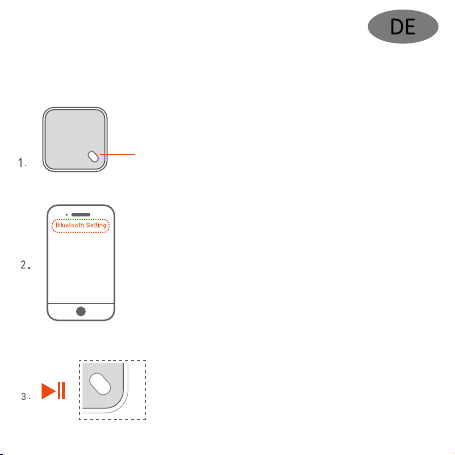
ON/OFF:3 Sekunden gedrückt halten, um das Produkt
Grünes Blinklicht: Suche nach Bluetooth-Gerät
ein- oder auszuschalten
Grünes Dauerlicht: Erfolgreiche Koppelung
Schalten Sie Bluetooth an Ihrem Gerät ein
(in den Einstellungen),um in der Nähe befindliche
Bluetooth-Geräte zu finden;
Wählen Sie ‚Gingko Mi Square‘, um eine Koppelung
durchzuführen (es kann bis zu einer Minute dauern,
bis das Gerät gefunden wird; eventuell müssen Sie die
Bluetooth-Funktion an Ihrem Gerät aus- und wieder
einschalten, um den MI Square zu finden)
Gingko Mi Square
Musikwiedergabe
Play / Pause: einmal drücken
Das Gerät schaltet sich automatisch aus, wenn
es 5 Minuten lang nicht benutzt wird.
Im Lieferumfang enthalten sind ein MI SQUARE-Lautsprecher,
ein USB-Ladekabel und ein Benutzerhandbuch.

5 V Micro USB-Ladeanschluss
Eine vollständige Aufladung dauert ca. 1,5-2 Stunden;
bitte laden Sie das Gerät vor der ersten Benutzung
vollständig auf;
Rote Lampe leuchtet: Gerät wird aufgeladen;
Rote Lampe aus: Gerät ist vollständig aufgeladen;
(das USB-Ladekabel kann an jedes 5 V USB-Ladegerät
angeschlossen werden, z. B. an ein Smartphone-Ladegerät
oder an den USB-Anschluss eines Computers, um das
Produkt aufzuladen).
Hinweise zur TWS-Koppelung
Das Produkt verfügt über die TWS-Technologie (True Wireless Stereo),
d. h. mit zwei MI Square-Lautsprechern können Sie echten Stereoklang
genießen.
Bitte gehen Sie wie unten beschrieben vor, um die Koppelung durchzuführen.
1. Schalten Sie beide Lautsprecher ein, indem Sie die Netztaste drei Sekunden
lang gedrückt halten und stellen Sie sicher, dass beide Lautsprecher nicht
schon mit einem Bluetooth-Gerät gekoppelt wurden.
2. Klicken Sie an einem oder an beiden Lautsprechern zweimal schnell
hintereinander auf die Netztaste. Daraufhin sollten die Lautsprecher in
15 Sekunden gekoppelt werden und es ertönt ein Piepston.
3. Wenn die Koppelung fehlschlägt, schalten Sie beide Geräte aus und
wiederholen den Vorgang noch einmal wie oben beschrieben. Nach der
Koppelung blinkt die Anzeigelampe am Hauptlautsprecher und die Lampe
am anderen Lautsprecher leuchtet dauerhaft.
4. Um die Geräte zu entkoppeln, klicken Sie zweimal auf die Netztaste.
5. Die beiden Geräte koppeln sich automatisch, wenn sie eingeschaltet
werden (sofern sie bereits zuvor gekoppelt wurden).
6. Wenn Sie an einem der Lautsprecher die Netztaste drücken, wird die
Wiedergabe unterbrochen oder neu gestartet.

Produktpflegehinweise
1. Das Produkt ist aus massivem Holz. Es wird deshalb empfohlen,
das Produkt bei einer Luftfeuchtigkeit von 35 % bis 85 % zu verwenden.
2. Durch eine heftige mechanische Einwirkung (z. B. einen Sturz) kann
das Holzgehäuse oder das Produkt selbst beschädigt werden.
3. Die sichtbare natürliche Holzmaserung oder kleinere Astlöcher im
Holzgehäuse sind kein Produktfehler.
4. Das Holzgehäuse kann mit einem feuchten Tuch gereinigt werden;
verwenden Sie jedoch kein Wasser direkt auf dem Produkt.
5. Schützen Sie das Produkt vor längerer oder direkter Sonneneinstrahlung;
andernfalls kann sich das Holz verfärben oder das Gehäuse wird nach
und nach angegriffen.
6. Bitte verwenden Sie zum Aufladen des Produkts nur einen
5 V USB-Ladeadapter. Andere Ladeadapter mit höherer Nennspannung
können das Produkt nach und nach beschädigen und letztendlich die
Batterielebensdauer verkürzen.
Liste d’emballage
Fonctionnement du produit
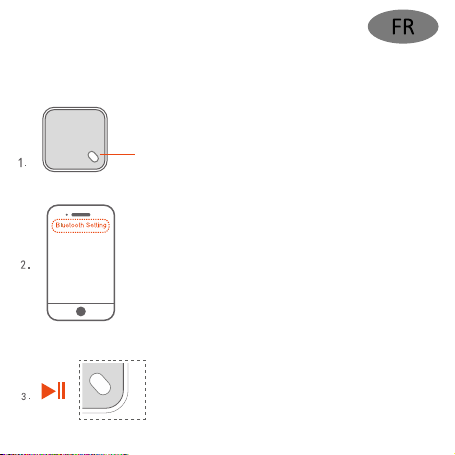
MARCHE/ARRÊT:maintenez-le appuyé pendant 3
Voyant vert clignotant : Recherche Bluetooth
secondes pour l'allumer ou l'éteindre
Voyant vert fixe : Appairage réussi
Activez le Bluetooth dans les paramètres de votre
appareil pour rechercher vos appareils Bluetooth
à proximité;
Sélectionnez « Gingko Mi Square » pour l’appairer
(Cela peut prendre jusqu'à une minute pour trouver
l’appareil ou il se peut que vous deviez désactiver et
réactiver la fonction Bluetooth sur votre appareil pour
pouvoir trouver le MI Square)
Gingko Mi Square
Lecture de musique
Lecture / Pause : appuyez une fois
L’appareil s’éteint tout seul s’il n’a pas été utilisé
dans les 5 minutes.
Elle comprend une enceinte MI SQUARE, un câble de charge
USB et un manuel d'utilisation.

Port de charge micro USB 5V
Environ 1,5 à 2 heures pour une charge complète ;
veuillez le charger complètement pour la première utilisation
Voyant rouge allumé : en cours de charge
Voyant rouge éteint : charge complète
(Vous pouvez connecter le câble de charge USB à un
chargeur USB 5V pour charger le produit, par exemple un
chargeur de smartphone ou un port USB d'ordinateur).
Instructions d'appairage TWS
Ce produit intègre la technologie TWS (True Wireless Stereo) qui vous permet
de profiter d’un son de qualité stéréo lorsque vous utilisez deux enceintes
MI Square.
Veuillez suivre les instructions ci-dessous pour les appairer.
1. Allumez les deux enceintes en maintenant le bouton d'alimentation
appuyé pendant 3 secondes et assurez-vous d’abord que les deux
enceintes n’aient été appairées à aucun appareil Bluetooth.
2. Appuyez rapidement deux fois sur le bouton d'alimentation de l'une ou
des deux enceintes. Elles devraient être appairées en 15 secondes
avec un bip.
3. Si l’appairage échoue, éteignez les deux appareils et essayez à nouveau
en suivant les instructions ci-dessus. Une fois appairées, le voyant d’indication
de l'enceinte principale clignote et le voyant de l’autre appareil reste allumé.
4. Pour dissocier les appareils, appuyez deux fois sur le bouton d'alimentation.
5. Les deux appareils seront automatiquement appairés une fois allumés
s'ils l'étaient déjà auparavant.
6. Si vous appuyez une fois sur le bouton d'alimentation de l'une ou l'autre
enceinte, la lecture s'interrompt ou reprend.

Environ 1,5 à 2 heures pour une charge complète ;
veuillez le charger complètement pour la première utilisation
Voyant rouge allumé : en cours de charge
Voyant rouge éteint : charge complète
(Vous pouvez connecter le câble de charge USB à un
chargeur USB 5V pour charger le produit, par exemple un
chargeur de smartphone ou un port USB d'ordinateur).
Avis concernant l’entretien du produit
1. Il est recommandé d'utiliser ce produit dans un environnement dont
l’humidité est comprise entre 35 % et 85 %, car il est fabriqué à partir de
bois naturel.
2. Une chute importante peut endommager le boîtier en bois et le produit
lui-même.
3. Un grain de bois naturel ou un léger nœud de bois sur le boîtier n’est
pas un défaut du produit.
4. Vous pouvez utiliser un chiffon humide pour nettoyer le boîtier en bois,
mais n'utilisez pas d'eau pour effectuer le nettoyage directement.
5. Tenez le produit à l’écart de toute exposition prolongée et directe au
soleil, car cela pourrait changer la couleur du bois ou causer d’autres
dommages progressifs au boîtier.
6. Utilisez uniquement un adaptateur de charge USB 5V pour charger ce
produit. N’importe quel adaptateur de charge à tension nominale plus
élevée peut endommager progressivement le produit ou finalement
réduire la durée de vie de la batterie.
Indice
Lingue:
Altri manuali GINGKO Altoparlanti


