
Gnet G-On Manuale utente

2CH FHD HDR DASH CAM
USER MANUAL

CAUTION FOR SAFE USE
CAUTION FOR MICRO SD MEMORY CARD
PRODUCT FEATURES
PACKAGE COMPONENT
NAME OF EACH PART
SPECIFICATION
INSTALLATION
02
03
04
05
06
07
08
hhhhhhhhhhhhhhhhhhhhhhhhhhhhhhhhhhhhhhhhhh
hhhhhhhh
hhhhhhhhhhhhhhhhhhhhhhhhhhhhhhhhhhhhhhhhhhhhhh
hhhhhhhhhhhhhhhhhhhhhhhhhhhhhhhhhhhhhhhhh
hhhhhhhhhhhhhhhhhhhhhhhhhhhhhhhhhhhhhhhhhhhhhh
hhhhhhhhhhhhhhhhhhhhhhhhhhhhhhhhhhhhhhhhhhhhhhhhhhhhhhhhh
hhhhhhhhhhhhhhhhhhhhhhhhhhhhhhhhhhhhhhhhhhhhhhhhhhhhhhhhhh
BEFORE USE
01
HOW TO USE
MEMORY CARD VIDEO FOLDER
15
21
hhhhhhhhhhhhhhhhhhhhhhhhhhhhhhhhhhhhhhhhhhhhhhhhhhhhhhhhhhhhhhh
hhhhhhhhhhhhhhhhhhhhhhhhhhhh
FUNCTION
02
HOW TO USE G-SYNCLOUD
HOW TO USE G-SYNCLOUD [IOS]
HOW TO USE G-SYNCLOUD [ANDROID]
GSYNCLOUD APP GUIDE
HOW TO USE G-SYNCLOUD [PC]
23
25
40
55
61
hhhhhhhhhhhhhhhhhhhhhhhhhhhhhhhhhh
hhhhhhhhhhhhhhhhhhhhhhhhhh
hhhhhhhhhhhhhhhh
hhhhhhhhhhhhhhhhhhhhhhhhhhhhhhhhhhhhhhh
hhhhhhhhhhhhhhhhhhhhhhhhhhhhhh
G-SYNCLOUD
03
PC VIEWER INSTALLATION
PC VIEWER MENU
63
68
hhhhhhhhhhhhhhhhhhhhhhhhhhhhhhhhhhhhhhh
hhhhhhhhhhhhhhhhhhhhhhhhhhhhhhhhhhhhhhhhhhhhhhhhhhhhhh
PC-VIEWER
04
QUESTION AND ANSWER
TROUBLE SHOOTING
WARRANTY CARD
76
94
100
hhhhhhhhhhhhhhhhhhhhhhhhhhhhhhhhhhhhhhhh
hhhhhhhhhhhhhhhhhhhhhhhhhhhhhhhhhhhhhhhhhhhhhhhh
hhhhhhhhhhhhhhhhhhhhhhhhhhhhhhhhhhhhhhhhhhhhhhhhhhhhh
BEFORE WI-FI CONNECTION
SMART PHONE CONNECTION
70
71
hhhhhhhhhhhhhhhhhhhhhhhhhhhhhhhhhhhh
hhhhhhhhhhhhhhhhhhhhhhhhhhhhhhhhhh
APPLICATION
05
CONTENTS

CAUTION FOR SAFE USE
All copyrights reserved to GNET SYSTEM.
G-NET is the trademark of G-NET SYSTEM Co.,Ltd. G-NET SYSTEM Co., Ltd. has
rights to G-NET (Name, Design, Brand image)
Do not shock and insert foreign material.
Video quality and GPS signal reception may be affected by dark tint or special
windshield. Refrain from dark tint or special windshield.
Do not control Dash cam while driving for safety.
Please check device time. If user don't use Dash cam for long time, Dash cam
would be initialized except for connecting with External GPS.
If camera is exposed by direct sunlight, temperature in car would be high.
So Memory card error and camera image distortion are likely happened. In case
that parking car outside for long time, we highly recommend that pulling out the
power cable from power terminal of device.
Avoid high temperature and high humidity which exceed Dash cam specification.
Periodically check Dash cam operation.
BEFORE USE 01
02

The memory card is a consumable item, so it should be replaced periodically.
Please purchase genuine Gnet memory card for preventing incompatibility
problem, only genuine SD card which is designated and supplied by GNET SYSTEM
is under warranty. Other brands SD card is not covered by warranty.
When a car accident occurs, it is recommended to remove the memory card from
the dash camera. After then, save video data to your computer. Because if the
memory card capacity is full, the video data will be overwitten and the accident
data will be erased.
Please make sure to remove memory card after the recording LED off.
Because Video data is possible to be damaged. And It causes defective memory
card or shorten lifetime of memory card.
If the memory card has inappropriate data which isn't related data for Dash camera,
it automatically erases inappropriate data for keeping video data stable.
Therefore do not use the memory card for other purposes.
Don't need to format Memory card periodically. However, We recommend format
memory card more than once a month through SD formatter program
(www.sdcard.org).
GNET SYSTEM camera can support from Min 4GB upto Max. 1TB memory card
In case that use the memory card for the first time or format it, it will go into
stand-by mode for 3 to 5 minutes. During in stand-by mode and formatting,
do not remove the memory card.
CAUTION FOR MICRO SD
MEMORY CARD BEFORE USE 01
03

External GPS
(Optional)
Automatic Low Voltage
Cut-off Power Off-12.0(24.0)V
Super Night Vision
Block physical access to the
microSD card slot by lock
ADAS
Advanced Driver
Assistance Systems
JDR file system :
Memory Format Free
BEFORE USE 01
PRODUCT FEATURES
OBD2 Support
0#%
Codec
HDR
3FBM
60FPS
Connect wit Gnet Appliaction
by Wi-Fi dongle(Optional)
04
G-syncloud service (3G/4G)
For Fleet Management System
(Optional)

Basic Components
PACKAGE COMPONENT
Cigarette lighter
power cable
ⲼThe image of components may be different from the real components.
ⲼSpecifications and Components may be change without notice for improving quality.
ⲼWe are highly recommend to use Genuine Memory card from Gnetsystem.
Optional Product
External GPS, Cigar jack cable, Wi-Fi dongle are sold separately with extra cost.
Wi-Fi dongle
External GPS
Direct power cableMain Camera & Rear Camera
(Including bracket)
Micro SD
Memory card
Rear Camera
connection cable
Screw, Wrench
User Manual
OBD power cable
BEFORE USE 01
05

NAME OF EACH PART
Front Camera
Rear Camera
an rear camera mount
Rear camera lens
Rear cable connection port
REC LED
Front Camera Lens
Security LED
Front camera bracket
GPS LED
Rear Camera Slot
OBD2 Connector
Micro SD card cover
Wi-Fi registration button
Extermal GPS Connector
Wi-Fi USB dongle Slot
Power Button
Power connector (DC-IN)
BEFORE USE 01
06

SPECIFICATION
ⲼSpecifications and Components may be changed without notice of improvement in advance.
Image Sensor
Audio input
Video Compression
Audio Compression
Resolution
FPS
3G/4G/LTE/5G (Optional)
Wi-Fi (Optional)
G-Sensor
Speaker
External GPS (Optional)
Lens
Viewer
Power
Allowable current
of providing fuse
Operation Temperature
Humidity
Dimension
Full HD CMOS Sensor
Built-in Microphone
H.265
ADPCM
Front / Rear Full HD 1080P(1920x1080)
Front : Max. 60fps / Rear : Max. 30fps
Connect to G-Syncloud FMS server via wireless telecommunication
(3G/4G/LTE/5G)
Connect to GNET Smart phone application via Wi-fi dongle
Event recording by External Shock
Operation Status alarm / Voice guidance
Synched with Google map, Keep track of location and Speed
Front : 160 degrees / Rear : 150 degrees
Windows XP/7/8/10, Support 32Bit / 64Bit,
Synchronizing Google map with PC viewer is supported over
Windows7 and explorer 10 as per Google' s policy.
DC 12V - 24V
3A
-20Ⳅ~ 85Ⳅ
10~95%
Front : 97 x 45 x 33MM / Rear : 59 x 28x 37 MM
Predictable recording time of SD memory capacity
(#NJO(#)3(#)3(#)3(#)3(#)3(#)3
BEFORE USE 01
07

1
INSTALLATION
How to Install Dashcam
2Insert the memory card into memory card slot, and then detach the cover from
the adhesive double side tape on the bracket.
Assemble the Front cam with a bracket. Until the hook is located on right place
with coming sound according to the order (ⴘ,ⴙ).
ⴙ
ⴙ
ⴘ
08
BEFORE USE 01
ear]
09
INSTALLATIO
N
BEFORE USE 01
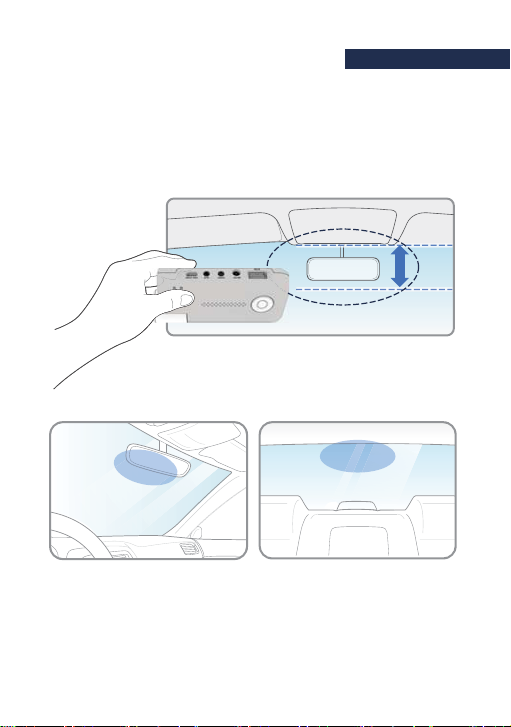
3Install the front camera at the windshield by adjusting the angle.
20%
[Front] [Rear]
Indice
Altri manuali Gnet Telecamera da cruscotto


