Hama DR7USB Manuale utente

Digital Radio
Digitalradio
00054242
(DR7USB)
QUICK GUIDE
KURZANLEITUNG
DK
N
E
SK
F
D
GB
I
S
PL
RUS
H
BG
CZ
TR
FIN
RO
GR
NL
P
Operating Instructions
Bedienungsanleitung
Mode d‘emploi
Instrucciones de uso
Gebruiksaanwijzing
Istruzioni per l‘uso
Instrukcja obsługi
Használati útmutató
Manual de utilizare
Návod kpoužití
Návod na použitie
Manual de instruções
Bruksanvisning
Руководство по эксплуатации
Работна инструкция
Οδηγίες χρήσης
Kullanma kılavuzu
Käyttöohje
Kort vejledning
Kortveiledning

Further information and features areavailable on/
WeitereInformationen und Features nden Sie hier
www.hama.com -> 00054242
Technical Data
Technische Daten
Display 2.1" (5.33cm) LCD, monochrome
Speaker
Lautsprecher Mono Speaker (2.25"), 0.5W(RMS)
Power Supply
Stromversorgung
MicroUSB: DC 5V/0.5A, max 2.5 W
Batteries: 4x AA (Mignon)
Supported Languages
Unterstützte Sprachen
English, German, Danish, Dutch, Finnish, French, Italian, Norwegian,
Polish, Portuguese, Spanish, Swedish, Turkish, Czech, Slovak
Packaging Content
Verpackungsinhalt Hama DR7USB, 4x AA Batteries, Short Manual
Audio Connectors
Audio Anschlüsse
Outputs Headphone 3.5mm
Sources
Quellen
Presets
Favoriten
DAB/DAB+
(174.928 -239.2 MHz) ü30
FM
(87.5 -108 MHz) ü30

11
12
13
2 4 6 7 8
1 3 10 95


2
GOperating Instructions
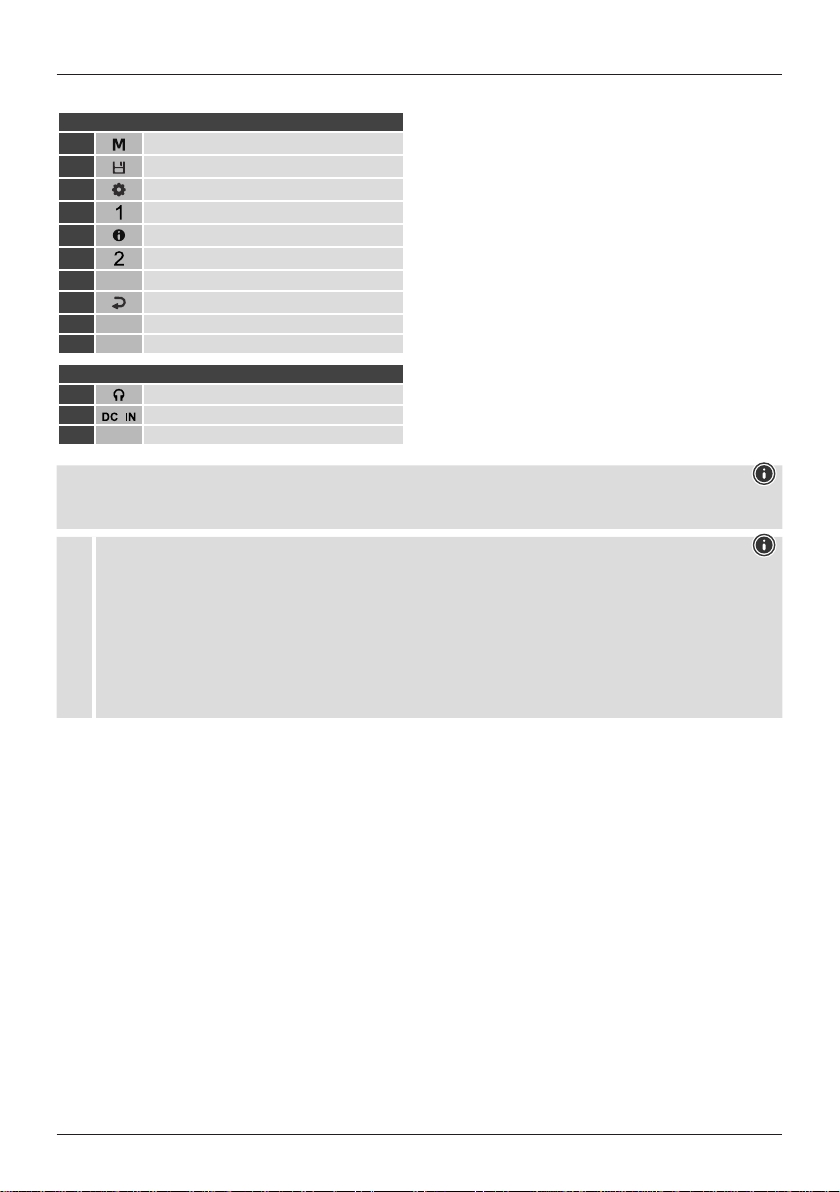
Controls and displays
A: Radio top view
1[MODE] button
2[PRESET] button
3[SETTINGS] button
4[PRESET 1] button
5[INFO] button
6[PRESET 2] button
7Display
8[BACK] button
9Navigation/OK/Volume
10 Antenna
B: Rear
11 Headset connection (3.5 mm)
12 Micro-USB mains connection
13 Battery compartment
Note
** Turning the controller allows you to change the volume or navigate through the menu structure. Pressing this rotary
controller puts the device in standby mode (volume control) or conrms aselection (navigation control).
!
Important information -Quick-reference guide:
•This quick-reference guide contains the most important basic information, such as safety instructions and the steps
necessary to operate the product.
•To help protect the environment and conserve valuable rawmaterials, Hama does not issue aprinted manual and
instead makes this available exclusively as aPDF download.
•The full text
of the
manual is available at the following internet address:
www.hama.com -> 00054242 -> Downloads
•Save the manual on your computer for reference and print it out if possible.

3
1. Explanation of warning symbols and notes
Risk of electric shock
This symbol indicates arisk of electric shock from
touching product parts carrying hazardous voltage.
Warning
This symbol is used to indicate safety instructions or to
draw your attention to specichazards and risks.
Note
This symbol is used to indicate additional information or
important notes.
2. Package contents
•DR7USB, Digital Radio
•4x AA (Mignon) batteries
•These operating instructions
3. Safety instructions
•The product is intended for private, non-commercial use
only.
•Do not use the product in areas in which electronic
products arenot permitted.
•Protect the product from dirt, moistureand overheating
and use it in dry rooms only.
•As with all electrical products, this device should be kept
out of the reach of children.
•Do not drop the product and do not expose it to any
major shocks.
•Do not operate the product outside the power limits
specied in the technical data.
•Keep the packaging material out of the reach of children
due to the risk of suffocation.
•Dispose of packaging material immediately in accordance
with the locally applicable regulations.
•Do not modify the device in any way.Doing so voids the
warranty.
•Use the product only for the intended purpose.
•Do not use the product in the immediate vicinity of
heaters, other heat sources or in direct sunlight.
•Do not use the product in adamp environment and avoid
splashing water.
•Only use the article under moderate climatic conditions.
Risk of electric shock
•Do not open the device or continue to operate it if it
becomes damaged.
•Do not attempt to service or repair the product yourself.
Leave any and all service work to qualied experts.
Warning –Batteries
•When inserting batteries, note the correct polarity (+
and -markings) and insert the batteries accordingly.
Failuretodosocould result in the batteries leaking or
exploding.
•Only use batteries (or rechargeable batteries) that
match the specied type.
•Beforeyou insert the batteries, clean the battery
contacts and the polarity contacts.
•Do not allow children to change batteries without
supervision.
•Do not mix old and new batteries, or batteries of
different types or from different manufacturers.
•Remove the batteries from products that arenot being
used for an extended period (unless these arebeing
kept ready for an emergency).
•Do not short-circuit batteries.
•Do not charge batteries.
•Do not burn batteries.
•Keep batteries out of the reach of children.
•Never open, damage or swallow batteries or allow
them to enter the environment. They can contain toxic,
environmentally harmful heavy metals.
•Remove spent batteries from the product and dispose
of them without delay.
•Avoid storing, charging and using in extreme
temperatures and at extremely low atmospheric
pressures (such as at high altitudes).
4. Getting started
Note -optimising reception
Please note:
•Always pull the antenna out completely.
•We recommend you adjust the antenna vertically to
ensureoptimal reception.
Note –Power supply
With batteries inserted, the radio is always supplied with
power from the batteries. Therefore, to operate the radio
off aUSB power supply,you should remove the batteries
from the battery compartment rst.

4
Battery operation
•Open the battery compartment cover,which is located on
the rear of the radio.
•To do this, slide the battery compartment cover in the
direction shown.
•Insert the batteries paying attention to match the
polarities correctly.The correct polarity is indicated by the
plus and minus symbols in the battery compartment.
•Then close the battery compartment cover.
4.1 Switching on
Warning -mains operation
•Disconnect the product from the power supply using
the On/Off switch –ifthis is not available, unplug the
power cordfromthe socket.
•If you will not be using the product for aprolonged
period, disconnect it from mains power.
•Connect asuitable USB power pack to the rear of the
radio using aMicroUSB cable (12).
•Connect the power pack to aproperly installed and easily
accessible mains socket.
•Wait until the radio has initialised fully.
•Press [NAVIGATION/OK/VOLUME](9) to switch on the
radio.
4.2 General notes on use
4.2.1 Switch On /Off /Standby
•Press [NAVIGATION/OK/VOLUME](9) to switch on the
radio.
•Press and hold [NAVIGATION/OK/VOLUME](9) for
approx. 3seconds to switch the radio off (standby).
•To completely switch off the device, disconnect it from the
power supply.
4.2.2 Navigation and control
•After pressing ashortcut button, navigate through the
menu items using.
•Select individual menu items by turning [NAVIGATION/
OK/VOLUME](9).
•Conrm the selection by pressing [NAVIGATION/OK/
VOLUME](9).
4.2.3 Volume adjustment
•Youcan turn the volume up (right) or down (left) by
turning [NAVIGATION/OK/VOLUME](9) accordingly.
4.3 Language
The rst time it is used, the radio's default language is
English. To change radio's menu language, proceed as
follows:
•Press [ ](3) to access the Settings menu.
•Use [POWER/VOLUME/ENTER/NAVIGATE](5) to
navigate to the "Language" menu item. Conrm the
selection by pressing [POWER/VOLUME/ENTER/
NAVIGATE](5).
•Use [POWER/VOLUME/ENTER/NAVIGATE](5) to select
your preferred system language.
Note
•The following languages areavailable:
Czech, English, Danish, Dutch, German, Finnish,
French, Italian, Norwegian, Polish, Portuguese, Slovak,
Spanish, Swedish and Turkish
5. Care and maintenance
•Only clean this product with aslightly damp, lint-free
cloth and do not use aggressive cleaning agents.
•If you do not plan to use the product for aprolonged
period, turn off the device and disconnect it from the
power supply.Storeitinaclean, dry place away from
direct sunlight.
6. Warranty disclaimer
Hama GmbH &CoKGassumes no liability and provides no
warranty for damage resulting from improper installation/
mounting, improper use of the product or from failureto
observe the operating instructions and/or safety notes.

5
8. Recycling information
Note on environmental protection:
After the implementation of the European
Directives 2012/19/EU and 2006/66/EU in the
national legal system, the following applies:
Electrical and electronic devices as well as
batteries must not be disposed of with household waste.
Consumers areobliged by law to return electrical and
electronic devices as well as batteries to the designated
public collection points or to the point of sale at the end
of their service lives. Detailed information on this topic is
dened in the national laws of the respective country.This
presence of the above symbol on the product, operating
instructions or package indicates that the product is
subject to these regulations. By recycling, reusing the
materials or other forms of utilising old devices/batteries,
you aremaking an important contribution to protecting
our environment.
9. Declaration of Conformity
Hama GmbH &CoKGhereby declares that the
radio equipment type [00054242] is in compliance
with Directive 2014/53/EU.The full text of the EU
declaration of conformity is available at the following
Internet address:
www.hama.com ->00054242->Downloads.
To limit exposuretoelectromagnetic elds
This device is intended for use at adistance of at least
20 cm from the body of the user or persons nearby.This
device must not be worn or carried on the body.

6
DSchnellstartanleitung
Bedienungselemente und Anzeigen
A: Radio Draufsicht
1[MODE]-Taste
2[PRESET]-Taste
3[SETTINGS]-Taste
4[PRESET 1]-Taste
5[INFO]-Taste
6[PRESET 2]-Taste
7Display
8[BACK]-Taste
9Navigation/OK/Lautstärke
10 Antenne
B: Radio Rückseite
11 Kopfhöreranschluss (3.5mm)
12 MicroUSB Netzanschluss
13 Batteriefach
Hinweis
** Durch Drehen des Reglers ändern Sie die Lautstärke oder Navigieren durch die Menüstruktur.Durch Drücken
dieses Drehreglers, wirddas Gerät in den Standby-Modus geschalten (Volume-Regler) bzw.eine Auswahl bestätigt
(Navigationsregler).
!
Wichtiger Hinweis -Kurzanleitung:
•Dies ist eine Kurzanleitung,die Siemit den wichtigsten Basis-Informationenwie Sicherheitshinweisenund der
Inbetriebnahme IhresProduktesversorgt.
•Aus Gründen desUmweltschutzesund der Einsparung wertvollerRohstoffeverzichtet dieFirma Hamaauf eine
gedruckte Langanleitung und bietet diese ausschließlich alsPDF-Download an.
•Die vollständige Langanleitung istunter der folgendenInternetadresse verfügbar:
www.hama.com->00054242 -> Downloads
•SpeichernSie dieLanganleitungzum Nachschlagenauf Ihrem Computer und druckenSie diese nach Möglichkeitaus.
Altri manuali per DR7USB
1
Questo manuale è adatto per i seguenti modelli
1
Indice
Lingue:
Altri manuali Hama Radio

Hama
Hama DIR355BT Manuale utente

Hama
Hama DR1400 Manuale utente

Hama
Hama 67054241 Manuale utente

Hama
Hama DIR3300SBT Manuale utente

Hama
Hama DR1610BTS Manuale utente

Hama
Hama IR80MBT Manuale utente

Hama
Hama DR7USB Manuale utente

Hama
Hama DR1510 Manuale utente

Hama
Hama DIT2010 Manuale utente

Hama
Hama DR35 Manuale utente

Hama
Hama DIR150BT Manuale utente

Hama
Hama 00054239 Manuale utente

Hama
Hama IR110MS Manuale utente

Hama
Hama DR350 Manuale utente

Hama
Hama 54874 Manuale utente

Hama
Hama DR35 Manuale utente

Hama
Hama IR40MBT Manuale utente

Hama
Hama DR-50 Manuale utente

Hama
Hama DIR1570CBT Manuale utente

Hama
Hama DIR3020BT Manuale utente