honor Watch 4 Manuale utente

HONOR Watch 4
User Gudie

Contents
Getting Staed
Getting to know your watch 1
Wearing your watch properly 1
Powering on/o and restaing your watch 2
Gestures 2
Pairing with a phone 4
Getting to know the button 5
Charging your watch 5
Exercise
Staing a workout 7
Customizing the workout list 8
Rope skipping 8
Taking a training course 9
Exercising based on animated instructions 9
Running with a viual companion 9
Eciently burning your fat based on audio instructions 10
Viewing workout records 10
Viewing daily activity records 10
Accurately routing back 11
Viewing your workout route 11
Health
Measuring your hea rate 13
Monitoring your sleep quality 14
Predicting your menstrual cycle 15
Measuring your SpO₂ 16
Measuring your tness age 16
Testing your stress 17
Breathing exercises 17
Sedenta ale 18
Assistant
Making a call 19
Answering a call 19
Playing a song 20
Remote shutter 21
Checking the weather 21
Setting an alarm 21
Compass 22
Flashlight 22
i

Finding your phone using your watch 23
Finding your watch using your phone 23
More Guidance
Changing the strap 24
Setting time and language 26
Connecting your watch to earphones 26
Changing the watch face 26
Setting an Always On Display (AOD) 27
Adjusting the display and brightness of the screen 28
Adjusting the volume 28
Setting the haptics strength 28
Enabling Do not disturb 28
Locking and unlocking the screen 29
Viewing device information 29
Updating your version 30
Cleaning and maintenance 30
Contents
ii

Getting Staed
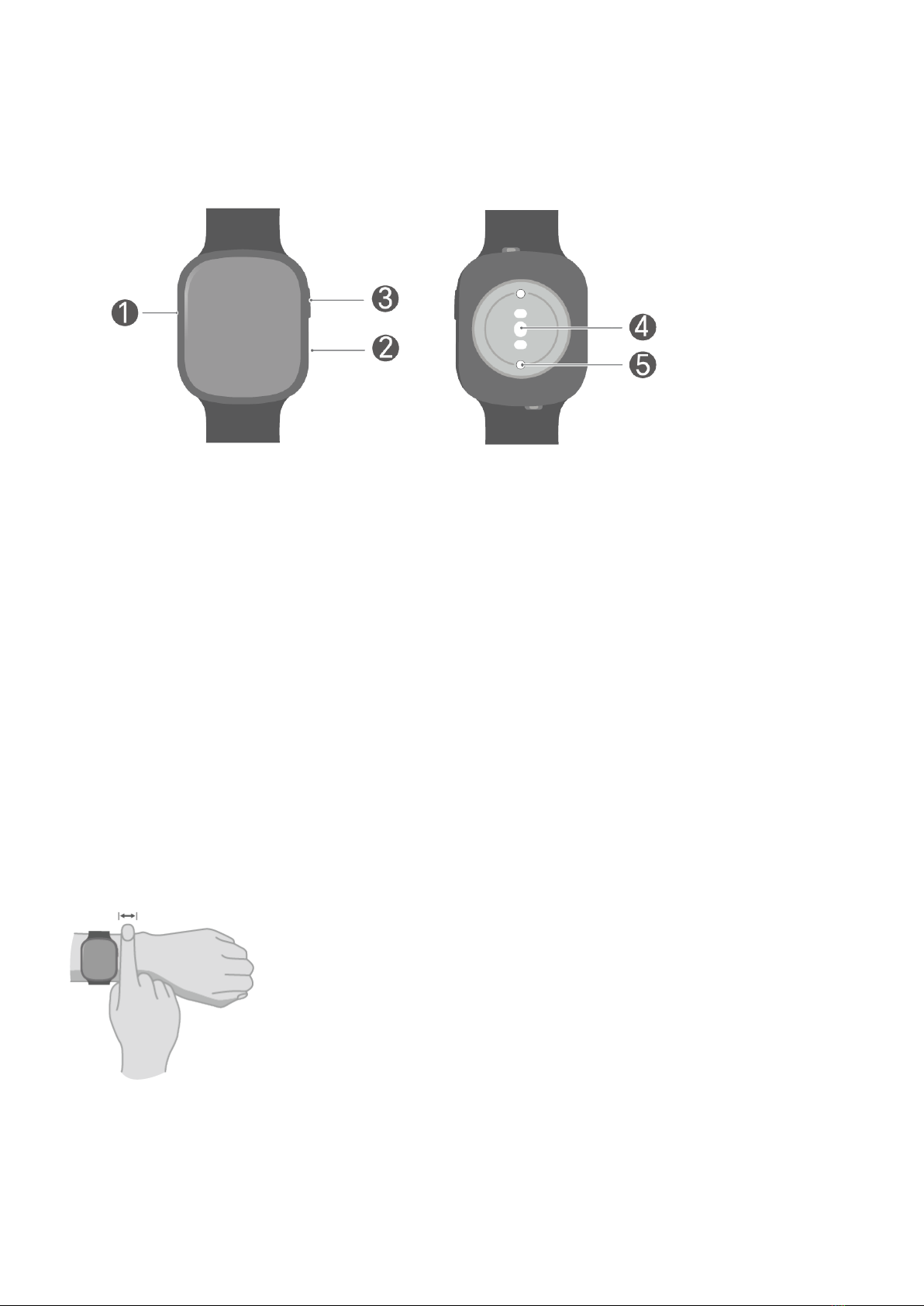
Getting to know your watch
Number Describe
1 Microphone
2 Speaker
3 Button
4Hea rate sensor
5 Charging po
Wearing your watch properly
Make sure that the back of your watch is clean and d, and adjust the strap so that your
watch ts snugly and comfoably on your wrist. Don't put a protective lm on the back of
your watch, as it may block the sensor and lead to failed or inaccurate measurements of
the hea rate, SpO₂, sleep, and other monitoring data.
1

•Your watch uses non-toxic materials that have passed strict skin allergy tests. You can rest
easy when wearing it. If you experience skin discomfo when wearing it, take it o and
consult a doctor.
•To ensure the accuracy of the monitoring results, wear your watch at least one nger away
from your wrist. Don't wear it too loosely or too tightly but make sure that it is attached
securely during a workout.
Powering on/o and restaing your watch
Powering on
•Press and hold the button to power on your watch.
•If it is powered o, it will automatically power on if you charge it.
Powering o
•Press and hold the button and tap Power o on the resta/power o screen.
•Press the button and select Settings > System > Power o.
•If the batte level is critically low, your watch will vibrate and then automatically power
o.
Restaing
•Press and hold the button and tap Resta on the resta/power o screen.
•Press the button and select Settings > System > Resta.
Force restaing
Press and hold the button for at least 16 seconds to force resta your watch.
Gestures
You can tap or tap and hold the screen and swipe up/down or right/left.
Gesture Description Feature
Tap Select and conrm.
Getting Staed
2

Tap and
hold
Change the watch face (by tapping and holding on the watch
face screen).
Swipe right •View the device card (by swiping right on the watch face
screen).
•Return to the previous screen.
Swipe left View the device card (by swiping left on the watch face
screen).
Swipe up •View message notications (by swiping up on the watch
face screen).
•View more features and information.
Swipe down •View the shocut menu (by swiping down on the watch face
screen).
•View more features and information.
Getting Staed
3

Pairing with a phone
Android
1Install HONOR Health.
To download and install the latest HONOR Health app, please scan the QR code.
2Open HONOR Health, tap Me > Log in to HONOR ID, and log in by entering the account
and password.
3Power on your watch and select the language.
4Place your watch close to your phone. Open the HONOR Health app and go to Device >
Add device. en, the app will automatically scan for available devices. Select the
target watch and pair it according to the onscreen instructions.
5If a pairing request appears on your watch, tap and conrm the pairing on your
phone.
•If you don't see the target watch in the list of available devices automatically found, tap
> Scan, scan the QR code on the watch, and pair it according to the onscreen instructions.
•After the successful pairing, your watch will display the success, and you can sta exploring
more features of your watch. If the pairing failed, your watch will display the failure and go
back to the power-on screen.
iOS
1Install HONOR Health.
To download and install the latest HONOR Health app, please scan the QR code.
2Open HONOR Health, tap Me > Log in to HONOR ID, and log in by entering the account
and password.
3Power on your watch and select the language.
4Place your watch close to your phone. Open the HONOR Health app and go to Device >
Add device. en, select the target watch in the list to pair it.
Getting Staed
4

5Some watches need to be paired with your phone via Bluetooth. In this case, connect
them on the Bluetooth setting screen according to the onscreen instructions. If a
pairing request appears on your watch, tap and conrm the pairing on your phone.
Getting to know the button
Button feature
Action Feature
Press the button •Wake up the screen when it is o.
•Go to the app list screen (if you are on the watch face screen).
•Go back to the watch face screen (if you are not on the watch
face screen).
Press and hold the
button
•Power on your watch if it is o.
•Go to the resta/power-o screen (press and hold the button for
three seconds if your watch is on).
Charging your watch
Charging
1Connect the charging cradle, charging cable, and power adapter (the rst two are
integrated for some watches), and plug in the power adapter.
2Rest your watch on top of the charging cradle and make sure that the your watch and
the cradle are aligned. Wait until the charging icon appears on the screen of your watch.
Getting Staed
5

•We recommend that you use an HONOR adapter, a USB po of a computer, or a non-
HONOR power adapter that complies with corresponding regional or national laws and
regulations as well as regional and international safety standards. Other power adapters and
power banks that don't meet corresponding safety standards may cause issues such as slow
charging, undercharging, and overheating. Exercise caution when using them.
•Keep the suace of the charging po and charging cradle d and clean to prevent sho
circuits or other risks. Don't charge or use your watch in a hazardous environment, and make
sure that there is nothing ammable or explosive nearby. Before using the charging cradle,
make sure that there is no residual liquid or foreign object on the USB po of the charging
cradle. Keep the charging cradle away from liquids and any ammable materials. Don't touch
the metal contacts of the charging cradle when it is being used for charging.
•After your watch is fully charged, the indicator will display 100%, and charging will
automatically stop. Charging will continue if your watch isn't fully charged and the power
adapter is plugged in.
•e charging cradle tends to attract metal objects as it is magnetic. erefore, it is
necessa to check and clean the cradle before use. Don't expose the charging cradle to
high temperatures for long, as this may cause it to demagnetize or cause other problems.
Checking the batte level
Method 1: Swipe down on the watch face screen and check the batte level from the
drop-down menu.
Method 2: Check the batte level on the indicator screen during charging.
Method 3: Check the batte level on the watch face that can display it.
Method 4: Check the batte level on the device details page of HONOR Health.
Getting Staed
6

Exercise
Staing a workout
Staing a workout on your watch
1In the application list, select Workout.
2Select a course or workout mode. You can also select Custom to add and select another
workout.
Tap of a workout mode to set the goal and reminder (available for ceain workout
modes).
3Tap the Sta icon to sta a workout. For an outdoor workout, wait until the GPS
coordinates are found.
4During the workout, you can peorm the following operations:
•Swipe left or right to switch to the settings, workout data, or music screen.
•On the settings screen, you can pause, resume, or end the workout, lock or unlock
the screen, and adjust the volume of audio instructions.
•On the workout data screen, swipe up or down to view the workout data.
•On the workout data screen, tap and hold the screen and tap the workout data type
displayed on the custom screen in real time. (Some data cannot be customized and
edited.)
5Swipe left or right and tap on the settings screen to end the workout.
Viewing workout data
In the application list, select Workout records to view the details of a workout record. e
items of a detailed record va by workout mode.
Automatically detecting the workout status and staing a workout
Your watch can automatically recognize the workout status and remind you to sta a
workout on your watch.
1In the application list, select Settings > Workout settings and toggle on Auto-detect
workouts.
2If your watch detects that you are exercising but haven't selected a workout mode, it
will remind you to sta a workout. You can ignore the reminder or tap to sta the
workout.
7
Indice
Altri manuali honor Orologio

honor
honor Watch GS Pro Manuale utente

honor
honor HBE-B19 Manuale utente

honor
honor Band 6 Manuale utente

honor
honor MNS-B39 Manuale utente

honor
honor TMA-B19 Manuale utente

honor
honor HES-B39 Manuale utente

honor
honor MUS-B19 Manuale utente

honor
honor Band Z1 Manuale utente

honor
honor MNS-B19 Manuale utente

honor
honor ADS-B19 Manuale utente

honor
honor Band 7 Manuale utente

honor
honor MagicWatch 2 Manuale utente

honor
honor MagicWatch 2 Manuale utente

honor
honor KAN-B19 Manuale utente

honor
honor GS 3 Manuale utente

honor
honor HES-B09 Manuale utente

honor
honor TMA-B19 Manuale utente

honor
honor MUS-B19 Manuale utente

honor
honor Watch ES Manuale utente