
iHome iWBT400 Manuale utente
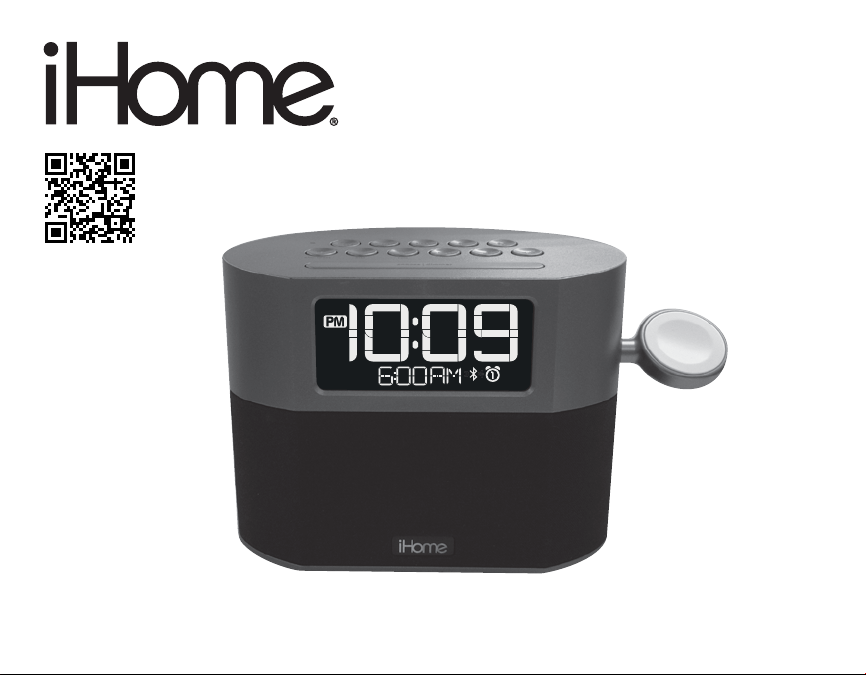
Model: iWBT400
instruction manual
iWBT400 Eng IB
Size: 153mm x 120mm
Printing color: Black
May 17, 2017 P1
Bluetooth
Dual Alarm Clock Radio
with USB Charging
Questions? Contact Customer Service at 1-800-288-2792

iWBT400
1
P2
Introduction
Thank you for purchasing the iHome iWBT400. This product is designed to provide high
quality wireless sound for your Bluetooth audio device and to charge your Apple Watch.
This instruction booklet explains the basic operation and care of the unit. Please read it
carefully and keep for future reference.
iHome Enhance App
Download the free iHome Enhance app from the Apple App Store or Google Play Store
to enjoy enhanced audio, alarm and sleep functions using your Bluetooth mobile device.
• Install and open the iHome Enhance app and select “Setup Device” from the main
menu.
• Select “iHome iWBT400 app” from your device’s Bluetooth menu
• Follow on-screen prompts and enjoy!
Maintenance
• Place the unit on a level surface away from sources of direct sunlight or excessive heat.
• Protect your furniture when placing your unit on a natural wood and lacquered finish.
A cloth or other protective material should be placed between it and the furniture.
• Clean your unit with a soft cloth moistened only with mild soap and water. Stronger
cleaning agents, such as thinner or similar materials can damage the surface of the
unit.

iWBT400
Table of Contents
2
What’s Included ................................................................................................................................................ 3
Meet Your iWBT400.......................................................................................................................................4
The Display/Setting Up the Unit............................................................................................................... 5
Replacing and Installing Clock Backup Batteries............................................................................. 6
Setting the Clock/Setting and Using the Alarms.........................................................................7-8
Previewing the Alarm and Turning the Alarm On/O................................................................... 8
Snooze/Display Dimmer Button/Sleep Mode/FM Radio............................................................. 9
Setting and Using FM Presets/Using FM Radio in Other Countries..................................... 10
Pairing Your Bluetooth Device ................................................................................................................11
Playing Audio Via Bluetooth .....................................................................................................................12
Using the Speakerphone Feature/Playing Audio via Aux-In ...................................................12
Using the iHome Enhance App................................................................................................................13
Charging Devices via USB Port............................................................................................................... 14
Battery Use Cautions and Tips.................................................................................................................15
Consumer Product Safety Guide ............................................................................................................16
FCC Information ..............................................................................................................................................17
Troubleshooting...............................................................................................................................................18
Warranty..............................................................................................................................................................19
P3
iWBT400
3
P4
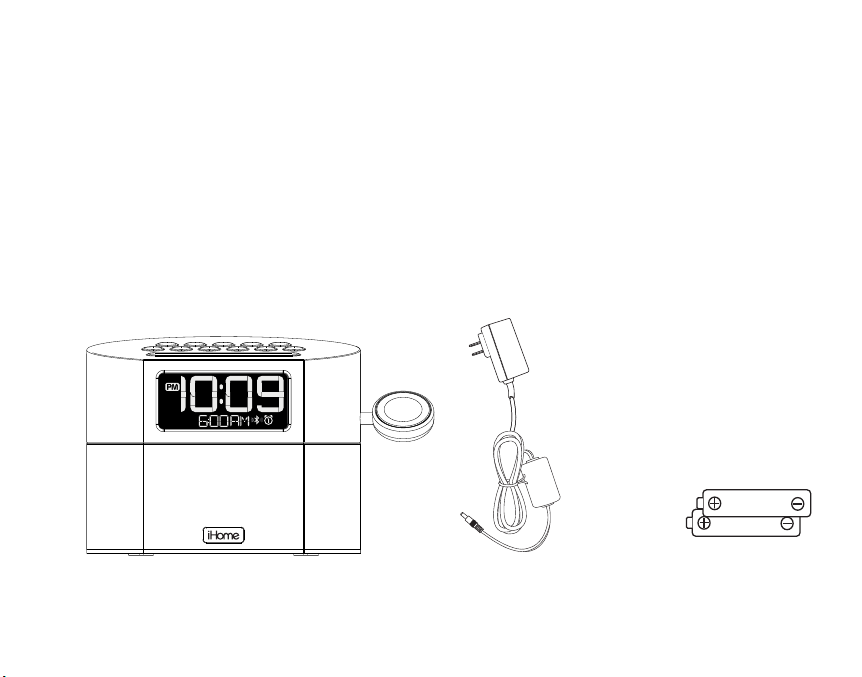
What’s Included
• iWBT400 unit
• 2 x AA batteries
• 100V-240V universal AC adapter
universal AC adapter 2 x AA batteries
iWBT400
DC 7.5V 2.3A
iWBT400
P5
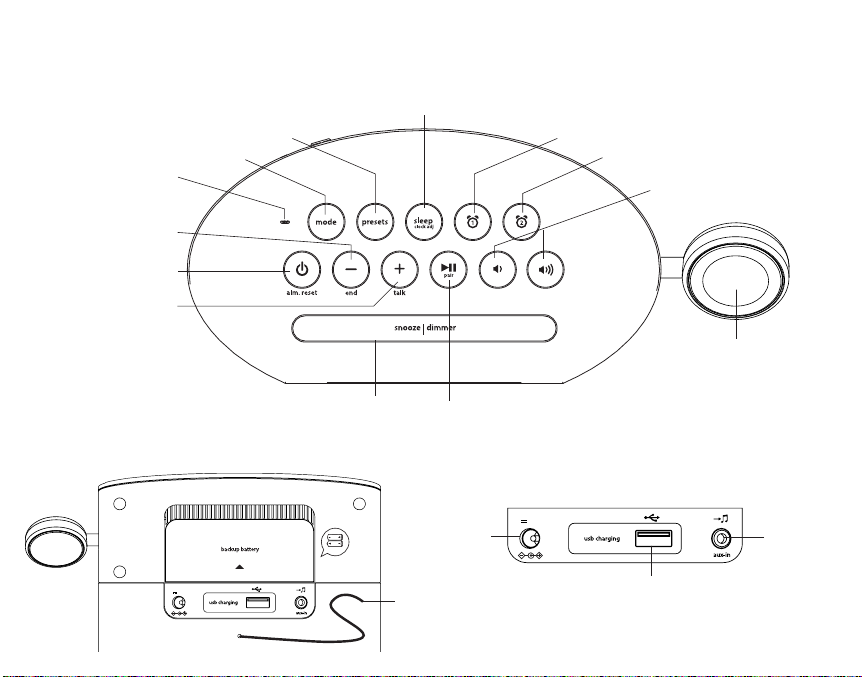
Meet Your iWBT400
Top
4
Backup Battery Compartment
Back
DC Jack
USB Charging Port
Aux-in Jack
FM Antenna
Answer Call/
Plus Settings
Button
Mode Button
Presets Button
Volume Down/
Volume Up Buttons
Snooze/Display Dimmer Button
Alarm 1 Button
Alarm 2 Button
Sleep/Clock
Adjust Button
Power/
Alarm Reset
Button
End Call/
Minus Settings
Button
Play/Pause/Pairing Button
Apple Watch
Magnetic
Charging Module
Micro-
phone
AA x 2
push to open
DC 7.5V 2.3A
RESET
RESET
TEST
TEST
Using the iWBT400
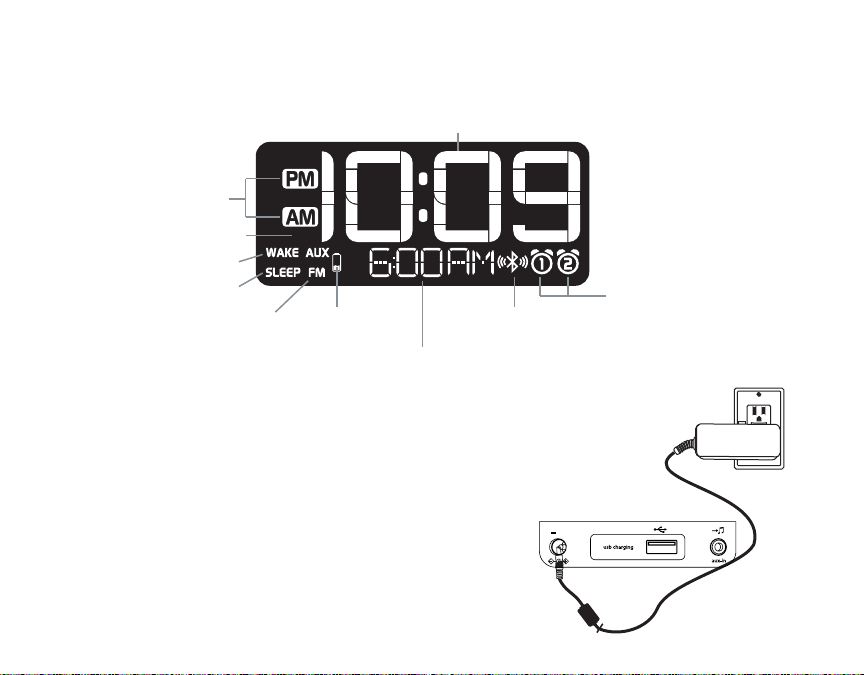
The Display
5
P6
Alarm Active Indicator
Aux-in Mode
Indicator
Set Wake-to
Sleep Mode
Indicator
FM Radio
Mode
Indicator
Bluetooth/Pairing
Indicator
PM/AM
Indicators
Alarm Time/Date/Radio Frequency
Wake to source: BT (Bluetooth), FM Radio, Tones
Mode: BT (Bluetooth), FM Radio, Aux
Time Display
Low Backup
Battery
Indicator
Setting Up the Unit
Connect the included AC adapter to the DC jack
located on the back of the unit and connect the other
end to a working wall outlet. Extend FM antenna.
2 AA batteries are included for battery backup. Install
them in the backup battery compartment located on
the back of the unit before using the unit. See page 6
for more on installing and replacing backup batteries.
DC 7.5V 2.3A
P7
6
Replacing and
Installing Clock Backup Batteries
Note: 2 AA batteries are included with the unit. Install them before using the unit.
This model is equipped with a battery backup circuit that will maintain the time and alarm time
settings in the event of a temporary power interruption (the display is NOT lit). The battery
backup circuit will also operate the buzzer alarm to wake you up at the selected wake up time
even if the power is out. When the backup batteries are getting weak the Low Backup Battery
Indicator will begin flashing in the display. When you see this flashing indicator you should
replace the backup batteries as soon as possible. Note: We recommend alkaline batteries for
best performance.
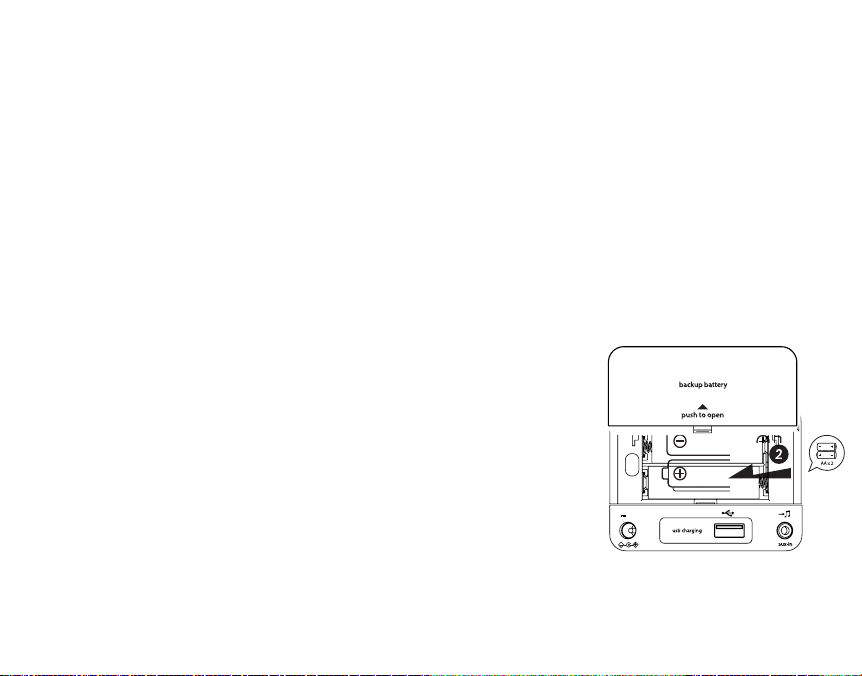
To install/replace the backup batteries:
IMPORTANT: When replacing the backup batteries be sure to
have the unit connected to the AC outlet to maintain all of your
settings, otherwise it will be necessary to reset the time and
alarm time after the batteries are replaced.
1. Press tab to remove the battery door located on the back of
the unit. If replacing batteries, remove the exhausted batteries.
2. Insert 2 fresh AA batteries in the backup battery compartment.
Make sure the polarity of the batteries (“+” or “-” nodes)
matches the illustration.
3. Close the battery compartment door. Confirm that the backup
battery indicator is not flashing in the display.
Note: Make sure you dispose of batteries properly (see your local regulations)
Using the iWBT400
Replacing Backup Batteries
DC 7.5V 2.3A

Setting the Clock
1. Press and hold the Sleep/Clock Adjust Button for 2 seconds until the clock display
flashes and a beep sounds.
2. Press the or Buttons to adjust the clock to the current time (hold for rapid setting).
Make sure you set the correct AM/PM time. The AM and PM indicators appear to the left of
the display.
3. Press the Sleep/Clock Adjust Button to confirm the time. The year will flash on the display.
4. Press the or Buttons to adjust the clock to the current year (hold for
rapid setting).
5. Press the Sleep/Clock Adjust Button to confirm the year. The date and month will flash on
the display.
6. Press the or Buttons to adjust the clock to the current date and month
(hold for rapid setting).
7. Press the Sleep/Clock Adjust Button to confirm the date and month and exit clock setting
mode. 2 beeps will confirm clock setting is complete.
TIP: To toggle the clock display between standard 12 hour time and 24 hour (“military”) time
display, press the Alarm Button or Alarm Button while the display is flashing during
clock setting.
Setting and Using the Alarms
This unit features dual alarms which can be set to dierent times and alarm sources. Each is set
in the same way. Instructions are given as “Alarm Button”; use Alarm Button or Alarm
Button to set respective alarms.
Note: Each step must be completed while display is flashing or step will time-out with any
changes saved.
TIP: Download the iHome Enhance app to access alarm functions remotely.
P8
7
Using the iWBT400

8
P9
Setting and Using the Alarms (Continued)
1. Press and hold the Alarm Button for 2 seconds until the alarm time display and alarm icon
flash. A beep sounds.
2. Press the or Buttons to adjust the alarm time to the desired time (hold for rapid
setting). Make sure you set the correct AM/PM alarm time. The AM and PM indicators
appear to the left of the display.
3. Press the Alarm Button to confirm the alarm time setting. The alarm schedule will flash.
4. Press the or Buttons to cycle to the desired schedule: 7 days (every day), 5 days
(week days) or 2 days (weekends).
5. Press the Alarm Button to confirm the alarm schedule setting. The wake-to source will
flash.
6. Press the or Buttons to select the desired wake to alarm source: Bluetooth, radio or
tones.
Wake to Bluetooth: You will wake to the currently linked Bluetooth device. If no device is
detected, the alarm will default to tone alarm.
Wake to Radio: Press the Alarm Button to confirm. Press the Presets Button to select an
FM preset to wake to, or press the or Buttons to tune in a desired wake to station. (To
set Presets, see Setting and Using FM Presets on page 10.)
Wake to Tone: You will wake to one of 4 tones. Press the Alarm Button to confirm. Press the
or Buttons to cycle through and hear tones 1 -4.
7. Press the Alarm Button to confirm the alarm settings and exit alarm setting mode. 2 beeps
will confirm alarm setting is complete. The alarm icon will remain on the display, indicating
the alarm is armed.
8. To turn o a sounding alarm and reset it to come on the next day at the same time, press
the Power/Alarm Reset Button or the associated alarm button ( or ) to reset alarm.
Previewing the Alarm and Turning the Alarm On/O
Press and release the desired Alarm Button as needed to toggle the alarm ON (indicated by the
alarm icon) or OFF (no alarm icon).
Using the iWBT400

P10
9
Snooze/Display Dimmer Button
1. To program Snooze, press and hold the Snooze/Display Dimmer Button for 2 seconds
during normal operation (when no alarm is sounding).
2. Press the or Buttons to select the desired snooze time (between 01 and 29 minutes).
3. Press and release the Snooze/Display Dimmer Button to confirm Snooze setting. 2 beeps
will sound.
4. While the alarm is sounding, press and release the Snooze/Display Dimmer Button to
temporarily silence the alarm for the set duration (9 minutes is the default). Snooze can be
used several times during alarm.
5. To adjust the brightness of the display, press and release the Snooze/Display Dimmer
Button during normal operation (when no alarm is sounding) to cycle through the
brightness display settings.
Sleep Mode
This unit allows you to sleep to the current sound source for a set time before turning the unit o.
1. To set Sleep time, press and release the Sleep/Clock Adjust Button as needed to cycle to the
desired sleep duration: 120, 90, 60, 30 or 15 minutes or OFF (turns the unit o).
2. Press the or Buttons to adjust the sleep volume on the unit. Note that the sleep volume
setting is stored separately from other volume settings.
FM Radio
Extend the FM antenna for best reception.
1. Press and release the Mode Button as needed until the FM indicator icon
and current FM radio frequency appear on the display.
2. Press the or Buttons to tune the radio to the desired station (hold to
scan for the next clear station).
3. Press the or Buttons to adjust the volume on the unit.
4. When you are through listening, press the Power/Alarm Reset Button to turn the unit o.
Using the iWBT400
Indice
Altri manuali iHome Sveglia

iHome
iHome iKN105 Manuale utente

iHome
iHome iPL10 Manuale utente

iHome
iHome iH18 Manuale del proprietario

iHome
iHome IP38 Manuale utente

iHome
iHome iBN18 Manuale utente

iHome
iHome IP43 Manuale utente

iHome
iHome IA63 Manuale utente

iHome
iHome iP40 Manuale utente

iHome
iHome iBT290 Manuale utente

iHome
iHome iKT50 Manuale utente

iHome
iHome iH41 Manuale utente

iHome
iHome IP21 Manuale utente

iHome
iHome iKN95 Manuale utente

iHome
iHome iPL10 Manuale utente

iHome
iHome iBTW450 Manuale utente

iHome
iHome IA17 Manuale utente

iHome
iHome iBTW38N Manuale utente

iHome
iHome iA5 Manuale utente

iHome
iHome POWERCLOCK iBT235 Manuale utente

iHome
iHome iBN350 Manuale utente


