Gardez les piles neuves et d’occasion à partir des enfants. Si le compartiment de la batterie ne
• pas fermer correctement, cesser d’utiliser le produit et garder loin des enfants.
• Ifyouthinkbatteriesmighthavebeenswallowedorplacedinsideanypartofthebody,seek
immediatemedicalattention.
Si vous pensez que les batteries peuvent avoir été avalé ou placé à l’intérieur d’une partie du corps,
consulter immédiatement un médecin.
• Donotmixoldandnewbatteries.
Ne pas mélanger vieilles et nouvelles batteries.
• Completelyreplacealloldbatterieswithnewones.
Remplacer complètement toutes les piles par des neuves.
• Donotmixalkaline,standard(carbon-zinc),orrechargeable(ni-cad,ni-mh,etc)batteries.
Ne mélangez pas des piles alcalines, standard (carbone-zinc) ou rechargeables
(Ni-Cd, Ni-MH, etc) batteries.
• Batteriesshouldberecycledordisposedofasperstateandlocalguidelines.
Piles doivent être recyclées ou éliminées selon les directives étatiques et locales.
FEATURES AND CONTROLS
BLUETOOTH SPEAKER
User’s Guide for Model No. ISBN504W v977-01
Important Safety Instructions
• ReadtheseInstructions.
• KeeptheseInstructions.
• HeedallWarnings.
• Followallinstructions.
• Donotusethisapparatusnearwater.
• Cleanonlywithadrycloth.
• Donotblockanyventilationopenings.Installinaccordancewiththemanufacturer’sinstructions.
• Donotinstallnearanyheatsourcessuchasradiators,heatregisters,stoves,orotherapparatus
(includingampliers)thatproduceheat.
• Donotdefeatthesafetypurposeofthepolarizedorgrounding-typeplug.Apolarizedplughastwo
bladeswithonewiderthantheother.Agroundingtypeplughastwobladesandathirdgrounding
prong.Thewidebladeorthethirdprongareprovidedforyoursafety.Whentheprovidedplugdoes
nottintoyouroutlet,consultanelectricianforreplacementoftheobsoleteoutlet.
• Protectthepowercordfrombeingwalkedonorpinchedparticularlyatplugs,convenience
receptacles,andthepointwheretheyexitfromtheapparatus.
• Onlyuseattachments/accessoriesspeciedbythemanufacturer.
• Unplugthisapparatusduringlightningstormsorwhenunusedforlongperiodsoftime.
• Referallservicingtoqualiedservicepersonnel.Servicingisrequiredwhentheapparatushasbeen
damagedinanyway,suchaspower-supplycordorplugisdamaged,liquidhasbeenspilledor
objectshavefallenintotheapparatus,theapparatushasbeenexposedtorainor
moisture,doesnotoperatenormally,orhasbeendropped.
• Useonlywithacart,stand,tripod,bracket,ortablespeciedbythemanufacturer,
orsoldwiththeapparatus.Whenacartisused,usecautionwhenmovingthecart/
apparatuscombinationtoavoidinjuryfromtip-over.
FCC Warnings
Warning:Changesormodicationstothisunitnotexpresslyapprovedbythepartyresponsiblefor
compliancecouldvoidtheuser’sauthoritytooperatetheequipment.
NOTE:ThisequipmenthasbeentestedandfoundtocomplywiththelimitsforaClassBdigital
device,pursuanttoPart15oftheFCCRules.Theselimitsaredesignedtoprovidereasonable
protectionagainstharmfulinterferenceinaresidentialinstallation.Thisequipmentgenerates,uses,and
canradiateradiofrequencyenergyand,ifnotinstalledandusedinaccordancewiththeinstructions,
maycauseharmfulinterferencetoradiocommunications.However,thereisnoguaranteethat
interferencewillnotoccurinaparticularinstallation.Ifthisequipmentdoescauseharmfulinterference
toradioortelevisionreception,whichcanbedeterminedbyturningtheequipmentoffandon,theuser
isencouragedtotrytocorrecttheinterferencebyoneormoreofthefollowingmeasures:
• Reorientorrelocatethereceivingantenna.
• Increasetheseparationbetweentheequipmentandreceiver.
• Connecttheequipmentintoanoutletonacircuitdifferentfrom
thattowhichthereceiverisconnected.
• Consultthedealeroranexperiencedradio/TVtechnicianforhelp.
Additional Warnings and Precautions
• CAUTION:TOPREVENTELECTRICSHOCK,MATCHWIDEBLADEOFPLUGTOWIDE
SLOT,FULLYINSERT.
• WARNING:Toreducetheriskofreorelectricshock,donotexposethisapparatustorain,
moisture,dripping,orsplashing.
AVIS: Pour réduire le risque d’incendie ou de choc électrique, ne pas exposer cet appareil sous
la pluie et l’humidité.
• CAUTION:Useofcontrolsoradjustmentsorperformanceofproceduresotherthanthosespecied
mayresultinhazardousradiationexposure.
• WARNING:Changesormodicationstothisunitnotexpresslyapprovedbythepartyresponsible
forcompliancecouldvoidtheuser’sauthoritytooperatetheequipment.
• WARNING:Donotplacethisunitdirectlyontofurnituresurfaceswithanytypeofsoft,porous,or
sensitivenish.Aswithanyrubbercompoundmadewithoils,thefeetcouldcausemarksorstaining
wherethefeetreside.Werecommendusingaprotectivebarriersuchasaclothorapieceofglass
betweentheunitandthesurfacetoreducetheriskofdamageand/orstaining.
• WARNING:Useofthisunitnearuorescentlightingmaycauseinterferenceregardinguseof
theremote.Iftheunitisdisplayingerraticbehaviormoveawayfromanyuorescentlighting,as
itmaybethecause.
• CAUTION:Dangerofexplosionifbatteryisincorrectlyreplaced.Replaceonlywiththesame
orequivalenttype.
AVIS: Danger d’explosion si les piles sont remplacées de façon incorrect. Remplacer les piles
seulement par le même type de pile ou l’équivalent.
• WARNING:ThereisadangerofexplosionifyouattempttochargestandardAlkalinebatteriesin
theunit.OnlyuserechargeableNiMHbatteries.
• WARNING:Theremotecontrol’sbuttoncellbatterycontainsmercury.Donotputinthetrash,
insteadrecycleordisposeofashazardouswaste
• WARNING:Lithiumbatteries,likeallrechargeablebatteries,arerecyclableandshouldberecycled
ordisposedofinnormalhouseholdwaste.Contactyourlocalgovernmentfordisposalorrecycling
practicesinyourarea.Theyshouldneverbeincineratedsincetheymightexplode.
• WARNING:Shockhazard-DoNotOpen.
AVIS: Risque de choc électrique - ne pas ouvrir
• Cautionandmarkinginformationislocatedattherearorbottomoftheapparatus.
Attention et de marquage des informations est situé sur le paneau arrière ou inférieur de l’unité.
• Objectslledwithliquids,suchasvases,shallnotbeplacedontheapparatus.
Objets remplis de liquides, comme des vases, ne doivent pas être placés sur l’appareil.
• Mainsplugisusedasdisconnectdeviceanditshouldremainreadilyoperableduringintended
use.Inordertodisconnecttheapparatusfromthemainscompletely,themainsplugshouldbe
disconnectedformthemainssocketoutletcompletely.
La prise du secteur est utilisé pour déconnecter le système. La prise du secteur ne doit pas être
obstruée ou doit être facilement accessible pendant son utilisation. Pour être complètement
déconnecté de l’alimentation d’entrée, la prise doit être débranchée du secteur.
• Batteryshallnotbeexposedtoexcessiveheatsuchassunshine,reorthelike.
Les piles ne doivent pas être exposées à de forte chaleur, tel qu’à la lumière du soleil, au feu ou
autres choses de semblable.
• Keepnewandusedbatteriesawayfromchildren.Ifthebatterycompartmentdoes
notclosesecurely,stopusingtheproductandkeepitawayfromchildren.
WARNING:Toreducetheriskofelectricshock,donotremovecover
(orback).Nouser-serviceablepartsinside.Referservicingtoqualied
servicepersonnel.
ATTENTION
RISQUE D' ÉLECTROCUTION
NE PAS OUVRIR
CAUTION
RISK OF ELECTRIC SHOCK
DO NOT OPEN
Theexclamationpointwithinanequilateraltriangleisintendedtoalertthe
usertothepresenceofimportantoperatingandmaintenance(servicing)
instructionsintheliteratureaccompanyingtheappliance.
Thissymbolindicatesthatthisproductincorporatesdoubleinsulation
betweenhazardousmainsvoltageanduseraccessibleparts.
Thelightningashwitharrowheadsymbol,withinanequilateraltriangle,is
intendedtoalerttheusertothepresenceofuninsulated“dangerousvoltage”
withintheproduct’senclosurethatmaybeofsufcientmagnitudeto
constituteariskofelectricshocktopersons.
PAIR VOLUME
LINE IN
POWER
OFF
LINE IN
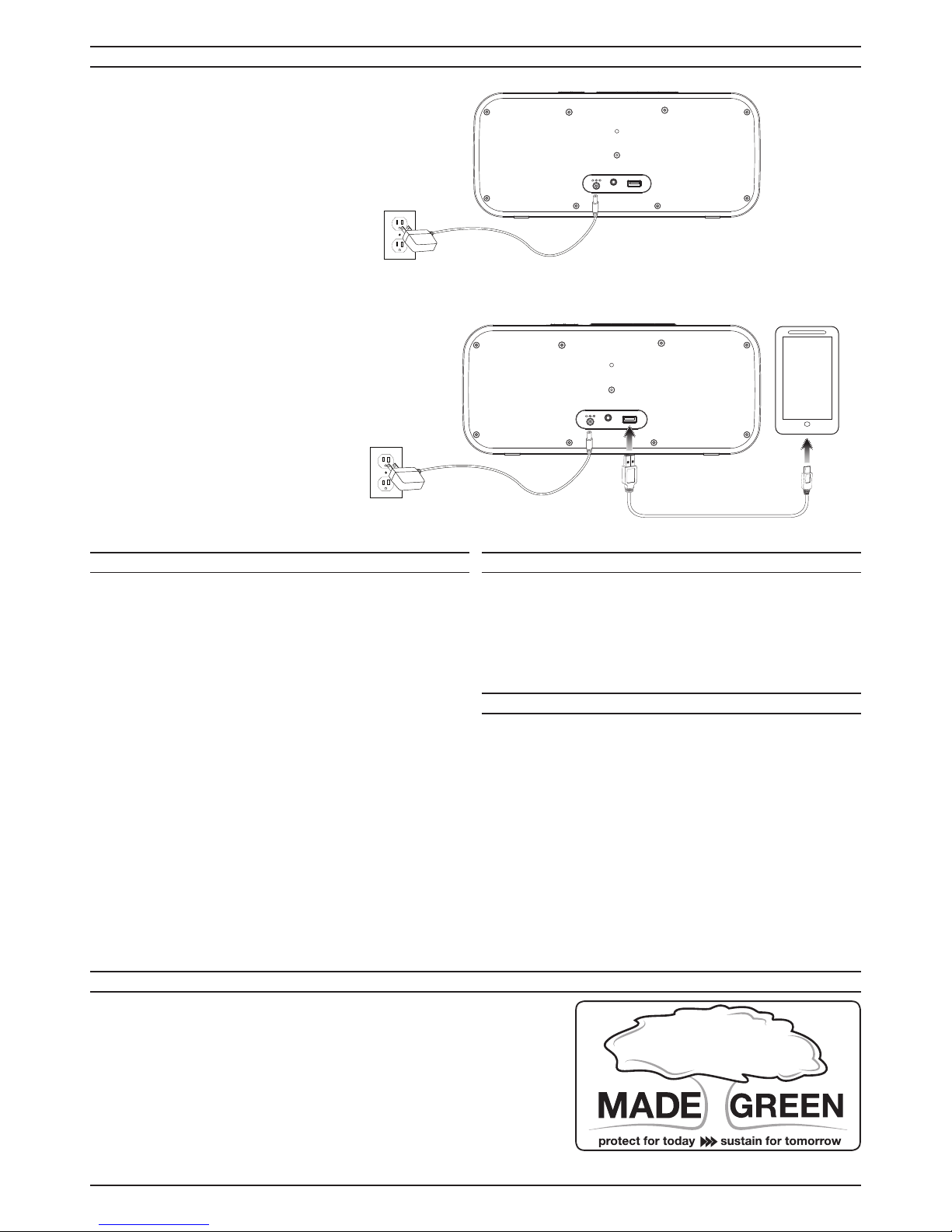
DC IN 5V USB CHARGER
Top View
Pair
DC Power Input
Volume +/-
Line In Input
Speakerphone
USB Charging Port
Power/Bluetooth/Line In
NFC Logo
Rear View