Infiltrator AQUAworx IPC Panel Manuale utente

1
JULY 2017
IPC™ Panels
Installation Manual
TABLE OF CONTENTS
INSTALLATION INSTRUCTIONS
GENERAL 2
INSTALLING THE IPC PANEL 3
INSTALLING THE PRESSURE
TRANSDUCER AND BELL
ASSEMBLY
4
PANEL ALARM CODES 5
AQUAWORX MARC™
OPERATING INSTRUCTIONS
GENERAL 6
MARC PLUG-IN & START-UP 7
CONTROLLER PASSWORDS
& LOGIN SETUP 7
MENU OPTIONS MAPPING 8
CONTROLLER MENU
OPTIONS 9
STATUS 10
EVENTS 10
MANUAL RUN 11
ACTIVATE SETTINGS 11
PUMP “A” SETTINGS 12
TIME SETTINGS 13
SD CARD OPERATIONS 13
USING THE SD CARD
SETTINGS 14
SAND FILTER PANEL SETUP 15
TIMED DOSING SETUP
FORMULATION 16
FREQUENTLY
ASKED QUESTIONS 18
www.infiltratorwater.com

Contact Infiltrator Water Technologies 1-800-221-4436 for additional technical and product information.
2
AQUAWORX IPC PANEL INSTALLATION INSTRUCTIONS
The Aquaworx IPC (Intelligent Pump Control) Panel
provides an innovative approach to pump control.
Designed specifically for the onsite industry, the IPC Panel
leverages simple pressure transducer technology for the
enhancement of pump system performance, and ease of
installation. Relying on an embedded microprocessor in
the pump controller and a floatless pressure transducer in
the pump chamber, the IPC Panel monitors liquid levels,
controls pumping time intervals, and logs events in real
time. Using the Mountable and Removable Controller
(MARC) as the user interface, the IPC Panel offers a cost-
effective solution with expanded capability.
Aquaworx offers three models of the IPC Panel; Simplex,
Duplex and Sand Filter, to meet a variety of system design
requirements. The Simplex Panel has the ability to time
control a single pump, while the Duplex Panel can control
two pumps in an alternating design with independent
timing. The Sand Filter Panel has the ability to time control
two individual pumps having independent level sensors,
allowing for a design which can time-dose a treatment
system and drainfield.
I. General
Unpack the Aquaworx IPC Panel and check for any visible
damage both external and internal. Also verify that there
are no cracks or damage to the pressure transducer bell.
Note: You will need to identify the number on the pressure
transducer bell as it is needed during the MARC setup.
Notify Aquaworx immediately at 1-877-278-2979 if any
damage has occurred.
ALL INSTALLATIONS MUST BE COMPLETED IN
ACCORDANCE WITH ALL APPLICABLE FEDERAL,
STATE AND LOCAL CODE.
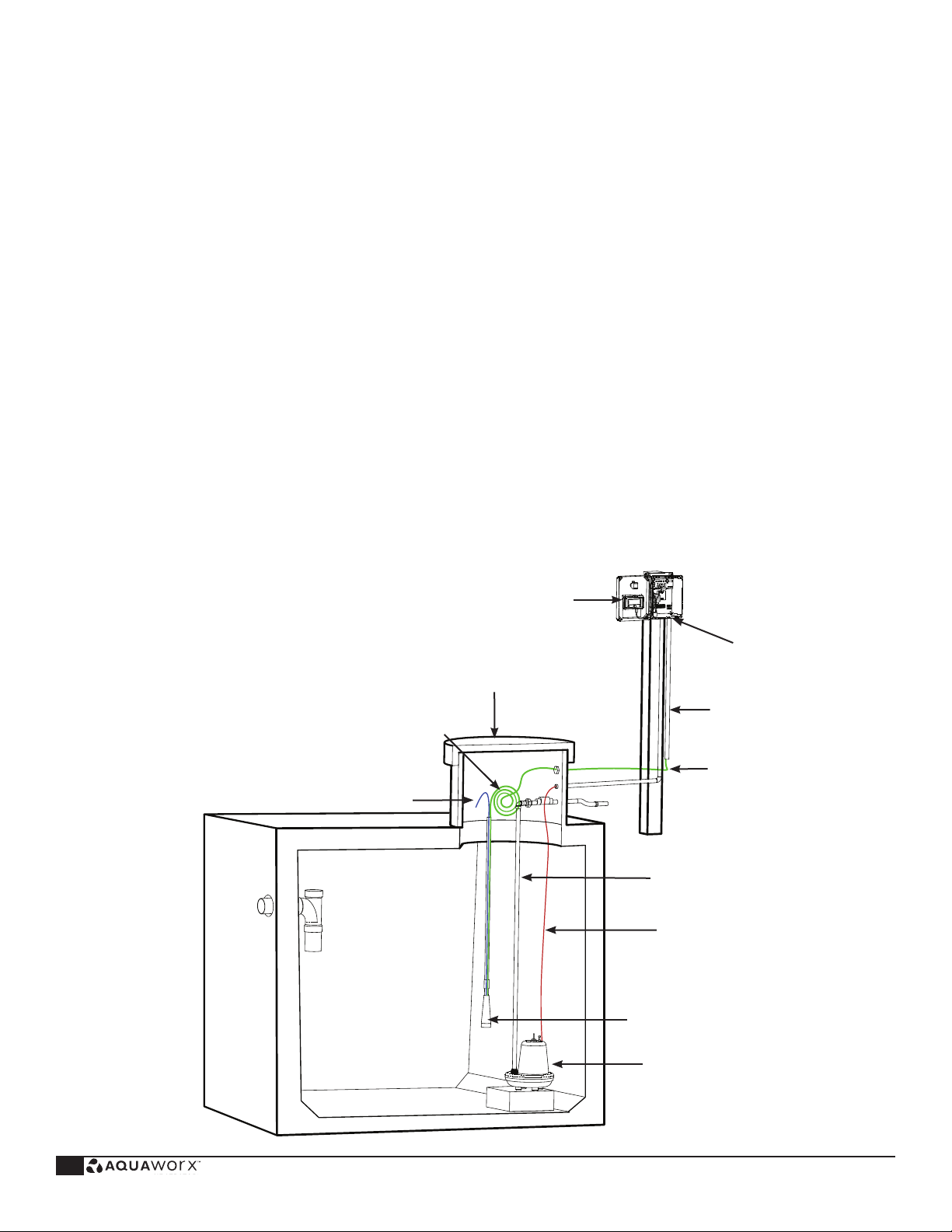
Aquaworx IPC Panel
REQUIRED
Gas Tight Seal
Conduit
Pump Tank Riser
Excess Transducer Cable
Pump Discharge
Pump Power Supply
Pressure Transducer Bell
Pump
Looped Snorkel Tube
secured to Top of Riser
Transducer Signal Wire
FIGURE 1: PUMP TANK TRANSDUCER ASSEMBLY

Contact Infiltrator Water Technologies 1-800-221-4436 for additional technical and product information. 3
AQUAWORX IPC PANEL INSTALLATION INSTRUCTIONS
II. Installing the IPC Panel
NOTE: A qualified electrician must perform all wiring.
Complete wiring diagram available at www.aquaworx.com
The following components and tools may be required
for installation:
• Screwdriver (sm and med size flat head)
• Pipe cutter and tape measure
• Fish tape
• Wire strippers/cutters
• Electrical tester
• Drill
• 3⁄4” to 1” screws
• 1” PVC coupler
• Step bit
• Hole saw
• Electrical conduit
• Electrical tape
• Splice box for pump connection
• Waterproof wire connectors
• 1” PVC (for transducer handle, amount determined by
tank depth (6’ length typical)
FIGURE 2: IPC PANEL WIRING SETUP AND
TRANSDUCER 3-WIRE CONNECTION
1. Mount the IPC Panel to the wall or post. Position the
IPC Panel so that the power supply enters the IPC Panel
through the bottom approximately 1” to the right of the
audible alarm unit.
2. On Simplex Panels drill two holes (3 holes for duplex)
in the bottom of the enclosure spaced approximately 2”
apart and in line with the audible alarm unit. When facing
the panel, the order of conduit connections from left to
right is shown below, as well as illustrated in Figure 2:
Power in: 2 dedicated 20 amp circuits from house to
power the panel, 120V (1) and pump, 120V or 220V(2)
Power out: Power supply from panel to pump
Transducer signal wire: Signal transmission from panel
to pump
NEMA 4X fittings must be installed in each field-drilled hole
to retain the integrity of the enclosure’s 4X rating.
Dedicated pump circuit from supply (#2)
(120 or 220 volt, 20 amp source; up to a 2 HP pump)
Power from panel to pump
(pump A for duplex)
Transducer signal wire terminal strip
Varistor surge suppressor
Ground terminals
Transducer wire and power in/out conduit connections
Audible alarm unit
Circuit board
Dedicated alarm from supply (#1)
(120 volt, 20 amp source)

Contact Infiltrator Water Technologies 1-800-221-4436 for additional technical and product information.
4
AQUAWORX IPC PANEL INSTALLATION INSTRUCTIONS
3. Power to pumps: run the panel (s) power wires from
the IPC Panel to the septic tank riser. Connect the wiring
in the splice box using water-tight connectors. Connect
pump wires to the IPC Panel by carefully following the
wiring diagram enclosed with the panel. A gas-tight seal
(see Figure 1) is required to prevent corrosive septic gases
from migrating into the IPC Panel.
4. Power to controller: wire the supply circuit to the panel.
Aquaworx recommends that the panel be wired to two
designated circuits. An external disconnect should be
incorporated into the supply circuit and mounted within
easy reach of the IPC Panel. Note: Site specific codes
have final authority on external wiring requirements.
III. Installing the Pressure Transducer
and Bell Assembly
The pressure transducer bell assembly replaces the tradi-
tional float tree assembly. The 1” PVC stand pipe may be
mounted by applying the same methods used to install a
float tree assembly.
1. Determine the position of the pressure transducer bell
assembly. The pressure transducer bell assembly must be
mounted so that it allows the liquid level to pump below
the bottom of the pressure transducer bell. This allows the
pressure transducer bell to get a fresh air bubble.
2. Feed the transducer signal wire and snorkel tube
through the 1” PVC stand pipe and glue to the pressure
transducer bell using a 1“ tee. The length of the stand
pipe when secured should position the bottom of the
pressure transducer bell above the top of the pump.
3. Cut off the snorkel tube approximately 9” lower
than the top of the stand pipe and secure it to the
transducer signal wire. The snorkel tube should be
positioned in the form of an upside-down U as high as
possible in the riser. This allows the snorkel tube to
create an air lock in the event of a flooded tank.
4) NOTE: The Z-bias value labeled on the side of the
pressure transducer bell. Later in the set-up, you will be
instructed to program the Z-bias into the IPC Panel.
5. Run the transducer signal wire back to the IPC Panel
and connect to the transducer signal wire terminal strip.
Connect Red to RD, blue to BL and black to BK (first
three positions). Make sure to leave enough cable in the
riser to allow for removal of the pressure transducer bell
assembly during maintenance. The transducer signal wire
is rated for direct burial. However, it can be run in a con-
duit. Site specific codes have final authority on installation
requirements.
NOTE: Do not attach the pressure transducer bell assembly to
the pump discharge pipe. Do not pinch or crimp the snorkel tube
tubing.
FIGURE 3: TRANSDUCER
Pump Power
Supply
Pump
Bell 4”
Above Off/
Idle Level
Pressure
Transducer
Bell
1” Tee
for Stand
Pipe
Drainage
1” PVC
Stand Pipe
Tank
Bracket
Snorkel Tube
Transducer
Signal Wire
Riser
Wall
Pump
Discharge
Excess
Transducer
Cable

Contact Infiltrator Water Technologies 1-800-221-4436 for additional technical and product information. 5
AQUAWORX IPC PANEL INSTALLATION INSTRUCTIONS
IV. Panel Alarm Codes
A) Visual Status Indicator
The indicator light on the front of the panel displays cur-
rent system status by flashing in unique 8 second pat-
terns. If the light does not flash for 8 seconds there is a
problem with the pump controller.
Patterns:
On solid The system is experiencing
a high-level alarm condition
1 short flash The system is idle
1 long flash The system is pumping
2 short flashes The system is waiting for the off
time to expire
B) Audible Status Indicator
The sounds convey event conditions that require atten-
tion. To silence the panel press the push to silence button
on the front of the IPC Panel. The following Morse Code
characters communicate specific system conditions:
Morse Code P ._ _. Controller was just powered up
On Continuous The water level is above the
high-level set point
Morse Code “S” . . . The level sensor is not
communicating with the controller
FIGURE 4: IPC PANEL WITH VISUAL ALARM
NOTE: SCB02 Panel uses a toggle switch on the side for
the same function.
C) Manual Pump/HOA Feature
Push to silence button may be used to manually operate
the pump in case a MARC is not available.
Steps:
1) Hold the alarm button down (continuously)
2) Turn off the power to the panel by throwing
the breaker or disconnecting the wires from the
transformer (Blue and Yellow).
3) Turn the power back on and release the alarm
button. The alarm should now only have a
single flash.
4) The pump will power on by holding the alarm
button down, and will turn off when released.
5) To return to automatic operation, the panel should
go through another power cycle without holding
down the alarm button.

Contact Infiltrator Water Technologies 1-800-221-4436 for additional technical and product information.
6
AQUAWORX MARC OPERATING INSTRUCTIONS
I. General
The MARC is a handheld device that is specifically
designed to program the Aquaworx IPC Panel product
line. The MARC has the ability to mount inside the IPC
Panel making it readily available for that individual panel.
Alternatively, it can be removed for use with multiple
panels. Removing the MARC has an additional benefit of
minimizing the ability of unauthorized persons to inadver-
tently adjust the system settings. The MARC connects to
and communicates with the panel using a standard RJ45
cable (included). The MARC includes a SD memory card
slot, allowing the user to capture and download system
events and settings onto a removable card. This provides
the operator with a history of system function, which is
critical to troubleshooting and maintaining a pump-driven
system.
FIGURE 5: THE MARC
Tracking SD-card slot
for event download
LCD text display
(2 line, 20 character)
Sturdy ABS enclosure
RJ45 Cable 3’ length
Simplex/Duplex and
backwards compatible
8-pin (RJ45) connector for easy
plug-in / disconnect
Enter -/Left Select +/Right Cancel
II. MARC Plug-in and Start-up
1. Plug RJ45 cable into bottom of MARC unit.
2. Plug other end of RJ45 cable into panel connector.
3. LCD screen will display.
NOTE: The MARC receives its power from the IPC Panel
and does not have a power source of its own.

Contact Infiltrator Water Technologies 1-800-221-4436 for additional technical and product information. 7
AQUAWORX MARC OPERATING INSTRUCTIONS
FIGURE 6: IPC PANEL WITH THE MARC
IV. Controller Menu Functions
Below is a list of menu functions available to the user.
See Figure 7 for complete MARC menu mapping.
SIMPLEX = The “SIMPLEX” panel user may access the
above menus in addition to the following menus:
A) VIEW STATUS “A”
B) VIEW EVENTS
C) MANUAL RUN “A” OR “B”
D) ACTIVATE SETTINGS
E) PUMP “A” SETTINGS
F) TIME SETTINGS
G) SD CARD SETTINGS
H) LOGIN
RJ45 Cable
Connection to MARC
DUPLEX = The “DUPLEX” panel user may access the
above menus in addition to the following menus:
• STATUS “B”
• MANUAL “B”
• PUMP “B” SETTINGS
RJ45 Cable Connection to
Circuit Board
MARC

Contact Infiltrator Water Technologies 1-800-221-4436 for additional technical and product information.
8
AQUAWORX MARC OPERATING INSTRUCTIONS
FIGURE 7:
MARC SIMPLEX
MENU OPTIONS MAPPING
300 AQUAWORX HUI
R1.3.2.C (c) 2012 LIPS
V
iew Status “A”
View Events
Run Ti
me = 00000:00:03
Doses = 00000 V = 00000
06-10-03 1
1:53:44
0012 Event
SW = DLL
3.00 V1.0.4.d
ID = 04-10-2012
00-00 12:30:14 0012
Man Off 00.0
Continuation of events
depending on
the amount stored
Manual Run
Pump “A” or “B”
Time State Level
000:00 MRun 00.00
Time State Level
000:00 MStop 00.00
Activate
Settings
Waiting/Pumping/Idle 001:30
Level 03.6
Pump “A”
Settings
Pump On Time
01:00
Veto On Time
01:00
Pump Off Time
060:00
Veto Off Time
030:00
High Level
20.0
Start Level
1.0
Veto Level
19.0
Zero Bias
07, 08, 09...
Auto Clear
Set Time & Date
12:04:51 06-14-13
SD Card
Operations Login
Save Events
Y/N
Clear Events
Y/N
Save Settings
Y/N
Activate
Time Settings
Save Full Event File
Y/N
Time State Level
000:00
Waiting 00.00
AQUAWORX
HUZ R1.3.2.2 by Infiltrator

Contact Infiltrator Water Technologies 1-800-221-4436 for additional technical and product information. 9
AQUAWORX MARC OPERATING INSTRUCTIONS
V. Controller Menu Options
View Status A
Displays panel Status “A” settings
(See Section A)
Displays real time event tracking log of system
(See Section B)
Manual pumping and stopping - HOA
(Hands Off Auto) switch
(See Section C)
Sets IPC Panel into auto mode after settings have
been modified
(See Section D)
Setup functions for Pump “A”
(See Section E)
IPC Panel setup for establishing local time and date
(See Section F)
Set of sub-menus designed to perform events and
settings retrieval, and to clear events when desired.
(See Section G)
Allows user to access administrative settings to update
advanced settings.
(See Section H)
View Events
Manual Run Pump “A”
Activate Settings
Pump A Settings
Time Settings
SD Card Settings
Login

Contact Infiltrator Water Technologies 1-800-221-4436 for additional technical and product information.
10
AQUAWORX MARC OPERATING INSTRUCTIONS
Section A.
STATUS: This is a read-only set of sub-menus that allow
the user to view the IPC Panel status in real-time and
program functions as it runs through the programmed
View Status A
Time State Level
000:00 Waiting 00.0
Run Time = 00000:00:03
Doses = 00000 V = 00000
06-10-03 11:53:44
0012 Event
SW = DLL3.00 V1.0.4.d
ID =04-10-2012
parameters. The IPC Panel identification number and
software version can be found in this menu.
NOTE: Status “B” is an available menu option on Duplex
panels.
300 AQUAWORX HUI
R1.3.2.C (c) 2012 LIPS
Time - min / sec
State - Pumping, Waiting, Idle
Level - Inches above bottom of bell
Run Time (hr / min / sec)
Doses - Cycle counter - normal dose
V - Cycle counter - veto dose
Date and time
Number of events
Software identification version and revision
IPC Panel identification number
Section B.
EVENTS: A read-only set of sub-menus that allows the
user to view the events logged into the system (up to
4,000 events). The LCD screen details the date, time,
liquid level, event code and event count number.
AQUAWORX HUZ R1.3.2.2
by Infiltrator
Software version
00-00 12:30:14 0012
Man Off 00.0
Date of
Event
Time of Event Event
Number
Event
Type Level at
Time of Event
Indice
Manuali Unità di controllo popolari di altre marche

Festo
Festo Compact Performance CP-FB6-E Manuale elenco delle parti

Elo TouchSystems
Elo TouchSystems DMS-SA19P-EXTME Manuale utente

JS Automation
JS Automation MPC3034A Manuale utente

JAUDT
JAUDT SW GII 6406 Series Guida rapida

Spektrum
Spektrum Air Module System Manuale utente

BOC Edwards
BOC Edwards Q Series Manuale utente