8
Settings
05
5.1 Key Setting
5.1.1 Factory Reset
Hold the button and turn on the device,
the buzzer will beep shortly to remind the
users that all parameters of the the humidity
probe are restored to factory settings.
5.1.2 Fast Setting
Press the button lightly to enter quick
set-up mode and set the value, the SV
screen will display the current setting value
and keep flashing. Press the button or
the button to change the value, hold the
button or the button to change the value
quickly, press the button again to save
settings and quit the setting mode, the
controller will also save settings and quit
the setting mode if there is no operation for
10 seconds.
5.1.3 Normal Setting
Hold the button for 2 seconds to enter
setting mode when the controller working
normally, the PV screen will display the code
“HS” of the first menu item and the SV
screen will display the corresponding
setting value. Press the button to switch
between menu items, press the button or
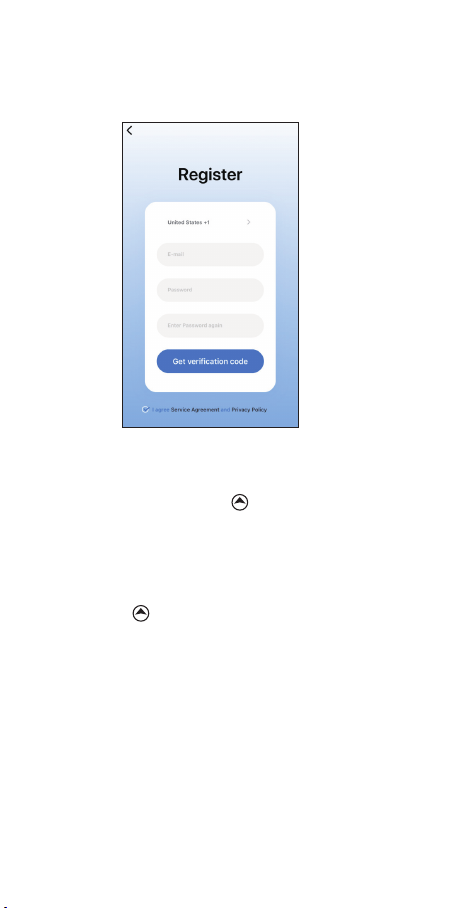
③ Tap “+” or “add device” button in home
page of the APP to add the device.
④ Press and hold the button for 2
seconds to reset the WIFI when the
controller is under normal working state.
The controller will enter the Smartconfig
configuration state by default. You can short
press the button to switch between the
Smartconfig configuration mode and the AP
mode.
As the WIFI module need time for data
processing, so it will take about 5 seconds
to display the corresponding LED symbol
and state if the Wi-Fi states change.
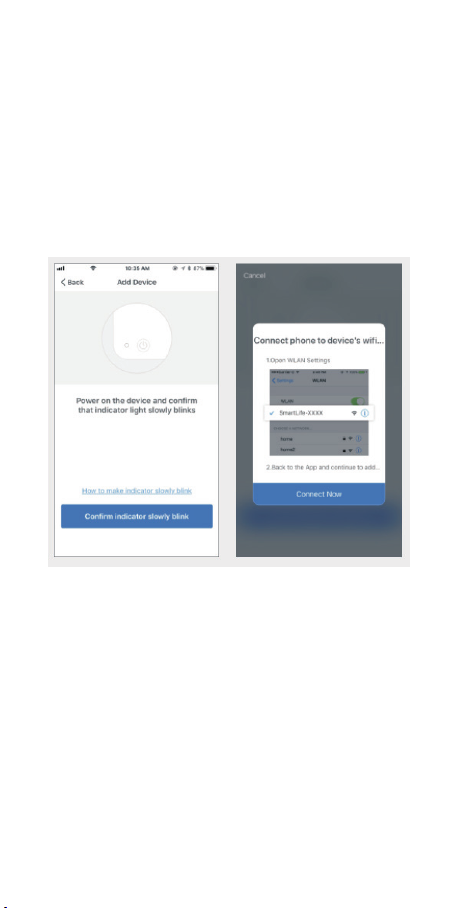
4.3 Quick Connection
(1) Plug the device in the socket and make
sure that the device is in the Smartconfig
state(the LED symbol is flashing rapidly,
interval flashing 250ms).
(2) Check if the LED symbol is blinking
rapidly and confirm on your app if it is, then
enter your Wi-Fi password to connect to
wireless network, click Confirm to connect
the device.
Note: The device only supports 2.4GHz
Wi-Fi router.
the button to change the value, the value
will be saved automatically when you switch
to another menu item by pressing the
button.
Press and hold the button for 2 seconds
to save settings and quit the setting mode,
the controller will also quit the setting mode
and turn to normal working mode if there’s
no operation for 30 seconds.
5.2 Flowchart of the Settings
6.1 Instructions for Humidity Control
Setting(HS,HD,DD)
The PV Screen displays the measured value
of current humidity when working normally,
recognize and switch between
humidification mode and dehumidification
mode automatically.
If the measured Humidity(PV) ≤ Humidity
Setting Value(HS)-Humidification Differential
Value(HD), the equipment will enter
humidification state, the red led is on,
WORK1 output socket turns on. If the
measured Humidity(PV) ≥ Humidity Setting
Value(HS), the red led is off, WORK1 output
socket turns off.
If the measured Humidity(PV) ≥ Humidity
Setting Value(HS)+Dehumidification
Differential Value(DD), the equipment will
enter dehumidification state, the green led
is on, WORK2 output socket turns on. If the
green led is blinking, indicating that the
dehumidification device is in the state of the
dehumidification delay protection, WORK2
output socket turns off. If the measured
Humidity(PV) ≤ Humidity Setting Value(HS),
the green led is off, WORK2 output socket
turns off.
Example: HS=50.0%RH, HD=5.0%RH,
DD=8.0%RH, If PV(the measured humidity)
≥ 58.0%RH(HS+DD), the equipment will
enter the dehumidification state, the green
led is on, WORK2 output socket turns on. If
PV ≤ 55.0%RH(HS), the green led is off,
WORK2 output socket turns off. If PV ≤
45.0%RH (HS-HD), the equipment will enter
the humidification state, the red led is on,
WORK1 output socket turns on. If PV ≥
50.0%RH(HS), the red led is off, WORK1
output socket turns off.
Note: There is no need to judge the
differential value of humidification or
dehumidification when power on or exiting
the setting state. For example: when power
on or exiting the setting state HS=50.0%RH,
HD=5.0%RH, DD=8.0%RH. If PV(the
measured humidity) > 50.0%RH(HS), it will
enter the dehumidification state. When PV ≤
50.0%RH(HS), the dehumidification stops,
then return to normal humidity control
mode. If PV < 50.0%RH, it will enter the
humidification state. When PV ≥ 50.0%RH,
the humidification stops, then return to
normal humidity control mode.
6.2 High/Low Humidity Alarm(AH,AL)
The equipment will alarm if the value of
measured humidity(PV) ≥ the set value of
high humidity alarm(AH), the PV screen will
display the set value of high humidity
alarm(AH) and the current humidity value
alternately, the buzzer will alarm like
“bi-bi-Biii”until the value of measured
humidity(PV) < the set value of high
humidity alarm(AH). You can also stop the
alarming by pressing any button of the
equipment.
The equipment will alarm if the value of
measured humidity(PV) ≤ the set value of
Low humidity alarm(AL), the PV screen will
display the set value of low humidity
alarm(AL) and the current humidity value
alternately, the buzzer will alarm like
“bi-bi-Biii” until the value of measured
humidity(PV) > the set value of low humidity
alarm(AL). You can also stop the alarming
by pressing any button of the equipment.
Note: The setting value of low humidity
alarm(AL) should be less than the setting
value of high humidity alarm(AH).
6.3 Dehumidification Delay Time(PT)
The equipment will not start immediately in
the mode of dehumidification for the first
time if the measured value is larger than the
sum value of set humidity value and
dehumification return difference, the
equipment will start to dehumidify after the
set delay time.
The equipment will dehumidify immediately
if the interval time of two adjacent
dehumidification is longer than the delay
time.
The equipment will dehumidify after delay
time if the interval time of two adjacent
dehumidification is shorter than the delay
time.
The delay time start timing when last
dehumidification is done.
Note: There is no need to judge the delay
time when power on or exiting the setting
state.
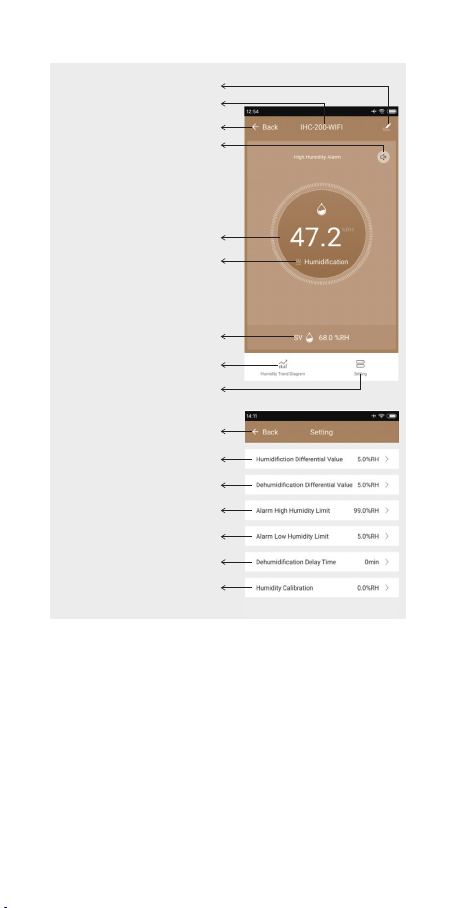
6.4 Humidity Calibration(CA)
If the measured humidity differs from the
standard humidity, you can calibrate the
device by adding or reducing the correction
value to align the measured humidity to the
standard humidity.The calibrated humidity =
the measured humidity value + the
calibration value.
WIFI
WIFI
WIFI
SET
SET
SET
SET