
IntesisHome MH-RC-WIFI-1 Manuale utente

IntesisHome
MH-RC-WIFI-1
INSTALLATION GUIDE
_________________
INSTALLATIONSANLEITUNG
_________________
GUIDE D’INSTALLATION
_________________
GUIDA PER L’INSTALLAZIONE
_________________
GUÍA DE INSTALACIÓN

CONTENTS
English ................................................................................ 3
Deutsch ............................................................................... 7
Français............................................................................... 11
Italiano................................................................................. 15
Español................................................................................ 19
Norsk ................................................................................... 23
Svenska............................................................................... 27
Dansk .................................................................................. 31
Nederlands .......................................................................... 35
Polski................................................................................... 39
Russian................................................................................ 43
IntesisHome®MH-RC-WIFI-1
3
INSTALLATION GUIDE
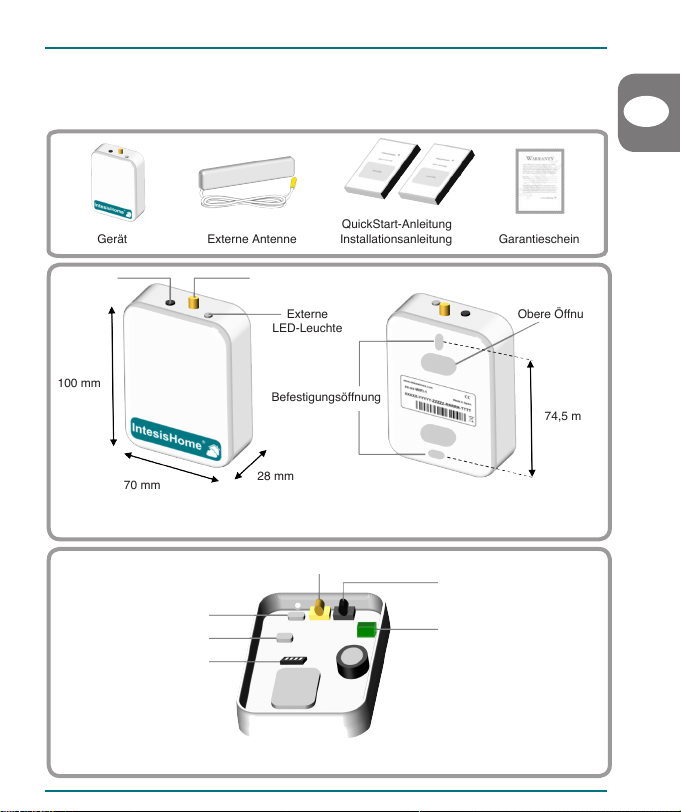
1. Product description
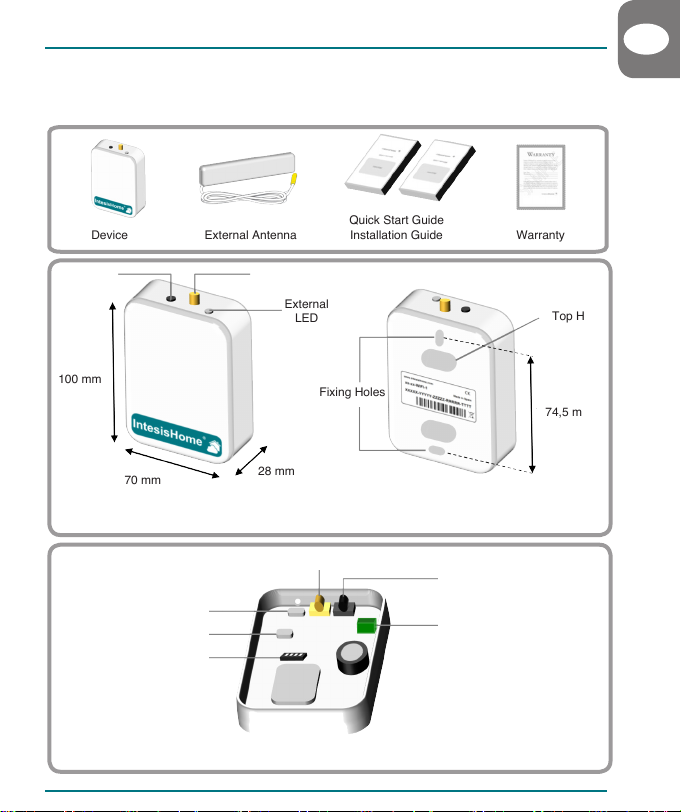
The IntesisHome device is an external module capable of connecting Mitsubishi Heavy Industries FD
and HyperMulti units into your Wi-Fi network in order to provide global connectivity and remote control
applications through a friendly user interface.
External View
Internal View
Front view Back view
External LED
Internal LED
Button
K1 Connector
Antenna Connector
Quick Start Guide
Device External Antenna Installation Guide Warranty
100 mm
70 mm 28 mm
74,5 mm
External
LED
Antenna Connector
Button
Top Hole
Fixing Holes
EN
DIP-Switch
4
INSTALLATION GUIDE
2. Installation procedure
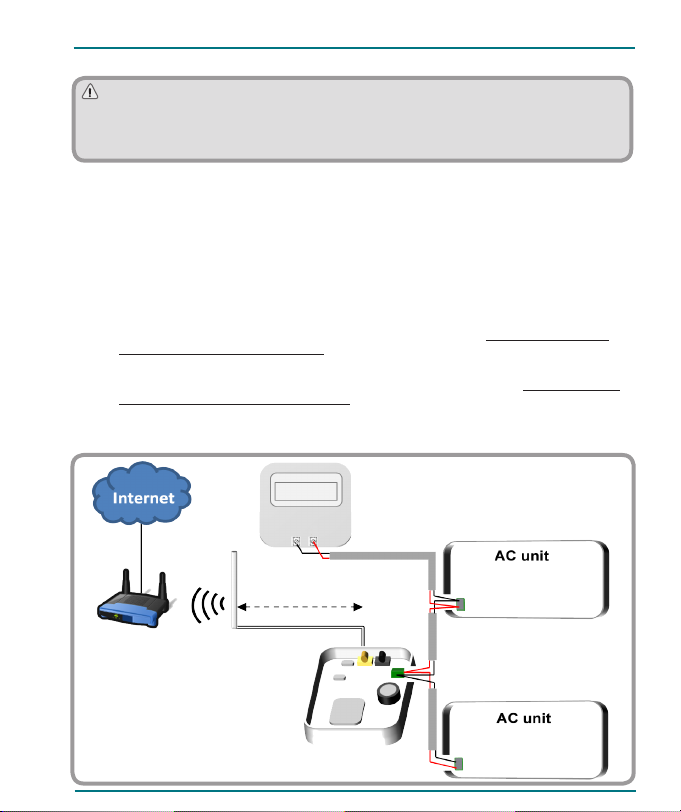
There are two installation options available: With Control Panel and without Control Panel.
2.1 With Control Panel (Recommended)
This method assumes that you want to control the Mitsubishi Heavy Industries system both with
IntesisHome and the Mitsubishi Heavy Industries Control Panel.
1. Unplug the Mitsubishi Heavy Industries system from mains electricity.
2. Open the top lid of the IntesisHome device and remove IntesisHome’s Top Hole cover.
3. Connect one end of Mitsubishi Heavy Industries’s bus cable into IntesisHome device K1 connector.
4. Connect the other end of Mitsubishi Heavy Industries’s bus cable into Mitsubishi Heavy
Industries’s Indoor Unit XY connector or Remote Control Wiring (see www.intesishome.com/
docs/MH-RC-WIFI-1-Install_sketch.pdf for more information).
5. Connect another cable from Mitsubishi Heavy Industries’s Control Panel connector to Mitsubishi
Heavy Industries’s Indoor Unit XY connector or Remote Control Wiring (see www.intesishome.
com/docs/MH-RC-WIFI-1-Install_sketch.pdf for more information).
6. Congure the IntesisHome switches (www.intesishome.com/docs/MH-RC-WIFI-1-Install_sketch.pdf).
Installation process should only be performed by an
authorized installer.
IntesisHome®MH-RC-WIFI-1
3 m X
Y
X
Y
. . .
# 1
# n
Please follow all Safety Instructions provided by the Mitsubishi Heavy Industries service manual
and/or installation manual.
Wi-Fi Router or
Access Point
K1
X Y
IntesisHome®MH-RC-WIFI-1
5
7. Close the IntesisHome’s and Mitsubishi Heavy Industries’s lid again.
8. Plug the Mitsubishi Heavy Industries system to mains electricity.
If connection with the Mitsubishi Heavy Industries system has been successful, IntesisHome
device LED will start blinking Green and then will change to steady Green.
9. Connect the external antenna into the antenna connector.
10. Place the antenna preferably in a vertical position and pointing directly to the Wi-Fi Router or
Access Point (AP). See section 3.
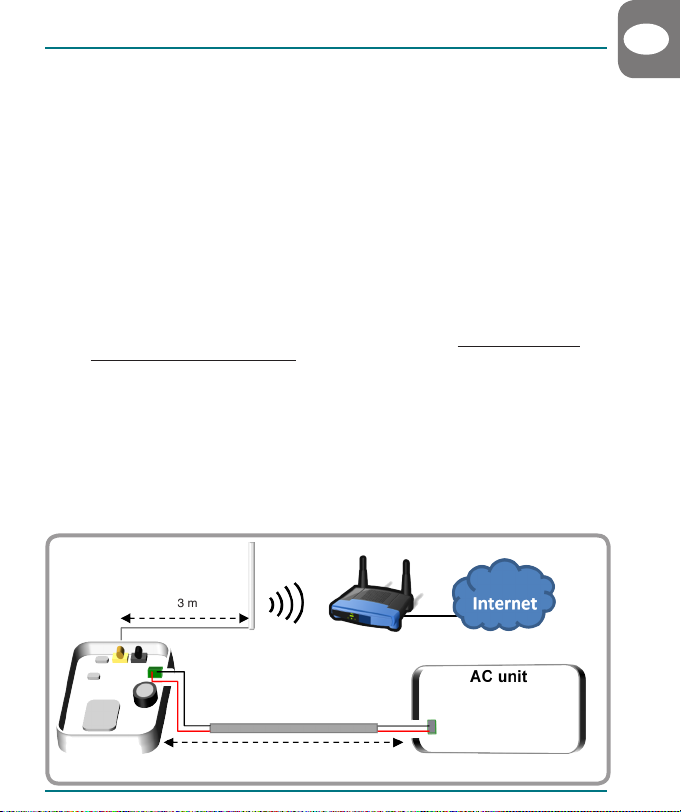
2.2 Without Control Panel
This method assumes that you want to control the Mitsubishi Heavy Industries system through
IntesisHome exclusively.
1. Unplug the Mitsubishi Heavy Industries system from mains electricity.
2. Open the top lid of the IntesisHome device and remove IntesisHome’s Top Hole cover.
3. Connect one end of Mitsubishi Heavy Industries’s bus cable into IntesisHome device K1 connector.
4. Connect the other end of Mitsubishi Heavy Industries’s bus cable into Mitsubishi Heavy
Industries’s Indoor Unit XY connector or Remote Control Wiring (see www.intesishome.com/
docs/MH-RC-WIFI-1-Install_sketch.pdf for more information).
5. Congure the IntesisHome switches (www.intesishome.com/docs/MH-RC-WIFI-1-Install_sketch.pdf)
6. Close the IntesisHome’s and Mitsubishi Heavy Industries’s lid again..
7. Plug the Mitsubishi Heavy Industries system to mains electricity.
If connection with the Mitsubishi Heavy Industries system has been successful, IntesisHome
device LED will start blinking Green and then will change to steady Green.
8. Connect the external antenna into the antenna connector.
9. Place the antenna preferably in a vertical position and pointing directly to the Wi-Fi Router or
Access Point (AP). See section 3.
INSTALLATION GUIDE
3 m
Max. 600 m
EN
X
Y
Wi-Fi Router or
Access Point
K1
IntesisHome®MH-RC-WIFI-1
6
INSTALLATION GUIDE
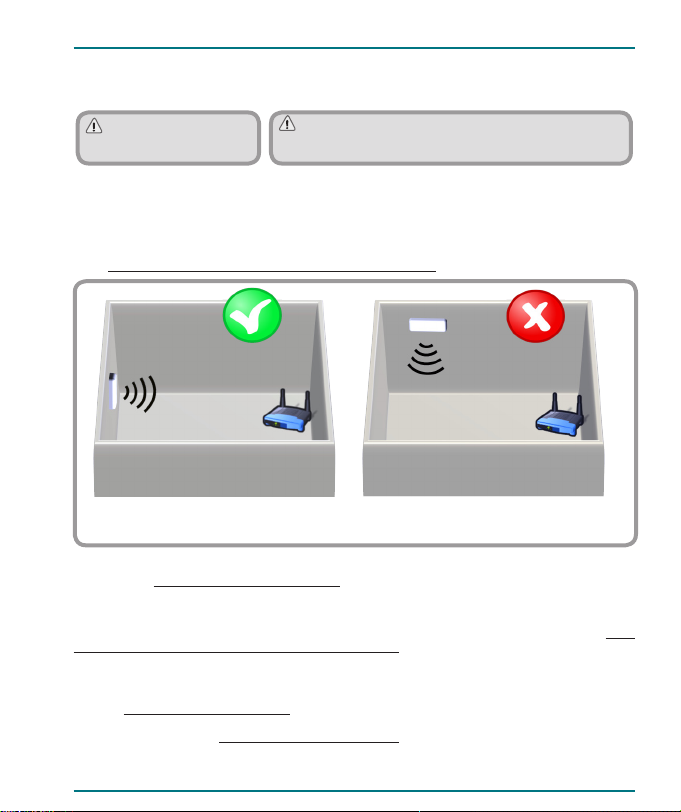
Important: Avoid placing
the antenna next to metal
surfaces.
Important: When possible, try to check Wi-Fi coverage
in the installation location. Good Wi-Fi level is strongly
recommended.
3. Antenna location
Locating the external antenna in a proper location and position will improve communication between the
IntesisHome device and your Wi-Fi Router or Access Point (AP).
Fix the external antenna preferably as close as possible from the Wi-Fi signal source (Access Point
or Router).
Please, make sure that you place the antenna in a vertical position and pointing directly to your Wi-Fi
Router or Access Point (AP).
See www.intesishome.com/docs/MH-RC-WIFI-1-Install_sketch.pdf for more information.
If you have coverage problems after installation, please visit the connectivity support section
in our site at www.intesishome.com/support/faq/
4. Technical information
In order to obtain a complete and technical description of the device, please see the document at www.
intesishome.com/docs/MH-RC-WIFI-1-Technical-Info-eng.pdf
5. FAQ and support
For any question or problem related with the product or the installation procedure, please visit our support
center at www.intesishome.com/support .
Please refer to the website www.intesishome.com/downloads for latest updates.
Antenna in vertical position and pointing to
the Wi-Fi Access Point or Router
Antenna in horizontal position and not
pointing to the Wi-Fi Access Point or Router
Antenna
Antenna
IntesisHome®MH-RC-WIFI-1
7
INSTALLATIONSANLEITUNG
DE
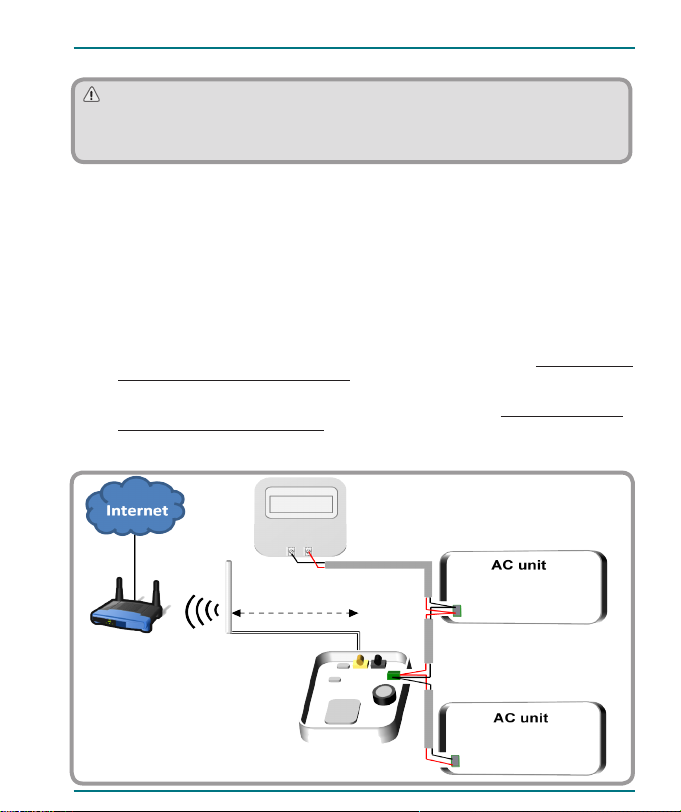
1. Produktbeschreibung
IntesisHome ist ein externes Modul für die Verbindung von Mitsubishi Heavy Industries FD und HyperMulti-
Geräte mit Ihrem WLan-Netz, das mittels einer benutzerfreundlichen Schnittstelle eine weltweite
Konnektivität sowie Anwendungen für eine Fernregelung bietet.
Außenansicht
Innenansicht
Vorderansicht Rückansicht
Externe LED-Leuchte
Interne LED-Leuchte
Taste
K1 Steckverbinder
Antennenanschluss
QuickStart-Anleitung
Gerät Externe Antenne Installationsanleitung Garantieschein
100 mm
70 mm 28 mm
74,5 mm
Externe
LED-Leuchte
Antennenanschluss
Taste
Obere Öffnung
Befestigungsöffnung
DIP-Switch
IntesisHome®MH-RC-WIFI-1
8
INSTALLATIONSANLEITUNG
2. Vorgehensweise zur Installation
Es gibt zwei verschiedene Kongurationsoptionen: Ohne Control Panel und mit Control Panel.
2.1 Mit Control Panel (empfohlen)
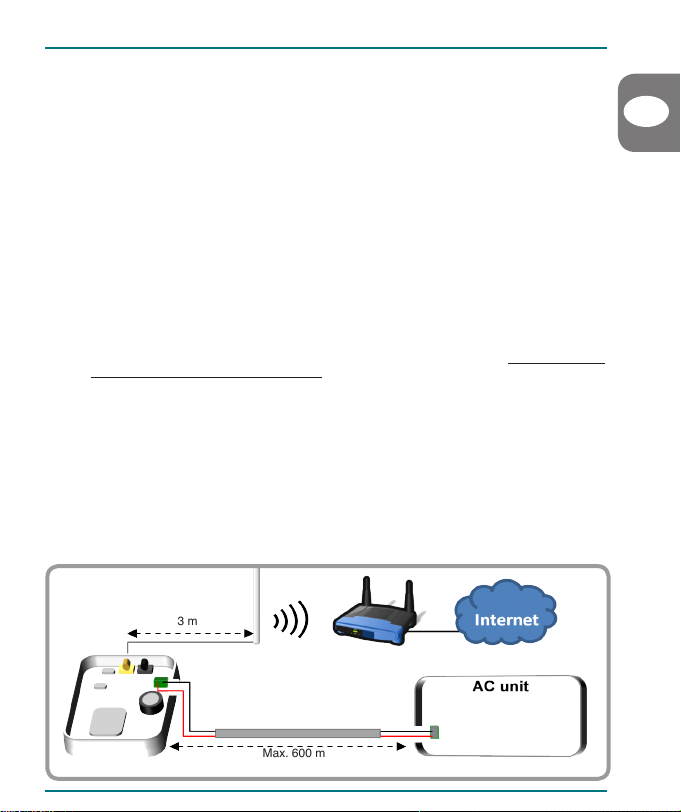
Diese Methode dient zur Steuerung Ihres Mitsubishi Heavy Industries-Systems sowohl mit IntesisHome
als auch mit dem Mitsubishi Heavy Industries-Control Panel.
1. Trennen Sie das Mitsubishi Heavy Industries-System von dem Stromnetz.
2. Öffnen Sie die obere Abdeckung von IntesisHome. Entfernen Sie die Abdeckung der oberen
Öffnung von IntesisHome.
3. Verbinden Sie ein Ende des Mitsubishi Heavy Industries-Buskabels mit dem K1-Anschluss von
IntesisHome.
4. Verbinden Sie das andere Ende des Mitsubishi Heavy Industries-Buskabels mit dem XY-
Anschluss des Indoor-Geräts oder der Verkabelung der Fernbedienung (siehe www.intesishome.
com/docs/MH-RC-WIFI-1-Install_sketch.pdf für nähere Informationen).
5. Verbinden Sie ein anderes Kabel von dem Control Panel-Anschluss aus mit dem XY-Anschluss
des Indoor-Geräts oder mit der Verkabelung der Fernbedienung (siehe www.intesishome.com/
docs/MH-RC-WIFI-1-Install_sketch.pdf für nähere Informationen).
6. Kongurieren Sie die IntesisHome Schalter (www.intesishome.com/docs/MH-RC-WIFI-1-Install_
sketch.pdf).
3 m X
Y
X
Y
. . .
# 1
# n
Wi-Fi Router oder
Access Point
Die Installation sollte ausschließlich von einem zugelassenen
Installateur vorgenommen werden.
Bitte befolgen Sie alle Sicherheitsanweisungen, die im Servicehandbuch der Mitsubishi Heavy
Industries Klimaanlage aufgeführt sind.
K1
X Y
IntesisHome®MH-RC-WIFI-1
9
INSTALLATIONSANLEITUNG
DE
7. Schließen Sie die Abdeckung von IntesisHome und Mitsubishi Heavy Industries erneut.
8. Schließen Sie das Mitsubishi Heavy Industries-System erneut an das Stromnetz an.
Wenn die Verbindung mit dem Mitsubishi Heavy Industries-System erfolgreich hergestellt wurde,
beginnt die LED-Leuchte von IntesisHome zu blinken, und wechselt daraufhin auf ein
durchgehendes grünes Licht.
9. Verbinden Sie die externe Antenne mit dem Antennenanschluss.
10. Geben Sie die Antenne vorzugsweise in eine vertikale Position, und stellen Sie sicher, dass diese
direkt auf den WLAN-Router oder Access Point (AP) zeigt. Siehe Abschnitt 3.
2.2 Ohne Control Panel
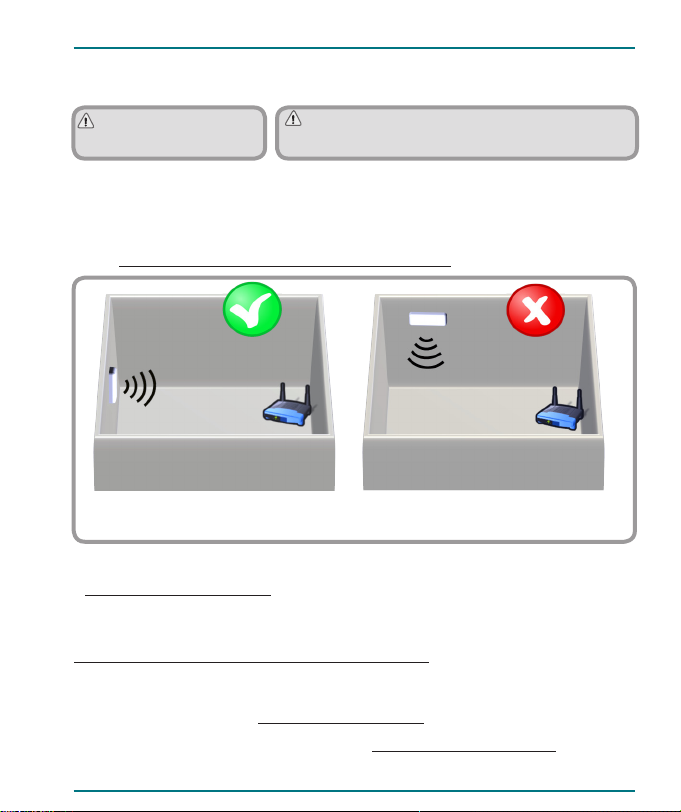
Bei dieser Methode wird davon ausgegangen, dass Sie das Mitsubishi Heavy Industries-System
ausschließlich über IntesisHome verbinden möchten.
1. Trennen Sie das Mitsubishi Heavy Industries-System von dem Stromnetz.
2. Öffnen Sie die obere Abdeckung von IntesisHome. Entfernen Sie die Abdeckung der oberen
Öffnung von IntesisHome.
3. Verbinden Sie ein Ende des Mitsubishi Heavy Industries-Buskabels mit dem K1-Anschluss von
IntesisHome.
4. Verbinden Sie das andere Ende des Mitsubishi Heavy Industries-Buskabels mit dem XY-
Anschluss des Indoor-Geräts oder der Verkabelung der Fernbedienung (siehe www.intesishome.
com/docs/MH-RC-WIFI-1-Install_sketch.pdf für nähere Informationen).
5. Kongurieren Sie die IntesisHome Schalter (www.intesishome.com/docs/MH-RC-WIFI-1-Install_
sketch.pdf).
6. Schließen Sie die Abdeckung von IntesisHome und Mitsubishi Heavy Industries erneut.
7. Schließen Sie das Mitsubishi Heavy Industries-System erneut an das Stromnetz an.
Wenn die Verbindung mit dem Mitsubishi Heavy Industries-System erfolgreich hergestellt wurde,
beginnt die LED-Leuchte von IntesisHome zu blinken, und wechselt daraufhin auf ein
durchgehendes grünes Licht.
8. Verbinden Sie die externe Antenne mit dem Antennenanschluss.
9. Geben Sie die Antenne vorzugsweise in eine vertikale Position, und stellen Sie sicher, dass diese
direkt auf den WLAN-Router oder Access Point (AP) zeigt). Siehe Abschnitt 3.
3 m
Max. 600 m
X
Y
Wi-Fi Router oder
Access Point
K1
IntesisHome®MH-RC-WIFI-1
10
INSTALLATIONSANLEITUNG
Wichtig: Vermeiden Sie eine
Positionierung des Geräts in
der Nähe von Metallächen.
Wichtig: Überprüfen Sie, sofern möglich, den WLan-
Empfang im Installationsbereich. Ein guter WLan-Empfang
wird dringend empfohlen.
3. Platzierung der Antenne
Die Positionierung der externen Antenne an dem korrekten Standort und in der bestmöglichen Position
verbessert die Kommunikation zwischen IntesisHome und Ihrem WLAN-Router oder Access Point (AP).
.
Fixieren Sie die externe Antenne vorzugsweise so nahe wie möglich an der WLAN-Signalquelle (Access
Point oder Router).
Bitte stellen Sie sicher, dass sich die Antenne in einer vertikalen Position bendet und direkt auf Ihren
WLAN-Router oder Access Point (AP) zeigt.
Siehe www.intesishome.com/docs/MH-RC-WIFI-1-Install_ sketch.pdf für nähere Informationen.
Wenn Sie nach der Installation Probleme mit dem Empfang haben, bitte besuchen Sie den
entsprechenden Abschnitt auf unserer Internetseite für nähere Informationen
www.intesishome.com/support/faq/
4. Technische Informationen
Eine vollständige technische Beschreibung des Geräts entnehmen Sie bitte der pdf-Datei unter
www.intesishome.com/docs/MH-RC-WIFI-1-Technical-Info-eng.pdf
5. FAQ und Support
Bitte besuchen Sie bei Fragen oder Problemen bezüglich dieses Produkts oder seiner Installation unser
Support-Center unter der Adresse www.intesishome.com/support .
Die neuesten Informationen nden Sie auf der Website www.intesishome.com/downloads
Antenne in vertikaler Position, zeigt direkt
auf WLAN-Router oder Access Point
Antenne in horizontaler Position, zeigt nicht
direkt auf WLAN-Router oder Access Point
Antenne
Antenne
Altri manuali per MH-RC-WIFI-1
1
Indice
Lingue:
Altri manuali IntesisHome Unità di controllo


Manuali Unità di controllo popolari di altre marche

Festo
Festo Compact Performance CP-FB6-E Manuale elenco delle parti

Elo TouchSystems
Elo TouchSystems DMS-SA19P-EXTME Manuale utente

JS Automation
JS Automation MPC3034A Manuale utente

JAUDT
JAUDT SW GII 6406 Series Guida rapida

Spektrum
Spektrum Air Module System Manuale utente

BOC Edwards
BOC Edwards Q Series Manuale utente


