
Kamstrup 66-0F-000-100 Manuale utente

S7210-038 GB/2004-10-19/Rev.C11
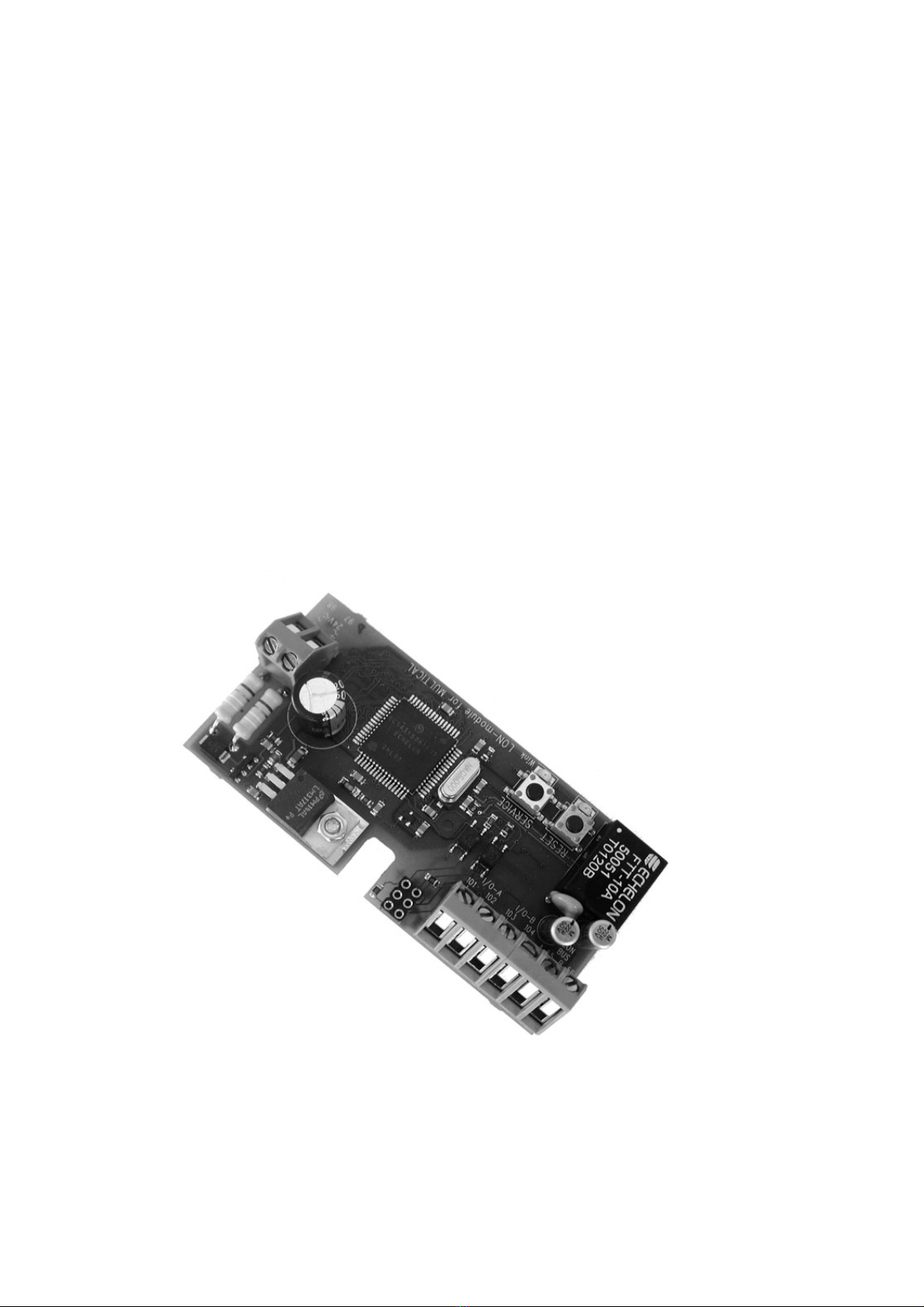
LON Module for MULTICAL/ MULTICALIII
Installation Guide
Type 66-0F-000-100
Kamstrup A/S
Industrivej 28, Stilling,
DK-8660 Skanderborg
TEL: +45 89 93 10 00,
FAX: +45 89 93 10 01
E-MAIL: [email protected]
WEB: www.kamstrup.com
S7210-038 GB/2004-10-19/Rev.C12
Contents
1. General information 3
1.1 Detailed information 4
2. Hardware installation 4
2.1 Reset 6
3. MULTICALI/O ports 6
3.1 Pulse inputs 6
3.2 Pulse outputs 7
4. Final assembly 7
LON module for MULTICAL

S7210-038 GB/2004-10-19/Rev.C13
Type 66-0F-000-100
1. General information
The LON module for MULTICALmakes it possible to integrate the MULTICALheat meter in a LON
network via the module's FTT-10 A transciever. This ensures an ideal data transfer to the CTS system, as
the remote registration always corresponds with the local reading.
When the LON module is used together with MULTICALtype 66-CDE, type 66-MP type 66-ST or
MULTICALIII type 66-B the actual data for water flow, temperature and power is updated every 60 sec..
Furthermore, a program version with more frequent up-dates is available. Current flow, temperature and
power data is updated every 10 seconds, which means that current heat meter data can be used as
input veriables for regulation. Other data is updated at intervals of 50 secons. This program version is
available at Kamstrups home page. (www.kamstrup.dk).
Temperature records and power calculation are updated for every energy integration in MULTICAL
(20…600 sec. interval depending on the actual water flow).
Kamstrup makes a complete functional test at the factory, therefore the module is delivered
Configured. Which is why the service LED will be off when voltage is supplied.
Please refer to the EcheLon Engineering Bulletin ”LonWorks Custom Node Development”, which
explains the various indications of the "Service" LED.

S7210-038 GB/2004-10-19/Rev.C14
The LON module can be used in following Kamstrup heat meters:
MULTICALtype 66-CDE, type 66-MP and type 66-ST
MULTICALtype 66-B
1.1 Detailed information
Visit http://www.kamstrup.com/download.html to down-load
-Xif-file, apb-file, nxe-file
-Installation guide DK and UK
-Installation guide, LonMaker for Windows
-Resource file
-Future application software
2. Hardware installation
Open MULTICALby loosening the two screws on the sides. Lift off the calculator top from the
connection bracket and place the LON module in the connection bracket in MULTICAL/ MULTICALIII.
If MULTICAL/ MULTICALIII is used for billing purposes and is sealed, the seals must only be broken
as agreed with the local utility, which usually is the owner of the meter.
Furthermore, the LON module can be placed in an external communication unit outside MULTICAL/
MULTICALIII . Data transmission between the LON module and MULTICAL/ MULTICALIII is done via
a 3-wire cable connected to a data module in MULTICAL/ MULTICALIII. This applies only for the
standard SW version.
Connect the supply voltage to terminal 97 and 98 on the LON module. Both 24 VDC and 24 VAC can be
used, both 30%. Usually the LON module uses approx. 35 mA, but to ensure a correct start and
initialization, min. 75 mA must be available (total starting current for the LON module incl. MULTICAL/
MULTICALIII).

S7210-038 GB/2004-10-19/Rev.C15
A simple and optimal solution is obtained by selecting MULTICAL/ MULTICALIII with a 24 V AC/DC
voltage module, which makes it possible to make an overloop from the source terminals of the
calculator to terminal 97 and 98 on the LON module.
The DIN rail transformator 230/24 V, type 66-99-401 from Kamstrup can supply up to 2 pcs. MULTICAL
/ MULTICALIII with current including LON modules.
Then connect the twisted 2-wire data cable to terminal 55 and 56. The polarity on the data cable is not
important, as the data output is transformer-coupled.
However, in connection with ring topology the same polarity must be used at all connections.
The transciever of the LON module is of the type FTT-10A (”Free Topology Transceiver”), and thus the
module can be used in all topologies (bus, ring, star) with a total cable length of up to 500 m and a
stub length of up to 0.3 m. When pure bus topology is used it is possible to use a cable length of up to
2,700 m.
When the software installation of the LON module is completed, the calculator top can be mounted.
Please note that the LON module does not contain any network termination. Therefore, use correct bus
termination as regards impenance cf. ”LonMark, Layers 1-6, Interoperability Guidelines”, which also
contains useful information on e.g. cable types.

S7210-038 GB/2004-10-19/Rev.C16
2.1 Reset
The LON module can be reset in several ways: Either when the 24 VAC/DC supply voltage is connected
to the LON module (Power-On Reset) or by activating the integral "Reset" press button of the LON
module. Or Lon Maker for Windows can initiate a reset. The application software of the LON module will
then be initiated and restarted.
Note : If MULTICAL/ MULTICALIII is replaced or reprogrammed, the LON module must be reset.
3. MULTICALI/O ports
The LON module is equipped with 2 I/O ports, which can either be used as pulse inputs or as pulse
outputs for MULTICAL/ MULTICALIII depending on the configuration of the MULTICAL/ MULTICAL
III in question (FF and GG coding). The LON module automatically reads the configuration in
MULTICAL/ MULTICALIII, and the ports are set in the correct direction.
3.1 Pulse inputs
When MULTICAL/ MULTICALIII is configured for FF and GG larger than "00", the 2 I/O ports function
with the terminal numbers 101-104 as 2 pulse inputs. E.g. water meters with Reed contact can be
connected.
Remember correct configuration of the pulse inputs (see Technical description for MULTICALType 66-
CDE).

S7210-038 GB/2004-10-19/Rev.C17
3.2 Pulse outputs
When MULTICAL/ MULTICALIII is configured for both FF and GG = 00 the 2 I/O ports with the terminal
numbers 101-104 function as 2 pulse outputs.
The pulse outputs are used for e.g. remote reading of energy and volume pulses or for controlling a 3-
point motor-operated valve. In this way MULTICAL/ MULTICALIII can function as a quantity limiter for
heat-flow rate and water flow.
The outputs must never be subject to stress above 10 mA and 30 V. When MULTICAL/ MULTICALIII is
used for valve control (PQ-limiter), the "Flow Controller" type S7590006 must be used. Ask for
instruction no. 5511-764 for further details on installation and commissioning of the PQ limiter.
4. Final assembly
Mount the calculator top and the two screws on the sides.
Sealing must be made by the local utility.
Make an operating control by pressing the right front key, until display readings for temperatures, heat
heat-flow rate and water flow appear.
Indice
Altri manuali Kamstrup Unità di controllo


Manuali Unità di controllo popolari di altre marche

Festo
Festo Compact Performance CP-FB6-E Manuale elenco delle parti

Elo TouchSystems
Elo TouchSystems DMS-SA19P-EXTME Manuale utente

JS Automation
JS Automation MPC3034A Manuale utente

JAUDT
JAUDT SW GII 6406 Series Guida rapida

Spektrum
Spektrum Air Module System Manuale utente

BOC Edwards
BOC Edwards Q Series Manuale utente


