Laser STB-6000 Manuale utente

STB-6000
USER MANUAL
STB-6000
Please read carefully before use

STB-6000
USER MANUAL
IMPORTANT SAFETY INSTRUCTIONS AND PRECAUTIONS
4
WHATS IN THE BOX
4
INSTALLING THE BATTERIES
4
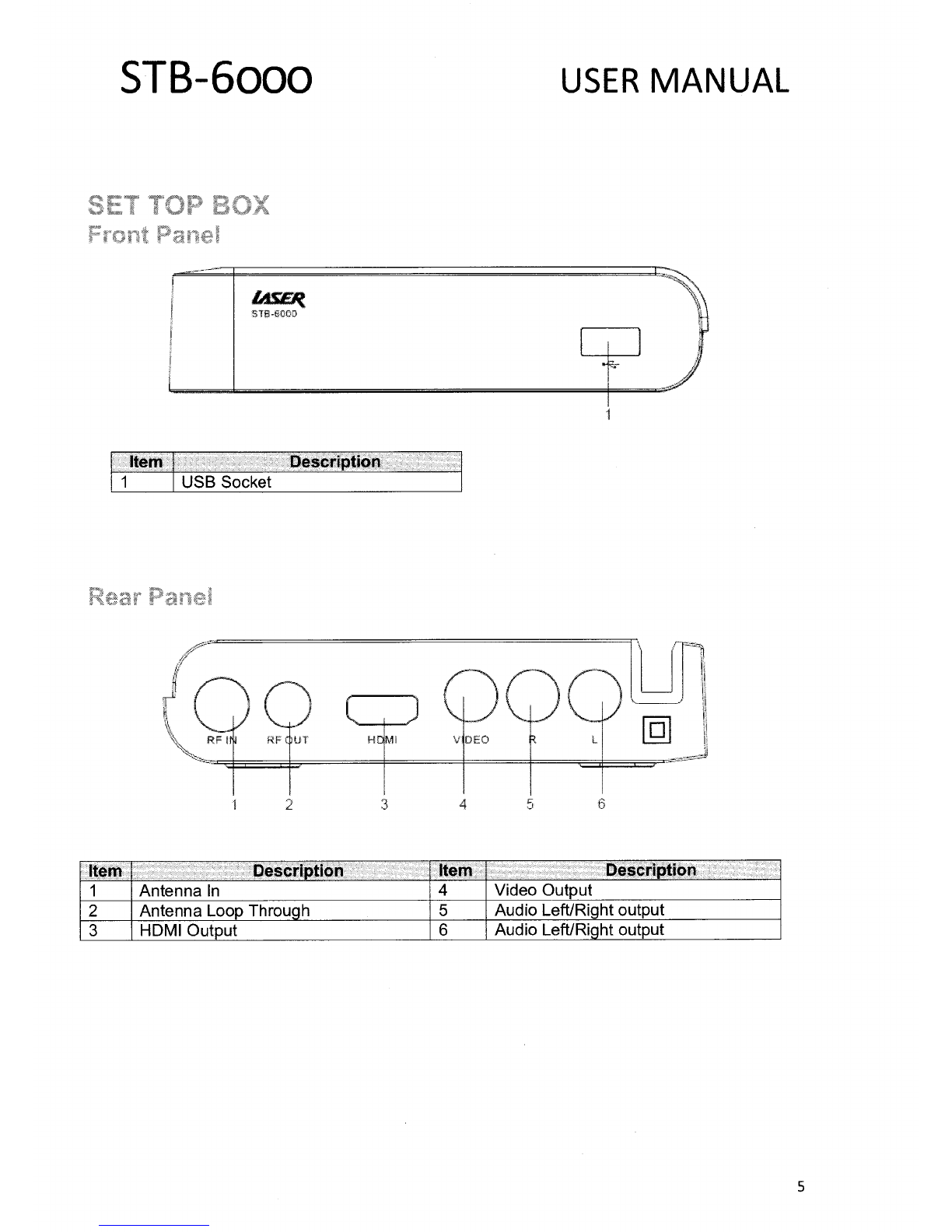
SET TOP BOX
5
Front Panel
5
Rear Panel
5
REMOTE CONTROL
6
Key Function
7
CONNECTING TO A TELEVISION
8
Power
8
Video and Audio Connection
9
Connection Method A: Composite
9
Connection Method C: HDMI
9
Audio Connection
9
FIRST TIME INSTALLATION
9
OSD Language
9
Country
10
Channel Search
10
BASIC OPERATION
10
Channel Selection
10
Volume Control
10
Channel Information
10
MAIN MENU
11
Program
11
Program Edit
11
EPG & Scheduling
12
Sort
13
LCN
13
Picture.
13
Channel Search
14
Auto Search.
14
Manual Search
14
Country
14
Antenna Power
14
Time
15
Time Offset
15
Country Region
15
Time Zone
15
2

STB-6000
USER MANUAL
Sleep
15
Option
15
OSD Language
15
Subtitle Language
15
Audio Language
15
Digital Audio
15
System Setting
16
Parental Guidance
16
Set Password
16
Restore Factory Defaults
16
Information
16
USB
16
Multimedia
16
Photo Configure
17
Movie Configuration
17
PVR Configuration
17
MULTIMEDIA PLAYBACK
18
Music
18
Photo
18
Movie
18
PVR
18
GENERAL INFORMATION
18
Simple Program Recording
19
Time Shifting Live TV
19
Connecting a USB Device
19
Connecting a USB FLASH Drive
19
Connecting a 2.5" (Notebook) Hard Drive
19
TROUBLE SHOOTING
20
TECHNICAL SPECIFICATIONS
20
Available accessories
21
Contact information
21
3

STB-6000
USER MANUAL
•
Read all instructions carefully before use.
•
Retain manuals for future reference.
•
Use this product only in the manner described.
•
Only use a water-dampened soft-cloth to clean the surface of this product.
•
Use electronic devices in well ventilated areas & not exposed to excess vibration.
•
The following will damage this product: any liquid such as water or moisture, extreme heat,
cold, humidity, dusty or sandy environments.
•
Disconnect this product from mains power and antenna during lightning storms.
•
Only place this device on stable surfaces and ensure that any attached cables are secure and
will not cause the device to fall.
•
There are no user serviceable parts in this product.
•
Un-authorized attempts to dismantle or repair this product will void product warranty and
may result in dangerous electric shock.
•
Remove any power or data cords by pulling them from the plug and not the cord.
•
Using this device near other electronic devices may cause interference.
•
When recording images or video using this product please be respectful or the
•
Copyright requirements and restrictions as they apply to each program in your area.
•
Images shown in this document are for references only and there may be differences between
images and actual products.
•
Do not mix old and new batteries in the remote.
•
We reserve the right to change the products and/or documentation without notice.
1 x STB-6000 HD Set Top Box
1 x Remote control
1 x AV Cable (Composite RCA)
1 x User Manual (This Document)
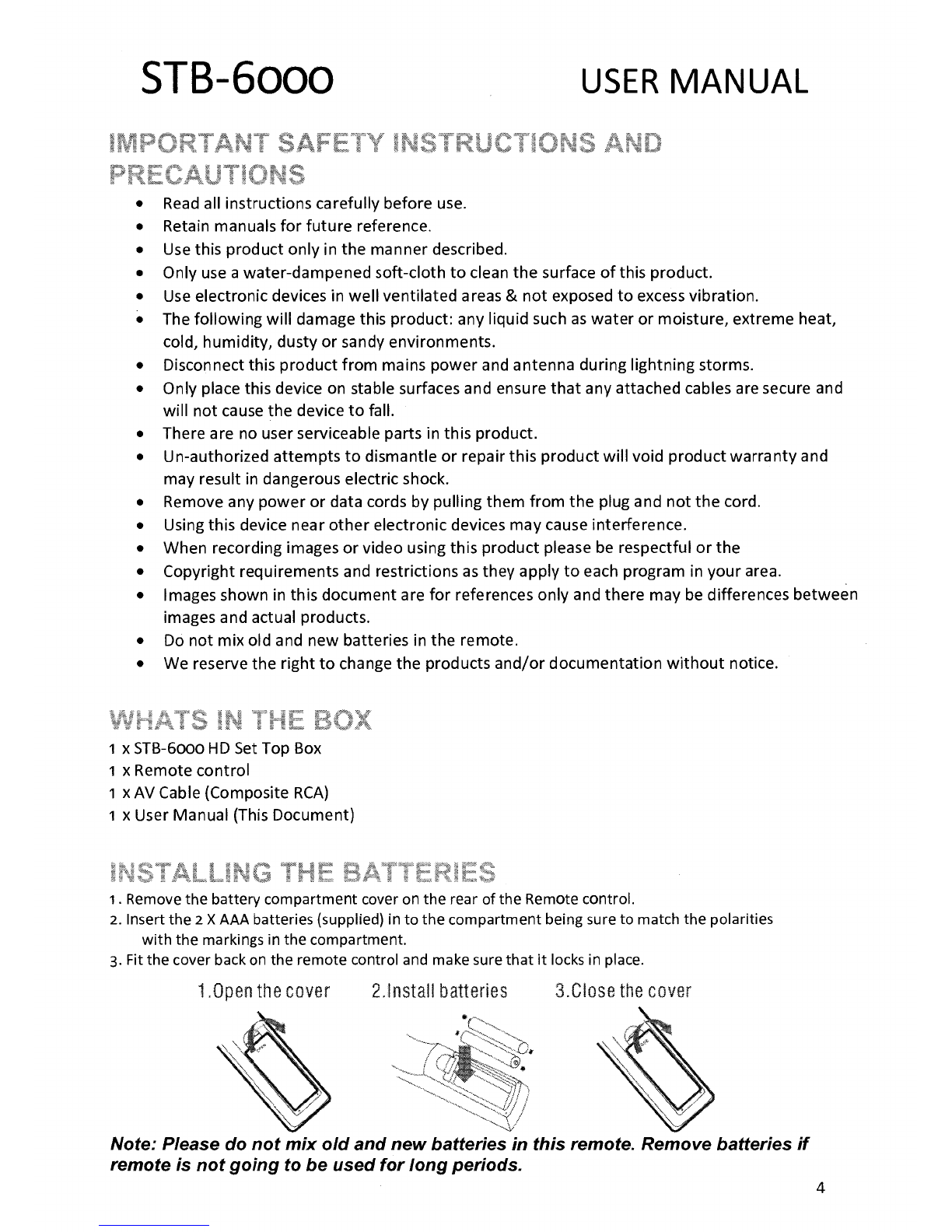
1.
Remove the battery compartment cover on the rear of the Remote control.
2.
Insert the
2
X AAA batteries (supplied) in to the compartment being sure to match the polarities
with the markings in the compartment.
3.
Fit the cover back on the remote control and make sure that it locks in place.
1.0pen the cover
2.Install batteries
3.Close the cover
Note: Please do not mix old and new batteries in this remote. Remove batteries if
remote is not going to be used for long periods.
4

a
0
STB-6000
USER MANUAL
STS-6 0
Item
Description
1
USB Socket
2
4
Item
Description
Item
Description
1
Antenna In
4
Video Output
2
Antenna Loop Through
5
Audio Left/Right output
3
HDMI
Output
6
Audio Left/Right output
5

STB-6000
USER MANUAL
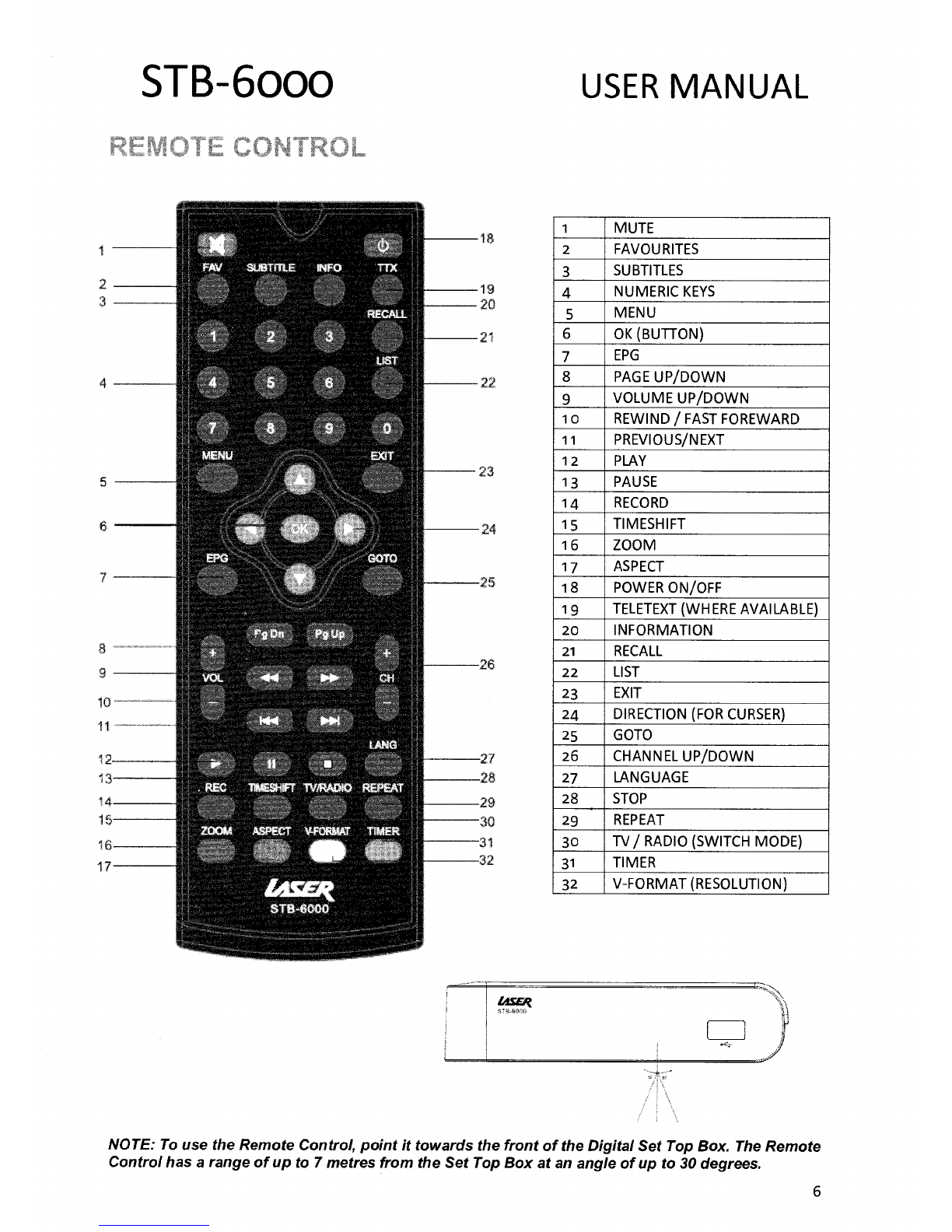
MUTE
2
FAVOURITES
3
SUBTITLES
4
NUMERIC KEYS
5
MENU
6
OK (BUTTON)
7
EPG
8
PAGE UP/DOWN
9
VOLUME UP/DOWN
10
REWIND / FAST FOREWARD
11
PREVIOUS/NEXT
12
PLAY
13
PAUSE
14
RECORD
15
TIMESHIFT
16
ZOOM
17
ASPECT
18
POWER ON/OFF
19
TELETEXT (WHERE AVAILABLE)
20
INFORMATION
21
RECALL
22
LIST
23
EXIT
24
DIRECTION (FOR CURSER)
25
GOTO
26
CHANNEL UP/DOWN
27
LANGUAGE
28
STOP
29
REPEAT
30
TV/ RADIO (SWITCH MODE)
31
TIMER
32
V-FORMAT (RESOLUTION)
NOTE: To use the Remote Control, point it towards the front of the Digital Set Top Box. The Remote
Control has a range of up to 7 metres from the Set Top Box at an angle of up to 30 degrees.
6

STB-6000
USER MANUAL
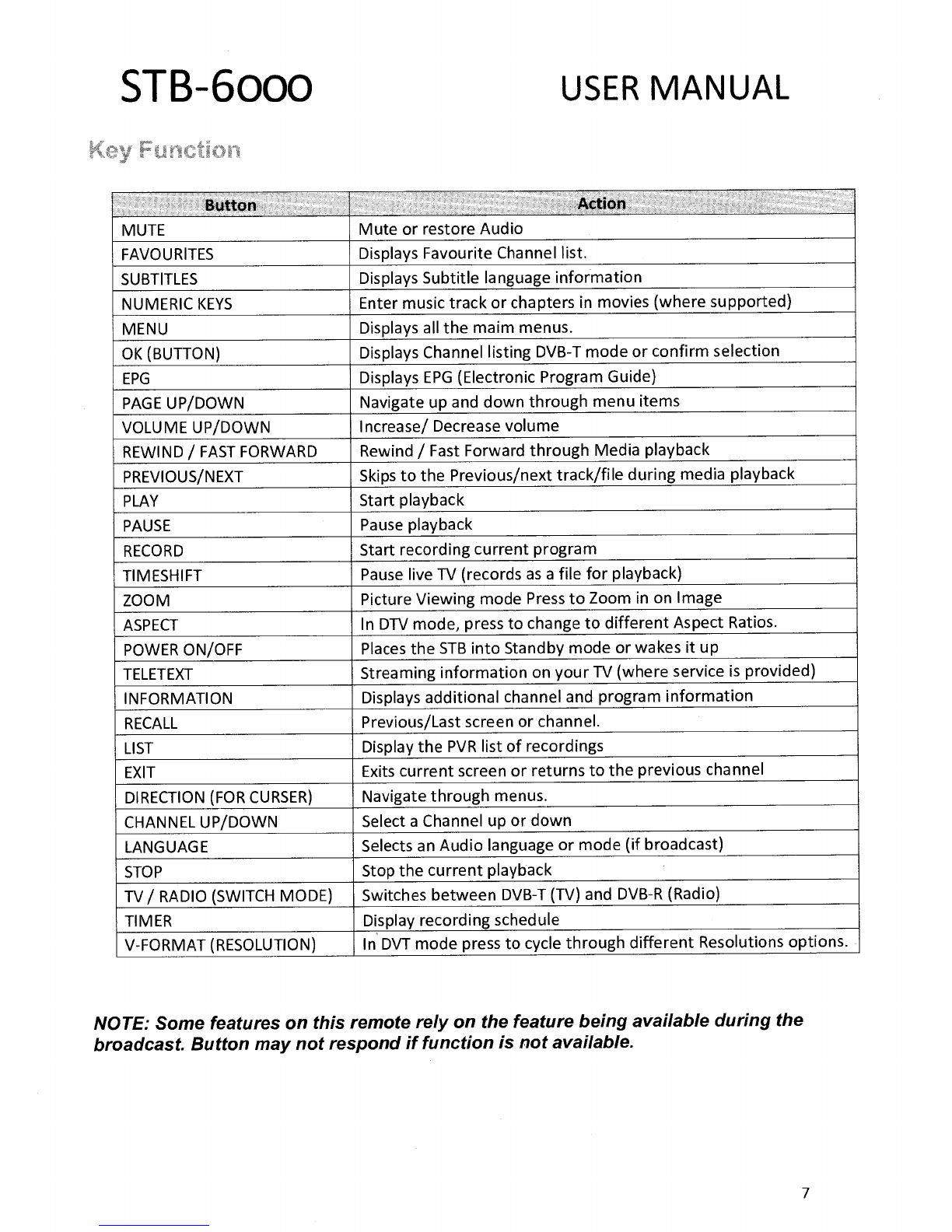
Button
Action
MUTE
Mute or restore Audio
FAVOURITES
Displays Favourite Channel list.
SUBTITLES
Displays Subtitle language information
NUMERIC KEYS
Enter music track or chapters in movies (where supported)
MENU
Displays all the maim menus.
OK (BUTTON)
Displays Channel listing DVB-T mode or confirm selection
EPG
Displays EPG (Electronic Program Guide)
PAGE UP/DOWN
Navigate up and down through menu items
VOLUME UP/DOWN
Increase/ Decrease volume
REWIND / FAST FORWARD
Rewind / Fast Forward through Media playback
PREVIOUS/NEXT
Skips to the Previous/next track/file during media playback
PLAY
Start playback
PAUSE
Pause playback
RECORD
Start recording current program
TIMESHIFT
Pause live TV (records as a file for playback)
ZOOM
Picture Viewing mode Press to Zoom in on Image
ASPECT
In DTV mode, press to change to different Aspect Ratios.
POWER ON/OFF
Places the STB into Standby mode or wakes it up
TELETEXT
Streaming information on your TV (where service is provided)
INFORMATION
Displays additional channel and program information
RECALL
Previous/Last screen or channel.
LIST
Display the PVR list of recordings
EXIT
Exits current screen or returns to the previous channel
DIRECTION (FOR CURSER)
Navigate through menus.
CHANNEL UP/DOWN
Select a Channel up or down
LANGUAGE
Selects an Audio language or mode (if broadcast)
STOP
Stop the current playback
TV / RADIO (SWITCH MODE)
Switches between DVB-T (TV) and DVB-R (Radio)
TIMER
Display recording schedule
V-FORMAT (RESOLUTION)
In DVT mode press to cycle through different Resolutions options.
NOTE: Some features on this remote rely on the feature being available during the
broadcast. Button may not respond if function is not available.
7

STB-6000
USER MANUAL
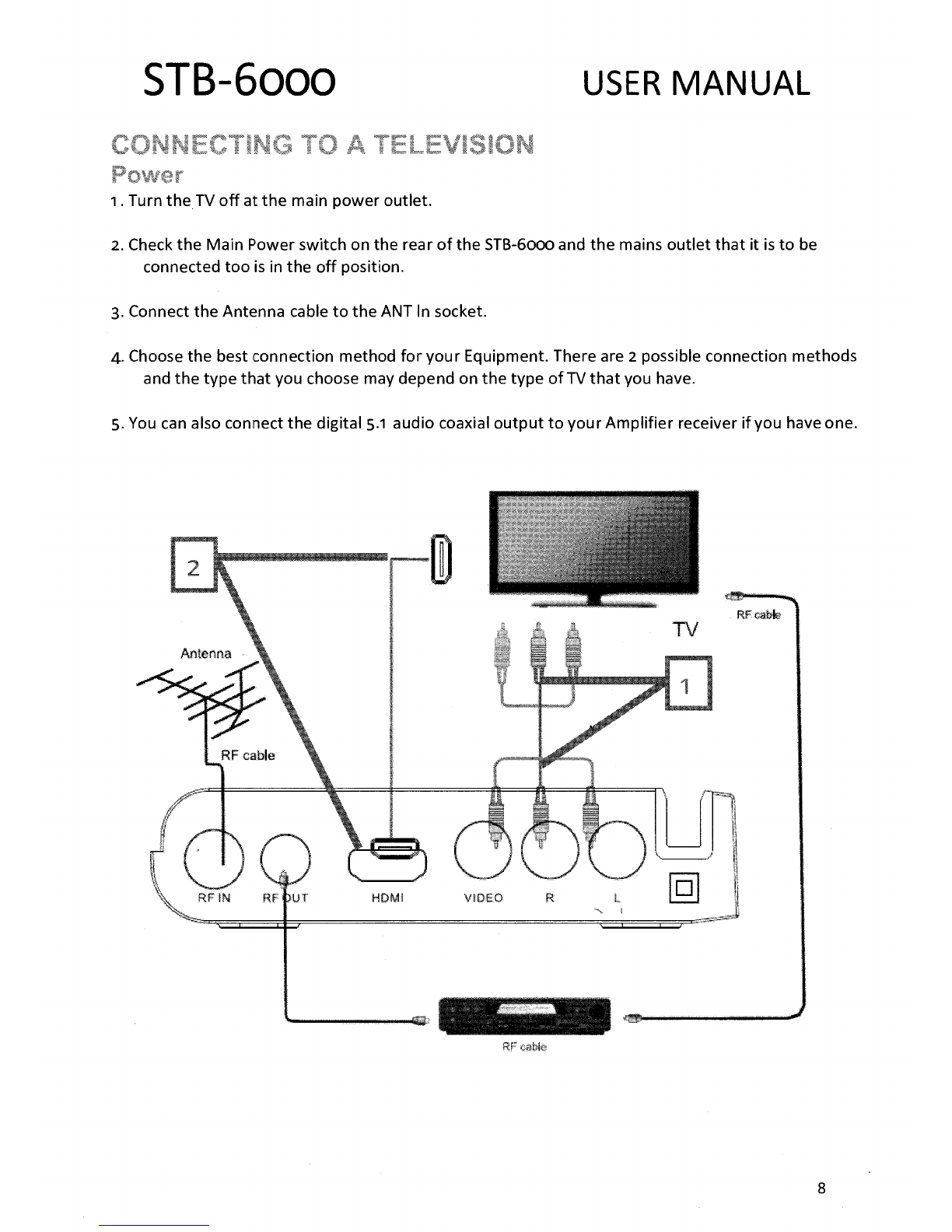
1.
Turn the TV off at the main power outlet.
2.
Check the Main Power switch on the rear of the STB-6000 and the mains outlet that it is to be
connected too is in the off position.
3.
Connect the Antenna cable to the ANT In socket.
4.
Choose the best connection method for your Equipment. There are
2
possible connection methods
and the type that you choose may depend on the type of TV that you have.
5.
You can also connect the digital 5.1 audio coaxial output to your Amplifier receiver if you have one.
8

STB-6000
USER MANUAL
Quality = Fair to Good
The composite cable (supplied) comprises of 1 x Video Cable (yellow) , 1 x Left Channel
Audio (White) cable and 1 x Right Channel Audio (Red) cable.
Best Used for:
Older CRT Type televisions or other displays with only a standard AV input.
Quality = Best
HDMI (High-Definition Multimedia Interface) is the preferred connection method as the
HDMI cable (not supplied) allows full HD Digital signal transmission to the TV.
Best Used For:
Any TV that has an HDMI input.
Audio can be connected to an external amplifier / receiver.
1.
Connect the Stereo Left and Right channels (White & Red) to the back of the Set Top Box and the
corresponding inputs on the back the audio device.
2.
Connect a SPDIF Coaxial Audio Cable (not supplied) to the rear of the Set Top Box
and the corresponding inputs on the back the audio device for full surround sound.
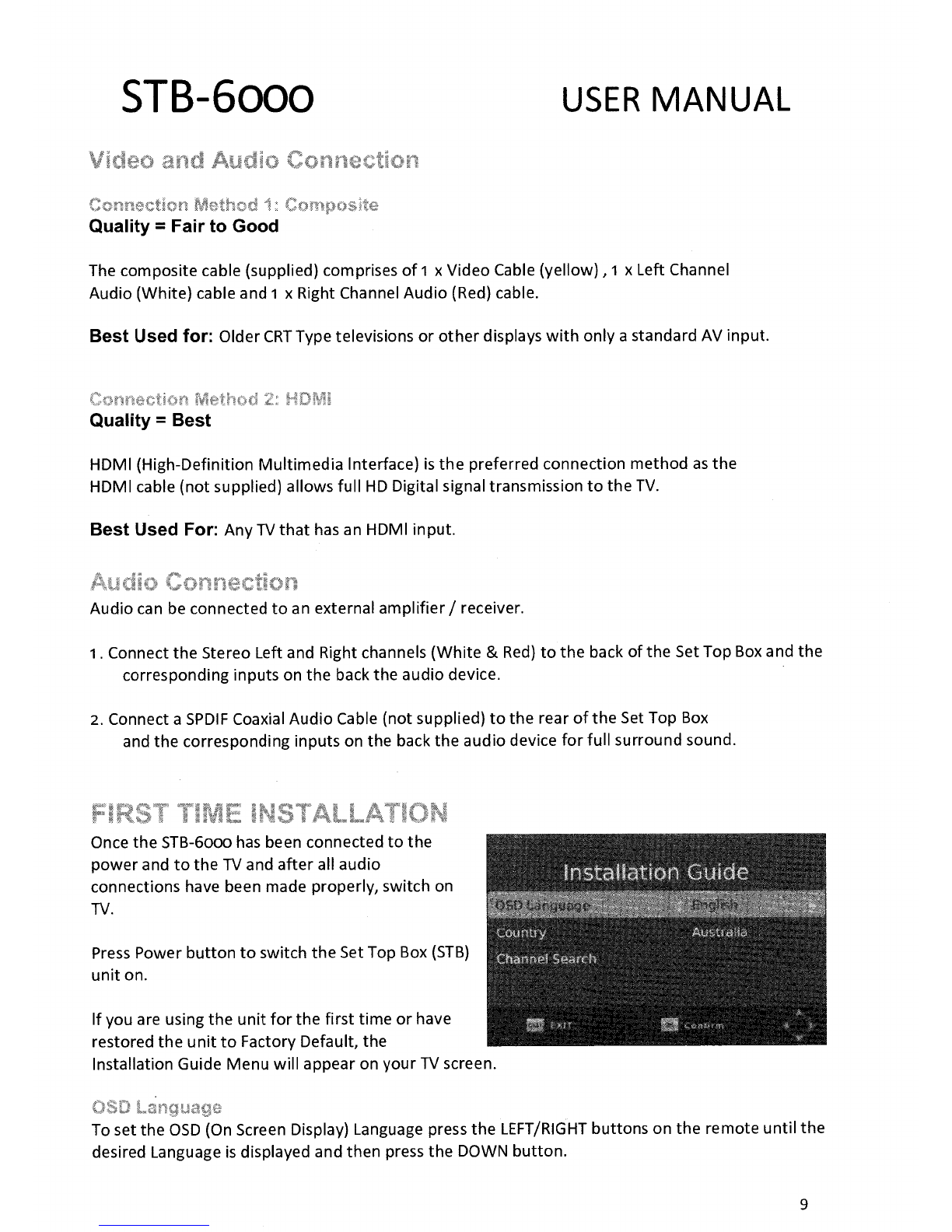
Once the STB-6000 has been connected to the
power and to the TV and after all audio
connections have been made properly, switch on
TV.
Press Power button to switch the Set Top Box (STB)
unit on.
If you are using the unit for the first time or have
restored the unit to Factory Default, the
Installation Guide Menu will appear on your TV screen.
To set the OSD (On Screen Display) Language press the LEFT/RIGHT buttons on the remote until the
desired Language is displayed and then press the DOWN button.
9

STB-6000
USER MANUAL
To change the Country Settings press the LEFT/RIGHT buttons on the remote until the desired
Country is displayed and then press the DOWN button.
Press OK to start the Channel Auto Search.
The System will now scan for the available channel in your area.
Found DVB-T Channels are shown in the left window and radio stations are displayed in the right.
Total progress is displayed in the bar below.
Press the EXIT or Menu Button to stop the scan at any time.
Once the Scan is complete the first Station is shown.
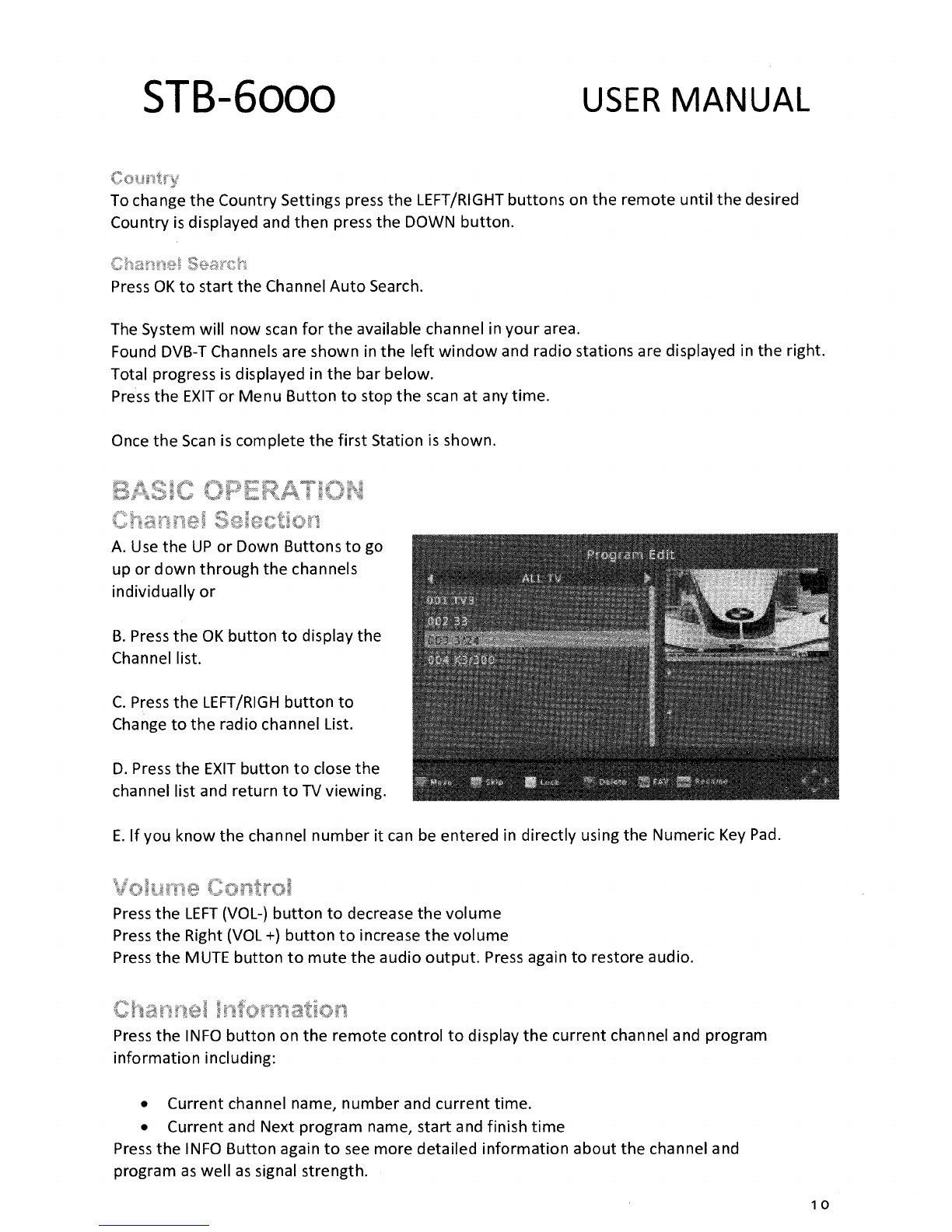
A.
Use the UP or Down Buttons to go
up or down through the channels
individually or
B.
Press the OK button to display the
Channel list.
C.
Press the LEFT/RIGH button to
Change to the radio channel List.
D.
Press the EXIT button to close the
channel list and return to TV viewing.
E. If you know the channel number it can be entered in directly using the Numeric Key Pad.
Press the LEFT (VOL-) button to decrease the volume
Press the Right (VOL +) button to increase the volume
Press the MUTE button to mute the audio output. Press again to restore audio.
Press the INFO button on the remote control to display the current channel and program
information including:
•
Current channel name, number and current time.
•
Current and Next program name, start and finish time
Press the INFO Button again to see more detailed information about the channel and
program as well as signal strength.
10
Altri manuali per STB-6000
1
Altri manuali Laser Decoder