
LG PJ2 Manuale utente

OWNER’S MANUAL
Portable
Bluetooth
Speaker
Please read this manual carefully before operating
your set and retain it for future reference.
MODELS
PJ2 PJ2B
*MFL70261305* Copyright © 2017 LG Electronics Inc. All Rights Reserved.
www.lg.com

1 Getting Started
Getting Started2
Getting Started
1
Safety Information
CAUTION
RISK OF ELECTRIC SHOCK
DO NOT OPEN
CAUTION: TO REDUCE THE RISK OF ELECTRIC
SHOCK DO NOT REMOVE COVER (OR BACK)
NO USER-SERVICEABLE PARTS INSIDE REFER
SERVICING TO QUALIFIED SERVICE PERSONNEL.
This lightning ash with arrowhead
symbol within an equilateral triangle
is intended to alert the user to the
presence of uninsulated dangerous
voltage within the product’s
enclosure that may be of sufcient
magnitude to constitute a risk of
electric shock to persons.
The exclamation point within an
equilateral triangle is intended
to alert the user to the presence
of important operating and
maintenance (servicing) instructions
in the literature accompanying the
product.
WARNING: TO PREVENT FIRE OR ELECTRIC SHOCK
HAZARD, DO NOT EXPOSE THIS PRODUCT TO RAIN
OR MOISTURE.
CAUTION: The apparatus should not be exposed to
water (dripping or splashing) and no objects lled
with liquids, such as vases, should be placed on the
apparatus.
WARNING: Do not install this equipment in a
conned space such as a book case or similar unit.
CAUTION: Do not use high voltage products around
this product. (ex. Electrical swatter) This product may
malfunction due to electrical shock.
CAUTION: No naked ame sources, such as lighted
candles, should be placed on the apparatus.
CAUTION: Do not block any ventilation openings.
Install in accordance with the manufacturer’s
instructions.
Slots and openings in the cabinet are provided
for ventilation and to ensure reliable operation of
the product and to protect it from over heating.
The openings shall be never be blocked by placing
the product on a bed, sofa, rug or other similar
surface. This product shall not be placed in a built-
in installation such as a bookcase or rack unless
proper ventilation is provided or the manufacturer’s
instruction has been adhered to.

Getting Started 3
Getting Started
1
CAUTION concerning the Power Cord
The Power Plug is the disconnecting device. In case
of an emergency, the Power Plug must remain readily
accessible.
Check the specication page of this owner’s manual
to be certain of the current requirements.
Do not overload wall outlets. Overloaded wall outlets,
loose or damaged wall outlets, extension cords, frayed
power cords, or damaged or cracked wire insulation
are dangerous. Any of these conditions could result
in electric shock or re. Periodically examine the
cord of your device, and if its appearance indicates
damage or deterioration, unplug it, discontinue use of
the device, and have the cord replaced with an exact
replacement part by an authorized service center.
Protect the power cord from physical or mechanical
abuse, such as being twisted, kinked, pinched, closed
in a door, or walked upon. Pay particular attention to
plugs, wall outlets, and the point where the cord exits
the device.
NOTICE: For safety marking information including
product identication and supply ratings, please refer
to the main label on the bottom or the other surface
of the product.
CAUTION when using this product in environments
of low humidity
yIt may cause static electricity in environments of
low humidity.
yIt is recommended to use this product after
touching any metal object which conducts
electricity.

Getting Started4
Getting Started
1
This device is equipped with a portable battery or
accumulator.
How to Safely remove the batteries or the
battery pack from the equipment: To Remove the
old batteries or battery pack, follow the assembly
steps in reverse order. To prevent contamination of
the environment and bring on possible threat to
human and/or animal health, the old batteries or the
battery pack must be put in an appropriate container
at designated collection points. Do not dispose
of batteries or battery pack together with other
waste. It is recommended that you use local, free
reimbursement systems batteries or battery packs,
(may not be available in your area). The batteries or
the battery pack should not be exposed to excessive
heat such as sunshine, re or the like.
Symbols
~Refers to alternating current (AC).
0Refers to direct current (DC).
Refers to class II equipment.
1Refers to stand-by.
!Refers to “ON” (power).
Refers to dangerous voltage.

Table of Contents 5
1
2
3
4
1 Getting Started
2 Safety Information
6 Unique features
6 Introduction
7 Speaker
2 Operating
8 Connecting the AC Adapter
8 – Checking the charging status
9 – Checking Battery status
10 Basic Operations
10 – Using power button
10 – Bluetooth Connection
10 – Bluetooth LED status
11 – Simple Operation Guide
12 Handsfree Function
13 Listening to Music from Your External Device
14 Using BLUETOOTH® technology
14 – Listening to music stored on the
BLUETOOTH devices
16 Multi Pairing
17 Other Operation
17 – Resetting
17 – Notice for Auto Power Off
3 Troubleshooting
18 Troubleshooting
4 Appendix
19 Trademarks and Licenses
19 Handling the Unit
20 Specifications
Table of Contents
Getting Started6
Getting Started
1
Unique features
Auto power down
This unit supports to turn off by itself for saving
energy consumption. (Page 17)
Portable In
Listen to music from your portable device.
(Smart phone, Notebook, etc..)
BLUETOOTH®
Listens to music stored on your Bluetooth device.
Introduction
Symbol used in this manual
, Note
Indicates special notes and operating features.
> Caution
Indicates cautions for preventing possible damages
from abuse.
Splash-proof (IPX4)
This unit is splash-proof according to IPX4.
IPX4 is a splash-proof for rain or splashing
water. This unit is splash-proof wireless speaker
but it can be damaged when you used under
water. Avoid the cases below.
yDo not use unit under water or other liquid.
yDo not spray water on the unit purposely.
yWhen battery is charging, do not expose the
unit to water.
yWhen exposed to water, wipe off it with a
soft dry cloth.
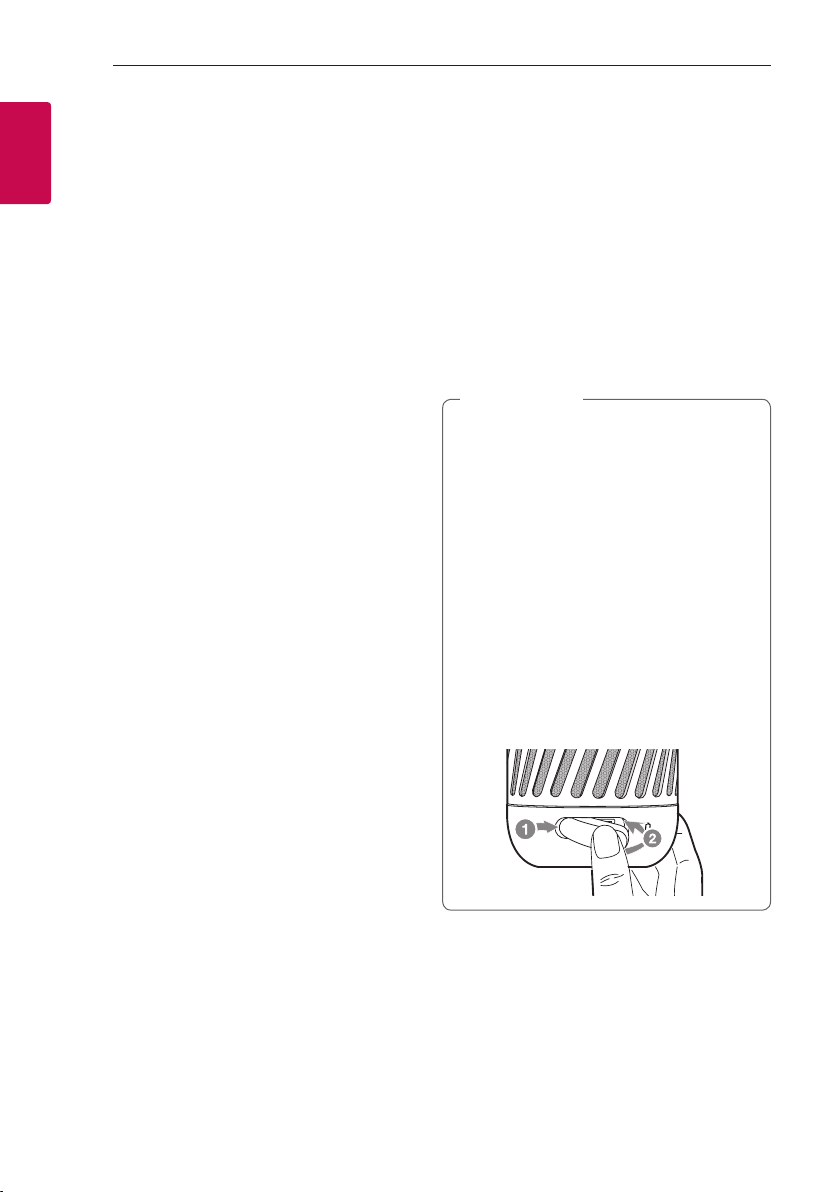
yPorts are not splash-proof. When you want
a splash-proof effect, close the port cover
securely from left to right as follows.
> Caution

Getting Started 7
Getting Started
1
Speaker
a
g
b
mec f
i j k
l
d
h
a
Power LED
b
Bluetooth LED
c
1
Turns On / Off : Press it.
d
j
- Adds a Bluetooth device for multi pairing.
(Press and hold j)
- Changes to Bluetooth mode in portable mode.
(Press j)
* When you connect the portable cable, the
function is changed to portable in mode
e
p : Turn down the volume.
f
o : Turn up the volume.
g
T
- Starts, pauses or skip playback on the
Bluetooth mode. (Page 11)
- Receives a call on the Bluetooth device.
(Page 12)
- Mutes the sound on the portable.
h
Port cover
i
PORT.IN (Portable In connector)
Listens to music from your portable device.
j
Reset hole
k
USB port for charging
l
MIC (Microphone)
m
Battery LED

2 Operating
Operating8
Operating
2
Connecting the
AC Adapter
This speaker uses built-in battery. Before using it,
charge the battery by connecting the AC Adapter.
1. Connect the supplied USB cable to the AC
adapter.
2. Connect the USB cable to USB port of the
speaker.
3. Plug the AC adapter into an AC outlet.
(Not supplied)
If the battery is fully charged in charging mode,
Battery LED is changed from red to green. After
15 seconds, Battery LED turns off.
AC adapter is not supplied.
It is recommended that you use the 5 V AC
adapter approved by LG Electronics Inc. (more
than 1.8 A) with this unit because of danger of
explosion. If you do not use the recommended
adapter, charging is unavailable or charging time
may differ.
> Caution
Checking the charging status
When speaker's battery is charging, you can check
the charging status by Battery LED .
LED Description
Green Of
f
Red
Battery is fully charged.
Green Of
f
Red
Battery is charging.
yOperating time is approx. 5 hours. (Based
on fully charged the battery and continuous
playback using 50 % volume level.)
It may vary depending on the battery status
and operational conditions.
yIf you listen to the music while charging, it will
take longer to charge.
yWhen the speaker is not charging by
overheating, Battery LED turn on red and
amber alternately. And charging is stopped.
yIf the Battery LED turns off, the speaker's
battery is fully charged.
, Note

Operating 9
Operating
2
Checking Battery status
If the power turned on, you can check the charging
status by pressing any button. Then Battery LED light
will change depending on battery charging status.
LED Description Status
Green
Amber
Red
Battery LED turns
on green.
70 %
10 %
10 %
Green
Amber
Red
Battery LED turns
on amber.
70 %
10 %
10 %
Green
Amber
Red
Battery LED blinks
in red with the
sound.
70 %
10 %
10 %

Operating10
Operating
2
Basic Operations
Using power button
Power On / Off
Press the
1
button.
Bluetooth Connection
LG PJs(XX)
Play the desired music on the Bluetooth device. After
pairing, you can control playback using the buttons
on the unit. (page 11, 14-15)
Bluetooth LED status
Check the Bluetooth LED blinks before connecting
Bluetooth device.
LED Status Description
Bluetooth LED
blinks with the
sound.
Searching for
Bluetooth device.
Bluetooth LED
turns on with the
sound.
Bluetooth device
is connected.
Once pairing is performed, it does not need to
be done again even if you turn off this unit.
, Note
Altri manuali per PJ2
3
Indice
Altri manuali LG Altoparlanti


