
Lifeloc FC10 Manuale utente

Lifeloc FC10
Operations Manual
Unlock the Power
of Alcohol Testing

2
Lifeloc FC10
www.Lifeloc.com |303-431-9500
Table of Contents
Table of Contents
Introduction
Congratulations .................................................................................................................................4
Front View ........................................................................................................................................... 5
Features................................................................................................................................................ 6
Preparation
Installing Batteries............................................................................................................................ 7
Turning the FC On and Off............................................................................................................ 7
Observing the Subject.................................................................................................................... 8
Attaching a Mouthpiece................................................................................................................. 8
Breath Testing Modes
Testing Modes Explained ...............................................................................................................9
End of Breath & Precise Volume Explained............................................................................ 9
Conducting an Automatic Test.................................................................................................. 10
Manual Override During an Automatic Test ......................................................................... 10
Conducting a Manual Test .............................................................................................................11
Conducting a Passive Test.............................................................................................................11
Operation
Breath Flow........................................................................................................................................12
Alcohol Curve....................................................................................................................................12
Test Results ........................................................................................................................................12
Viewing Previous Test Results ....................................................................................................12
Removing the Mouthpiece ...........................................................................................................12
User Settings
Setting the Default Test Order....................................................................................................13
Setting the Trigger Mode..............................................................................................................13
Calibration Settings
Calibration/Cal Check Explained .............................................................................................. 14
Wet Bath and Dry Gas Explained ..................................................................................... 14 - 15
Selecting the Calibration Standard...........................................................................................15
Selecting the Standard Type.......................................................................................................16

3
Lifeloc FC10
www.Lifeloc.com |303-431-9500
Table of Contents
Table of Contents
Wet Bath Calibration
Wet Bath Simulator Set-Up .........................................................................................................16
Wet Calibration.................................................................................................................................17
Wet Calibration Check...................................................................................................................18
Dry Gas Calibration
Dry Gas Tank Set-Up.......................................................................................................................19
Dry Gas Calibration ..................................................................................................................19-20
Dry Gas Calibration Check.....................................................................................................20-21
Maintenance
Fuel Cells.............................................................................................................................................21
Cleaning...............................................................................................................................................21
Batteries ..............................................................................................................................................21
On-Screen Messages
Messages Explained.......................................................................................................................22
Service
Lifeloc Factory Warranty .............................................................................................................23
Extended Service Plans................................................................................................................23
Service.................................................................................................................................................23
General Usage
Notice ..................................................................................................................................................24
Specifications ...................................................................................................................................24
FC10 Supplies
Accessories and Supplies ............................................................................................................25
Menu Charts
User Settings Chart........................................................................................................................26
Calibration Display Chart.............................................................................................................26

4
Lifeloc FC10
www.Lifeloc.com |303-431-9500
Attention FC10 Operator:
Congratulations on your purchase of a Lifeloc FC10.
For over 25 years, Lifeloc Technologies has been providing advanced alcohol testing
equipment & training to Law Enforcement and Corrections Professionals. We are the
leader in product innovation, precision instruments, ease of use & Five Star Customer Care.
The FC10 breath alcohol tester is manufactured in Wheat Ridge, Colorado, by Lifeloc Tech-
nologies, Inc. Lifeloc offers premium quality products combined with exceptional service
and technical support.
The FC10 is a state-of-the-art breath alcohol tester that is software based and incorporates
unique cutting edge technologies. Because of the advanced FC10 design:
• Results on a positive test register within 10 seconds.
• You can take another test within 30 seconds after a positive. Repeatability is not
compromised.
• Your FC10 will automatically take the test when it senses a deep lung sample is
delivered.
• Your FC10 will provide an accurate test, or else explain to you why it cannot, and even
provide suggestions on how to proceed to complete an accurate test on your subject.
• AA or NiMH batteries last for about 160 “on” hours or up to 6000 tests.
The following pages will explain in detail the operation of your FC Series portable breath
tester.
Unlock the Power of Alcohol Testing
Introduction
5
Lifeloc FC10
www.Lifeloc.com |303-431-9500
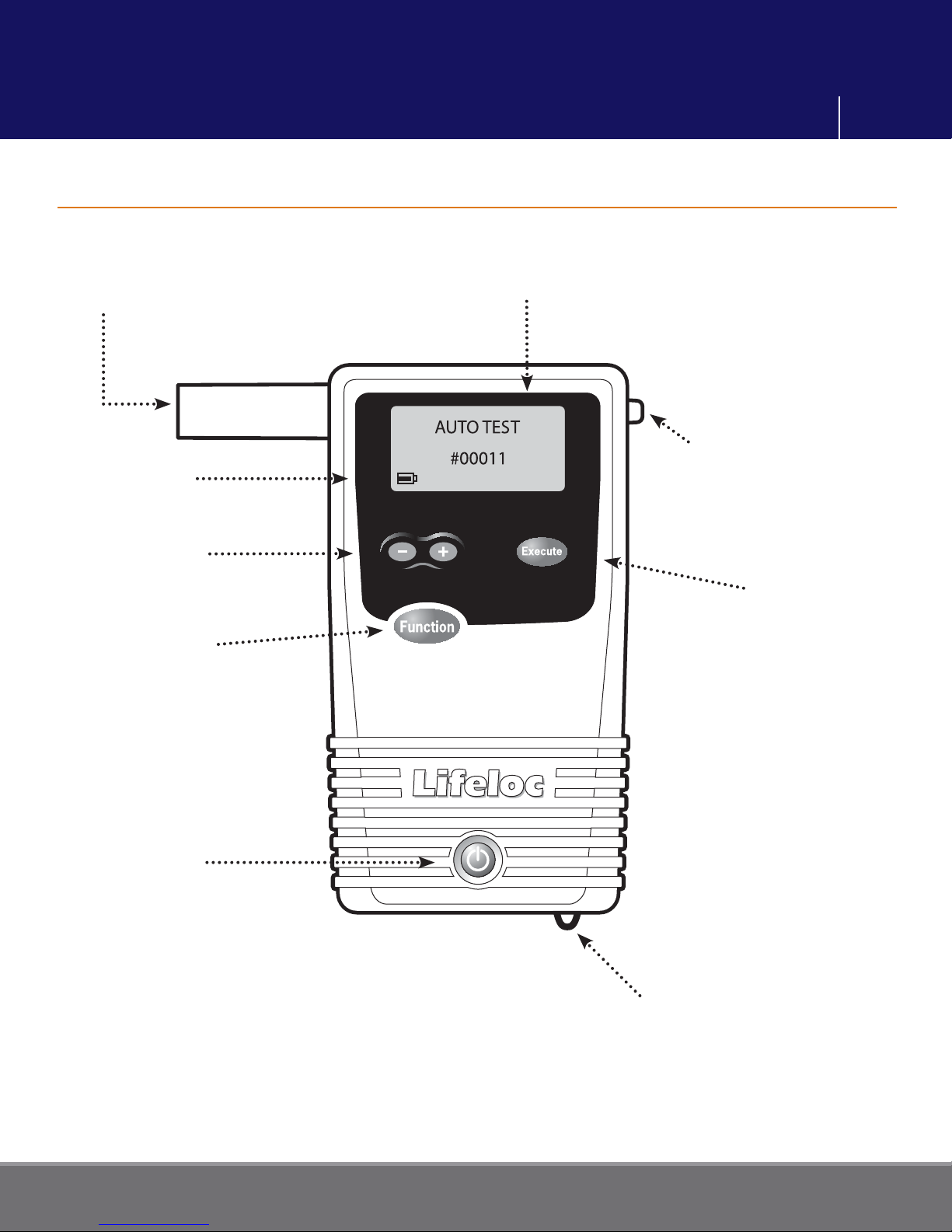
Mouthpiece
+/- Buttons set
calibration standard
Battery Icon indicates
battery level
Function Button
scrolls through menus
and saves changes
Execute Button
enables you to perform
the function
Mouthpiece Removal Tab
Large Graphic LCD Screen
displays functions and results
Power Button
turns unit on and off;
also returns you to
main testing mode
Wrist Strap
Attachment Loop
Introduction
Front View (with Mouthpiece)

6
Lifeloc FC10
www.Lifeloc.com |303-431-9500
Features
• Large Graphic LCD Display: Capable of showing numbers, letters, icons and plain
English text messages.
• Automated Calibration: Software-controlled adjustments; no tools necessary.
• Auto Test Mode: The easiest way to take a test. Tester automatically takes deep lung
sample when subject is at end of breath.
• Manual Test Mode: Enables operator to control exact point of breath sample.
• Passive Test Mode: Checks for the presence of alcohol in the breath or in an open
container, without using a mouthpiece.
• User-Selectable Test Order: Allows choice of either Auto Test or Passive Test default
mode.
• Auto Shut-Off: Preserves battery life.
• Fast, Simple Operation: While the FC10 contains a host of features, it is still very easy
to use.
• Automatic Backlight: Easy viewing of test results either day or night.
• Exceptional Battery Life: Up to 160 hours or 6000 test operation using four AA or
NiMH rechargeable batteries.
Introduction
7
Lifeloc FC10
www.Lifeloc.com |303-431-9500
Installing Batteries
Turning the FC On and Off
Press in and down on the battery door located on the back of the FC10.
Install the four AA Alkaline batteries in the direction of the symbols in the battery case.
Close the case by pushing up on the battery door until it locks shut.
See page 21 for directions on using rechargeable batteries.
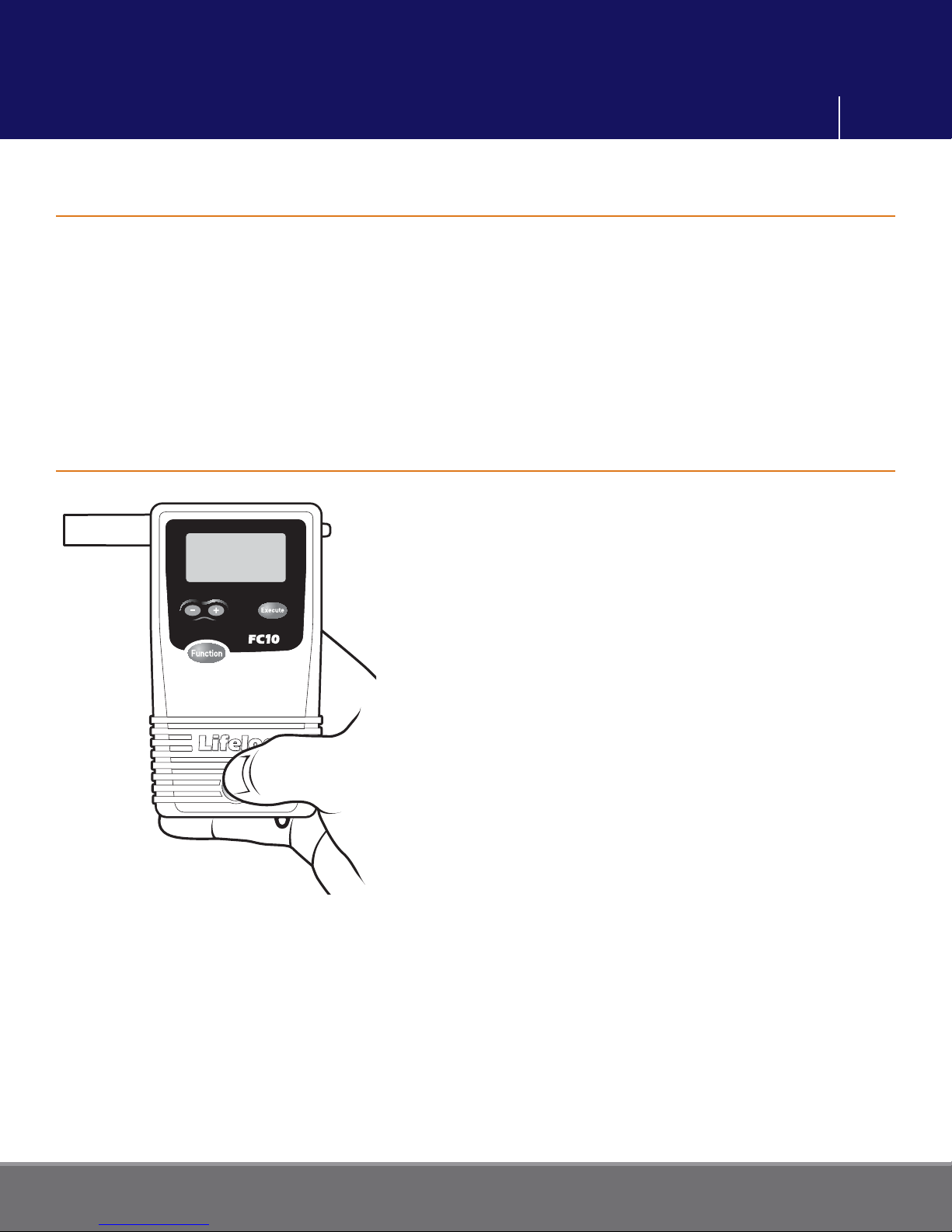
Press and hold the Power button on the bottom
of the front of the unit until it beeps. The FC10
performs an automatic internal diagnostics
check.
To turn the unit off, press and hold the Power
button until it beeps twice. The unit will shut
down.
Note: Momentarily pressing the Power button,
when the unit is on, will return you to the main
menu.
Preparation
8
Lifeloc FC10
www.Lifeloc.com |303-431-9500
Preparation
Observing the Subject
Attaching a Mouthpiece
The FC10 provides a highly accurate reading of breath alcohol acquired by sampling deep
lung air. Readings will also detect residual mouth alcohol.
To prevent mouth alcohol from affecting a test, make certain that the subject is not
allowed to put anything in their mouth for 15 minutes prior to taking a test.
If the subject just took a drink, a 15 minute observation period in which they are not
permitted to put anything in their mouth should be observed before testing. This will
ensure all residual alcohol from any source has completely dissipated and test results will
be valid.
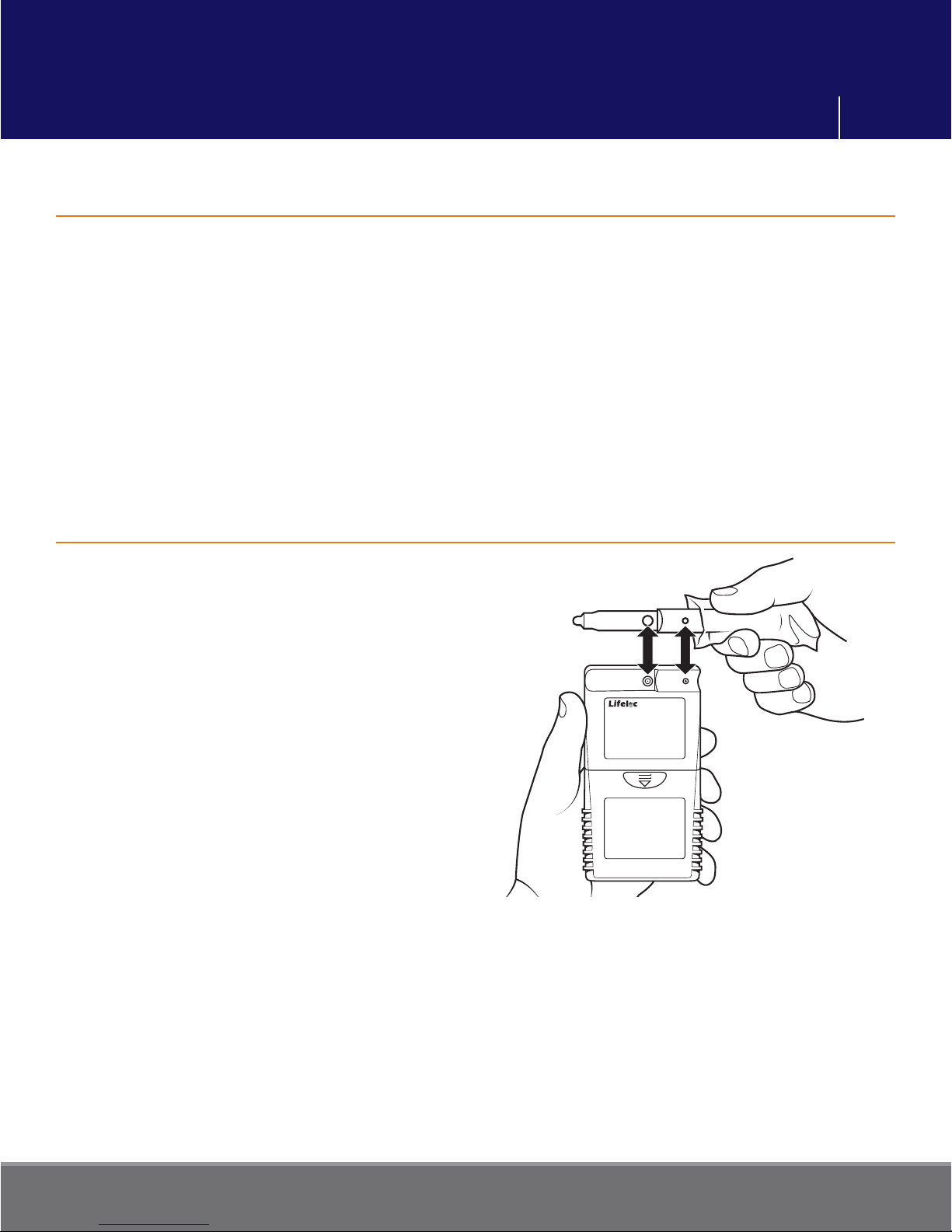
Remove the mouthpiece from its wrapper,
making sure not to touch the end which
the subject will be blowing into.
Attach the mouthpiece to the port on the
back of the FC10.
Line up the mouthpiece port over the
holes in the back of the mouthpiece. Press
in place.
Ensure it is securely attached.

9
Lifeloc FC10
www.Lifeloc.com |303-431-9500
Breath Testing Modes Explained
End of Breath and Precise Volume Explained
The FC10 is capable of conducting Automatic, Manual, and Passive tests.
•Automatic Test is the easiest way to achieve a deep lung sample. The FC10 monitors
the subject’s breath and automatically takes the sample near the end of the breath
flow.
•
Manual Test is normally used only when the subject is unable to provide a sufficient
breath sample for the automatic test.
•
Passive Test is a quick screen to detect alcohol but is not designed to quantify the
results. Passive results are reported as “POS” if alcohol is detected, “NEG” if alcohol is
not detected. In this mode, no mouthpiece is required.
In Auto Test mode, the unit can be set to take a sample either:
•
When the subject nears the end of the exhalation (End of Breath)
— or —
•
When it detects 1.5L of breath (Precise Volume)
Both will give accurate results. Precise Volume may work better with uncooperative
subjects.
(To select “END OF BREATH” or “PRECISE VOLUME” mode, see Trigger Mode
instructions on p.13)
Breath Testing Modes
10
Lifeloc FC10
www.Lifeloc.com |303-431-9500
Conducting an Automatic Test
Manual Override during an Automatic Test
Turn the FC10 on.
Verify the display reads “AUTO TEST.”
Attach the mouthpiece to the back of the
unit.
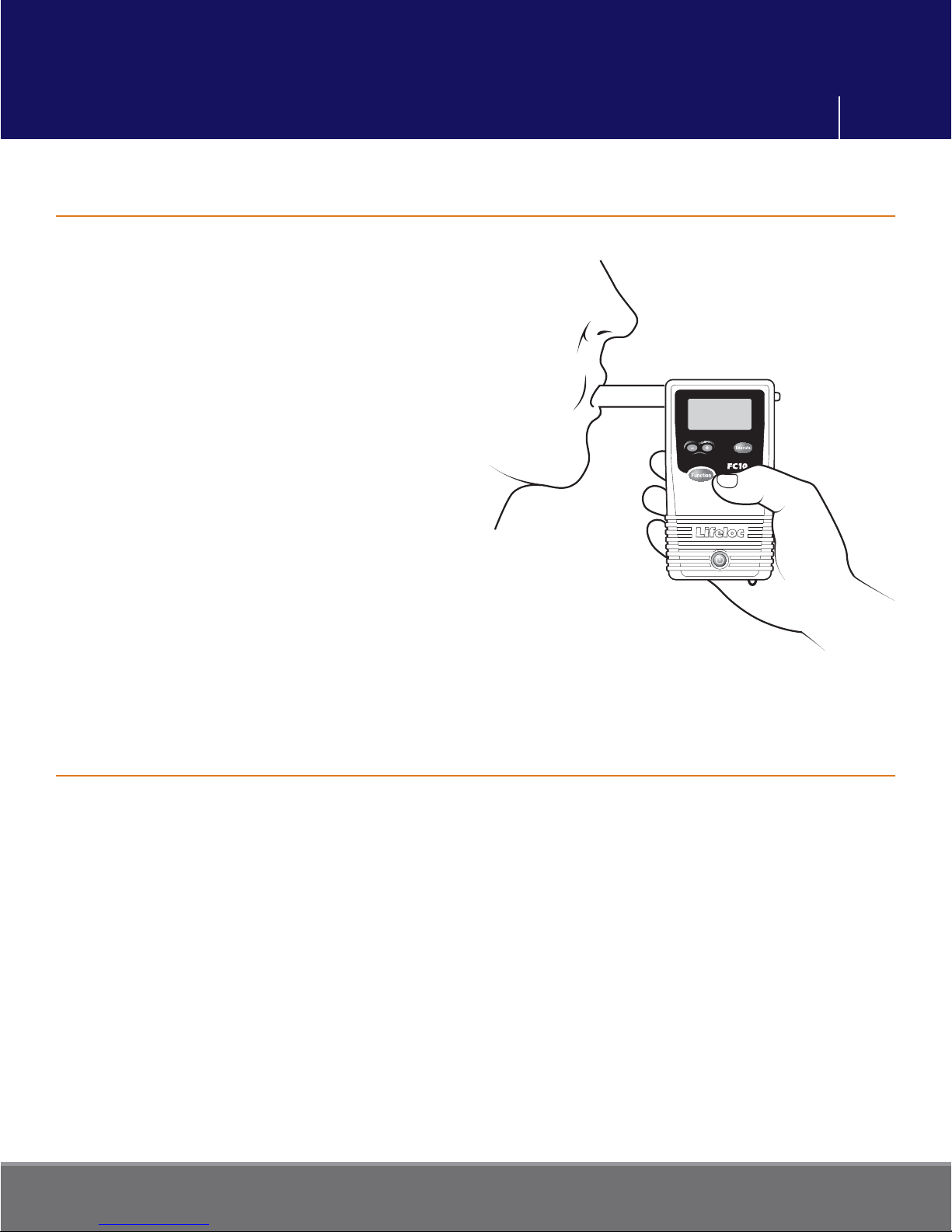
Instruct subject to blow into the
mouthpiece firmly and steadily for as long
as they can. (But not necessarily as hard
as they can.) The unit calculates volume
and will give an error message if the
subject cannot reach 1.3 liters.
Read the result.
After taking a test, the FC10 will display
the results in large numbers on the display.
Press the Function button to return to the
test mode.
Note: This feature allows the completion of a test in the occasional instance when the
subject may have diminished lung capacity and cannot activate the Auto Test.
Turn the FC10 on.
Attach a mouthpiece to the back of the unit and verify the display reads “AUTO TEST”.
Instruct the subject to blow into the mouthpiece firmly and steadily for as long as they
can.
When they are near the end of their breath, press the Execute button.
Read the result.
Breath Testing Modes
Indice
Altri manuali Lifeloc Apparecchiature di prova


Manuali Apparecchiature di prova popolari di altre marche

SMART
SMART KANAAD SBT XTREME 3G Series Manuale utente

Agilent Technologies
Agilent Technologies BERT Serial Manuale utente

Agilent Technologies
Agilent Technologies N3280A Manuale utente

Vernier
Vernier Go Direct Voltage Manuale utente

Fluke
Fluke T5-600 Istruzioni per l'uso e l'installazione

Mercury
Mercury TSL01 Manuale utente


