
LT DI-6400 Manuale utente

multi-function + auto-range, CATIII 1000V
ACV/DCV/OHMS/4 to 4000 M ohm, 100V, 250V, 500V, 1000V
INSULATION TESTER
Model : DI-6400
Your purchase of this INSULATION TESTER marks a step
forward for you into the field of precision measurement.
Although this INSULATION TESTER is a complex and delicate
instrument, its durable structure developed. Please read the
following instructions carefully and always keep this manual
within easy reach.
OPERATION MANUAL
Caution Symbol
Caution :
* Risk of electric shock !
Caution :
* Do not touch the input terminals
& the test lead's pins during the
measurements.
* Mega ohm range, do not appl
y
external voltage to input
terminals at any time.
* ACV & ohms range, do not apply
the overload voltage to the input
terminals !
* Remove test leads before open
the battery cover !
* Cleaning - Only use the dr
y
cloth to clean the plastic case !
Environment Conditions
* Installation 1000v CAT III .
* Pollution Degree 2.
* Altitude up to 2000 meters.
* Indoor use.
* Relative humidity 80% max.

TABLE OF CONTENTS
1. FEATURES................................................................
.
1
2. SPECIFICATIONS......................................................
.
1
2-1 General Specifications.......................................... 1
2-2 Electrical Specifications........................................ 3
3. FRONT PANEL DESCRIPTION..................................... 4
3-1 Display..............................................................
.
4
3-2 Function/Range Switch.......................................
.
4
3-3 Dc Adapter Input Socket..................................... 4
3-4 RS-232 Output Socket........................................
.
4
3-5 Input Terminal................................................... 4
3-6 Hold Button.......................................................
.
4
3-7 Test Button........................................................ 4
3-8 Lock Button.......................................................
.
4
3-9 Battery Cover/Compartment................................4
4. PRECAUTION & PREPARATIONS FOR
MEASUREMENTS....................................................... 5
5. MEASURING PROCEDURE.......................................... 5
5-1 OHMS Measurement (Continuous Check).............
.
5
5-2 Meg OHM Measurement(Insulation
Measurement).................................................
.
6
5-3 ACV/DCV Measurement.....................................
.
7
6 MEASURING CONSIDERATION FOR
Meg OHM TESTING................................................... 8
7 RS-232 PC Serial Interface.........................................
.
8
8. BATTERY REPLACEMENT...........................................
.
10
9 THE ADDRESS OF AFTER SERVICE CENTER................ 11

1. FEATURES
* Digital display, easy and correct read-out.
* Auto-range and multi-function for insulation measurement
of 4/40/400/4000 MΩ( 100 V, 250 V, 500 V, 1000 V ).
* Insulation measurement with auto discharge function, safety.
* Build in the ACV & DCV & OHMS measurement function.
* Precision 400 ohm & 4000 ohm auto-range easy for measuring low
resistance such as motor windings, relay coils etc.
* A continuity beeper is equipped in OHM range.
* Data hold function to lock the current reading.
* Lock & Test functions offer worker's safety and easy operation.
* 77 X 49 mm (1.06" height) large LCD display.
* Battery operating easily to carry with user.
* LCD display allows clear read-out even at bright place.
* LSI-circuit provides high reliability and durability.
* Built-in over-input and low battery indication.
* Overload protection for each range.
* Automatic zero adjust & automatic circuit discharge.
* Durable & portable housing case with the front protective
cover.
* RS-232 computer interface.
* Powered by AA DC 1.5V X 8 batteries or DC 9V adapter.
2. SPECIFICATIONS
2-1 General Specifications
Display 27 mm (1.06") LCD (Liquid Crystal Display),
Max. indication : 6100 ( V ), 4200 ( MΩ),
4200 ( Ω).
Measurement Insulation 4/40/400/4000 MΩ/100 V
4/40/400/4000 MΩ/250 V
4/40/400/4000 MΩ/500 V
4/40/400/4000 MΩ/1000 V
DCV 600.0 V
ACV 600.0 V
OHM 400.0/4000 Ω
1

Sampling Time 0.4 second.
4000M ohm Max. approx. 4.0 second.
Respond Time
Zero Adjustment Automatic adjustment.
Over-input Indication of " - - - - " .
Operating Temp. 0 to 50 ( 0 to 122 ).℃℉
Operating Less than 80% R.H.
Humidity
Power Supply 1.5V AA ( UM-3 ) battery x 8 PCs,
Alkaline or heavy duty battery
or DC 9V adapter ( 500 mA ).
Power Approx. 112 mA (100M ohm/1000V range).
Consumption Approx. 70 mA (100 M ohm/500V range).
Approx. 58 mA (100 M ohm/250V range).
Approx. 53 mA (100 M ohm/100V range).
Approx. 18 mA ( ACV range).
Approx. 18 mA ( DCV range).
Approx. 65 mA (0 ohm/OHM range).
Dimension 225 x 125 x 64 mm (8.86 x 4.92 x 2.52 inch),
Weight 819 g / 1.80 LB (includes 8 PCs batteries).
Standard Instruction Manual ............................. 1 PC
Accessories Test leads ( TL-888 )..........................
.
1 set
Heavy duty alli
g
ators ( AL-05 )............
.
1 pair
2

2-2 Electrical Specifications (23± 5 )℃
Meg ohm ( Insulation )
Range Accuracy Resolution
4/40/400/4000 M ohm ± ( 3% + 5d) 1 K/10 K/0.1 M/1 M ohm
(100V/250V/500V/1KV)
< 2000 M ohm
± ( 5% + 5d)
2000 M ohm≧
< 4000 M ohm
OHMS
Range Accuracy Resolution Open Circuit
Voltage
400/4000 ohm ± ( 1% + 2d) 0.1/1 ohm Approx. 4.7 V
* Overload Circuit Protection AC/DC 500V (within 20 sec)
DC VOLTAGE
RANGE Accuracy Resolution Input
Impedance
600 DCV ± ( 1% + 2d) 0.1 DCV 10 M ohm
* Overload Circuit Protection AC/DC 600V
AC VOLTAGE
RANGE Accuracy Resolution Input
Impedance
600 ACV ± ( 1% + 2d) 0.1 ACV 10 M ohm
* Overload Circuit Protection AC/DC 600V
3
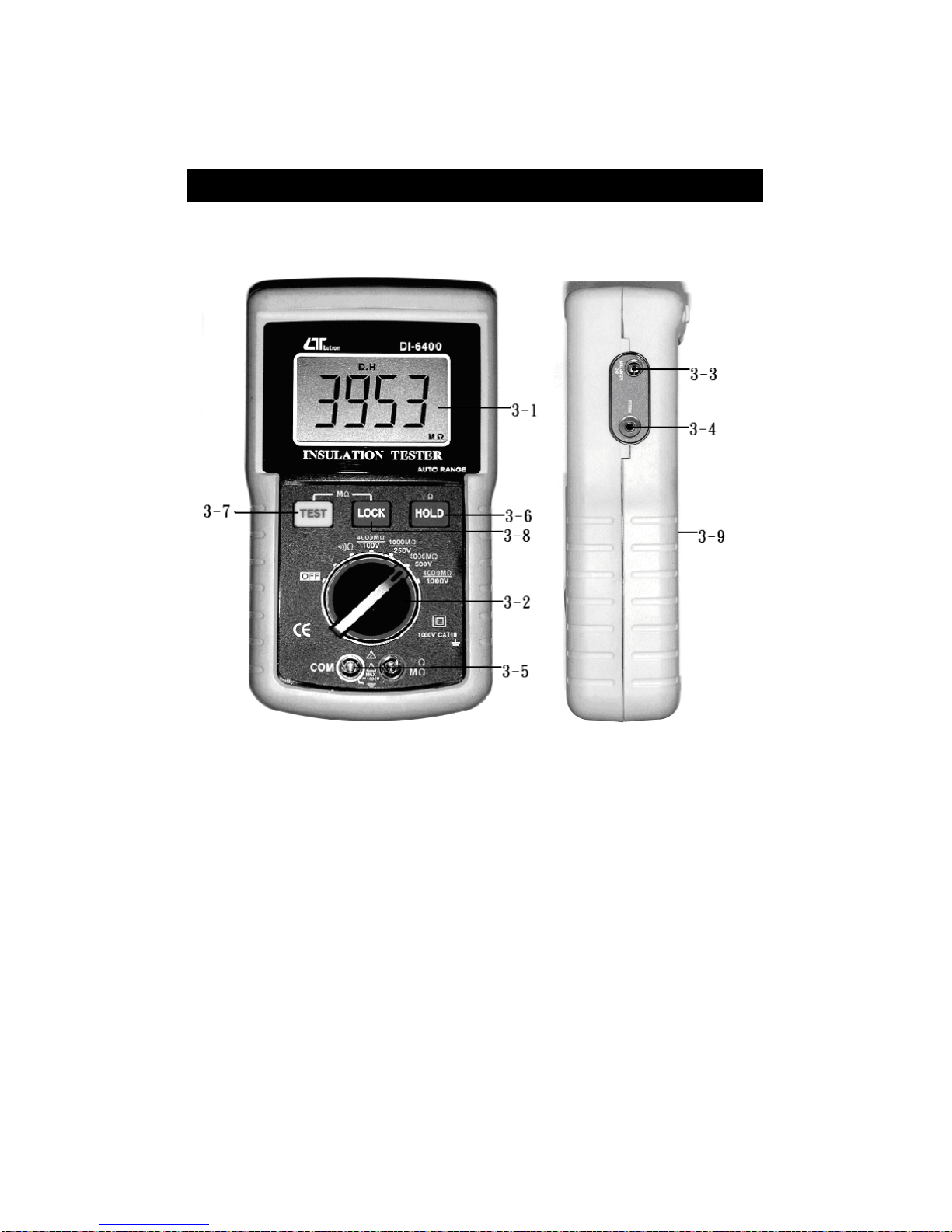
3. FRONT PANEL DESCRIPTION
Fig. 1
3-1 Display
3-2 Function/Range Switch
3-3 DC Adapter Input Socket
3-4 RS-232 Output Socket
3-5 Input Terminal
3-6 Hold Button
3-7 Test Button
3-8 Lock Button
3-9 Battery Cover/Compartment
4

4. PRECAUTION & PREPARATIONS FOR
MEASUREMENTS
1) Remove the power from the circuit when making the
measurement. If any voltage is present in the testing
circuit, then an erroneous reading will result.
2) Ensure that the batteries (8 x 1.5 V AA battery) is
connected correctly the right position into the battery
compartment or DC 9V adapter.
3) Rotate the "Function/Range Switch" (3-2, Fig. 1) to the
right position before making measurement.
5. MEASURING PROCEDURE
5-1 OHMS Measurement (Continuous Check)
*Do not apply the external voltage
to the input terminals !
1) Connect the RED test plug into " ohm terminal " ( 3-5, Fig. 1 )
2) Connect the BLACK test plug into " COM terminal " ( 3-5,
Fig. 1 ).
3) Rotate the " Function/Range Switch " ( 3-2, Fig. 1 ) to the
" Ω" position.
4 Connect test alligator clips into circuit under test.
Note :
* A continuity beeper is equipped. If the measured
resistance < approx. 4 ohm, the beeper sounds will be
generated.
* If want to delete interior impedance of test-lead, you
can short them then press " TEST " button ( 3-7, Fig. 1 )
to subtract scrap value and get precision reading.
This function only valid if the interior impedance less
than 100 Ω.
* During the OHMS measurement, if press the " Hold Button "
( 3-6, Fig. 1 ) will freeze the display value.
5

5-2 Meg OHM Measurement
( Insulation Measurement)
* Do not touch the input terminals & the test
lead's pins during the measurements.
* Do not apply external voltage to input terminals
at any time.
1) Connect the RED test plug into " MΩterminal " ( 3-5, Fig. 1 )
2) Connect the BLACK test plug into " COM terminal " ( 3-5,
Fig. 1 )
3) Rotate the " Function/Range Switch " ( 3-2, Fig. 1 ) to the
" 4000MΩ/100V ", " 4000MΩ/250V ", " 4000MΩ/500V "
or "4000MΩ/1000V " position according the user's
requirement.
4) Connect the test ALLIGATOR CLIPS into the circuit under test.
5) You'll may choice " MANUAL " or " LOCK " mode to make
the measurement.
MANUAL mode
* The exciting voltage just generate to the test terminals
within a short period only.
1) Press " TEST " Button ( 3-7, Fig. 1 ) continuously ( finger is
not released from the " TEST " Button ), the meter will
sound " bi-bi-bi " warning voice ( about 3 seconds ) then
start the measurement, then the meter will sound " one
second ON, one second OFF " continuously, the
measurement value will present on the display.
Until the display value is stable, release the " TEST "
button, the display will show " D.H " symbol and latch the
measurement value.
2) After finish the measurement, press " TEST " Button to
cancel hold function and prepare next measurement.
6
LOCK mode
* The exciting voltage just generate to the test terminals
continuously.
1) Press " LOCK " button ( 3-8. Fig. 1 ) once the display will
show " LOCK " symbol.
2) Press " TEST " button once, the meter will sound " bi-bi-bi "
warning voice ( about 3 seconds ) then start the measurement,
then the meter will sound " one second ON, one second OFF "
continuously, the measurement value will present on the display.
Note :
* During this period, the exciting voltage will
generate to the test terminals continuously.
3) Press " TEST " button once again to close measurement
at same time the display will show "D.H" symbol and
latch last value, press " TEST " button once again to cancel
hold function and ready for next measurement.
5-3 ACV/DCV Measurement
* Do not apply the overload voltage
to the input terminals !
1) Rotate the " Function/Range Switch " ( 3-2, Fig. 1 ) to the
" V " position.
2) Press " TEST button " ( 3-7, Fig. 1 ) once to choice " AC " or
" DC " function.
3) Connect the RED test plug into " V terminal " ( 3-5, Fig. 1 )
4) Connect the BLACK test plug into " COM terminal " ( 3-5, Fig. 1 )
5) Connect test leads into circuit under test.
6) The reading will show on the display, press " HOLD " button
( 3-6, Fig. 1 ) will latch the reading value, press the " HOLD "
button once again will release " HOLD " function "
Note :
* During the ACV/DCV measurement, if press the " Hold
Button " ( 3-6, Fig. 1 ) will freeze the display value.
7
Indice
Manuali Apparecchiature di prova popolari di altre marche

SMART
SMART KANAAD SBT XTREME 3G Series Manuale utente

Agilent Technologies
Agilent Technologies BERT Serial Manuale utente

Agilent Technologies
Agilent Technologies N3280A Manuale utente

Vernier
Vernier Go Direct Voltage Manuale utente

Lifeloc
Lifeloc R.A.D.A.R. Manuale utente

Fluke
Fluke T5-600 Istruzioni per l'uso e l'installazione


