Magic-Pro Computer MP-6VIP-C+ Manuale utente

MP-6VIP-C+
Motherboard
User’s Manual
Product Name:MP-6VIP-C+
Manual Revision:English, 1.00
Release Date:January, 2000

POST-CONSUMER
RECYCLED PAPER
Federal Communications Commission Statement
This device complies with FCC Rules Part 15. Operation is subject to the following two
conditions:
wThis device may not cause harmful interference
wThis device must accept any interference received, including interference that may
cause undesired operation.
This equipment has been tested and found to comply with the limits for a Class B digital
device, pursuant to Part 15 of the FCC Rules. These limits are designed to provide
reasonable protection against harmful interference in a residential installation. This equipment
generates, uses and can radiate radio frequency energy. If this equipment is not installed and
used in accordance with the manufacturer's instructions, it may cause harmful interference to
radio communications. However, there is no guarantee that interference will not occur in a
particular installation. If this equipment does cause harmful interference to radio or television
reception, which can be determined by turning the equipment off and on, the user is
encouraged to try to correct the interference by one or more of the following measures:
wReorient or relocate the receiving antenna.
wIncrease the separation between the equipment and receiver.
wConnect the equipment to an outlet on a circuit different from that to which the
receiver is connected.
wConsult the dealer or an experienced radio/TV technician for help.
The use of shielded cables for connection of the monitor to the graphics card is required to
assure compliance with FCC regulations. Changes or modifications to this unit not expressly
approved by the party responsible for compliance could void the user's authority to operate
this equipment.
Canadian Department of Communications Statement
This digital apparatus does not exceed the Class B limits for audio noise emissions from
digital apparatusses set out in the Radio Interference Regulations of the Canadian
Department of Communications.
Manufacturer's Disclaimer Statement
The information in this document is subject to change without notice and does not represent a
commitment on the part of the vendor. No warranty or representation, either expressed or implied,
is made with respect to the quality, accuracy or fitness for any particular purpose of this document.
The manufacturer reserves the right to make changes to the content of this document and/or the
products associated with it at any time without obligation to notify any person or organization of such
changes. In no event will the manufacturer be liable for direct, indirect, special, incidental or
consequential damages arising out of the use or inability to use this product or documentation, even
if advised of the possibility of such damages. This document contains materials protected by
copyright. All rights are reserved. No part of this manual may be reproduced or transmitted in any
form, by any means or for any purpose without expressed written consent of it's authors. Product
names appearing in this document are mentioned for identification purposes only. All trademarks,
product names or brand names appearing in this document are registered property of their
respective owners.
Copyright Magic-Pro Computer Co., LTD.
All rights reserved
Author : Raymond
Printed in Taiwan January 2000

CONTENT
MOTHERBOARD DIAGRAM .................................................... 5
NOTE: For 100MHz/133MHz CPU environ ent, the SDRAM
sepc ust co ply with PC-100/PC-133 spec. ...................... 5
STANDARD CMOS SETUP .................................................... 12
BIOS FEATURES SETUP ...................................................... 14
CHIPSET FEATURES SETUP ............................................... 18
POWER MANAGEMENT SETUP ........................................... 21
PnP/PCI CONFIGURATION SETUP ...................................... 25
LOAD SETUP DEFAULTS ..................................................... 28
CPU SPEED SETTING .......................................................... 29
INTEGRATED PERIPHERALS............................................... 31
SUPERVISOR/USER PASSWORD........................................ 35
IDE HDD AUTO DETECTION ................................................ 36
SAVE & EXIT SETUP ............................................................. 36
EXIT WITHOUT SAVING ........................................................ 36
Appendix A
Flash Me ory Update Installation ....................................... 37

!
Appendix B
Driver installation .................................................................. 38
Appendix C
THE USAGE OF RT2 ............................................................. 40

"
VIA APOLLO PRO133 SOCKET-370
3x 3.3V DIMM sockets.
8MB to 768MB DRAM size.
SYSTEM MEMORY
2x Ultra ATA33/66 Bus Master IDE orts.
2x USB orts.
1x PS/2 mouse connector and 1x PS/2 keyboard connector.
1x 2.88MB Flo y ort, 2x High S eed 16550A UART orts
and 1x IrDA TX / RX Header.
ONBOARD I/O
ATX ower su ly connector.
Power-On by LAN(WOL), RTC Alarm, Modem Ring.
POWER
2MB FLASH BIOS.
Licensed AWARD BIOS, su orts SCSI / ZIP / LS-120 / CD-
ROM boot and ACPI Power Management.
BIOS
1x AGP slot su orts 1x / 2x mode bus; 4x PCI Bus Master
slots; 2x ISA slots.
SLOT
ATX, 4 layers PCB, 17.0cm x 30.5cm size.
FORM FACTOR / PCB
F E A T U R E
CHIPSET
VIA APOLLO PRO133 VT82C693A chi set.
Su orts Intel PPGA Celeron 370 CPUs 300 ~ 533MHz or
higher.
Su orts Intel FC-PGA Pentium III (Co ermine) CPUs 500E
~ 550E MHz or higher.
Su orts Cyrix Joshua CPUs.
Su orts 66/ 75*/ 83*/ 100/ 103*/ 112*/ 124*/ 133*/ 140*/
150*MHz system bus s eeds.
Clock multi liers u to 8x.
PROCESSOR

#
M O T H E R B O A R D D I A G R A M
Default setting: Intel Celeron 300A/66MHz.
NOTE: For 100MHz/133MHz CPU environment, the SDRAM se c must com ly
with PC-100/PC-133 s ec.
1 3
1 3
1 1 1 3
1 3
1 3
1 3
JP12
JP13
JP14
JP15
1 3
1 3
JP21
JP22
1 3
1 3
JP3
JP4
JP5
JP11JP10
1 3
JVGA1
JP20
1 3
JP17
3
1
JBAT1
JP6
3
1
JP2
FAN2
FAN1
FAN3
SPK RST PWR/LED SUSLED
HD/LED IR PWR SUSPEND
J2
J3
15
15
JWOL1
AGP
PCI 1
PCI 2
PCI 3
PCI 4
FDC
DIMM1
DIMM2
DIMM3
IDE2
IDE1
SOCKET 370
ATX POWER
ISA1
ISA2
FLASH BIOS
Li
Battery
Clock
Generator
LPT1
COM2 COM1 PS/2
MOUSE
PS/2
K/B
upper
lower
USB1
USB0
upper
lower
I/O
Controller
Intel
Cyrix
1-2 SHORT
JP20/JP21/JP22
2-3 SHORT
VIA
693A
VIA
596B

$
C P U C L O C K S E T T I N G
CPU Type Configura ion
CPU MODEL BUS RATIO BUS CLOCK
NOTE: (#) Pentium III Coppermin FC-PGA CPUs.
Celeron 300/66
(66MHz * 4.5x)
JP12
JP13
JP14
JP15
1 3
1 3
1 3
1 3
1 3
1 3
1 3
JP3
JP4
JP5
Celeron 333/66
(66MHz * 5.0x)
Pentium III 500E/100
#
(100MHz * 5.0x)
Celeron 366/66
(66MHz * 5.5x)
Pentium III 550E/100
#
(100MHz * 5.5x)
JP12
JP13
JP14
JP15
1 3
1 3
1 3
1 3
1 3
1 3
1 3
JP3
JP4
JP5
JP12
JP13
JP14
JP15
1 3
1 3
1 3
1 3
1 3
1 3
1 3
JP3
JP4
JP5
Celeron 400/66
(66MHz * 6.0x)
JP12
JP13
JP14
JP15
1 3
1 3
1 3
1 3
1 3
1 3
1 3
JP3
JP4
JP5
Celeron 433/66
(66MHz * 6.5x)
JP12
JP13
JP14
JP15
1 3
1 3
1 3
1 3
1 3
1 3
1 3
JP3
JP4
JP5
Celeron 466/66
(66MHz * 7.0x)
JP12
JP13
JP14
JP15
1 3
1 3
1 3
1 3
1 3
1 3
1 3
JP3
JP4
JP5
Celeron 500/66
(66MHz * 7.5x)
JP12
JP13
JP14
JP15
1 3
1 3
1 3
1 3
1 3
1 3
1 3
JP3
JP4
JP5
Celeron 533/66
(66MHz * 8.0x)
JP12
JP13
JP14
JP15
1 3
1 3
1 3
1 3
1 3
1 3
1 3
JP3
JP4
JP5

%
J U M P E R S E T T I N G
FAN# FUNCTION
FAN1 CPU FAN
FAN2 POWER FAN
FAN3 CHASSIS FAN
FAN#: Onboar FAN (12V) Connector
Keyboa d Powe On JP2
JP2: Keyboar Power On
Disabled (default) !
Enabled !
NOTE 1: If motherboard does not su ort keyboard ower on function, the JP2
will be fixed by jum erwire.
NOTE 2: When the keyboard ower on function shows any com atible roblem,
choose Disabled and re ort the keyboard model to your vender/maker.
NOTE 3: Keyboard ower on function must be set from the BIOS. Refer to the
Integrated Peri herals sector.
Signal Level Shift Cont ol JP3
JP3: Signal Level Shift Control
Facto y default setting
(default)
!
A. : HDD LED
C. : POWER SWITCH
E. : SPEAKER
G. : POWER LED
I. : SUSPEND LED
B. : INFRARED (IR)
D. : SUSPEND CONNECTOR
F. : RESET SWITCH
H. : KEYLOCK
1
1
15
15
J2
J3
A.
E. F. G. H. I.
B. C. D.

&
JVGA1: VGA Use
This jumper is set for the PCI VGA card only. Open this jumper when the system
is not able to boot up. If you use AGP card, it is important to set default with
VGA1.
JVGA1
Fo PCI VGA ca d
No mal (default)
JP10 / JP11: USB Port Select
JP10 / JP11USB Po t
Redi ect USB po t1 to USB
connecto (default)
Redi ect USB po t1 to AGP
JP4 / JP5: CPU Host Clock Select
JP4 / JP5
CPU Host Clock
Auto (default)
!
!
JP4 JP5
100MHz (ove lock)
!
!
JP4 JP5
100MHz
!
Auto Select 66/100/133MHz
(default)
!
133MHz
!
JP6: Bus Clock Select
Bus Clock Select JP6

'
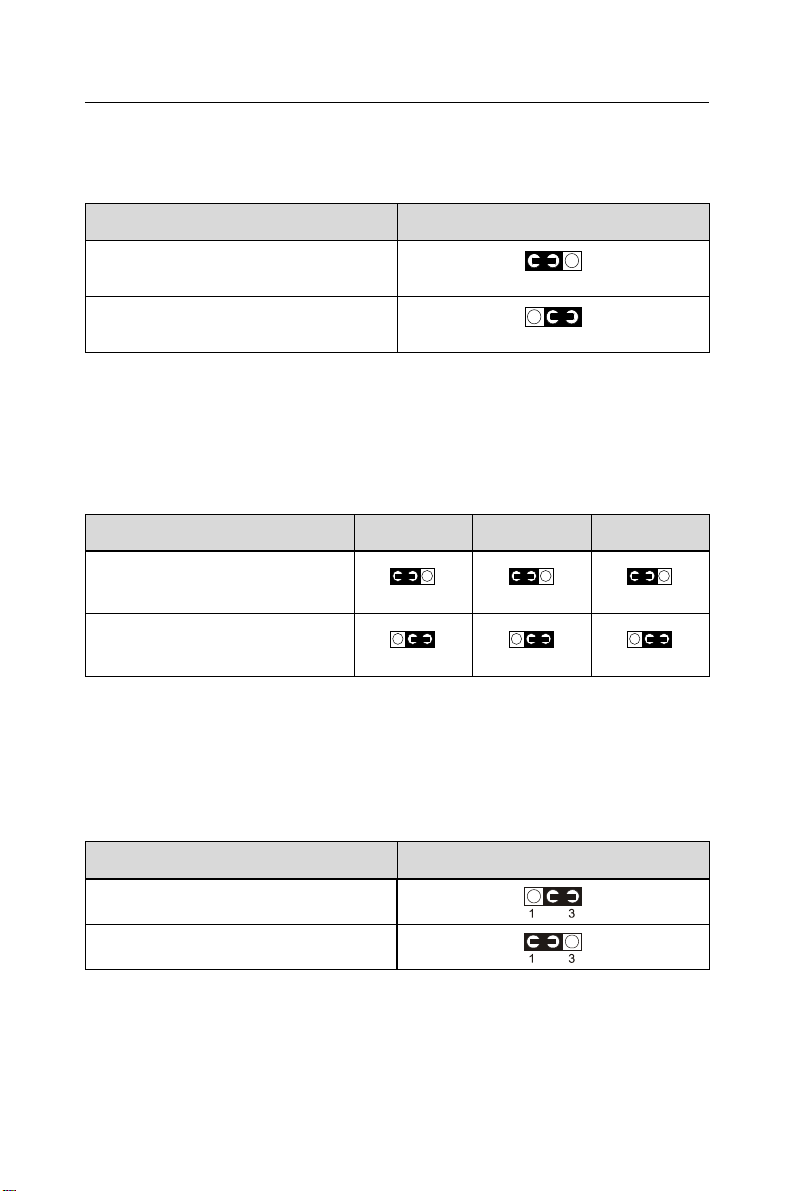
JP17: Power Lost Resume
This jumper allows user to use the switch of ATX power supply to control ON/
OFF switch directly instead of using the power switch on the motherboard.
NOTE: This feature must work with BIOS. Please refer to the BIOS Power On
After PWR-Fail sector.
Powe Lost Resume JP17
Enabled !
No mal (default) !
JP20 / JP21 / JP22: Intel / Cyrix CPU Select
CPU TYPE
Intel CPU (Default)
Cy ix Joshua CPU
JP22
!
!
JP21
!
!
JP20
!
!
JBAT1: Clear CMOS ata
Clear the CMOS memory by shorting this jumper 2 & 3 momentarily, and then
remove the cap back to 1 & 2 to retain original CMOS setting.
JBAT1
Clea CMOS Data
Retain Data (default)
JBAT1
Indice
Altri manuali Magic-Pro Computer Scheda madre
Manuali Scheda madre popolari di altre marche

Telit Wireless Solutions
Telit Wireless Solutions SL869-3DR Manuale utente

Gigabyte
Gigabyte GA-9IVDT Manuale utente

Texas Instruments
Texas Instruments ADS8372EVM Manuale utente

Commell
Commell MS-C73 Manuale utente

IBT Technologies
IBT Technologies MB860 Manuale utente

Nvidia
Nvidia TEGRA DG-04927-001_V01 Manuale utente