MAGINON RC-1 Manuale utente


1
1. Table of contents
1. TABLE OF CONTENTS 1
INTRODUCTION 2
2. PACKAGE CONTENTS 2
3. SAFETY AND WARNING NOTICES 3
4. THIS IS YOUR Wireless Reversing Camera 5
5. INSTALLATION 7
5.1. Installation of camera 7
5.2. Connection of camera 7
5.3. Installation of mirror 8
6. USE 9
6.1.Charging the battery 9
6.2.Switching on/o 9
6.3.Displaying the camera image 9
6.4.MP3 player 9
6.5.Radio function 10
7. CONFORMITY 10
8. STORAGE 10
9. DISPOSAL 11
10. WARRANTY AND SERVICE 11
11. TECHNICAL SPECIFICATIONS 12

2
2. Package Contents
Please unpack the Wireless Reversing Camera carefully and check that all of the following
items are included:
1. Maginon® Wireless Reversing Camera
2. Rear-view mirror
3. Transmitter
4. USB car charger
5. USB cable
6. 2 screws
7. Instruction manual
8. Warranty documents
Dear Customer,
congratulations on purchasing a high quality Maginon product. You have decided on a
Wireless Reversing Camera with excellent technical features, with the proper accessories
and which is particularly easy to operate. Please read all instructions carefully and
attentively and observe all the safety instructions.
The device has a three year warranty. If the Wireless Reversing Camera should encounter a
defect, you must present the enclosed warranty card and your purchase receipt.
Please store them carefully together with the operating instructions.
Make sure to include the instruction manual if the product is passed on to another party.
Note:
• Removetheprotectiveplasticfromtherear-viewmirrorandpossiblyfromthelens
of the camera by pulling on the protruding tab.
• Caution!Keepplasticlmsandbagsawayfrombabiesandtoddlers,thereisa
danger of suocation.

3
3. Safety and warning notices
If the Wireless Reversing Camera and accessories are handled improperly, this can be a
source of danger to yourself and others, or respectively damage or destroy the Wireless
Reversing Camera. Please read and strictly observe the following hazard, safety and war-
ning notices.
Intended use
This Reversing Camera is intended for improved visibility at the rear of your vehicle when
reversing. It is designed for private use and is not suitable for commercial applications.
Risks for persons with limited abilities to use electronic devices
Accessories and packaging are not toys. Therefore keep them away from children.
Among other things, there is a risk of poisoning and suffocation.
The Reversing Camera and accessories may not be used by people with limited
knowledge of the device. The Reversing Camera may only be used by people who are
physically and mentally capable of operating it safely.
Risk of electric shock by wetness and moisture
The affiliated components except the wireless camera may not be exposed to dripped
or sprayed water. Furthermore, no objects filled with liquids, such as vases or glasses,
may be placed on or near the device. There is a fire and electric shock hazard.
Do not use the Reversing Camera near water. There is a fire and electric shock hazard.
Pay special attention to the Wireless Reversing Camera when in rain, snowfall, on the
beach or close to water and protect it from liquid and moisture.
Do not use the Reversing Camera in environments with high humidity, a lot of steam,
smoke or dust.There is a fire and electric shock hazard.
Electrical hazard
If foreign objects or water have entered the Wireless Reversing Camera, turn it off.
Let everything dry thoroughly. Otherwise there is a fire and electric shock hazard.
If the Wireless Reversing Camera has been dropped or the housing is damaged, turn it
off. Otherwise there is a fire and electric shock hazard.
The Wireless Reversing Camera may not be taken apart, modified or repaired. There is
a fire and electric shock hazard.
Heat damage - re hazard
Do not leave the Reversing Camera laying around in places where the temperature
could rise significantly. This could damage the housing or the parts inside, which in turn
could cause a fire.

4
Do not wrap the Reversing Camera in anything and do not place it on textiles. This
might cause heat to build up in the Reversing Camera, resulting in a deformation of the
housing, and it can also cause a fire.
Hazards through the use of batteries
Danger of explosion in case of incorrect removal of the battery or use of incorrect
type of battery.
Never expose the batteries to excessive heat such as sunlight, fire, etc. This is a fire or
explosion hazard. Do not store the batteries near fire, stoves or other sources of heat.
The batteries may not be thrown in fire, short-circuited, completely discharged,
deformed or disassembled. There is a fire and explosion hazard.
Never touch leaking batteries without the corresponding protection. If the battery acid
comes into contact with your skin, wash the affected area with soap and water.
Avoid eye contact with the battery acid. Should your eyes ever come into contact with
the battery acid, flush your eyes with water and immediately contact a doctor.
Dispose of the batteries promptly and properly, observing any local hazardous waste
regulations. Do not burn or bury them.
Injuries and property damage
Only place the Wireless Reversing Camera on a stable surface. If not, this could cause
the Wireless Reversing Camera to fall or tilt, causing damage to your product.
Only use the car power supply specified for the Reversing Camera. No liability shall
be accepted for damage caused by an incorrect car power supply.
Make sure that the LCD monitor is not exposed to impact or point pressure. This could
result in the glass of the monitor being damaged. If the monitor liquid gets into your eyes
or onto your skin, it must be rinsed off immediately with clear water. Seek medical
attention immediately.
Damage to the electronics, monitors, or the lens, which were caused by external
influences such as shock, drop, or otherwise, are not warranty cases and will therefore
not be repaired free of charge.
Do not drop or bump the Reversing Camera and always treat it with care. Otherwise, it
could get damaged.

5
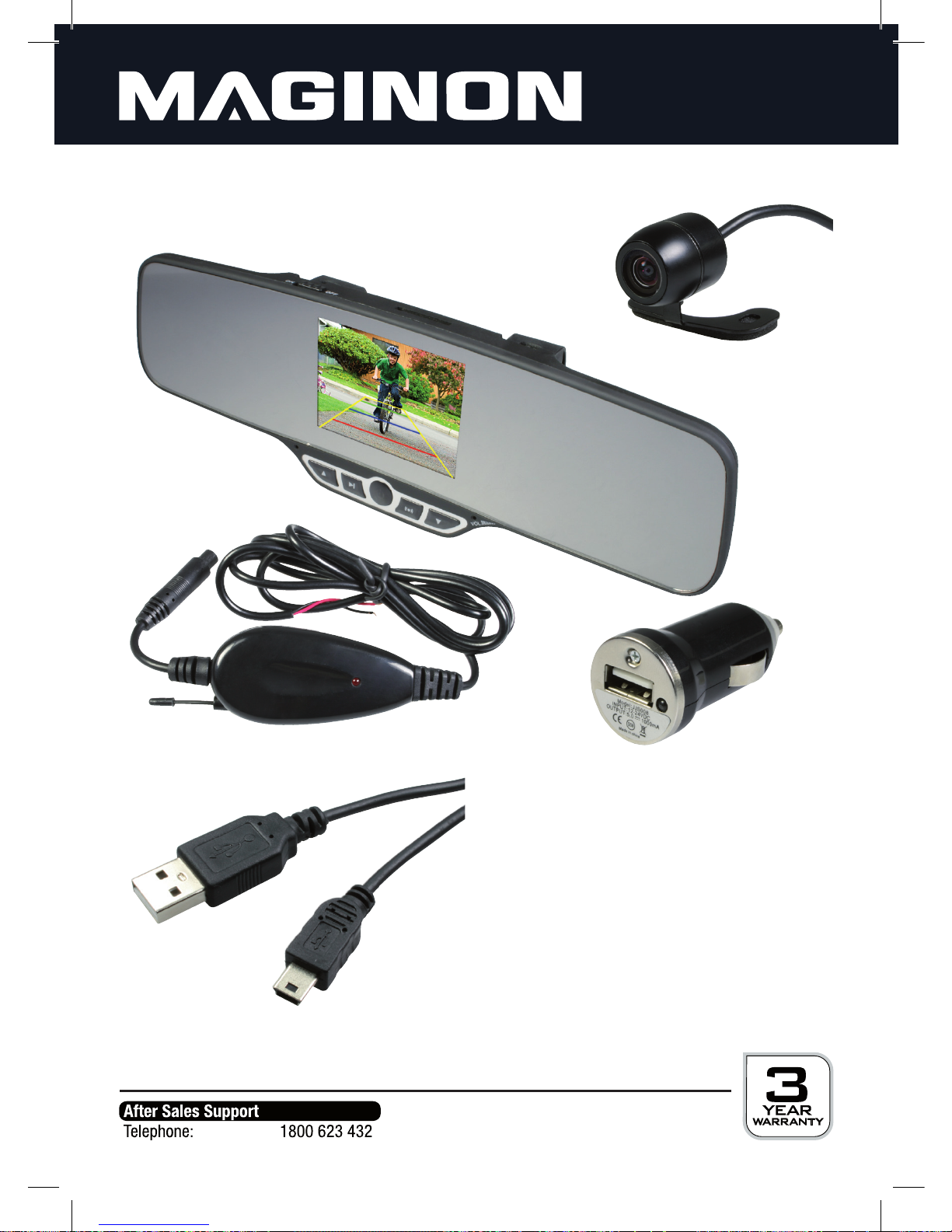
4. This is your Wireless Reversing Camera
Reversing camera
USB cable
Transmitter box
USB Car charger
Rear-view mirror
Without illustration:
- 2 screws
- Instruction manual
- Warranty documents

6
VOL
DC 5V
Mini USB connector for
charging DC 5V
USB 2.0 connector
for USB drive Volume control
Up button
MP3 button
Standby button FM button
Down button
Volume control
ON / OFF Switch SD cardslot
3.5 inch TFT-colour display
Top view of mirror
Bottom view of mirror
Front view of mirror
Speakers ON / OFF Switch
Back view of mirror

7
5. Installation
5.1. Installation of camera
The camera can be installed inside as well as on the outside of the vehicle as it is
water-proof. Inside the vehicle, the camera can be installed using the provided adhesive
pad.Thecameracanalsobeattachedinsideoroutsidethevehicleusingthexedholder.
Fix the camera at a point not impeding your rear view. It must also be ensured that the
cable is safely routed.
Forxingthecamerausingbolts,suitableholesmustrstbedrilledattheplaceofinstalla-
tion. Next, bolt the holder to the supporting surface, using the supplied bolts. Then lay the
cableinitsnalposition.
Whensecuringthecamerausingtheadhesivepad,rstlaythecableinitsnalposition.
Cleansurfacewithsomealcoholtoremovedustandgrease.Removeprotectivelmfrom
adhesivepadandrmlypresspadontosurface.
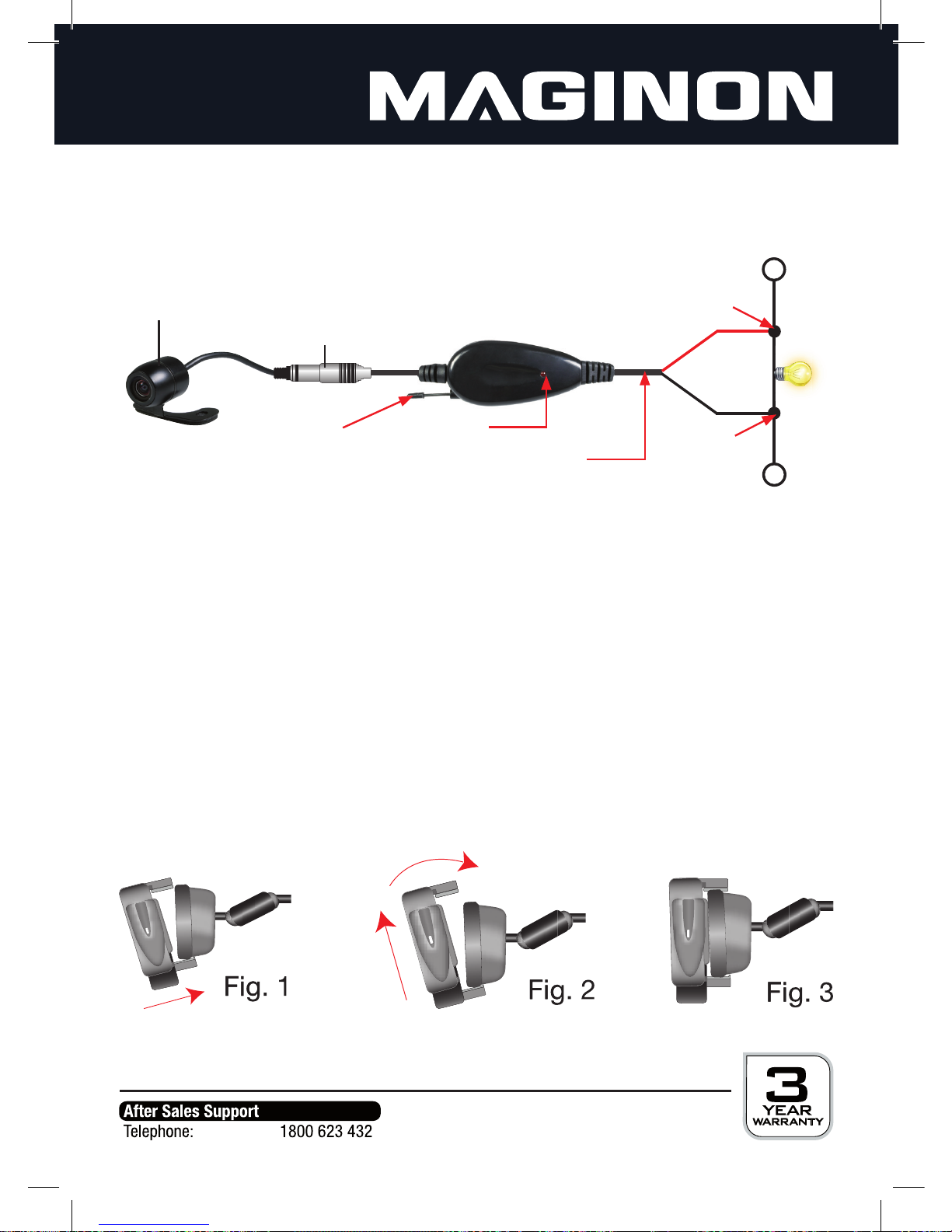
Turn inside the holder to correctly align camera as required.

8
5.2. Connection of camera
To supply your camera with power it must be connected to the connecting cable of your
vehicle´s reversing lights. The camera is then activated every time the reverse gear is
selected.
Connect the red camera cable to the positive cable of the reversing lights and the black
cable to the negative cable. The positive cable is normally coloured, whist the negative
cable is generally black. For absolute certainty the correct cables should, however, be
determined by measuring or checking with the manufacturer.
Ensure that the cables are accurately connected and insulate the connecting points to
preventbadcontactsandshortcircuiting!
5.3. Installation of mirror
Attach the mirror and integrated display to the existing rear-view mirror of your vehicle as
follows:Positionthebottomxtureontherearofthemirroragainstthebottomofthe
rear-viewmirror.Slidetopxtureupwardsandpushoverthetopedgeoftherear-view
mirror.Assoonasyouletgoofthetopxings,thexingswillclamparoundtherear-view
mirror. Additionally secure mirror using existing rubber bands.
Camera
Connector Transmitter box
Antenna Red LED
Power cable
red
black
Reverse
lamp
wire clamp
wire clamp
Indice
Altri manuali MAGINON Telecamera da cruscotto