1
2
1
2
3
3
4
4
5
6
7
5
67
1
1
1
1
Sensor tester
ST 300D
Supplied material
• Sensor’stester
• User’smanual
• Poweradapter
• USBcable
CAT8BST1779202 - USER’S MANUAL - ST 300D ITA/ENG ed. 01/2018
serial
number items specications remarks
1 Test Type NPN or PNP Auto-Detect
2 Output Voltage
4.8 V ~ 5.2 V 5 V output
23.0 V ~ 24.5 V 24 V output
3 Output Current
≤ 0.2 A 5 V output
≤ 0.15 A 24 V output
4 Battery Capacity 2,500 mAh Li-ion
5Theoretical
Working Hour 10 h 24 V, 15 mA
6 Charging Time 4.5 h -
7Output Voltage for char-
ghing External Device 4.8 V ~ 5.2 V Power Bank
8 Working Temperature -10 °C ~ 45 °C -
9 Weight 145 g -
10 Size 125.5 x 62 x 22.5 -
11 Other Functions Silence mode, Sleep mode, Output short-cir-
cuit protection
specications
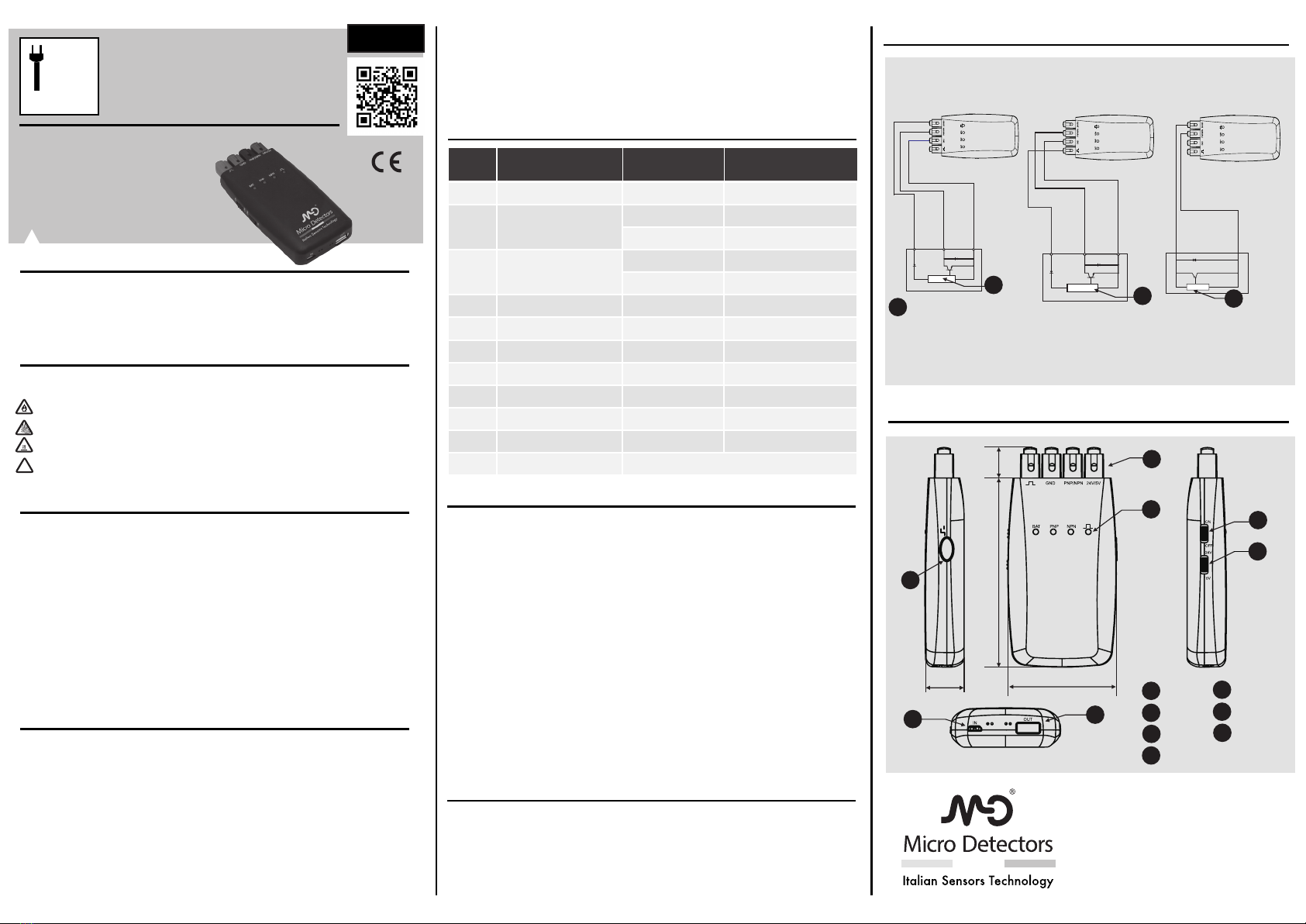
outline dimensional drawing (mm)
operating instruction
Connectingtheproductcablestothetesteraccordinglya)ThreeWired
• Three wires
M.D.MicroDetectorsS.p.A.
StradaS.Caterina235-41122Modena-Italy
tel.+39059420411
fax+39059253973
info@microdetectors.com
www.microdetectors.com
operatinginstructionorUser’smanual.
• Malfunctionthatiscausedbyunpredictablefactors(suchaschangeofscienceandtechnology)
aftertheproductisdeliveredfromourcompany.
• Malfunctionthatiscaused by naturaldisasterssuch asre,earthquakeandood; or abnormal
shaftvoltage.
(2)Anyindirectconsequencessuchasdevicesdamage,lossofopportunities,lostprots,orotherdamage
beyondthescopeofwarranty(Whichisonlylimitedtoregulation)(1)
user’s manual
Please read the manual carefully before using this product. This product should be
appliedbysomeonewithacertainlevelofelectricalknowledge.Pleasereadandmake
surethatyouunderstandhowtooperatetheproductbeforeusingit.Pleasekeepthis
manualreadillyaccesibleforfuturereferenceswhenneeded.
warning
Pleasecomplywiththewarningsindicatedbefore:
• Pleasedonotexceedmaximumratedvoltageduringusageinordertoprevent
testermalfunctionorre.
• PleasedonotapplyACpowersupplytoavoidbreakage.
• Pleasedonotsubjecttheproducttohightemperaturetoavoidscalding
• The product contains a non removable Li-ion battery. For the delivery of the
product,followNationalandIATAregulations.
precautions
Complywiththewarningsindicatedbelowfortheyareimportant:
• Pleasedonotuseitinammableorexplosiveenvironments.
• Pleasedonotuseitinenvironmentswithwater,oil,chemicalsorsteams.
• Pleasedonotdisassemble,repairoralterthisproduct.
• Pleasedonotexceedtheratedvoltageandcurrent.
• Pleasedonotexceedtheratedenvironment.
• Pleaseobserveelectricalpolaritywhenmakingconnections.
• Pleaseconnectloadcorrectly.
• Pleaseavoidshort-circuitingtheload.
• Pleasedonotoperateit,ifthehousingisbroken.
• Whendisposingthetester,pleasetreatitasanindustrialwaste.
warranty
Ourproductshavebeentestedpriortoshipping,howeverifmalfunctionoccurs,please
contactourocesnearyouandpresentthefailureindetailssothatwecanprovidethe
bestsolutiontoyou.
WarrantyPeriod
Thewarrantyperiodis1yearstartingfromtheshipmentdate.
Scopeofwarranty
(1)Ifmalfunctioniscausedbyourcompanywithinthewarrantyperiod,freeserviceofrepairingshallbe
oered.Thecaseslistedbelowdonotfallintothescopeofwarranty.
• Failtocomplywithoperatinginstruction.User’smanualorbreechofcontractswithourcompany.
• Anymalfunctionthatiscausedbybuyer’sowndeviceorsoftware,insteadofourproduct’sdefect
• Malfunctionthatiscausedbymodicationorrepairmenoutsideourcompany.
• Malfunctionthatcouldbeavoidedbyacorrectrepairorreplacingofwearingpartsbyfollowing
operating instructions
Charging
When BAT light turns Into red, It Indicates that test box needs to be charged. During
chilrging,itremainsinreduntilthesensortesterisfullychargedandthenitbecomes
green.
SleepMode
Whenthesensortesterisonstandbyformontthen2minutesitwillautomaticallyenter
into sleep mode to lower power consumption. Meanwhile the BAT light will icker 2
secondIntervalstoremindusertoswitchthepowero.Whenpressingthepulsebutton
again,thesensortesterwillbere-activilted.
SilenceMode
PressandholdPulseButtonfor5seconds,theNPNlightandPNPlightwillickertwice
atthesametimethenthetestboxwillenterintosilencemode.Whenthereisanoutput
fromthesensorthecorrespondingNPNlightorPNPlightonthesensortesterwillswitch
onwithoutthebeepingsound.
Powerbank
Sensortestercanserveasapowerbank.ConnecttheUSBchargingcablebetweenthe
OUTportandthedevicethatneedscharging.Thesensortesterwillbegintochargethe
devicewhenthepowerbuttonisswitchedon.
Note
• Pleasemakesurethepowerisobeforeconnectingthecable.
• Pleasemakesurethevoltageuctuationsarewithinmaximumratedrange.
• Whenthepowerison,pleasedonotapplythedeviceIntherst0.5s.
• Pleasedonotsubjectthedevicetodust,dirtorvapor.
• Pleasedonotsubjectthedevicetowater,oilororganicsolventsuch1sdiluents.
Pulse
button
Wire
terminal
62
LED
Power
Button
Power
Switch
Charging
Input
Charging
Output
22.5
108 17.5
brown
black
blue
blue
circuit
PowerOn:Select5Vor24Vaccordingtoproduct’srequirements
Test:Switchthepowerbutton,thesensortesterwillscanthesensor.Ifthereisanoutputfromthe
sensor,thecorrespondingNPNlightorPNPlightwillbeonalongwithabeepingsound
Pulse:UsercanpressPulse buttontosupply power to the sensor.When pressingPulseButton,
thelightindicatorwillbeon.Supplyingoutputvoltagetotheredwireterminal.Theoutputvoltageis
determinedbythepowerswitch
brown
black
blue
brown
ENG
• Twowires
!


