
Minox DC 4011 Manuale utente

1
Warranty Policy
This camera is under warranty for one full year from the date of purchase by the original
purchaser. In case of defects in materials or workmanship, we will replace or repair the camera
free of charge. This warranty applies to the camera only. This warranty does not include
batteries, or other accessories which have not been manufactured by our company. This
warranty will not be honored if the camera has been mishandled or tampered with, or altered by
anyone other than the manufacturer. Other than for the warranty herein, we are not respon-
sible for loss, damage, or inconvenience of any kind. A defective camera being returned under
warranty must be accompanied by a brief description of the difficulties encountered and also by
a proof of purchase with the date of purchase clearly indicated. All related transportation costs
and insurances are at the owner’s expense. Any alteration of this warranty cannot be made
without the written approval from our company.
FCC Notice
This equipment has been tested and found to comply with the limits for a Class B digital device,
pursuant to part 15 of the FCC Rules. These limits are designed to provide reasonable
protection against harmful interference in commercial installation. This equipment generates,
uses and can radiate radio frequency energy and if not installed and used in accordance with
the instructions, may cause harmful interference to radio communications. However, there is
no guarantee that interference will not occur in a particular installation. If this equipment does
cause harmful interference to radio or television reception, detectable by turning the equipment
in question off and on, the user is encouraged to try to correct the interference by one or more
of the following measures:
Reorient or relocate the receiving antenna
Increase the distance between the equipment and the receiver
Connect the equipment to an outlet on a different circuit than that which the
receiver is connected to
Consult the dealer or an experienced radio/TV technician for help
NOTE
A shielded-type DC power cable incorporated with a ferrite core is required in order to meet the
FCC emission limits and also to prevent interference to the nearby radio and television reception.
Use only shielded I/O cable incorporated with a ferrite core to connect this equipment to host
computer and TV set. Shielded AC power cable and shielded I/O cables are required in order
to meet the FCC emission limits. It is essential that only the supplied power cord and I/O cable
(s) can be used.
85939-450-E.p65 2002/11/12, ¤U¤È 01:131

2
READ THIS FIRST
Notice:
1. Product design and specifications are subject to change without notice. This includes
primary product specifications, software, software drivers, and user’s manual. This
User Manual is a general reference guide for the product.
2. The product and accessories that come with your camera may be different from those
described in this manual. This is due to the fact that different retailers often specify
slightly different product inclusions and accessories to suit their market requirements,
customer demographics, and geographical preferences. Products very often vary
between retailers especially with accessories such as batteries, chargers, AC adapters,
memory cards, cables, carrying cases/pouches, and language support. Occasionally
a retailer will specify a unique product color, appearance, and internal memory capacity.
Contact your dealer for precise product definition and included accessories.
3. The manufacturer assumes no liability for any errors or discrepancies in this User
Manual.
4. For driver updates, refer to our website.
85939-450-E.p65 2002/11/12, ¤U¤È 01:132

3
WARNING
Do not use this camera if it is emitting smoke, becomes unusually hot to be touched,
emitting any unusual odor or noise, or if it is in any other abnormal states.
Operating the camera in any of these situations may cause a fire or an electrical shock.
Stop using the camera immediately, turn the camera off, and then disconnect the power
source (batteries or AC power adapter). (If you are using the AC power adapter, unplug
the adapter from the AC power outlet after you have disconnected the camera.)
After checking that smoke is no longer being emitted, contact your dealer or your local
authorized service facility and request repairs. Never attempt to repair this camera by
yourself as this is dangerous.
Do not use the camera if any water has entered the camera.
Turn the camera off, and then disconnect the power source (batteries or AC power
adapter).
(if you are using the AC power adapter, unplug the adapter from the AC power outlet
after you have disconnected the camera.) Then contact your dealer or your local
authorized service facility.
Do not continue to use the camera as this may cause a fire or an electrical shock.
Do not use the camera if any foreign objects have entered the camera.
Turn the camera off, and then disconnect the power source (batteries or AC power
adapter).
(if you are using the AC power adapter, unplug the adapter from the AC power outlet
after you have disconnected the camera.) Then contact your dealer or your local
authorized service facility.
Do not continue to use the camera as this may cause a fire or an electrical shock.
If the camera has been dropped or if the camera case has been damaged, turn the
camera off, and then disconnect the power source (batteries or AC power adapter). (if
you are using the AC power adapter, unplug the adapter from the AC power outlet after
you have disconnected the camera.) Then contact your dealer or your local authorized
service facility.
Do not continue to use the camera as this may cause a fire or an electrical shock.
Do not place the camera in any unstable locations such as on a wobbly table or sloping
surface where the camera may fall or tip over and cause injury.
Do not expose the camera to moisture and make sure that there is no water getting into
the camera. Take particular care when using the camera under extreme weather
conditions such as rain or snow, or when operating the camera at the beach on near
water.
Water in the camera may cause a fire or an electrical shock.
Do not insert or drop metallic or inflammable foreign objects into the camera through
access points such as the memory card slot.
This may cause a fire or an electrical shock.
85939-450-E.p65 2002/11/12, ¤U¤È 01:133

4
WARNING
Do not attempt to modify this camera.
This may cause a fire or an electrical shock.
Do not remove the camera casing.
This may cause an electrical shock.
Internal inspection, maintenance and repairs should only be carried out by your dealer
or local authorized service facility.
Avoid using this camera in the bathrooms.
Exposure to excessive moisture may cause a fire or an electrical shock.
Do not touch the power plug during a thunderstorm if you are using the AC power
adapter.
This may cause an electrical shock.
Never operate this camera in any way while driving a vehicle.
This may cause a traffic accident.
85939-450-E.p65 2002/11/12, ¤U¤È 01:134

5
CAUTION
Do not place this camera in damp or dusty locations.
This may cause a fire or an electrical shock.
Do not place this camera in a location affected by oil fumes or steam, such as near a
cooking stove or humidifier.
This may cause a fire or an electrical shock.
Do not leave this camera in a location subject to extremely high temperatures, such as
in a sealed vehicle or in direct sunlight.
Exposure to high temperatures may adversely affect the camera case and internal
components and may cause a fire.
Do not cover or wrap the camera or the AC power adapter with a cloth or quilt.
This may cause heat to build up and distort the case and cause a fire.
Always use the camera and its accessories in well-ventilated locations.
Handle the camera carefully and do not bump the camera into any hard object.
Handling the camera roughly may cause a malfunction.
Do not move the camera while it is switched on.
(if you are using the AC power adapter, unplug the adapter from the AC power outlet
after you have switched off the camera.) Ensure that any connector cords or cables to
other devices are disconnected before moving the camera.
Failure to do so may damage the cords or cables and cause a fire or an electrical shock.
When handling the camera, always unplug it from the power source (batteries or AC
power adapter) for safety.
(if you are using the AC power adapter, unplug the adapter from the AC power outlet
after you have disconnected the camera.)
Failure to do so may result in an electrical shock.
When leaving the camera unused for long periods, such as during a vacation, always
unplug the camera from the power source (batteries or AC power adapter ) for safety.
(if you are using the AC power adapter, unplug the adapter from the AC power outlet
after you have disconnected camera.)
Failure to do so could result in a fire.
Do not use batteries other than those specified for use with your camera.
The use of unsuitable batteries may result in the batteries splitting or leaking and causing
a fire, injury, or soiling of the battery compartment.
When fitting batteries into the camera, check the polarity markings on the battery
( - and + )to ensure that battery correctly.
Incorrect battery polarity may result in the batteries splitting or leaking and causing a fire,
injury, or soiling of the battery compartment.
Remove the batteries if the camera will not be used for an extended period of time.
The batteries may leak and cause a fire, injury or soiling of the battery compartment.
If the batteries leak, clean and wipe the battery compartment carefully and install new
batteries.
Wash your hands carefully if you touch the battery fluid.
85939-450-E.p65 2002/11/12, ¤U¤È 01:135

6
TABLE OF CONTENTS
8 Introduction
8 Package Contents
8 Optional Accessories
9 Preparing the Camera
9 Getting to Know the Camera
9 Name of Parts
10 Dial Knob
10 Attaching the Strap
11 Preparing Power Supply
11 Loading Batteries
11 Using the Power Adapter (Optional Accessory)
12 Inserting/Removing the Memory Card (Optional Accessory)
12 Inserting a Memory Card
12 Removing a Memory Card
13 Getting Started
13 Turning the Camera On/Off
13 Checking Batteries
13 Turning the LCD Monitor On and Off
14 Formatting the Memory Card
14 Memory Card Indicator
15 Camera Operation
15 Capture Mode
15 LCD Monitor Display
15 Icon Indicator
16 LCD Button
16 Taking Pictures
16 Number of Recordable Images
17 Zoom Control
17 Optical Zoom
17 Digital Zoom
18 Selecting the Scene Program
19 Focus Mode Setting
19 Selecting the Flash Mode
20 Self-timer Photography
85939-450-E.p65 2002/11/12, ¤U¤È 01:136

7
21 Capture Menu
21 Navigation Buttons
21 Mode
22 Quality
22 ISO Sensitivity
22 Exposure
23 White Balance
23 Photometry
24 AE Mode
25 Playback Mode
25 LCD Monitor
25 Icon Indicator
25 LCD Button
26 Playback Single Image
26 Thumbnail Display
26 Zoom Playback
27 Viewing Image on a TV monitor
28 Playback Menu
28 Erase All Images
29 Erase Single Image
30 Protect
31 Print Setting
32 Setup Menu
32 Date Setting
33 Card Formatting
33 Language
33 LCD Brightness
33 Beep
34 Auto Shut Off
34 Video Out
35 Transferring Pictures to the Computer
35 System Requirements
35 Installing the Software (Driver & Image Application)
35 Connecting the Camera to Your Computer
36 Downloading Pictures
37 Warning and Error Messages
38 Specifications
85939-450-E.p65 2002/11/12, ¤U¤È 01:137

8
INTRODUCTION
Congratulations on your purchase of the new digital camera.
Capturing high-quality digital pictures is fast and easy with this state-of-the-art smart camera.
Equipped with a 4.0 Megapixel CCD, this camera is capable of capturing pictures with a
resolution of up to 2272 x 1704 pixels.
Other cool features provided by the camera include the following:
LCD Monitor - The 1.6" full-color LCD at the back of the camera makes it easy to frame your
subject when taking pictures. It also displays a preview of the pictures you have taken.
Digital Zoom - Zoom in 2x and get a larger, closer view of the subject (in Capture mode).
Macro Mode - Take pictures of people portrait or objects at close range using Macro mode.
Flexible Flash Settings - Change the flash setting according to your lighting environment.
Camera Settings - Have more control over picture quality by adjusting settings such as White
Balance, EV Compensation, Resolution, and more.
Thumbnail View - Display in sets of nine pictures on the LCD for easier and quicker selection
of pictures.
TV Connection - View pictures on a television monitor while browsing through your pictures.
Package Contents
Digital Camera
USB cable
Video cable
Software CD-ROM
User manual
Wrist strap
Camera pouch
Optional Accessories
Memory card
AC power adapter
Batteries
85939-450-E.p65 2002/11/12, ¤U¤È 01:138

9
PREPARING THE CAMERA
This section introduces you to the digital camera. Follow the instructions in this section to
install batteries, use the power adapter, and install a memory card.
Getting to Know the Camera
Names of Parts
1. Shutter button
2. Dial knob
3. Power button
4. Built-in flash
5. Self-timer LED
6. Lens cover knob
7. Lens/Lens cover
8. Viewfinder
9. Viewfinder LED
10. Optical viewfinder
11. Navigation buttons
/ button
/ button
/ button
/ button
12. WIDE button
13. TELE button
14.Card access LED
15. LCD monitor
16. Menu button
17. ENTER button
18. LCD button
19. Strap attachment
20. Battery cover
21. Card cover
22. USB port
23. Tripod socket
24. Terminal cover
Video port
Adapter port
8
4
7
6
5
15
11
16
17
18
10 12 13 14
9
20
23
21
22
19
24
85939-450-E.p65 2002/11/12, ¤U¤È 01:139
10
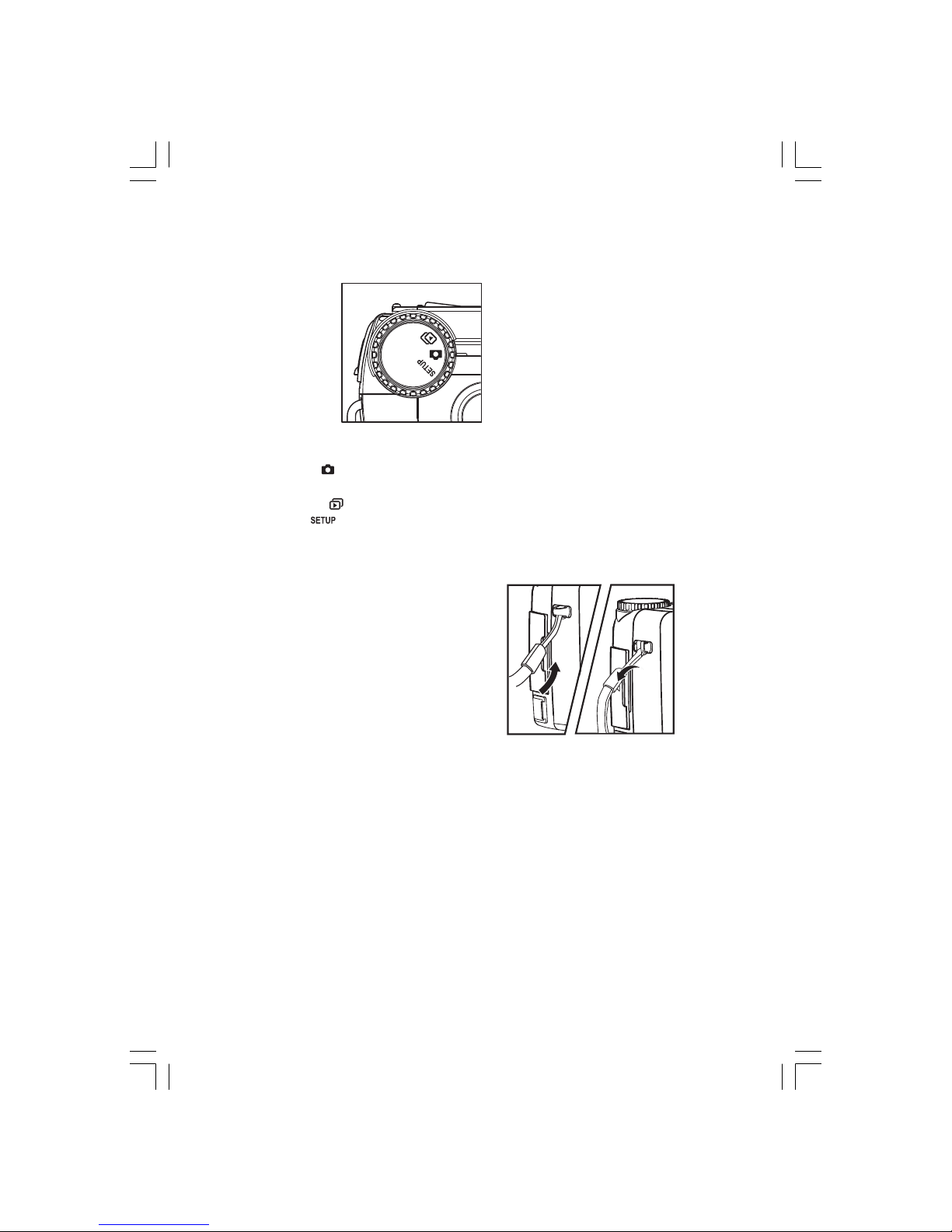
Dial Knob
It also allows you to choose from three camera modes:
Capture mode ( ) – This mode enables taking pictures and stores pictures on the memory
card.
Playback mode ( ) – This mode enables you to view pictures you have taken.
Setup mode ( ) – This mode sets basic camera settings such as Date Setting, Card
Formatting, Language, LCD Brightness, Beep, Auto Shut Off and Video Out.
Attaching the Strap
To attach the strap to the camera:
1. Insert the thin end of strap into the strap
attachment.
2. Pass the other end of the strap through the
loop of thin cord and pull the strap tight.
85939-450-E.p65 2002/11/12, ¤U¤È 01:1310
Altri manuali per DC 4011
1
Indice
Altri manuali Minox Macchina fotografica digitale

Minox
Minox CD 48 Manuale utente

Minox
Minox DSC Manuale utente

Minox
Minox DC 5011 Manuale utente

Minox
Minox DC 5011 Manuale utente

Minox
Minox MX Manuale utente

Minox
Minox Minox A Manuale utente

Minox
Minox DC 5222 Manuale utente

Minox
Minox DC 6011 Manuale utente

Minox
Minox CD 155 Manuale utente

Minox
Minox DD1 Manuale di istruzioni

Minox
Minox DD1 Manuale utente

Minox
Minox CD 70 Manuale utente

Minox
Minox DCC Leica M3 Manuale utente

Minox
Minox MobiDV Manuale utente

Minox
Minox DIGITAL CLASSIC CAMERA 5.1 Manuale utente

Minox
Minox 35 ML Manuale utente

Minox
Minox 35 PL Manuale utente

Minox
Minox DC 1011 Manuale utente

Minox
Minox DC 2133 Manuale utente

Minox
Minox DC 1422 Manuale utente


