
Moza Mini MX 2 Manuale utente

2
English
3 –13
Čeština
14 –25
Slovenčina
26 –36
Magyar
37 –48
Deutsch
49 –60

3
Dear customer,
Thank you for purchasing our product. Please read the following instructions carefully
before first use and keep this user manual for future reference. Pay particular attention
to the safety instructions. If you have any questions or comments about the device,
please contact the customer line.
✉www.alza.co.uk/kontakt
✆+44 (0)203 514 4411
Importer Alza.cz a.s., Jankovcova 1522/53, Holešovice, 170 00 Prague 7, www.alza.cz
4
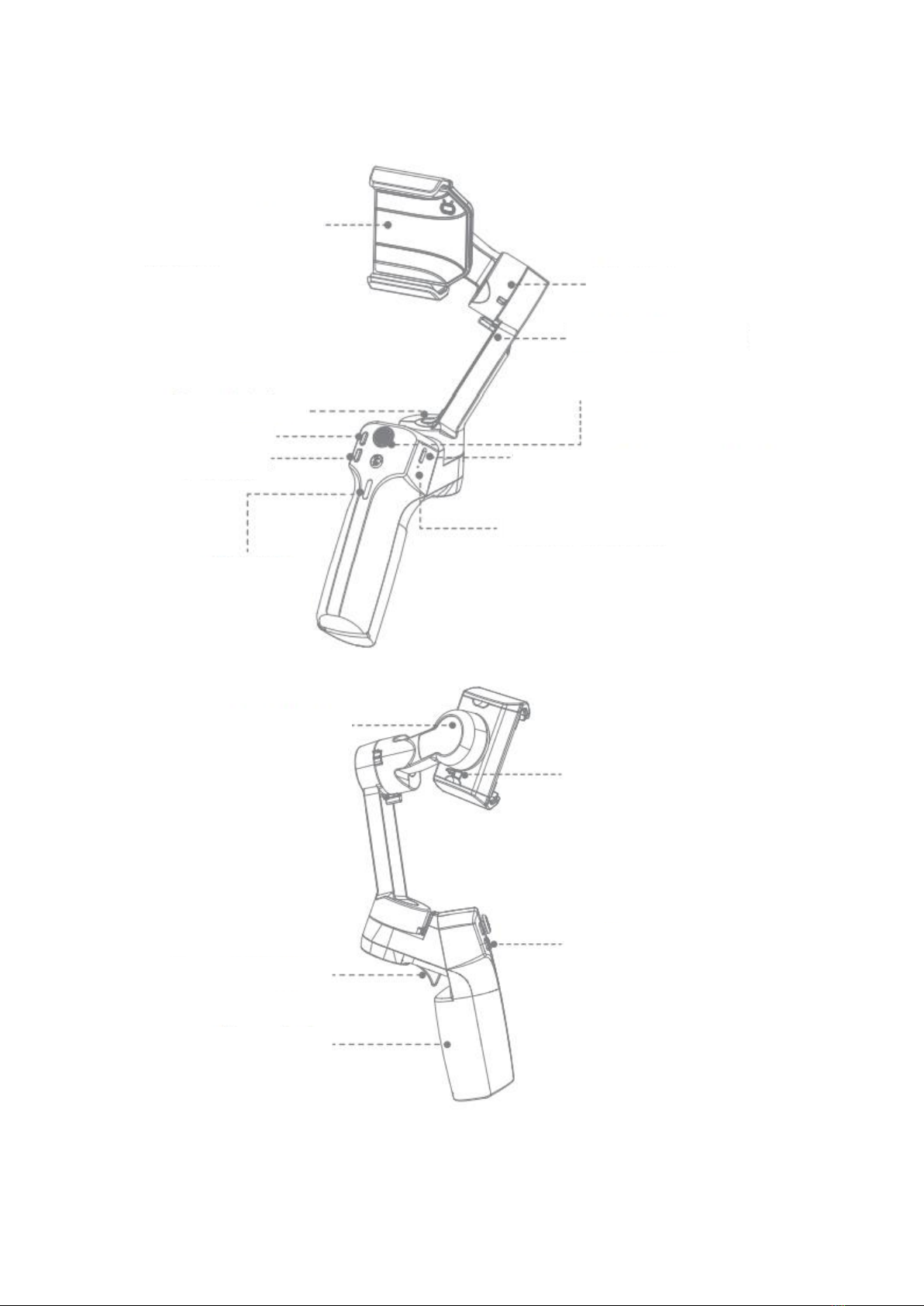
Mini MX 2 Overview
Note: Please activate MOZA Mini MX2 with MOZA Genie App before the first use.
Otherwise, normal working functions may be limited.
Electric phone holder
Pan Motor
Zoom +
Zoom -
Power Indicator
Reset Button
Type-C Charging Port
Joystick
Tilt Motor Lock
Tilt Motor
Roll Motor
Smart Trigger
Handgrip
Fn Button
Roll Motor Lock
5
Download APP
You can scan the QR code download the “MOZA Genie” directly, or you can search the
“MOZA Genie” in the APP store & Google Play to download it. (Scan the QR code below to
download the APP)
•The customized “MOZA Genie” APP for Mini MX 2 can help you make better use of
the various functions of the gimbal.
•Please routinely check of the latest version of the MOZA Genie app. Make sure
you have set to automatic update on your mobile smartphone.
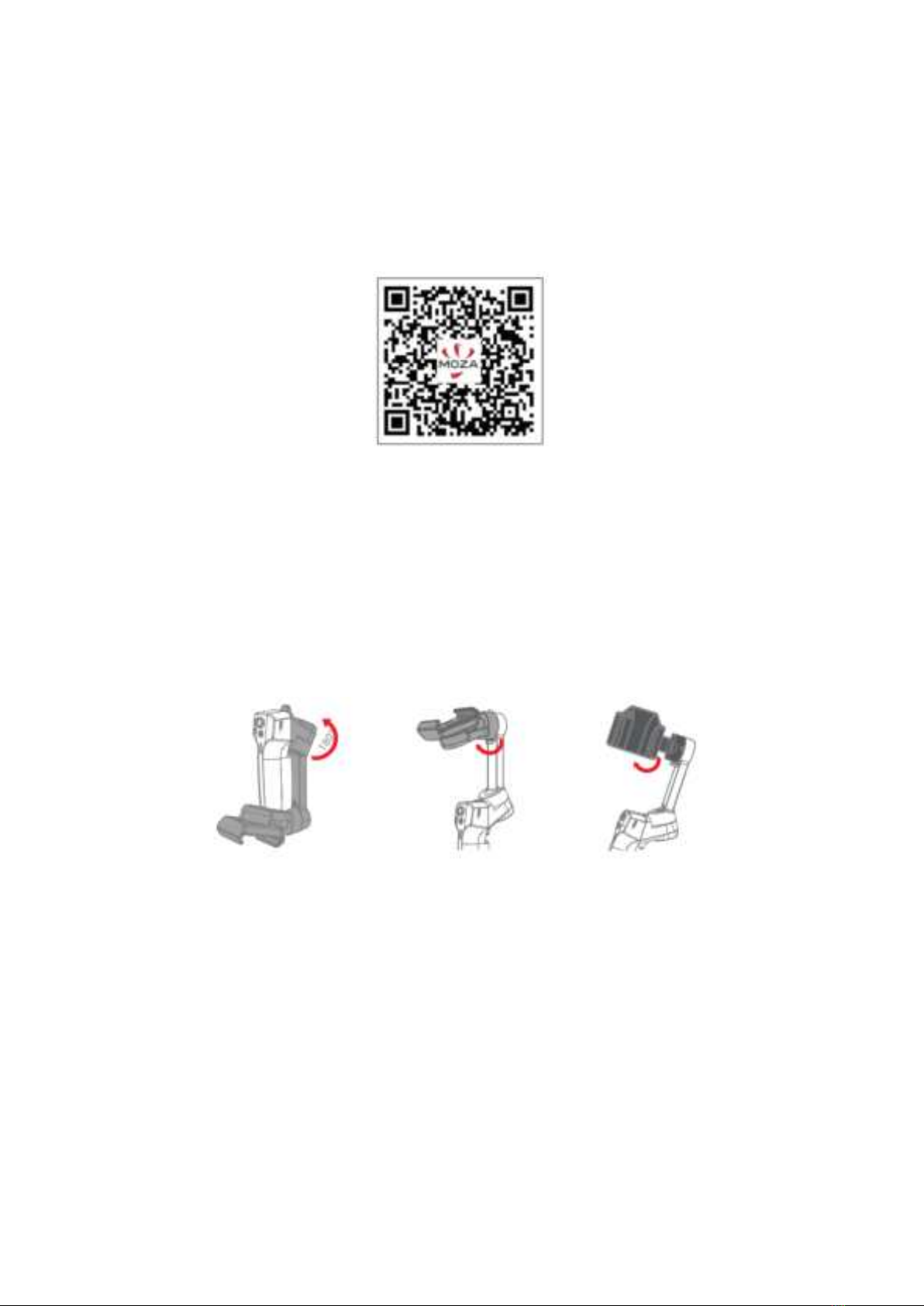
Installation and Unlocking
Follow the steps shown in the pictures below and unlock the gimbal.
Phone Holder Operation
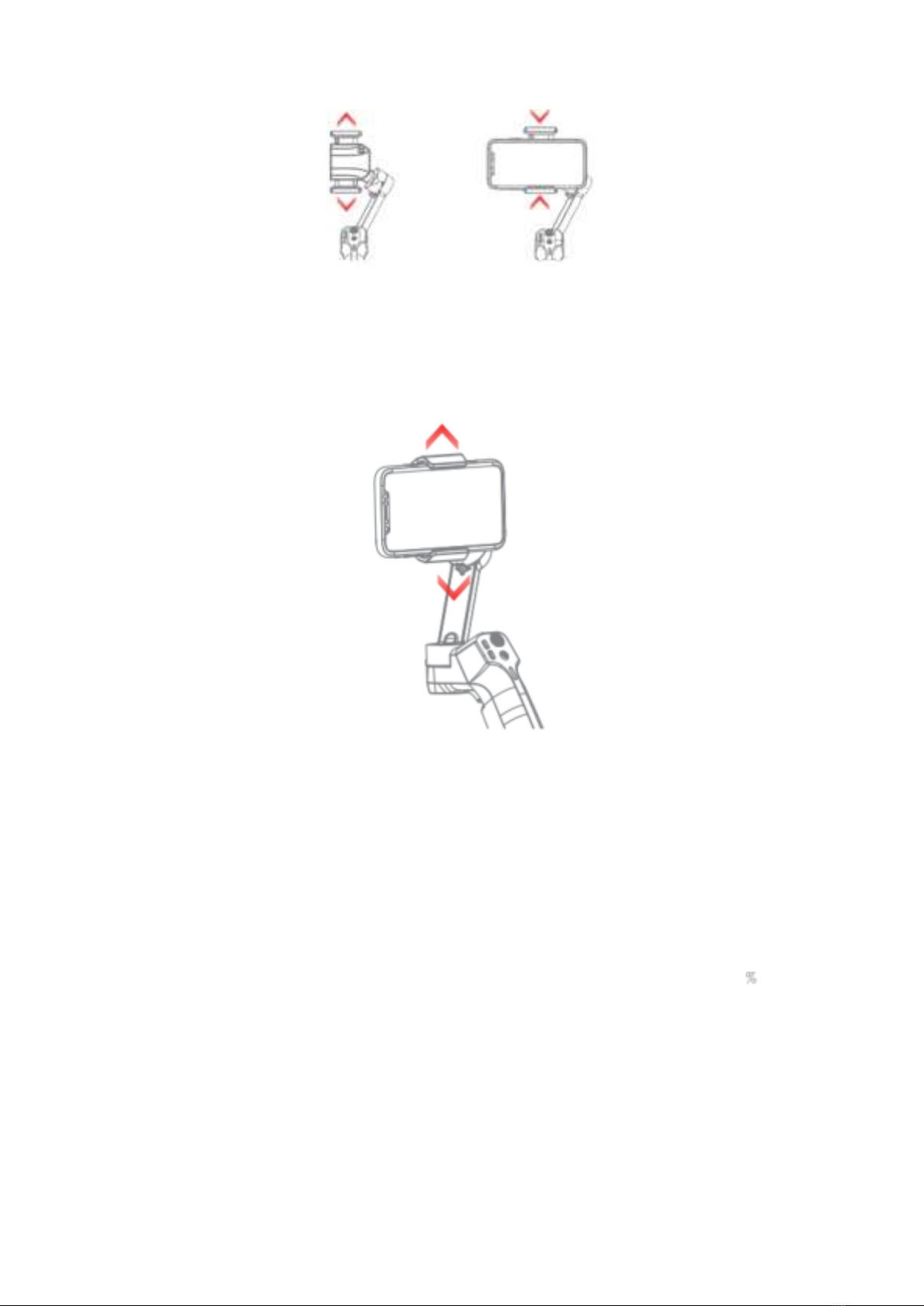
Power on and install the phone
Long press the power button to turn on the stabilizer. The phone holder will open
automatically.
Place the phone in the centre of the phone holder, the phone holder will clamp
automatically when a mobile phone is sensed.
6
Power off and remove the phone
First press the trigger button and hold, while long press the power button, the phone
holder will open automatically.
Then remove the phone, the phone holder will close, and gimbal will turn off when it no
longer senses the phone.
Phone holder operation
Press and hold the trigger button and “+” button: The phone holder will open.
Press and hold the trigger button and “-“ button: The phone holder will close.
Charging
•The MOZA Mini MX 2 has a built-in lithium battery. Before first use, fully charge it
to condition the battery to ensure smooth operation.
•When the power indicator starts flashing, the battery level is less than 20 .
Please charge it in time.
•With a universal Type-C port, Mini MX 2 can be charged by both phone charger
and power bank.
•The battery will automatically stop charging when it gets fully charged. The blue
indicator light will turn off. Please disconnect the charger.

7
Battery Lever Indicators
•The blue indicator light is always on in three bars, and the power is 70%~100%.
•Two bars of the blue indicator light are always on, the battery level is 40%~70%.
•The blue indicator light is always on, and the power is 20%~40%.
•The blue indicator light flashes once, and the battery level is 0%~20%
•The blue indicator light flashes from top to bottom, and the gimbal is in upgrade
mode.
•The blue indicator lights are on from bottom to top, charging.
Note: The indicator light is off after fully charged when power off, and the indicator light
is always on after fully charged when power on.
Connecting to the MOZA Genie App
Refer to the illustration, installing the phone and balancing the gimbal.
Long press the function button for 3s to power on the gimbal, turn on the Bluetooth on
the phone, launch MOZA Genie App.
Click the Bluetooth icon in the main interface of MOZA Genie App to search for
connectable devices, select the device with the connection prefix as Mini MX 2. After
successful connection, the gimbal will automatically enter the shooting interface.
Mini MX 2 Activation
Enter the APP main interface to select the gimbal to be connected, the activation prompt
box will prop up, click Activate. After the activation is completed, the gimbal will work
normally. If activation fails, please try to reactivate, if it fails again, please follow the
prompts to contact customer service.
Button function (MOZA Genie App Control)
Fn button
Long press: on/off
Power on and enter standby mode (phone not clipped/unlocked)
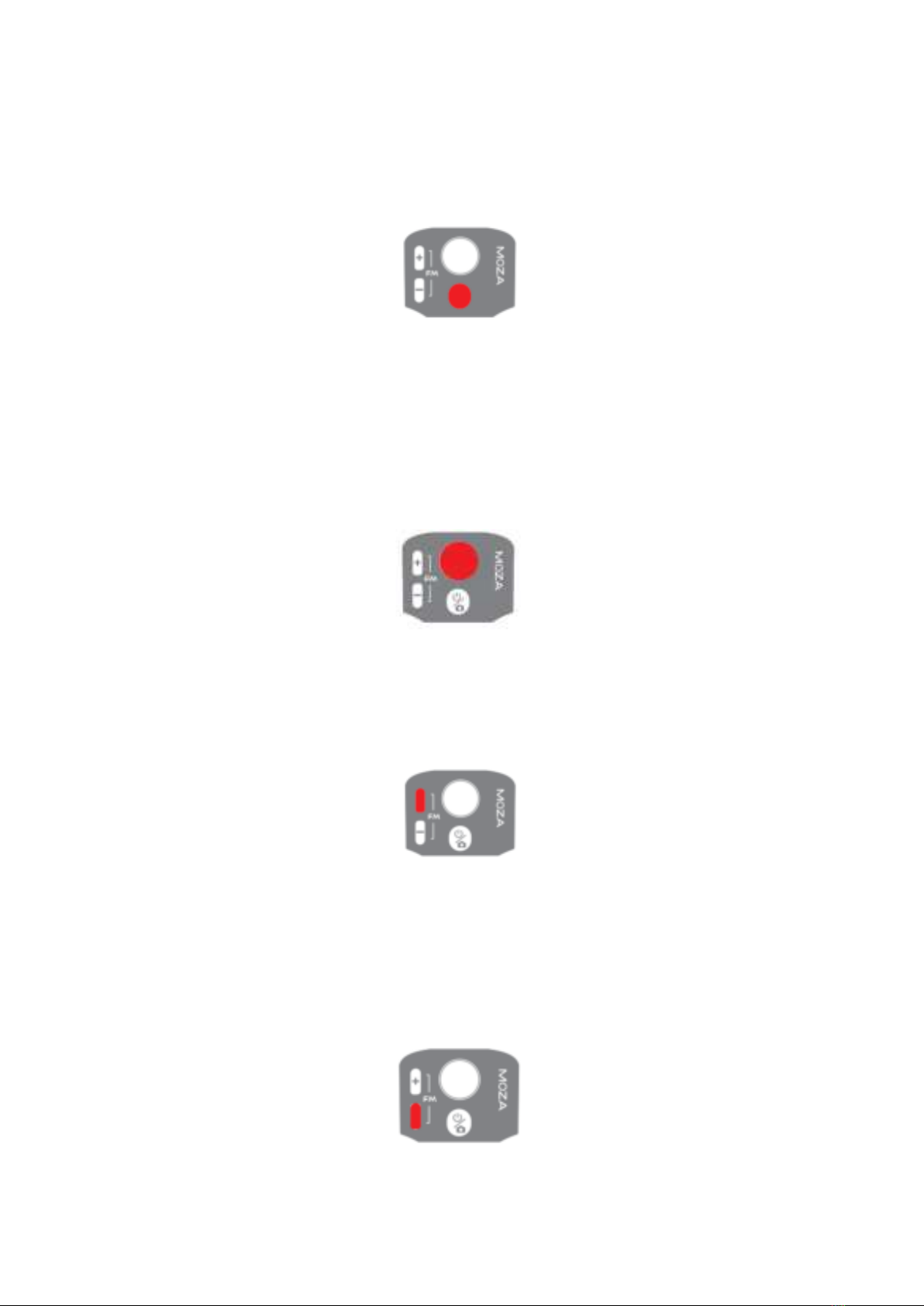
8
Single press: shutter, record/stop
Wake up (gimbal in standby mode)
Double press: switch to video mode/photo mode
Triple press: Horizontal and vertical mode switching
Joystick
Move upwards: phone camera goes up
Move downwards: phone camera goes down
Move leftwards: phone camera goes left
Move rightwards: phone camera goes right
Inception mode: Move leftwards, roll axis rotates counter clockwise.
Move rightwards, roll axis rotates clockwise
Zoom +
Click and hold: Zoom in
Single press: Pan-tilt follow
Double click: Automatically zoom in to maximum
Zoom –
Press and hold: Zoom out
Single press: FPV Mode
Double click: Automatically zoom out to minimum
Inception Mode: Push the joystick left and right in FPV mode to control the rotation
direction

9
Smart Trigger
Click and hold: All Lock Mode
Double click and hold: Sport Gear Mode
One-Click: Face Tracking and lock in the centre of the shot.
Double click: Re-centre and exit the current mode
Triple Click: Switch between the rear and front-facing camera
Note: Mini MX 2 can control the phone’s original camera to take pictures, record/stop.
When working with a native camera, some key functions cannot be used. It is
recommended to use it with MOZA Genie App. When the App is connected, the current
mode will be displayed on the App.
Firmware upgrade
Turn off the power of the gimbal first, press and hold the ZOOM-button, and click the
function button at the same time until the indicator light flashes from top to bottom, at
this time the gimbal enters the firmware upgrade mode, then connect to the APP, and
click firmware upgrade.
Bluetooth reset
When you cannot search for Mini MX 2 Bluetooth on your phone, please power on the
gimbal, hold + button, then press the power button at the same time until the power
indicator flashes. The the Bluetooth reset is successful.
Product Specification
Payload
280g
Weight
423g
Gimbal Dimension (L*W*H mm)
Unfolded: 120*120*265
Folded: 145*60*180
Supported Phone
Width: 60 ~ 88m
Weight: 143 ~ 280g
Battery Life
24 h (Reference battery life under test
with gimbal well balanced).
Battery Specs
Working voltage: 7.4 V
Battery capacity: 2000 mAh
Charging Time
2.5 Hours
Mechanical Range
Pan: 340°
Roll: 300°
Tilt: 140°

10
Faq
Why does my gimbal automatically enter sleep mode after a short while of usage?
1. Make sure you’ve installed your phone, and check whether the mobile phone is
well balanced. Serious unbalance will cause motor overload and goes to sleep to
protect it.
2. Please have a check whether the indicator flashes quickly, if it does, it means low
battery and the gimbal can not work.
Does the gimbal support fast charging?
1. Fast charging is not supported, the charging specification is 5V/2A
What can I do if there is a delay in the movement and video in my App?
1. Check whether the anti-shake function is turned on in the App, if it is, please turn
off the anti-shake function.
2. If the delay still exists after you turned off the anti-shake function, please
uninstall the App and download it again. If the problem still exists, please contact
our after-sale service.
What should I do if x appears after I opened the App and searched Bluetooth?
1. Close Bluetooth search box in the MOZA genie app, then re-open the search box
and search again the Bluetooth device, try to connect again.
What should I do if the Object Tracking fails?
1. Please try to select a target of a suitable size in a single background environment.
The screen and be clearly visible without any foreground objects.
2. If it still doesn’t work, please try to upgrade the App and gimbal firmware.
What is Magic Mode?
1. The Magic Mode in MOZA Genie App provides some cool short clips filming
templates, you can easily shoot several clips by following the templates.
2. The Magic Mode guide you record and filming from three aspects including
“camera movement” “transition”, “sound effect” to achieve “one step filming”.
3. You just need to hold a button to start shooting, the gimbal will automatically
move according to the scene’s requirements, and some may provide tips to users
on following the camera movement.
What should I do if the indicator light is not on and I can’t turn the gimbal on due to
upgrade failure?
1. When upgrade failure happens, please force your gimbal enter firmware upgrade
mode (also called boot mode, hold zoom- button then press fn button) and
upgrade firmware again.
Indice
Lingue:
Altri manuali Moza Accessori per fotocamere

Moza
Moza Mini-MI Manuale utente

Moza
Moza AIR Manuale utente

Moza
Moza iFocus Manuale utente

Moza
Moza AirCross 2 Manuale di istruzioni

Moza
Moza AirCross 2 Manuale utente

Moza
Moza Slypod Manuale utente

Moza
Moza NANO SE Manuale utente

Moza
Moza AirCross 2 Manuale utente

Moza
Moza Mini-MX Manuale utente

Moza
Moza Air 2S Manuale utente

Moza
Moza AirCross 3 Manuale utente
Moza
Moza Mini-S Manuale utente

Moza
Moza Mini-P Manuale utente

Moza
Moza Mini MX Manuale utente

Moza
Moza Mini-P Manuale utente

Moza
Moza Mini-MX Manuale utente

Moza
Moza Air 2 Manuale utente

Moza
Moza AirCross 3 Manuale utente

Moza
Moza SLYPOD PRO Manuale utente

Moza
Moza Slypod Manuale utente


