
Niobrara QUCM 3964 Istruzioni per il montaggio

QUCM 3964(R) Application Manual
QUCM 3964(R)
Installation and Programming Manual
This Manual describes the QUCM application for interfacing 3964(R) devices to a Modbus master.
Effective: 17 April, 2001
Niobrara Research & Development Corporation
P.O. Box 3418 Joplin, MO 64803 USA
Telephone: (800) 235-6723 or (417) 624-8918
Facsimile: (417) 624-8920
www.niobrara.com

Modicon, TSX Quantum Automation, Modbus, Modbus Plus are registered trademarks of Schneider
Automation.
Identsystem CIS2 and Identsystem CIS3 are trademarks of Euchner GmbH + Co.
SIMATIC is a trademark of Siemens Corp.
Subject to change without notice.
© Niobrara Research & Development Corporation 1999, 2000. All Rights Reserved.

3
Contents
1 Introduction .........................................................................................................................5
2 Installation.............................................................................................................................7
Module Installation.........................................................................................................7
Software Installation.......................................................................................................7
Serial Connections to the QUCM-L ...............................................................................7
Port 1 to Modbus Master .........................................................................................7
Port 2 to the Personal Computer .............................................................................9
Loading the Applications into the QUCM .....................................................................9
3964(R) to QUCM Port 2 .............................................................................................11
3 Modbus to 3964(R) Bridge ......................................................................................13
Configure QUCM.........................................................................................................13
3964(R) Configuration ..........................................................................................14
4 Examples...............................................................................................................................15
Example 1.....................................................................................................................15
Example 2.....................................................................................................................17
5 Troubleshooting ..............................................................................................................19
Module Lights ..............................................................................................................19
User Lights ...................................................................................................................20
Figures
Figure 2-1 QUCM-L to RS-232 DTE Port (9-pin) (MM2 Cable).................................................8
Figure 2-2 QUCM-L Layout ..........................................................................................................8
Figure 2-3 QUCM-L to RS-232 PC DCE Port (9-pin) (MM1 Cable) .........................................9
Figure 2-4 QUCM-L RS-232 to Euchner read/write head CIT3SX.............................................11
Figure 4-1 Modbus Plus Example ................................................................................................16
Figure 4-2 Modbus TCP Example................................................................................................17

4
Tables
Table 4-1 Server Index Table For EPE5-TCP..............................................................................17
Table 5-1 Module Lights ..............................................................................................................19
Table 5-2 User Light Definitions .................................................................................................20

QUCM 3964(R) Application Manual 1Introduction 5
1
Introduction
The Niobrara QUCM is a TSX Quantum® compatible module that is capable of run-
ning multiple applications for performing communication translations between serial
protocols. This document covers an application that allows a Modbus RTU master to
communicate with 3964(R) devices. This setup allows a Modbus master to be placed
in a point to point configuration with a single 3964(R) device.
One application is required to be loaded into the QUCM: app1.qcc contains the
Modbus and 3964(R) serial drivers, and the configuration software. This application
must be running for the system to properly perform.
Port 1 of the QUCM is to be connected to a Modbus RTU master to provide the inter-
face to the 3964(R) device. Port 2 is the 3964(R) port, and must be connected point
to point with the 3964(R) device. The QUCM supports many 3964(R) devices includ-
ing the Euchner Identsystem CIS3. These devices are accessed via Modbus RTU by
selecting the slave ID assigned to the QUCM (0-254).
Port 2 is also the configuration port. When Application 2’s RUN/HALT switch is
switched to the memory protect mode, it interfaces to an ASCII terminal to provide
the user with a simple way to reconfigure the two serial ports.
A Modicon two (or more) slot Quantum rack and appropriate Quantum power supply
is needed for mounting the QUCM.

6Introduction 1QUCM 3964(R) Application Manual

QUCM 3964(R) Application Manual 2Installation 7
2
Installation
Module Installation
1 Mount the QUCM in an available slot in the register rack. Secure the screw at the
bottom of the module.
Software Installation
The application files for the QUCM are included in the 3964R.ZIP file. This file must
be unzipped using PKUNZIP.EXE. A copy of PKUNZIP is included on the standard
NR&D software disk and is also available at www.niobrara.com. The latest version of
the 3964R.ZIP file is located at
ftp.niobrara.com/qucm/3964R/3964R.zip
The latest version of this document in pdf format is located at:
ftp.niobrara.com/qucm/3964R/3964R.pdf
The 3964(R) communications protocol is available from several companies. The in-
formation concerning the protocol is usually listed in the specific product’s manyal.
Serial Connections to the QUCM-L
Port 1 to Modbus Master
If connecting to a Modicon PLC, Port 1 of the QUCM-L will be set to be RS-232.
The Niobrara cable MM2 is ideal for this connection since it includes an RJ45 RS-232
connection for the QUCM-L and a 9-pin male RS-232 Modicon-style pinout for the
PLC. This cable pinout is described in Figure 2-1
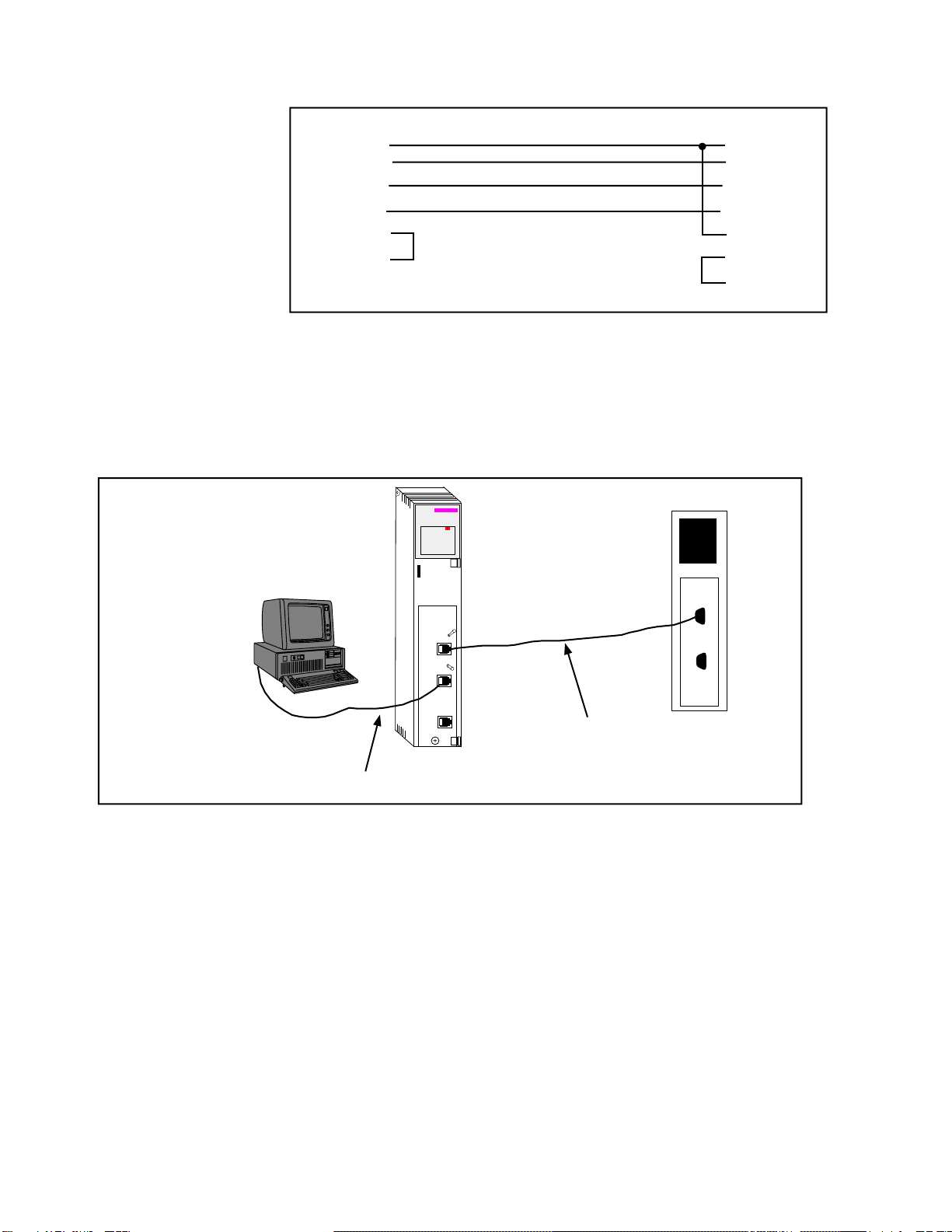
8Installation 2QUCM 3964(R) Application Manual
Figure 2-1 QUCM-L to RS-232 DTE Port (9-pin) (MM2 Cable)
The Modbus master must be configured to match the serial settings of the QUCM Port
1. The supported baud rates by both units are 1200, 2400, 9600, and 19200. 9600
baud is the default.
Figure 2-2 QUCM-L Layout
RJ45 DB9 (male)
2
34
2
43
55
6 6
77
8
QUCM-L
MM1 Cable
MM2 Cable
140
QUCM
Niobrara
Active
Ready
Run
Col
Lnk
TXE
RXE
1
2
3
4
5
RN1
TX1
RX1
6
7
8
9
10
RN2
TX2
RX2
Fault
Quantum

QUCM 3964(R) Application Manual 2Installation 9
Port 2 to the Personal Computer
A physical connection must be made from the personal computer to the QUCM in or-
der to download the applications. This link may be a serial connection from a COM
port on the personal computer to the RS-232 port on the QUCM-S. The Niobrara
MM1 cable may be used for this connection. This cable is shown in Figure 2-3.
Figure 2-3 QUCM-L to RS-232 PC DCE Port (9-pin) (MM1 Cable)
Loading the Applications into the QUCM
The QUCM is rapidly evolving so be sure to upgrade the firmware in the module be-
fore loading the latest version of APP1.QCC. Most likely the QCOMPILE.EXE has
been updated so be sure to use the newest version. Firmware upload is as follows:
1 Remove the module from the rack.
2 Move the RUN/LOAD switch on the back of the module to LOAD.
3 Replace the module in the rack and apply power.
4 Only the 3 light should be on. (The Link and RX E-net lights may be on if the
E-net port is connected and there is traffic.)
5 Connect the PC to QUCM Port 1 with a MM1 cable.
6 From the command line enter
> fwload qucmtcpl.fwl com1:
Be sure to have the colon after the PC’s com port name. The download will only
take a few minutes and will inform when finished.
7 Remove the module from the rack and change the switch back to RUN.
8 It is a good idea to press the RESET button after a firmware change.
It is recommended, though not necessary, to use the Ethernet capabilities of QLOAD
to load APP1.QCC into the QUCM. Set up the IP parameters of the module by the fol-
lowing method:
1 Move Switch 1 to Halt.
2 Connect the PC to QUCM Port 1 with a MM1 cable.
3 From the command line enter
>zapreg32 com1:9600,e,8,1 255 -b
This will start zapreg32 in Modbus RTU mode to slave address 255. Use the ar-
row and Page Up/Down keys to move to register 46. The IP parameters are shown
RJ45 DE9S (female)
32
43
55
64
76
7
8

10 Installation 2QUCM 3964(R) Application Manual
below for a unit with the IP = 206.223.51.150 subnet Mask = 255.255.255.0, De-
fault Gate = 206.223.51.1, Modbus/TCP port number = 503, Telnet Port number =
24: Register DescriptionExample (decimal)
-------- ---------- ---------------------
46 IP MSByte 206
47 IP 223
48 IP 51
49 IP LSByte 150
50 SN Mask 255
51 SN Mask 255
52 SN Mask 255
53 SN Mask 0
54 Def. Gate 206
55 Def. Gate 223
56 Def. Gate 51
57 Def. Gate 1
58 TCP Control 7 (leave this at 7)
59 Reserved 0
60 Reserved 0
61 Reserved 0
62 TCP backstep 100 (leave this at 100)
63 Modbus Port 503 (this defaults to 502)
64 Telnet Port 24 (this defaults to 23)
65 Quiet Timer 900 (leave this at 900)
66 Clients -1 (leave this at -1)
4 After entering the IP parameters, attempt to ping the module to verify the settings.
> ping 206.223.51.150
5 Verify a connection to the internal Modbus/TCP server with zapreg32.
> zapreg32 206.223.51.150:503 255
Should connect to the QUCM on port 503 with Destination index 255.
6 Load the APP1 file with qload.
> qload 1 app1 206.223.51.150:503 -a
Will load the file into application 1’s flash and set the program to automatically
start on power-up.
7 Place Switch 1 in RUN. The RN1 light should come on.
8 Place Switch 2 in HALT.
Connect the Modbus master to QUCM port 1 with an MM2 cable.
Questo manuale è adatto per i seguenti modelli
1
Indice
Manuali Unità di controllo popolari di altre marche

Festo
Festo Compact Performance CP-FB6-E Manuale elenco delle parti

Elo TouchSystems
Elo TouchSystems DMS-SA19P-EXTME Manuale utente

JS Automation
JS Automation MPC3034A Manuale utente

JAUDT
JAUDT SW GII 6406 Series Guida rapida

Spektrum
Spektrum Air Module System Manuale utente

BOC Edwards
BOC Edwards Q Series Manuale utente


