Omega UWPC-2-NEMA Manuale utente

UWPC-2-NEMA
Wireless Process
Voltage/Current Transmitter
MADE IN
e-mail: [email protected]
For latest product manuals:
omegamanual.info
Shop online at
omega.com®
User’s Guide

Servicing North America:
U.S.A.: Omega ngineering, Inc., One Omega Drive, P.O. Box 4047
ISO 9001 Cert f ed Stamford, CT 06907-0047 USA
Toll Free: 1-800-826-6342 T L: (203) 359-1660
FAX: (203) 359-7700 e-mail: [email protected]
Canada: 976 Bergar
Laval (Quebec), H7L 5A1, Canada
Toll-Free: 1-800-826-6342 T L: (514) 856-6928
FAX: (514) 856-6886 e-mail: [email protected]
For immediate technical or application assistance:
U.S.A. and Canada: Sales Service: 1-800-826-6342/1-800-TC-OM GA®
Customer Service: 1-800-622-2378/1-800-622-B ST®
ngineering Service: 1-800-872-9436/1-800-USA-WH N®
Mexico/ T L: 001 (203) 359-1660 FAX: 001 (203) 359-7700
Latin America: e-mail: [email protected]
Servicing Asia:
China:: 1698 Yi Shan Road, Unit 102
Min Hang District
Shanghai, China 201103 P.R.C.
Hotline: 800 819 0559/400 619 0559
e-mail: [email protected]
Servicing Europe:
Benelux: Toll-Free: 0800 099 3344 T L: +31 20 347 21 21
FAX: +31 20 643 46 43 e-mail: [email protected]
Czech Republic: Frystatska 184
733 01 Karviná, Czech Republic
T L: +420-59-6311899 FAX: +420-59-6311114
e-mail: [email protected]
France: Toll-Free: 0805 541 038 T L: 01 57 32 48 17
FAX: 01 57 32 48 18 e-mail: [email protected]
Germany/ Austria: Daimlerstrasse 26
D-75392 Deckenpfronn, Germany
Toll-Free: 0800 8266342 T L: +49 (0) 7056 9398-0
FAX: +49 (0) 7056 9398-29 e-mail: [email protected]
United Kingdom: OM GA ngineering Ltd.
ISO 9001 Cert f ed One Omega Drive, River Bend Technology Centre, Northbank
Irlam, Manchester M44 5BD United Kingdom
Toll-Free: 0800-488-488 T L: +44 (0) 161 777-6611
FAX: +44 (0) 161 777-6622 e-mail: [email protected]
MEGAnet®nline Service Internet e-mail
omega.com info@omega.com
It is t e policy of OMEGA Engineering, Inc. to comply wit all worldwide safety and EMC/EMI
regulations t at apply. OMEGA is constantly pursuing certification of its products to t e European New
Approac Directives. OMEGA will add t e CE mark to every appropriate device upon certification.
T e information contained in t is document is believed to be correct, but OMEGA accepts no liability for any
errors it contains, and reserves t e rig t to alter specifications wit out notice.
WARNING: T ese products are not designed for use in, and s ould not be used for, uman applications.

Table of Contents
Section ............................................................................................................ Page
Section 1 Introduction ........................................................................................... 1-1
1.1 Precautions ................................................................................................. 1-1
1.2 Statement on FCC and C ....................................................................... 1-2
1.3 General Description and System Components ..................................... 1-2
Section 2 Hardware ............................................................................................... 2-1
2.1 Unpacking and Inspection ....................................................................... 2-1
2.2 Included Items ........................................................................................... 2-1
Section 3 peration ............................................................................................... 3-1
3.1 Main Transmitter Board ........................................................................... 3-1
Section 4 Software ................................................................................................. 4-1
4.1 Getting Started ........................................................................................... 4-1
4.2 Software Installation ................................................................................. 4-1
Section 5 End Device peration ......................................................................... 5-1
5.1 Setup and Configuration .......................................................................... 5-1
5.2 Mounting Installation ............................................................................... 5-7
5.3 Battery Replacement ................................................................................. 5-9
5.4 Input Connections ................................................................................... 5-11
Section 6 System peration ................................................................................. 6-1
6.1 Introduction ............................................................................................... 6-1
6.2 RF Communication Basics ....................................................................... 6-1
6.3 Basic System Overview ............................................................................ 6-1
6.4 nvironment/ Operating Conditions .................................................... 6-2
6.5 Transmit Rate vs. Battery Life ................................................................. 6-3
Section 7 Service and Calibration ....................................................................... 7-1
7.1 Service and Calibration ............................................................................ 7-1
Section 8 Specifications ......................................................................................... 8-1
Section 9 Approvals, Regulatory Compliance .................................................. 9-1
i
UWPC-2-NEMA
Wireless Process Voltage/Current Transmitter

List of Figures
Section Figure Description ............................................................... Page
Section 3.1 3-1 Main Transmitter Board ........................................... 3-1
Section 4.2.2 4-1 Software - Welcome Screen ...................................... 4-1
Section 4.2.2 4-2 Software - Select Installation Screen ....................... 4-2
Section 4.2.2 4-3 Software - Confirm Installation Screen .................. 4-2
Section 4.2.2 4-4 Software – License Agreement Screen ................... 4-3
Section 4.2.2 4-5 Software – Installation Complete Screen ............... 4-3
Section 5.1 5-1 USB Cable ................................................................... 5-1
Section 5.1.4 5-2 Main Transmitter Board ........................................... 5-3
Section 5.1.4 5-3 Launch Setup Utility ................................................. 5-3
Section 5.1.4 5-4 Utility Program - Welcome ...................................... 5-4
Section 5.1.4 5-5 Utility Program – Connect To Transmitter ............ 5-4
Section 5.1.4 5-6 Utility Program – Setup Transmitter ...................... 5-5
Section 5.1.4 5-7 Utility Program – stablish Link ............................ 5-5
Section 5.1.4 5-8 Utility Program – Choose Options ......................... 5-6
Section 5.1.4 5-9 Utility Program – Send Setting To Transmitter ..... 5-6
Section 5.2.1 5-10 Mounting .................................................................... 5-7
Section 5.2.1 5-11 Fresnel Zone ............................................................... 5-7
Section 5.3 5-12 Battery Replacement ................................................. 5-9
Section 5.3.2 5-13 Fresnel Zone ............................................................. 5-10
Section 5.4 5-14 Input Connection Diagrams .................................. 5-11
Section 6.3 6-1 nd Device/Receiver ............................................... 6-1
ii
UWPC-2-NEMA
Wireless Process Voltage/Current Transmitter

Section 1 - Introduction
Please read this manual completely before installing and operating your wireless
end device and receiver system. It’s important read and follow all notes,
cautions, warnings and safety precautions before operating this device. “Device”
refers to your transmitter or receiver unit.
1.1 Precautions
• This device is not designed for use in any medical or nuclear applications.
• Do not operate this device in flammable or explosive environments.
• Never operate with a power source other than the one recommended in this
manual.
• This device has been designed for dry, moisture free indoor applications only.
• Do not operate this device outside of the recommended use outlined in this
manual.
• No co-location with other radio transmitters is allowed. By definition, co-
location is when another radio device or it’s antenna is located within 20 cm
of your connector/transmitter and can transmit simultaneously with your
UWPC unit.
• Never install wireless transmitters within 20 cm or less from each other.
• Never install and/or operate your UWPC transmitter closer than 20 cm to
nearby persons.
• Never use your UWPC transmitter as a portable device. Your unit has been
designed to be operated in a permanent installation only.
There are no user serv ceable parts ns de your dev ce.
Attempt ng to repa r or serv ce your un t may vo d your
warranty.
1-1
Introduction 1
NOTE:

1.2 Statement on FCC and CE Marking
1.2.1 FCC Marking
FCC ID: OUR-XB PRO IC #4214A-XB PRO
This device complies with Part 15 of the FCC rules. Operation is subject to the
following two conditions: 1.) This device may not cause harmful interference.
2.) This device must accept any interference received, including interference that
may cause undesired operation.
1.2.2 CE Marking
It is the policy of OM GA to comply with all worldwide safety and MI/ MC
regulations that apply. OM GA is constantly pursuing certification of its
products to the uropean New Approach Directives. OM GA will add the C
mark to every appropriate device upon certification.
1.3 General Description & System Components
1.3.1 General Description
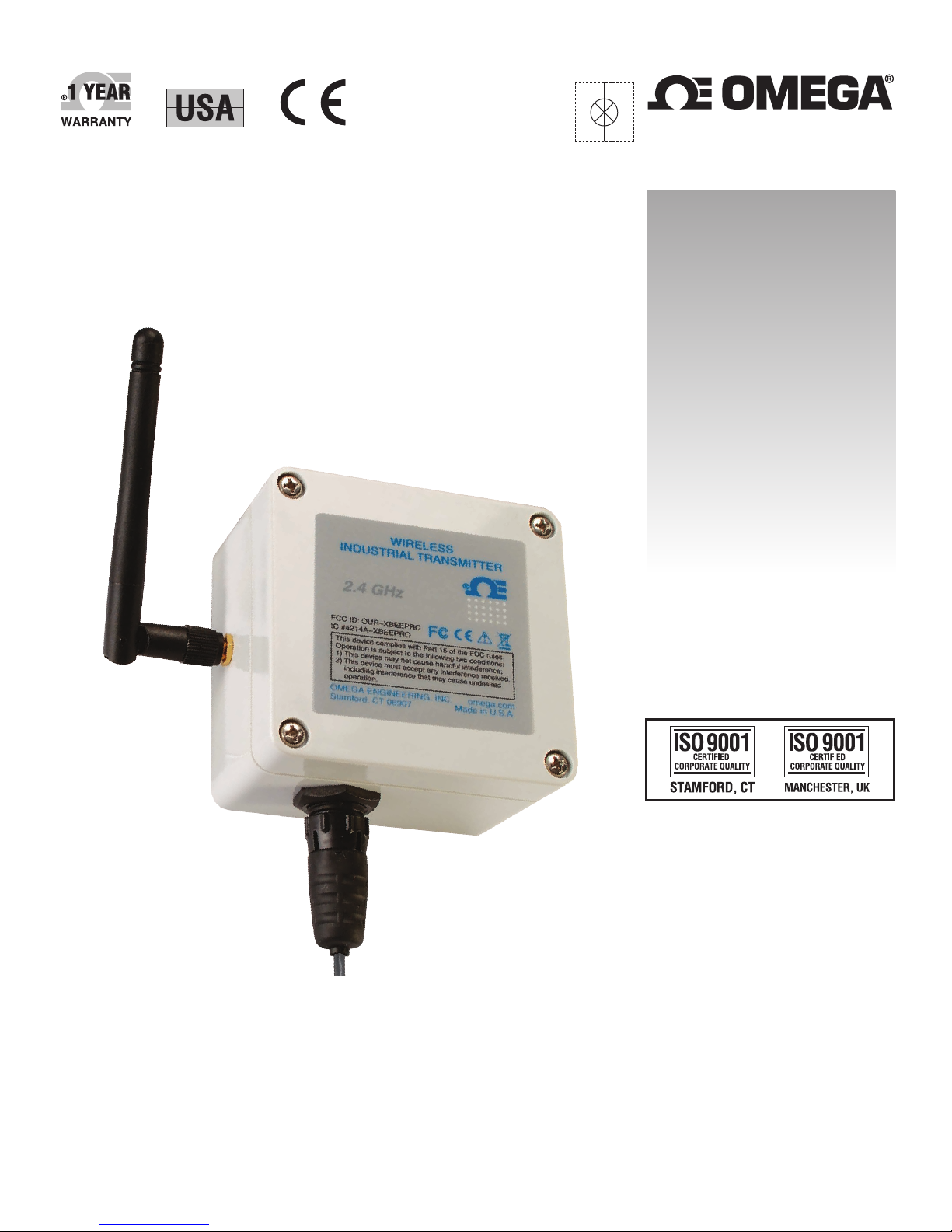
Model UWPC-2-N MA Wireless Process transmitter features a stand-alone,
compact, battery powered N MA design that transmits measurements back to a
host receiver up to 90 m (300') away. When activated the wireless transmitter will
transmit readings continuously at pre set time interval that was programmed by
the user during the initial setup. ach unit measures and transmits: Process
Voltage or Current Readings, RF Signal Strength and Battery Condition to the
receiver and is displayed on your PC screen in real time using the provided
software.
Introduction
1
1-2

Section 2 Hardware
It is important that you read this manual completely and follow all safety
precautions before operating this instrument.
2.1 Package Inspection
Remove the packing list and verify that you have received all your equipment. If
you have any questions about the shipment, please call our Customer Service
Department at
1-800-622-2378 or 203-359-1660. We can also be reached on the Internet at
omega.com
e-mail: cservice@omega.com
When you receive the shipment, inspect the container and equipment for any
signs of damage. Note any evidence of rough handling in transit. Immediately
report any damage to the shipping agent.
The carr er w ll not honor any damage cla ms unless all
sh pp ng mater al s saved for nspect on. After exam n ng
and remov ng contents, save pack ng mater al and carton n
the event resh pment s necessary.
2.2 Included Items
The following items are supplied in the box.
• 1 UWPC-2-N MA transmitter
• 1 User’s Guide
• Measurement/Data Logging Software
• 3.6V Lithium Battery
• USB Cable
2-1
Hardware 2
NOTE:

Section 3 - Operation
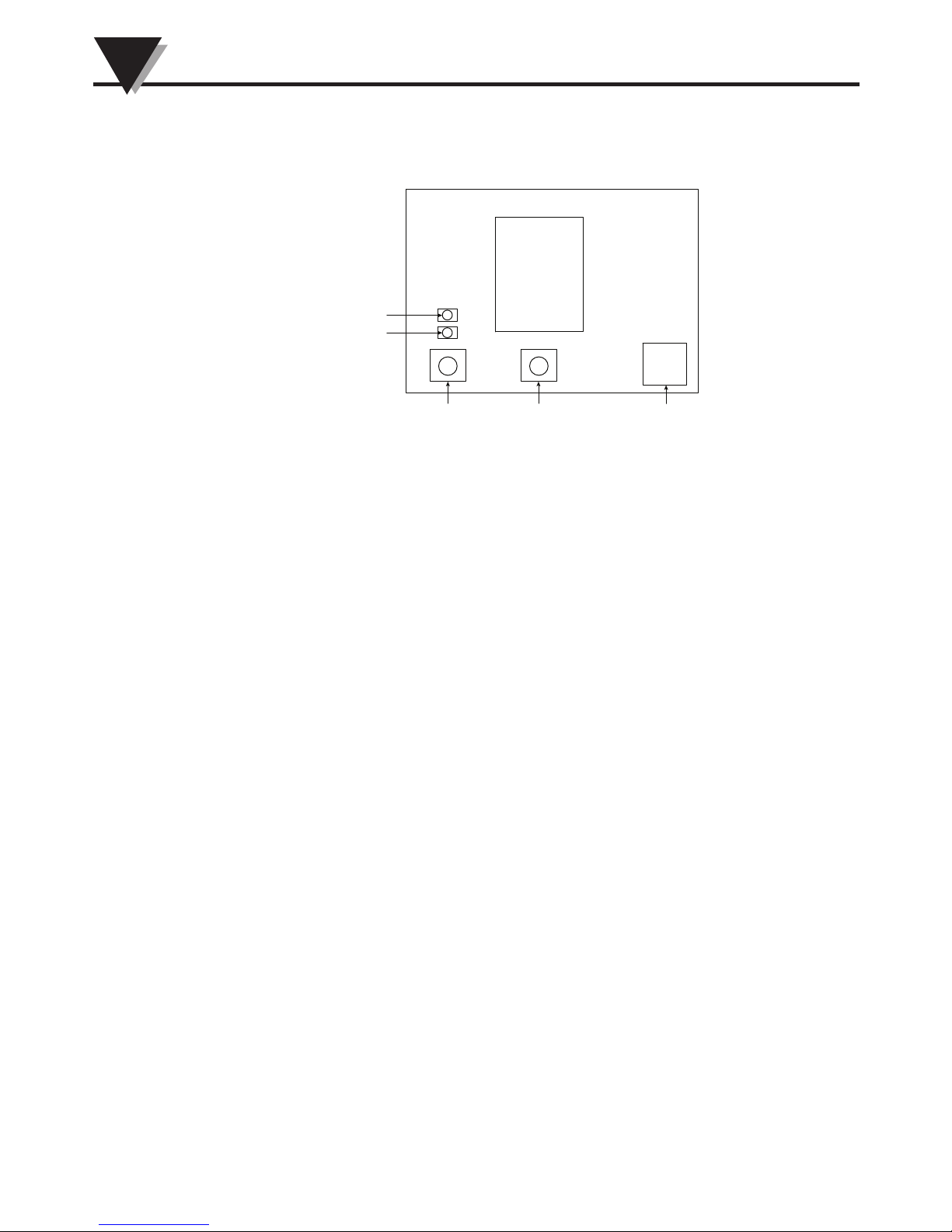
3.1 Main Transmitter Board
Figure 3-1. Main Transmitter Board
3-1
Operation
3
ON/OFF SETUP USB
STATUS
LOW BATTERY

Section 4 Software
4.1 Getting Started
The following program files are included on the TC-Central User Software CD
supplied with your Receiver. These files can also be downloaded from the
omega.com website should you misplace your CD.
• nd Device Setup Utility Software
• Receiver/Transceiver Setup Utility Software
• TC-Central Measurement and Data Logging Software
4.2 Software Installation
4.2.1 System Requirements
Your PC should meet the following minimum requirements:
• Pentium Class processor
• Hard Drive Space: 210 meg
• Ram: 256 meg or higher
• 1 Available USB Port
• 1 CD-ROM Drive
• Windows 2000, XB, or Vista (32 bit) Operating System
4.2.2 Software Installation
Insert the TC-Central User CD that was included with your receiver unit into the
CD-ROM drive on your PC. Your system should begin the installation process
automatically.
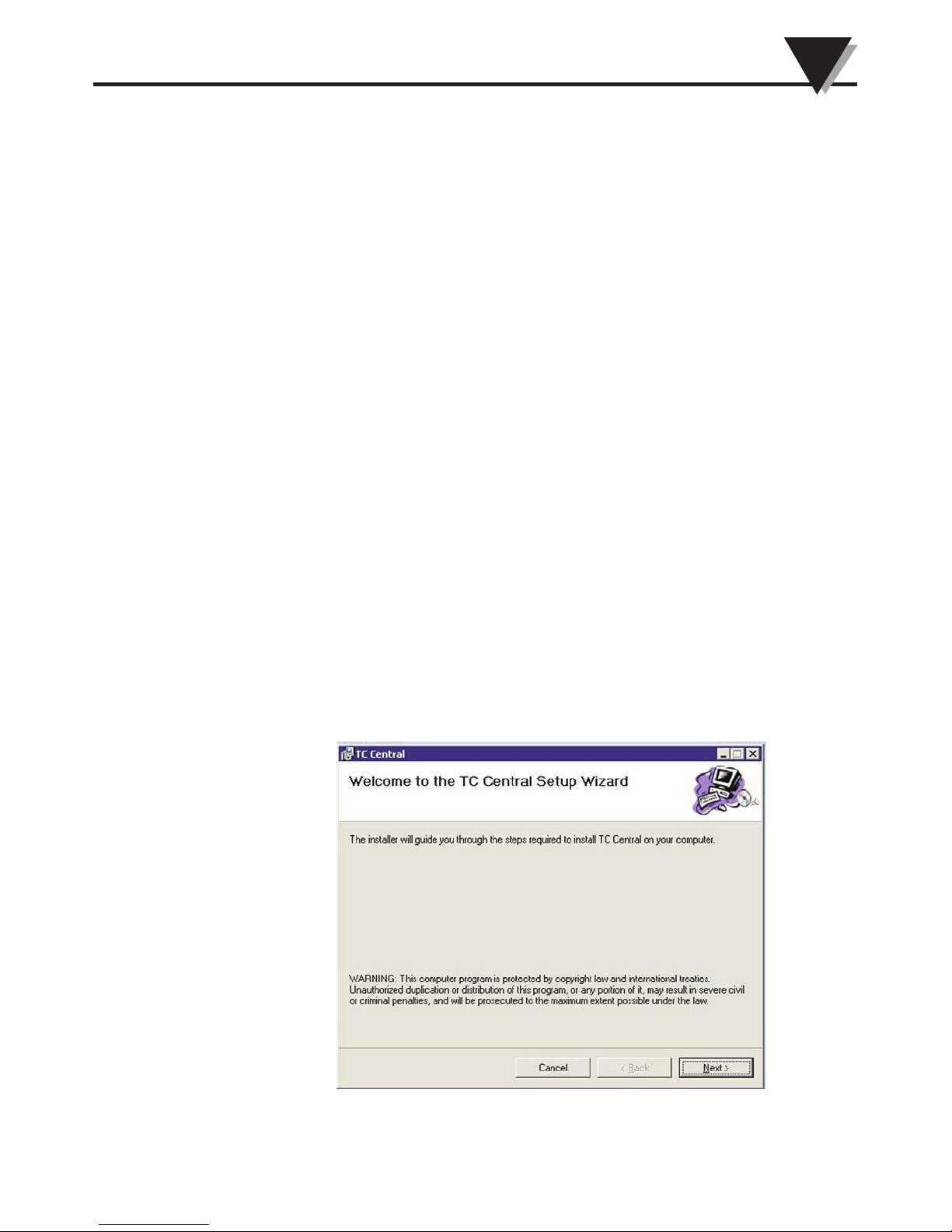
Figure 4-1. Software - Welcome Screen
4-1
Software 4

This welcome screen should be visible on your computer screen. To continue
with installing the program, click the “Next >” button.
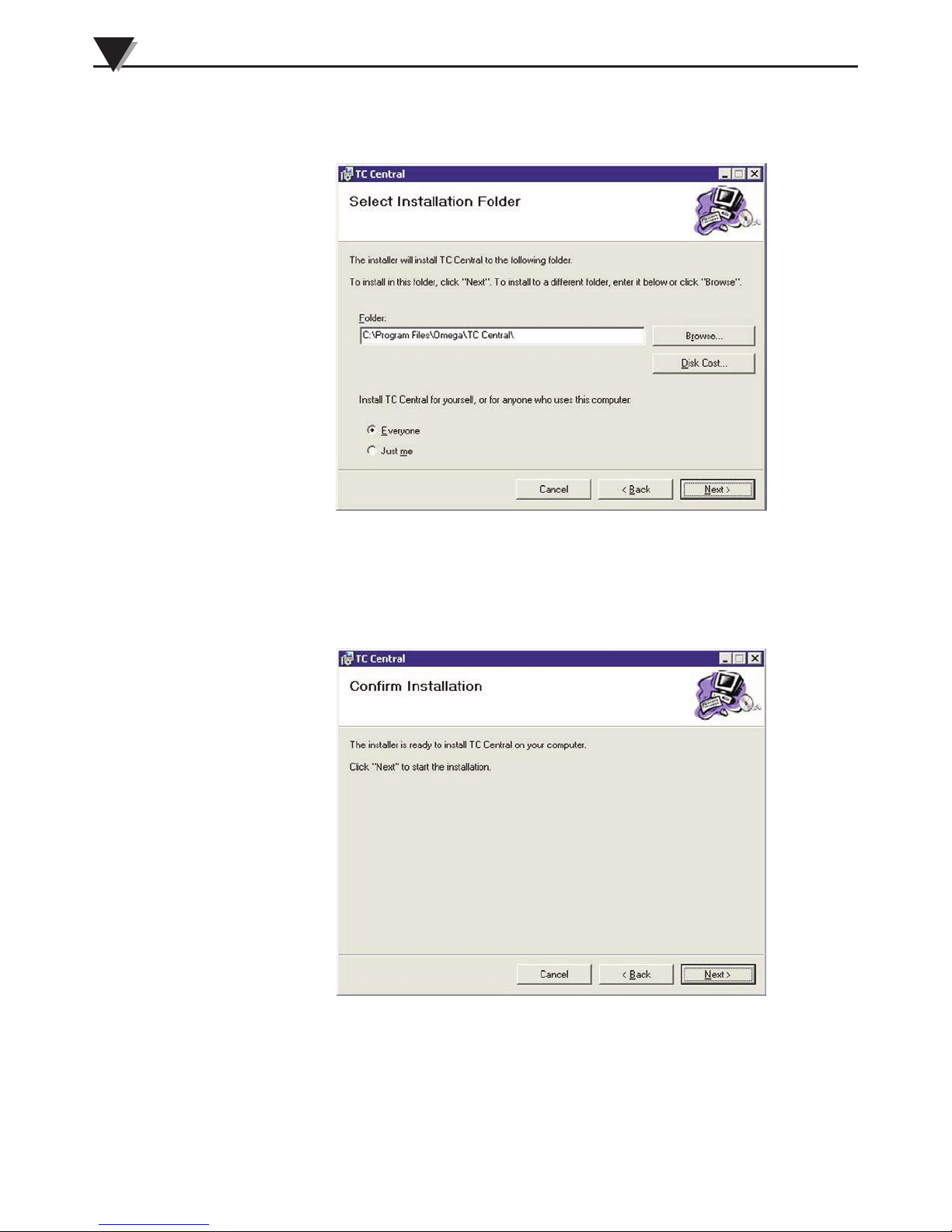
Figure 4-2. Software - Select Installation Screen
From this screen you select the folder were you want the program files installed
on your PC. The default setting will install the software under your “Program”
folders in a new folder named “Omega” To continue with installing the program
click the “Next >” button.
Figure 4-3. Software - Confirm Installation Screen
The setup wizard now has all the information to complete the installation of the
software on your PC. To continue with installing the program click the “Next >”
button.
Software
4
4-2
Indice
Altri manuali Omega Trasmettitore

Omega
Omega DRST-CM Manuale utente

Omega
Omega OS137 SERIES Manuale utente

Omega
Omega FMA1001A series Manuale utente

Omega
Omega W Series Manuale utente

Omega
Omega UWBT Series Manuale utente

Omega
Omega ZW Series Manuale utente

Omega
Omega PX119 Series Manuale utente

Omega
Omega TX787 Manuale utente

Omega
Omega OS137A Series Manuale utente

Omega
Omega TX93A Manuale utente

Omega
Omega LVU-700 Manuale utente

Omega
Omega EWS-RH Manuale utente

Omega
Omega OS101 Manuale utente

Omega
Omega EWS-BP-A Manuale utente

Omega
Omega LVU800 Series Manuale utente

Omega
Omega TX12 Manuale utente

Omega
Omega OM-CP-RF Series Manuale utente

Omega
Omega DMD4059 Manuale utente

Omega
Omega TX12 Manuale utente

Omega
Omega LVU500 Series Manuale utente