Orion XTR1002 Manuale utente

Component Speaker
MODEL
XTR1002
OWNER'S MANUAL

TABLE OF CONTENTS
English . . . . . . . . . . . . . . . . . . . . . . . . . . . . . . . . . . . . . . . . . . . . . . . . . . . . . . . . . . . . . . . 1
Français . . . . . . . . . . . . . . . . . . . . . . . . . . . . . . . . . . . . . . . . . . . . . . . . . . . . . . . . . . . . . . 9
Español. . . . . . . . . . . . . . . . . . . . . . . . . . . . . . . . . . . . . . . . . . . . . . . . . . . . . . . . . . . . . . 13
Deutsch . . . . . . . . . . . . . . . . . . . . . . . . . . . . . . . . . . . . . . . . . . . . . . . . . . . . . . . . . . . . . 17
Italiano. . . . . . . . . . . . . . . . . . . . . . . . . . . . . . . . . . . . . . . . . . . . . . . . . . . . . . . . . . . . . . 21
Português . . . . . . . . . . . . . . . . . . . . . . . . . . . . . . . . . . . . . . . . . . . . . . . . . . . . . . . . . . . 25
Introduction. . . . . . . . . . . . . . . . . . . . . . . . . . . . . . . . . . . . . . . . . . . . . . . . . . . . . . . . . . . 1
Practice Safe Sound™. . . . . . . . . . . . . . . . . . . . . . . . . . . . . . . . . . . . . . . . . . . . . . . . . . . 2
What’s in the Box . . . . . . . . . . . . . . . . . . . . . . . . . . . . . . . . . . . . . . . . . . . . . . . . . . . . . . 2
Tools of the Trade . . . . . . . . . . . . . . . . . . . . . . . . . . . . . . . . . . . . . . . . . . . . . . . . . . . . . . 2
Installation. . . . . . . . . . . . . . . . . . . . . . . . . . . . . . . . . . . . . . . . . . . . . . . . . . . . . . . . . . . . 3
Finding Speaker Mounting Locations . . . . . . . . . . . . . . . . . . . . . . . . . . . . . . . . . . . . . . 3
Door Mounting . . . . . . . . . . . . . . . . . . . . . . . . . . . . . . . . . . . . . . . . . . . . . . . . . . . . . . . . 3
Rear Deck Mounting. . . . . . . . . . . . . . . . . . . . . . . . . . . . . . . . . . . . . . . . . . . . . . . . . . . . 3
Installing the Tweeters . . . . . . . . . . . . . . . . . . . . . . . . . . . . . . . . . . . . . . . . . . . . . . . . . . 4
Installing the Crossover . . . . . . . . . . . . . . . . . . . . . . . . . . . . . . . . . . . . . . . . . . . . . . . . . 6
Specifications. . . . . . . . . . . . . . . . . . . . . . . . . . . . . . . . . . . . . . . . . . . . . . . . . . . . . . . . . . 7
Features . . . . . . . . . . . . . . . . . . . . . . . . . . . . . . . . . . . . . . . . . . . . . . . . . . . . . . . . . . . . . . 7
Warranty . . . . . . . . . . . . . . . . . . . . . . . . . . . . . . . . . . . . . . . . . . . . . . . . . . . . . .back cover
INTRODUCTION
Thank you for your purchase of the Orion XTR Component Tweeter system. These
speakers represent a combination of incredible performance and value. The XTR
feature silk dome tweeters with sophisticated crossover and protection circuits.
Capable of maintaining their balance and clarity at exceptionally high output levels,
they are the perfect complement to the XTR subwoofers and component loudspeakers.
The crossovers feature tweeter level adjustment. These high-performance tweeters
are built with 4 ohm voice coils, to get the most out of your amplifier.
We at Orion strive to give you all the latest up to date information about this product.
What we can’t give you in this manual is personal installation or technical experience.
If you have questions concerning the use or application of this product, please refer
to the nearest Authorized Orion Dealer for assistance or call the Orion technical
support hot-line at 1-800-876-0800. As we are always finding new ways to improve our
product, the features and specifications are subject to change without notice.

2 © 2008 directed electronics—all rights reserved
PRACTICE SAFE SOUND™
Continuous exposure to sound pressure levels over 100dB may cause permanent
hearing loss. High powered automotive sound systems can generate sound pressure
levels in excess of 130dB. When playing your system at high levels, please use hearing
protection and prevent long term exposure.
Model Number: _______________
Date of Purchase: _______________
WHAT’S IN THE BOX
Included in this box are all the necessary mounting hardware and cables for your basic
installation. Listed below is a detailed list of the components included in this system
package.
Quantity Description
1 Owner's Manual
2 XTR Tweeter Elements
2 Surface mount hardware
2 Flush mount hardware
2 Passive crossovers with attached cables
1 Mounting template
Mounting screws
TOOLS OF THE TRADE
Listed are the majority of the tools required to perform the installation. Having the
proper tools will make the installation much easier. It is very difficult when you get
half way through the installation and discover that you require a specific tool to
get yourself through a particular part of the installation. Some of these tools are
necessities. Some make the job much easier.
• Marking Pen • Electric Drill
• Wire Strippers • Phillips Screwdriver
• 1/8" Drill Bit • Volt/Ohm Meter (Optional)
• 3/8" Drill Bit • Needle Nose Pliers
• Assorted Tin Snips • Wire Crimpers
• Hole Saw Arbor (for flush mount option)
• 2" or 2-1/8" Hole Saw (for flush mount tweeter installation.)

© 2008 directed electronics—all rights reserved 3
INSTALLATION
The performance of the XTR Component tweeters is directly proportional to the
quality of installation. Care taken during the installation process will be rewarded with
years of satisfying performance. If you are unsure about your installation capabilities,
please refer to your local Authorized Orion Dealer for technical assistance. Orion
dealers are trained professionals dedicated to extracting the maximum performance
out of your Orion system. If you decide to install this speaker system yourself, please
read the entire installation section before starting your installation.
FINDING SPEAKER MOUNTING LOCATIONS
Choosing the correct speaker locations will have the greatest effect on the sound
quality of the system. Different considerations are needed when choosing the
locations that best suit your needs. The locations must be large enough for the
speakers to fit. Care is needed to ensure that the location you have chosen will not
affect any of the mechanical or electrical operations of the vehicle.
Determining the best location for the speakers will depend on your cosmetic needs
and your vehicle's interior. If minimal intrusion in your vehicle is desired, factory
speaker locations may be the ticket for you. Placing the speaker in the factory location
can often give very desirable results.
DOOR MOUNTING
When checking for possible tweeter locations in the doors, check the operation of
the window and all assemblies. There is also a stabilizer stop bar in between the door
and the door jamb. This bar prevents the door from opening too far. Many shade tree
installers overlook this and check for clearance only when the door is fully open.
REAR DECK MOUNTING
In rear deck installations, check the operation of the trunk suspension springs or
tension bars. These tension bars move in the opening and closing of the trunk. You
cannot be too cautious during this part of the installation, In addition, do not locate
the tweeters too close to the back of the rear deck. Installing the far screws will only
be possible with the removal of the rear window.

4 © 2008 directed electronics—all rights reserved
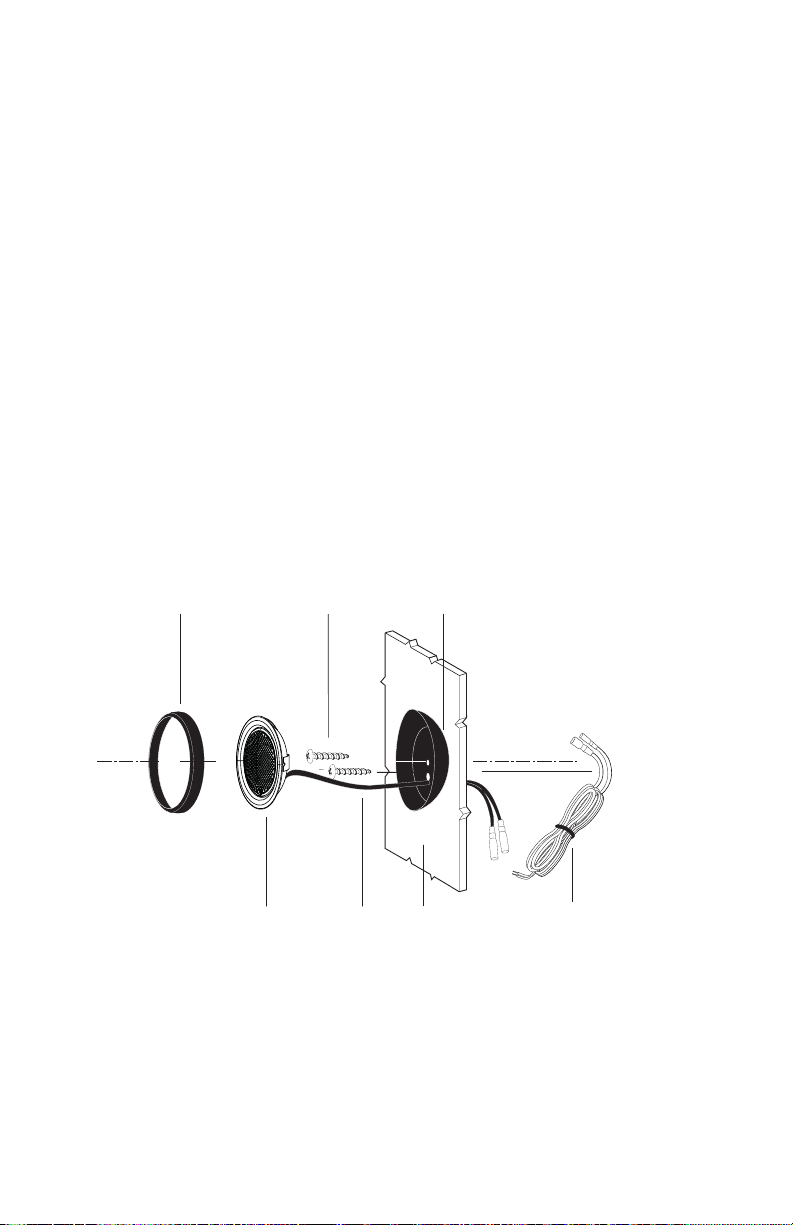
INSTALLING THE TWEETERS
SURFACE MOUNTING
Step 1: Determine the tweeter mounting location, then route the wires from the
crossover to the tweeter location.
Step 2: Place the provided template or tweeter cup against the panel and mark the
two holes at the rear of the housing.
Step 3: Drill the smaller holes using a 1/8" drill bit. These are the mounting screw
holes.
WARNING: Check for clearance of window mechanisms and electrical
wires BEFORE you drill.
Step 4: Drill the larger off-center hole using a 3/8" drill bit, insert a grommet
and route the speaker wire from the crossover through the grommet.
Step 5: After removing the surface mount tweeter assembly trim ring, route the
tweeter wires through the larger hole in the housing and connect to the
speaker wires from the crossover.
Step 6: Insert the excess speaker wire into the hole and position the housing so the
housing will not pinch the wires after final mounting.
Step 7: Attach the housing using the supplied screws of the correct length for a solid
mount.
Step 8: Insert the tweeter into the housing and attach the surface mount trim ring.
SURFACE
MOUNT
TRIM RING
MOUNTING SCREWS SURFACE MOUNT HOUSING
TWEETER
TWEETER
WIRE PANEL WIRING HARNESS
Figure 1
Figura 1
Abbildung 1

© 2008 directed electronics—all rights reserved 5
FULL FLUSH MOUNTING
Step 1: Determine where the tweeter will be mounted. Make sure there is a flat
area large enough for the tweeter and no obstructions behind the area.
Step 2: Using supplied template mark with a pen the hole needed for the tweeter.
Step 3: Be sure the hole is large enough for the tweeter housing.
Step 4: Cut the hole for the tweeter. When using factory locations, this step can be
skipped. A hole can be cut either with a pair of metal tin snips or a 2" hole
saw for soft materials or 2-1/8" hole saw for hard materials.
WARNING: Check for clearance of window mechanisms and electrical wires
BEFORE you drill.
Step 5: Install tweeter in flush mount housing.
Step 6: Connect the speaker wires observing the correct polarity.
Step 7: Install tweeter and housing in the hole cut for mounting, so that the trim
ring is flat with the front of the surface.
Step 8: Use the supplied x bracket to secure the housing to the surface.
Flush Mount
Tweeter Assembly
Tweeter
Cup
X Bracket
Tweeter
Wire
Flush Mount
Trim Ring
Wiring
Harness
Panel
Screw
Figure 2
Figura 2
Abbildung 2

6 © 2008 directed electronics—all rights reserved
INSTALLING THE CROSSOVER
There is a tweeter level jumper for adjusting the tweeter. Cutting this jumper will
change the output gain of the tweeter. Where the adjustment should be depends on
the location of the tweeter and your preference. Adjustments can be made from 0dB
to -3dB by cutting the "level jumper". Tweeter phase can be changed by reversing
the polarity of the amplifier output wire connections to the crossover. If the tweeter
is within 6" of the woofer center the tweeter should be in phase with the woofer. If
the tweeter is further than 6" from the center of the woofer, both in phase and out
of phase should be tried to see which is best.
Use wire tie or screws to secure crossover housing in place.
_
+
To Tweeter
Amplifier
Crossover
Note: Jumper is under top cover of crossover housing.
Remarque : Le cavalier se trouve sous le couvercle du boîtier du filtre.
Nota: El puente está debajo de la tapa de arriba del alojamiento del crossover.
Hinweis: Der Jumper befindet sich unter dem Deckel des Crossover-Gehäuses.
Nota: il ponticello si trova sotto il coperchio superiore del supporto del crossover
Nota: O jumper está embaixo da tampa superior da carcaça do crossover.
Level jumper
-
+
Note: The tweeter positive is the wire marked with the stripe.
Note: Le câble positif du haut-parleur d'aigus est rayé.
Nota. El positivo del tweeter es el cable que tiene la franja.
Hinweis: Der positive Hochtönerdraht ist mit dem Streifen markiert.
Nota: il filo positivo del tweeter è contrassegnato da una striscia.
Nota: O cabo positivo do tweeter está marcado com a listra.
Figure 3
Figura 3
Abbildung 3

© 2008 directed electronics—all rights reserved 7
SPECIFICATIONS
Model XTR1002
Nominal Impedance 4 Ω
Power Continuous/Maximum 60/120 (watts)
Frequency Response 1.5 kHz - 20 kHz
Sensitivity 88 dB
Mounting Depth 1" (25 mm)
Mounting Diameter 2" (51 mm)
FEATURES
Magnet Neodymium
Voice Coil copper wire
Tweeter dome–silk - Ferrofluid
Custom crossover with 12dB high pass, tweeter level adjustments jumper,
tweeter protection.
Custom grills
Custom tweeter mounting kits including swivel
Note: Specifications are subject to change without notice.


© 2008 directed electronics—Tous droits réservés 9
FRANÇAIS
CHOIX DES EMPLACEMENTS DE MONTAGE DES HAUT-
PARLEURS
Le choix des emplacements de montage des haut-parleurs a une très grande influence
sur la qualité sonore du système. Pour choisir les emplacements répondant le mieux
aux besoins de l’utilisateur, divers facteurs doivent être pris en compte. Il faut qu’il y
ait suffisamment de place pour y placer les haut-parleurs. Vérifiez que l’emplacement
choisi est compatible avec le fonctionnement mécanique et électrique du véhicule.
Le choix des meilleurs emplacements pour les haut-parleurs est conditionné par
l’esthétisme et le décor intérieur du véhicule. Pour une discrétion maximale, les
emplacements d’usine des haut-parleurs peuvent être la solution idéale. L’utilisation
des emplacements d’usine permet souvent d’obtenir des résultats très satisfaisants.
MONTAGE DANS LA PORTE
En recherchant les emplacements de montage possibles pour les haut-parleurs d’aigus
dans les portes, vérifiez le bon fonctionnement de la vitre et de tous les ensembles. De
plus, il y a une barre d’arrêt stabilisatrice entre la porte et son montant. Cette barre
empêche une ouverture excessive de la porte. De nombreux installateurs amateurs n’y
prêtent pas attention et ne vérifient le jeu que lorsque la porte est grande ouverte..
MONTAGE SUR LA PLAGE ARRIÈRE
Dans le cas d’une installation sur la plage arrière, vérifiez le fonctionnement des barres
de tension ou des ressorts de suspension du coffre. Ces barres de tension bougent lors
de l’ouverture et de la fermeture du coffre. Faites tout particulièrement attention
pendant cette phase de l’installation. En outre, ne placez pas les haut-parleurs d’aigus
trop près du fond de la plage arrière. La mise en place des vis du fond n’est possible
qu’en retirant la vitre arrière.
Indice
Lingue:
Altri manuali Orion Altoparlanti

Orion
Orion XTX64 Manuale utente

Orion
Orion Cobalt CO552 Manuale utente

Orion
Orion Ntense NT8 DVC Manuale utente

Orion
Orion HCCA10d Manuale utente

Orion
Orion HCCA 5.2 Manuale utente

Orion
Orion XTR8S Manuale utente

Orion
Orion Cobalt CO552 Manuale utente

Orion
Orion COBALT CM65 Manuale utente

Orion
Orion XTR55.SC Manuale utente

Orion
Orion CO400C Manuale utente