
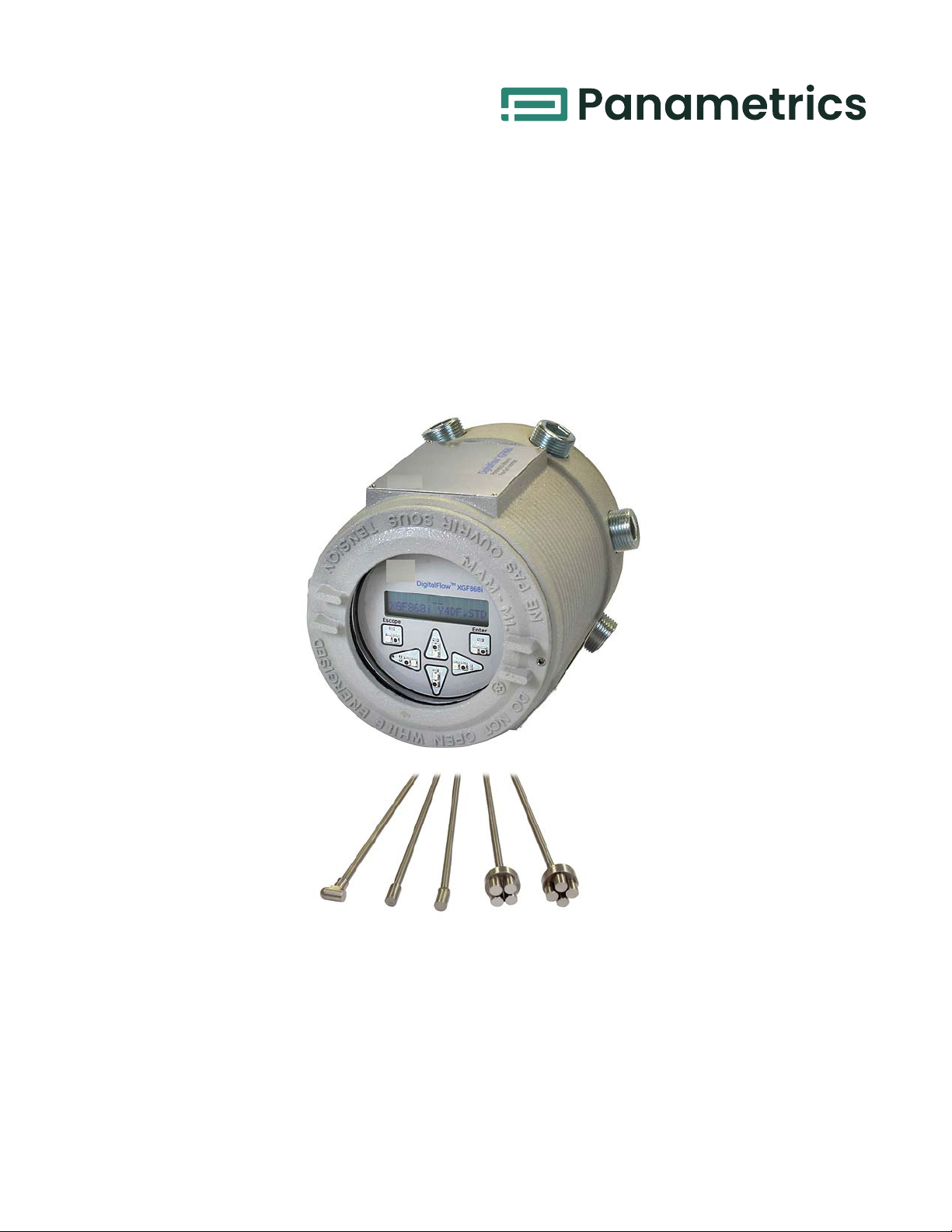
Panametrics DigitalFlow XGF868i Manuale utente


panametrics.com
Copyright 2022 Baker Hughes company.
This material contains one or more registered trademarks of Baker Hughes Company and its subsidiaries
in one or more countries. All third-party product and company names are trademarks of their respective
holders.
DigitalFlow™ XGF868i
Panametrics Flare Gas Flow Transmitter
Service Manual
910-198 SC
June 2022

ii
[no content intended for this page]
DigitalFlow™ XGF868i Service Manual iii
Preface
Information Paragraphs
Note: These paragraphs provide information that provides a deeper understanding of the situation, but is not
essential to the proper completion of the instructions.
IMPORTANT: These paragraphs provide information emphasizing instructions which are essential to proper setup of
the equipment. Failure to follow these instructions carefully may cause unreliable performance.
Safety Issues
Auxiliary Equipment
Local Safety Standards
The user must make sure that he operates all auxiliary equipment in accordance with local codes, standards,
regulations, or laws applicable to safety.
Working Area
WARNING! Indicates a potentially hazardous situation which can result in serious personal
injury or death, if it is not avoided.
CAUTION! Indicates a potentially hazardous situation which can result in minor or moderate
injury to personnel or damage to the equipment, if it is not avoided.
HIGH VOLTAGE! This symbol indicates the presence of high voltage. It calls your attention to
situations or operations that could be dangerous to you and other persons operating the
equipment. Read these messages and follow the instructions carefully.
WARNING! It is the responsibility of the user to make sure all local, county, state and national
codes, regulations, rules and laws related to safety and safe operating conditions
are met for each installation.
WARNING! Auxiliary equipment may have both manual and automatic modes of operation. As
equipment can move suddenly and without warning, do not enter the work cell of
this equipment during automatic operation, and do not enter the work envelope of
this equipment during manual operation. If you do, serious injury can result.
Preface
iv DigitalFlow™ XGF868i Service Manual
Qualification of Personnel
Make sure that all personnel have manufacturer-approved training applicable to the auxiliary equipment.
Personal Safety Equipment
Make sure that operators and maintenance personnel have all safety equipment applicable to the auxiliary
equipment. Examples include safety glasses, protective headgear, safety shoes, etc.
Unauthorized Operation
Make sure that unauthorized personnel cannot gain access to the operation of the equipment.
Environmental Compliance
Waste Electrical and Electronic Equipment (WEEE) Directive
Baker Hughes is an active participant in Europe’s Waste Electrical and Electronic Equipment (WEEE) take-back
initiative, directive 2012/19/EU.
The equipment that you bought has required the extraction and use of natural resources for its production. It may
contain hazardous substances that could impact health and the environment.
In order to avoid the dissemination of those substances in our environment and to diminish the pressure on the
natural resources, we encourage you to use the appropriate take-back systems. Those systems will reuse or recycle
most of the materials of your end life equipment in a sound way.
The crossed-out wheeled bin symbol invites you to use those systems.
If you need more information on the collection, reuse and recycling systems, please contact your local or regional
waste administration.
Visit www.bakerhughesds.com/health-safety-and-environment-hse for take-back instructions and more
information about this initiative.
WARNING! Make sure that power to the auxiliary equipment is turned OFF and locked out
before you perform maintenance procedures on the equipment.

DigitalFlow™ XGF868i Service Manual v
Contents
Chapter 1. Calibration
1.1 Introduction . . . . . . . . . . . . . . . . . . . . . . . . . . . . . . . . . . . . . . . . . . . . . . . . . . . . . . . . . . . . . . . . . . . . . . . . . . . . . . . . . . . . . . . . . . . . . . . . . . . . . .1
1.2 Accessing the Calibration Menu. . . . . . . . . . . . . . . . . . . . . . . . . . . . . . . . . . . . . . . . . . . . . . . . . . . . . . . . . . . . . . . . . . . . . . . . . . . . . . . . . .1
1.3 Calibrating and Testing the Analog Outputs. . . . . . . . . . . . . . . . . . . . . . . . . . . . . . . . . . . . . . . . . . . . . . . . . . . . . . . . . . . . . . . . . . . . . 2
1.3.1 Preparing for Calibration . . . . . . . . . . . . . . . . . . . . . . . . . . . . . . . . . . . . . . . . . . . . . . . . . . . . . . . . . . . . . . . . . . . . . . . . . . . . . . . . . . . . 2
1.3.2 Calibrating the Low End of the Output Range . . . . . . . . . . . . . . . . . . . . . . . . . . . . . . . . . . . . . . . . . . . . . . . . . . . . . . . . . . . . . . . 3
1.3.3 Calibrating the High End of the Output Range . . . . . . . . . . . . . . . . . . . . . . . . . . . . . . . . . . . . . . . . . . . . . . . . . . . . . . . . . . . . . . 3
1.3.4 Testing Output Linearity. . . . . . . . . . . . . . . . . . . . . . . . . . . . . . . . . . . . . . . . . . . . . . . . . . . . . . . . . . . . . . . . . . . . . . . . . . . . . . . . . . . . . 3
1.4 Calibrating the Analog Inputs . . . . . . . . . . . . . . . . . . . . . . . . . . . . . . . . . . . . . . . . . . . . . . . . . . . . . . . . . . . . . . . . . . . . . . . . . . . . . . . . . . . 4
1.4.1 Preparing for Calibration . . . . . . . . . . . . . . . . . . . . . . . . . . . . . . . . . . . . . . . . . . . . . . . . . . . . . . . . . . . . . . . . . . . . . . . . . . . . . . . . . . . . 5
1.4.2 Accessing the Calibration/Test Menu. . . . . . . . . . . . . . . . . . . . . . . . . . . . . . . . . . . . . . . . . . . . . . . . . . . . . . . . . . . . . . . . . . . . . . . 5
1.5 Calibrating the RTD Inputs . . . . . . . . . . . . . . . . . . . . . . . . . . . . . . . . . . . . . . . . . . . . . . . . . . . . . . . . . . . . . . . . . . . . . . . . . . . . . . . . . . . . . . . 6
1.5.1 Preparing for Calibration . . . . . . . . . . . . . . . . . . . . . . . . . . . . . . . . . . . . . . . . . . . . . . . . . . . . . . . . . . . . . . . . . . . . . . . . . . . . . . . . . . . . 6
1.5.2 Accessing the Calibration/Test Menu. . . . . . . . . . . . . . . . . . . . . . . . . . . . . . . . . . . . . . . . . . . . . . . . . . . . . . . . . . . . . . . . . . . . . . . 6
1.5.3 Entering the Set Point . . . . . . . . . . . . . . . . . . . . . . . . . . . . . . . . . . . . . . . . . . . . . . . . . . . . . . . . . . . . . . . . . . . . . . . . . . . . . . . . . . . . . . . 6
1.5.4 Entering the Slope . . . . . . . . . . . . . . . . . . . . . . . . . . . . . . . . . . . . . . . . . . . . . . . . . . . . . . . . . . . . . . . . . . . . . . . . . . . . . . . . . . . . . . . . . . 6
1.6 Testing the Frequency Outputs . . . . . . . . . . . . . . . . . . . . . . . . . . . . . . . . . . . . . . . . . . . . . . . . . . . . . . . . . . . . . . . . . . . . . . . . . . . . . . . . . . 6
1.6.1 Preparing for Testing . . . . . . . . . . . . . . . . . . . . . . . . . . . . . . . . . . . . . . . . . . . . . . . . . . . . . . . . . . . . . . . . . . . . . . . . . . . . . . . . . . . . . . . . 6
1.6.2 Testing the Output . . . . . . . . . . . . . . . . . . . . . . . . . . . . . . . . . . . . . . . . . . . . . . . . . . . . . . . . . . . . . . . . . . . . . . . . . . . . . . . . . . . . . . . . . . 8
Chapter 2. Error Codes
2.1 Introduction . . . . . . . . . . . . . . . . . . . . . . . . . . . . . . . . . . . . . . . . . . . . . . . . . . . . . . . . . . . . . . . . . . . . . . . . . . . . . . . . . . . . . . . . . . . . . . . . . . . . . 11
Chapter 3. Diagnostics
3.1 Introduction . . . . . . . . . . . . . . . . . . . . . . . . . . . . . . . . . . . . . . . . . . . . . . . . . . . . . . . . . . . . . . . . . . . . . . . . . . . . . . . . . . . . . . . . . . . . . . . . . . . . .17
3.2 Displaying Diagnostic Parameters. . . . . . . . . . . . . . . . . . . . . . . . . . . . . . . . . . . . . . . . . . . . . . . . . . . . . . . . . . . . . . . . . . . . . . . . . . . . . . .17
3.3 Flowcell Problems . . . . . . . . . . . . . . . . . . . . . . . . . . . . . . . . . . . . . . . . . . . . . . . . . . . . . . . . . . . . . . . . . . . . . . . . . . . . . . . . . . . . . . . . . . . . . . 19
3.3.1 Gas Problems . . . . . . . . . . . . . . . . . . . . . . . . . . . . . . . . . . . . . . . . . . . . . . . . . . . . . . . . . . . . . . . . . . . . . . . . . . . . . . . . . . . . . . . . . . . . . . 19
3.3.2 Pipe Problems . . . . . . . . . . . . . . . . . . . . . . . . . . . . . . . . . . . . . . . . . . . . . . . . . . . . . . . . . . . . . . . . . . . . . . . . . . . . . . . . . . . . . . . . . . . . . 19
3.4 Transducer Problems. . . . . . . . . . . . . . . . . . . . . . . . . . . . . . . . . . . . . . . . . . . . . . . . . . . . . . . . . . . . . . . . . . . . . . . . . . . . . . . . . . . . . . . . . . .20
Chapter 4. Parts Replacement
4.1 Introduction . . . . . . . . . . . . . . . . . . . . . . . . . . . . . . . . . . . . . . . . . . . . . . . . . . . . . . . . . . . . . . . . . . . . . . . . . . . . . . . . . . . . . . . . . . . . . . . . . . . . .21
4.2 Removing the Circuit Board Assembly. . . . . . . . . . . . . . . . . . . . . . . . . . . . . . . . . . . . . . . . . . . . . . . . . . . . . . . . . . . . . . . . . . . . . . . . . . 22
4.3 Replacing the LCD Display/Interconnect Board Subassembly . . . . . . . . . . . . . . . . . . . . . . . . . . . . . . . . . . . . . . . . . . . . . . . . . . 23
4.4 Replacing the Fuse . . . . . . . . . . . . . . . . . . . . . . . . . . . . . . . . . . . . . . . . . . . . . . . . . . . . . . . . . . . . . . . . . . . . . . . . . . . . . . . . . . . . . . . . . . . . .24
4.5 Replacing the User Program. . . . . . . . . . . . . . . . . . . . . . . . . . . . . . . . . . . . . . . . . . . . . . . . . . . . . . . . . . . . . . . . . . . . . . . . . . . . . . . . . . . .25
4.6 Installing an Option Card . . . . . . . . . . . . . . . . . . . . . . . . . . . . . . . . . . . . . . . . . . . . . . . . . . . . . . . . . . . . . . . . . . . . . . . . . . . . . . . . . . . . . . .26
4.6.1 Attaching an Optional Heat Sink to an I/O Option Card . . . . . . . . . . . . . . . . . . . . . . . . . . . . . . . . . . . . . . . . . . . . . . . . . . . . 26
4.7 Assembling/Installing the Circuit Board Assembly . . . . . . . . . . . . . . . . . . . . . . . . . . . . . . . . . . . . . . . . . . . . . . . . . . . . . . . . . . . . . 26
4.7.1 Assembling the Circuit Board Assembly . . . . . . . . . . . . . . . . . . . . . . . . . . . . . . . . . . . . . . . . . . . . . . . . . . . . . . . . . . . . . . . . . . . 26
4.7.2 Installing the Circuit Board Assembly. . . . . . . . . . . . . . . . . . . . . . . . . . . . . . . . . . . . . . . . . . . . . . . . . . . . . . . . . . . . . . . . . . . . . . 28
Appendix A. Service Record
A.1 Introduction . . . . . . . . . . . . . . . . . . . . . . . . . . . . . . . . . . . . . . . . . . . . . . . . . . . . . . . . . . . . . . . . . . . . . . . . . . . . . . . . . . . . . . . . . . . . . . . . . . . . 33
A.2 Data Entry . . . . . . . . . . . . . . . . . . . . . . . . . . . . . . . . . . . . . . . . . . . . . . . . . . . . . . . . . . . . . . . . . . . . . . . . . . . . . . . . . . . . . . . . . . . . . . . . . . . . . . 33
A.3 Diagnostic Parameters . . . . . . . . . . . . . . . . . . . . . . . . . . . . . . . . . . . . . . . . . . . . . . . . . . . . . . . . . . . . . . . . . . . . . . . . . . . . . . . . . . . . . . . . .35
Appendix B. Calibration and Testing with PanaView
B.1 Introduction . . . . . . . . . . . . . . . . . . . . . . . . . . . . . . . . . . . . . . . . . . . . . . . . . . . . . . . . . . . . . . . . . . . . . . . . . . . . . . . . . . . . . . . . . . . . . . . . . . . . 37
B.2 Accessing the Calibration/Test Menu . . . . . . . . . . . . . . . . . . . . . . . . . . . . . . . . . . . . . . . . . . . . . . . . . . . . . . . . . . . . . . . . . . . . . . . . . .38
B.3 Calibrating Slot 0 Analog Outputs . . . . . . . . . . . . . . . . . . . . . . . . . . . . . . . . . . . . . . . . . . . . . . . . . . . . . . . . . . . . . . . . . . . . . . . . . . . . . .39
B.4 Calibrating Slot 1 Option Cards . . . . . . . . . . . . . . . . . . . . . . . . . . . . . . . . . . . . . . . . . . . . . . . . . . . . . . . . . . . . . . . . . . . . . . . . . . . . . . . . . 41
B.4.1 Analog Outputs . . . . . . . . . . . . . . . . . . . . . . . . . . . . . . . . . . . . . . . . . . . . . . . . . . . . . . . . . . . . . . . . . . . . . . . . . . . . . . . . . . . . . . . . . . . .42
B.4.2 Analog Inputs . . . . . . . . . . . . . . . . . . . . . . . . . . . . . . . . . . . . . . . . . . . . . . . . . . . . . . . . . . . . . . . . . . . . . . . . . . . . . . . . . . . . . . . . . . . . .43
B.4.3 RTD Inputs. . . . . . . . . . . . . . . . . . . . . . . . . . . . . . . . . . . . . . . . . . . . . . . . . . . . . . . . . . . . . . . . . . . . . . . . . . . . . . . . . . . . . . . . . . . . . . . . .44
B.4.4 Entering the Set Point. . . . . . . . . . . . . . . . . . . . . . . . . . . . . . . . . . . . . . . . . . . . . . . . . . . . . . . . . . . . . . . . . . . . . . . . . . . . . . . . . . . . . .44
B.4.5 Entering the Slope. . . . . . . . . . . . . . . . . . . . . . . . . . . . . . . . . . . . . . . . . . . . . . . . . . . . . . . . . . . . . . . . . . . . . . . . . . . . . . . . . . . . . . . . .44
B.4.6 Testing Frequency Outputs. . . . . . . . . . . . . . . . . . . . . . . . . . . . . . . . . . . . . . . . . . . . . . . . . . . . . . . . . . . . . . . . . . . . . . . . . . . . . . . .45

Contents
vi DigitalFlow™ XGF868i Service Manual
B.5 Testing the XGF868i Software and Hardware . . . . . . . . . . . . . . . . . . . . . . . . . . . . . . . . . . . . . . . . . . . . . . . . . . . . . . . . . . . . . . . . . . .45
B.5.1 Uploading the Signal Array Data . . . . . . . . . . . . . . . . . . . . . . . . . . . . . . . . . . . . . . . . . . . . . . . . . . . . . . . . . . . . . . . . . . . . . . . . . . .46
B.5.2 Uploading the XGF868i Memory . . . . . . . . . . . . . . . . . . . . . . . . . . . . . . . . . . . . . . . . . . . . . . . . . . . . . . . . . . . . . . . . . . . . . . . . . . .47
B.5.3 Testing the XGF868i Hardware. . . . . . . . . . . . . . . . . . . . . . . . . . . . . . . . . . . . . . . . . . . . . . . . . . . . . . . . . . . . . . . . . . . . . . . . . . . . .48
Appendix C. Factory Tests
C.1 Introduction . . . . . . . . . . . . . . . . . . . . . . . . . . . . . . . . . . . . . . . . . . . . . . . . . . . . . . . . . . . . . . . . . . . . . . . . . . . . . . . . . . . . . . . . . . . . . . . . . . . .57
C.2 Resetting the Number of Channels . . . . . . . . . . . . . . . . . . . . . . . . . . . . . . . . . . . . . . . . . . . . . . . . . . . . . . . . . . . . . . . . . . . . . . . . . . . . .57
C.3 Resetting the XGF868i to Factory Defaults . . . . . . . . . . . . . . . . . . . . . . . . . . . . . . . . . . . . . . . . . . . . . . . . . . . . . . . . . . . . . . . . . . . . . .57

DigitalFlow™ XGF868i Service Manual 1
Chapter 1. Calibration
Chapter 1. Calibration
1.1 Introduction
Calibrating the XGF868i analog outputs and inputs is explained in this chapter. In addition, testing the optional
totalizer, frequency and alarm relay outputs is discussed. The chapter includes the following specific topics:
• Calibrating the Slot 0 and Slot 1 analog outputs - page 2.
• Calibrating option card analog inputs - page 4.
• Calibrating option card RTD inputs - page 6.
• Testing option card frequency outputs - page 6.
Note:
Convention in this manual identifies any expansion slot as Slot x, where x is a number from 0-2. Slot 2 is
used only for data logging, MODBUS or HART option cards.
See Chapter 1, Installation, and Appendix B, Data Records, in the Startup Guide for a complete description of the
available option cards and the procedures for wiring them.
1.2 Accessing the Calibration Menu
The Calibration menu is accessible through the Keypad Program, as well as through PanaView™ software. (If you are
using PanaView to calibrate the XGF868i, refer to Appendix B.) Use this menu to calibrate and test the Slot 0 analog
outputs, as well as to calibrate and/or test any option cards that are installed in expansion Slot 1. Refer to the menu
maps in Figure 3 on page 9 as a guide in following the calibration instructions.
1. Power up the XGF868i and wait until it has initialized.
2. Press the [Escape], [Enter], [Escape] keys. The Keypad Program appears on the screen.
3. Press the right arrow key to scroll to the CALIB menu. Press [Enter]. The Cal window opens.
Proceed to the appropriate sections of this chapter to calibrate and/or test any of the installed inputs and/or
outputs.
Note:
The Calibration menu never returns to the Keypad Program. Pressing [Escape] to exit the menu causes the
XGF868i to restart.
Chapter 1. Calibration
2 DigitalFlow™ XGF868i Service Manual
1.3 Calibrating and Testing the Analog Outputs
Every XGF868i flowmeter includes two built-in analog outputs (A and B) at terminal block J1, which is designated as
Slot 0. Additional analog outputs may be added to the Model XGF868i by installing an appropriate option card in
Slot 1. This option card contains two analog outputs, which are also designated as A and B.
Before beginning calibration, an ammeter must be connected to the desired analog output. Both the zero-point and
full-scale values for all of these outputs must be calibrated. After calibrating the outputs, which have a resolution of
5.0 A (0.03% full scale), their linearity should be tested.
Note:
The zero point of the analog output may be set at either 0 mA or 4 mA. However, the calibration always uses
the 4 mA point, as the meter extrapolates this value to obtain the 0 mA point.
1.3.1 Preparing for Calibration
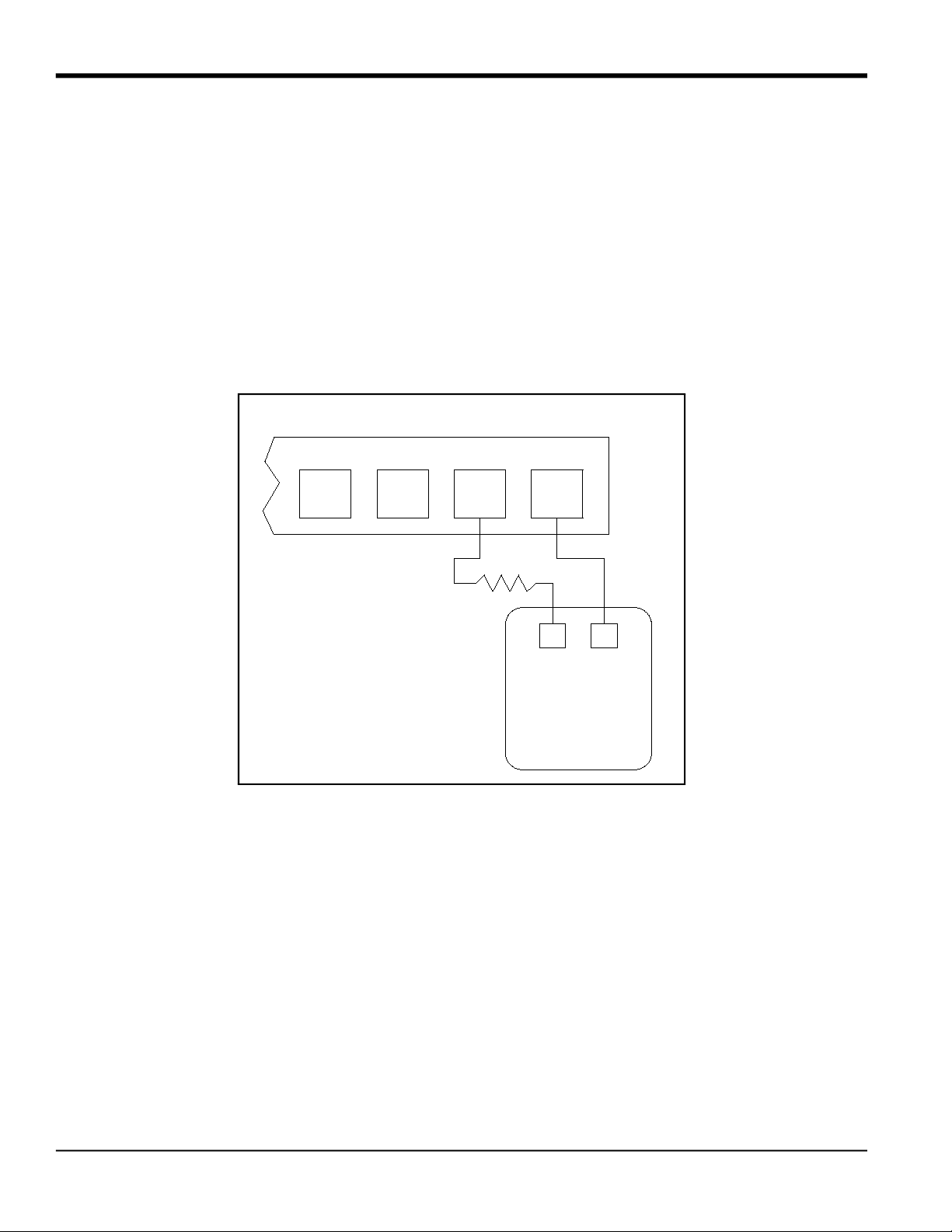
Prepare for calibration by inserting an ammeter in series with the load on the desired output. Refer to Figure 1 below
and Figure 4 on page 10 to identify the OUT(+) and RTN(-) pins for the desired output.
Figure 1: Ammeter Connection (Output A)
Terminal Block J1 (Slot 0)
B
RTN
B
SIG
A
RTN
A
SIG
41
+
-
Ammeter
Load
Altri manuali per DigitalFlow XGF868i
1
Indice
Altri manuali Panametrics Trasmettitore

Panametrics
Panametrics VeriDri Manuale utente

Panametrics
Panametrics AquaTrans AT868 Manuale utente

Panametrics
Panametrics DigitalFlow XGF868i Guida utente

Panametrics
Panametrics DigitalFlow XGM868i Manuale del proprietario

Panametrics
Panametrics DigitalFlow XMT868i Guida utente

Panametrics
Panametrics DewPro MMR30 Manuale utente

Panametrics
Panametrics DigitalFlow XGS868i Guida utente

Panametrics
Panametrics DewPro MMY31 Manuale utente

Panametrics
Panametrics DigitalFlow XGS868i Manuale utente

Panametrics
Panametrics DigitalFlow XMT868i Manuale del proprietario


