
PICO VMX1-1 Manuale utente

User Manual
VMX1-1 HD MPEG-2/4 QAM Set-Top Box

Specifications subject to change. Copyright ® 2015 by Pico Digital Inc. All rights reserved. REV. 090115
VMX1-1 HD MPEG 2/4 QAM Set-Top Box
2
Document History: Version 1.0
1 INTRODUCTION.............................................................................................................. 3
1.1 Important Information ..................................................................................................................................... 3
1.2 Unpacking ....................................................................................................................................................... 4
1.3 Front Panel ...................................................................................................................................................... 5
1.4 Rear Panel ....................................................................................................................................................... 6
1.5 Remote Control ............................................................................................................................................... 7
2 INSTALLATION ................................................................................................................ 8
2.1 Connecting the Set-Top Box .......................................................................................................................... 8
2.2 Troubleshooting ............................................................................................................................................ 10
3 SYSTEM SET-UP ........................................................................................................... 12
3.1 Programming the Remote Control ............................................................................................................... 12
3.2 Changing the Menu Language ..................................................................................................................... 13
3.3 Parental Controls .......................................................................................................................................... 13
3.4 Changing the Password ............................................................................................................................... 14
3.5 Locking Channels ......................................................................................................................................... 15
3.6 Remove Channels from a Locked List ......................................................................................................... 17
3.7 Unlocking Channels ...................................................................................................................................... 18
3.8 Locking the Menu ......................................................................................................................................... 19
3.9 Unlocking the Menu...................................................................................................................................... 20
3.10 Power Save Mode......................................................................................................................................... 21
4 ADVANCED FEATURES ................................................................................................ 22
4.1 Recording a Live TV Program....................................................................................................................... 22
4.2 Electronic Program Guide ........................................................................................................................... 22
4.3 Schedule/Manage Recordings ..................................................................................................................... 23
4.4 Playing Back a Program ............................................................................................................................... 24
4.5 Email Messages from the Cable Company ................................................................................................. 25
4.6 Favorites........................................................................................................................................................ 26
Table Of Contents
Specifications subject to change. Copyright ® 2015 by Pico Digital Inc. All rights reserved. REV. 090115
3
VMX1-1 HD MPEG 2/4 QAM Set-Top Box
1. INTRODUCTION
This user manual is for the VMX1-1 cable set-top box. This set-top box is equipped for you to customize your settings
and place parental controls for programming that you prefer your children not view. This set-top box is SD/HD compliant,
providing you with the ability to view all content from your cable provider.
This box has been designed for ease of use and is simple to upgrade to take advantage of any advanced features we
may release in the future.
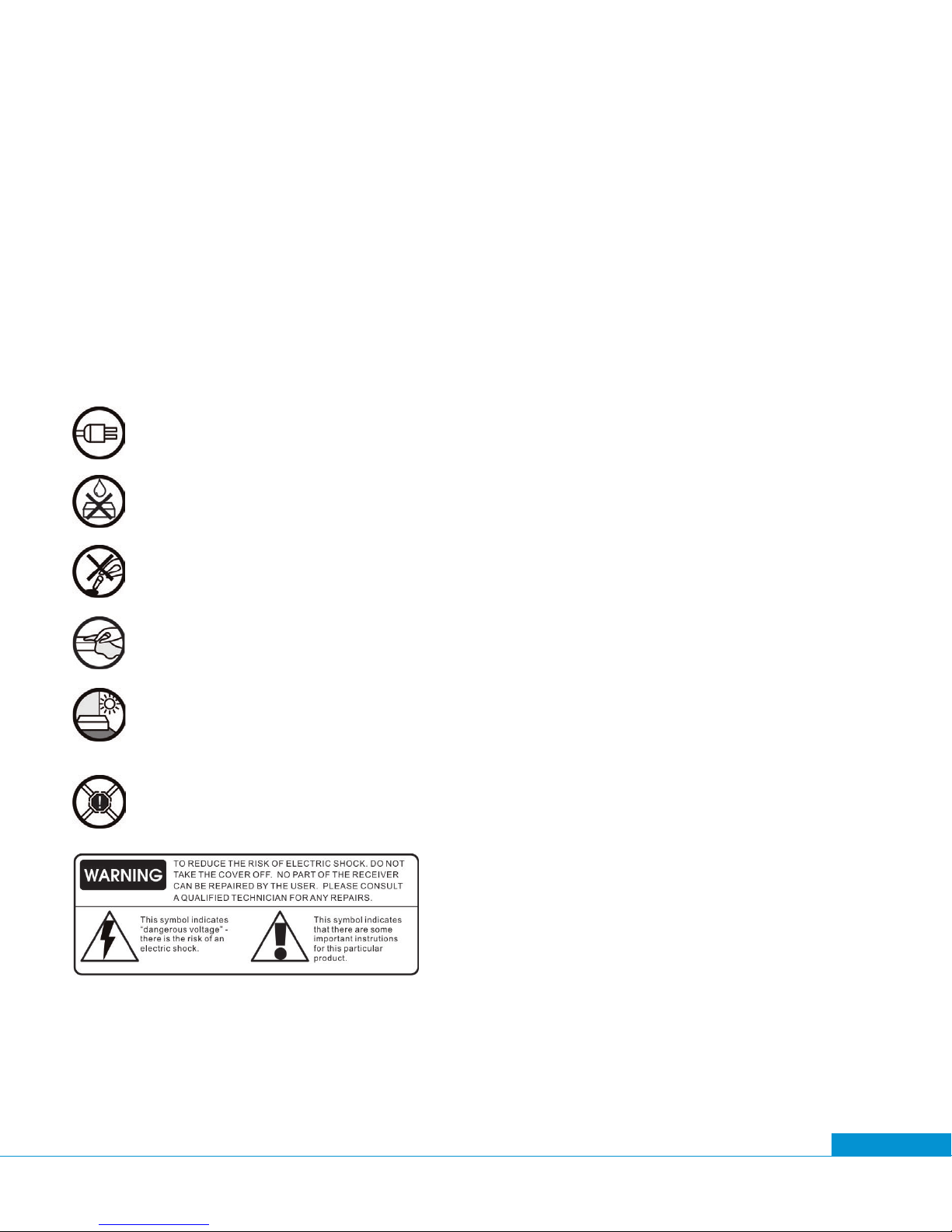
1.1 Important Information
POWER REQUIREMENTS:
100 V - 240 VAC ~ 50 Hz/60 Hz
LIQUIDS:
Take care not to spill any liquids over the receiver or splash it.
Avoid placing objects with liquids on or next to the receiver.
SMALL OBJECTS:
Avoid placing small metallic objects close to the unit. These could accidentally enter through the
ventilation slots and cause serious damage.
CLEANING:
Unplug the receiver from the mains before cleaning it.
Use a slightly damp, soft cloth (no detergent) to clean the outside of the receiver.
VENTILATION:
Place the receiver in a well-ventilated area so that the slots are not blocked in any way. Avoid
exposure to the sun or to other sources of heat.
Do not place on top of other equipment.
CONNECTIONS:
Carry out the recommended connections only to avoid any possible damage.

Specifications subject to change. Copyright ® 2015 by Pico Digital Inc. All rights reserved. REV. 090115
VMX1-1 HD MPEG 2/4 QAM Set-Top Box
4
1.2 Unpacking
Upon receipt inspect the box and note any damage to the box or the unit. In case of damage contact your
cable operator.
The box includes:
A. 1 - VMX1-1 Quick Start Guide
B. 1 - VMX1-1 unit
C. 1 - Remote control
D. 1 - Power adaptor
E. 2 - Batteries for the remote control
F. 1 - Composite cable
G. 1 - HDMI cable
E F
C
D
A B
G
User Manual
VMX1-1 HD MPEG-2/4 QAM Set-Top Box
(Verimatrix
®
CAS)

Specifications subject to change. Copyright ® 2015 by Pico Digital Inc. All rights reserved. REV. 090115
5
VMX1-1 HD MPEG 2/4 QAM Set-Top Box
1.3 Front Panel
The VMX1-1 is designed for ease of use and offers a small foot print. The front panel features minimal buttons and
graphics.
Button Function
Navigate UP
Navigate DOWN
Navigate LEFT
Navigate RIGHT
Turns the receiver on/off (STBY)
OK Used to make selections in the menu
Navigate to the previous menu
MENU Brings up the menu
▲
▼
▲
▲

Specifications subject to change. Copyright ® 2015 by Pico Digital Inc. All rights reserved. REV. 090115
VMX1-1 HD MPEG 2/4 QAM Set-Top Box
6
1.4 Rear Panel
The rear panel of the cable box includes multiple options for connecting to your TV. With all options you will need to
insert the coaxial cable into the Cable In (2) plug on the back of the unit in order to receive the cable feed.
1
2
34 5 678
Label Function
1 Cable Out Coaxial cable out for loop through to TV – connect to TV
2 Cable In Input of coaxial cable as content source
3 Video and L/R Audio Composite cable to connect to TV
3.1 SPDIF Optical digital audio
4 HDMI HDMI cable to connect to TV
5 Ethernet Ethernet cable for Internet access
6 USB USB 2.0 for PVR capability
7 IR Extender External IR receiver
8 Power Connect to 12V power supply
3.1

Specifications subject to change. Copyright ® 2015 by Pico Digital Inc. All rights reserved. REV. 090115
7
VMX1-1 HD MPEG 2/4 QAM Set-Top Box
CUSTOM Can be programmed as any other button.
VOL + Increase the volume
VOL - Decrease the volume
CH Channel up
CH Channel down
TV Press to turn TV ON/OFF
TV/AV Changes TV source
SET Program remote
1.5 Remote Control
Button Function
CBL Press to turn set-top box ON/OFF
Mute ON/OFF
AV Change set-top box HDMI resolution
CC Closed captions ON/OFF
MAIL Displays e-mail messages (if available)
AUDIO Toggles mono/stereo audio options
SUB Subtitles ON/OFF
MEDIA Displays recorded “Library”
FAV Displays “Favorites” list
INFO Displays program information
Back Return to previous menu
EPG Displays the program guide
MENU Displays the menu
EXIT Leaves the menu/program information
OK Select
VOL + Increase the volume
VOL - Decrease the volume
CH Channel up
CH Channel down
Navigation directions
0...9 Channel/password numbers
Record
Stop
Play
Fast forward
Rewind
Pause
Menu selection buttons
▲
▲
▲
▲
▲
▲
▲▲
▲
▲
▲
Programmable:*
▲
▲
*Note: These buttons can be programmed as any other button. The functions listed are suggested.

Specifications subject to change. Copyright ® 2015 by Pico Digital Inc. All rights reserved. REV. 090115
VMX1-1 HD MPEG 2/4 QAM Set-Top Box
8
2. INSTALLATION
2.1 Connecting the Set-Top Box
When you receive the set-top box, it will include the small VMX1-1 unit, a power cable, composite cables, an HDMI
cable, and the remote control with batteries.
We recommend that you make sure you have all necessary cables before starting the installation process.
A. Disconnect power from the TV and set-top box.
B. Plug the cable TV cable into the “Cable In.” (Figure 2.1.1)
C. Connect an external HDD to the set-top box using a USB cable (if available).
D. Connect the set-top box to your television. There are three different connection options for this:
1. HDMI cable (included) - Figure 2.1.2
2. Composite (yellow, red and white cable - included) - Figure 2.1.2
3. RF out (Coaxial cable for cable TV - not included) - Figure 2.1.2
E. Plug the power cord into the back of the set-top box (Figure 2.1.3) and plug the power supply
into your power source.
F. Reconnect power to the TV.
Figure 2.1.1 Figure 2.1.2 Figure 2.1.3
Cable TV HDMI
Video/Audio
Power Adapter
Coaxial

Specifications subject to change. Copyright ® 2015 by Pico Digital Inc. All rights reserved. REV. 090115
9
VMX1-1 HD MPEG 2/4 QAM Set-Top Box
G. The set-top box will start an Auto Channel Scan. This will program the channels into the box.
H. Let this continue to 100%
I. Once this Auto Channel Scan has completed, the number of detected channels will appear.
Press “OK.”
J. The set-top box is now ready for use. All detected channels should now be available for viewing.
K. View the rst channel to appear without changing channels after exiting the menu. This is the home
channel. Verify that reception is clear without visible artifacts. If the home channel is not received
clearly, contact your cable operator for further instructions.

Specifications subject to change. Copyright ® 2015 by Pico Digital Inc. All rights reserved. REV. 090115
VMX1-1 HD MPEG 2/4 QAM Set-Top Box
10
2.2 Troubleshooting
2.2.1 Reset to First-Time Installation
If the set-top box is not working, then the rst step is to restart the box. If this does not work, then try resetting the
box to rst-time installation. This is done by following these instructions:
A. With the TV switched ON and the set-top box switched ON, press the “MENU” button on the remote control.
This brings up the following menu:
B. Go to the “Settings” option and press “OK.” This will take you into the settings menu.
Indice
Altri manuali PICO Decoder


