
point DUSTY500 Manuale utente

User manual
Robotic Vacuum Cleaner
DUSTY500

SE
Tack för att du har köpt ditt nya robotdammsugare med påse från POINT.
Denna bruksanvisning hjälper dig att använda den på ett säkert och korrekt
sätt. Vi rekommenderar att du tar dig tid att läsa igenom denna
bruksanvisning för att till fullo förstå alla driftfunktioner som den erbjuder.
Läs noga igenom alla säkerhetsinstruktioner före användning och spara
bruksanvisningen för framtida bruk.
ENDK
Tak for købet af dit nye robotstøvsuger med pose fra POINT. Disse
brugervejledninger hjælper dig med at bruge dette apparat rigtigt og sikkert.
Vi anbefaler, at du læser denne brugervejledning, så du får en fuld forståelse
af hvordan alle funktionerne virker. Læs sikkerhedsforskrifterne grundigt
inden brug, og gem denne brugervejledning til senere brug.
ENNO
Takk for at du kjøpte din nye POINT robotstøvsuger. Denne
bruksanvisningen vil hjelpe deg med å bruke den på en trygg og riktig måte.
Vi anbefaler at du tar deg tid til å lese gjennom hele bruksanvisningen for å
bli fortrolig med alle funksjonene som tilbys. Les alle sikkerhetsanvisningene
nøye før bruk, og oppbevar bruksanvisningen for fremtidig referanse.
ENFI
Kiitos, kun valitsit uuden pussillisen POINT-robottipölynimuri.
Nämä käyttöohjeet opastavat sinua käyttämään laitetta oikein ja turvallisesti.
On suositeltavaa käyttää aikaa tämän käyttöoppaan lukemiseen, jotta
ymmärrät täysin, mitä toiminnallisia ominaisuuksia tuote tarjoaa. Lue kaikki
turvallisuusohjeet huolellisesti ennen laitteen käyttöä ja säilytä käyttöopas
myöhempää käyttöä varten.
GB
2
Thank you for purchasing your new POINT Robotic Vacuum Cleaner.
These operating instructions will help you use it properly and safely.
We recommend that you spend some time reading this user manual in order
safety instructions carefully before use and keep this user manual for future
that you fully understand all the operational features it oers. Read all the
reference.

Brugervejledning – Dansk .....................
Bruksanvisning - Norsk .........................
Käyttöopas – Suomi .............................
Bruksanvisning – Svenska ..................... sidor
SE DK NO
FI
22
40
58
76
side
sivu
side 75
93
57
39
21
-
-
-
-
-
User manual - English ..........................
GB
GB
4
3
page

1. Safety instructions
4
Always power o the appliance if it is not to be used for more than
one month or not on the charging dock.
After finishing vacuuming, the appliance should be properly
connected to the charging dock.
Early exclusion of the possible problems in the course of cleaning is
necessary. Remove any objects on the ground such as mains power
cables or other items that may obstruct the appliance. Make sure to
turn the carpet tassel over and make sure any hanging curtains and
tablecloths are higher than the ground.
If there is a drop-o in the cleaning area due to a step or stairs, you
should operate the appliance to ensure that it can defect the step
without falling over the edge. It may become necessary to place a
physical barrier at the edge to keep the appliance from falling. Make
sure the physical barrier is not a trip hazard.
Operate the appliance according to the instructions. Only use the
attachment recommended or sold by the manufacturer.
Make sure your power supply voltage matches the power voltage
marked on the charging dock.
Before using the appliance, make sure the dustbin and filter have
been installed properly.
If the mains power cable is damaged, it must be replaced by
manufacturer or its after-service agents in order to avoid any danger.
Turn o the power switch of the appliance before cleaning and
maintaining it.
Pull out the mains power plug from the mains power socket before
cleaning and maintaining the appliance.
Before disposing of the appliance, remove it from the charging dock,
turn o its power switch, and remove the battery.
Before disposing of the appliance, take the battery out and throw it
away following the local laws.
1.
2.
3.
4.
5.
6.
7.
8.
9.
10.
11.
12.
Cautions

Follow the local laws to dispose of the old battery.
Only use the appliance indoors in a home environment. Do not
use it outdoors, or in a commercial or industrial area.
Do not use the appliance in a room where a baby is sleeping.
Do not use the appliance if the mains power cable or plug is
already damaged. Do not use the appliance if it has been
dropped, damaged, outdoors, or in damp areas and if it is not
operating properly. It must be repaired by the manufacturer or
after-service agents in order to avoid the danger.
Use the appliance properly according to the instruction manual.
We will not be responsible for any damage caused by
inappropriate usage.
Only applicable to the original charging dock specially supplied by
the manufacturer. Users are forbidden to replace the battery
privately. If the battery is suspected to be damaged, contact the
manufacturer, authorized dealer or similar professionals to
replace it.
Do not use the appliance close to an open fire and fragile objects.
The working temperature of the product ranges from 0ºC to 40ºC.
It should not be used under too high or too cold temperatures.
Do not get your finger, hair or cloth close to the opening or
moving parts.
Do not use the appliance in a moist environment or wet ground.
Do not use the appliance to suck any particles which may clog the
suction channel, such as stones, big pieces of papers, and so on.
Do not use the appliance to suck any flammable substances,
such as gasoline, toners for printers or copiers. Do not use the
product in a flammable area.
5
13.
14.
15.
16.
17.
1.
2.
3.
4.
5.
6.
7.
▲ Warning
GB

Do not use the appliance to suck any burning particles, such as
cigarettes, matches ashes or anything that may cause a fire.
Do not put anything at the suction channel, and clean up the
suction channel regularly, like dust, cotton wool, hair. Do not use
it when the suction channel is already obstructed.
Use the mains power cable carefully to avoid any damage. Do not
use the mains power cable to drag or pull the appliance and
charging dock. Do not use the mains power cable as a handle. Do
not clamp the mains power cable into a door seam. Do not pull the
mains power cable at sharp corners and corners. Do not operate
the appliance on the power line, and the mains power cable
should be kept away from heating source.
Do not use the charging dock, if it is already damaged, it must be
repaired or replaced by a manufacturer, authorized dealer, or
similar professionals in order to avoid any danger.
Do not burn the appliance even if it has been seriously damaged,
since the battery may explode.
When recharging the battery, only use the detachable
supply unit DK18-190060H-V/ YJS015F-1900600G provided with it.
The appliance is not intended to be used by children under the age
of 8, as well as the persons with reduced physical, sensory, or
mental capabilities, unless they have been given supervision or
instruction concerning the use of the appliance in a safe way by a
person responsible for their safety. Do not allow the children to
ride on the appliance or play with it as a toy.
6
8.
9.
10.
11.
12.
13.
14.

GB
7
2. Product Components
• Main Body
• Main Brush Type
• Charging Base
• Dustbin Box
<1> Front Bumper Sensors Assembly
<2> AUTO Button (Start/Stop)
<3> Dust Collector & Water Tank Release Button
<4> Charging Pins
<5> Battery Cover
<6> Driving Wheel
<7> Power Switch
<8> Anti-drop Sensor
<9> Universal Wheel
<10> Side Brush
<11> Main Brush Assembly
<12> Dust Collector
<1> Power Indicator
<2> Power Adapter
<3> Power Adapter Port
<4> Charging Dock Pins
<1>
<2>
<3>
<7>
<4>
<5>
<6>
<8>
<9>
<10>
<11>
<12>
<1>
<2>
<3>
<4>

8
<1> AUTO Cleaning
<2> Direction Control
<3> Suction Power Adjustment
<4> Return to Changing Base
<5> Schedule Cleaning
<6> LCD Screen
<7> Return to Changing Base
<8> Current Time setting
<9> Spot Cleaning
<10> Edge Cleaning
<11> Start/Stop/Confirm
<1> Pre-filter
<2> Filter Sponge
<3> HEPA filter
<4> Dust Collector Cover
<5> Dust Collector
<6> Dust Collector release button
• Remote Control
• Dust Collector
Caution
Install 2pcs of AAA/R03P batteries before using the remote control.
Remove the batteries if the remote control is not to be used for a long time.
The eective remote control range to the appliance is within 6 meters.
*
*
*
<1> AUTO
POWER
<6>
<7>
<11>
<9>
<10>
<8>
<2>
<3>
<4>
<5>
<1>
<2>
<5>
<6>
<3>
<4>

GB
9
3. Technical Specifications
4. Operations
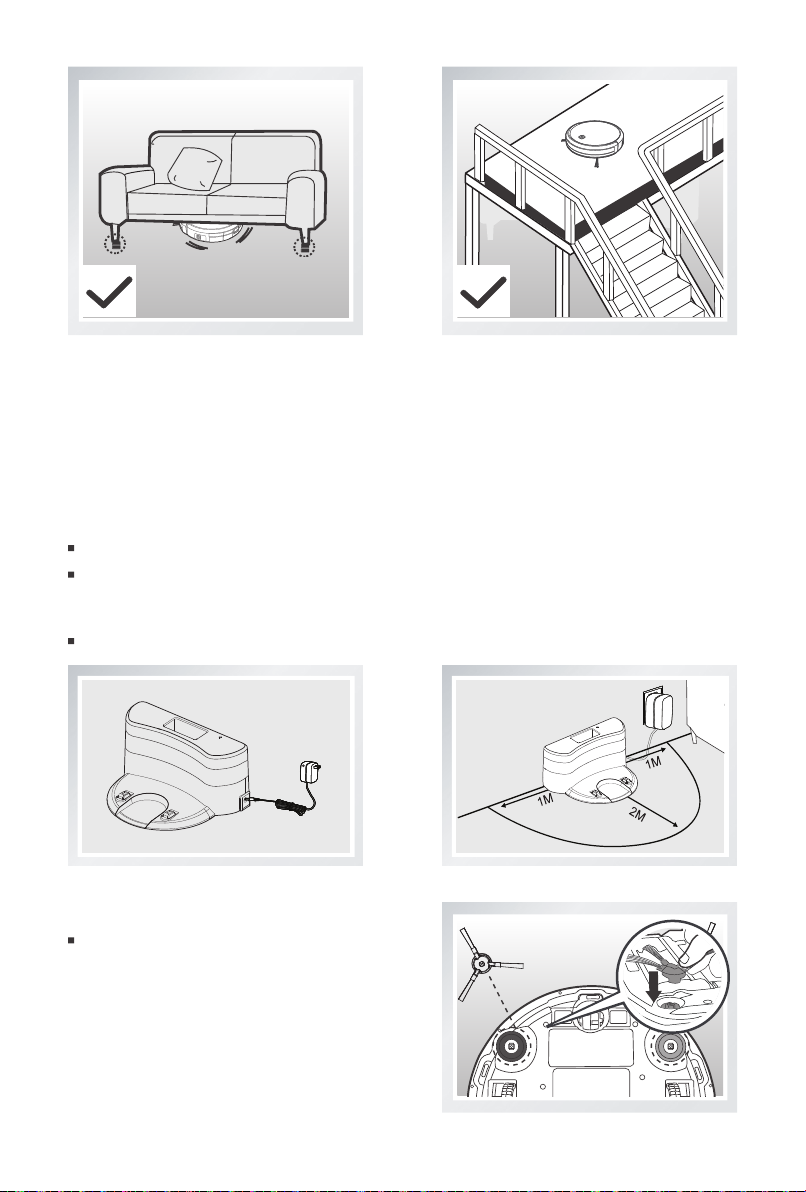
Remove cables and other debris scattered on
the ground which may obstruct the appliance
before using.
Roll up any fringed edges of carpets.
4.1 Cautions
Refer to the guide below and check the cleaning area before using.
Model DUSTY500
Voltage (V) 19 V
19 V
Rated Power (W) 11.4W
0.6A
Charge Station
Rated Input Voltage(V) Rated Output Current (A)
AAA Battery R03P/UM4/1.5V
Power Adapter Model DK18-190060H-V/ YJS015F-1900600G
Input 100-240 V~0.5A Max
50-60Hz Output 19 V 0.6 A
OFF/Standby Mode
Rated Power <0.5W
10
Furniture lower than 8cm may block the
appliance, raise the furniture higher than
8cm.
A protection barrier should be used on
double layer stairs to ensure that the
appliance works safely.
Connect the adapter to the charging base
Put the charging base flat on the ground next to a wall, and do not put any obstacles around it. The
charging base needs 1meter clear both left and right sides and 2meter clear at the front. Do not put a
mirror or any other obstacle with a reflecting surface nearby.
Connect to the power.
4.2 Quick Operation
1. Charging Preparation
2. Install the side brushes
Install the side brushes into the right
position at the bottom of the appliance,
make sure that they have been installed
properly.
Indice
Lingue:
Altri manuali point Aspirapolvere

point
point pro Series Manuale utente

point
point ORBIT ONE Manuale utente

point
point pro Series Manuale utente

point
point POVCKIT Manuale utente

point
point DUSTY510WET Manuale utente

point
point pro Series Manuale utente

point
point DUSTY300 Manuale utente

point
point pro Series Manuale utente

point
point pro Series Manuale utente

point
point DUSTY700 Manuale utente

point
point POPENCIL Manuale utente

point
point pro Series Manuale utente

point
point DUSTY700 Manuale utente

point
point pro Series Manuale utente

point
point POVCB50GR Manuale utente

point
point POVC112BLKIT Manuale utente

point
point PO42GR Manuale utente

point
point pro Series Manuale utente

point
point POVC618DB Manuale utente


