Prodigit 3301A Manuale utente

3301A
使 用 手 冊 (E)
S/N: 90033013 rev:A

3301A Mainframe Operation Manual
Table of contents
ˍˍˍˍˍˍˍˍˍˍˍˍˍˍˍˍˍˍˍˍˍˍˍˍˍˍˍˍˍˍˍˍˍˍˍˍˍˍˍˍˍˍˍ
Chapter 1 Introduction.........................................................................................................1
1-1.Features .................................................................... 1
1-2.Option ...................................................................... 1
1-3.Specifications .............................................................. 1
1-4.System block diagram ........................................................ 2
Chapter 2 Installation........................................................................................................... 3
2-1.Inspection .................................................................. 3
2-2.Check line voltage .......................................................... 3
2-3.Grounding requirements ...................................................... 4
2-4.Adjust the feet ............................................................. 4
2-5.Rack mount .................................................................. 4
2-6.Enviremental requirements ................................................... 4
2-7.Repairing ................................................................... 4
2-8.Accessories ................................................................. 5
2-9.GPIB connection ............................................................. 5
2-10.Remote control Port ........................................................ 6
2-11.Master/Slave operating mode ................................................ 7
Chapter 3 Mainframe operation........................................................................................... 9
3-1.Feet stands ................................................................. 9
3-2.Power switch ................................................................ 9
3-3.STORE/RECALL operation ..................................................... 10
Chapter 4 GPIB programming operation.......................................................................... 11
4-1.The summary of GPIB command ................................................ 11
4-2.The description of abstraction ............................................. 11
4-3.GPIB command description ................................................... 13
4-4.3301A Operation flowchart .................................................. 21
4-5.GPIB Command listing ....................................................... 22
Figure
Figure 1-1 Block diagram ........................................................ 2
Figure 2-1 Set of the power switch .............................................. 3
Figure 2-2 AC line receptacle socket ............................................ 4
Figure 2-3 rear panel ........................................................... 5
Figure 2-4 Address switch ....................................................... 6
Figure 2-5 Diagram of Remote Control Port ....................................... 6
Figure 2-6 The channel number of Master/Slave operation ......................... 7
Figure 2-7 25PIN 〝D〞type cable ................................................ 8
Figure 3-1 3301A front panel .................................................... 9
Figure 4-1 3301A Operation flowchart ........................................... 21

Table
Table 1-1 Specification ......................................................... 1
Table 4-1 GPIB Command listing ................................................. 11
Table 4-2 GPIB command terminator .............................................. 12
Table 4-3 Maximun load current level ........................................... 16
Table 4-4 Slew rate code for SLOW, MID, and FAST ............................... 17
Table 4-5 specification code for 3320 series load module ....................... 19

3301A MAINFRAME OPERATION MANUAL 1
ˍˍˍˍˍˍˍˍˍˍˍˍˍˍˍˍˍˍˍˍˍˍˍˍˍˍˍˍˍˍˍˍˍˍˍˍˍˍˍˍˍˍˍˍˍˍˍˍˍˍˍˍˍˍˍˍˍˍˍ
Chapter 1 Introduction
The 3301A Electronic load mainframe is designed to install up to 4 channels 3320 series plug-
in load module, 3320 (60V/30A 150W), 3321 (60V/60A 300W) or 3322 (250V/10A, 300W) plug-in
module can be installed to any slot of the 3301A mainframe. A total 1200W maximum capacity can
be implemented in 3301A mainframe.
1-1.Features
3301A mainframe provides easy operation and cost effective solution for power source testing,
the features of the 3301A Electronic load mainframe is described in the following:
1.Plug-in design, it is easy to replace different specifications load module.
2.Flexible configuration, each slot of 3301A mainframe can be installed one of 3320, 3321 or
3322 load module.
3.STORE/RECALL up to 5 states, it can reduce the testing time in incoming inspection as well
as production line.
4.Master/Slave operation two 3301A mainframe only occupy one GPIB address when operating in
Master/Slave mode.
5.Built-in GPIB interface.
1-2.Option
1. Blank panel
2. GPIB cable 1M
3. GPIB cable 2M
4. 25 pins "D" type cable 1M
5. Model 9931 Remote Controller
1-3.Specifications
The detail specifications of 3301A mainframe is shown in Table 1-1.
AC INPUT LINE 100V/115V ±10﹪ 200V/230V ±10﹪
FREQUENCY 50/60 Hz
FUSE 2A/250V (5*20mm) 1A/250V (5*20mm)
MAX.POWER
CONSUMPTION 100W
DIMENSIONS (W*H*D) 440mm * 177mm * 445mm
WEIGHT NET:9.3Kg
Table 1-1 Specification

2 PRODIGIT
ˍˍˍˍˍˍˍˍˍˍˍˍˍˍˍˍˍˍˍˍˍˍˍˍˍˍˍˍˍˍˍˍˍˍˍˍˍˍˍˍˍˍˍˍˍˍˍˍˍˍˍˍˍˍˍˍˍˍˍ
1-4.System block diagram
The system block diagram is shown in Fig 1-1, there are five power supplies in 3301A mainframe
one for 3301A mainframe, and others are for each channel respectively.
The 3301A mainframe is optically isolated with each load module.
3310 MAINFRAME
POWER
SUPPLY
#5
SYSTEM
CONTROLLER
(CPU,RAM,
NON-VOLATILE
RAM,I/O etc.)
POWER
SUPPLY
#1
ISOLATED I/O
INTERFACE #1
POWER
SUPPLY
#2
ISOLATED I/O
INTERFACE #2
ISOLATED I/O
INTERFACE #3
IEEE-488
INTERFACE
MAINFRAME
OPERATION
KEY
STORE/RECALL
MASTER/SLAVE
DIO INTERFACE
POWER
SUPPLY
#4
POWER
SUPPLY
#3
ISOLATED I/O
INTERFACE #4 3320
SERIES
PLUG-IN
LOAD
MODULE
#4
3320
SERIES
PLUG-IN
LOAD
MODULE
#3
3320
SERIES
PLUG-IN
LOAD
MODULE
#2
3320
SERIES
PLUG-IN
LOAD
MODULE
#1
9931 REMOTE
CONTROL
INTERFACE
Figure 1-1 Block diagram

3301A MAINFRAME OPERATION MANUAL 3
ˍˍˍˍˍˍˍˍˍˍˍˍˍˍˍˍˍˍˍˍˍˍˍˍˍˍˍˍˍˍˍˍˍˍˍˍˍˍˍˍˍˍˍˍˍˍˍˍˍˍˍˍˍˍˍˍˍˍˍ
Chapter 2 Installation
2-1.Inspection
The 3301A mainframe was carefully inspected before shipment. If instrument damage has occurred
during transport, please inform Prodigit's sales and service office or representative.
Your 3301A mainframe was shipped with a power cord for the type of outlet used at your
location. If the appropriated cord was not included, please contact your nearest Prodigit
sales office to obtain the correct cord. Refer to " check line voltage " to check the line
voltage selection and fuse type.
2-2.Check line voltage
The 3301A mainframe and 3320 series Electronic load can operation with 100, 115, 200, 230Vac
input as indicated on the label on the rear panel.
Make sure that the factory check mark correspond to your nominal line voltage. Skip this
procedure if the label is corrected marked.
1.With the 3301A mainframe power OFF, disconnect the power cord, and remove two bottom cover
screws.
2.Turn the 3301A mainframe up side down, remove the bottom cover.
3.Refer the drawing on the PC board in Fig 2-1, set the switches to the proper voltage as
describe in the following:
a.115Vac:Set SW1 to left side (SW1Å).
b.230Vac:Set SW1 to right side (SW1Æ).
POWER SUPPLY PCB
SW1
115V 230V
Figure 2-1 Set of the power switch
4.Replace the cover and mark the correct voltage on the rear panel of 3301A mainframe.
5.Check the rating of the line fuse and replace it with the correct fuse if necessary.
6.The line fuse is located below the AC line receptacle see Fig 2-2. With the power cord
removed, use a small screwdriver to extract the fuse holder from under the AC socket.
Replace the fuse with the appropriate type as indicated in table 1-1. These fuses are
normal-blow fuses.

4 PRODIGIT
ˍˍˍˍˍˍˍˍˍˍˍˍˍˍˍˍˍˍˍˍˍˍˍˍˍˍˍˍˍˍˍˍˍˍˍˍˍˍˍˍˍˍˍˍˍˍˍˍˍˍˍˍˍˍˍˍˍˍˍ
Figure 2-2 AC line receptacle socket
7.Reinstall fuse holder and connect the power cord.
2-3.Grounding requirements
Model 3301A mainframe and 3320 series Plug-in load is equipped with three conductor calbe
which plugges in an appropriate receptacle to ground the instrument's cover.
2-4.Adjust the feet
The 3301A Electronic load mainframe is equipped with feet and tilt stands installed and is
ready for used as a bench instrument. The feet provide a good viewing angle for bench-top use.
2-5.Rack mount
The 3301A mainframe is designed to permit mounted in a standard 19 inches rack for system
application.
2-6.Enviremental requirements
The operating temperature should keep etween 0 degree and 40 degree, while the ideal operating
temperature 25 ±5 degree.
2-7.Repairing
If the instrument is damaged, please attach a tag to the instrument to identify the owner and
indicated the require service or repairing. And inform the Prodigit sales and service office
or representative.

3301A MAINFRAME OPERATION MANUAL 5
ˍˍˍˍˍˍˍˍˍˍˍˍˍˍˍˍˍˍˍˍˍˍˍˍˍˍˍˍˍˍˍˍˍˍˍˍˍˍˍˍˍˍˍˍˍˍˍˍˍˍˍˍˍˍˍˍˍˍˍ
2-8.Accessories
The following parts should be include in the shipment.
1.Three conductor power cord 1pc
2.3301A mainframe operation manual 1pc
2-9.GPIB connection
The GPIB connector on the rear panel connects the 3301A mainframe to the controller and to
other GPIB devices. An GPIB system can be connected in any configuration ( star, linear, or
both ) as long as;
1.The maximun number of devices including the controller is no more than 15.
2.The maximum length of all cable in no more than 2 meters times the number of devices
connected together, up to 20 meters maximum.
Please make sure the lock screws are firmly hand - tightened, use a screwdriver only for
the removal of screws.
Fig 2-3 shows the rear panel of 3301A mainframe, the GPIB connector and GPIB address
setting switch is located on the rear panel of 3301A mainframe.
0
1
16842
LINE FUSE RATING
100V
115V
200V
230V
50/60 Hz
2A
1A
LINE INPUT
GPIB ADDRESS
1DIO CONTROL ANALOG PROGRAMMING INPUT
CH2 CH1CH3CH4
3310 SERIES USED ONLY.
PRODIGIT ELECTRONICS CO., LTD
0 10 Vac+dc
R
EXTERNAL REMOTE CONTROLLER
(5 RECALL MEMORY)
MADE IN TAIWAN, TAIPEI, R.O.C.
MASTER/SLAVE
Figure 2-3 rear panel
The GPIB address of the 3301A mainframe is factory set to address 05. The GPIB address can
be set by adjust the GPIB address switch setting the weighting of the address switch is
following from left to right in 1, 2, 4, 8, 16 sequence.
The unused switch should set to OFF position.

6 PRODIGIT
ˍˍˍˍˍˍˍˍˍˍˍˍˍˍˍˍˍˍˍˍˍˍˍˍˍˍˍˍˍˍˍˍˍˍˍˍˍˍˍˍˍˍˍˍˍˍˍˍˍˍˍˍˍˍˍˍˍˍˍ
The switch 1 and 3 are in ON position for address 05 when the 3301A mainframe is shipped
from Prodigit. Fig 2-4 shows the detail outlook of the address switch.
12345678ON
124816
ADDRESS
No.
Figure 2-4 Address switch
2-10.Remote control Port
The D-sub 9 pin connector on the rear panel connects the 3301A mainframe to the PRODIGIT mode
9931 remote controller and to replace the RECALL option key 1 to 5 on the front panel of 3301A
mainframe.
1
2
3
4
5
STORE
1
2
3
4
5
6
7
8
9
NC
NC
NC
NC
D-sub 9 Pin
PRODIGIT
INSTRUMENT PRO.
9931 REMOTE INTERFACE
9 Pin to 9 Pin 1.5M Cable
1
2
3
4
5
Figure 2-5 Diagram of Remote Control Port

3301A MAINFRAME OPERATION MANUAL 7
ˍˍˍˍˍˍˍˍˍˍˍˍˍˍˍˍˍˍˍˍˍˍˍˍˍˍˍˍˍˍˍˍˍˍˍˍˍˍˍˍˍˍˍˍˍˍˍˍˍˍˍˍˍˍˍˍˍˍˍ
2-11.Master/Slave operating mode
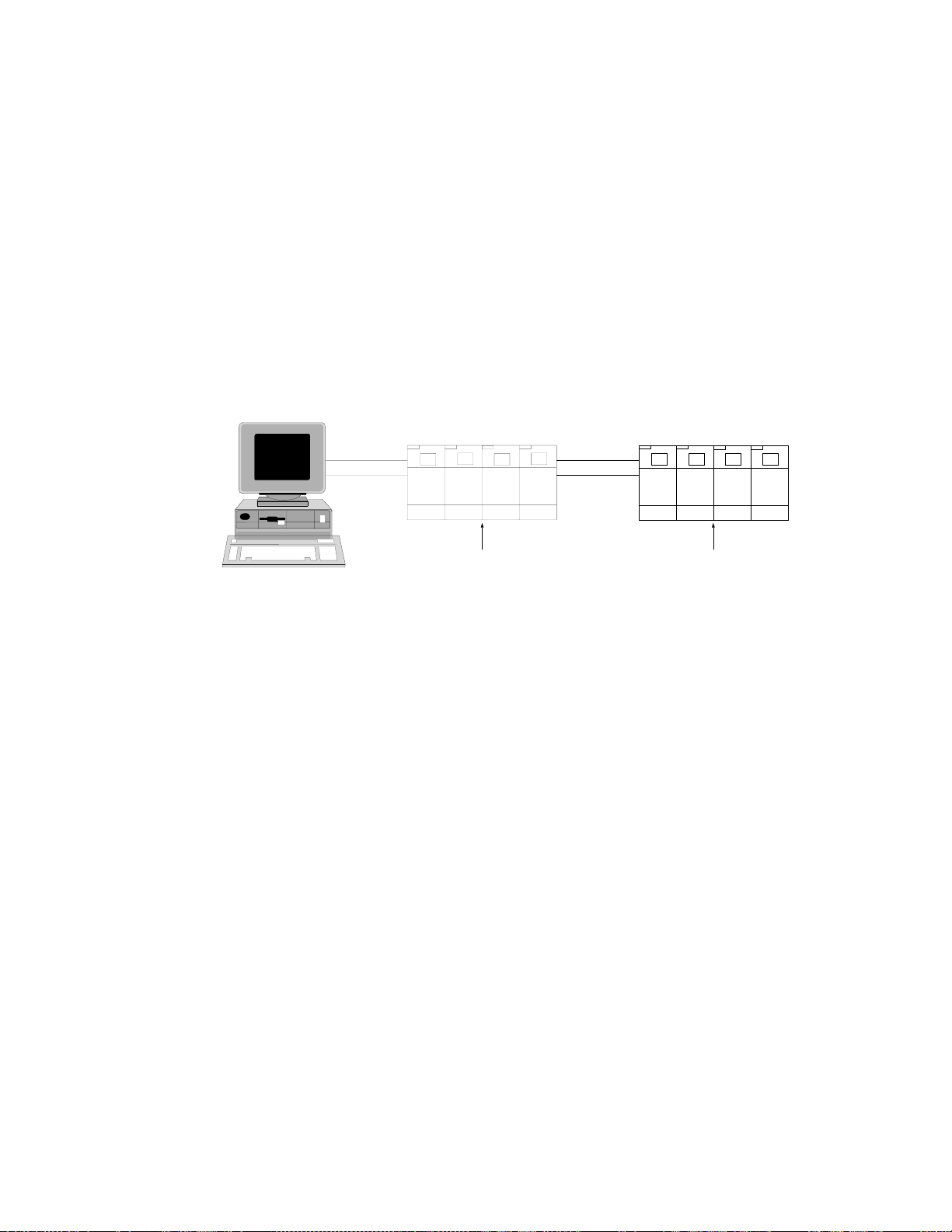
Fig 2-6 shows the connection of two 3301A mainframe is Master/Slave operating mode. The
connection method is shown below:
1.The Master unit of 3301A mainframe's rear panel connects the GPIB cable to the controller
(computer)
2.Use 25 pin "D" type cable to connect two 3301A mainframe (Master and Slave unit)
3.The channel number of Master / Slave operating is shown in Fig 2-7, i.e.; in the Master
unit from left to right:ch1, ch2, ch3 and ch4, and in Slave unit from left to right: ch5,
ch6, ch7 and ch8 respectively.
4.Please disconnect the 25 pin "D" type cable when Master / Slave operating mode is not used.
CH1 CH2 CH3 CH4 CH1 CH2 CH3 CH4
COMPUTER
GPIB CABLE DC LOAD
MASTER SLAVE
D-SUB 25Pin
CABLE DC LOAD
Figure 2-6 The channel number of Master/Slave operation
Indice
Altri manuali Prodigit Scheda madre
Manuali Scheda madre popolari di altre marche

Telit Wireless Solutions
Telit Wireless Solutions SL869-3DR Manuale utente

Gigabyte
Gigabyte GA-9IVDT Manuale utente

Texas Instruments
Texas Instruments ADS8372EVM Manuale utente

Commell
Commell MS-C73 Manuale utente

IBT Technologies
IBT Technologies MB860 Manuale utente

Nvidia
Nvidia TEGRA DG-04927-001_V01 Manuale utente