
seeed studio Grove MP3 v3.0 Manuale utente
7/24/22, 10:41 AM
Grove - MP3 v3.0 - Seeed Wiki
https://wiki.seeedstudio.com/Grove-MP3-v3/
1/14
Grove - MP3 v3.0
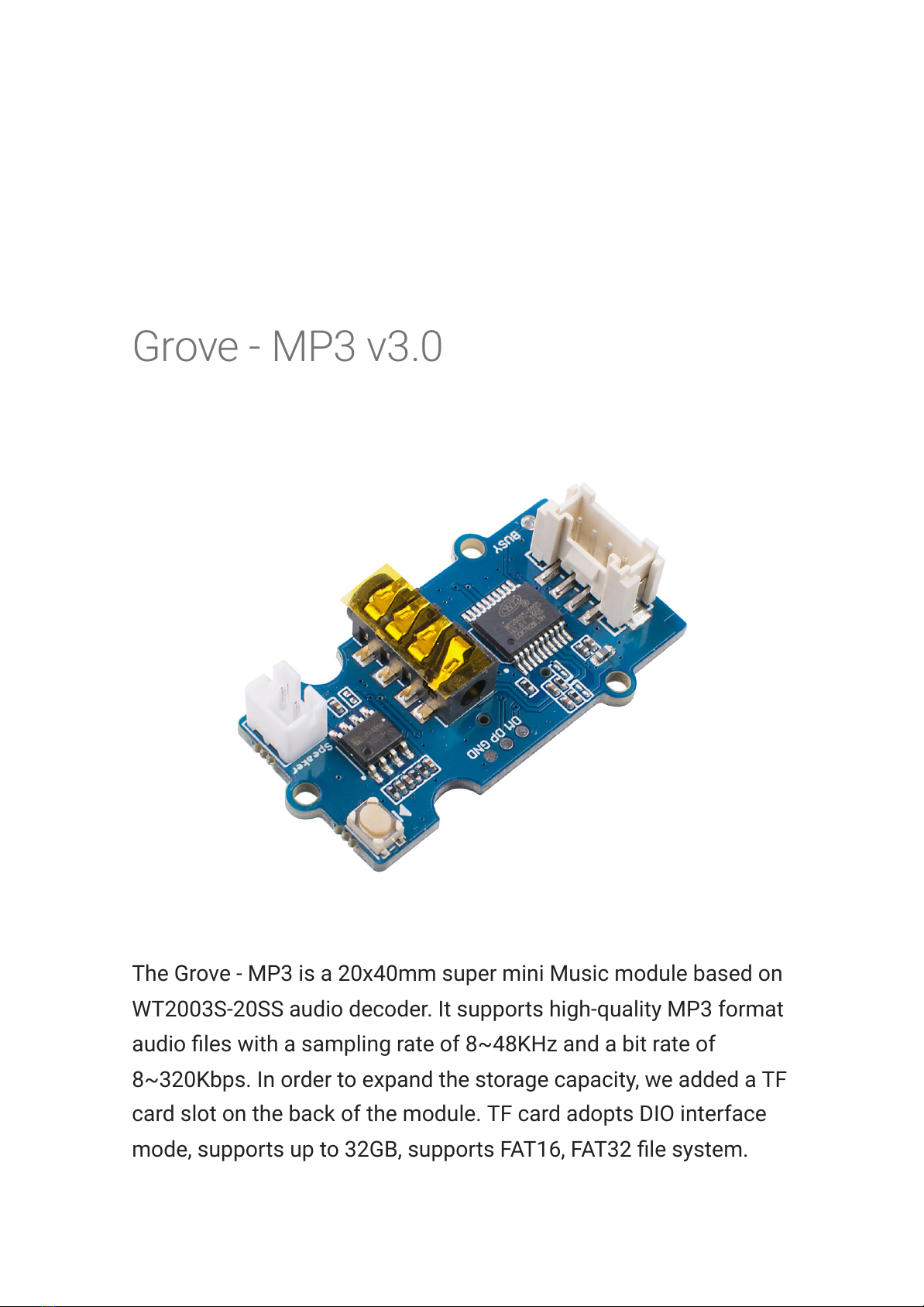
The Grove - MP3 is a 20x40mm super mini Music module based on
WT2003S-20SS audio decoder. It supports high-quality MP3 format
audio les with a sampling rate of 8~48KHz and a bit rate of
8~320Kbps. In order to expand the storage capacity, we added a TF
card slot on the back of the module. TF card adopts DIO interface
mode, supports up to 32GB, supports FAT16, FAT32 le system.
7/24/22, 10:41 AM
Grove - MP3 v3.0 - Seeed Wiki
https://wiki.seeedstudio.com/Grove-MP3-v3/
2/14
Now with this little music module, you can carry hundreds and
thousands of music in your pocket.
As the name indicates, the Grove - MP3 V3 is the upgraded version
of Grove - MP3 V2. Compared with Grove MP3 V2, the V3 added a
JST2.0 speaker port, so that you can output the audio via speaker
and 3.5mm earphone at the same time.
[https://www.seeedstudio.com/Grove-MP3-V3-p-4297.html]
Feature
Supports MP3 format audio les
Sampling rate: 8~48KHz / bit rate: 8~320Kbps
Support up to 32GB TF card
Support speaker and earphone output audio at the same time
Compatible with 3.3V and 5V platform.
Support 32-level volume adjustment
Specication

7/24/22, 10:41 AM
Grove - MP3 v3.0 - Seeed Wiki
https://wiki.seeedstudio.com/Grove-MP3-v3/
3/14
Parameter Value
Supply voltage 3.3V / 5V
Sampling rate 8~48KHz / bit rate: 8~320Kbps
Interface I2C(Default I2C Address: 0x36) & Non-Changeable
Output Speaker/3.5mm Audio Jack
Resolution Support 32-level volume adjustment
Hardware Overview
[https://les.seeedstudio.com/wiki/Grove-MP3-
V3/img/hardware.jpg]
Platforms Supported
7/24/22, 10:41 AM
Grove - MP3 v3.0 - Seeed Wiki
https://wiki.seeedstudio.com/Grove-MP3-v3/
4/14
Arduino Raspberry
Pi
Getting Started
Play With Arduino
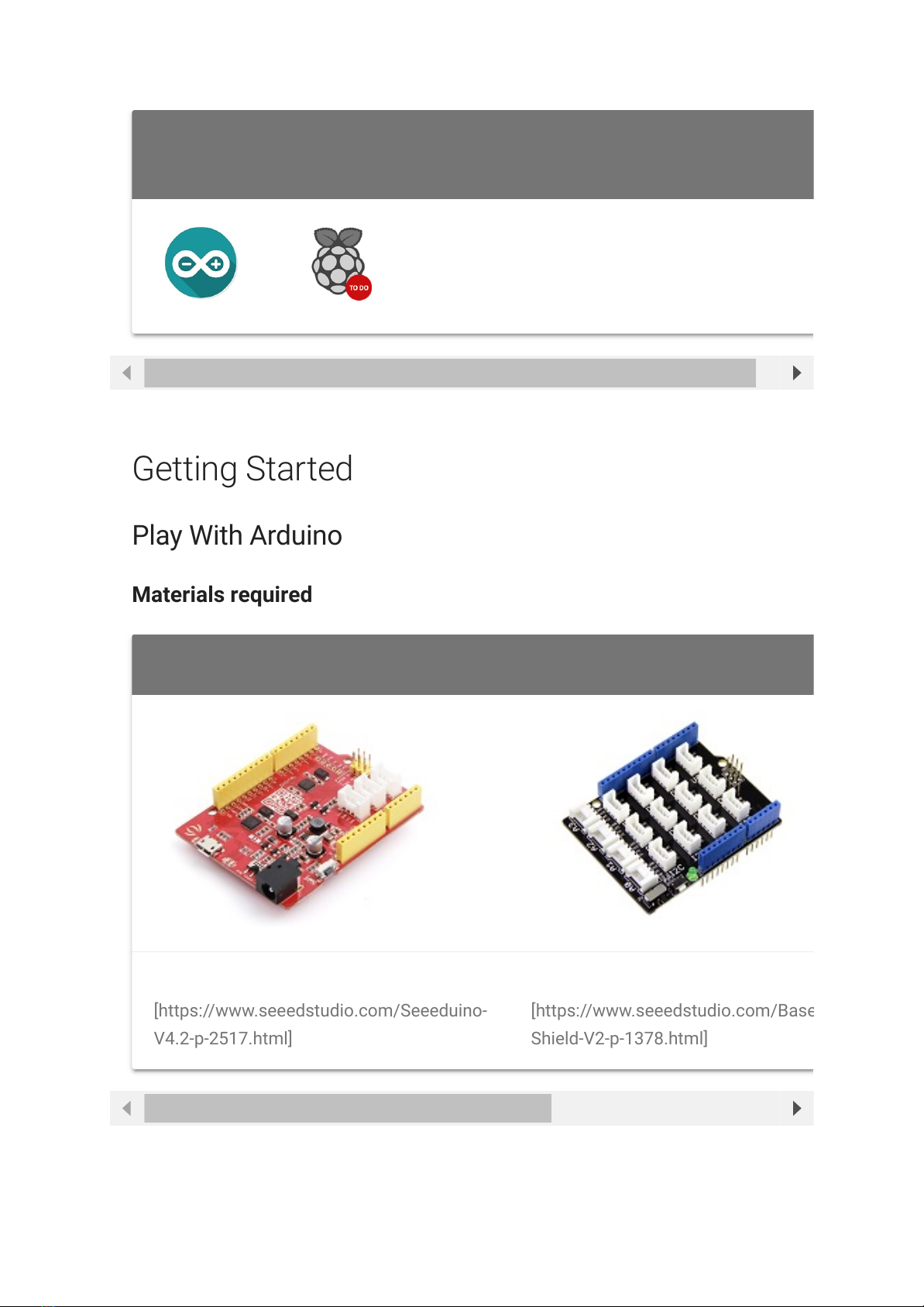
Materials required
Seeeduino V4.2 Base Shield
Get ONE Now
[https://www.seeedstudio.com/Seeeduino-
V4.2-p-2517.html]
Get ONE Now
[https://www.seeedstudio.com/Base
Shield-V2-p-1378.html]
7/24/22, 10:41 AM
Grove - MP3 v3.0 - Seeed Wiki
https://wiki.seeedstudio.com/Grove-MP3-v3/
5/14
In addition, you can consider our new Seeeduino Lotus M0+
[https://www.seeedstudio.com/Seeeduino-Lotus-Cortex-M0-p-
2896.html], which is equivalent to the combination of Seeeduino
V4.2 and Baseshield.
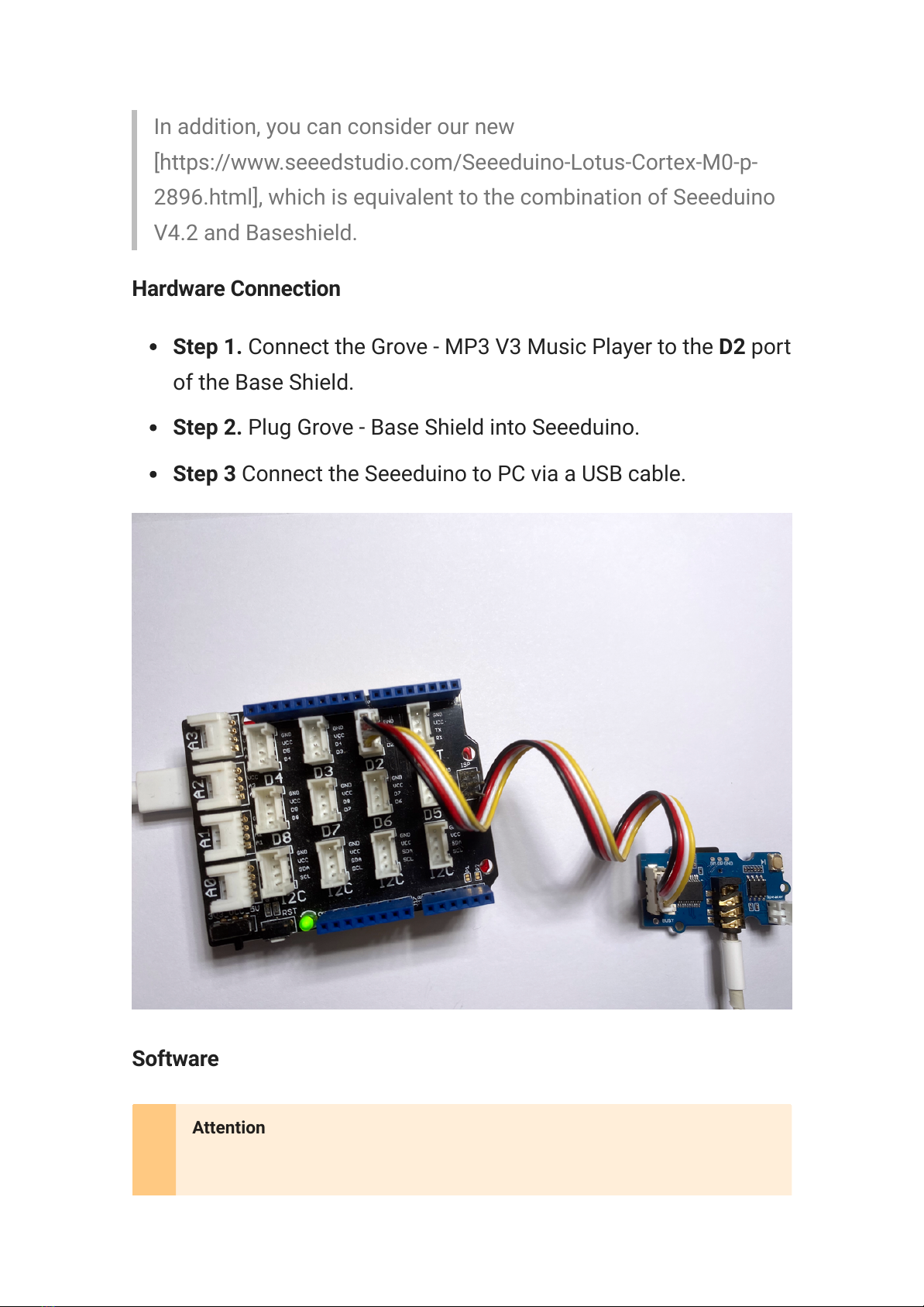
Hardware Connection
Step 1. Connect the Grove - MP3 V3 Music Player to the D2 port
of the Base Shield.
Step 2. Plug Grove - Base Shield into Seeeduino.
Step 3 Connect the Seeeduino to PC via a USB cable.
Software
Attention
7/24/22, 10:41 AM
Grove - MP3 v3.0 - Seeed Wiki
https://wiki.seeedstudio.com/Grove-MP3-v3/
6/14
Step 1. Copy your .mp3 music le to the tf card and save them
in the root location in the tf card.
Step 2. Download the Seeed_Serial_MP3
[https://github.com/Seeed-Studio/Seeed_Serial_MP3_Player]
Library from Github.
Step 3. Restart the Arduino IDE. Open
WT2003S_Terminal_Player example via the path: File →
Examples → Seeed_Serial_MP3_Player →
WT2003S_Terminal_Player. You can play .mp3 format music
le using this moudle, and use 3.5mm Audio Jack, Speaker via
JST2.0 speaker port or even output both in the same time.
The WT2003S_Terminal_Player Example code is as follow:
If this is the rst time you work with Arduino, we strongly recommend you
to see Getting Started with Arduino
[https://wiki.seeedstudio.com/Getting_Started_with_Arduino/] before the
start.
Note
Refer How to install library to install library
[https://wiki.seeedstudio.com/How_to_install_Arduino_Library/] for
Arduino.
1#include "WT2003S_Player.h"
2
3#ifdef __AVR__
4#include <SoftwareSerial.h>
5SoftwareSerial SSerial(2,3); // RX, TX
6#define COMSerial SSerial
7#define ShowSerial Serial
8

7/24/22, 10:41 AM
Grove - MP3 v3.0 - Seeed Wiki
https://wiki.seeedstudio.com/Grove-MP3-v3/
7/14
9WT2003S<SoftwareSerial> Mp3Player;
10 #endif
11
12 #ifdef ARDUINO_SAMD_VARIANT_COMPLIANCE
13 #define COMSerial Serial1
14 #define ShowSerial SerialUSB
15
16 WT2003S<Uart> Mp3Player;
17 #endif
18
19 #ifdef ARDUINO_ARCH_STM32F4
20 #define COMSerial Serial
21 #define ShowSerial SerialUSB
22
23 WT2003S<HardwareSerial> Mp3Player;
24 #endif
25
26
27 uint8_t vol = 10;
28 uint32_t spi_flash_songs = 0;
29 uint32_t sd_songs = 0;
30 STROAGE workdisk = SD;
31 struct Play_history {
32 uint8_t disk;
33 uint16_t index;
34 char name[8];
35 }* SPISong, *SDSong;
36
37 void readSongName(struct Play_history* ph, uint32_t num
38 Mp3Player.volume(0);
39 delay(100);
40 switch (disk) {
41 case SPIFLASH:
42 Mp3Player.playSPIFlashSong(0x0001);
43 break;
44 case SD:
45 Mp3Player.playSDRootSong(0x0001);
46 break;
47 case UDISK:
48 Mp3Player.playUDiskRootSong(0x0001);
49 break;

7/24/22, 10:41 AM
Grove - MP3 v3.0 - Seeed Wiki
https://wiki.seeedstudio.com/Grove-MP3-v3/
8/14
50 }
51 ShowSerial.println("2...");
52 for (int i = 0; i < num ; i++) {
53 delay(300);
54 ph[i].disk = disk;
55 ph[i].index = Mp3Player.getTracks();
56 Mp3Player.getSongName(ph[i].name);
57 Mp3Player.next();
58 }
59 ShowSerial.println("4...");
60 Mp3Player.pause_or_play();
61 Mp3Player.volume(14);
62 delay(100);
63 }
64
65 void getAllSong() {
66 uint8_t diskstatus = Mp3Player.getDiskStatus();
67 ShowSerial.println(diskstatus);
68 spi_flash_songs = Mp3Player.getSPIFlashMp3FileNumbe
69 ShowSerial.print("SPIFlash:");
70 ShowSerial.println(spi_flash_songs);
71 if (spi_flash_songs > 0) {
72 SPISong = (struct Play_history*)malloc((spi_fla
73 readSongName(SPISong, spi_flash_songs, SPIFLASH
74 }
75 if (diskstatus && 0x02){// have SD
76 sd_songs = Mp3Player.getSDMp3FileNumber();
77 ShowSerial.print("SD:");
78 ShowSerial.println(sd_songs);
79 if (sd_songs > 0) {
80 SDSong = (struct Play_history*)malloc((sd_so
81 ShowSerial.println("1...");
82 readSongName(SDSong, sd_songs, SD);
83 }
84 }
85 }
86 void printSongs() {
87 ShowSerial.print("-------------------");
88 ShowSerial.print("index");
89 ShowSerial.print("<-------->");
90 ShowSerial.print("name");

7/24/22, 10:41 AM
Grove - MP3 v3.0 - Seeed Wiki
https://wiki.seeedstudio.com/Grove-MP3-v3/
9/14
91 ShowSerial.print("-------------------");
92 ShowSerial.println();
93 ShowSerial.println("-------------------spi flash---
94 for (int i = 0; i < spi_flash_songs; i++) {
95 ShowSerial.print("-------------------");
96 ShowSerial.print(SPISong[i].index);
97 ShowSerial.print("<-------->");
98 ShowSerial.print(SPISong[i].name);
99 ShowSerial.print("-------------------");
100 ShowSerial.println();
101 }
102 ShowSerial.println("-------------------sd card-----
103 for (int i = 0; i < sd_songs; i++) {
104 ShowSerial.print("-------------------");
105 ShowSerial.print(SDSong[i].index);
106 ShowSerial.print("<-------->");
107 ShowSerial.print(SDSong[i].name);
108 ShowSerial.print("-------------------");
109 ShowSerial.println();
110 }
111 }
112
113 void setup() {
114 while (!ShowSerial);
115 ShowSerial.begin(9600);
116 COMSerial.begin(9600);
117 ShowSerial.println("++++++++++++++++++++++++++++++++
118 Mp3Player.init(COMSerial);
119
120 ShowSerial.println("0...");
121 getAllSong();
122 printMenu();
123 printSongs();
124 }
125
126 void loop() {
127 if (ShowSerial.available()) {
128 char cmd = ShowSerial.read();
129 switch (cmd) {
130 case '+': {
131 ShowSerial.print("Volume up: ");

7/24/22, 10:41 AM
Grove - MP3 v3.0 - Seeed Wiki
https://wiki.seeedstudio.com/Grove-MP3-v3/
10/14
132 vol = Mp3Player.getVolume();
133 Mp3Player.volume(++vol);
134 ShowSerial.print(vol);
135 ShowSerial.println();
136 break;
137 }
138 case '-': {
139 ShowSerial.print("Volume down: ");
140 vol = Mp3Player.getVolume();
141 if (--vol > 31) {
142 vol = 0;
143 }
144 Mp3Player.volume(vol);
145 ShowSerial.print(vol);
146 ShowSerial.println();
147 break;
148 }
149 case 't': {
150 uint8_t status;
151 ShowSerial.print("status:");
152 status = Mp3Player.getStatus();
153 if (status == 0x01) {
154 ShowSerial.print("playing");
155 }
156 if (status == 0x02) {
157 ShowSerial.print("stop");
158 }
159 if (status == 0x03) {
160 ShowSerial.print("pause");
161 }
162 ShowSerial.println();
163 break;
164 }
165 case 'n': {
166 Mp3Player.next();
167 break;
168 }
169 case 'p': {
170 Mp3Player.pause_or_play();
171 break;
172 }
Indice
Altri manuali seeed studio Unità di controllo


Manuali Unità di controllo popolari di altre marche

Festo
Festo Compact Performance CP-FB6-E Manuale elenco delle parti

Elo TouchSystems
Elo TouchSystems DMS-SA19P-EXTME Manuale utente

JS Automation
JS Automation MPC3034A Manuale utente

JAUDT
JAUDT SW GII 6406 Series Guida rapida

Spektrum
Spektrum Air Module System Manuale utente

BOC Edwards
BOC Edwards Q Series Manuale utente


