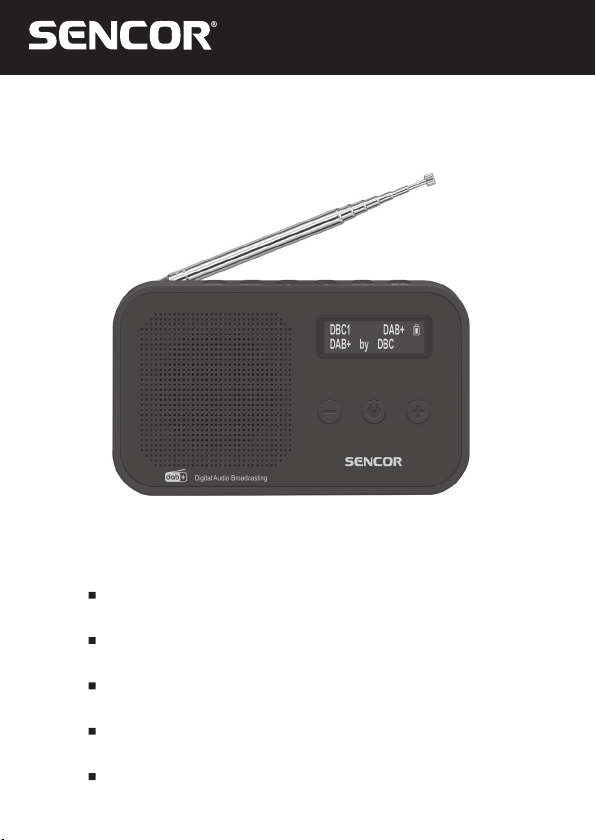
Sencor SRD 7200 Manuale utente

SRD 7200
EN User Manual RADIO
CZ Uživatelská příručka RÁDIO
SK Používateľská príručka RÁDIO
HU Felhasználói kézikönyv RÁDIÓ
PL Podręcznik użytkownika RADIO

EN – 2 EN – 3
SAFETY INFORMATION
IMPORTANT SAFETY INSTRUCTIONS
The exclamation mark symbol located inside an equilateral triangle
informs the user about important instructions for operation and
maintenance (repairs), which are found in the attached device
documentation.
WARNING: TO PREVENT ELECTRIC SHOCK, DO NOT REMOVE THE
PRODUCT COVER (OR THE BACK SIDE). THERE ARE NO SERVICEABLE
PARTS INSIDE - PLEASE REFER ALL REPAIRS TO QUALIFIED SERVICE
TECHNICIANS.
1. READ THE INSTRUCTIONS - Before starting to use this product, please
read all safety instructions and the user’s manual.
2. RETAIN THE INSTRUCTIONS - Keep the safety and operating
instructions for future use.
3. HEED WARNINGS - Please heed all warnings stated on the product and
in the user’s instructions.
4. OBSERVE THE INSTRUCTIONS - Please observe all instructions for
operation and use.
5. WATER AND MOISTURE - Do not use this product near water - for
example, near bathtubs, washbasins, kitchen sinks or laundry tubs, in
damp basements, near swimming pools, etc. This appliance must not be
exposed to dripping or splashing water and no objects lled with liquid,
such as vases, should be placed on it.
6. CLEANING - Prior to cleaning, please disconnect this product from your
power outlet. Do not use liquid cleaning agents or cleaning agents in
sprays. Use a damp cloth for cleaning.
7. VENTILATION - Openings and holes in the unit’s cabinet are designed
for ventilation to ensure reliable operation of the product and its
protection from overheating. These openings must not be blocked or
covered. These openings must never be blocked by placing the product
on bed, sofa, rug or other similar surface. Do not place this product in
an enclosed space, such as a bookcase or rack, unless required by the
manufacturer's instructions or proper ventilation is provided.
8. ACCESSORIES - Use only manufacturer recommended accessories.
9. ENERGY SOURCES - Use only the power source specied on the type
plate to power this product. If you are in doubt about the type of the
power sources in your home, contact your vendor or the local energy
company. For products that use the built-in battery power, please follow
the instructions in the user’s manual.

EN – 3
10. IF THE DEVICE IS TO BE LEFT UNUSED - If you plan to leave
your device unused for a prolonged period of long time, unplug the
product's power cord and turn the power switch (OFF).
11. ENTRY OF FOREIGN OBJECTS AND LIQUIDS - Never push objects
of any kind into this product through openings as they may touch
dangerous voltage points or short out parts which could result in a re or
electric shock. Protect this product from being spilt by liquids.
12. HEAT - This device must be kept out of sources of heat such as heaters,
convection heaters, stoves or similar appliances (including ampliers)
that produce heat.
13. Position the power cord so that it cannot be stepped on or pinched,
especially at plugs, convenience receptacles, and the point where they
exit from the apparatus.
14. REPAIRS - No not attempt to repair this product by yourself as opening
the cabinet and removing the covers may expose you to a dangerous
voltage or other risk. Please refer all repairs to qualied service
technicians.
15. The device must not be exposed to dripping or splashing water.
16. Where the plug of the socket adapter is used to disconnect from the
power supply, this disconnecting device must remain easily accessible.
17. WARNING: Do not open. There are no user serviceable parts inside.
Please refer all repairs to qualied technicians.
18. WARNING: Never grease any part of this device.
19. WARNING: Place this unit on at, rm and stable surface.
20. WARNING: Never put this device on other electrical equipment.
21. WARNING: Keep this unit out of direct sunlight, open ames and heat
sources.

EN – 4 EN – 5
SUPPLY CONTENT
A SRD 7200 UNIT
B Power/charging cable
C User’s manual

EN – 5
Equipment description:
1 SCAN – search available stations
2 PRESET – set presets
3LEFT ( TUNING - ) – switch to the previous station
4RIGHT ( TUNING + ) – switch to the next station
5SELECT– select (conrm the choice) / snooze the alarm
6 INFO/MENU – enter the menu
7 Rod antenna
8 Loudspeaker
9 VOLUME ( – ) – volume down
10 POWER/MODE – on/o button / change power supply
(FM / DAB)
11 VOLUME ( + ) – volume up
12 Display
13 Headphone socket mini jack (3.5 mm)
14 Power/charging socket (DC 5 V)

EN – 6 EN – 7
OPERATING INSTRUCTIONS
Battery power ((built-in rechargeable battery)
Connect the device by inserting the charging cable into the DC
5 V IN connector and inserting the other end into your charging
adapter. The charging time is approximately 3 hours depending on
your charging adapter specications. Charging will be indicated on
the device display.
Power adapter
To use an external power supply, use your 5 V power adapter with
USB input and connect the connecting power cable to port “13”.
Notice:
Do not charge the battery with the power adapter for more than
24 hours.
If you have not used this unit for a long time, the rechargeable
battery may be completely drained. After prolonged inactivity, we
recommend charging the battery for at least 5 hours.
Your power adapter should meet the following specications:
5 V / 1 A.
Turning on the radio
1. Use a charged rechargeable battery for power or connect the
unit to a mains adapter
2. Press and hold the POWER button to start DAB/FM mode
3. In DAB/FM mode, press the POWER button once to switch
to standby mode or press and hold the POWER button for
2 seconds to switch the unit on/o.
Notice:
Completely switching o the device will clear the set values. It is
recommended to put the device in standby mode.

EN – 7
DAB mode
Automatic scan
1. Adjust the length and angle of the antenna for best reception.
2. Press the POWER button to turn on the device.
3. When the radio is connected to a power source and turned on
for the rst time, DAB mode will be selected automatically and
the quick scan of the DAB channels will be launched to nd
available stations. Please wait until this process is nished.
4. The rst launch and station search will be in English. To
change the user language, press and hold the INFO/MENU
button Press the LEFT ( )or RIGHT ( ) button to select
LANGUAGE, conrm with the SELECT button, select the
desired language and conrm with the SELECT button.
5. Press the LEFT ( ) or RIGHT ( ) button to select the desired
station.
6. Press SCAN to completely scan available channels again.
Manual scan
1. Hold down the INFO/MENU button, and select Manual Tuning,
then press the SELECT button.
2. Press the LEFT ( ) or RIGHT ( ) button to select the desired
channel (5A-13F) and press the SELECT button to select that
channel.

3. Select a station using the LEFT ( ) or RIGHT ( ) button.
FM radio
1. Press and hold the POWER button for 2 seconds to switch
on the device.
2. Press POWER to select the FM mode.
3. Select a station using the LEFT ( ) or RIGHT ( ) button.
4. Or press the SCAN button to start automatic tuning.
• Press SCAN once to search for next station forward.
• Hold down SCAN once to search for previous station
backward.
5. Adjust the sound volume using the VOLUME + or VOLUME –.

EN – 8 EN – 9
DAB/FM radio station presets:
You can store up to 20 radio stations in memory. You can erase
a stored frequency from the memory by storing other frequency in
its position.
1. Tune a required station in the DAB mode.
2. Hold down the PRESET button until “Preset” (Preset Storage)
appears with the number 1–20 (1–20 is the preset position
number)
The preset number is empty, “Preset” (Preset Empty) will be
shown.
If a station is stored at a given position, that station’s frequency
will be shown.
3. Press the LEFT ( ) or RIGHT ( ) button to select the desired
memory location.
4. Press SELECT once to conrm and store the selected station.
5. Listening to a preset station:
• Press PRESET once.
• Press the LEFT ( ) or RIGHT ( ) button to select the desired
station and press the SELECT button to conrm.
Setting the alarm
1. In stand-by mode
2. Press and hold the Info/Menu button. Press the LEFT ( ) or
RIGHT ( ) button to select SET ALARM. Press the LEFT ( ) or
RIGHT ( ) button to select Alarm 1 / Alarm 2 (ashes ON/OFF).
3. Press the LEFT ( ) or RIGHT ( ) button to select OFF or ON.
Press SELECT to conrm.
4. Set the clock by pressing the LEFT ( ) or RIGHT ( ) button
while the display is still ashing. Press SELECT to set the
minutes.
5. Set the minutes by pressing the LEFT ( ) or RIGHT ( ) button
while the display is still ashing. Press SELECT to conrm.
6. Alarm mode: Daily, Once, Weekends, Weekdays will ash.
Press the LEFT ( ) or RIGHT ( ) button to select the desired
alarm mode and press the SELECT button to conrm.

EN – 9
7. Alarm type: BEEPER, FM, DAB options will ash. Press the
LEFT ( )or RIGHT ( ) button to select the desired alarm type
and press the SELECT button to conrm.
8. Press the LEFT ( ) or RIGHT ( ) button to select the desired
alarm type and press the SELECT button to conrm.
Snooze function
1. When the alarm clock goes o, you can cancel it temporarily by
pressing SELECT/ SNOOZE. The alarm clock goes o again in
9 minutes. (The snooze interval is 9 minutes).
2. The Snooze will repeat until you press POWER .
Sleep timer
1. In stand-by mode
2. Press and hold the INFO/MENU button. Press the LEFT ( ) or
RIGHT ( ) button to select SLEEP.
3. Press the LEFT ( ) or RIGHT ( ) button to select OFF or the
amount of time the device will be o, 10minutes, 30minutes,
60minutes, 90minutes. Press SELECT to conrm.
Restoring factory defaults
In DAB or FM mode, press and hold the INFO/MENU button, preset
SELECT to open “Factory Reset” and display the “No” or “Yes”
options. Press the LEFT ( ) or RIGHT ( ) button to select “Yes” and
press the SELECT button to conrm – the device will reset to its
original settings.
Volume
Adjust the sound volume using the VOLUME + or VOLUME –
buttons.
Headphone connection
You can connect headphones with a 3.5mm connector to the “14”
jack. The speaker will be automatically muted.

EN – 10 EN – 11
Locking the buttons
Press and hold the SELECT button for ve seconds to activate the
button lock feature (lock icon appears on the display), which locks
all buttons. Press and hold the SELECT button for ve seconds to
deactivate the button lock feature (lock icon will disappear).
Questo manuale è adatto per i seguenti modelli
1
Indice
Altri manuali Sencor Radio

Sencor
Sencor SRD 7800 Manuale utente

Sencor
Sencor SIR 5000WDB Manuale utente

Sencor
Sencor SPT 227 Manuale utente

Sencor
Sencor SRD 215 B Manuale utente

Sencor
Sencor SPT 233 Manuale utente

Sencor
Sencor SMR 601 Manuale utente

Sencor
Sencor SRD 15 B Manuale utente

Sencor
Sencor SRD 1100 Manuale utente

Sencor
Sencor SMR 131 Manuale utente

Sencor
Sencor SRD 6600 DAB+ Manuale utente