
Sencor SMP ATV2 Manuale utente

SMP ATV2
EN User Manual Android TV box
CZ Uživatelská příručka Android TV box
SK Používateľská príručka Android TV box
HU Felhasználói kézikönyv Android TV box
PL Podręcznik użytkownika Android TV box

EN 1
EN
Table of contents
Copyright © 2022, Fast ČR, a. s. Revision 06/2022
Table of contents
Safety Instructions................................................................................2
Introduction............................................................................................. 4
Declaration.............................................................................................. 4
Supply content ...................................................................................... 4
1. General instructions ..................................................................5
2. Device description .....................................................................6
3. Input peripheral devices...........................................................8
4. Remote control...........................................................................8
5. Wiring diagram......................................................................... 10
6. Putting into operation and using ..........................................13
6.1 Putting into operation...................................................13
6.2 Advanced settings ........................................................ 16
6.3 Turning the unit on and off.........................................17
6.4 Applications.....................................................................17
6.5 Kodi ..................................................................................18
6.6 Bluetooth ....................................................................... 20
6.7 HDMI CEC ..................................................................... 20
6.8 Voice control ...................................................................21
6.9 Customizing the home screen channels
and sorting the applications .......................................21
7. Factory settings........................................................................22
8. Troubleshooting........................................................................23
9. Specifications............................................................................25

2 EN
EN
Copyright © 2022, Fast ČR, a. s. Revision 06/2022
Safety Instructions
Safety Instructions
This product has been designed with the utmost safety in mind.
However, incorrect use may lead to electric shock or fire. This is
why users should observe the following instructions when using
this device.
This device uses asemiconductor unit and contains no user
serviceable parts. Do not disassemble this device, otherwise you
are exposed to the risk of electric shock. If any damage to this
product occurs, please have this product repaired by aqualified
service technician.
Power source
Power supply of this unit must be match the serial plate data.
Heat source
Keep this unit out of heat sources like stove or direct sunlight.
Cleaning
Prior to cleaning, please disconnect power first. For cleaning, don’t
use liquid detergents or caustic liquids - just clean the unit with
asoft cloth.
Heavy objects
Do not place heavy objects on the unit, otherwise damage might
occur.
Connecting other devices
Before connecting other devices to this unit, please make sure to
disconnect power. Otherwise damage to the unit or personal injury
might occur.

EN 3
EN
Safety Instructions
Copyright © 2022, Fast ČR, a. s. Revision 06/2022
Faults to be repaired
If any of the following problems occurs, please disconnect power to
the unit and contact aqualified service technician.
A. Power cord or plug is damaged.
B. Liquids or other foreign objects have penetrated inside the
product.
C. If the unit does not work even if it’sbeing operated according
to the instructions, don’t press any buttons other than those
described in these instructions. Otherwise, damage to this unit
may occur along with amore demanding repair.
D. This unit has fallen on the ground from abig height.
E. Burns can be smelled from the product inside.
Maintenance
If you don’t have enough technical knowledge necessary to
maintain this unit, don’t attempt to repair it by yourself. By
removing the cover, you are exposed to arisk of electric shock.
If needed, please contact aqualified service technician.
Replacement of parts
If you need to replace any part of this unit, ask your service
technician to make areplacement for equal spare part models.
If other spare part models are used for replacement, serious
damage, electric shock or shortening the unit’slifetime may occur.
Safety check
When done with the maintenance, ask your service technician
to perform an on-site safety check to make sure that the
unit’soperation is safe.
Note:
Before using this product, read these instructions carefully and
keep it well for future use.

4 EN
EN
Copyright © 2022, Fast ČR, a. s. Revision 06/2022
Introduction
Introduction
Thank you for choosing our product. In this user’smanual you will
find the information necessary to operate your unit easily. Please
read it carefully before first use and save for future reference.
Declaration
We have tried to obtain the most up-to-date information regarding
this product. No warranty of this user’smanual content is provided
and we do not assume any implied warranties. The information
provided in this manual are mere instructions to operate the unit.
We reserve the right to make corrections, changes and translations
in this user'smanual without prior notice. For this reason, we
recommend that you regularly visit our website and acquire the
latest information.
Supply content
Box
1 pc - TV Box
1 pc - Remote control
1 pc - Power adapter
1 pc - HDMI cable
1 pc - User’smanual

EN 5
EN
General instructions
Copyright © 2022, Fast ČR, a. s. Revision 06/2022
1. General instructions
USB connector, notes on using the unit
USB memory device must be inserted directly into the unit.
To prevent data transmission failure or interference, do not use
USB extension cables. If you want to use external hard discs or
other portable storage device, please connect them before turning
the unit on. Connecting when the unit is powered on may lead
to restarting the unit and losing unsaved data or cause playback
interruption.
Electrostatic discharges may cause the unit to malfunction. In such
an event, the user must restart the unit.
Before using aUSB memory device, test its ability to communicate
with the unit, its data reading and writing speed.
To achieve maximum reading speed we recommend that you
keep disk space defragmented. Use FAT32 or NTFS file system,
single partition and without protection. If reading and writing on
the USB flash disk is discontinuous, undesirable effects may occur
such as partial image loss (block noise) or complete image loss,
audio defects, and in extreme cases the operation will be stopped.
Unexpected behaviour of the connected memory device, or the
presence of viruses or other damaging software may cause the
functions of the appliance to stop working, necessitating arestart.
The USB connector is the standard type and is not able to power
aUSB device with ahigh power usage (e.g. hard disk drives HDD).
Use devices with independent power supplies and power them
from their own power supplies.
The unit has been designed to achieve maximum compatibility
with memory devices. With respect to the variety of devices on
the market, it is not possible to guarantee compatibility with every
USB device. In the event of difficulties, try formatting the memory
device directly in the appliance. If problems persist, use adifferent
memory device.

6 EN
EN
Copyright © 2022, Fast ČR, a. s. Revision 06/2022
Device description
2. Device description

EN 7
EN
Device description
Copyright © 2022, Fast ČR, a. s. Revision 06/2022
A Front side 1 Status LED
- red indication (sleep)
- blue indication (power on)
- multi-colour indication (active voice
control, changes in the device
settings)
2 IR remote control receiver
B Rear side 3 5V DC power socket
4 HDMI port
5 Ethernet RJ 45
6 Audio and analogue output
C Right side 7 Memory card slot
8 USB A3.0
9 USB A2.0
8 EN
EN
Copyright © 2022, Fast ČR, a. s. Revision 06/2022
Input peripheral devices
3. Input peripheral devices
USB
The device supports portable hard drives and USB storages which
can be connected via USB 2.0 or USB 3.0. To facilitate the device
control, you can use PC keyboards and mice without advanced
functions such as special game button, sound control keys etc.
Micro SD card
Next to the USB ports, there is aslot to insert amicro SD card of
up to 64 GB. Insert the card into the unit with the contacts pointing
up.
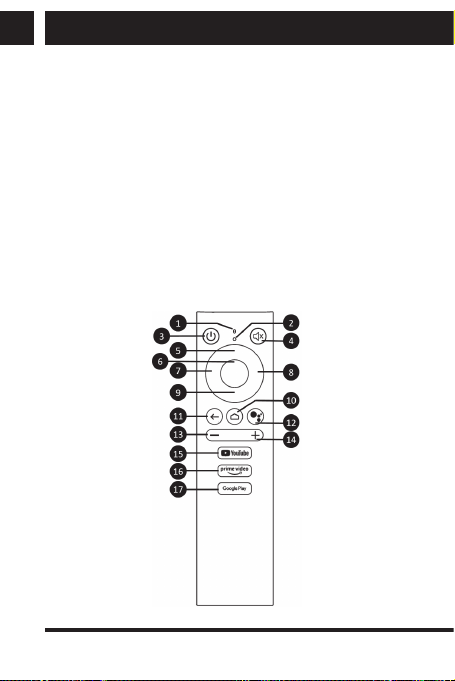
4. Remote control
Buttons and their functions
Questo manuale è adatto per i seguenti modelli
1
Indice
Altri manuali Sencor Decoder


