Sferalabs Exo Sense Pi Manuale utente

Exo Sense Pi User Guide
May 2021
Revision 002
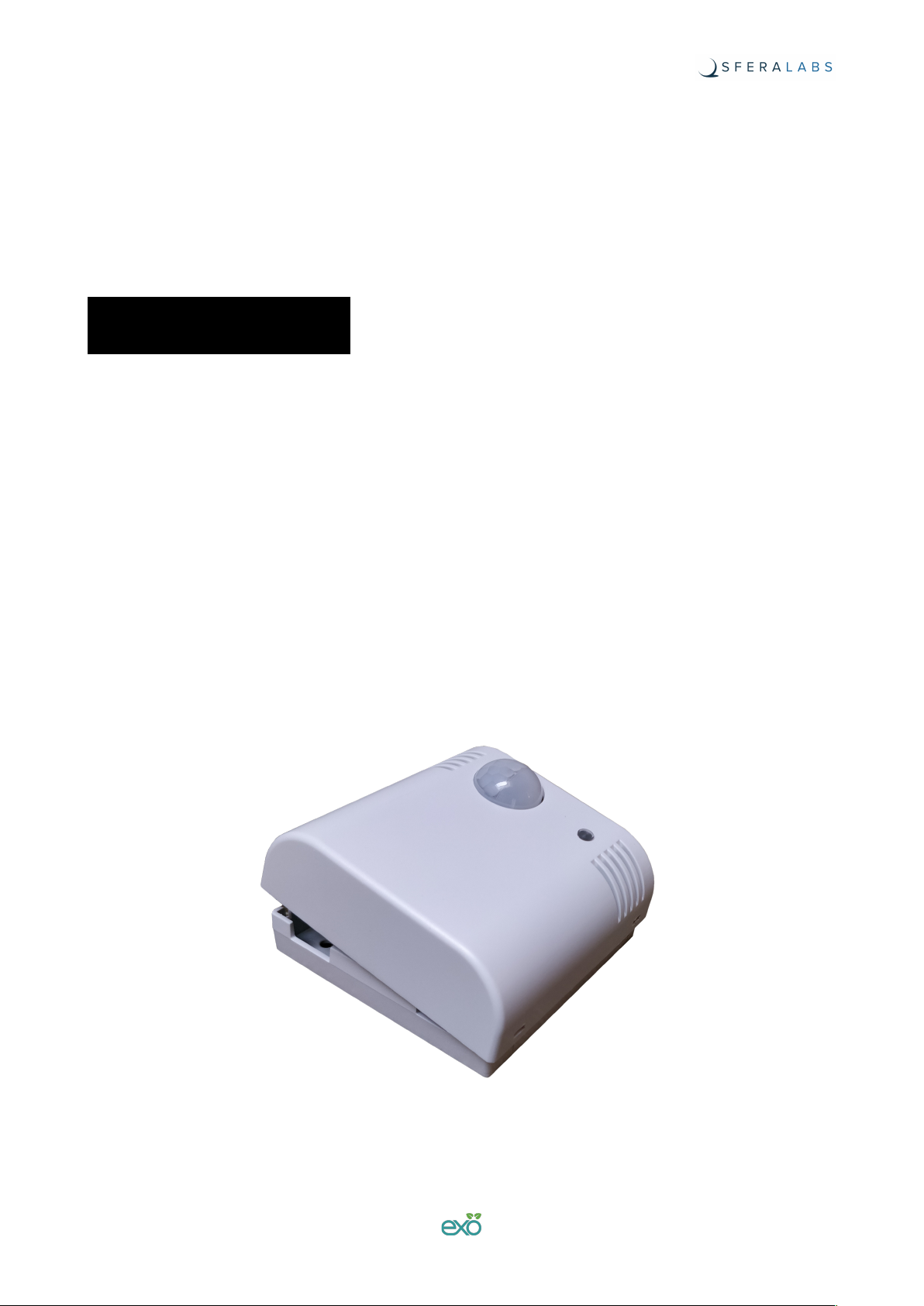
ESCB10X Exo Sense Pi
ESCB10E Exo Sense Pi with earthquake sensor
ESCB10X4101008 Exo Sense Pi with CM4 Wireless, 1GB RAM, 8GB eMMC
ESCB10X4102016 Exo Sense Pi with CM4 Wireless, 2GB RAM, 16GB eMMC
ESCB10X4102000 Exo Sense Pi with CM4 Wireless, 2GB RAM, Lite
!

Safety information 4
Qualified personnel 4
Hazard levels 4
Safety instructions 5
General safety instructions 5
Battery 5
Device identification 6
Introduction 7
Features 8
Hardware setup 9
Opening the case 9
Closing the case 10
Raspberry Pi Compute Module 4 board installation 10
Replacing the RTC backup battery 11
Connections 12
Power supply 13
Software installation and configuration 14
Raspberry Pi OS Kernel module 14
Calibration 15
Raspberry Pi OS Real Time Clock installation 15
Features details 17
Temperature, humidity and air quality sensors 17
Light sensor 18
Microphone 18
PIR motion sensor 19
TTLx/DIx: TTL input/output or generic digital inputs 19
DO1: Open collector output 21
Buzzer 21
LEDs 21
RS-485 serial port 21
Real Time Clock 22
ATECC608A secure element 23
Earthquake sensor module (optional) 23
Dedicated GPIO pins 24
I²C bus addresses 24
Block diagram 25
1
Exo Sense Pi User Guide

Board layout 26
Technical specifications 27
Dimensions 29
Disposal 30
Installation and use restrictions 30
Standards and regulations 30
Safety instructions 30
Set-up 30
Conformity Information 31
EU 31
USA 31
CANADA 32
RCM AUSTRALIA / NEW ZEALAND 32
Compliance information for Raspberry Pi CM4 32
EU 32
USA 32
CANADA 32
2
Exo Sense Pi User Guide

Be sure to always remove the power supply before installing or
removing the CM4 board inside Exo Sense Pi.
Exo Sense Pi must be operated with the plastic case installed.
Follow all applicable electrical safety standards, guidelines,
specifications and regulations for installation, wiring and operations of
Exo Sense Pi.
Carefully and fully read this Exo Sense Pi user guide before installation.
Exo Sense Pi is not authorised for use in safety-critical applications where a failure of the
product would reasonably be expected to cause personal injury or death. Safety-critical
applications include, without limitation, life support devices and systems, equipment or
systems for the operation of nuclear facilities and weapons systems. Exo Sense Pi is
neither designed nor intended for use in military or aerospace applications or
environments and for automotive applications or environment. Customer acknowledges
and agrees that any such use of Exo Sense Pi is solely at Customer's risk, and that
Customer is solely responsible for compliance with all legal and regulatory requirements in
connection with such use.
Sfera Labs S.r.l. may make changes to specifications and product descriptions at any time,
without notice. The product information on the web site or materials is subject to change
without notice.
Please download and read the Sfera Labs Terms and Conditions document available at:
http://www.sferalabs.cc
Exo and Sfera Labs are trademarks of Sfera Labs S.r.l. Other brands and names may be
claimed as the property of others.
#
Copyright © 2021 Sfera Labs S.r.l. All rights reserved.!
3
Exo Sense Pi User Guide

Safety information
Carefully and fully read this user guide before installation and retain it for future reference.
Qualified personnel
The product described in this manual must be operated only by personnel qualified for the
specific task and installation environment, in accordance with all relevant documentation
and safety instructions. A qualified person should be capable of fully identifying all
installation and operation risks and avoid potential hazards when working with this product.
Hazard levels
This manual contains information you must observe to ensure your personal safety and
prevent damage to property. Safety information in this manual are highlighted by the safety
symbols below, graded according to the degree of danger.
Indicates a hazardous situation which, if not avoided, will result in death or serious
personal injury.
Indicates a hazardous situation which, if not avoided, may result in death or serious
personal injury.
Indicates a hazardous situation which, if not avoided, can result in minor or moderate
personal injury.
Indicates a situation which, if not avoided, can result in damage of property.
DANGER
WARNING
CAUTION
NOTICE
4
Exo Sense Pi User Guide

Safety instructions
General safety instructions
Protect the unit against moisture, dirt and any kind of damage during transport, storage
and operation. Do not operate the unit outside the specified technical data.
Never open the housing. Do not obstruct cooling of the unit. Keep out of the reach of
children.
Life threatening voltages are present within and around an open control cabinet.
When installing this product in a control cabinet or any other areas where dangerous
voltages are present, always switch off the power supply to the cabinet or equipment.
Risk of fire if not installed and operated properly.
Follow all applicable electrical safety standards, guidelines, specifications and regulations
for installation, wiring and operations of this product.
Ensure that the product is properly installed and ventilated to prevent overheat.
The connection of expansion devices to this product may damage the product and other
connected systems, and may violate safety rules and regulations regarding radio
interference and electromagnetic compatibility.
Use only appropriate tools when installing this product. Using excessive force with tools
may damage the product, alter its characteristics or degrade its safety.
Battery
This product uses a small lithium non-rechargeable battery to power its internal real time
clock (RTC).
WARNING
WARNING
NOTICE
5
Exo Sense Pi User Guide

Improper handling of lithium batteries can result in an explosion of the batteries and/or
release of harmful substances.
Worn-out or defective batteries can compromise the function of this product.
KEEP OUT OF REACH OF CHILDREN. Swallowing may lead to serious injury or death in
as little as 2 hours due to chemical burns and potential perforation of the esophagus.
Immediately see doctor.
Replace the RTC lithium battery before it is completely discharged. Replace the battery
every 5 years even if the battery is still working properly. The lithium battery must be
replaced only with an identical CR1025 Lithium / Manganese Dioxide (Li/MnO2) battery.
Do not throw lithium batteries into fire, do not solder on the cell body, do not recharge, do
not open, do not short-circuit, do not reverse polarity, do not heat above 100°C and protect
from direct sunlight, moisture and condensation.
Dispose of used batteries according to local regulations and the battery manufacturer's
instructions.
Device identification
The device can be identified with the information provided in the rating and identification
plate, permanently attached to the internal side of the front cover case.
EXAMPLE RATING AND IDENTIFICATION PLATE
WARNING
6
Exo Sense Pi User Guide

Introduction
Exo Sense Pi is an extremely versatile indoor environment sensor. It combines the
computing power and wireless capabilities of the Raspberry Pi Compute Module 4 with
several environmental sensors and input/output lines.
Exo Sense Pi embeds temperature, humidity, air quality, light and PIR-based motion
detection sensors, as well as a microphone for ambient noise measurements and audio
recording. Two digital input/output lines and an open-collector output line are available on
the terminal block. A real time clock module with battery back-up is also standard. It can
optionally have a factory-installed earthquake sensor module.
An ESD-protected RS-485 bus is available for wired serial communication using the
industry standard Modbus protocol or any other half-duplex serial protocol.
You can use your preferred Compute Module board. Both the Lite versions (without
eMMC) and all versions with embedded eMMC are supported.
7
Exo Sense Pi User Guide

Features
The Exo Sense Pi key features are:
✓10÷28Vdc power supply, with surge and reverse polarity protection, and 1.1A resettable
fuse
✓compatible with all versions of Raspberry Pi Compute Module 4
✓Sensirion SHT40 temperature and humidity sensor
✓Sensirion SGP40 air quality (Volatile Organic Compounds) sensor
✓Texas Instruments OPT3001 digital ambient light sensor (ALS) with high-precision
human-eye response
✓Panasonic EKMC PIR motion sensor
✓TDK ICS-43432 digital I²S microphone for audio recording and environment noise
detection
✓two digital inputs for potential-free contacts or TTL level input/output with 1-Wire, I²C
and Wiegand support
✓one open collector output with a maximum output current of 100mA, protected against
over-current and short circuits
✓standard RS-485 interface to the Compute Module UART serial lines, with electrostatic
discharge (ESD) protection
✓real time clock with replaceable CR1025 Lithium / Manganese Dioxide back-up battery
✓Microchip ATECC608 secure element chip
✓GPIO/PWM-controlled piezoelectric buzzer, for acoustic feedback
✓GPIO-controlled LED
✓hidden micro USB port with Micro-AB receptacle (to flash the Raspberry Pi Compute
Module eMMC), can be accessed opening the case
✓hidden microSD slot to install the external flash memory of the Raspberry Pi Compute
Module 4 Lite, can be accessed opening the case
✓Optional external 10/100 Mbps Ethernet interface with PoE support (IEEE 802.3at
Type$1)
✓Optional earthquake sensor module
✓80x80 mm wall mount ABS case with fast snap-in terminal block for easier installation.
8
Exo Sense Pi User Guide

Hardware setup
For the initial setup, the plastic wall mount case must be removed to access the circuit
board and internal connectors.
The case also needs to be opened to connect insert the µSD card or plug the microUSB
connector, and if the factory configuration of the internal jumpers for the RS-485
termination resistors or digital input configuration must be changed.
Before opening the Exo Sense Pi case, disconnect all power sources and any connection
to external devices.
Opening the case
Follow these steps, in the exact order, to open the case:
1. Use a small flat screwdriver to gently separate the front plastic cover from the wall
mount back
2. The circuit board should remain attached to the front plastic cover; pay attention not to
drop the circuit board, as it could be not firmly attached
3. With a small flat screwdriver gently separate the circuit board from the front cover. In
some cases the circuit board could separate from the front case and remain connected
to the terminal block.
SEPARATE THE FRONT PLASTIC COVER FROM THE WALL MOUNT BACK
NOTICE
9
Exo Sense Pi User Guide
Questo manuale è adatto per i seguenti modelli
5
Indice
Altri manuali Sferalabs Unità di controllo
Manuali Unità di controllo popolari di altre marche

Festo
Festo Compact Performance CP-FB6-E Manuale elenco delle parti

Elo TouchSystems
Elo TouchSystems DMS-SA19P-EXTME Manuale utente

JS Automation
JS Automation MPC3034A Manuale utente

JAUDT
JAUDT SW GII 6406 Series Guida rapida

Spektrum
Spektrum Air Module System Manuale utente

BOC Edwards
BOC Edwards Q Series Manuale utente