
SSSR Labs SM042 Manuale utente

A TI REF
5050
220
220
.1 uF
332J100
20.000
TL074CN
TL074CN
TL074CN
CD4011BE
CD40106BE
TL072P
TL072P
TL072P
LM393P
LF
442CN
SSSR Labs MCU Chip
KOTELNIKOV 1.2
CD4042BE
KP590KH5
AD7545A
SM042, Assembly Manual
PCB Version 1.2
SM042, Assembly Manual
PCB Version 1.2
Step 1: PCB Top Side
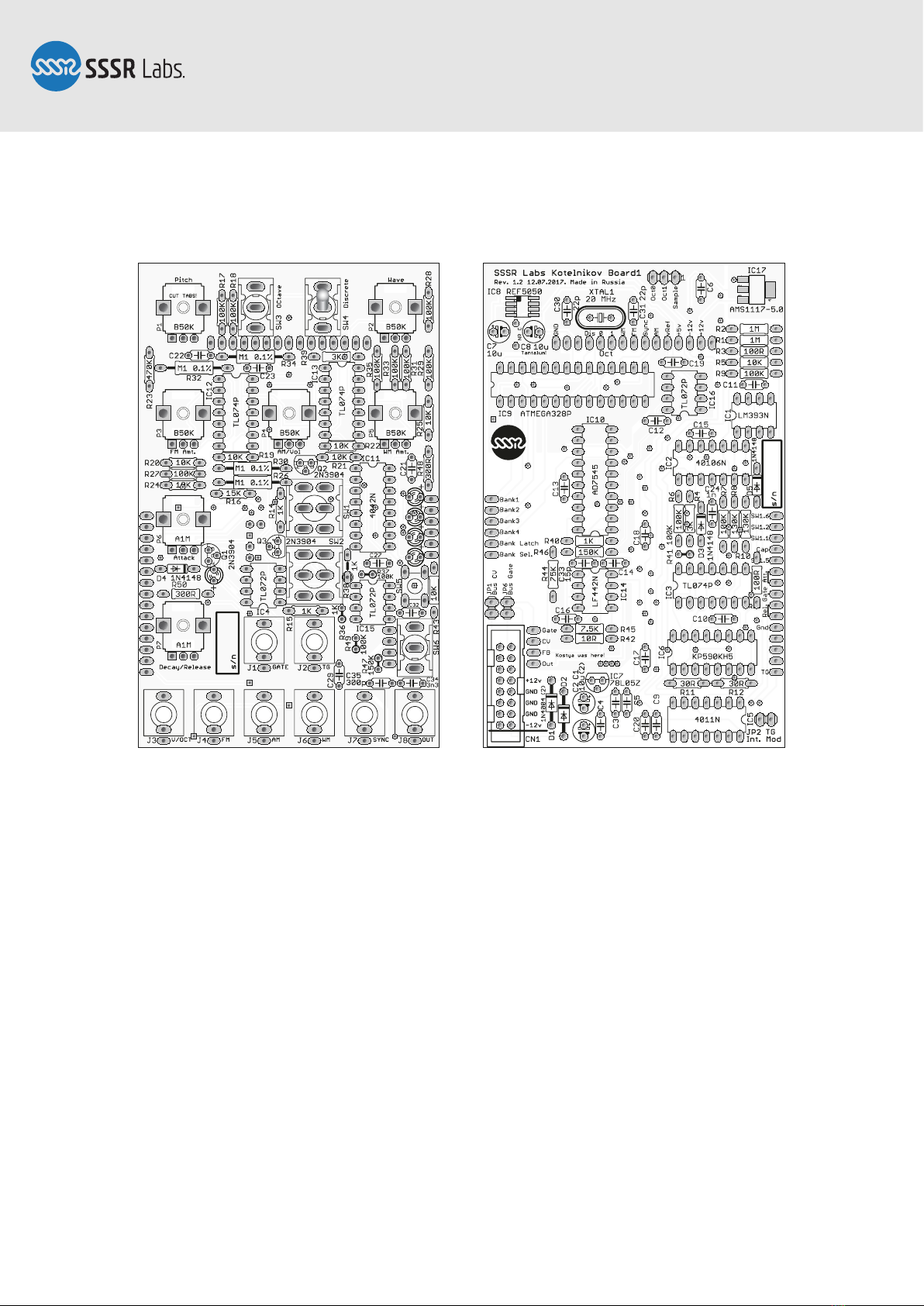
The SM042 DIY Kit contains two boards:
Circuit board 1. (Rear) This board consists of the main powering, VCO and TG circuitry.
Circuit board 2. (Front) This board contains interface circuitry and the linear scaling
circuitry for CV and reference voltage.
Most of the components have to be placed on the top side of both boards, but pin-
header connectors and couple of aluminium capacitors are have to be soldered to the
bottom side
The order of assembly briefly can be described like that: Install SMD components,
small diodes, horizontally placed resistors, IC sockets, small capacitors, the rest of
non-mechanical components, then LED, pin-headers and bottom-side capacitors, then
install all chips, power and jumper connectors, the tactile switch, then toggle
switches, potentiometers and jack sockets. The following manual will guide you
through the assembling process in details.
Page 2 of 18
A TI REF
5050
A TI REF
5050
Order of soldering
Key dot
SM042, Assembly Manual
PCB Version 1.2
Step 2: SMD Components
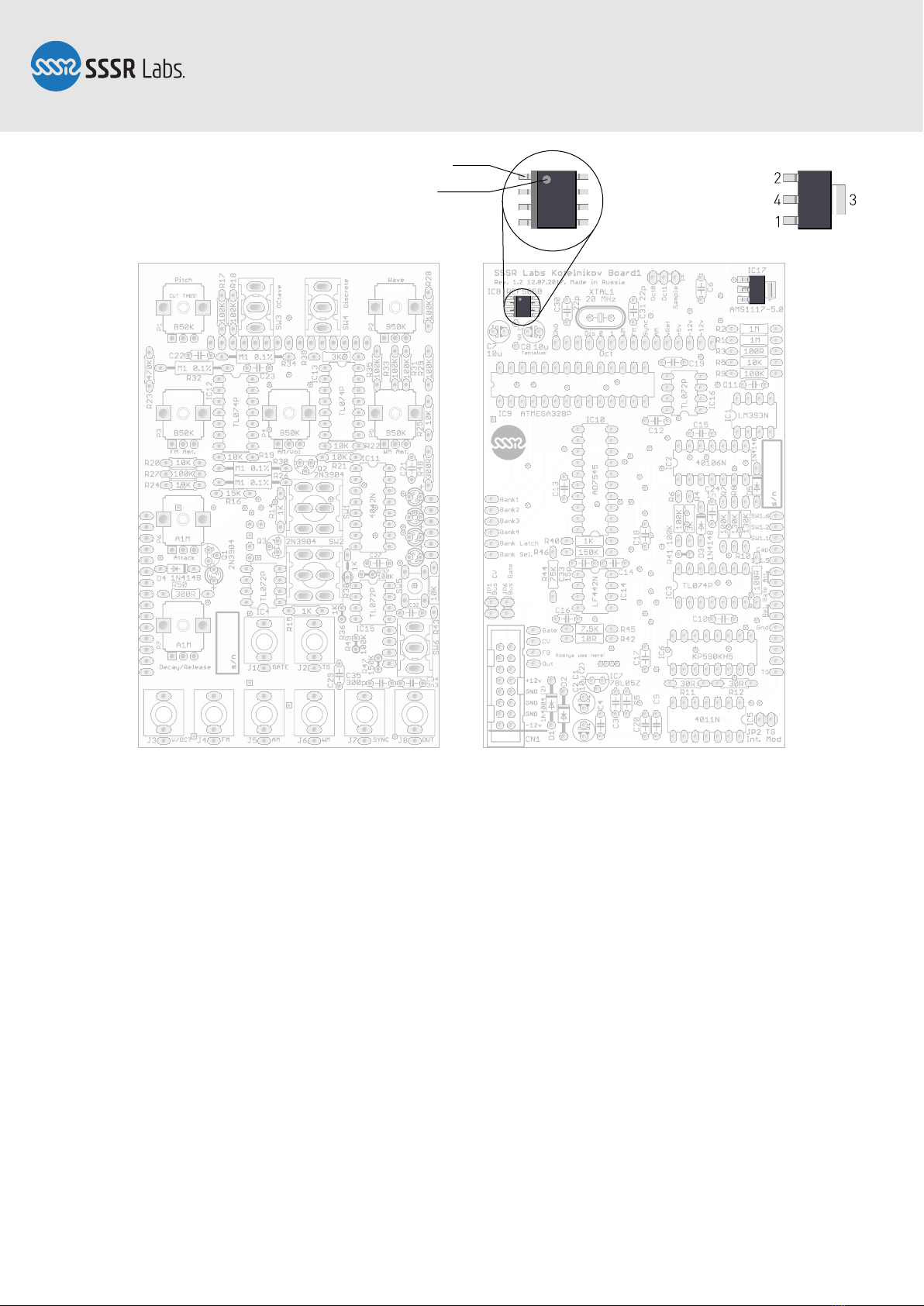
The AMS1117-5.0 and REF5050 are the only two SMD components in our DIY kit. Place
the AMS1117 chip accurately aligned to its footprint, then solder pins according to the
order given in the picture above. The pin 4 (heatsink) will require long heating up. Don’t
worry about the overheating, this component is designed to be heated seriously! Install
the REF5050 chip oriented as shown on the picture above. Solder one of the pins in a
corner, align the chip well, solder the opposite corner, then the remaining pins.
Page 3 of 18
Pin 1
A TI REF
5050
SM042, Assembly Manual
PCB Version 1.2
Step 3: Small Signal Diodes
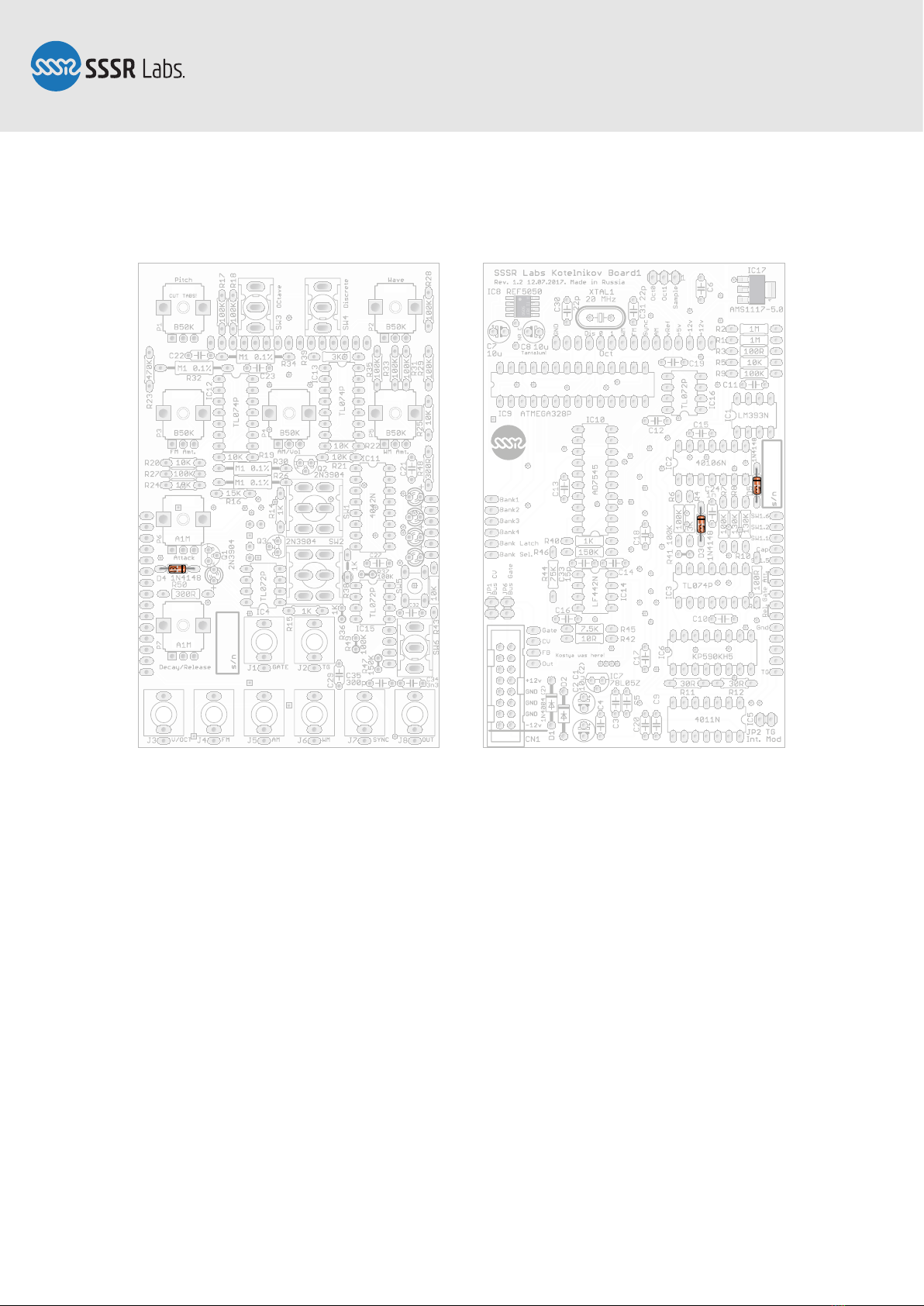
Find the thinnest components: a silicon small-signal diodes. Notice the polarity. The
black stripes indicating the cathodes must correspond with stripes on the PCB. Solder
all diodes to the top side of the PCB, then proceed to step 4.
Page 4 of 18

A TI REF
5050
Bend a bit
to the right
SM042, Assembly Manual
PCB Version 1.2
Step 4: Resistors
Install the resistors. You can use the above picture as the reference to verify values
before soldering.
Flip the PCB over, trim the pins and reflow and solder everything to the bottom side.
This technique is the best method to accurately and firmly solder axial components, so
it’s recommended to use it with all components allowing you access to the top side.
Page 5 of 18

A TI REF
5050
Reverse direction!Pin 1
Notch
SM042, Assembly Manual
PCB Version 1.2
Step 5: IC Sockets
Insert all DIP IC sockets. Please pay double attention to the correct orientation. The
default orientation for chips in the module is the notch turned to the top, or to the left,
but there are chips with other directions, marked by blue areas in the picture.
These sockets are very slippy, so it’s practical to gently bend their pins towards each
other to help them fixate in the holes while you’re flipping the board over and soldering
them. It’s recommended to solder just two pins in the opposite corners of each socket
and then reflow them while pushing the socket closer to the surface of the PCB. Then
solder the remaining pins.
Page 6 of 18
A TI REF
5050
SM042, Assembly Manual
PCB Version 1.2
Step 6: Bypass Capacitors
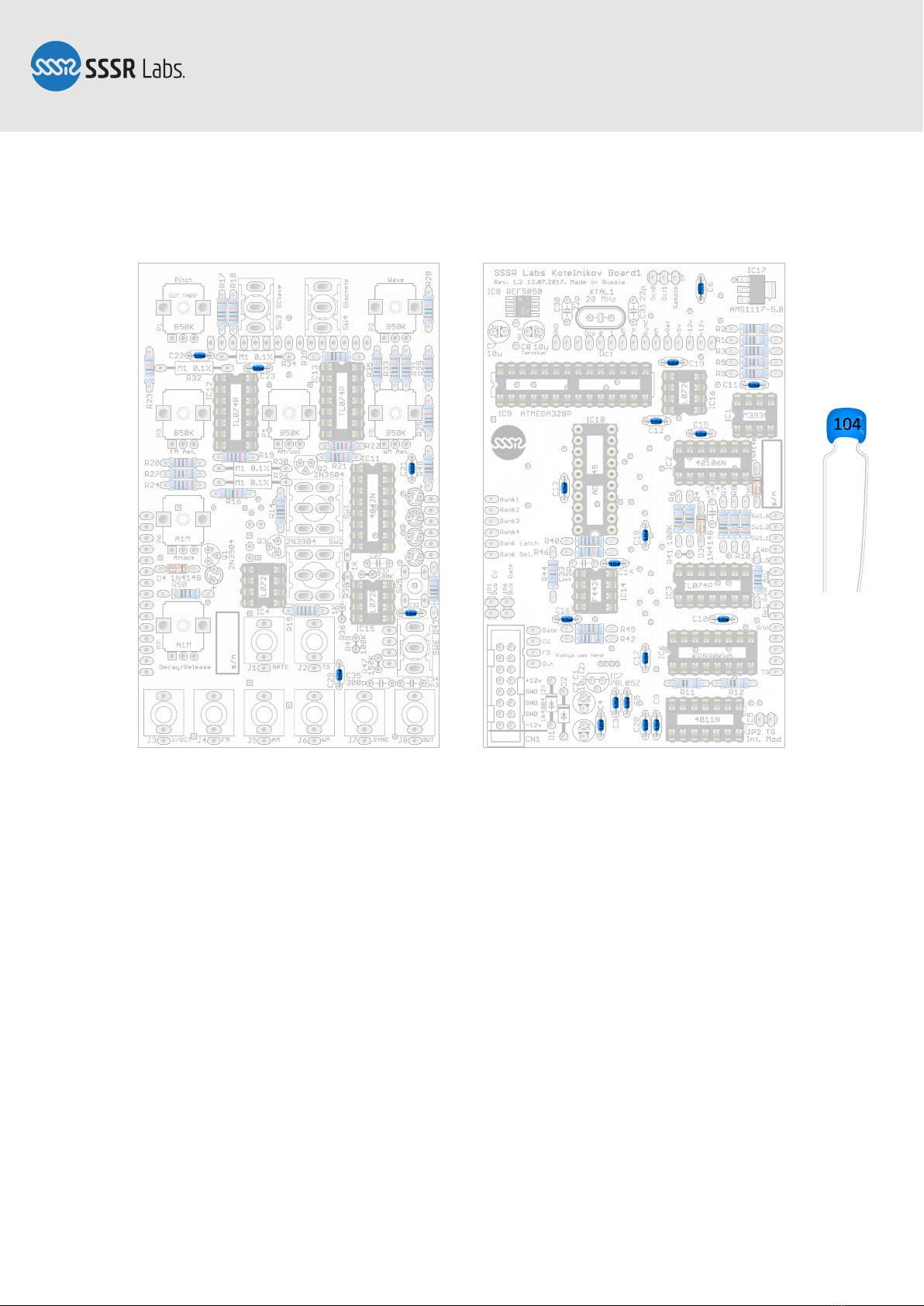
Install and solder the 100 nF bypass capacitors, labelled as “104”. There are total of 21
of them. In some early kits, the MuRata ceramic capacitors was replaced with Epcos
polyester film capacitors.
Page 7 of 18

A TI REF
5050
220
220
.1 uF
332J100
20.000
Identifying
capacitors:
22 or 220: 220 pF
.1μJ100
or μ10J100
or 104: 100 nF
331: 330 pF
(repl. for 300 pF)
15 or 150: 15 pF
1nJ100
or 102: 1 nF
332J100
or 332: 3.3 nF
SM042, Assembly Manual
PCB Version 1.2
Step 7: Other Small Capacitors And Quartz Crystal
Install other small capacitors. You can identify them by labels listed on the picture.
Also, it's good to know that there are two types of notation for a capacitor value.
Style 1: 3-digit. The first two digits should be read as they are, and then you need to
add as much zeroes as are indicated by the third digit, and interpret this as the value in
pF. 150 means 15 pF, 334 means 330000 pF (= 330 nF). Very simple.
Style 2: The value usually consists of 2 or 3 digits and a letter p, n or u (µ) indicating
the unit of the value. This letter actually stands in place of the decimal point, so 33n
means 33 nF, 3n3 means 3.3 nF, and n33 means 0.33 nF (= 330 pF). The following
“J100” on film capacitors indicates the tolerance class, and the voltage rating.
Page 8 of 18

A TI REF
5050
220
220
.1 uF
332J100
20.000
≤8 mm
≥3 mm
SM042, Assembly Manual
PCB Version 1.2
Step 8: Remaining Top-Side Components
Install precision 100K resistors into their places. They must be elevated above the
board as shown on the picture. This method of installation is required by the resistors'
design and it helps to keep values within tolerance. Then install rectifier diodes and
aluminium capacitors. All of those are all polarized components! As with the small-
signal diodes, cathodes of the rectifier diodes are marked with stripes on diodes and
footprints. All holes for the positive pins of electrolytic capacitors are marked with the
“+” sign. All positive pins on capacitors are longer than negative pins
Finally, install the vertically oriented resistors. The allowed height of the resistors
must be non greater than 8 mm to ensure that leads do not touch the surface of the
panel.
Page 9 of 18
A TI REF
5050
220
220
.1 uF
332J100
20.000
SM042, Assembly Manual
PCB Version 1.2
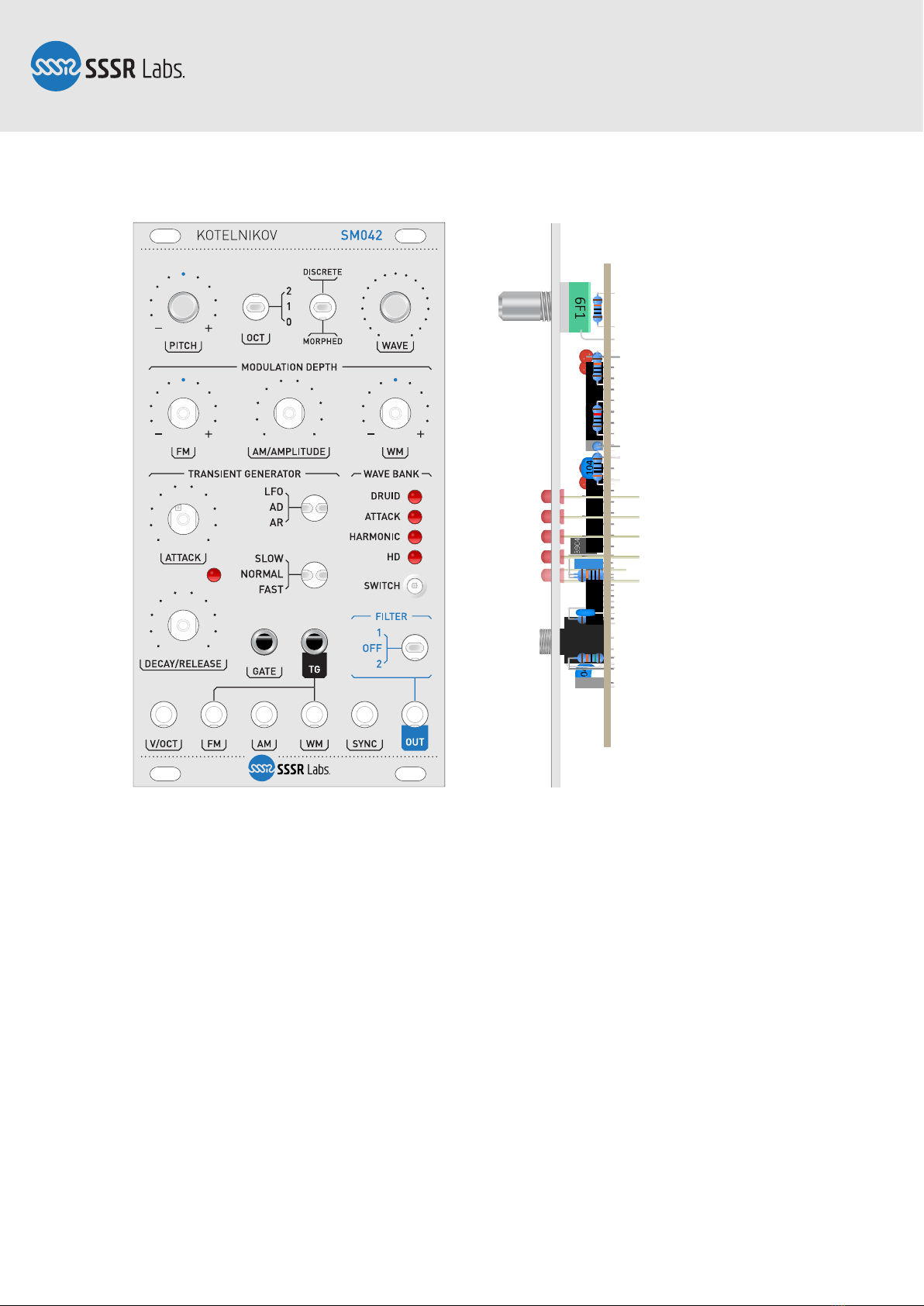
Step 9: LED
Take two potentiometers or toggle switches, and two jack sockets. Install them into
places for P1, P2 (SW3, SW4), J1 and J2 but do not solder them. Then insert five LEDs
keeping the correct polarity. Anodes are indicated by the “+” sign on the board and the
longer pins. Remove the film from the front panel if there's any, and install the panel
onto the board through the switches and jack sockets. Holding the panel, turn the
module upside down and let all diodes slip into their holes. Then solder them one by
one keeping the correct clamping of the panel and LEDs' height.
Now, take off the panel and proceed to the next step.
Page 10 of 18
Altri manuali SSSR Labs Unità di controllo

Manuali Unità di controllo popolari di altre marche

Festo
Festo Compact Performance CP-FB6-E Manuale elenco delle parti

Elo TouchSystems
Elo TouchSystems DMS-SA19P-EXTME Manuale utente

JS Automation
JS Automation MPC3034A Manuale utente

JAUDT
JAUDT SW GII 6406 Series Guida rapida

Spektrum
Spektrum Air Module System Manuale utente

BOC Edwards
BOC Edwards Q Series Manuale utente


