Stentofon 100 7007 000 Manuale utente

User Manual
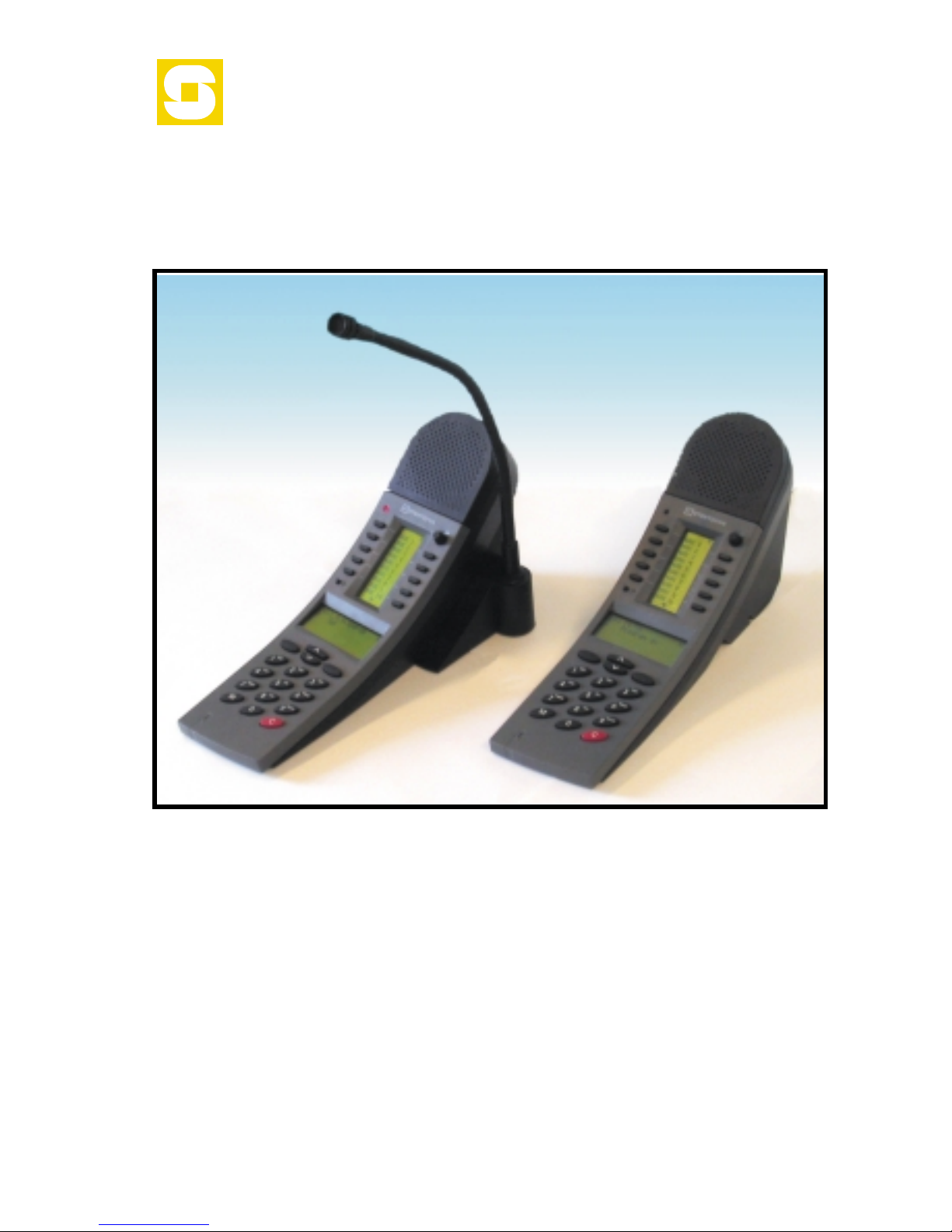
Master Station
Dual Display
100 7007 000
MI 30211 Eng
02-09
STENTOFON

MASTER STATION WITH
DUAL DISPLAY
100 7007 000 - 2 - MI 30211
02-09
Loudspeaker
Indicator lamp
Volume control
Direct access display
Direct access keys
Privacy button
Information display
Arrow keys
Selection keys
Dialing keys
M(anual) speech control
C(ancel)

INTRODUCTION
The STENTOFON Master Station with Dual Display is designed for table-top
mounting in office and bank/finance environments . An optional noise canceling
goose-neck microphone can be mounted in noisy areas.
·The station may use 20 or more Direct Access Keys (DAK) divided into
pages of 10 DAK keys with information text for each DAK on a 5-8 char-
acter display.
The standard is 2 DAK pages but may be more depending on system
size and configuration. Contact the STENTOFON supervisor in your
company.
·The dialing keys 2-9 have letters to be used for search facility in the in-
tercom directory and display text editing. The station has 4 specific navi-
gation keys used in menus.
·Information, guidance and menus are shown on a large 4 line graphic
display.
·Most functions and codes are the same as for the STENTOFON
stations in the InterGuard range. Special functions that require addi-
tional equipment are marked in the text where necessary.
·To benefit from the new features in the Dual Display Station, the AMC
card in your AlphaCom exchange must have SW version 900 or later. In
earlier versions the text in the DAK display can not be edited and the
info display will show two lines only.
You can check the AMC SW version by dialing 789.
Note that default directory numbers and time-out periods are used in this
guide. They may have been changed to meet the special requirements of your
AlphaCom installation. If you are in doubt, contact the STENTOFON supervi-
sor in your company.
100 7007 000 - 3 - MI 30211
02-09
The company reserves the right to modify designs and alter specifications without notice,
in pursuance of a policy of continuous improvement.

100 7007 000 - 4 - MI 30211
02-09
TABLE OF CONTENTS
INTRODUCTION ...............................3
Table of Contents ...............................4
MAKING INTERCOM CALLS ......................6
Starting and ending a hands-free call.................6
Calling to and from noisy rooms ....................6
Private mode ..................................6
Adjusting the sound level .........................7
Muting the microphone...........................7
If someone is not at their station....................7
Waiting for a busy station to become free .............8
Re-dial .......................................8
SEARCHING FOR A PERSON ......................8
Voice paging - calling a group of stations ..............8
Answering voice paging (meet me) ..................9
Pocket paging ..................................9
Search list.....................................9
Automatic search ..............................10
PRIORITIES ..................................10
Priority features ...............................10
Priority setting for the station .....................10
ABSENCE MESSAGES...........................11
Leaving an absence message at your station ..........11
Leaving an absence message from a remote station .....11
Removing an absence message ....................11
VOICE / TEXT MESSAGES .......................12
Leaving a call-back message ......................12
Answering a call-back message ....................12
Sending a voice / text message to another station ......12
Removing a message / reading back messages .........12
Reading messages from a remote station.............13
VOICE HELP FEATURE ..........................13
Voice help ....................................13
TRANSFER FEATURES ..........................14
Inquiry call ...................................14
Call transfer ..................................14
Call Forwarding................................14
Follow me ....................................15
REMINDER - WAKE-UP CALL .....................15
RE-DIAL .....................................15
CALL REQUEST ...............................16

100 7007 000 - 5 - MI 30211
02-09
RADIO / MUSIC PROGRAMS .....................17
Selecting a program ............................17
Switching off a program .........................17
Stepping through available programs................17
Turning on/off programs to other stations ............17
CONFERENCE ................................18
DOOR OPENING ..............................18
TELEPHONE CALLS ............................19
Making an internal telephone call ..................19
Making an external telephone call ..................19
Calling from a telephone to an intercom station .......20
Receiving a telephone call at your station ............20
POCKET PAGING ..............................21
Paging with answer option........................21
Answering paging (meet me)......................22
Paging without answer option .....................22
Paging without calling an intercom station............23
DISPLAY INFORMATION ........................24
Direct access key display .........................24
Information display .............................24
Idle station ...................................25
Menu ...............................................25
Name ...............................................25
Help messages ................................25
Subscriber directory ............................26
Name search ............................................26
Traditional search .........................................27
Check Station Identity ..........................27
PROGRAMMING DIRECT ACCESS KEYS..............28
Program DAK call numbers and functions ............28
Delete DAK call numbers and functions..............28
EditaDAKkeytext ............................29
GOOSENECK MICROPHONE MODULE .............30
Mounting ....................................30
Mini manual ..................................31

MAKING INTERCOM CALLS
Starting and ending a hands-free call
To call another station:
·Dial the station number
or, if the number has been preprogrammed:
·Press the direct access key (DAK)
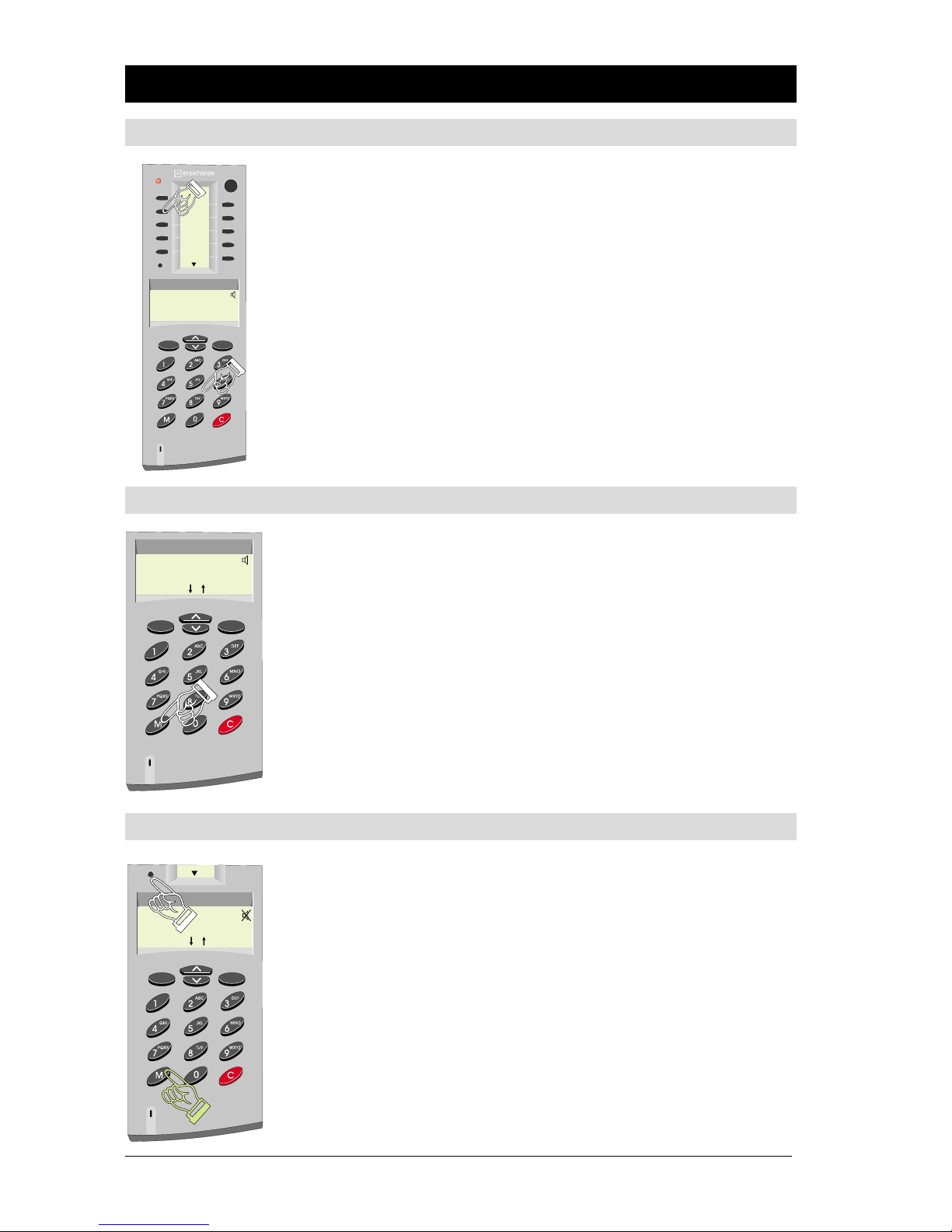
The red lamp lights on both stations when the call is
connected and you hear a short tone.
To end the conversation:
·Press C
The red lamp goes out.
Calling to and from noisy rooms
If there is disturbing background noise:
·Press M while you speak
·Release M while you listen
You are now in simplex mode.
The volume will increase at the listening end.
To go back to automatic direction switching:
·Press M briefly
Either party can use the M-function.
Private mode
In PRIVATE mode, calls do not come through directly but
are indicated by a ringing tone in both stations.
To set the station in PRIVATE mode:
·Press the P button
A “Loudspeaker mute” icon will be shown in the
information display
If you want to answer the call:
·Press the M button
within 30 seconds. After 30 seconds the call attempt is
automatically canceled.
100 7007 000 - 6 - MI 30211
02-09
P
20/08-2002 09:15
100001 Own Name
Dial number:
Menu Dak Name
Name1
Name2
Name3
Name4
Name5
Name6
Name7
Name8
Name9
Name10
10002 Called station
10001 Own name
9 Serch
/
P
100002 Called name
100001 Own Name
9 Search
/

FYour system may be set so that some calls are always in OPEN or PRIVATE
mode regardless of switch setting.
Incoming telephone calls are normally announced by private ringing.
Adjusting the sound level
Turn the volume knob to required sound level.
Muting the microphone
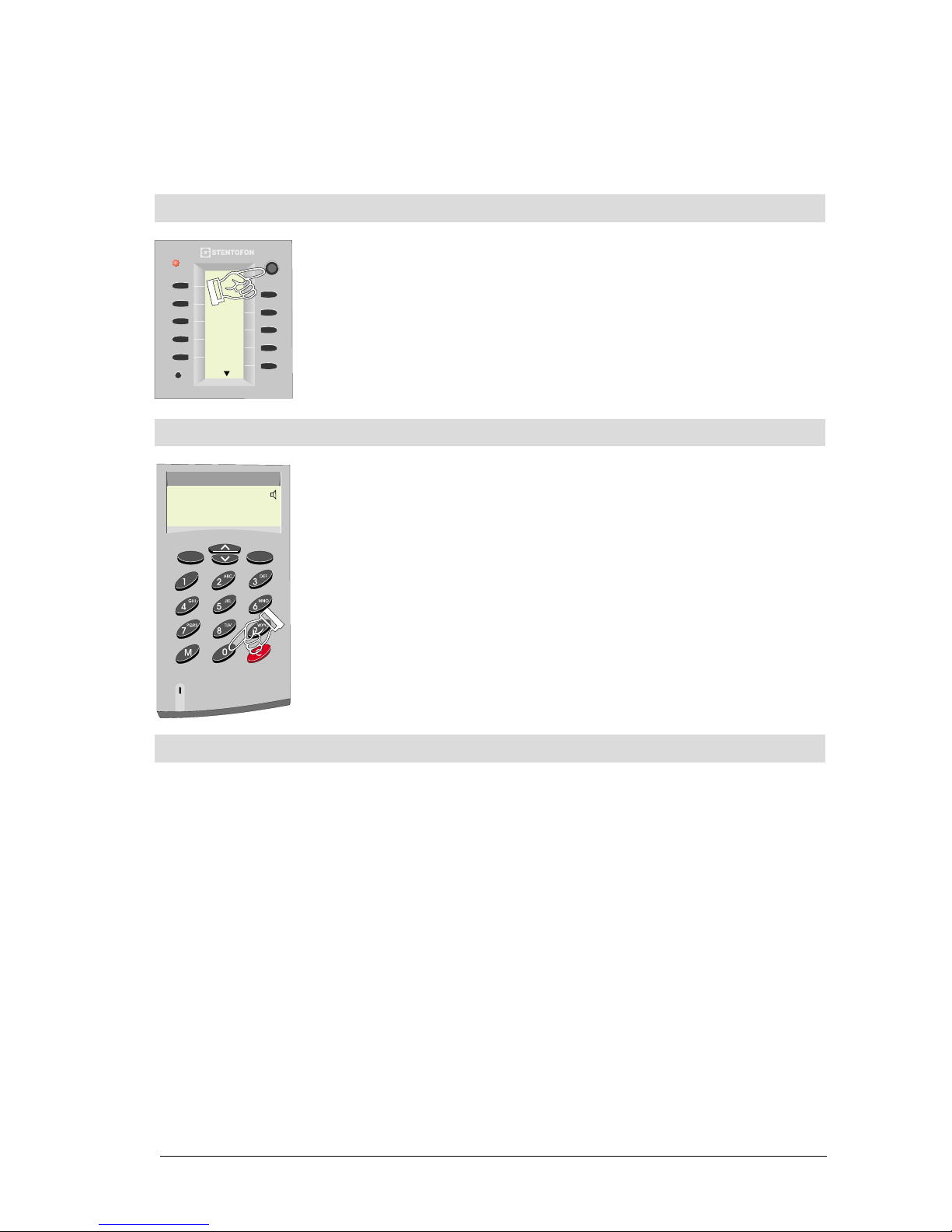
To mute the microphone:
·Press digit 0 during conversation
To open the microphone again:
·Release digit 0
If someone is not at their station
You have several possibilities:
·Activate the preprogrammed search list, see page 8
·Send a Call Back message, see page 12
·Send a voice/text message, see page 12
·Activate the person’s pocket pager, see page 21-23
·Cancel and make a group call (or all call), see page 8
·Cancel and use the re-dial feature later, see page 15
100 7007 000 - 7 - MI 30211
02-09
P
Name1
Name2
Name3
Name4
Name5
Name6
Name7
Name8
Name9
Name10
100002 Called name
100001 Own Name
0 Mute mic
Menu Dak Name

Waiting for a busy station to become free
If a station or a feature that you call is busy, you will hear a
“busy” tone and your display will show “Busy”.
You can either:
·Press C to disconnect and try again later
or
·Wait for up to 30 seconds
If the station or feature becomes free within 30 seconds, you
will be connected automatically.
Re-dial
You can program one of the DAK keys on your station to
re-dial the last intercom number dialed from the station. See
page 28 on how to program a single-touch key.
·The default directory number for the re-dial
feature is 9532.
SEARCHING FOR A PERSON
Voice paging - calling a group of stations
You can search for somebody by making a Group Call from
any station if not disabled in the exchange).
Each group has its own directory number. Default numbers are:
Group1-5: 84-88(84includes all subscribers)
Group 6 - 15: 890 - 899
Making a Group Call:
·Dial the directory number for the group
·Wait for the chime signal
·Press M while you are speaking
The audio goes to all stations in the group.
If you want an answer:
·Wait
If not:
·Press C
The answer time is one minute by default.
100 7007 000 - 8 - MI 30211
02-09
100002 Busy
100001 Own Name
9 Search
/
P
Redial
Name2
Name3
Name4
Name5
Name6
Name7
Name8
Name9
Name10

To repeat your message:
·Press M while you are speaking
To extend the waiting period by another minute:
·Press M lightly
To make an All Call (all stations in the system):
·Dial 84
For programming your group membership, contact the STENTOFON supervisor
in your company.
Answering voice paging (meet me)
·Dial 99 on the nearest intercom station within the
answer period (1 minute)
You are automatically connected to the person who initiated
the call.
Pocket paging
The Pocket Paging features are described on pages 21 to 23.
Search list
Each station can have a preprogrammed search list. The list
can include an ordinary directory number, a group call num-
ber, or a message to a pocket pager.
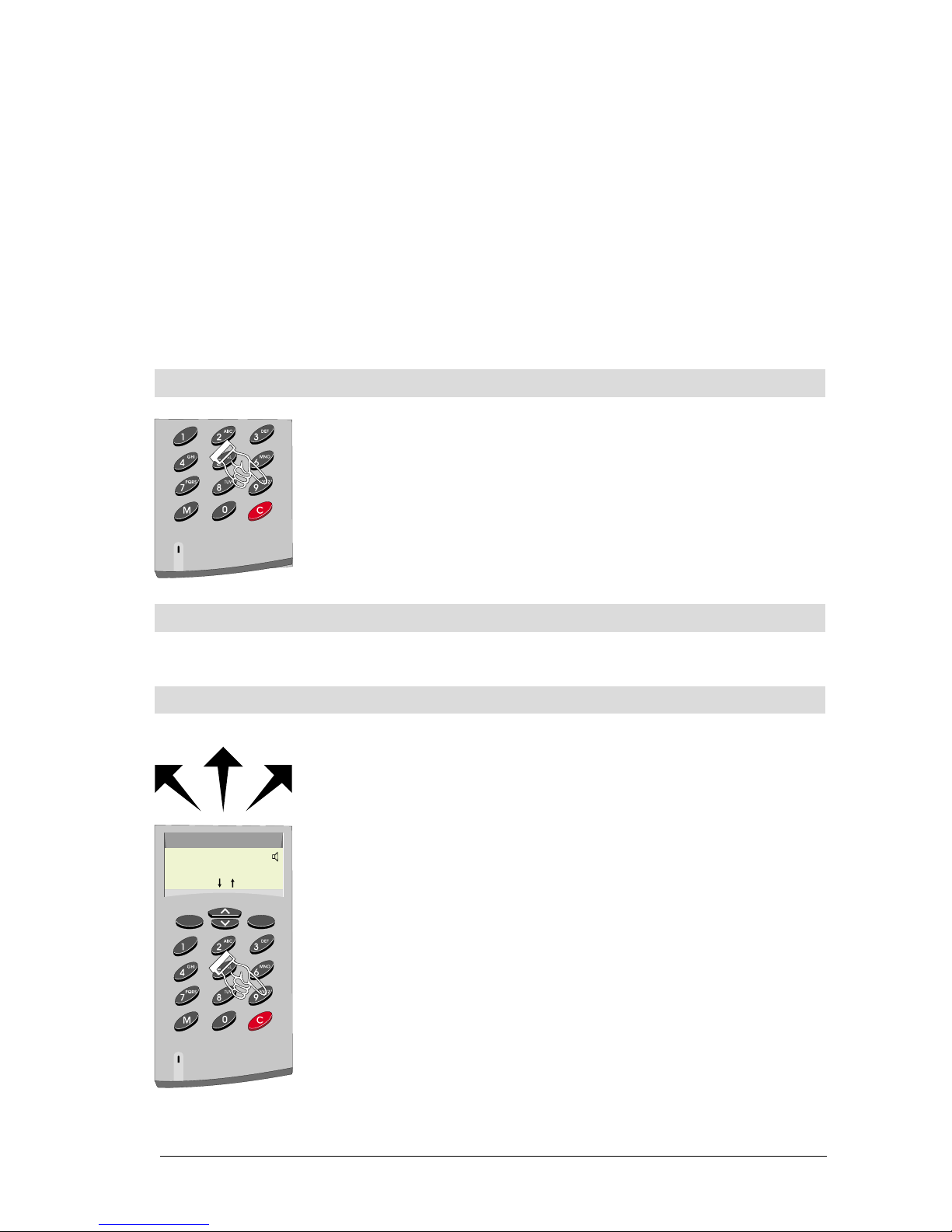
If you want to search for a person:
·Dial the extension number
If no one answers the call:
·Press 9 to activate the first step on the list
If no one answers your search, you can activate the next step
by pressing 9 once more.
If the station you call has no search list, or if you have come
to the end of the list, pressing 9 has no effect.
For programming your search list, contact the STENTOFON
supervisor in your company.
100 7007 000 - 9 - MI 30211
02-09
100002 Called name
100001 Own Name
9 Search
/

Automatic search
The system can be set up so that the search list is automatically activated when
you get an absence message or after a time-out for private ringing.
Please contact the STENTOFON supervisor in your company to have this feature
implemented for a station.
PRIORITIES
Priority features
Your station can be assigned one of several priority features.
Please contact your STENTOFON supervisor for the assign-
ment of these priority features to your station.
PRIVATE / Message Override
·Dial 59 or press M to break through a private set-
ting or an absence message left at the station
(like “Busy at the moment”).
Busy Notify
When the station you call is busy:
·Dial 57 or press M to send an attention tone to the
busy station. At the other end, the display shows
who wants to reach you.
Busy Override
When the station you call is busy:
·Dial 58 or press M twice quickly. This cancels the
current conversation, and you are connected.
Priority setting for the station
Your station is set up to have a priority level (out of four). Depending on the
priority setting, outgoing calls will behave differently:
·Make outgoing calls in private
·Override private setting
·Override an absence message
·Connect you to a busy station (and disconnect the ongoing
conversation)
Please contact the STENTOFON supervisor at your company for the set-up of
your station priority level.
100 7007 000 - 10 - MI 30211
02-09
100001 Own Name
9 Search
/
100002 Busy
100002 Own Name
Call waiting 100001
/
100003 Called name
Indice
Altri manuali Stentofon Sistema di interfono

Stentofon
Stentofon 1401110100 Foglio di istruzioni

Stentofon
Stentofon Pulse System Manuale utente

Stentofon
Stentofon IP Master Series Manuale utente

Stentofon
Stentofon IP Substation Manuale utente

Stentofon
Stentofon LBB 7026/65 Manuale di istruzioni per l'installazione

Stentofon
Stentofon Pulse System Manuale utente

Stentofon
Stentofon Turbine Compact Series Manuale utente

Stentofon
Stentofon ALPHACOM E A100K10602 Manuale utente

Stentofon
Stentofon LBB 7026/65 Manuale utente